Wired Broadband
Communication
CS4422 Wireless and Broadband Networking
Dilum Bandara
Dilum.Bandara@uom.lk
Some slides extracted from ZigBee by J. Dohl, F. Diehm, & P. Grosa and
ZigBee by E. Ünal CSE 401 Special Topics In Computer Networks
Outline
 Broadband services
 Core network technologies
 X.25, Frame Relay, ATM
 Access network technologies
 xDSL, Cable Modem, FTTx
 Primary focus
2
Triple Play
3
Source: www.datavoiz.com/solution_network_triple_play.aspx
Broadband
 A transmission medium’s ability to transport
multiple signals & traffic types simultaneously
 Source – Wikipedia
 A transmission facility having a bandwidth
sufficient to carry multiple voice, video, or data
channels simultaneously
 Broadband often refers to Internet access service with
transmission speed from 100s of Kbps to several Mbps
 Source – Prof. Stephen McLaughlin
 Medium can be coax, twisted pair, optical fiber,
wireless, etc.
 We already discussed about wireless 4
Broadband Adoption at Home
5
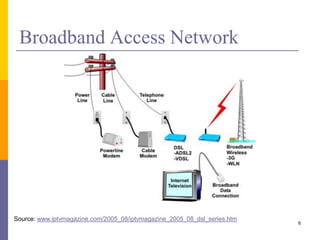
Broadband Access Network
6
Source: www.iptvmagazine.com/2005_08/iptvmagazine_2005_08_dsl_series.htm
WAN Devices
7
Source: http://sclabs.blogspot.com/2010/07/ex4-chapter-1-introduction-to-wans.html
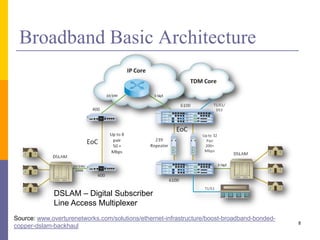
Broadband Basic Architecture
8
Source: www.overturenetworks.com/solutions/ethernet-infrastructure/boost-broadband-bonded-
copper-dslam-backhaul
DSLAM – Digital Subscriber
Line Access Multiplexer
Core Network Technologies
 X.25
 Frame Relay
 Asynchronous Transfer Mode (ATM)
 These technologies are disappearing with
advent of Ethernet over fiber optics, MPLS,
VPN, & dedicated broadband services (cable
modem & DSL)
9
X.25
10
DCE – Data Circuit-terminating Equipment
DTE – Data Terminal Equipment
PSE – Packet Switching Exchange
Source: Wikipedia
Leased lines,
POTS, or ISDN
Frame Relay
11
Source: Wikipedia
X.25 vs. Frame Relay
12
X.25 Frame Relay
Layer 1 Specification Yes None
Layer 2 Protocol Family HDLC HDLC
Multiplexing of virtual circuits Yes Yes
Layer 3 Support PLP None
Variable length packets Yes Yes
Error Correction Node to Node None
Propagation Delay High Low
Ease of Implementation Difficult Easy
Good for Interactive Applications Too Slow Yes
Good for Voice No Yes
Good for LAN File Transfer Slow Yes
HDLC – High-level data link control
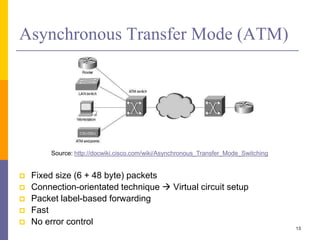
Asynchronous Transfer Mode (ATM)
 Fixed size (6 + 48 byte) packets
 Connection-orientated technique  Virtual circuit setup
 Packet label-based forwarding
 Fast
 No error control
13
Source: http://docwiki.cisco.com/wiki/Asynchronous_Transfer_Mode_Switching
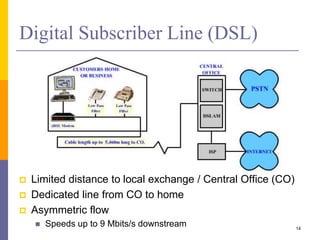
Digital Subscriber Line (DSL)
 Limited distance to local exchange / Central Office (CO)
 Dedicated line from CO to home
 Asymmetric flow
 Speeds up to 9 Mbits/s downstream 14
DSL (Cont.)
 Generic name for technologies which transport
high-bit-rate digital services over ordinary phone
lines
 Data is only transmitted as far as local exchange
 Hence, distinct from conventional modems that go all
the way up to CO
 xDSL
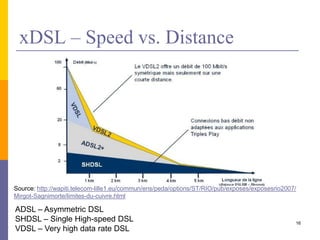
 Few Kbps to 100 Mbps
 Data rate reduces with distance
15
xDSL – Speed vs. Distance
16
Source: http://wapiti.telecom-lille1.eu/commun/ens/peda/options/ST/RIO/pub/exposes/exposesrio2007/
Mirgot-Sagnimorte/limites-du-cuivre.html
ADSL – Asymmetric DSL
SHDSL – Single High-speed DSL
VDSL – Very high data rate DSL
xDSL Comparison
17
Source: http://cocxel.blogspot.com/p/wan-network-2.html
HDSL – High-bit-rate digital subscriber line
IDSL – ISDN Digital Subscriber Line
RADSL – Rate-adaptive digital subscriber line, proprietary technology by AT&T
CDSL – Consumer Digital Subscriber Line, trademarked by Rockwell Corp.
Asymmetric DSL (ADSL)
 Asymmetric
 Different up & down link rates
 Typically high downstream bandwidth
 Purely digital
 Subscriber Line
 Data is carried over a single twisted pair copper loop
to subscriber premises
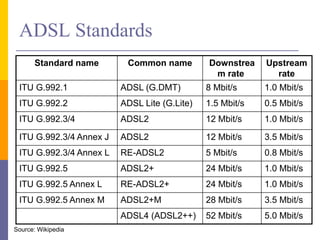
ADSL Standards
Standard name Common name Downstrea
m rate
Upstream
rate
ITU G.992.1 ADSL (G.DMT) 8 Mbit/s 1.0 Mbit/s
ITU G.992.2 ADSL Lite (G.Lite) 1.5 Mbit/s 0.5 Mbit/s
ITU G.992.3/4 ADSL2 12 Mbit/s 1.0 Mbit/s
ITU G.992.3/4 Annex J ADSL2 12 Mbit/s 3.5 Mbit/s
ITU G.992.3/4 Annex L RE-ADSL2 5 Mbit/s 0.8 Mbit/s
ITU G.992.5 ADSL2+ 24 Mbit/s 1.0 Mbit/s
ITU G.992.5 Annex L RE-ADSL2+ 24 Mbit/s 1.0 Mbit/s
ITU G.992.5 Annex M ADSL2+M 28 Mbit/s 3.5 Mbit/s
ADSL4 (ADSL2++) 52 Mbit/s 5.0 Mbit/s
Source: Wikipedia
unused tones
due to line conditions
tone spacing
(4.3 kHz)
frequency
= QAM-modulated
subchannel (tone)
individually optimized
as a function of impairments
20 kHz
4 kHz 1.1 MHz
power
spectrum
spectrum used
for dow nstream data
spectrum used
for up stream data
POTS
unused tones
due to line conditions
tone spacing
(4.3 kHz)
frequency
= QAM-modulated
subchannel (tone)
individually optimized
as a function of impairments
20 kHz
4 kHz 1.1 MHz
power
spectrum
spectrum used
for dow nstream data
spectrum used
for up stream data
POTS
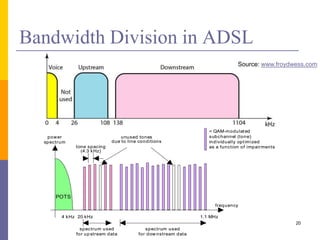
Bandwidth Division in ADSL
20
Source: www.froydwess.com
Discrete Multi-Tone (DMT)
 DMT separates DSL signals s.t. usable
frequency range is separated into 256 channels
of 4.3125 kHz each
 224 downstream frequency bins (or carriers)
 32 upstream frequency bins
 Constantly shifts signals between different channels
to ensure that the best channels are used for
transmission & reception
 Uses OFDM
DMT Technique
22
ADSL Modem
 G.Lite & UADSL do not use splitters
 Typically low bandwidth
23
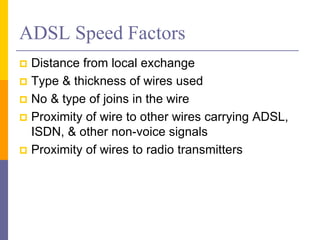
ADSL Speed Factors
 Distance from local exchange
 Type & thickness of wires used
 No & type of joins in the wire
 Proximity of wire to other wires carrying ADSL,
ISDN, & other non-voice signals
 Proximity of wires to radio transmitters
Crosstalk in Network
 DSM = Dynamic Spectrum Management
 Adapt transmit spectrum dynamically
 Reduce crosstalk (i.e., noise) for other users in
network
 DMT is very suited to apply DSM (flexible spectrum
allocation)
Central
Office
User
Modem
User
Modem
Central
Office
Traditional Cable Network
26
Challenge – designed to support one-way traffic
Hybrid Fibre-Coaxial (HFC) Network
27
Cable Technology
 Shared lines to the nearest splitter
 Generally higher speeds
 Coaxial cables  high bandwidth
 Reaches more households since distance limitation is
removed
 Typical offering 4 Mbits/s
 Last mile advantage 28
Cable Modem (CM)
29
Cable Modem Transmission System
(CMTS)
30
DSL vs. Cable Modem
31
DSL Cable Modem
Always-on Yes Yes
Speed 8 Mbps down
1.5 Mbps Up
Depends on location
27 – 36 Mbps down
0.5 – 10 Mbps Up
Shared bandwidth
Security Dedicate line, better security Shared line, easier to snoop
Wire Twisted-pair Coax cable
Price High Lower, if bundled
Coverage Growing Widely used
Passive Optical Networks
 Fibre to the home/business is a long-term goal
 FTTx (Fibre To The x)
 Passive optical networks
 No active electronics in network
 Some implementations are emerging
 SLT offer FTTH/FTTO
 http://slt.lk/en/personal/broadband/ftth/new-connection-
charges
32
Passive Optical Networks
 FDH – Fiber Distribution Hub
 OLT – Optical Line Terminal
 ONT – Optical Network Terminal 33
Source: www.3-edge.de/en/solutions/measure-applications/fttx-pon-networks/FTTx-PON-Network-Overview/
Multiple Services on Passive Optical
Networks
34
Source: www.infocellar.com/networks/new-tech/EPON/EPON.htm
FTTx Topologies
35
Source: www.foss.ae/products-services/gigabit-ethernet-passive-optical-network-solutions-gepon/
Hybrid Networks
36
Source: www.3-edge.de/export/sites/default/.content/3Edge_Artikelbilder/Apps_FTTx_Fig3.png
Still there are many places that none of these
technologies cover
Satellite Broadband Services
37
Source: www.isatafrica.com/satellite-broadband.html
Satellite Broadband Services (Cont.)
38
Source: http://measuretek.com/pages/
products/data-communications.aspx
Source: www.broadbandanywhere.eu/about-
broadband-anywhere/how-it-works
Sometimes uplink may not be through satellite
Summary
 Bandwidth is increasing
 Triple-play is becoming preferred choice
 Core network technologies
 X.25, Frame Relay, ATM
 Access network technologies
 xDSL, Cable Modem, FTTx
 Satellite data services
39

Wired Broadband Communication

  • 1.
    Wired Broadband Communication CS4422 Wirelessand Broadband Networking Dilum Bandara Dilum.Bandara@uom.lk Some slides extracted from ZigBee by J. Dohl, F. Diehm, & P. Grosa and ZigBee by E. Ünal CSE 401 Special Topics In Computer Networks
  • 2.
    Outline  Broadband services Core network technologies  X.25, Frame Relay, ATM  Access network technologies  xDSL, Cable Modem, FTTx  Primary focus 2
  • 3.
  • 4.
    Broadband  A transmissionmedium’s ability to transport multiple signals & traffic types simultaneously  Source – Wikipedia  A transmission facility having a bandwidth sufficient to carry multiple voice, video, or data channels simultaneously  Broadband often refers to Internet access service with transmission speed from 100s of Kbps to several Mbps  Source – Prof. Stephen McLaughlin  Medium can be coax, twisted pair, optical fiber, wireless, etc.  We already discussed about wireless 4
  • 5.
  • 6.
    Broadband Access Network 6 Source:www.iptvmagazine.com/2005_08/iptvmagazine_2005_08_dsl_series.htm
  • 7.
  • 8.
    Broadband Basic Architecture 8 Source:www.overturenetworks.com/solutions/ethernet-infrastructure/boost-broadband-bonded- copper-dslam-backhaul DSLAM – Digital Subscriber Line Access Multiplexer
  • 9.
    Core Network Technologies X.25  Frame Relay  Asynchronous Transfer Mode (ATM)  These technologies are disappearing with advent of Ethernet over fiber optics, MPLS, VPN, & dedicated broadband services (cable modem & DSL) 9
  • 10.
    X.25 10 DCE – DataCircuit-terminating Equipment DTE – Data Terminal Equipment PSE – Packet Switching Exchange Source: Wikipedia Leased lines, POTS, or ISDN
  • 11.
  • 12.
    X.25 vs. FrameRelay 12 X.25 Frame Relay Layer 1 Specification Yes None Layer 2 Protocol Family HDLC HDLC Multiplexing of virtual circuits Yes Yes Layer 3 Support PLP None Variable length packets Yes Yes Error Correction Node to Node None Propagation Delay High Low Ease of Implementation Difficult Easy Good for Interactive Applications Too Slow Yes Good for Voice No Yes Good for LAN File Transfer Slow Yes HDLC – High-level data link control
  • 13.
    Asynchronous Transfer Mode(ATM)  Fixed size (6 + 48 byte) packets  Connection-orientated technique  Virtual circuit setup  Packet label-based forwarding  Fast  No error control 13 Source: http://docwiki.cisco.com/wiki/Asynchronous_Transfer_Mode_Switching
  • 14.
    Digital Subscriber Line(DSL)  Limited distance to local exchange / Central Office (CO)  Dedicated line from CO to home  Asymmetric flow  Speeds up to 9 Mbits/s downstream 14
  • 15.
    DSL (Cont.)  Genericname for technologies which transport high-bit-rate digital services over ordinary phone lines  Data is only transmitted as far as local exchange  Hence, distinct from conventional modems that go all the way up to CO  xDSL  Few Kbps to 100 Mbps  Data rate reduces with distance 15
  • 16.
    xDSL – Speedvs. Distance 16 Source: http://wapiti.telecom-lille1.eu/commun/ens/peda/options/ST/RIO/pub/exposes/exposesrio2007/ Mirgot-Sagnimorte/limites-du-cuivre.html ADSL – Asymmetric DSL SHDSL – Single High-speed DSL VDSL – Very high data rate DSL
  • 17.
    xDSL Comparison 17 Source: http://cocxel.blogspot.com/p/wan-network-2.html HDSL– High-bit-rate digital subscriber line IDSL – ISDN Digital Subscriber Line RADSL – Rate-adaptive digital subscriber line, proprietary technology by AT&T CDSL – Consumer Digital Subscriber Line, trademarked by Rockwell Corp.
  • 18.
    Asymmetric DSL (ADSL) Asymmetric  Different up & down link rates  Typically high downstream bandwidth  Purely digital  Subscriber Line  Data is carried over a single twisted pair copper loop to subscriber premises
  • 19.
    ADSL Standards Standard nameCommon name Downstrea m rate Upstream rate ITU G.992.1 ADSL (G.DMT) 8 Mbit/s 1.0 Mbit/s ITU G.992.2 ADSL Lite (G.Lite) 1.5 Mbit/s 0.5 Mbit/s ITU G.992.3/4 ADSL2 12 Mbit/s 1.0 Mbit/s ITU G.992.3/4 Annex J ADSL2 12 Mbit/s 3.5 Mbit/s ITU G.992.3/4 Annex L RE-ADSL2 5 Mbit/s 0.8 Mbit/s ITU G.992.5 ADSL2+ 24 Mbit/s 1.0 Mbit/s ITU G.992.5 Annex L RE-ADSL2+ 24 Mbit/s 1.0 Mbit/s ITU G.992.5 Annex M ADSL2+M 28 Mbit/s 3.5 Mbit/s ADSL4 (ADSL2++) 52 Mbit/s 5.0 Mbit/s Source: Wikipedia
  • 20.
    unused tones due toline conditions tone spacing (4.3 kHz) frequency = QAM-modulated subchannel (tone) individually optimized as a function of impairments 20 kHz 4 kHz 1.1 MHz power spectrum spectrum used for dow nstream data spectrum used for up stream data POTS unused tones due to line conditions tone spacing (4.3 kHz) frequency = QAM-modulated subchannel (tone) individually optimized as a function of impairments 20 kHz 4 kHz 1.1 MHz power spectrum spectrum used for dow nstream data spectrum used for up stream data POTS Bandwidth Division in ADSL 20 Source: www.froydwess.com
  • 21.
    Discrete Multi-Tone (DMT) DMT separates DSL signals s.t. usable frequency range is separated into 256 channels of 4.3125 kHz each  224 downstream frequency bins (or carriers)  32 upstream frequency bins  Constantly shifts signals between different channels to ensure that the best channels are used for transmission & reception  Uses OFDM
  • 22.
  • 23.
    ADSL Modem  G.Lite& UADSL do not use splitters  Typically low bandwidth 23
  • 24.
    ADSL Speed Factors Distance from local exchange  Type & thickness of wires used  No & type of joins in the wire  Proximity of wire to other wires carrying ADSL, ISDN, & other non-voice signals  Proximity of wires to radio transmitters
  • 25.
    Crosstalk in Network DSM = Dynamic Spectrum Management  Adapt transmit spectrum dynamically  Reduce crosstalk (i.e., noise) for other users in network  DMT is very suited to apply DSM (flexible spectrum allocation) Central Office User Modem User Modem Central Office
  • 26.
    Traditional Cable Network 26 Challenge– designed to support one-way traffic
  • 27.
  • 28.
    Cable Technology  Sharedlines to the nearest splitter  Generally higher speeds  Coaxial cables  high bandwidth  Reaches more households since distance limitation is removed  Typical offering 4 Mbits/s  Last mile advantage 28
  • 29.
  • 30.
    Cable Modem TransmissionSystem (CMTS) 30
  • 31.
    DSL vs. CableModem 31 DSL Cable Modem Always-on Yes Yes Speed 8 Mbps down 1.5 Mbps Up Depends on location 27 – 36 Mbps down 0.5 – 10 Mbps Up Shared bandwidth Security Dedicate line, better security Shared line, easier to snoop Wire Twisted-pair Coax cable Price High Lower, if bundled Coverage Growing Widely used
  • 32.
    Passive Optical Networks Fibre to the home/business is a long-term goal  FTTx (Fibre To The x)  Passive optical networks  No active electronics in network  Some implementations are emerging  SLT offer FTTH/FTTO  http://slt.lk/en/personal/broadband/ftth/new-connection- charges 32
  • 33.
    Passive Optical Networks FDH – Fiber Distribution Hub  OLT – Optical Line Terminal  ONT – Optical Network Terminal 33 Source: www.3-edge.de/en/solutions/measure-applications/fttx-pon-networks/FTTx-PON-Network-Overview/
  • 34.
    Multiple Services onPassive Optical Networks 34 Source: www.infocellar.com/networks/new-tech/EPON/EPON.htm
  • 35.
  • 36.
  • 37.
    Satellite Broadband Services 37 Source:www.isatafrica.com/satellite-broadband.html
  • 38.
    Satellite Broadband Services(Cont.) 38 Source: http://measuretek.com/pages/ products/data-communications.aspx Source: www.broadbandanywhere.eu/about- broadband-anywhere/how-it-works Sometimes uplink may not be through satellite
  • 39.
    Summary  Bandwidth isincreasing  Triple-play is becoming preferred choice  Core network technologies  X.25, Frame Relay, ATM  Access network technologies  xDSL, Cable Modem, FTTx  Satellite data services 39

Editor's Notes

  • #4 See http://slt.lk/en/personal/broadband/ftth/new-connection-charges
  • #8 CSU/DSU - Channel Service Unit/Data Service Unit for T1 lines
  • #9 EoC - Ethernet over Coax
  • #10 MPLS - Multiprotocol Label Switching
  • #11 X.25 is an ITU-T standard protocol suite for packet switched WAN communication. X.25 WAN consists of packet-switching exchange (PSE) nodes as networking hardware, & leased lines, plain old telephone service (POTS) connections or ISDN connections as physical links. Was popular during the 1980s with telecommunications companies & in financial transaction systems such as ATM. X.25 has been replaced to a large extent by less complex protocols like IP. However, service is still used & available in niche & legacy applications
  • #12 Frame relay is a standardized WAN technology - specifies physical & logical link layers of digital telecommunications channels using a packet switching methodology. Originally designed for transport across ISDN infrastructure, it may be used today in many other network interfaces. Network providers commonly implement frame relay for voice & data as an encapsulation technique, used between LANs over a WAN. Each end-user gets a private line to a frame relay node. Frame relay network handles transmission over a frequently changing path transparent to all end-user. Less expensive than leased lines. Extreme simplicity of configuring user equipment in a frame relay network offers another reason for frame relay's popularity. With the advent of Ethernet over fiber optics, MPLS, VPN & dedicated broadband services (e.g., cable modem & DSL), end may loom for frame relay protocol. However, many rural areas remain lacking DSL & cable modem services. In such cases, frame relay is still the least expensive type of non-dial-up connection
  • #36 N - Node