

WINDOWS PHONE 8
Introducing Windows Phone 8 Development
FOLLOW US
Twitter

: @chothanihitesh

Slideshare

: http://www.slideshare.net/Chothani-Hitesh

Email

: chothani.hitesh@gmail.com

Support

: windows.chothani@live.com

LinkedIn

: in.linkedin.com/pub/hiteshchothani/6b/311/2b8

W8 Publisher

: AppStudios

WP Publisher : AppStudios
Website

: www.appmobinfotech.com
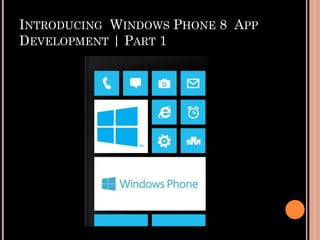
INTRODUCING WINDOWS PHONE 8 APP
DEVELOPMENT | PART 1
NEW WP8 HARDWARE
BEAUTIFUL

NEW HARDWARE FROM

NOKIA, HTC, SAMSUNG

AND MORE…
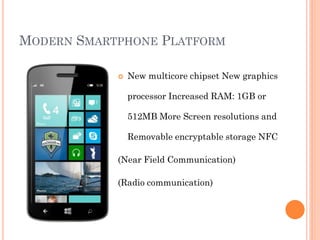
MODERN SMARTPHONE PLATFORM


New multicore chipset New graphics
processor Increased RAM: 1GB or
512MB More Screen resolutions and
Removable encryptable storage NFC

(Near Field Communication)

(Radio communication)
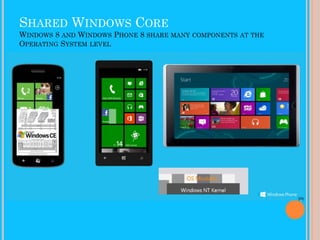
SHARED WINDOWS CORE
WINDOWS 8 AND WINDOWS PHONE 8 SHARE MANY COMPONENTS
OPERATING SYSTEM LEVEL

AT THE
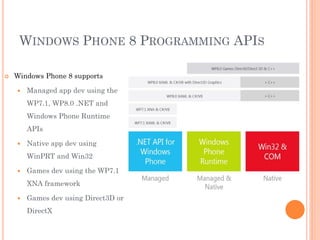
WINDOWS PHONE 8 PROGRAMMING APIS


Windows Phone 8 supports


Managed app dev using the
WP7.1, WP8.0 .NET and
Windows Phone Runtime
APIs



Native app dev using
WinPRT and Win32



Games dev using the WP7.1
XNA framework



Games dev using Direct3D or
DirectX
.NET API FOR WINDOWS PHONE



The .NET API for Windows Phone is the primary managed API





Includes *all* the types and APIs from Windows Phone OS 7.1
Contains classes and types from the System and Microsoft.Phone namespaces

There have been new classes added for Windows Phone 8.0, for example


Microsoft.Phone.Wallet



Microsoft.Phone.Tasks.ShareMediaTask



Microsoft.Phone.Tasks.MapsTask



Microsoft.Phone.Storage.ExternalStorage



Microsoft.Phone.Networking.Voip



Many more…!
WINDOWS PHONE RUNTIME API


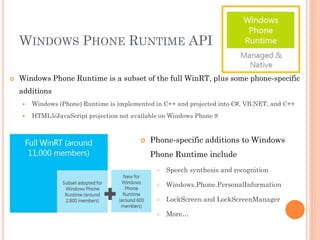
Windows Phone Runtime is a subset of the full WinRT, plus some phone-specific
additions


Windows (Phone) Runtime is implemented in C++ and projected into C#, VB.NET, and C++



HTML5/JavaScript projection not available on Windows Phone 8



Phone-specific additions to Windows
Phone Runtime include


Speech synthesis and recognition



Windows.Phone.PersonalInformation



LockScreen and LockScreenManager



More…
API CHOICES FOR MANAGED CODE
DEVELOPERS


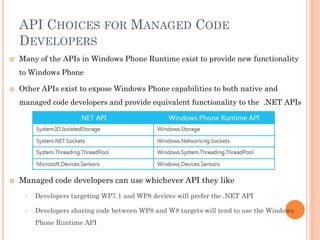
Many of the APIs in Windows Phone Runtime exist to provide new functionality
to Windows Phone



Other APIs exist to expose Windows Phone capabilities to both native and
managed code developers and provide equivalent functionality to the .NET APIs



Managed code developers can use whichever API they like
•

Developers targeting WP7.1 and WP8 devices will prefer the .NET API

•

Developers sharing code between WP8 and W8 targets will tend to use the Windows
Phone Runtime API
XAML UI WITH MANAGED CODE


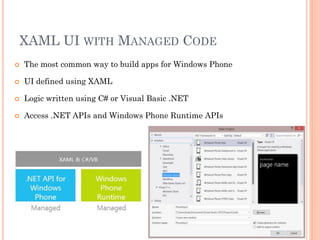
The most common way to build apps for Windows Phone



UI defined using XAML



Logic written using C# or Visual Basic .NET



Access .NET APIs and Windows Phone Runtime APIs
XNA GAMES USING MANAGED CODE


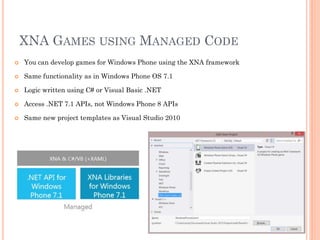
You can develop games for Windows Phone using the XNA framework



Same functionality as in Windows Phone OS 7.1



Logic written using C# or Visual Basic .NET



Access .NET 7.1 APIs, not Windows Phone 8 APIs



Same new project templates as Visual Studio 2010
DIRECT3D APP


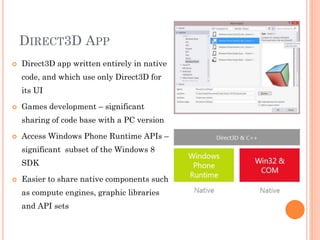
Direct3D app written entirely in native
code, and which use only Direct3D for
its UI



Games development – significant
sharing of code base with a PC version



Access Windows Phone Runtime APIs –
significant subset of the Windows 8

SDK


Easier to share native components such
as compute engines, graphic libraries
and API sets
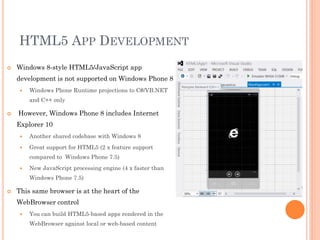
HTML5 APP DEVELOPMENT


Windows 8-style HTML5/JavaScript app

development is not supported on Windows Phone 8


Windows Phone Runtime projections to C#/VB.NET
and C++ only



However, Windows Phone 8 includes Internet
Explorer 10


Another shared codebase with Windows 8



Great support for HTML5 (2 x feature support
compared to Windows Phone 7.5)



New JavaScript processing engine (4 x faster than
Windows Phone 7.5)



This same browser is at the heart of the
WebBrowser control


You can build HTML5-based apps rendered in the
WebBrowser against local or web-based content
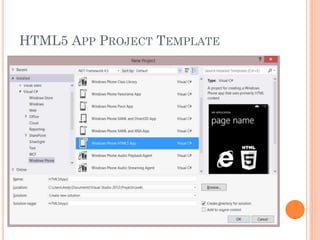
HTML5 APP PROJECT TEMPLATE
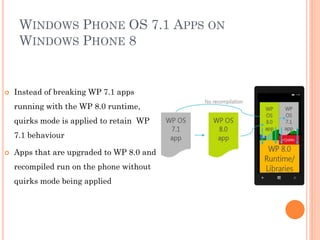
WINDOWS PHONE OS 7.1 APPS ON
WINDOWS PHONE 8



Instead of breaking WP 7.1 apps
running with the WP 8.0 runtime,

quirks mode is applied to retain WP
7.1 behaviour


Apps that are upgraded to WP 8.0 and
recompiled run on the phone without
quirks mode being applied
CONVERTING CODE DEVELOPED FOR WP
OS 7.1 TO WP 8.0


When converting existing WP7.1 code to WP 8.0, be careful your code does
not rely on WP 7.1 behaviour



Two scenarios to consider:


Source code incompatibility – when code is recompiled for Windows Phone 8, the new WP8
behaviour applies which differs from how the same code behaved when run on WP 7.1
Example: Assembly.GetType property method searches for the specified type in mscorlib.dll
as well as in the assembly on which it is called on WP OS 7.1, but on WP8, it searches for
the specified type only in the assembly on which it is called



Binary app incompatibility – some behaviours cannot be quirked, so an app that has been
written for, and tested on WP OS 7.1 will not run the same on a WP8 device because of a
difference in runtime behaviour Example: The garbage collector in the WP8 runtime is
completely different from that on WP OS 7.1. If your 7.1 code relies on a particular order of
object finalization, it may be broken. The dependency on a particular order of finalization
should be removed
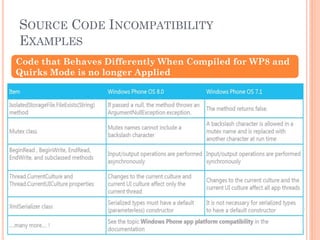
SOURCE CODE INCOMPATIBILITY
EXAMPLES
Code that Behaves Differently When Compiled for WP8 and
Quirks Mode is no longer Applied
Thank You

Windows phone 8 session 1

  • 1.
    WINDOWS PHONE 8 IntroducingWindows Phone 8 Development
  • 2.
    FOLLOW US Twitter : @chothanihitesh Slideshare :http://www.slideshare.net/Chothani-Hitesh Email : chothani.hitesh@gmail.com Support : windows.chothani@live.com LinkedIn : in.linkedin.com/pub/hiteshchothani/6b/311/2b8 W8 Publisher : AppStudios WP Publisher : AppStudios Website : www.appmobinfotech.com
  • 3.
    INTRODUCING WINDOWS PHONE8 APP DEVELOPMENT | PART 1
  • 4.
    NEW WP8 HARDWARE BEAUTIFUL NEWHARDWARE FROM NOKIA, HTC, SAMSUNG AND MORE…
  • 5.
    MODERN SMARTPHONE PLATFORM  Newmulticore chipset New graphics processor Increased RAM: 1GB or 512MB More Screen resolutions and Removable encryptable storage NFC (Near Field Communication) (Radio communication)
  • 6.
    SHARED WINDOWS CORE WINDOWS8 AND WINDOWS PHONE 8 SHARE MANY COMPONENTS OPERATING SYSTEM LEVEL AT THE
  • 7.
    WINDOWS PHONE 8PROGRAMMING APIS  Windows Phone 8 supports  Managed app dev using the WP7.1, WP8.0 .NET and Windows Phone Runtime APIs  Native app dev using WinPRT and Win32  Games dev using the WP7.1 XNA framework  Games dev using Direct3D or DirectX
  • 8.
    .NET API FORWINDOWS PHONE  The .NET API for Windows Phone is the primary managed API    Includes *all* the types and APIs from Windows Phone OS 7.1 Contains classes and types from the System and Microsoft.Phone namespaces There have been new classes added for Windows Phone 8.0, for example  Microsoft.Phone.Wallet  Microsoft.Phone.Tasks.ShareMediaTask  Microsoft.Phone.Tasks.MapsTask  Microsoft.Phone.Storage.ExternalStorage  Microsoft.Phone.Networking.Voip  Many more…!
  • 9.
    WINDOWS PHONE RUNTIMEAPI  Windows Phone Runtime is a subset of the full WinRT, plus some phone-specific additions  Windows (Phone) Runtime is implemented in C++ and projected into C#, VB.NET, and C++  HTML5/JavaScript projection not available on Windows Phone 8  Phone-specific additions to Windows Phone Runtime include  Speech synthesis and recognition  Windows.Phone.PersonalInformation  LockScreen and LockScreenManager  More…
  • 10.
    API CHOICES FORMANAGED CODE DEVELOPERS  Many of the APIs in Windows Phone Runtime exist to provide new functionality to Windows Phone  Other APIs exist to expose Windows Phone capabilities to both native and managed code developers and provide equivalent functionality to the .NET APIs  Managed code developers can use whichever API they like • Developers targeting WP7.1 and WP8 devices will prefer the .NET API • Developers sharing code between WP8 and W8 targets will tend to use the Windows Phone Runtime API
  • 11.
    XAML UI WITHMANAGED CODE  The most common way to build apps for Windows Phone  UI defined using XAML  Logic written using C# or Visual Basic .NET  Access .NET APIs and Windows Phone Runtime APIs
  • 12.
    XNA GAMES USINGMANAGED CODE  You can develop games for Windows Phone using the XNA framework  Same functionality as in Windows Phone OS 7.1  Logic written using C# or Visual Basic .NET  Access .NET 7.1 APIs, not Windows Phone 8 APIs  Same new project templates as Visual Studio 2010
  • 13.
    DIRECT3D APP  Direct3D appwritten entirely in native code, and which use only Direct3D for its UI  Games development – significant sharing of code base with a PC version  Access Windows Phone Runtime APIs – significant subset of the Windows 8 SDK  Easier to share native components such as compute engines, graphic libraries and API sets
  • 14.
    HTML5 APP DEVELOPMENT  Windows8-style HTML5/JavaScript app development is not supported on Windows Phone 8  Windows Phone Runtime projections to C#/VB.NET and C++ only  However, Windows Phone 8 includes Internet Explorer 10  Another shared codebase with Windows 8  Great support for HTML5 (2 x feature support compared to Windows Phone 7.5)  New JavaScript processing engine (4 x faster than Windows Phone 7.5)  This same browser is at the heart of the WebBrowser control  You can build HTML5-based apps rendered in the WebBrowser against local or web-based content
  • 15.
  • 16.
    WINDOWS PHONE OS7.1 APPS ON WINDOWS PHONE 8  Instead of breaking WP 7.1 apps running with the WP 8.0 runtime, quirks mode is applied to retain WP 7.1 behaviour  Apps that are upgraded to WP 8.0 and recompiled run on the phone without quirks mode being applied
  • 17.
    CONVERTING CODE DEVELOPEDFOR WP OS 7.1 TO WP 8.0  When converting existing WP7.1 code to WP 8.0, be careful your code does not rely on WP 7.1 behaviour  Two scenarios to consider:  Source code incompatibility – when code is recompiled for Windows Phone 8, the new WP8 behaviour applies which differs from how the same code behaved when run on WP 7.1 Example: Assembly.GetType property method searches for the specified type in mscorlib.dll as well as in the assembly on which it is called on WP OS 7.1, but on WP8, it searches for the specified type only in the assembly on which it is called  Binary app incompatibility – some behaviours cannot be quirked, so an app that has been written for, and tested on WP OS 7.1 will not run the same on a WP8 device because of a difference in runtime behaviour Example: The garbage collector in the WP8 runtime is completely different from that on WP OS 7.1. If your 7.1 code relies on a particular order of object finalization, it may be broken. The dependency on a particular order of finalization should be removed
  • 18.
    SOURCE CODE INCOMPATIBILITY EXAMPLES Codethat Behaves Differently When Compiled for WP8 and Quirks Mode is no longer Applied
  • 19.