•
•
•
•
•
•
•
•
•
•
•
•
•
v-fspuls@microsoft.com
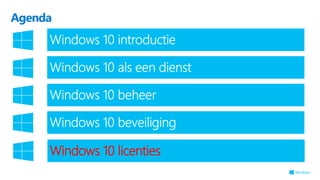
Agenda
Agenda
Windows 10 introductie
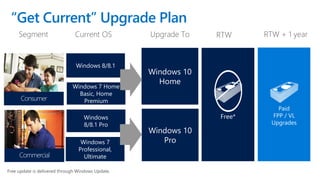
“Get Current” Upgrade Plan
Windows 7 Home
Basic, Home
Premium
Current OS
Windows 8/8.1
Upgrade To
Windows 10
Home
Segment
Windows 7
Professional,
Ultimate
Windows
8/8.1 Pro
Windows 10
Pro
RTW RTW + 1 year
Free update is delivered through Windows Update.
Consumer
Commercial
Paid
FPP / VL
Upgrades
Free*
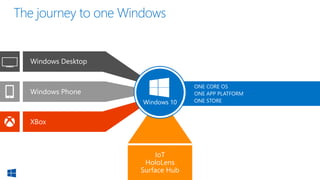
Windows Desktop
IoT
HoloLens
Surface Hub
Windows Phone
XBox
ONE CORE OS
ONE APP PLATFORM
ONE STOREWindows 10
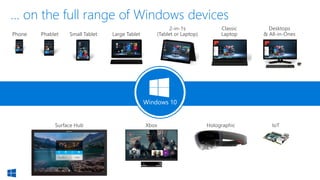
Phone Small Tablet
2-in-1s
(Tablet or Laptop)
Desktops
& All-in-OnesPhablet Large Tablet
Classic
Laptop
Xbox IoTSurface Hub
… on the full range of Windows devices
Holographic
Windows 10
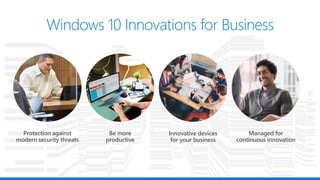
Innovative devices
for your business
Protection against
modern security threats
Managed for
continuous innovation
Be more
productive
Agenda
Windows 10 als een dienst
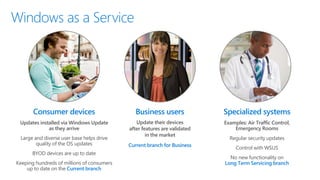
Consumer devices
Updates installed via Windows Update
as they arrive
Large and diverse user base helps drive
quality of the OS updates
BYOD devices are up to date
Keeping hundreds of millions of consumers
up to date on the Current branch
Regular security updates
Control with WSUS
No new functionality on
Long Term Servicing branch
Examples: Air Traffic Control,
Emergency Rooms
Specialized systems
Update their devices
after features are validated
in the market
Current branch for Business
Business users
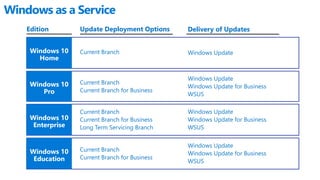
Delivery of Updates
Windows as a Service
Edition
Windows 10
Home
Windows 10
Pro
Windows 10
Enterprise
Update Deployment Options
Windows UpdateCurrent Branch
Windows Update
Windows Update for Business
WSUS
Current Branch
Current Branch for Business
Windows Update
Windows Update for Business
WSUS
Current Branch
Current Branch for Business
Long Term Servicing Branch
Windows 10
Education
Windows Update
Windows Update for Business
WSUS
Current Branch
Current Branch for Business
Agenda
Windows 10 beheer
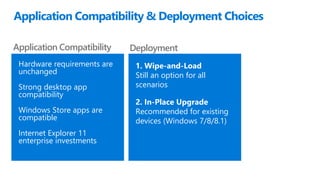
Application Compatibility & Deployment Choices
Application Compatibility
Hardware requirements are
unchanged
Strong desktop app
compatibility
Windows Store apps are
compatible
Internet Explorer 11
enterprise investments
Deployment
1. Wipe-and-Load
Still an option for all
scenarios
2. In-Place Upgrade
Recommended for existing
devices (Windows 7/8/8.1)
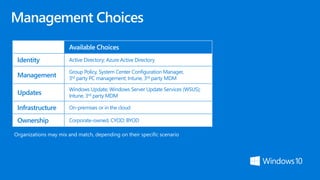
Available Choices
Identity Active Directory; Azure Active Directory
Management
Group Policy, System Center Configuration Manager,
3rd party PC management; Intune, 3rd party MDM
Updates
Windows Update; Windows Server Update Services (WSUS);
Intune, 3rd party MDM
Infrastructure On-premises or in the cloud
Ownership Corporate-owned, CYOD; BYOD
Organizations may mix and match, depending on their specific scenario
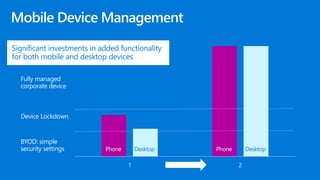
1 2
BYOD: simple
security settings
Device Lockdown
Fully managed
corporate device
Phone Desktop Phone Desktop
Significant investments in added functionality
for both mobile and desktop devices
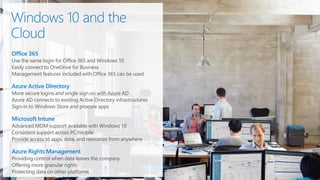
Office 365
Use the same login for Office 365 and Windows 10
Easily connect to OneDrive for Business
Management features included with Office 365 can be used
Azure Active Directory
More secure logins and single sign on with Azure AD
Azure AD connects to existing Active Directory infrastructures
Sign-in to Windows Store and procure apps
Microsoft Intune
Advanced MDM support available with Windows 10
Consistent support across PC/mobile
Provide access to apps, data, and resources from anywhere
Azure Rights Management
Providing control when data leaves the company
Offering more granular rights
Protecting data on other platforms
Agenda
Windows 10 beveiliging
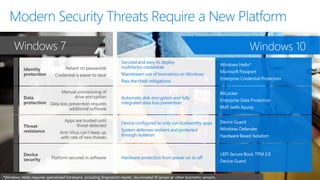
Reliant on passwords
Credential is easier to steal
Manual provisioning of
drive encryption
Data loss prevention requires
additional software
Apps are trusted until
threat detected
Anti-Virus can’t keep up
with rate of new threats
Platform secured in software
Secured and easy to deploy
multifactor credentials
Mainstream use of biometrics on Windows
Pass the Hash mitigations
Automatic disk encryption and fully
integrated data loss prevention
Device configured to only run trustworthy apps
System defenses resilient and protected
through isolation
Hardware protection from power on to off
Windows 7 Windows 10
*Windows Hello requires specialized hardware, including fingerprint reader, illuminated IR sensor or other biometric sensors.
Agenda
Windows 10 licenties
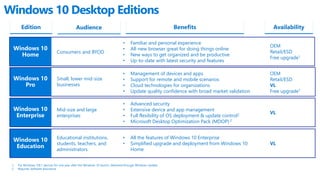
Windows 10 Desktop Editions
Edition Audience Benefits
Consumers and BYOD
1. For Windows 7/8.1 devices for one year after the Windows 10 launch, delivered through Windows Update
2. Requires Software Assurance
Availability
Windows 10
Home
• Familiar and personal experience
• All-new browser great for doing things online
• New ways to get organized and be productive
• Up-to-date with latest security and features
OEM
Retail/ESD
Free upgrade1
Windows 10
Pro
Small, lower mid-size
businesses
• Management of devices and apps
• Support for remote and mobile scenarios
• Cloud technologies for organizations
• Update quality confidence with broad market validation
OEM
Retail/ESD
VL
Free upgrade1
Windows 10
Enterprise
Mid-size and large
enterprises
• Advanced security
• Extensive device and app management
• Full flexibility of OS deployment & update control2
• Microsoft Desktop Optimization Pack (MDOP) 2
VL
Windows 10
Education
Educational institutions,
students, teachers, and
administrators
• All the features of Windows 10 Enterprise
• Simplified upgrade and deployment from Windows 10
Home
VL
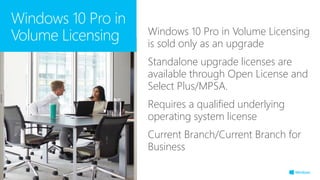
Windows 10 Pro in Volume Licensing
is sold only as an upgrade
Standalone upgrade licenses are
available through Open License and
Select Plus/MPSA.
Requires a qualified underlying
operating system license
Current Branch/Current Branch for
Business
Windows 10 Pro in
Volume Licensing
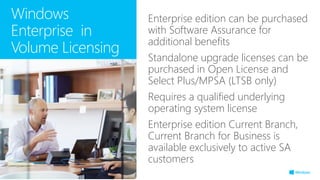
Enterprise edition can be purchased
with Software Assurance for
additional benefits
Standalone upgrade licenses can be
purchased in Open License and
Select Plus/MPSA (LTSB only)
Requires a qualified underlying
operating system license
Enterprise edition Current Branch,
Current Branch for Business is
available exclusively to active SA
customers
Windows
Enterprise in
Volume Licensing
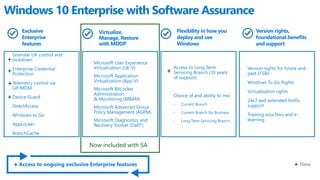
Microsoft User Experience
Virtualization (UE-V)
Microsoft Application
Virtualization (App-V)
Microsoft BitLocker
Administration
& Monitoring (MBAM)
Microsoft Advanced Group
Policy Management (AGPM)
Microsoft Diagnostics and
Recovery Toolset (DaRT)
Virtualize,
Manage, Restore
with MDOP
Version rights for future and
past LTSBs
Windows To Go Rights
Virtualization rights
24x7 and extended hotfix
support
Training vouchers and e-
learning
Version rights,
foundational benefits
and support
Access to Long Term
Servicing Branch (10 years
of support)
Choice of and ability to mix:
- Current Branch
- Current Branch for Business
- Long Term Servicing Branch
Flexibility in how you
deploy and use
Windows
Granular UX control and
lockdown
Enterprise Credential
Protection
Telemetry control via
GP/MDM
Device Guard
DirectAccess
Windows to Go
AppLocker
BranchCache
Exclusive
Enterprise
features
Windows 10 Enterprise with Software Assurance
Access to ongoing exclusive Enterprise features New
Now included with SA
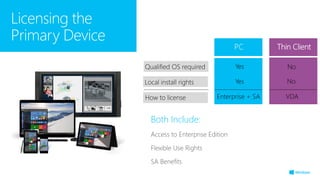
Both Include:
Access to Enterprise Edition
Flexible Use Rights
SA Benefits
Licensing the
Primary Device
PC
Yes NoQualified OS required
YesLocal install rights No
Enterprise + SAHow to license VDA
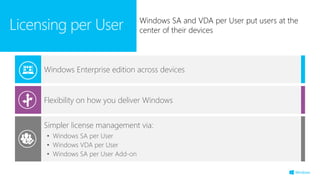
Simpler license management via:
• Windows SA per User
• Windows VDA per User
• Windows SA per User Add-on
Flexibility on how you deliver Windows
Windows Enterprise edition across devices
Licensing per User Windows SA and VDA per User put users at the
center of their devices
© 2015 Microsoft Corporation. All rights reserved. Microsoft, Windows, and other product names are or may be registered trademarks and/or trademarks in the U.S. and/or other countries.
The information herein is for informational purposes only and represents the current view of Microsoft Corporation as of the date of this presentation. Because Microsoft must respond to changing market conditions, it should not be interpreted to be a commitment on the
part of Microsoft, and Microsoft cannot guarantee the accuracy of any information provided after the date of this presentation. MICROSOFT MAKES NO WARRANTIES, EXPRESS, IMPLIED OR STATUTORY, AS TO THE INFORMATION IN THIS PRESENTATION.
•
•
•
•
•
•
•
•
•
•
•
•
•
•
•
•
•
•
•
•
•
•
•
•
•
•
•
•
•
•
•
•
•
•
•
•
•
•
•
•
•
•
•
•
•
•
•
•
•
•
•
•
•
•
•
•
•
•
•
•
•
•
•
•
•
•
•
•
•
•
•
•
•
•
•
•
•
•
•
•
•
•
•
•
•
•
•
•
•
•
•
•
•
•
•
•
•
•
•
•
•
•
•
•
•
Windows 10 voor bedrijven

Windows 10 voor bedrijven

  • 3.
  • 4.
  • 7.
  • 9.
  • 12.
  • 13.
  • 14.
    “Get Current” UpgradePlan Windows 7 Home Basic, Home Premium Current OS Windows 8/8.1 Upgrade To Windows 10 Home Segment Windows 7 Professional, Ultimate Windows 8/8.1 Pro Windows 10 Pro RTW RTW + 1 year Free update is delivered through Windows Update. Consumer Commercial Paid FPP / VL Upgrades Free*
  • 15.
    Windows Desktop IoT HoloLens Surface Hub WindowsPhone XBox ONE CORE OS ONE APP PLATFORM ONE STOREWindows 10
  • 16.
    Phone Small Tablet 2-in-1s (Tabletor Laptop) Desktops & All-in-OnesPhablet Large Tablet Classic Laptop Xbox IoTSurface Hub … on the full range of Windows devices Holographic Windows 10
  • 18.
    Innovative devices for yourbusiness Protection against modern security threats Managed for continuous innovation Be more productive
  • 19.
  • 20.
    Consumer devices Updates installedvia Windows Update as they arrive Large and diverse user base helps drive quality of the OS updates BYOD devices are up to date Keeping hundreds of millions of consumers up to date on the Current branch Regular security updates Control with WSUS No new functionality on Long Term Servicing branch Examples: Air Traffic Control, Emergency Rooms Specialized systems Update their devices after features are validated in the market Current branch for Business Business users
  • 21.
    Delivery of Updates Windowsas a Service Edition Windows 10 Home Windows 10 Pro Windows 10 Enterprise Update Deployment Options Windows UpdateCurrent Branch Windows Update Windows Update for Business WSUS Current Branch Current Branch for Business Windows Update Windows Update for Business WSUS Current Branch Current Branch for Business Long Term Servicing Branch Windows 10 Education Windows Update Windows Update for Business WSUS Current Branch Current Branch for Business
  • 22.
  • 23.
    Application Compatibility &Deployment Choices Application Compatibility Hardware requirements are unchanged Strong desktop app compatibility Windows Store apps are compatible Internet Explorer 11 enterprise investments Deployment 1. Wipe-and-Load Still an option for all scenarios 2. In-Place Upgrade Recommended for existing devices (Windows 7/8/8.1)
  • 24.
    Available Choices Identity ActiveDirectory; Azure Active Directory Management Group Policy, System Center Configuration Manager, 3rd party PC management; Intune, 3rd party MDM Updates Windows Update; Windows Server Update Services (WSUS); Intune, 3rd party MDM Infrastructure On-premises or in the cloud Ownership Corporate-owned, CYOD; BYOD Organizations may mix and match, depending on their specific scenario
  • 25.
    1 2 BYOD: simple securitysettings Device Lockdown Fully managed corporate device Phone Desktop Phone Desktop Significant investments in added functionality for both mobile and desktop devices
  • 26.
    Office 365 Use thesame login for Office 365 and Windows 10 Easily connect to OneDrive for Business Management features included with Office 365 can be used Azure Active Directory More secure logins and single sign on with Azure AD Azure AD connects to existing Active Directory infrastructures Sign-in to Windows Store and procure apps Microsoft Intune Advanced MDM support available with Windows 10 Consistent support across PC/mobile Provide access to apps, data, and resources from anywhere Azure Rights Management Providing control when data leaves the company Offering more granular rights Protecting data on other platforms
  • 27.
  • 28.
    Reliant on passwords Credentialis easier to steal Manual provisioning of drive encryption Data loss prevention requires additional software Apps are trusted until threat detected Anti-Virus can’t keep up with rate of new threats Platform secured in software Secured and easy to deploy multifactor credentials Mainstream use of biometrics on Windows Pass the Hash mitigations Automatic disk encryption and fully integrated data loss prevention Device configured to only run trustworthy apps System defenses resilient and protected through isolation Hardware protection from power on to off Windows 7 Windows 10 *Windows Hello requires specialized hardware, including fingerprint reader, illuminated IR sensor or other biometric sensors.
  • 31.
  • 32.
    Windows 10 DesktopEditions Edition Audience Benefits Consumers and BYOD 1. For Windows 7/8.1 devices for one year after the Windows 10 launch, delivered through Windows Update 2. Requires Software Assurance Availability Windows 10 Home • Familiar and personal experience • All-new browser great for doing things online • New ways to get organized and be productive • Up-to-date with latest security and features OEM Retail/ESD Free upgrade1 Windows 10 Pro Small, lower mid-size businesses • Management of devices and apps • Support for remote and mobile scenarios • Cloud technologies for organizations • Update quality confidence with broad market validation OEM Retail/ESD VL Free upgrade1 Windows 10 Enterprise Mid-size and large enterprises • Advanced security • Extensive device and app management • Full flexibility of OS deployment & update control2 • Microsoft Desktop Optimization Pack (MDOP) 2 VL Windows 10 Education Educational institutions, students, teachers, and administrators • All the features of Windows 10 Enterprise • Simplified upgrade and deployment from Windows 10 Home VL
  • 33.
    Windows 10 Proin Volume Licensing is sold only as an upgrade Standalone upgrade licenses are available through Open License and Select Plus/MPSA. Requires a qualified underlying operating system license Current Branch/Current Branch for Business Windows 10 Pro in Volume Licensing

  • 34.
    Enterprise edition canbe purchased with Software Assurance for additional benefits Standalone upgrade licenses can be purchased in Open License and Select Plus/MPSA (LTSB only) Requires a qualified underlying operating system license Enterprise edition Current Branch, Current Branch for Business is available exclusively to active SA customers Windows Enterprise in Volume Licensing
  • 35.
    Microsoft User Experience Virtualization(UE-V) Microsoft Application Virtualization (App-V) Microsoft BitLocker Administration & Monitoring (MBAM) Microsoft Advanced Group Policy Management (AGPM) Microsoft Diagnostics and Recovery Toolset (DaRT) Virtualize, Manage, Restore with MDOP Version rights for future and past LTSBs Windows To Go Rights Virtualization rights 24x7 and extended hotfix support Training vouchers and e- learning Version rights, foundational benefits and support Access to Long Term Servicing Branch (10 years of support) Choice of and ability to mix: - Current Branch - Current Branch for Business - Long Term Servicing Branch Flexibility in how you deploy and use Windows Granular UX control and lockdown Enterprise Credential Protection Telemetry control via GP/MDM Device Guard DirectAccess Windows to Go AppLocker BranchCache Exclusive Enterprise features Windows 10 Enterprise with Software Assurance Access to ongoing exclusive Enterprise features New Now included with SA
  • 36.
    Both Include: Access toEnterprise Edition Flexible Use Rights SA Benefits Licensing the Primary Device PC Yes NoQualified OS required YesLocal install rights No Enterprise + SAHow to license VDA
  • 37.
    Simpler license managementvia: • Windows SA per User • Windows VDA per User • Windows SA per User Add-on Flexibility on how you deliver Windows Windows Enterprise edition across devices Licensing per User Windows SA and VDA per User put users at the center of their devices
  • 39.
    © 2015 MicrosoftCorporation. All rights reserved. Microsoft, Windows, and other product names are or may be registered trademarks and/or trademarks in the U.S. and/or other countries. The information herein is for informational purposes only and represents the current view of Microsoft Corporation as of the date of this presentation. Because Microsoft must respond to changing market conditions, it should not be interpreted to be a commitment on the part of Microsoft, and Microsoft cannot guarantee the accuracy of any information provided after the date of this presentation. MICROSOFT MAKES NO WARRANTIES, EXPRESS, IMPLIED OR STATUTORY, AS TO THE INFORMATION IN THIS PRESENTATION.
  • 44.
  • 45.
  • 46.
  • 47.
  • 48.
  • 49.
  • 50.
  • 51.
  • 52.
  • 53.
  • 56.
  • 57.
  • 58.
  • 59.
  • 61.
  • 62.
  • 63.
  • 64.
  • 65.
  • 66.
  • 67.
  • 68.
  • 69.
  • 70.
  • 71.
  • 72.
  • 73.
  • 74.
  • 77.