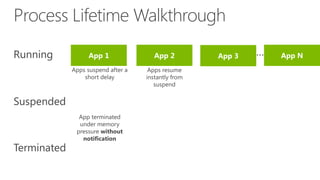
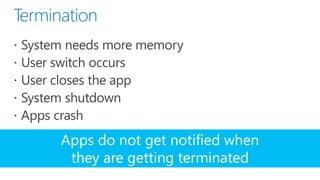
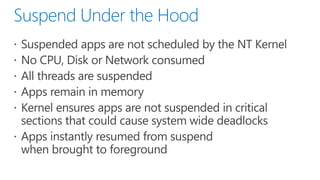

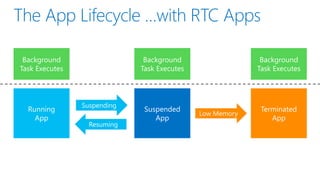
Apps do not get notified when
 they are getting terminated
demo
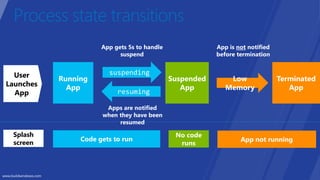
User
Launches
  App


 Splash
 screen
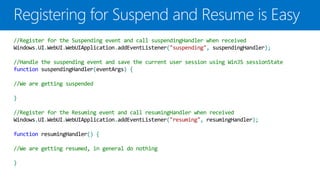
//Register for the Suspending event and call suspendingHandler when received
Windows.UI.WebUI.WebUIApplication.addEventListener("suspending", suspendingHandler);

//Handle the suspending event and save the current user session using WinJS sessionState
function suspendingHandler(eventArgs) {

//We are getting suspended

}

//Register for the Resuming event and call resumingHandler when received
Windows.UI.WebUI.WebUIApplication.addEventListener("resuming", resumingHandler);

function resumingHandler() {

//We are getting resumed, in general do nothing

}
demo
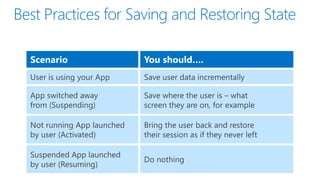
Scenario   You should….
demo
demo
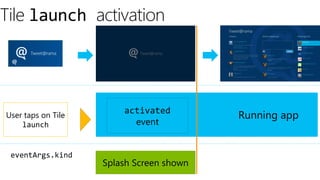
Tile launch activation


                        activated
User taps on Tile                         Running app
    launch                event


 eventArgs.kind
                    Splash Screen shown
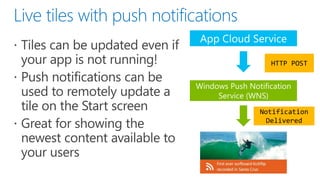
HTTP POST


Notification
 Delivered
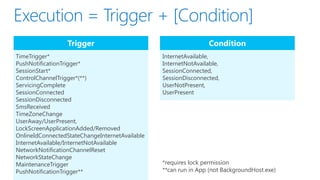
Trigger                                        Condition
TimeTrigger*                                    InternetAvailable,
PushNotificationTrigger*                        InternetNotAvailable,
SessionStart*                                   SessionConnected,
ControlChannelTrigger*(**)                      SessionDisconnected,
ServicingComplete                               UserNotPresent,
SessionConnected                                UserPresent
SessionDisconnected
SmsReceived
TimeZoneChange
UserAway/UserPresent,
LockScreenApplicationAdded/Removed
OnlineIdConnectedStateChangeInternetAvailable
InternetAvailable/InternetNotAvailable
NetworkNotificationChannelReset
NetworkStateChange
MaintenanceTrigger                              *requires lock permission
PushNotificationTrigger**                       **can run in App (not BackgroundHost.exe)
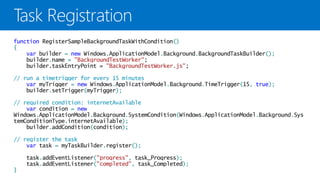
function RegisterSampleBackgroundTaskWithCondition()
{
    var builder = new Windows.ApplicationModel.Background.BackgroundTaskBuilder();
    builder.name = "BackgroundTestWorker";
    builder.taskEntryPoint = "BackgroundTestWorker.js";

// run a timetrigger for every 15 minutes
    var myTrigger = new Windows.ApplicationModel.Background.TimeTrigger(15, true);
    builder.setTrigger(myTrigger);

// required condition: internetAvailable
    var condition = new
Windows.ApplicationModel.Background.SystemCondition(Windows.ApplicationModel.Background.Sys
temConditionType.internetAvailable);
    builder.addCondition(condition);

// register the task
    var task = myTaskBuilder.register();

    task.addEventListener("progress", task_Progress);
    task.addEventListener("completed", task_Completed);
}
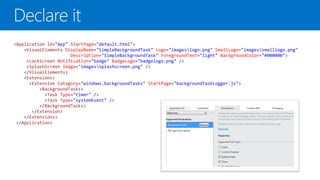
<Application Id="App" StartPage="default.html">
    <VisualElements DisplayName="SimpleBackgroundTask" Logo="imageslogo.png" SmallLogo="imagessmalllogo.png"
                      Description="SimpleBackgroundTask" ForegroundText="light" BackgroundColor="#000000">
     <LockScreen Notification="badge" BadgeLogo="badgelogo.png" />
     <SplashScreen Image="imagessplashscreen.png" />
    </VisualElements>
    <Extensions>
      <Extension Category="windows.backgroundTasks" StartPage="backgroundTaskLogger.js">
          <BackgroundTasks>
            <Task Type="timer" />
            <Task Type="systemEvent" />
          </BackgroundTasks>
       </Extension>
    </Extensions>
 </Application>
demo
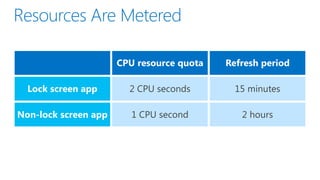
CPU resource quota   Refresh period

  Lock screen app

Non-lock screen app
#win8aca : How and when metro style apps run

#win8aca : How and when metro style apps run

  • 6.
    Apps do notget notified when they are getting terminated
  • 7.
  • 8.
    User Launches App Splash screen
  • 9.
    //Register for theSuspending event and call suspendingHandler when received Windows.UI.WebUI.WebUIApplication.addEventListener("suspending", suspendingHandler); //Handle the suspending event and save the current user session using WinJS sessionState function suspendingHandler(eventArgs) { //We are getting suspended } //Register for the Resuming event and call resumingHandler when received Windows.UI.WebUI.WebUIApplication.addEventListener("resuming", resumingHandler); function resumingHandler() { //We are getting resumed, in general do nothing }
  • 11.
  • 14.
    Scenario You should….
  • 15.
  • 20.
  • 23.
    Tile launch activation activated User taps on Tile Running app launch event eventArgs.kind Splash Screen shown
  • 27.
  • 34.
    Trigger Condition TimeTrigger* InternetAvailable, PushNotificationTrigger* InternetNotAvailable, SessionStart* SessionConnected, ControlChannelTrigger*(**) SessionDisconnected, ServicingComplete UserNotPresent, SessionConnected UserPresent SessionDisconnected SmsReceived TimeZoneChange UserAway/UserPresent, LockScreenApplicationAdded/Removed OnlineIdConnectedStateChangeInternetAvailable InternetAvailable/InternetNotAvailable NetworkNotificationChannelReset NetworkStateChange MaintenanceTrigger *requires lock permission PushNotificationTrigger** **can run in App (not BackgroundHost.exe)
  • 35.
    function RegisterSampleBackgroundTaskWithCondition() { var builder = new Windows.ApplicationModel.Background.BackgroundTaskBuilder(); builder.name = "BackgroundTestWorker"; builder.taskEntryPoint = "BackgroundTestWorker.js"; // run a timetrigger for every 15 minutes var myTrigger = new Windows.ApplicationModel.Background.TimeTrigger(15, true); builder.setTrigger(myTrigger); // required condition: internetAvailable var condition = new Windows.ApplicationModel.Background.SystemCondition(Windows.ApplicationModel.Background.Sys temConditionType.internetAvailable); builder.addCondition(condition); // register the task var task = myTaskBuilder.register(); task.addEventListener("progress", task_Progress); task.addEventListener("completed", task_Completed); }
  • 36.
    <Application Id="App" StartPage="default.html"> <VisualElements DisplayName="SimpleBackgroundTask" Logo="imageslogo.png" SmallLogo="imagessmalllogo.png" Description="SimpleBackgroundTask" ForegroundText="light" BackgroundColor="#000000"> <LockScreen Notification="badge" BadgeLogo="badgelogo.png" /> <SplashScreen Image="imagessplashscreen.png" /> </VisualElements> <Extensions> <Extension Category="windows.backgroundTasks" StartPage="backgroundTaskLogger.js"> <BackgroundTasks> <Task Type="timer" /> <Task Type="systemEvent" /> </BackgroundTasks> </Extension> </Extensions> </Application>
  • 37.
  • 39.
    CPU resource quota Refresh period Lock screen app Non-lock screen app