Wimax
     &
 Comparison
With
   Wifi
          M.Kanimozhi
          III MCA
          29713
•Why WiMAX?
•What is WiMAX?
•History of WiMAX
•How WiMAX
         works?
Think about how you access
            the
            Z


   Internet today??????
There are basically three different
                          options

 Broadband access

 Wi-Fi access

 Dial-up access
Need for new Technology...

The high speed of broadband service.

Wireless rather than wired access .

It would be a lot less expensive than cable or DSL

 Much easier to extend to suburban and rural
areas

Broad coverage like the cell phone network
instead of small WiFi hotspots
A system to provide all these features
is known as WiMAX
WIMAX
 Worldwide Interoperability for Microwave
                                         Access

 It is of the standard IEEE 802.16.

   WiMAX could replace cable and DSL services,
          providing universal Internet access just
          about anywhere you go.
History Of WiMAX
                               1999
 The Institute of Electrical and Electronics Engineers (IEEE)
       devised the 802.16 standard

                                 2001
  Operated on a point-to-point radio link network by means of
     line of sight transmissions, had a frequency range of
     10 GHz to 66 GHz
  Developers focused more exclusively on the 802.16 standard
     that functioned in the range of
     2 GHz to 11 GHz.
  The WiMAX Forum was established with the agenda to market
     and promote the 802.16 standard

                                 2003
   The IEEE came out with 802.16a, which transmitted data through
  non-line of sight radio channels to and from omni-directional
  antennas.
History Of WIMAX(contd…)
                                2004
The 802.16-2004 standard was released. This standard combined the
updates from the IEEE 802.16a, 802.16b, and 802.16c regulations.


                                2005
First Mobile WiMAX system: 802.16e.it supported over 2,000
        subcarriers, optimized handover delay and packet loss, and
        increased network security.

 Publish their next major 802.16 standard named 802.16m.
      One of the goals for this version is to increase data speeds to
        1Gbps.
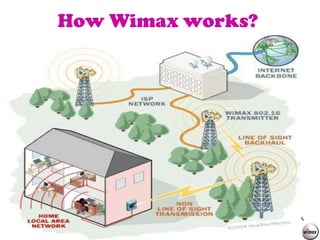
How Wimax works?
A WiMAX tower station can connect directly to the Internet
using a high-bandwidth, wired connection (for example, a T3
line).

 It can also connect to another WiMAX tower using a line-of-
sight, microwave link.

This connection to a second tower (often referred to as
a backhaul), along with the ability of a single tower to cover up
to 3,000 square miles

It allows WiMAX to provide coverage to remote rural areas.
How Wimax works?
•WiMAX System
• Two forms of wireless
                 service
•WiMAX Coverage and
                 Speed
• WiMAX Spectrum
•WiMAX Standards
•WIMAX Equipment
•Uses of WiMAX
•Applications
A WiMAX System
It consists of two parts:

A WiMAX tower


A WiMAX receiver
A WiMAX tower
It is similar in concept to a cell-phone tower .

A single WiMAX tower can provide
       coverage to a very large area –
       as big as 3,000 square miles
       (~8,000 square km).
A WiMAX receiver

The receiver and antenna could be a
small box or PCMCIA card,
or they could be built into a laptop the way
WiFi access is today.
Two forms of wireless
           service

Non-line-of-sight

line-of-sight
Non-line-of-sight

 WiFi sort of service

 A small antenna on your computer
connects to the tower.

 WiMAX uses a lower frequency range --
2 GHz to 11 GHz (similar to WiFi).
Line-of-sight
 A fixed dish antenna points straight at the WiMAX
tower from a rooftop or pole.

 The line-of-sight connection is stronger and more
stable, so it's able to send a lot of data with fewer
errors

It use higher frequencies, with ranges reaching a
possible 66 GHz.

 At higher frequencies, there is less interference
and lots more bandwidth.
Coverage and speed
WiMAX should be able to handle up to 70 megabits
per second.

WiMAX will blanket a radius of 30 miles (50 km)
with wireless access.

The increased range is due to the frequencies
used and the power of the transmitter.
IEEE 802.16 Specifications

Range - 30-mile (50-km) radius from base station

Speed - 70 megabits per second

Line-of-sight not needed between user and base station

Frequency bands - 2 to 11 GHz and 10 to 66 GHz (licensed
and unlicensed bands)
WiMax Spectrum
 Unlicensed 5 GHz : The bands between
                            5.25 and 5.85 GHz.

 Licensed 3.5 GHz:The Bands between
                           3.4 and 3.6 GHz

 Licensed 2.5 GHz: The bands between
                           2.5 and 2.6 GHz
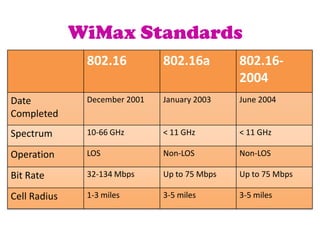
WiMax Standards
               802.16          802.16a         802.16-
                                               2004
Date           December 2001   January 2003    June 2004
Completed
Spectrum       10-66 GHz       < 11 GHz        < 11 GHz

Operation      LOS             Non-LOS         Non-LOS

Bit Rate       32-134 Mbps     Up to 75 Mbps   Up to 75 Mbps

Cell Radius    1-3 miles       3-5 miles       3-5 miles
WiMAX Technology at
                   Home
An Internet service provider sets up a WIMAX base station 10 miles
from your home.

You would buy a WiMAX-enabled computer or upgrade your old
computer to add WiMAX capability.

 You would receive a special encryption code that would give you
access to the base station.

 The base station would beam data from the Internet to your
computer (at speeds potentially higher than today's cable modems),
for which you would pay the provider a monthly fee.

The cost for this service could be much lower than current high-
speed Internet-subscription fees because the provider never had to
run cables.
Types of Wireless access

Fixed wireless access (FWA)


Mobile wireless access (MWA)


Nomadic wireless access (NWA)
Fixed wireless access
                   (FWA)
 Wireless access application in which the
 location of the end-user termination and
 the network access point to be connected
 to the end-user are fixed.
Mobile wireless access
                   (MWA)

Wireless access application in which the
location of the end-user termination is
mobile.
Nomadic wireless access
                (NWA)
Wireless access application in which the
location of the end-user termination may
be in different places but it must be
stationary while in use.
WiMAX Technology

                                   .
For fixed and portable access applications
• Up to 40 Mbps per channel, in a cell radius of 3 ~ 10 km


For mobile network deployments
• Up to 15 Mbps per channel, in a cell radius up to 3 km
WIMAX Equipments
There are numerous devices on the market that provide connectivity
to a WiMAX network. These are known as the "subscriber unit" (SU).

Some connecting devices:

Gateways

Dongles

Mobile Phones
Gateways

•WiMAX gateway devices are available as both indoor and
outdoor versions from several manufacturers.


Indoor gateways

Outdoor gateways
Gateways


Indoor gateways are convenient, but radio losses mean that the
subscriber may need to be significantly closer to the WiMAX base
station than with professionally-installed external units.


Outdoor gateways are roughly the size of a laptop PC, and their
installation is comparable to the installation of a residential satellite
dish.
Dongles

It provides connectivity to a WiMAX network.

Dongles typically have omnidirectional antennae which are of
lower-gain compared to other devices, as such these devices are
best used in areas of good coverage.

The Bluetooth USB Dongle is an external adapter that can be
connected to the USB port of any notebook or desktop PC
Mobile Phone

HTC announced the first WiMAX enabled mobile
phone, the Max   4G, on November 12, 2008.
The device was only available to certain markets
in Russia on the Yota network.
Interesting Points

 Simultaneously support hundreds of businesses with
    T-1 speed connectivity and thousands of homes with
    DSL speed connectivity.

 Promise of potential low cost and flexibility in building
   broadband networks.

Support for both voice and video as well as Internet
  data.
Uses of WI-MAX
The bandwidth and range of WiMAX make it suitable for the
following potential applications


Providing portable mobile broadband connectivity across cities
and countries through a variety of devices.

Providing a wireless alternative to cable and DSL for "last mile "
broadband access

Providing data, telecommunications (VoIP) and IPTV services
(triple play).
WiMax Applications:
According to WiMax Forum it supports 5 classes of
applications:

    Multi-player Interactive Gaming.

    VOIP and Video Conference

    Streaming Media

    Web Browsing and Instant Messaging

    Media Content Downloads
WiMAX and wiFi
IEEE Standards

Wi-Fi is based on IEEE 802.11
                      standard
WiMAX is based on IEEE 802.16
                      standard
Coverage and speed
WiFi-style access will be limited to a 4-to-6 mile radius

WiMAX access will be within 30 mile radius(due to stronger
line-of-sight antennas)


The fastest WiFi connection can transmit up to 54 megabits
per second
 WiMAX can transmit up to 70 megabits per second.


       The biggest difference isn't speed; it's distance
Data Transfer

Wimax offer high speed internet as a broadband access
which transfer data, voice, video at very high speed.


WiFi offer short range of data transfer because WiFi can
connect only in specified areas so only file sharing may
possible.
Cost

Wimax is a high cost network.

Wifi is a low cost network

therefore mostly people adopt WiFi network due to less
expenditure and avoid Wimax due to expensive installations.
Quality of Service


Wi-Fi does not guarantee any QoS
WiMax will provide your several level of QoS.
conclusion

Provide high-speed Internet access to home and business
                             subscribers, without wires.

Use wireless links with microwave

standard based technology enabling the delivery of last mile

wireless broadband access as an alternative to cable and
                                                  DSL
References…
• www.howstuffworks.com

• www.ask.com
Thank You!!!!

Wimax

  • 1.
    Wimax & Comparison With Wifi M.Kanimozhi III MCA 29713
  • 2.
    •Why WiMAX? •What isWiMAX? •History of WiMAX •How WiMAX works?
  • 3.
    Think about howyou access the Z Internet today??????
  • 4.
    There are basicallythree different options Broadband access Wi-Fi access Dial-up access
  • 5.
    Need for newTechnology... The high speed of broadband service. Wireless rather than wired access . It would be a lot less expensive than cable or DSL  Much easier to extend to suburban and rural areas Broad coverage like the cell phone network instead of small WiFi hotspots
  • 6.
    A system toprovide all these features is known as WiMAX
  • 7.
    WIMAX  Worldwide Interoperabilityfor Microwave Access  It is of the standard IEEE 802.16.  WiMAX could replace cable and DSL services, providing universal Internet access just about anywhere you go.
  • 8.
    History Of WiMAX 1999  The Institute of Electrical and Electronics Engineers (IEEE) devised the 802.16 standard 2001 Operated on a point-to-point radio link network by means of line of sight transmissions, had a frequency range of 10 GHz to 66 GHz Developers focused more exclusively on the 802.16 standard that functioned in the range of 2 GHz to 11 GHz. The WiMAX Forum was established with the agenda to market and promote the 802.16 standard 2003  The IEEE came out with 802.16a, which transmitted data through non-line of sight radio channels to and from omni-directional antennas.
  • 9.
    History Of WIMAX(contd…) 2004 The 802.16-2004 standard was released. This standard combined the updates from the IEEE 802.16a, 802.16b, and 802.16c regulations. 2005 First Mobile WiMAX system: 802.16e.it supported over 2,000 subcarriers, optimized handover delay and packet loss, and increased network security.  Publish their next major 802.16 standard named 802.16m. One of the goals for this version is to increase data speeds to 1Gbps.
  • 10.
    How Wimax works? AWiMAX tower station can connect directly to the Internet using a high-bandwidth, wired connection (for example, a T3 line).  It can also connect to another WiMAX tower using a line-of- sight, microwave link. This connection to a second tower (often referred to as a backhaul), along with the ability of a single tower to cover up to 3,000 square miles It allows WiMAX to provide coverage to remote rural areas.
  • 11.
  • 12.
    •WiMAX System • Twoforms of wireless service •WiMAX Coverage and Speed • WiMAX Spectrum •WiMAX Standards •WIMAX Equipment •Uses of WiMAX •Applications
  • 13.
    A WiMAX System Itconsists of two parts: A WiMAX tower A WiMAX receiver
  • 14.
    A WiMAX tower Itis similar in concept to a cell-phone tower . A single WiMAX tower can provide coverage to a very large area – as big as 3,000 square miles (~8,000 square km).
  • 15.
    A WiMAX receiver Thereceiver and antenna could be a small box or PCMCIA card, or they could be built into a laptop the way WiFi access is today.
  • 16.
    Two forms ofwireless service Non-line-of-sight line-of-sight
  • 17.
    Non-line-of-sight  WiFi sortof service  A small antenna on your computer connects to the tower.  WiMAX uses a lower frequency range -- 2 GHz to 11 GHz (similar to WiFi).
  • 18.
    Line-of-sight  A fixeddish antenna points straight at the WiMAX tower from a rooftop or pole.  The line-of-sight connection is stronger and more stable, so it's able to send a lot of data with fewer errors It use higher frequencies, with ranges reaching a possible 66 GHz.  At higher frequencies, there is less interference and lots more bandwidth.
  • 19.
    Coverage and speed WiMAXshould be able to handle up to 70 megabits per second. WiMAX will blanket a radius of 30 miles (50 km) with wireless access. The increased range is due to the frequencies used and the power of the transmitter.
  • 20.
    IEEE 802.16 Specifications Range- 30-mile (50-km) radius from base station Speed - 70 megabits per second Line-of-sight not needed between user and base station Frequency bands - 2 to 11 GHz and 10 to 66 GHz (licensed and unlicensed bands)
  • 21.
    WiMax Spectrum  Unlicensed5 GHz : The bands between 5.25 and 5.85 GHz.  Licensed 3.5 GHz:The Bands between 3.4 and 3.6 GHz  Licensed 2.5 GHz: The bands between 2.5 and 2.6 GHz
  • 22.
    WiMax Standards 802.16 802.16a 802.16- 2004 Date December 2001 January 2003 June 2004 Completed Spectrum 10-66 GHz < 11 GHz < 11 GHz Operation LOS Non-LOS Non-LOS Bit Rate 32-134 Mbps Up to 75 Mbps Up to 75 Mbps Cell Radius 1-3 miles 3-5 miles 3-5 miles
  • 23.
    WiMAX Technology at Home An Internet service provider sets up a WIMAX base station 10 miles from your home. You would buy a WiMAX-enabled computer or upgrade your old computer to add WiMAX capability.  You would receive a special encryption code that would give you access to the base station.  The base station would beam data from the Internet to your computer (at speeds potentially higher than today's cable modems), for which you would pay the provider a monthly fee. The cost for this service could be much lower than current high- speed Internet-subscription fees because the provider never had to run cables.
  • 24.
    Types of Wirelessaccess Fixed wireless access (FWA) Mobile wireless access (MWA) Nomadic wireless access (NWA)
  • 25.
    Fixed wireless access (FWA) Wireless access application in which the location of the end-user termination and the network access point to be connected to the end-user are fixed.
  • 26.
    Mobile wireless access (MWA) Wireless access application in which the location of the end-user termination is mobile.
  • 27.
    Nomadic wireless access (NWA) Wireless access application in which the location of the end-user termination may be in different places but it must be stationary while in use.
  • 28.
    WiMAX Technology . For fixed and portable access applications • Up to 40 Mbps per channel, in a cell radius of 3 ~ 10 km For mobile network deployments • Up to 15 Mbps per channel, in a cell radius up to 3 km
  • 29.
    WIMAX Equipments There arenumerous devices on the market that provide connectivity to a WiMAX network. These are known as the "subscriber unit" (SU). Some connecting devices: Gateways Dongles Mobile Phones
  • 30.
    Gateways •WiMAX gateway devicesare available as both indoor and outdoor versions from several manufacturers. Indoor gateways Outdoor gateways
  • 31.
    Gateways Indoor gateways areconvenient, but radio losses mean that the subscriber may need to be significantly closer to the WiMAX base station than with professionally-installed external units. Outdoor gateways are roughly the size of a laptop PC, and their installation is comparable to the installation of a residential satellite dish.
  • 32.
    Dongles It provides connectivityto a WiMAX network. Dongles typically have omnidirectional antennae which are of lower-gain compared to other devices, as such these devices are best used in areas of good coverage. The Bluetooth USB Dongle is an external adapter that can be connected to the USB port of any notebook or desktop PC
  • 33.
    Mobile Phone HTC announcedthe first WiMAX enabled mobile phone, the Max 4G, on November 12, 2008. The device was only available to certain markets in Russia on the Yota network.
  • 34.
    Interesting Points  Simultaneouslysupport hundreds of businesses with T-1 speed connectivity and thousands of homes with DSL speed connectivity.  Promise of potential low cost and flexibility in building broadband networks. Support for both voice and video as well as Internet data.
  • 35.
    Uses of WI-MAX Thebandwidth and range of WiMAX make it suitable for the following potential applications Providing portable mobile broadband connectivity across cities and countries through a variety of devices. Providing a wireless alternative to cable and DSL for "last mile " broadband access Providing data, telecommunications (VoIP) and IPTV services (triple play).
  • 36.
    WiMax Applications: According toWiMax Forum it supports 5 classes of applications: Multi-player Interactive Gaming. VOIP and Video Conference Streaming Media Web Browsing and Instant Messaging Media Content Downloads
  • 37.
  • 38.
    IEEE Standards Wi-Fi isbased on IEEE 802.11 standard WiMAX is based on IEEE 802.16 standard
  • 39.
    Coverage and speed WiFi-styleaccess will be limited to a 4-to-6 mile radius WiMAX access will be within 30 mile radius(due to stronger line-of-sight antennas) The fastest WiFi connection can transmit up to 54 megabits per second  WiMAX can transmit up to 70 megabits per second. The biggest difference isn't speed; it's distance
  • 40.
    Data Transfer Wimax offerhigh speed internet as a broadband access which transfer data, voice, video at very high speed. WiFi offer short range of data transfer because WiFi can connect only in specified areas so only file sharing may possible.
  • 41.
    Cost Wimax is ahigh cost network. Wifi is a low cost network therefore mostly people adopt WiFi network due to less expenditure and avoid Wimax due to expensive installations.
  • 42.
    Quality of Service Wi-Fidoes not guarantee any QoS WiMax will provide your several level of QoS.
  • 43.
    conclusion Provide high-speed Internetaccess to home and business subscribers, without wires. Use wireless links with microwave standard based technology enabling the delivery of last mile wireless broadband access as an alternative to cable and DSL
  • 44.
  • 45.