Anthony Hortin
@maddisondesigns
Why you should be using
WordPress Child Themes
#WPMELB
#wpmelb @maddisondesigns
What is a Child Theme?
#wpmelb @maddisondesigns
A child theme is a theme that
inherits the functionality and
styling of another theme (called
the parent theme). Child themes
are the recommended way of
modifying an existing theme.
“
*https://codex.wordpress.org/Child_Themes
#wpmelb @maddisondesigns
Why use a Child theme?
#wpmelb @maddisondesigns
It’s Safer
If you modify a theme’s CSS or HTML directly and it gets
updated, you’ll lose all your modifications.
#wpmelb @maddisondesigns
It’s Quicker
Using a Child Theme can speed up your

development time.
#wpmelb @maddisondesigns
It’s Easier
If the Parent Theme is developed properly,

using a Child Theme can make it easier to

override functionality.
#wpmelb @maddisondesigns
When should you use a

Child Theme?
#wpmelb @maddisondesigns
Almost Always
If you buy a theme from a Theme Shop or even
download a free one from WordPress.org,

you should consider setting up a Child Theme.
#wpmelb @maddisondesigns
How do you create a

Child Theme?
#wpmelb @maddisondesigns
Creating a Child Theme
A Child Theme consists of the Child Theme directory,
and two files.
(style.css and functions.php)
#wpmelb @maddisondesigns
Create a Child Theme Folder
Step 1: Create your Child Theme directory

in wp-content/themes
#wpmelb @maddisondesigns
Creating a Child Theme Stylesheet
Step 2: Create your Child Theme's stylesheet (style.css)
#wpmelb @maddisondesigns
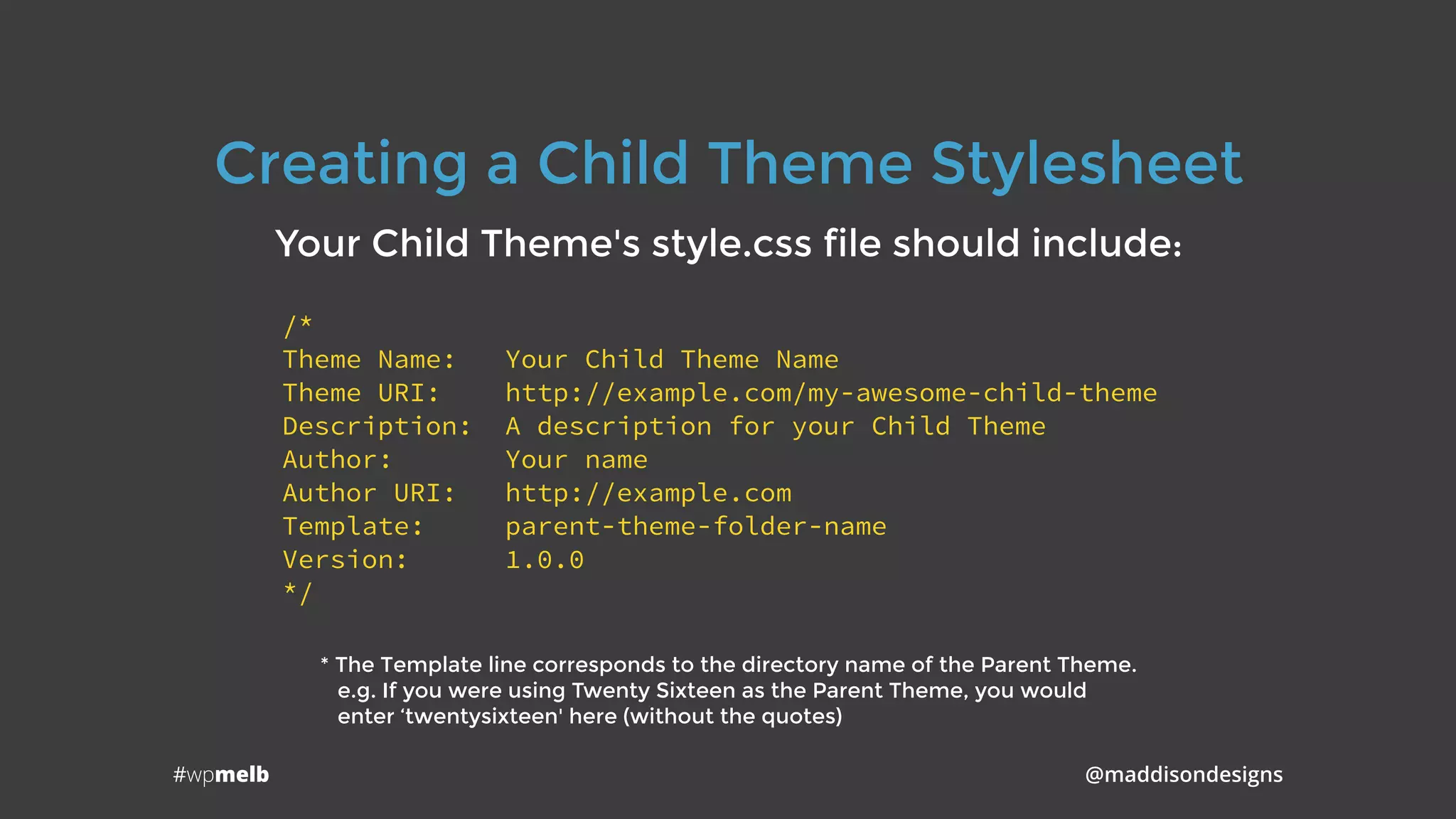
Creating a Child Theme Stylesheet
Your Child Theme's style.css file should include:
/*
Theme Name: Your Child Theme Name
Theme URI: http://example.com/my-awesome-child-theme
Description: A description for your Child Theme
Author: Your name
Author URI: http://example.com
Template: parent-theme-folder-name
Version: 1.0.0
*/
* The Template line corresponds to the directory name of the Parent Theme.

e.g. If you were using Twenty Sixteen as the Parent Theme, you would

enter ‘twentysixteen' here (without the quotes)
#wpmelb @maddisondesigns
Creating a Child Theme’s Functions
Step 3: Create your Child Theme's functions file
(functions.php)
#wpmelb @maddisondesigns
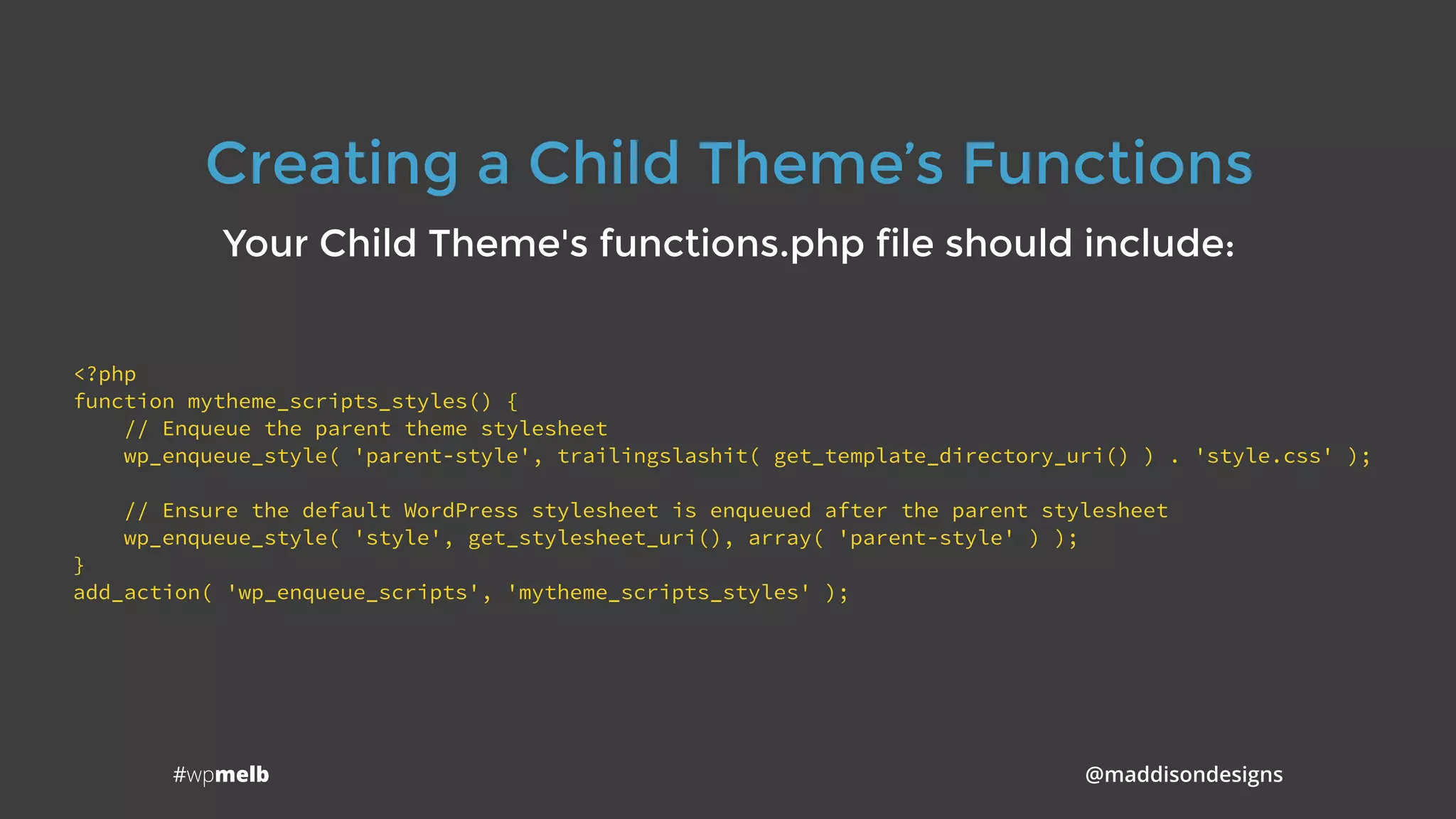
Creating a Child Theme’s Functions
Your Child Theme's functions.php file should include:
<?php
function mytheme_scripts_styles() {
// Enqueue the parent theme stylesheet
wp_enqueue_style( 'parent-style', trailingslashit( get_template_directory_uri() ) . 'style.css' );
// Ensure the default WordPress stylesheet is enqueued after the parent stylesheet
wp_enqueue_style( 'style', get_stylesheet_uri(), array( 'parent-style' ) );
}
add_action( 'wp_enqueue_scripts', 'mytheme_scripts_styles' );
#wpmelb @maddisondesigns
Activating your Child Theme
Step 4: Login to your Dashboard, go to

Appearance > Themes and activate your Child Theme
#wpmelb @maddisondesigns
High Five!
Step 5: Pat yourself on the back

because you’ve just created

your first Child Theme!
It's that easy!
#wpmelb @maddisondesigns
Creating a Child Theme’s Screenshot
Optional Step: Create a .png image (screenshot.png) to display
a screenshot on the Themes page in the Dashboard.
The image should be 1200 x 900px.
#wpmelb @maddisondesigns
WordPress Codex

https://codex.wordpress.org
Child Themes on the WordPress Codex

https://codex.wordpress.org/Child_Themes
Official WordPress Theme Directory

https://wordpress.org/themes
Example Child Theme Code

https://maddisondesigns.com/child-theme-example
Links to Remember
I’m Anthony Hortin
You can find me here
@maddisondesigns
maddisondesigns.com
@easywpguide
easywpguide.com
Thanks!
Questions?

Why you should be using WordPress child themes