What to Expect from Sahi Pro
Simple Reliable Test Automation
@sahipro
sahipro.com
sahipro.com
Q: What is Sahi Pro?
• Sahi Pro is a test automation tool
• It enables testers to
– Convert manual tests to automation tests
– Rapidly and reliably execute batches of such tests
– Provide detailed reports of playback results
• Sahi Pro is easy to use and can be used by
non programmers too
• Sahi Pro needs minimal maintenance
sahipro.com
Q: How do the tests look?
This is a scenario file. It defines business flows.
sahipro.com
Scenarios
• Scenarios define business flows
• They are easily readable and can be used as
manual tests too.
• They do not depend on the actual user interface
• Any good tester (manual or automation) can
write them, even if they do not have
programming knowledge.
– This is the bulk of Sahi automation and requires
understanding of your business domain and
organizing your tests.
sahipro.com
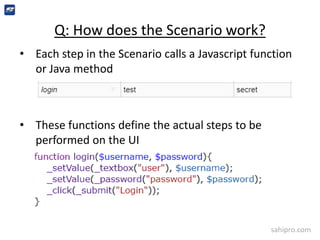
Q: How does the Scenario work?
• Each step in the Scenario calls a Javascript function
or Java method
• These functions define the actual steps to be
performed on the UI
sahipro.com
Functions in Sahi Scripts
• Such Javascript functions are defined in Sahi scripts
• Sahi scripts use Sahi APIs to interact with
– Web Browsers
– Desktop applications
– Java applications
– Flex Applications
– Mobile Applications
• Sample Sahi APIs:
– Action APIs: _click, _setValue etc.
– Accessor APIs: _textbox, _button etc.
sahipro.com
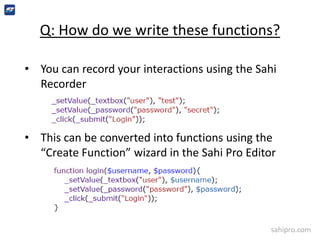
Q: How do we write these functions?
• You can record your interactions using the Sahi
Recorder
• This can be converted into functions using the
“Create Function” wizard in the Sahi Pro Editor
sahipro.com
Q: Record? Hmm…
• If you have religious reasons to not use recorders,
you can write the script manually too.
– Record and playback is frowned upon because of inability
to work with dynamic data, identifiers which are sub-
optimal etc.
– Good recorders and object spies can make object
detection and interaction scripting easy.
– Use Sahi’s recorder to your advantage. You can always fall
back to manual scripting if needed.
sahipro.com
Q: How do I run Scenarios?
• Scenarios can be executed from
– Sahi Pro UI
– Command line
– ANT
– Continuous Integration systems like Jenkins
• Normally hundreds or thousands of Scenario
files are grouped in a Suite file and executed
as a batch.
sahipro.com
Suites
– Suites are a group of scenarios/scripts.
– Scenarios/scripts can be organized via tags. Selective
tags can be run
– Data can be passed to Scenarios/scripts. Same
scenario can be run with multiple sets of input data.
sahipro.com
Suite Execution
• Sahi Pro can distribute scenarios/scripts
across machines for faster results
– Say across 6 machines and finish off in 1/6th time
• Sahi Pro can run browser scenarios/scripts in
parallel on a single machine
– 6 machines each running 5 instances of browsers
can run 30 scripts simultaneously!
sahipro.com
Q: What about Reports?
• Reports are automatically generated, without
writing any code
• Reports show
 historical data of all suites and scripts run
Can be drilled down to suite report
Drill down further to script/scenario report
Drill down to function call
Drill down to step executed, along with screen shot if
there is an error
Drill down to exact line of code in Script.
sahipro.com
Q: Aren’t UI tests flaky?
• Not with Sahi. UI tests break for 2 reasons
– Brittle identification mechanisms
– Waits or synchronization issues
• Sahi uses smart identification mechanisms which are not
easily affected by UI change
– No XPaths
• Sahi automatically waits for the right amount of time
between steps
– No wait statements required
• Sahi tests have very few false positives or false negatives.
When a script fails, you can say with confidence that the
application has changed.
sahipro.com
Q: No XPaths, No waits?
_navigateTo("http://mail.google.com");
_setValue(_emailbox("identifier"), "madeupname");
_click(_span("Next"));
_setValue(_password("password"), "secret");
_click(_span("Next"));
_click(_div("COMPOSE"));
_setValue(_textarea("to"), "abc@example.com");
_setValue(_textbox("subjectbox"), "Hi there!");
_click(_image("Minimise"));
_click(_link("/Google Account: /"));
_click(_link("Sign out"));
_click(_span(0, _near(_image("photo.jpg"))));
_click(_submit("Remove an account"));
_click(_div(0, _near(paragraph("Madeup Name"))));
_click(_div("Yes, remove"));
_assertVisible(_emailbox("identifier"));
Here is a sample script, automating Gmail. Try it!
sahipro.com
Summary
• Sahi scripts are easy to create and maintain
• The tester concentrates on business
functionality. Sahi does all the tooling parts.
• Sahi scripts execute fast and reliably, helping
agile teams get rapid feedback
• Very little time is wasted in the automation
process.
sahipro.com
Try
Sahi Pro with a fully functional 1 month trial
license
Or play with the free
Sahi Pro Starter
www.sahipro.com
@sahipro
support@sahipro.com
sales@sahipro.com

What to Expect from Sahi Pro

  • 1.
    What to Expectfrom Sahi Pro Simple Reliable Test Automation @sahipro sahipro.com
  • 2.
    sahipro.com Q: What isSahi Pro? • Sahi Pro is a test automation tool • It enables testers to – Convert manual tests to automation tests – Rapidly and reliably execute batches of such tests – Provide detailed reports of playback results • Sahi Pro is easy to use and can be used by non programmers too • Sahi Pro needs minimal maintenance
  • 3.
    sahipro.com Q: How dothe tests look? This is a scenario file. It defines business flows.
  • 4.
    sahipro.com Scenarios • Scenarios definebusiness flows • They are easily readable and can be used as manual tests too. • They do not depend on the actual user interface • Any good tester (manual or automation) can write them, even if they do not have programming knowledge. – This is the bulk of Sahi automation and requires understanding of your business domain and organizing your tests.
  • 5.
    sahipro.com Q: How doesthe Scenario work? • Each step in the Scenario calls a Javascript function or Java method • These functions define the actual steps to be performed on the UI
  • 6.
    sahipro.com Functions in SahiScripts • Such Javascript functions are defined in Sahi scripts • Sahi scripts use Sahi APIs to interact with – Web Browsers – Desktop applications – Java applications – Flex Applications – Mobile Applications • Sample Sahi APIs: – Action APIs: _click, _setValue etc. – Accessor APIs: _textbox, _button etc.
  • 7.
    sahipro.com Q: How dowe write these functions? • You can record your interactions using the Sahi Recorder • This can be converted into functions using the “Create Function” wizard in the Sahi Pro Editor
  • 8.
    sahipro.com Q: Record? Hmm… •If you have religious reasons to not use recorders, you can write the script manually too. – Record and playback is frowned upon because of inability to work with dynamic data, identifiers which are sub- optimal etc. – Good recorders and object spies can make object detection and interaction scripting easy. – Use Sahi’s recorder to your advantage. You can always fall back to manual scripting if needed.
  • 9.
    sahipro.com Q: How doI run Scenarios? • Scenarios can be executed from – Sahi Pro UI – Command line – ANT – Continuous Integration systems like Jenkins • Normally hundreds or thousands of Scenario files are grouped in a Suite file and executed as a batch.
  • 10.
    sahipro.com Suites – Suites area group of scenarios/scripts. – Scenarios/scripts can be organized via tags. Selective tags can be run – Data can be passed to Scenarios/scripts. Same scenario can be run with multiple sets of input data.
  • 11.
    sahipro.com Suite Execution • SahiPro can distribute scenarios/scripts across machines for faster results – Say across 6 machines and finish off in 1/6th time • Sahi Pro can run browser scenarios/scripts in parallel on a single machine – 6 machines each running 5 instances of browsers can run 30 scripts simultaneously!
  • 12.
    sahipro.com Q: What aboutReports? • Reports are automatically generated, without writing any code • Reports show  historical data of all suites and scripts run Can be drilled down to suite report Drill down further to script/scenario report Drill down to function call Drill down to step executed, along with screen shot if there is an error Drill down to exact line of code in Script.
  • 13.
    sahipro.com Q: Aren’t UItests flaky? • Not with Sahi. UI tests break for 2 reasons – Brittle identification mechanisms – Waits or synchronization issues • Sahi uses smart identification mechanisms which are not easily affected by UI change – No XPaths • Sahi automatically waits for the right amount of time between steps – No wait statements required • Sahi tests have very few false positives or false negatives. When a script fails, you can say with confidence that the application has changed.
  • 14.
    sahipro.com Q: No XPaths,No waits? _navigateTo("http://mail.google.com"); _setValue(_emailbox("identifier"), "madeupname"); _click(_span("Next")); _setValue(_password("password"), "secret"); _click(_span("Next")); _click(_div("COMPOSE")); _setValue(_textarea("to"), "abc@example.com"); _setValue(_textbox("subjectbox"), "Hi there!"); _click(_image("Minimise")); _click(_link("/Google Account: /")); _click(_link("Sign out")); _click(_span(0, _near(_image("photo.jpg")))); _click(_submit("Remove an account")); _click(_div(0, _near(paragraph("Madeup Name")))); _click(_div("Yes, remove")); _assertVisible(_emailbox("identifier")); Here is a sample script, automating Gmail. Try it!
  • 15.
    sahipro.com Summary • Sahi scriptsare easy to create and maintain • The tester concentrates on business functionality. Sahi does all the tooling parts. • Sahi scripts execute fast and reliably, helping agile teams get rapid feedback • Very little time is wasted in the automation process.
  • 16.
    sahipro.com Try Sahi Pro witha fully functional 1 month trial license Or play with the free Sahi Pro Starter www.sahipro.com @sahipro support@sahipro.com sales@sahipro.com