WEPA
Webdriver Enhanced Platform for Automation
@vgpmiami
http://www.linkedin.com/in/freddyvega
SUMMARY
• FRAMEWORK? WHY?
• WHAT TO INCLUDE
• HOW IT WORKS
• HOW TO SCALE IT
WHY USE A FRAMEWORK
• STANDARD NOMENCLATURE
• TEST ARTIFACTS (SCREENSHOTS, LOG FILES)
• TEST SCRIPTS
• TEST CLASSES
• REUSABILITY (SAME FRAMEWORK DIFF PROJECTS)
• EASY TO MAINTAIN
• EASY TO EXTEND
• EASY TO UNDERSTAND
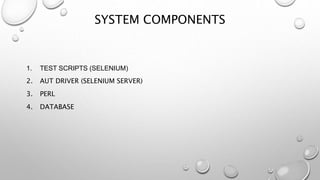
SYSTEM COMPONENTS
1. TEST SCRIPTS (SELENIUM)
2. AUT DRIVER (SELENIUM SERVER)
3. PERL
4. DATABASE
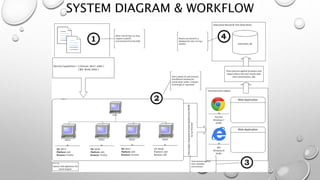
SYSTEM DIAGRAM & WORKFLOW
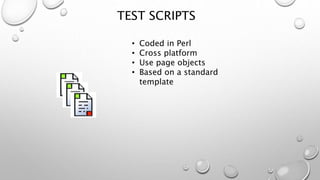
TEST SCRIPTS
• Coded in Perl
• Cross platform
• Use page objects
• Based on a standard
template
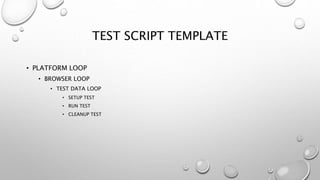
TEST SCRIPT TEMPLATE
• PLATFORM LOOP
• BROWSER LOOP
• TEST DATA LOOP
• SETUP TEST
• RUN TEST
• CLEANUP TEST
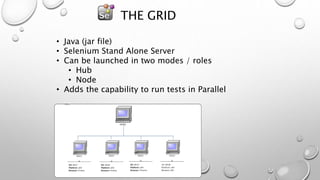
THE GRID
• Java (jar file)
• Selenium Stand Alone Server
• Can be launched in two modes / roles
• Hub
• Node
• Adds the capability to run tests in Parallel
GRID1
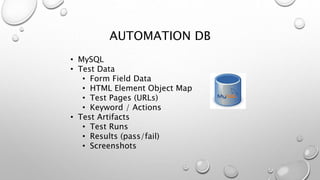
AUTOMATION DB
• MySQL
• Test Data
• Form Field Data
• HTML Element Object Map
• Test Pages (URLs)
• Keyword / Actions
• Test Artifacts
• Test Runs
• Results (pass/fail)
• Screenshots
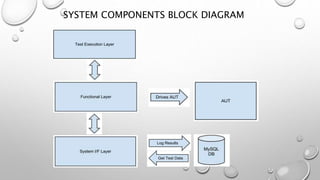
SYSTEM COMPONENTS BLOCK DIAGRAM
TEST EXECUTION LAYER
• FACES THE USER (SCRIPT PROGRAMMER)
• COMMUNICATES WITH FUNCTIONAL LAYER
VIA EXPOSED METHODS (ACTIONS):
• LOAD_TEST_DATA
• LOGIN_AS
• ADD_ITEM
• EDIT_ITEM
• DETERMINES PASS / FAIL STATUS
• TEST.PL
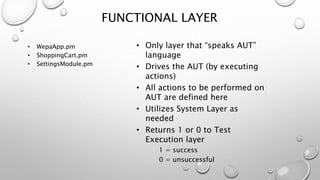
• Only layer that “speaks AUT”
language
• Drives the AUT (by executing
actions)
• All actions to be performed on
AUT are defined here
• Utilizes System Layer as
needed
• Returns 1 or 0 to Test
Execution layer
1 = success
0 = unsuccessful
• WepaApp.pm
• ShoppingCart.pm
• SettingsModule.pm
FUNCTIONAL LAYER
• Interface with anything that is
not AUT
• Provides Services for the other
layers
– DB access
– Write and Parse Log Files
– Test results processing
• WepaSubs.pm
SYSTEM LAYER
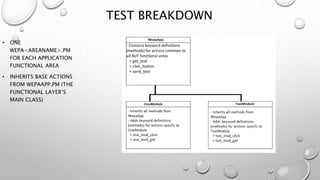
TEST BREAKDOWN
• ONE
WEPA<AREANAME>.PM
FOR EACH APPLICATION
FUNCTIONAL AREA
• INHERITS BASE ACTIONS
FROM WEPAAPP.PM (THE
FUNCTIONAL LAYER’S
MAIN CLASS)
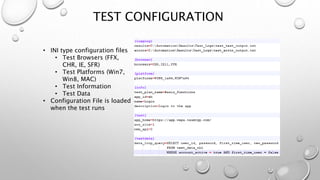
TEST CONFIGURATION
• INI type configuration files
• Test Browsers (FFX,
CHR, IE, SFR)
• Test Platforms (Win7,
Win8, MAC)
• Test Information
• Test Data
• Configuration File is loaded
when the test runs
SYSTEM REQUIREMENTS
• WebDriver itself does not have any system requirements
• Requirements will depend on numerous factors:
• Total number of tests
• Number of physical machines (PC’s)
• Complexity of the tests
• Type of test (end-to-end, regression)
• 12 Browsers per WebDriver node (VM)
• 2 GB RAM
• ~1.5 – 2GHz Processor
General Guideline
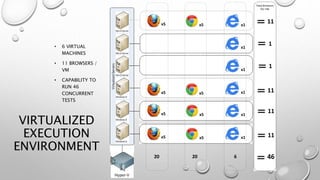
VIRTUALIZED
EXECUTION
ENVIRONMENT
• 6 VIRTUAL
MACHINES
• 11 BROWSERS /
VM
• CAPABILITY TO
RUN 46
CONCURRENT
TESTS
x5
x5
x5
x5
x5
x5
x5
x5
x1
x1
x1
x1
x1
x1
20 20 6
Total Browsers
Per VM
11
11
11
11
1
1
46
MORE INFORMATION - Q&A
URL Description
http://perlmaven.com/perl-
tutorial
excellent quick and dirty tutorial from one of
Perl’s leading authorities
http://perldoc.perl.org the official Perl documentation
http://search.cpan.org the online repository of Perl modules – this is
the reason Perl is known as the Internet’s Swiss
Army knife
http://www.seleniumhq.org
/docs
official Selenium documentation
http://blog.teamvgp.com My blog
Visit the below links for information about Perl, Selenium and Automation in general

WEPA - Webdriver Enhanced Platform for Automation - WEPATest

  • 1.
    WEPA Webdriver Enhanced Platformfor Automation @vgpmiami http://www.linkedin.com/in/freddyvega
  • 2.
    SUMMARY • FRAMEWORK? WHY? •WHAT TO INCLUDE • HOW IT WORKS • HOW TO SCALE IT
  • 3.
    WHY USE AFRAMEWORK • STANDARD NOMENCLATURE • TEST ARTIFACTS (SCREENSHOTS, LOG FILES) • TEST SCRIPTS • TEST CLASSES • REUSABILITY (SAME FRAMEWORK DIFF PROJECTS) • EASY TO MAINTAIN • EASY TO EXTEND • EASY TO UNDERSTAND
  • 4.
    SYSTEM COMPONENTS 1. TESTSCRIPTS (SELENIUM) 2. AUT DRIVER (SELENIUM SERVER) 3. PERL 4. DATABASE
  • 5.
  • 6.
    TEST SCRIPTS • Codedin Perl • Cross platform • Use page objects • Based on a standard template
  • 7.
    TEST SCRIPT TEMPLATE •PLATFORM LOOP • BROWSER LOOP • TEST DATA LOOP • SETUP TEST • RUN TEST • CLEANUP TEST
  • 8.
    THE GRID • Java(jar file) • Selenium Stand Alone Server • Can be launched in two modes / roles • Hub • Node • Adds the capability to run tests in Parallel GRID1
  • 9.
    AUTOMATION DB • MySQL •Test Data • Form Field Data • HTML Element Object Map • Test Pages (URLs) • Keyword / Actions • Test Artifacts • Test Runs • Results (pass/fail) • Screenshots
  • 10.
  • 11.
    TEST EXECUTION LAYER •FACES THE USER (SCRIPT PROGRAMMER) • COMMUNICATES WITH FUNCTIONAL LAYER VIA EXPOSED METHODS (ACTIONS): • LOAD_TEST_DATA • LOGIN_AS • ADD_ITEM • EDIT_ITEM • DETERMINES PASS / FAIL STATUS • TEST.PL
  • 12.
    • Only layerthat “speaks AUT” language • Drives the AUT (by executing actions) • All actions to be performed on AUT are defined here • Utilizes System Layer as needed • Returns 1 or 0 to Test Execution layer 1 = success 0 = unsuccessful • WepaApp.pm • ShoppingCart.pm • SettingsModule.pm FUNCTIONAL LAYER
  • 13.
    • Interface withanything that is not AUT • Provides Services for the other layers – DB access – Write and Parse Log Files – Test results processing • WepaSubs.pm SYSTEM LAYER
  • 14.
    TEST BREAKDOWN • ONE WEPA<AREANAME>.PM FOREACH APPLICATION FUNCTIONAL AREA • INHERITS BASE ACTIONS FROM WEPAAPP.PM (THE FUNCTIONAL LAYER’S MAIN CLASS)
  • 15.
    TEST CONFIGURATION • INItype configuration files • Test Browsers (FFX, CHR, IE, SFR) • Test Platforms (Win7, Win8, MAC) • Test Information • Test Data • Configuration File is loaded when the test runs
  • 16.
    SYSTEM REQUIREMENTS • WebDriveritself does not have any system requirements • Requirements will depend on numerous factors: • Total number of tests • Number of physical machines (PC’s) • Complexity of the tests • Type of test (end-to-end, regression) • 12 Browsers per WebDriver node (VM) • 2 GB RAM • ~1.5 – 2GHz Processor General Guideline
  • 17.
    VIRTUALIZED EXECUTION ENVIRONMENT • 6 VIRTUAL MACHINES •11 BROWSERS / VM • CAPABILITY TO RUN 46 CONCURRENT TESTS x5 x5 x5 x5 x5 x5 x5 x5 x1 x1 x1 x1 x1 x1 20 20 6 Total Browsers Per VM 11 11 11 11 1 1 46
  • 18.
    MORE INFORMATION -Q&A URL Description http://perlmaven.com/perl- tutorial excellent quick and dirty tutorial from one of Perl’s leading authorities http://perldoc.perl.org the official Perl documentation http://search.cpan.org the online repository of Perl modules – this is the reason Perl is known as the Internet’s Swiss Army knife http://www.seleniumhq.org /docs official Selenium documentation http://blog.teamvgp.com My blog Visit the below links for information about Perl, Selenium and Automation in general