MuleSoft ESB
Payload Encrypt using anypoint enterprise security
By
AKASH PRAJAPATI
Topics :
• Encrypt using anypoint enterprise security
Pre-requisites :
• Basic under standing of Mule ESB
• JDK 1.8 or above
• Anypoint Studio v 6.0.0 or above
• Mule Server v 3.8.3 EE or above
• Anypoint Enterprise Security Components
• Encryption v1.6.0
• Security v1.6.0
Purpose:
• Encrypt incoming payload and generate encrypted file.
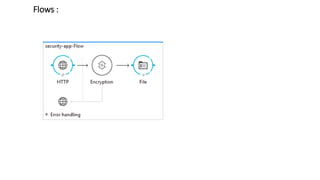
Flows :
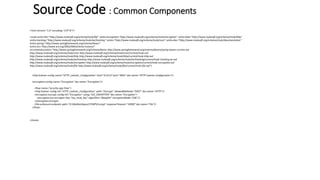
Source Code : Common Components
<?xml version="1.0" encoding="UTF-8"?>
<mule xmlns:file="http://www.mulesoft.org/schema/mule/file" xmlns:encryption="http://www.mulesoft.org/schema/mule/encryption" xmlns:http="http://www.mulesoft.org/schema/mule/http"
xmlns:tracking="http://www.mulesoft.org/schema/mule/ee/tracking" xmlns="http://www.mulesoft.org/schema/mule/core" xmlns:doc="http://www.mulesoft.org/schema/mule/documentation"
xmlns:spring="http://www.springframework.org/schema/beans"
xmlns:xsi="http://www.w3.org/2001/XMLSchema-instance"
xsi:schemaLocation="http://www.springframework.org/schema/beans http://www.springframework.org/schema/beans/spring-beans-current.xsd
http://www.mulesoft.org/schema/mule/core http://www.mulesoft.org/schema/mule/core/current/mule.xsd
http://www.mulesoft.org/schema/mule/http http://www.mulesoft.org/schema/mule/http/current/mule-http.xsd
http://www.mulesoft.org/schema/mule/ee/tracking http://www.mulesoft.org/schema/mule/ee/tracking/current/mule-tracking-ee.xsd
http://www.mulesoft.org/schema/mule/encryption http://www.mulesoft.org/schema/mule/encryption/current/mule-encryption.xsd
http://www.mulesoft.org/schema/mule/file http://www.mulesoft.org/schema/mule/file/current/mule-file.xsd">
<http:listener-config name="HTTP_Listener_Configuration" host="0.0.0.0" port="9091" doc:name="HTTP Listener Configuration"/>
<encryption:config name="Encryption" doc:name="Encryption"/>
<flow name="security-app-Flow">
<http:listener config-ref="HTTP_Listener_Configuration" path="/encrypt" allowedMethods="POST" doc:name="HTTP"/>
<encryption:encrypt config-ref="Encryption" using="JCE_ENCRYPTER" doc:name="Encryption">
<encryption:jce-encrypter key="my_mule_key" algorithm="Blowfish" encryptionMode="CBC"/>
</encryption:encrypt>
<file:outbound-endpoint path="D:MyWorkSpaceTEMPEncrypt" responseTimeout="10000" doc:name="File"/>
</flow>
</mule>
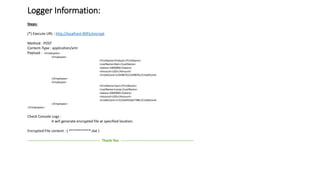
Logger Information:
Steps:
(*) Execute URL : http://localhost:9091/encrypt
Method : POST
Content-Type : application/xml
Payload : <Employees>
<Employee>
<FirstName>Prakash</FirstName>
<LastName>Nair</LastName>
<Salary>1000000</Salary>
<Amount>USD</Amount>
<CreditCard>1234987612349876</CreditCard>
</Employee>
<Employee>
<FirstName>Sam</FirstName>
<LastName>Lamp</LastName>
<Salary>2000000</Salary>
<Amount>USD</Amount>
<CreditCard>1122334455667788</CreditCard>
</Employee>
</Employees>
Check Console Logs :
It will generate encrypted file at specified location.
Encrypted File content : ( ***********.dat )
------------------------------------------------------------ Thank You ------------------------------------------------------------

MuleSoft ESB Payload Encrypt using Anypoint Security

  • 1.
    MuleSoft ESB Payload Encryptusing anypoint enterprise security By AKASH PRAJAPATI
  • 2.
    Topics : • Encryptusing anypoint enterprise security Pre-requisites : • Basic under standing of Mule ESB • JDK 1.8 or above • Anypoint Studio v 6.0.0 or above • Mule Server v 3.8.3 EE or above • Anypoint Enterprise Security Components • Encryption v1.6.0 • Security v1.6.0 Purpose: • Encrypt incoming payload and generate encrypted file.
  • 3.
  • 4.
    Source Code :Common Components <?xml version="1.0" encoding="UTF-8"?> <mule xmlns:file="http://www.mulesoft.org/schema/mule/file" xmlns:encryption="http://www.mulesoft.org/schema/mule/encryption" xmlns:http="http://www.mulesoft.org/schema/mule/http" xmlns:tracking="http://www.mulesoft.org/schema/mule/ee/tracking" xmlns="http://www.mulesoft.org/schema/mule/core" xmlns:doc="http://www.mulesoft.org/schema/mule/documentation" xmlns:spring="http://www.springframework.org/schema/beans" xmlns:xsi="http://www.w3.org/2001/XMLSchema-instance" xsi:schemaLocation="http://www.springframework.org/schema/beans http://www.springframework.org/schema/beans/spring-beans-current.xsd http://www.mulesoft.org/schema/mule/core http://www.mulesoft.org/schema/mule/core/current/mule.xsd http://www.mulesoft.org/schema/mule/http http://www.mulesoft.org/schema/mule/http/current/mule-http.xsd http://www.mulesoft.org/schema/mule/ee/tracking http://www.mulesoft.org/schema/mule/ee/tracking/current/mule-tracking-ee.xsd http://www.mulesoft.org/schema/mule/encryption http://www.mulesoft.org/schema/mule/encryption/current/mule-encryption.xsd http://www.mulesoft.org/schema/mule/file http://www.mulesoft.org/schema/mule/file/current/mule-file.xsd"> <http:listener-config name="HTTP_Listener_Configuration" host="0.0.0.0" port="9091" doc:name="HTTP Listener Configuration"/> <encryption:config name="Encryption" doc:name="Encryption"/> <flow name="security-app-Flow"> <http:listener config-ref="HTTP_Listener_Configuration" path="/encrypt" allowedMethods="POST" doc:name="HTTP"/> <encryption:encrypt config-ref="Encryption" using="JCE_ENCRYPTER" doc:name="Encryption"> <encryption:jce-encrypter key="my_mule_key" algorithm="Blowfish" encryptionMode="CBC"/> </encryption:encrypt> <file:outbound-endpoint path="D:MyWorkSpaceTEMPEncrypt" responseTimeout="10000" doc:name="File"/> </flow> </mule>
  • 5.
    Logger Information: Steps: (*) ExecuteURL : http://localhost:9091/encrypt Method : POST Content-Type : application/xml Payload : <Employees> <Employee> <FirstName>Prakash</FirstName> <LastName>Nair</LastName> <Salary>1000000</Salary> <Amount>USD</Amount> <CreditCard>1234987612349876</CreditCard> </Employee> <Employee> <FirstName>Sam</FirstName> <LastName>Lamp</LastName> <Salary>2000000</Salary> <Amount>USD</Amount> <CreditCard>1122334455667788</CreditCard> </Employee> </Employees> Check Console Logs : It will generate encrypted file at specified location. Encrypted File content : ( ***********.dat ) ------------------------------------------------------------ Thank You ------------------------------------------------------------