LEARNING FILE
MANAGEMENT
LESSON 2:
PRAYER TO ST. MICHAEL ARCHANGEL
Saint Michael the Archangel, defend us against
the enemy. Be our safeguard against the
wickedness and the snares of the devil; May God
rebuke him, we humbly pray; And do thou, O
Prince of the Heavenly Host, by the power of
God, cast into hell Satan and all evil spirits who
prowl about the world for the ruin of souls.
Amen.
FILE
MANAGEMENT,
FOLDER CREATION
& SUBFOLDER
CREATION
File management is the sorting,
naming, and maintaining of
computer files. It aims to
organize and classify computer
data to remove unwanted files.
What is file management?
• What files will this
folder have?
• Will it contain
schoolwork for Math,
English, Science, or
Filipino?
Navigate the location where you
want to place the new folder.
Folder
Creation
Why do we
need to create a
folders?
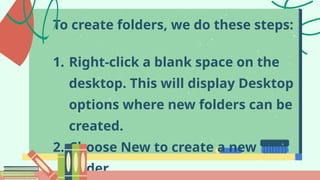
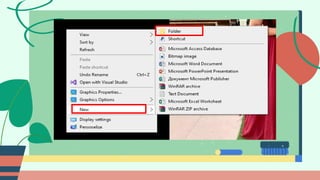
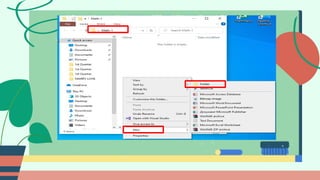
To create folders, we do these steps:
1. Right-click a blank space on the
desktop. This will display Desktop
options where new folders can be
created.
2. Choose New to create a new
folder.
3. Rename the new folder with the
name we plan to use (e.g., subject
folders for schoolwork: Math,
English, or Filipino).
A folder that is placed within another
folder. Although there may be a limit to
the actual number of subfolders users
can create within a folder, it is usually a
very large number.
Subfolder Creation
Subfolders are created similarly,
but this time, we right-click
inside the main folder to activate
the options and follow the same
steps in creating a folder.
If we already have created folders
and want to organize them, we
may move them around. To do
this we:
1. Select the folders we want to
move.
3. Open the destination folder or
the main folder where we want to
move the folder.
4. Right-click inside the main folder,
then select Paste.
5. Return to the original location of
the folder we moved, and delete the

THANK
YOU!!!

Week 2 - File Management (1).pptx grade 4

  • 1.
  • 2.
    PRAYER TO ST.MICHAEL ARCHANGEL Saint Michael the Archangel, defend us against the enemy. Be our safeguard against the wickedness and the snares of the devil; May God rebuke him, we humbly pray; And do thou, O Prince of the Heavenly Host, by the power of God, cast into hell Satan and all evil spirits who prowl about the world for the ruin of souls. Amen.
  • 3.
  • 4.
    File management isthe sorting, naming, and maintaining of computer files. It aims to organize and classify computer data to remove unwanted files. What is file management?
  • 5.
    • What fileswill this folder have? • Will it contain schoolwork for Math, English, Science, or Filipino?
  • 6.
    Navigate the locationwhere you want to place the new folder. Folder Creation
  • 7.
    Why do we needto create a folders?
  • 8.
    To create folders,we do these steps: 1. Right-click a blank space on the desktop. This will display Desktop options where new folders can be created. 2. Choose New to create a new folder.
  • 10.
    3. Rename thenew folder with the name we plan to use (e.g., subject folders for schoolwork: Math, English, or Filipino).
  • 12.
    A folder thatis placed within another folder. Although there may be a limit to the actual number of subfolders users can create within a folder, it is usually a very large number. Subfolder Creation
  • 13.
    Subfolders are createdsimilarly, but this time, we right-click inside the main folder to activate the options and follow the same steps in creating a folder.
  • 15.
    If we alreadyhave created folders and want to organize them, we may move them around. To do this we: 1. Select the folders we want to move.
  • 16.
    3. Open thedestination folder or the main folder where we want to move the folder. 4. Right-click inside the main folder, then select Paste. 5. Return to the original location of the folder we moved, and delete the

  • 17.