WEBSITE ANALYSIS
FOR ISLAND SCHOOL
SURVIVAL GUIDE
BY Nuha Thaika 11R
Research
By creating an accounts on different websites
that provides a pathway to start our own
website, we had a clear idea on which sort of
platform is most suitable for the purpose of our
project.
Websites that are being analyzed
These are the most commonly
used website making sites
 Weebly
 Wix
 Webs
 Google Sites
Qualities needed for the website
MUSTS
- Easy to navigate
- Comment box (where people can give feedback and suggest
new video ideas)
- Attractive for the users/ eye-catching
- Can be customized for the needs of our target group
- Should be able to upload videos/pictures and different media
Weeby
 Free to use
 Broad range of templates
 Relatively easy to use
 No free email accounts.
They have partnered with
Gmail for $4 a month.
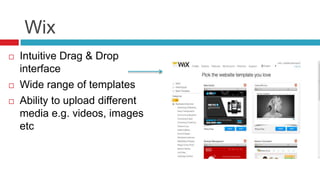
Wix
 Intuitive Drag & Drop
interface
 Wide range of templates
 Ability to upload different
media e.g. videos, images
etc
Webs
 Drag and drop builder
 Webs allow you to build membership
sites directly on their websites - allows
you to manage members, send out group
email to members, and restrict which of your
pages could be viewed by the public, or by
members only
 Webs has an App Store
 Easy to customize your website –
Allows you to upload e.g. banners
 6 different page layout configurations
Final decision
 We had chosen Webs for our website as it was fit for
purpose.
 It had all the qualities needed for our website
 Its interactive – our users can easy access and
comment/upload their own materials
 easy to navigate – Webs is clear and is easy to follow for
both us and the viewers
 eye-catching – Webs has a broad range of templates
that are straight forward and appealing
 ease of use – the drag and drop functions for each page
WEBS
Specialty pages – Webs
has dedicated, pre-set
structured webpages for
you to choose from
Mobile
templates -
Webs also
provide you
with some
options when it
comes to
customizing
mobile
templates so

Website analysis

  • 1.
    WEBSITE ANALYSIS FOR ISLANDSCHOOL SURVIVAL GUIDE BY Nuha Thaika 11R
  • 2.
    Research By creating anaccounts on different websites that provides a pathway to start our own website, we had a clear idea on which sort of platform is most suitable for the purpose of our project.
  • 3.
    Websites that arebeing analyzed These are the most commonly used website making sites  Weebly  Wix  Webs  Google Sites
  • 4.
    Qualities needed forthe website MUSTS - Easy to navigate - Comment box (where people can give feedback and suggest new video ideas) - Attractive for the users/ eye-catching - Can be customized for the needs of our target group - Should be able to upload videos/pictures and different media
  • 5.
    Weeby  Free touse  Broad range of templates  Relatively easy to use  No free email accounts. They have partnered with Gmail for $4 a month.
  • 6.
    Wix  Intuitive Drag& Drop interface  Wide range of templates  Ability to upload different media e.g. videos, images etc
  • 7.
    Webs  Drag anddrop builder  Webs allow you to build membership sites directly on their websites - allows you to manage members, send out group email to members, and restrict which of your pages could be viewed by the public, or by members only  Webs has an App Store  Easy to customize your website – Allows you to upload e.g. banners  6 different page layout configurations
  • 8.
    Final decision  Wehad chosen Webs for our website as it was fit for purpose.  It had all the qualities needed for our website  Its interactive – our users can easy access and comment/upload their own materials  easy to navigate – Webs is clear and is easy to follow for both us and the viewers  eye-catching – Webs has a broad range of templates that are straight forward and appealing  ease of use – the drag and drop functions for each page
  • 9.
    WEBS Specialty pages –Webs has dedicated, pre-set structured webpages for you to choose from Mobile templates - Webs also provide you with some options when it comes to customizing mobile templates so