Eliran Sinvani - Software Team Leader
How to Shrink Your
Datacenter Footprint by 50%
Presenter
2
Eliran Sinvani
Eliran is a core team leader Scylla for the past year, before
that, he had 6 years of experience developing real-time and
Linux-based embedded systems. He started at Marvell as
an L1 comm stack engineer and most recently was a
low-level infrastructure team leader at Airspan where he
was involved in the hardware and software planning and
execution of the second generation of Sprint MagicBox.
Eliran has a BSc in electronics and computer engineering. In
his spare time, he creates simulations and games for VR
systems and tinkers with open-source embedded projects.
3
+ The Real-Time Big Data Database
+ Drop-in replacement for Cassandra
+ 10X the performance & low tail latency
+ New: Scylla Cloud, DBaaS
+ Open source and enterprise editions
+ Founded by the creators of KVM hypervisor
+ HQs: Palo Alto, CA; Herzelia, Israel
About ScyllaDB
Agenda
+ Theory:
+ Establish some basic concepts
+ Define the problem
+ Technical Session:
+ Look at the most common 2 existing solutions
+ Overview of workload prioritization implementation
+ Configuring Workload prioritization overview
+ Practical session:
+ Commands example
+ Some examples
+ Real World example
+ Final words
+ Questions
Basic concepts
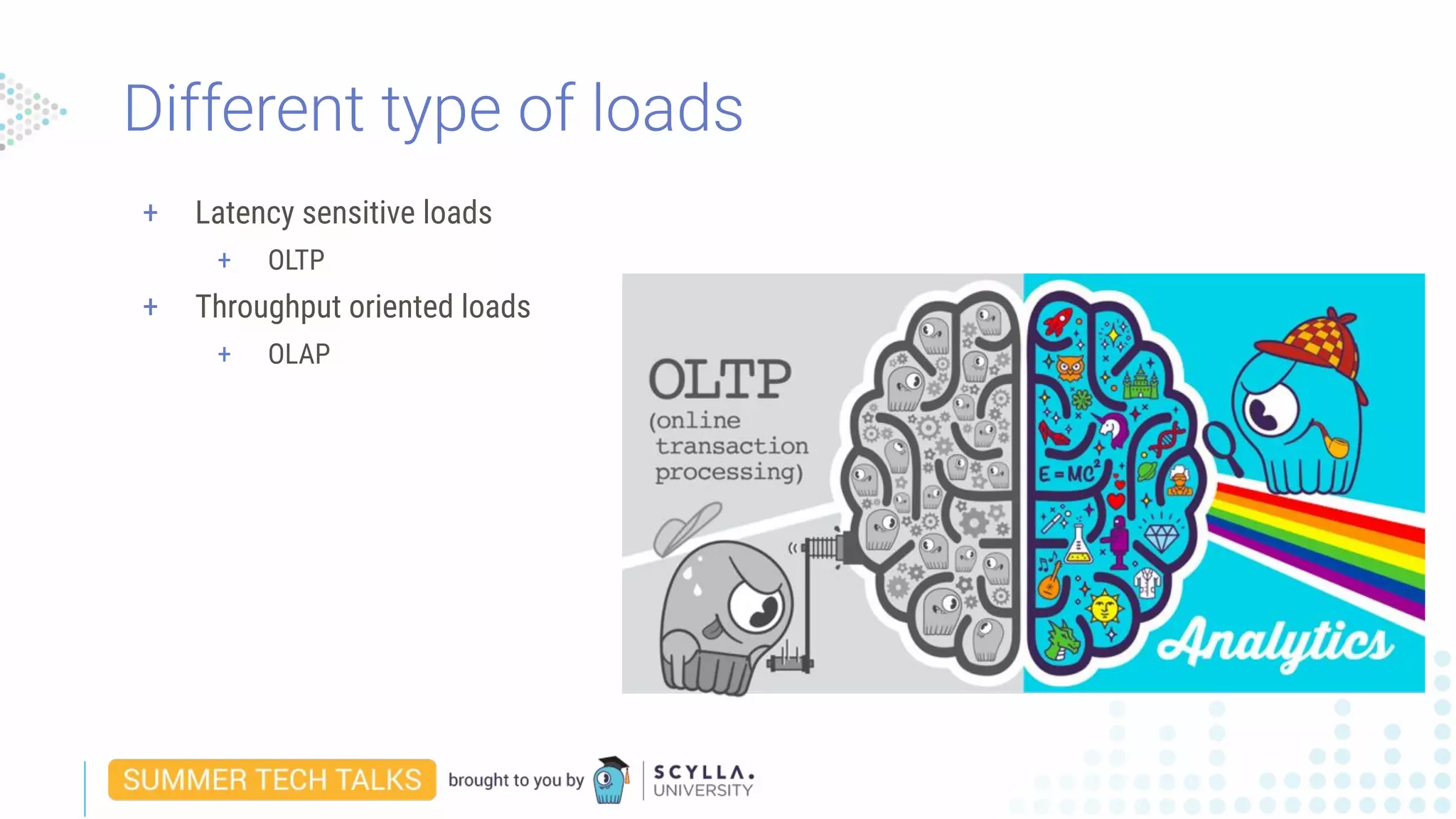
+ Latency sensitive loads
+ OLTP
+ Throughput oriented loads
+ OLAP
Different type of loads
OK, so why can’t I simply do both?
7
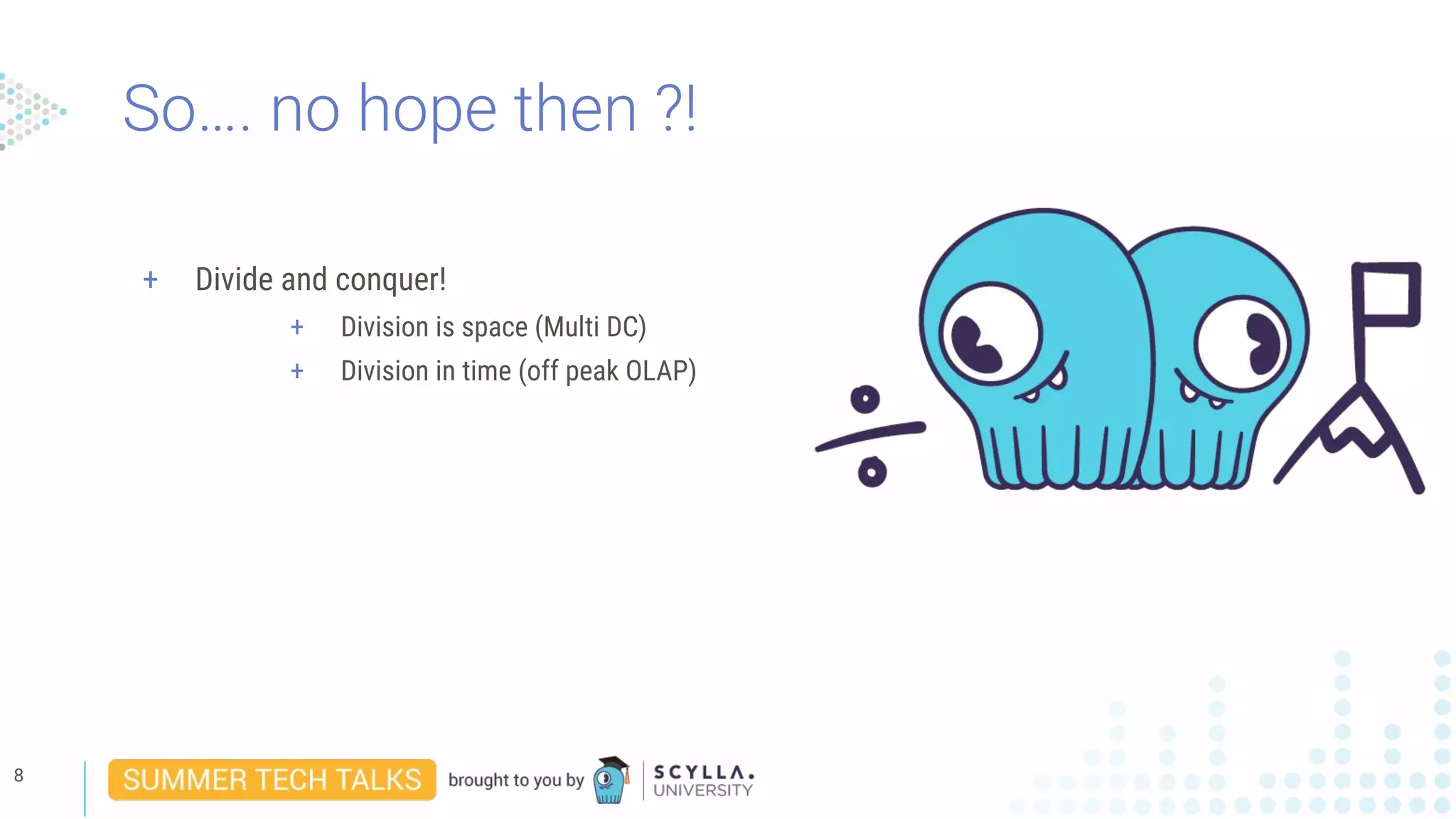
So…. no hope then ?!
8
+ Divide and conquer!
+ Division is space (Multi DC)
+ Division in time (off peak OLAP)
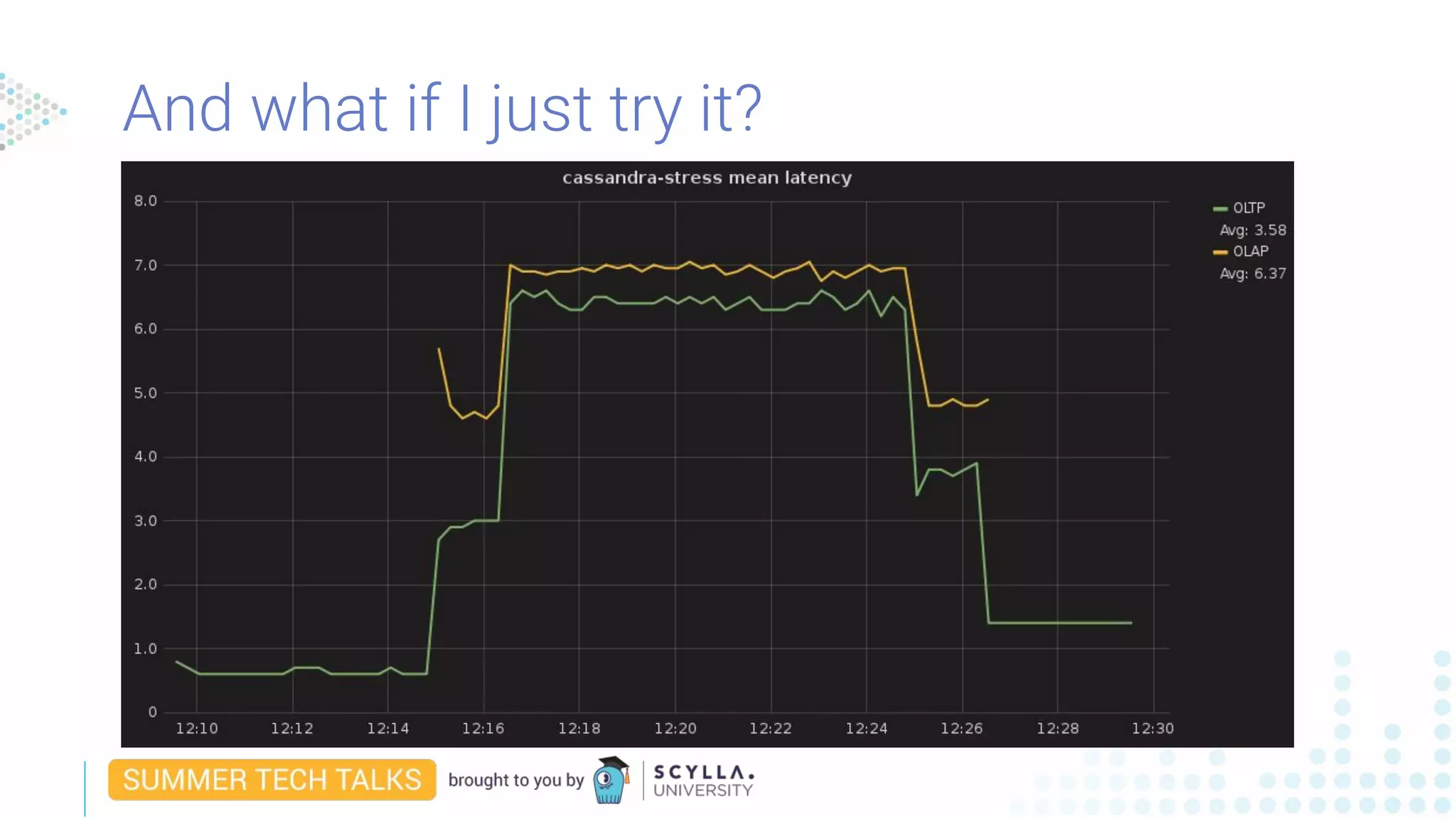
And what if I just try it?
A closer look at the common solutions
Multi DC
10
+ 2 DCs
+ Typically the OLAP DC is a little bit smaller,
But not always.
A closer look at the common solutions
Multi DC
11
+ 2 DCs
+ Typically the OLAP DC is a little bit smaller,
But not always.
+ Typical OLTP DC is mostly 40-60%
A closer look at the common solutions
Multi DC
12
+ 2 DCs
+ Typically the OLAP DC is a little bit smaller,
But not always.
+ Typical OLTP DC is mostly 40-60%
+ Typical OLAP load is 80-90% but for short periods of
Time or alternatively with long pauses.
A closer look at the common solutions
Multi DC
13
+ 2 DCs
+ Typically the OLAP DC is a little bit smaller,
But not always.
+ Typical OLTP DC is mostly 40-60%
+ Typical OLAP load is 80-90% but for short periods of
Time or alternatively with long pauses.
+ Both are up 100% of the time!!!
A closer look at the common solutions
Time Division
14
+ 1 DC
A closer look at the common solutions
Time Division
15
+ 1 DC
+ Typical OLTP load is, as before, mostly 40-60%
A closer look at the common solutions
Time Division
16
+ 1 DC
+ Typical OLTP load is, as before, mostly 40-60%
+ We will pick a time where OLTP at its minimum and...
17
+ 1 DC
+ Typical OLTP load is, as before, mostly 40-60%
+ We will pick a time where OLTP at its minimum and...
+ We will kick start the OLAP job in.
A closer look at the common solutions
Time Division
A closer look at the common solutions
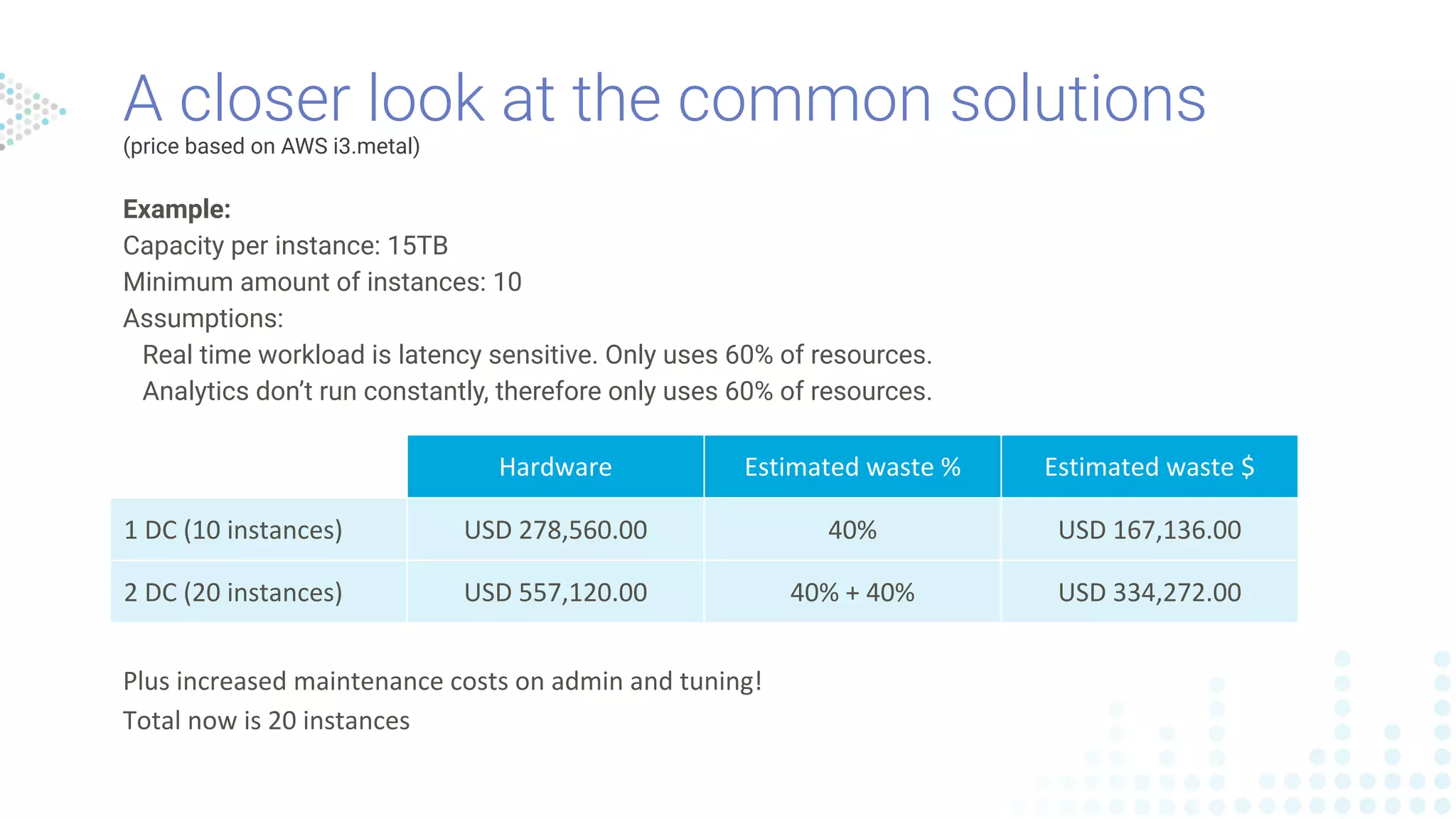
(price based on AWS i3.metal)
Hardware Estimated waste % Estimated waste $
1 DC (10 instances) USD 278,560.00 40% USD 167,136.00
2 DC (20 instances) USD 557,120.00 40% + 40% USD 334,272.00
Plus increased maintenance costs on admin and tuning!
Total now is 20 instances
Example:
Capacity per instance: 15TB
Minimum amount of instances: 10
Assumptions:
Real time workload is latency sensitive. Only uses 60% of resources.
Analytics don’t run constantly, therefore only uses 60% of resources.
Workload Prioritization
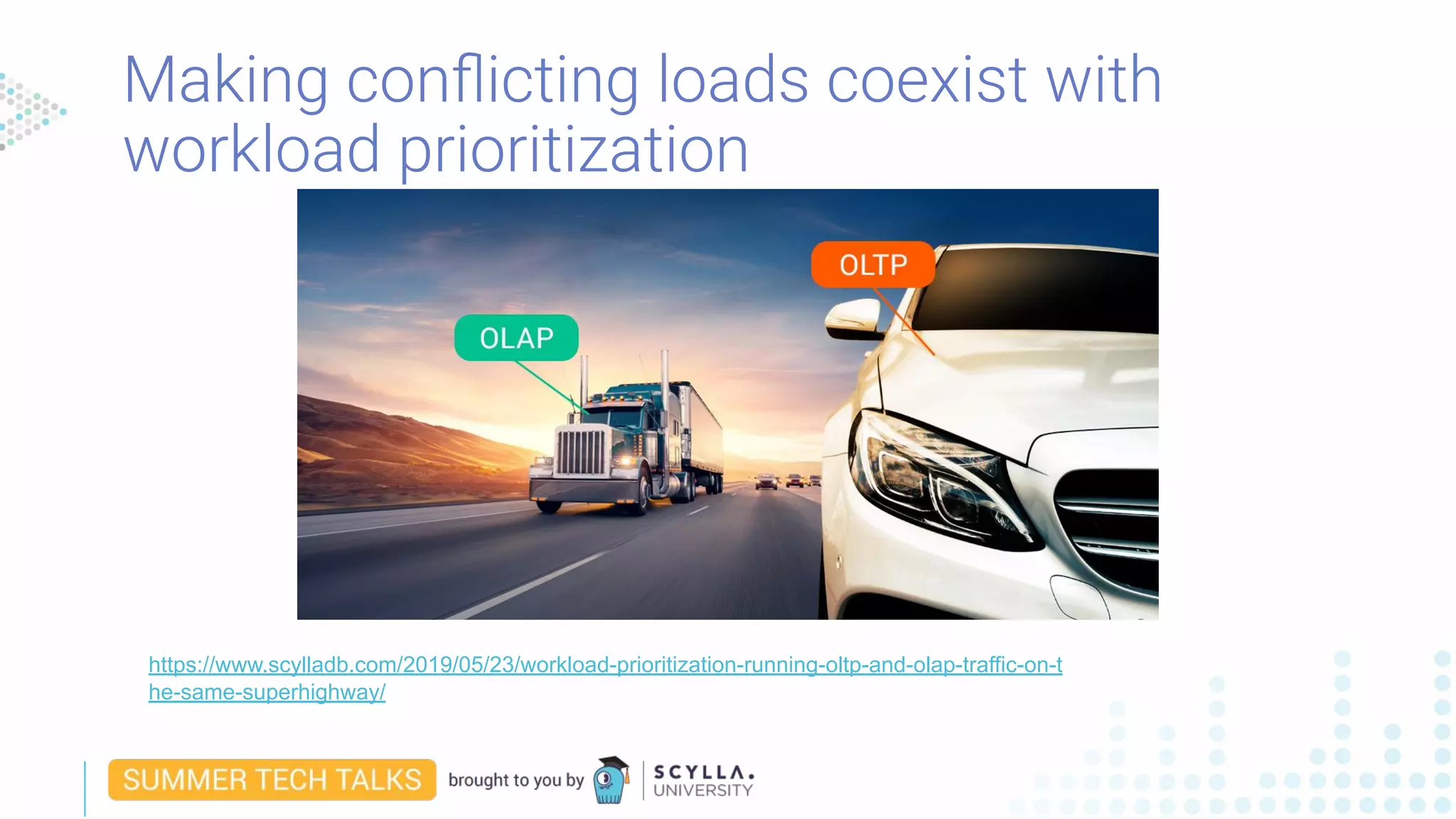
Making conflicting loads coexist with
workload prioritization
https://www.scylladb.com/2019/05/23/workload-prioritization-running-oltp-and-olap-traffic-on-t
he-same-superhighway/
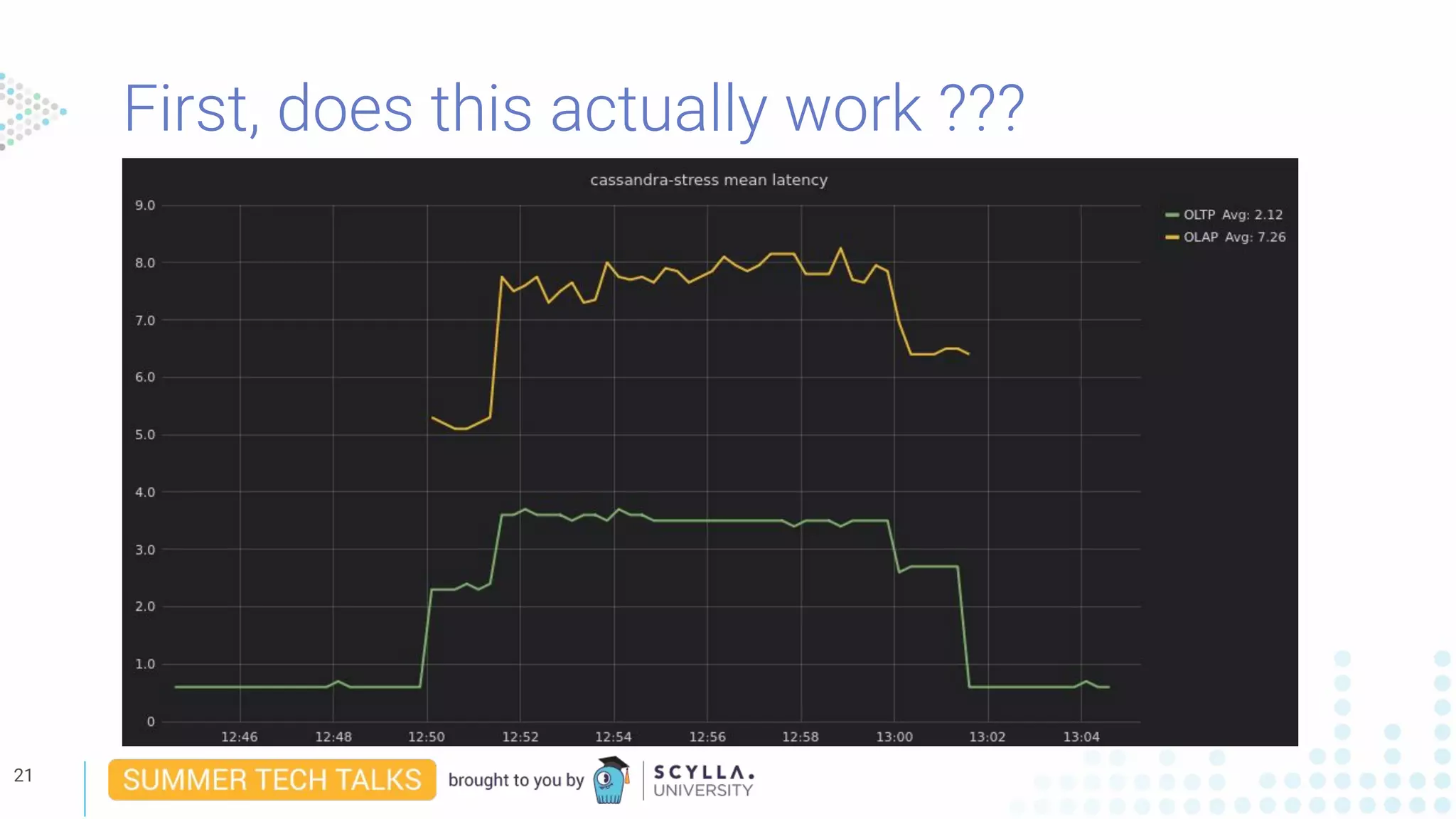
First, does this actually work ???
21
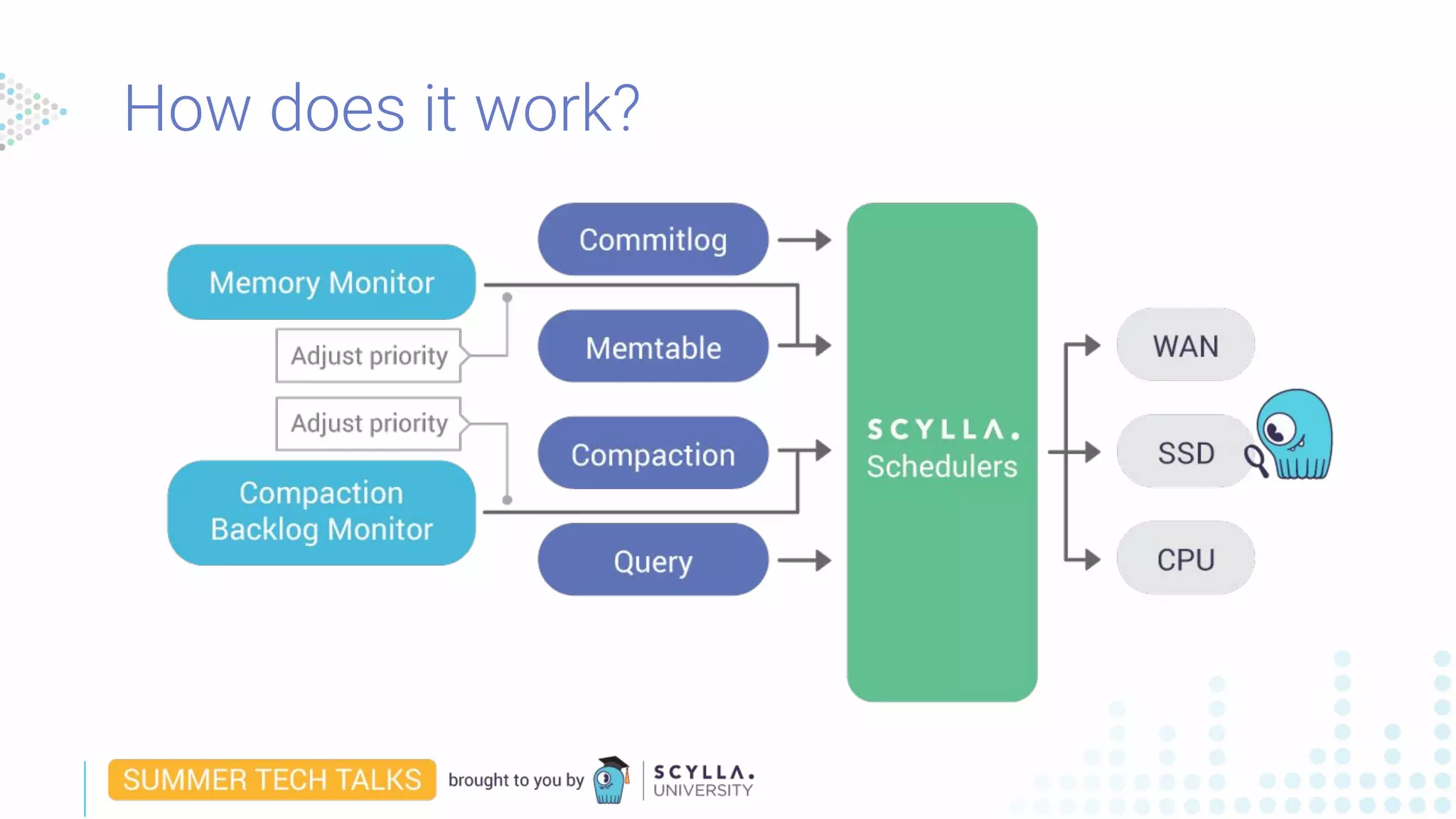
How does it work?
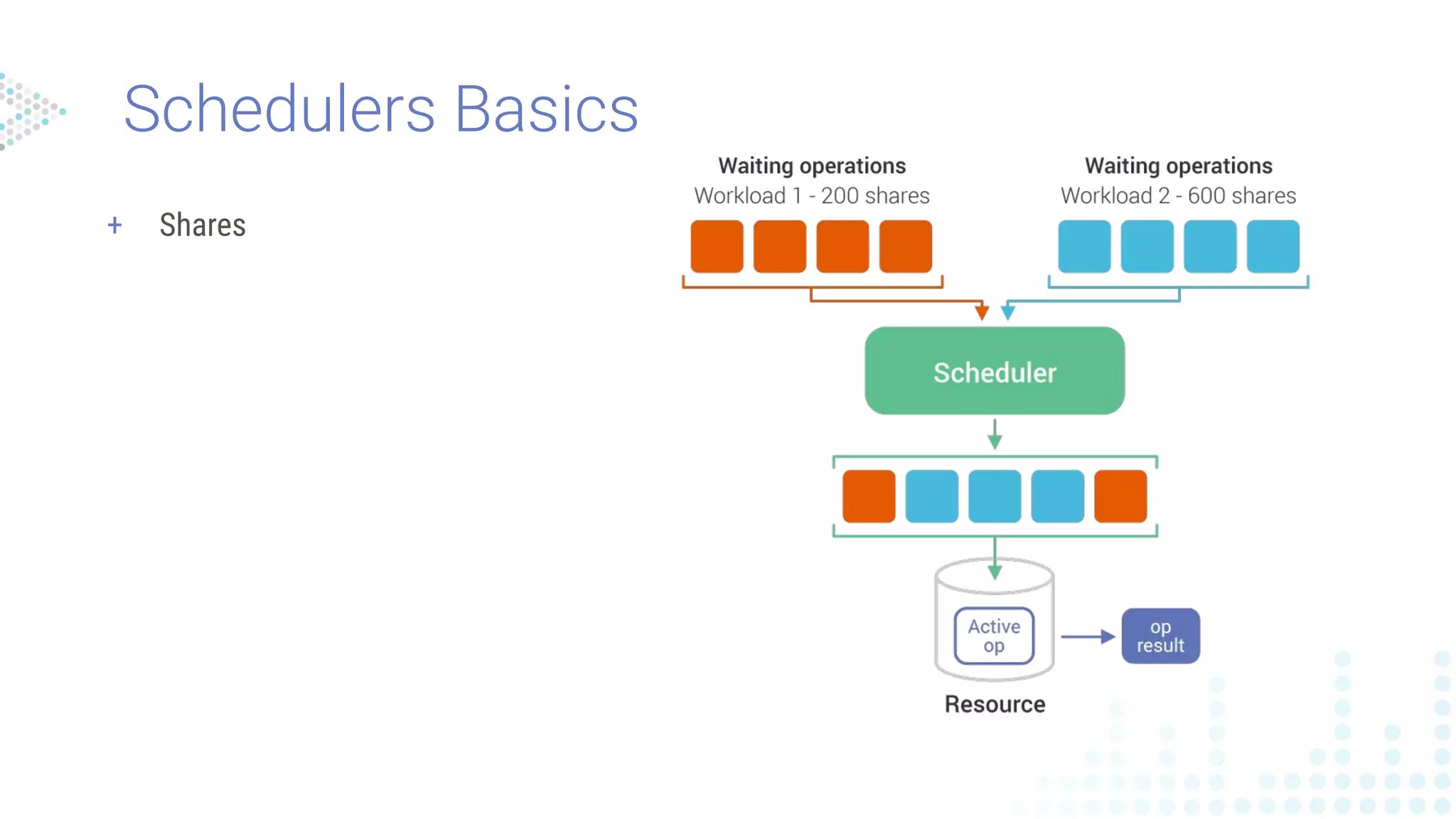
Schedulers Basics
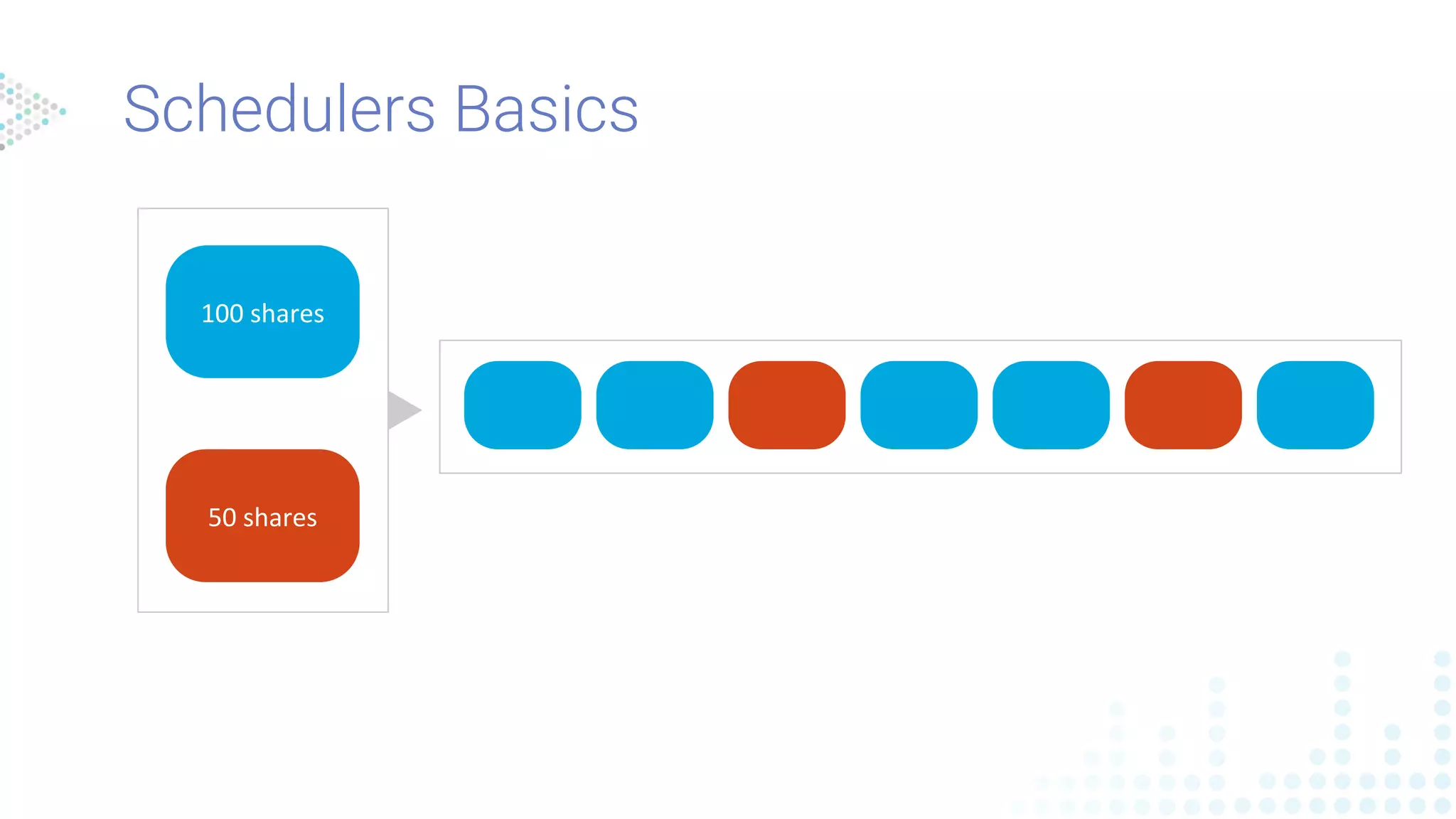
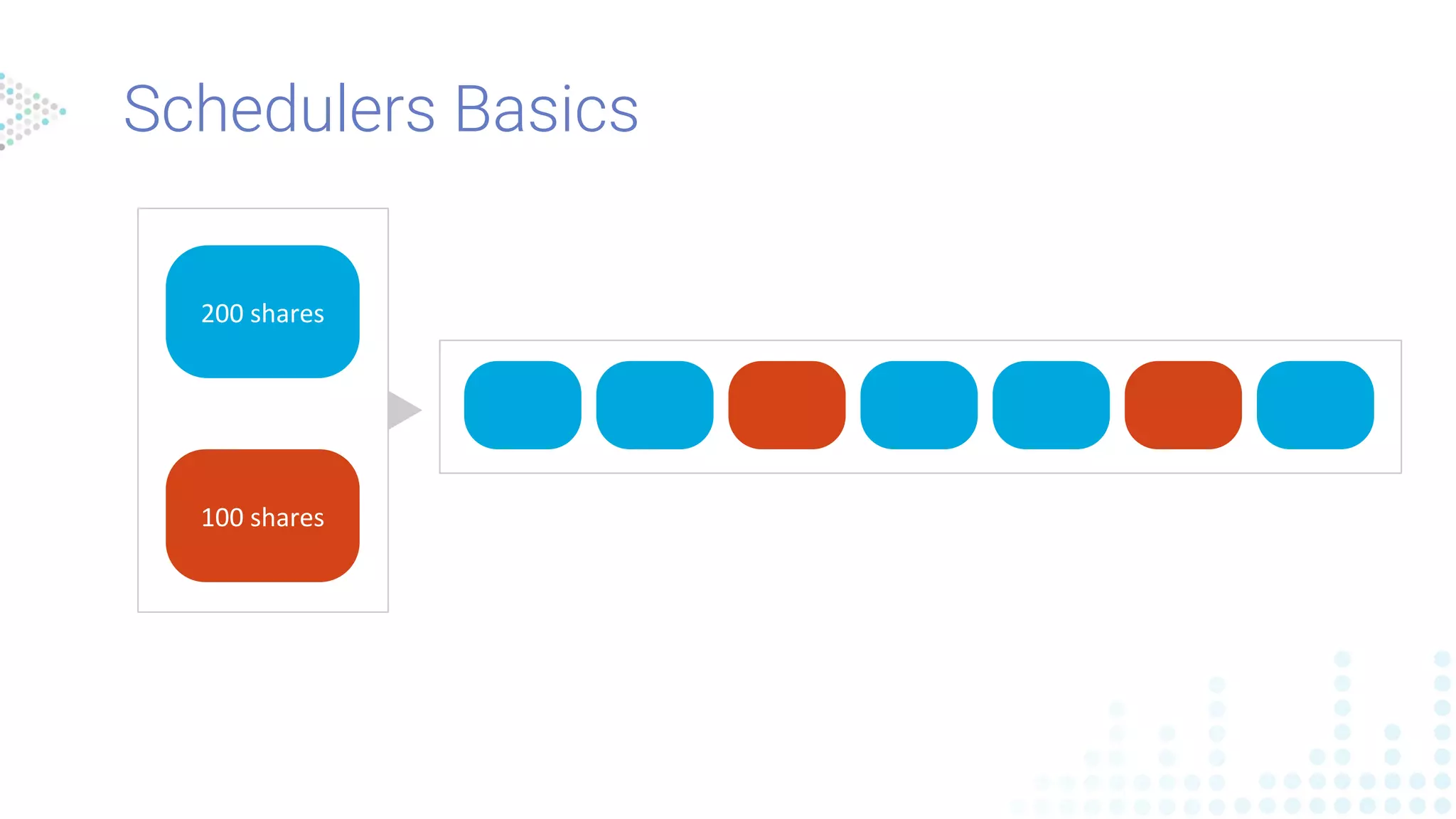
+ Shares
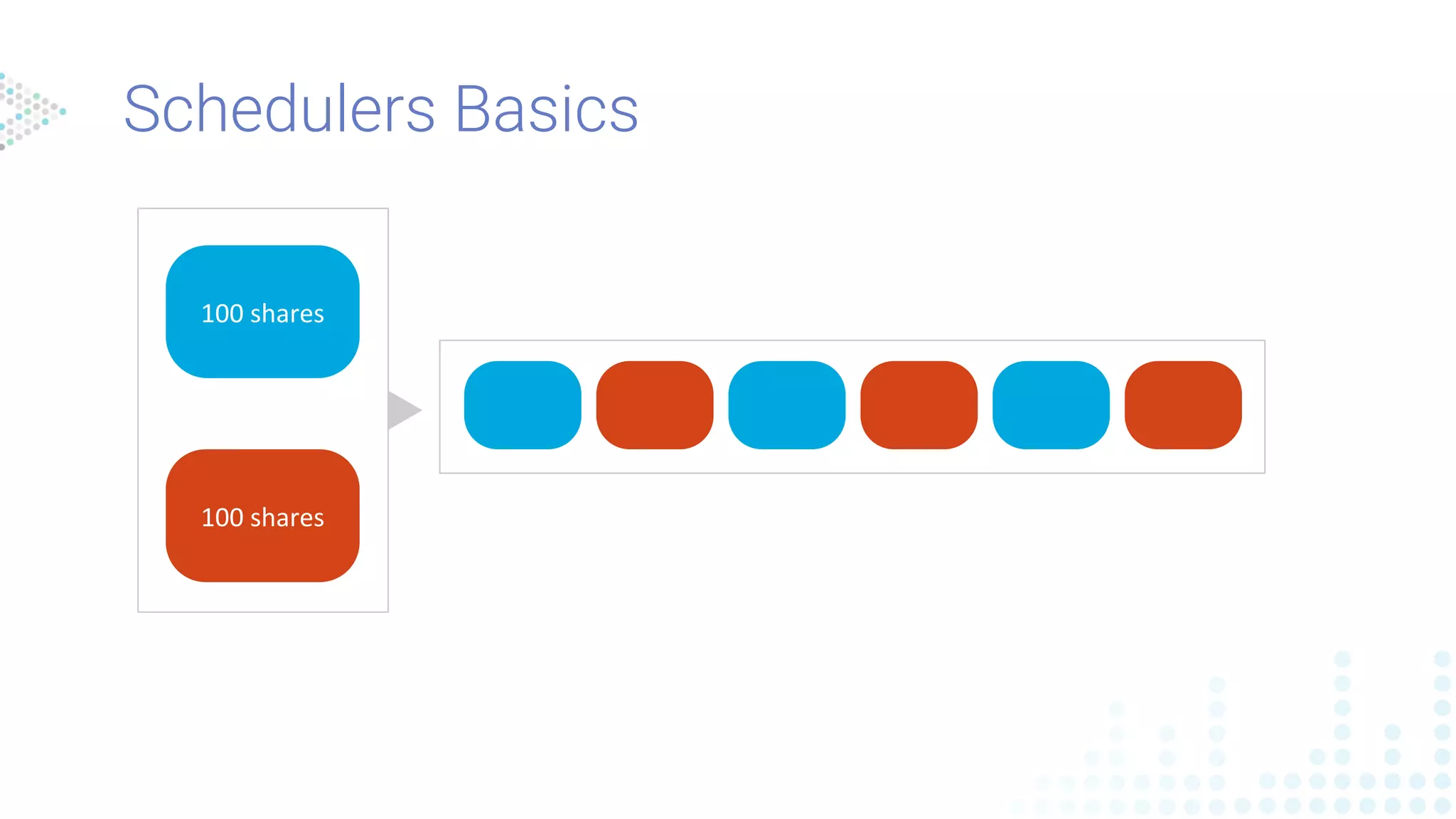
Schedulers Basics
100 shares
100 shares
Schedulers Basics
100 shares
50 shares
200 shares
100 shares
Schedulers Basics
Schedulers Basics - operation highlight
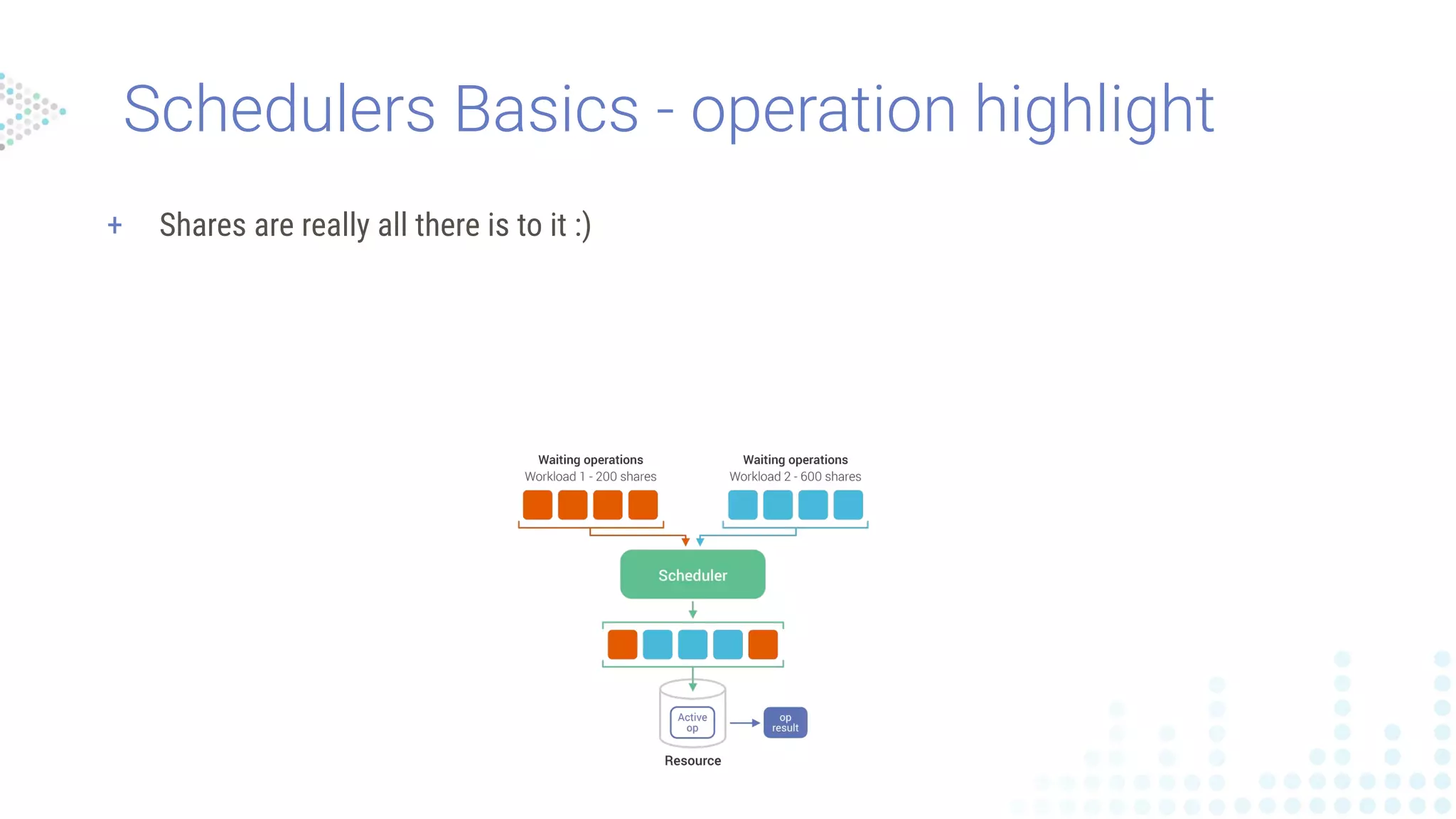
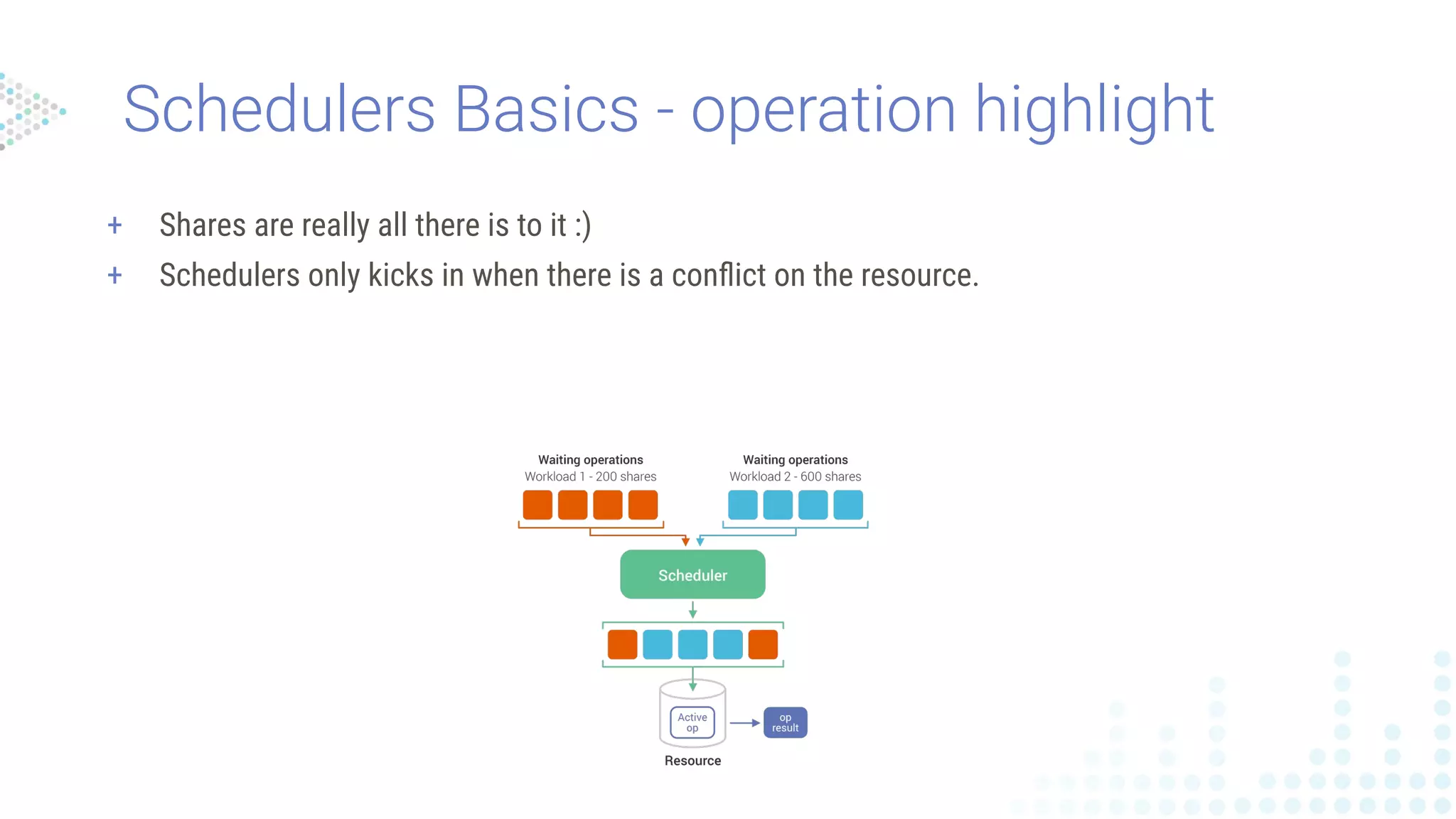
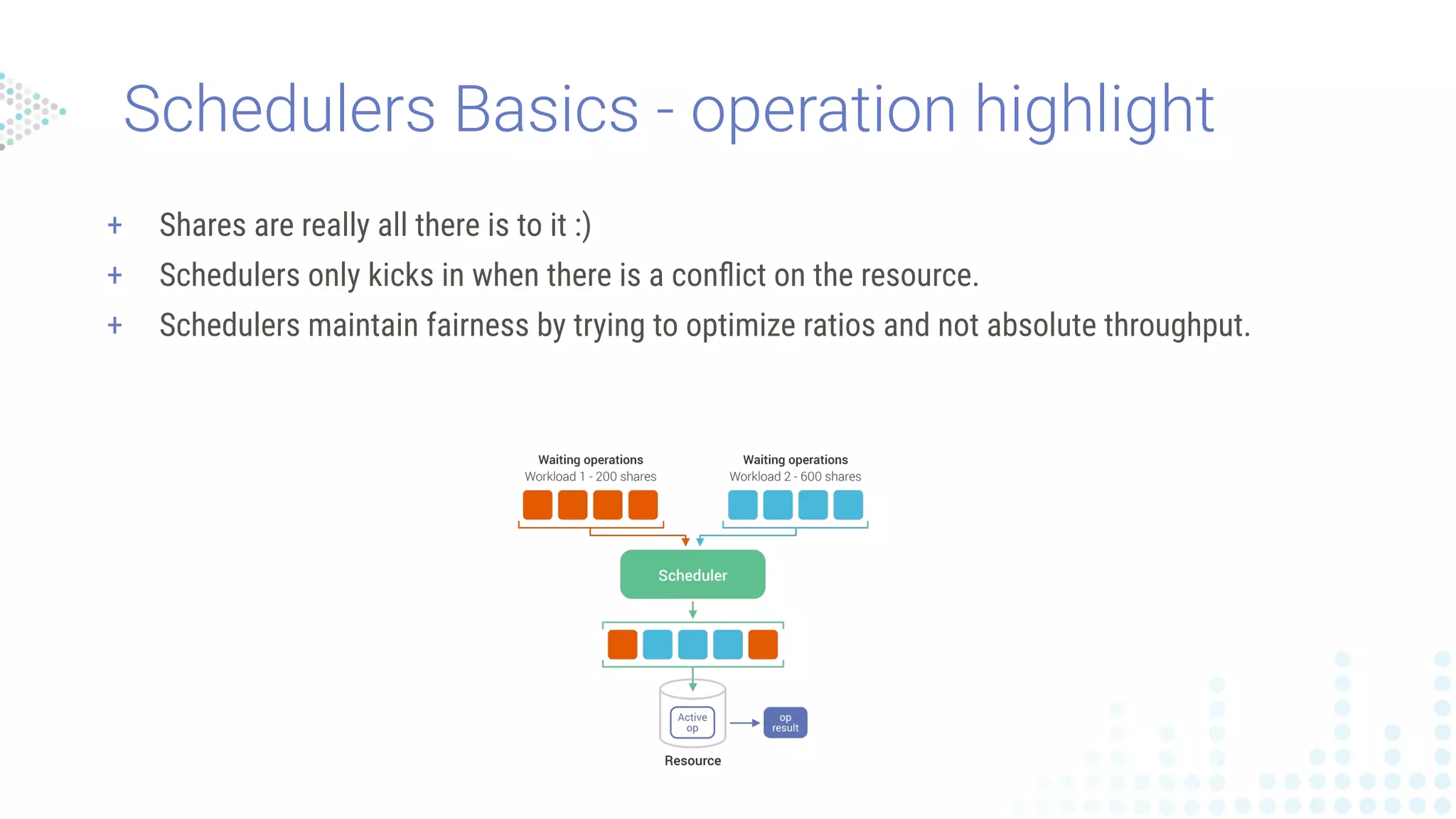
+ Shares are really all there is to it :)
+ Schedulers only kicks in when there is a conflict on the resource.
Schedulers Basics - operation highlight
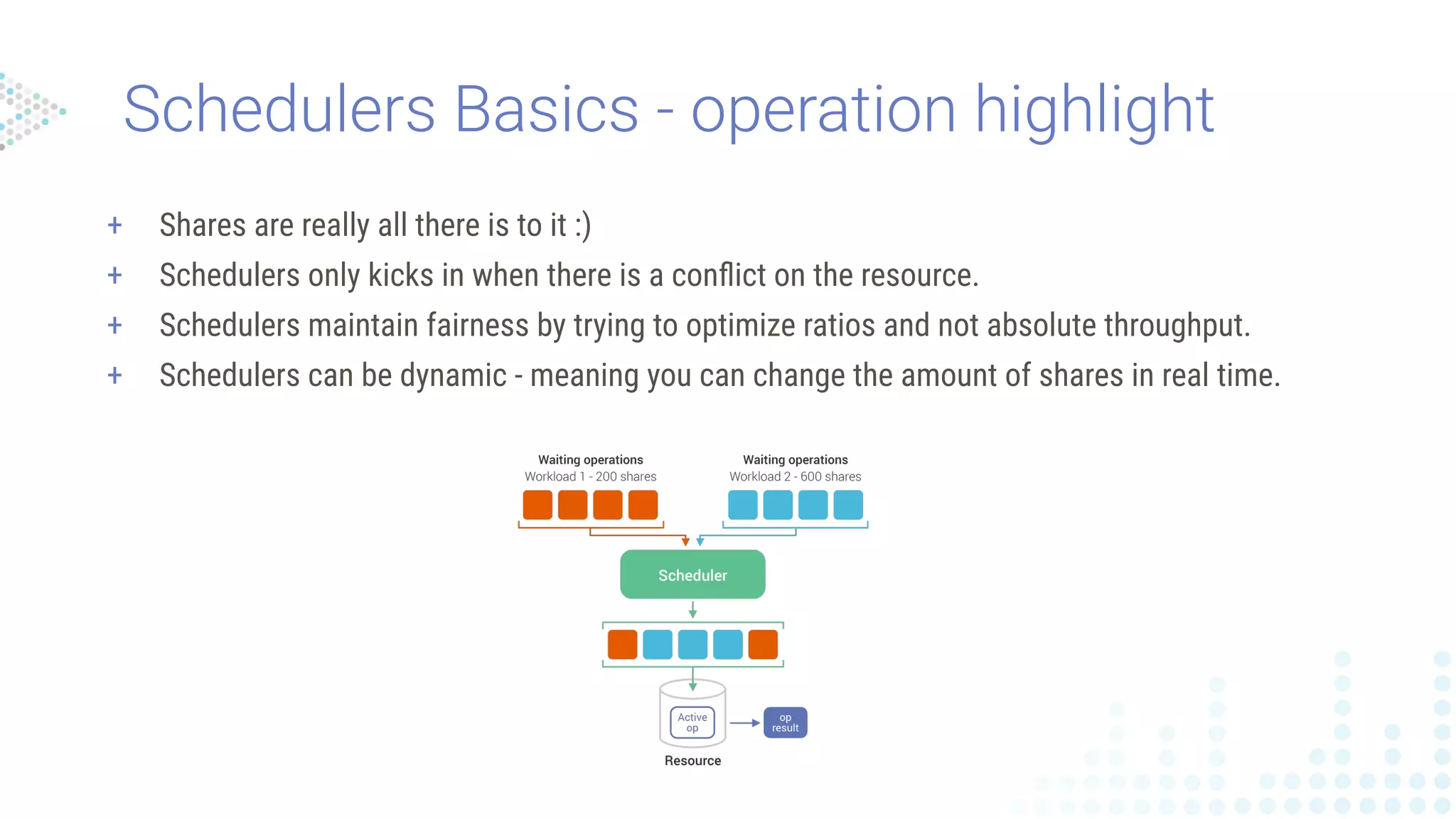
+ Shares are really all there is to it :)
+ Schedulers only kicks in when there is a conflict on the resource.
+ Schedulers maintain fairness by trying to optimize ratios and not absolute throughput.
Schedulers Basics - operation highlight
+ Shares are really all there is to it :)
+ Schedulers only kicks in when there is a conflict on the resource.
+ Schedulers maintain fairness by trying to optimize ratios and not absolute throughput.
+ Schedulers can be dynamic - meaning you can change the amount of shares in real time.
Schedulers Basics - operation highlight
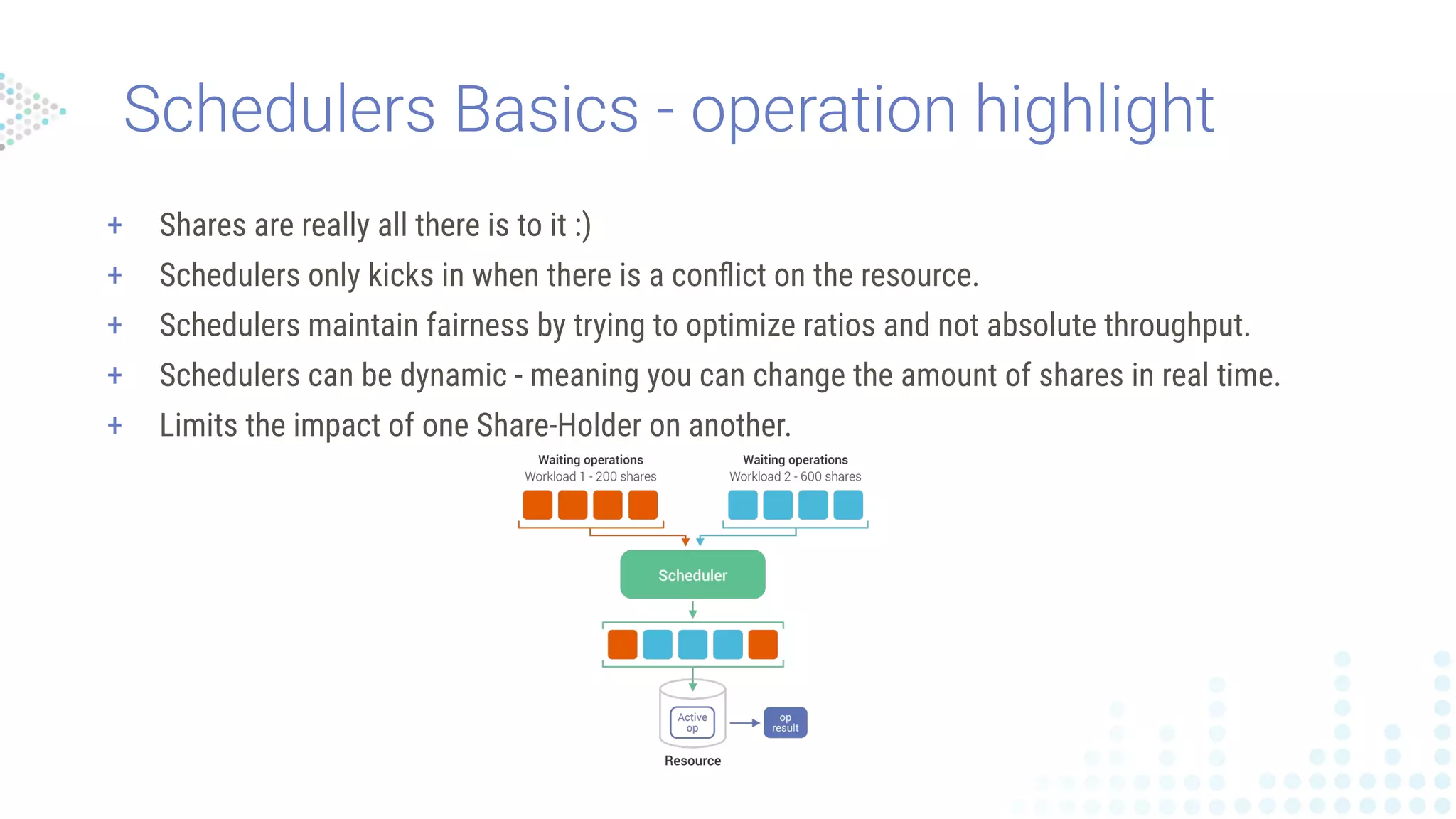
+ Shares are really all there is to it :)
+ Schedulers only kicks in when there is a conflict on the resource.
+ Schedulers maintain fairness by trying to optimize ratios and not absolute throughput.
+ Schedulers can be dynamic - meaning you can change the amount of shares in real time.
+ Limits the impact of one Share-Holder on another.
Schedulers Basics - operation highlight
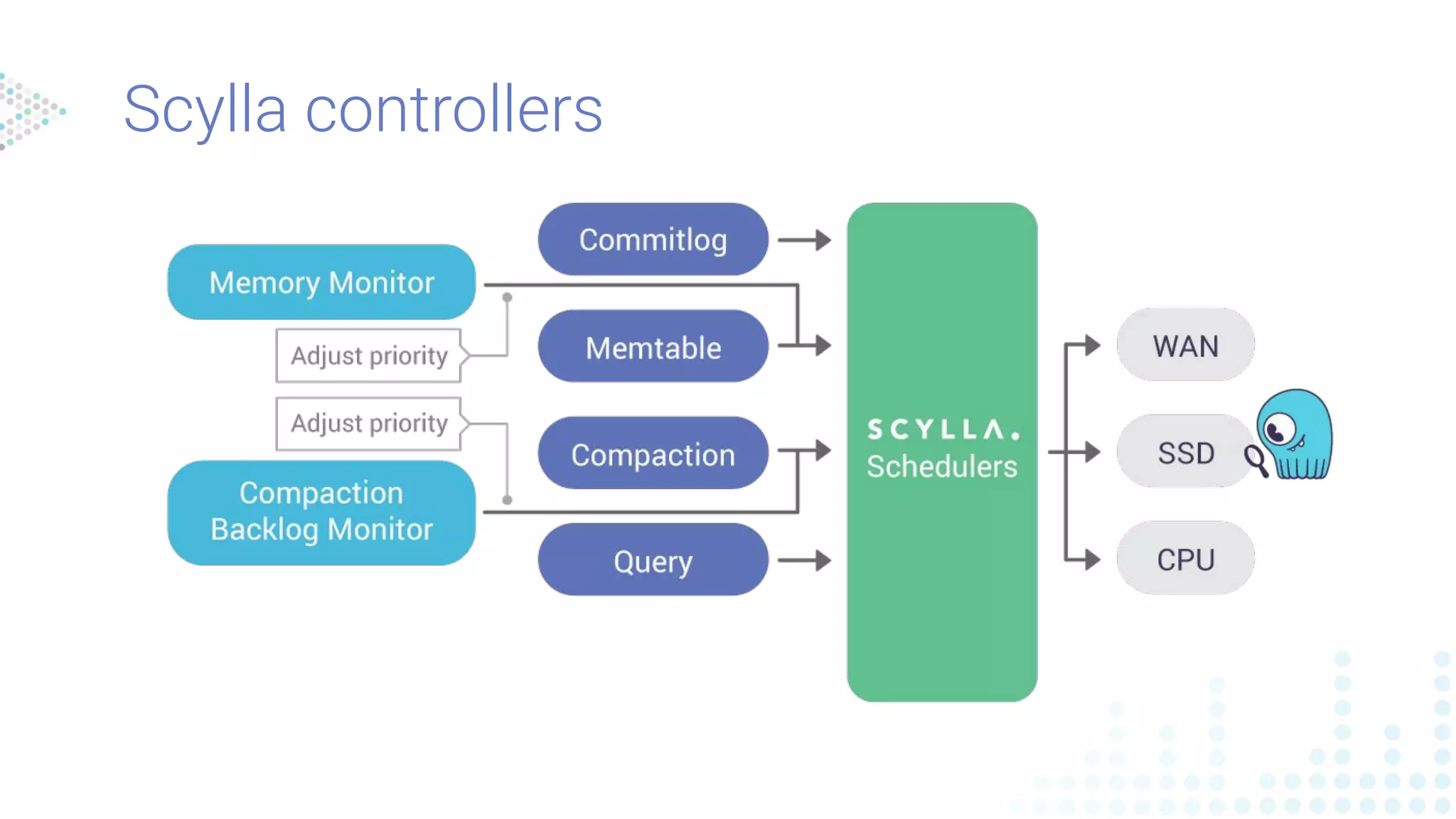
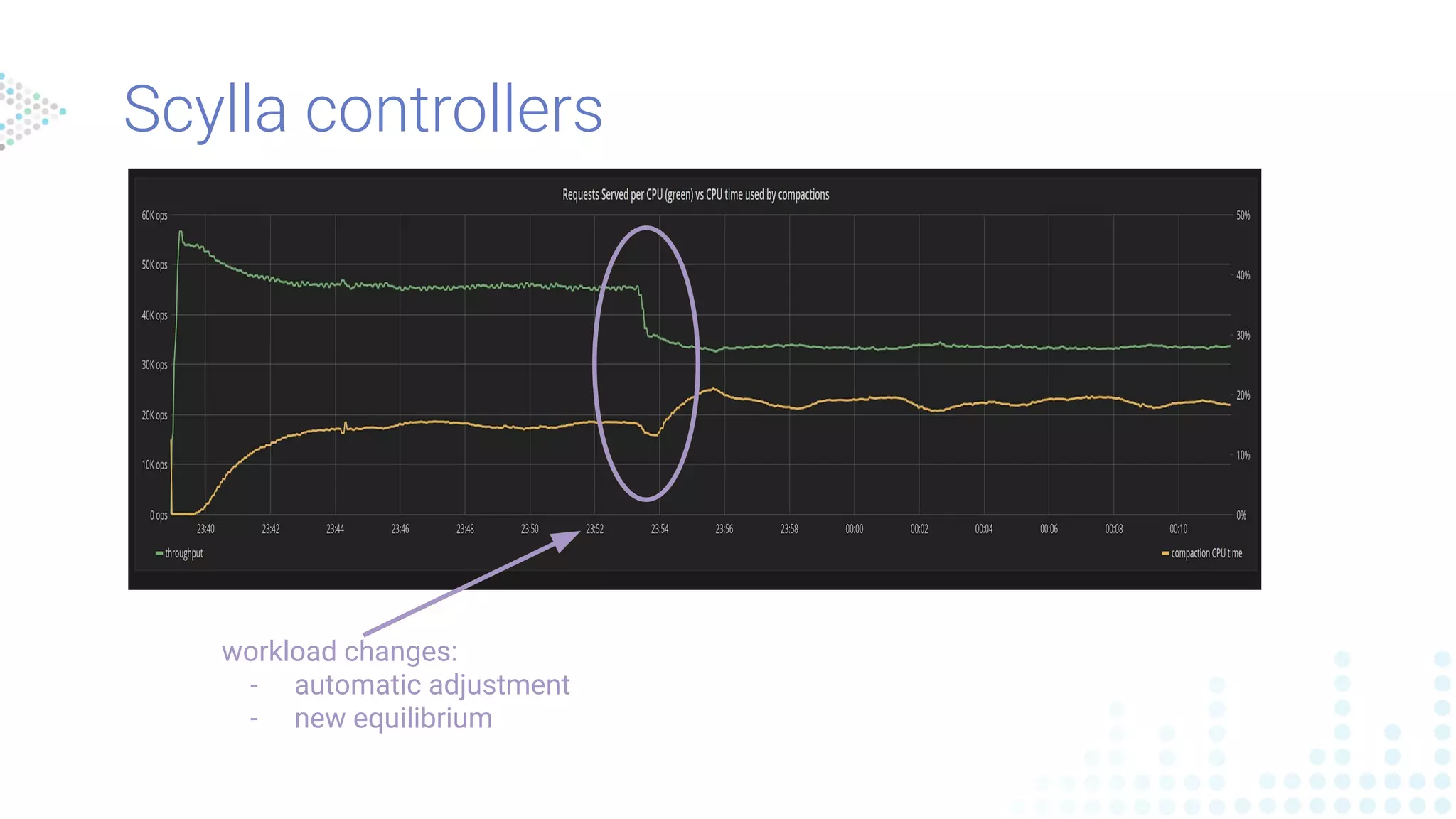
Scylla controllers
workload changes:
- automatic adjustment
- new equilibrium
Scylla controllers
Advantages
+ Better system utilization
+ Easier setup
+ Dynamic adjustment
+ Schedulers
+ Easy to configure
+ Dynamically adjusted
+ Doesn’t harm system utilization
+ Limits the impact between different
loads.
How does it work?
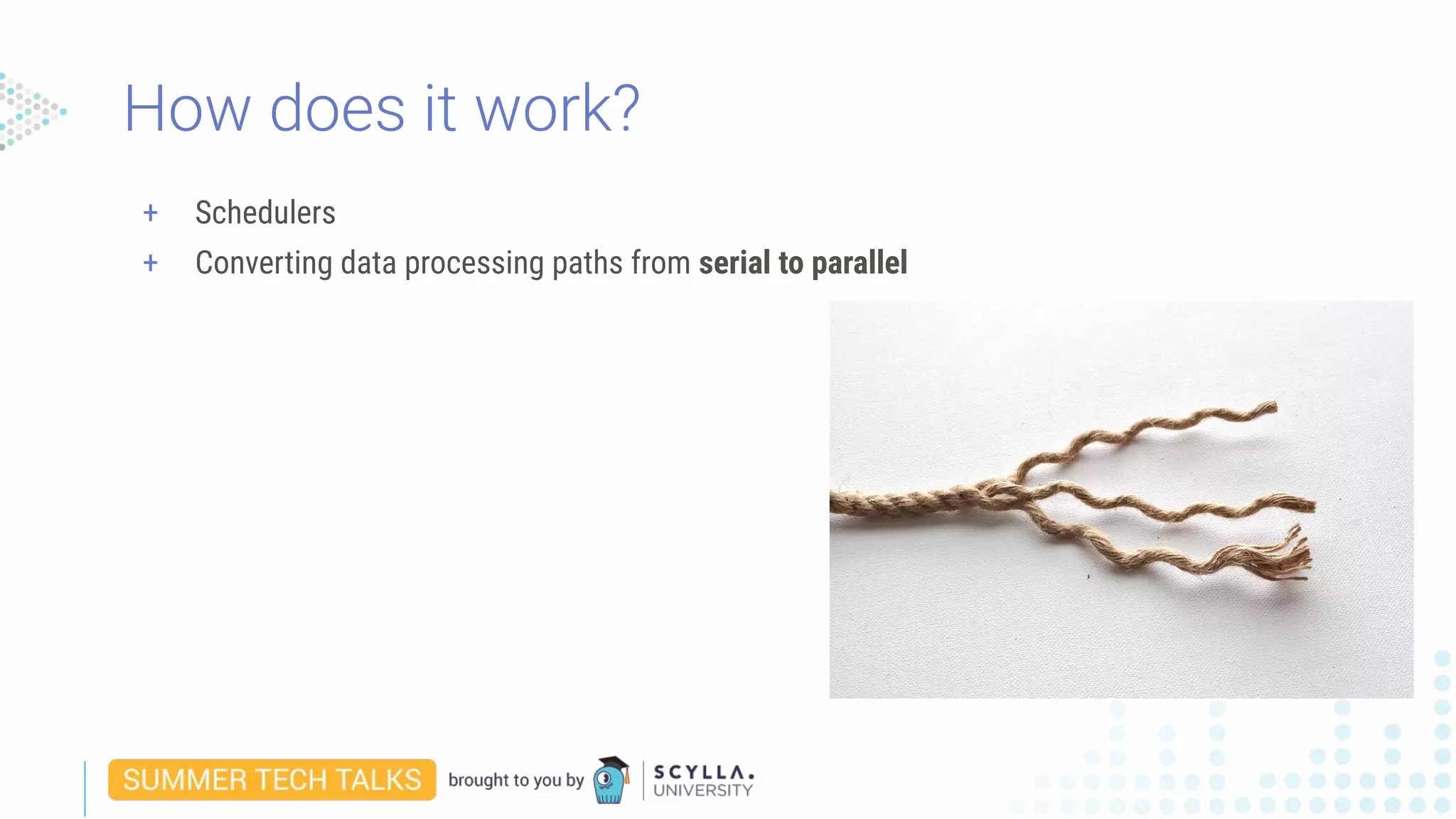
+ Schedulers
+ Converting data processing paths from serial to parallel
How does it work?
+ Schedulers
+ Converting data processing paths from serial to parallel
+ Operation priority classification
How does it work?
Workload Prioritization
in practice
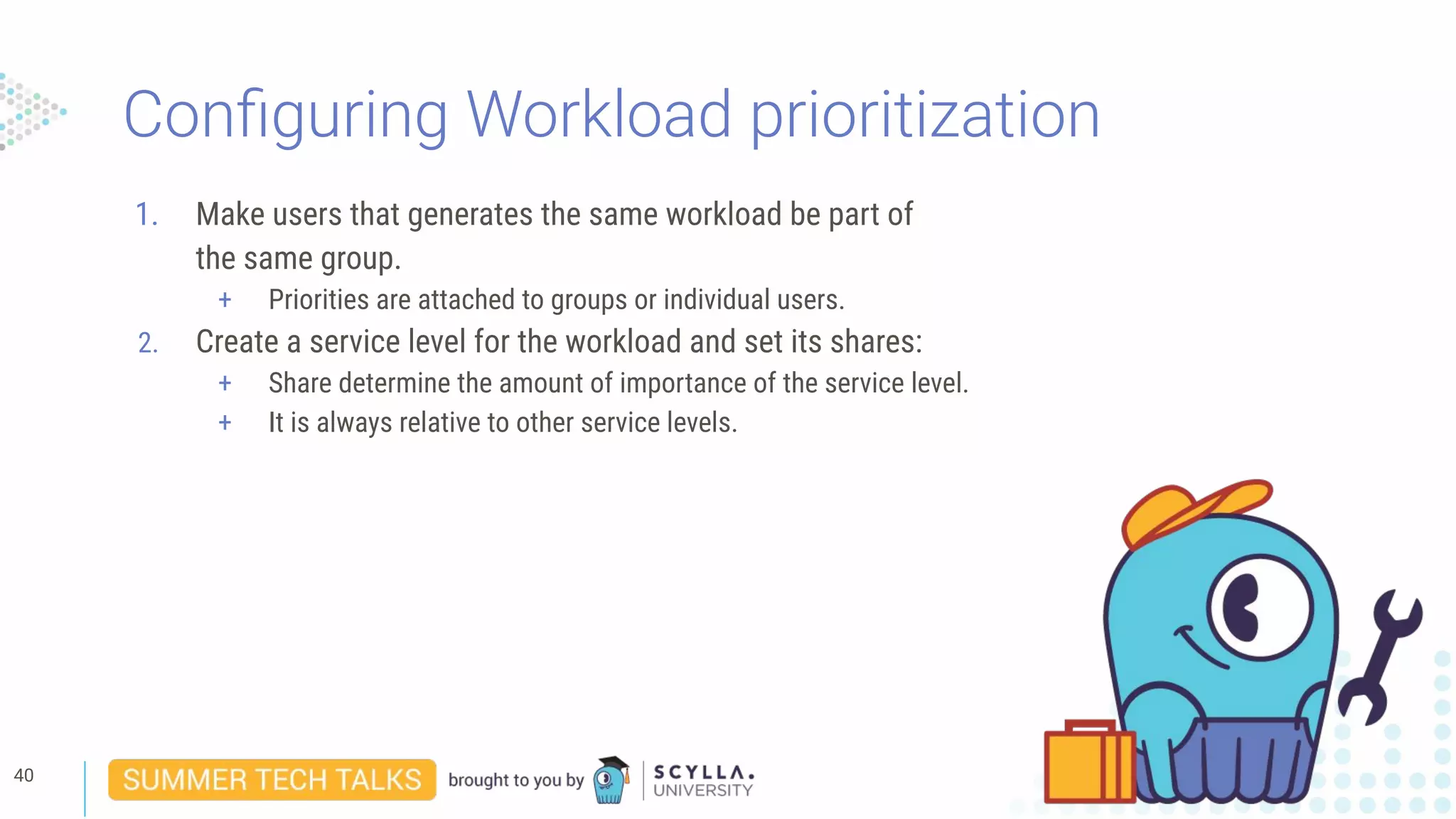
Configuring Workload prioritization
1. Make users that generates the same workload be part of
the same group.
+ Priorities are attached to groups or individual users.
39
Configuring Workload prioritization
1. Make users that generates the same workload be part of
the same group.
+ Priorities are attached to groups or individual users.
2. Create a service level for the workload and set its shares:
+ Share determine the amount of importance of the service level.
+ It is always relative to other service levels.
40
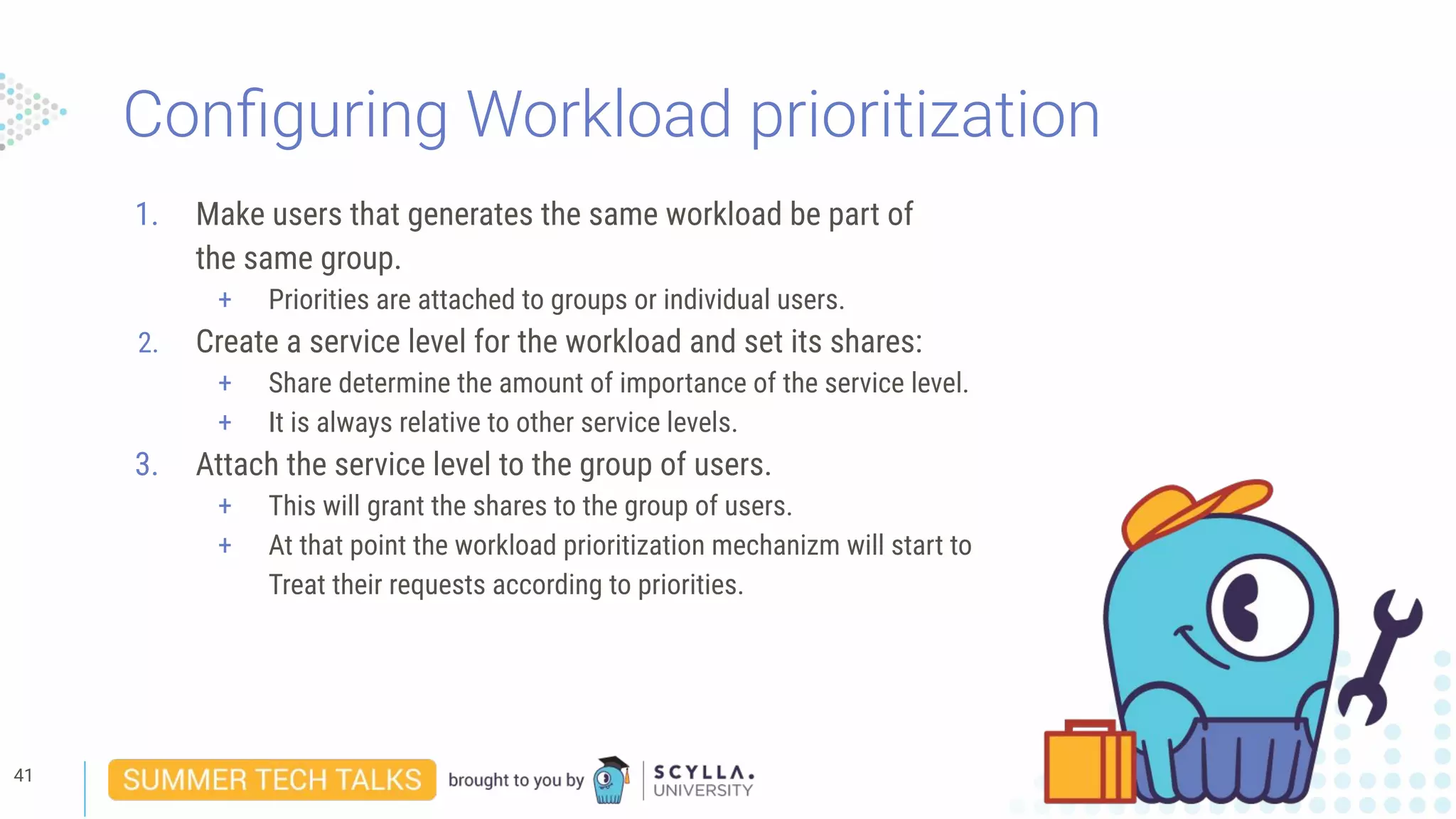
Configuring Workload prioritization
1. Make users that generates the same workload be part of
the same group.
+ Priorities are attached to groups or individual users.
2. Create a service level for the workload and set its shares:
+ Share determine the amount of importance of the service level.
+ It is always relative to other service levels.
3. Attach the service level to the group of users.
+ This will grant the shares to the group of users.
+ At that point the workload prioritization mechanizm will start to
Treat their requests according to priorities.
41
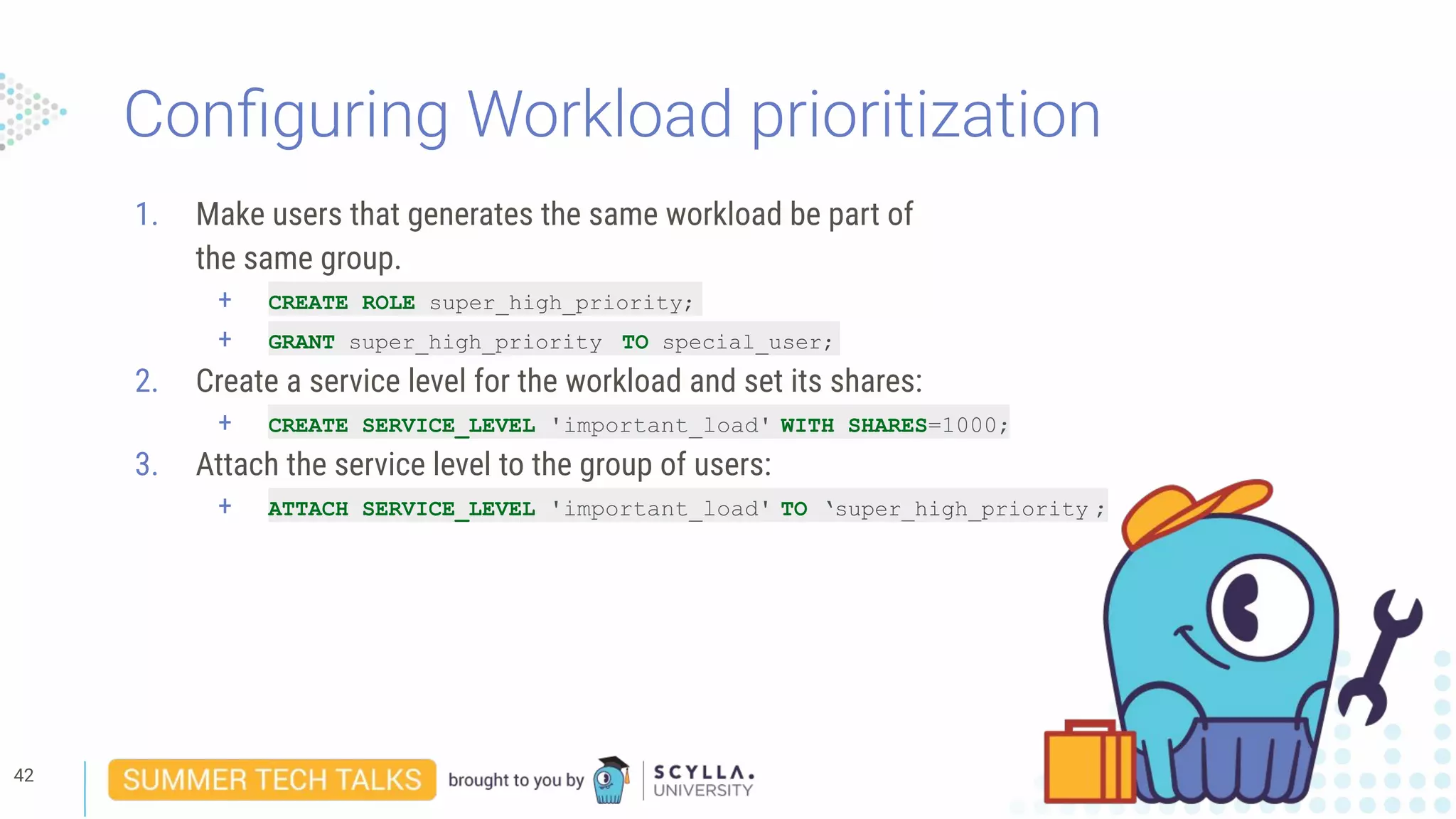
Configuring Workload prioritization
1. Make users that generates the same workload be part of
the same group.
+ CREATE ROLE super_high_priority;
+ GRANT super_high_priority TO special_user;
2. Create a service level for the workload and set its shares:
+ CREATE SERVICE_LEVEL 'important_load' WITH SHARES=1000;
3. Attach the service level to the group of users:
+ ATTACH SERVICE_LEVEL 'important_load' TO ‘super_high_priority ;
42
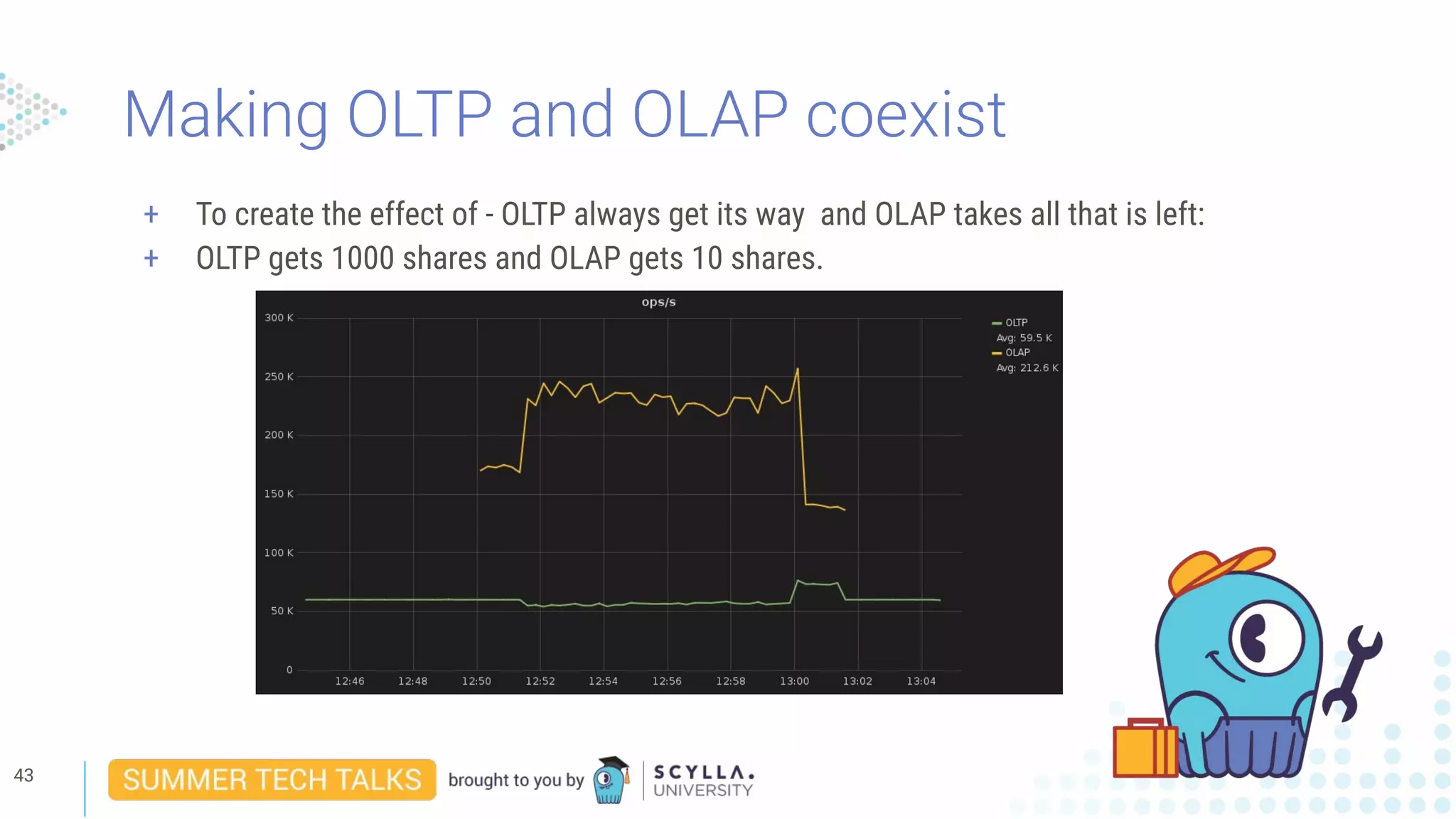
Making OLTP and OLAP coexist
+ To create the effect of - OLTP always get its way and OLAP takes all that is left:
+ OLTP gets 1000 shares and OLAP gets 10 shares.
43
Prioritizing between some workloads
+ Workload prioritization in general facilitates resource division between several loads.
+ There are a lot of effects that can be achieved.
44
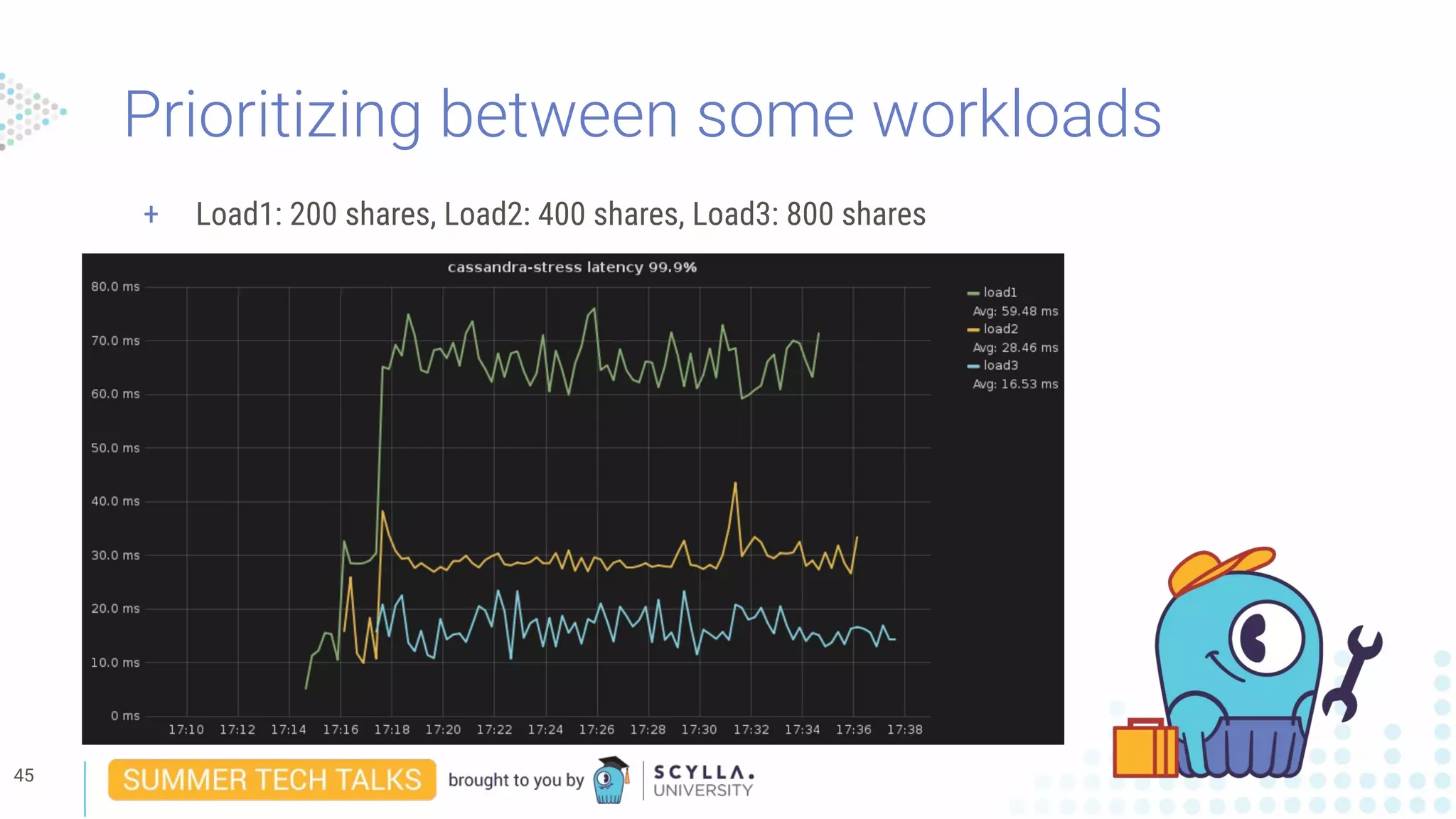
Prioritizing between some workloads
+ Load1: 200 shares, Load2: 400 shares, Load3: 800 shares
45
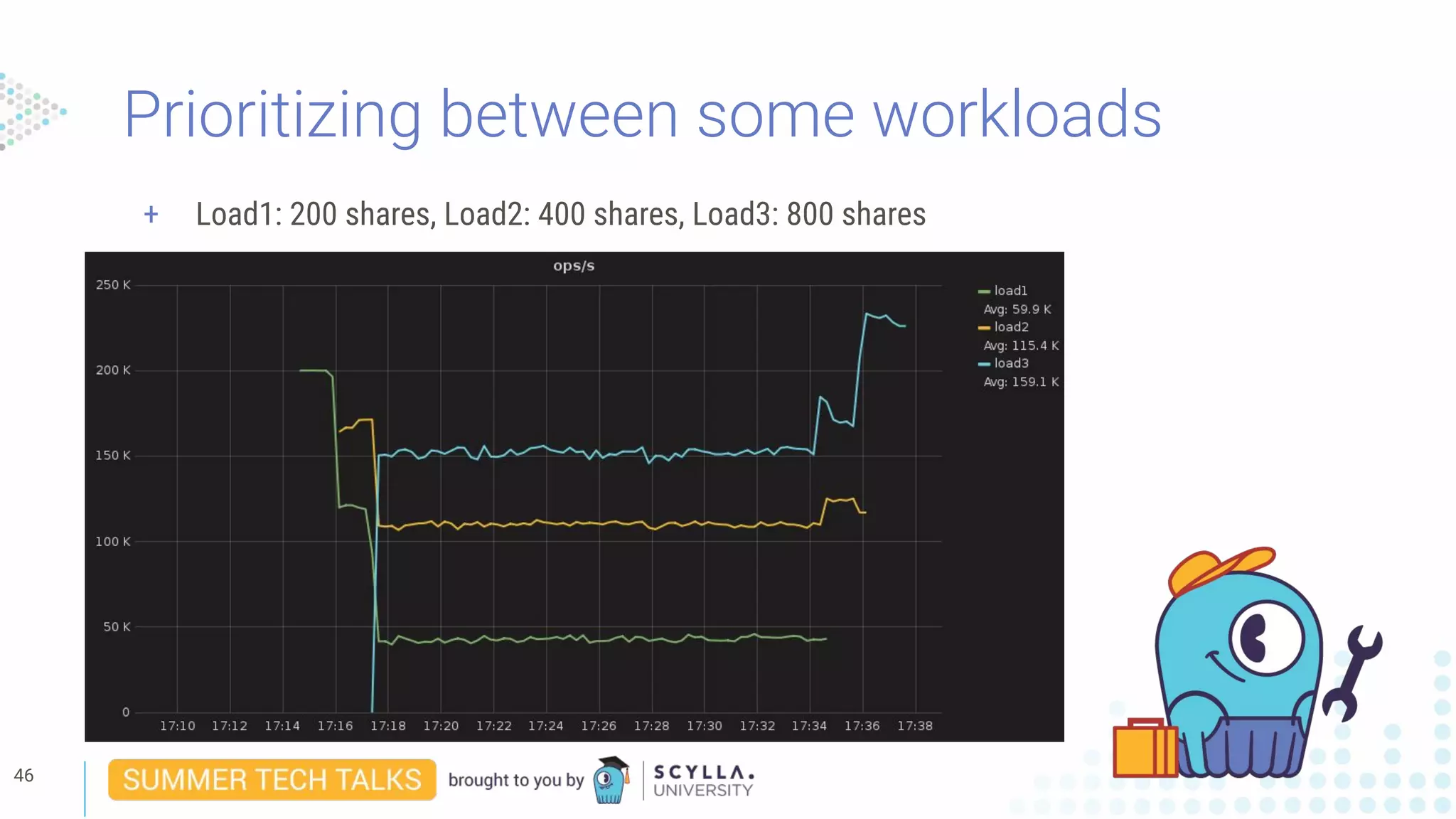
Prioritizing between some workloads
+ Load1: 200 shares, Load2: 400 shares, Load3: 800 shares
46
Customer use case
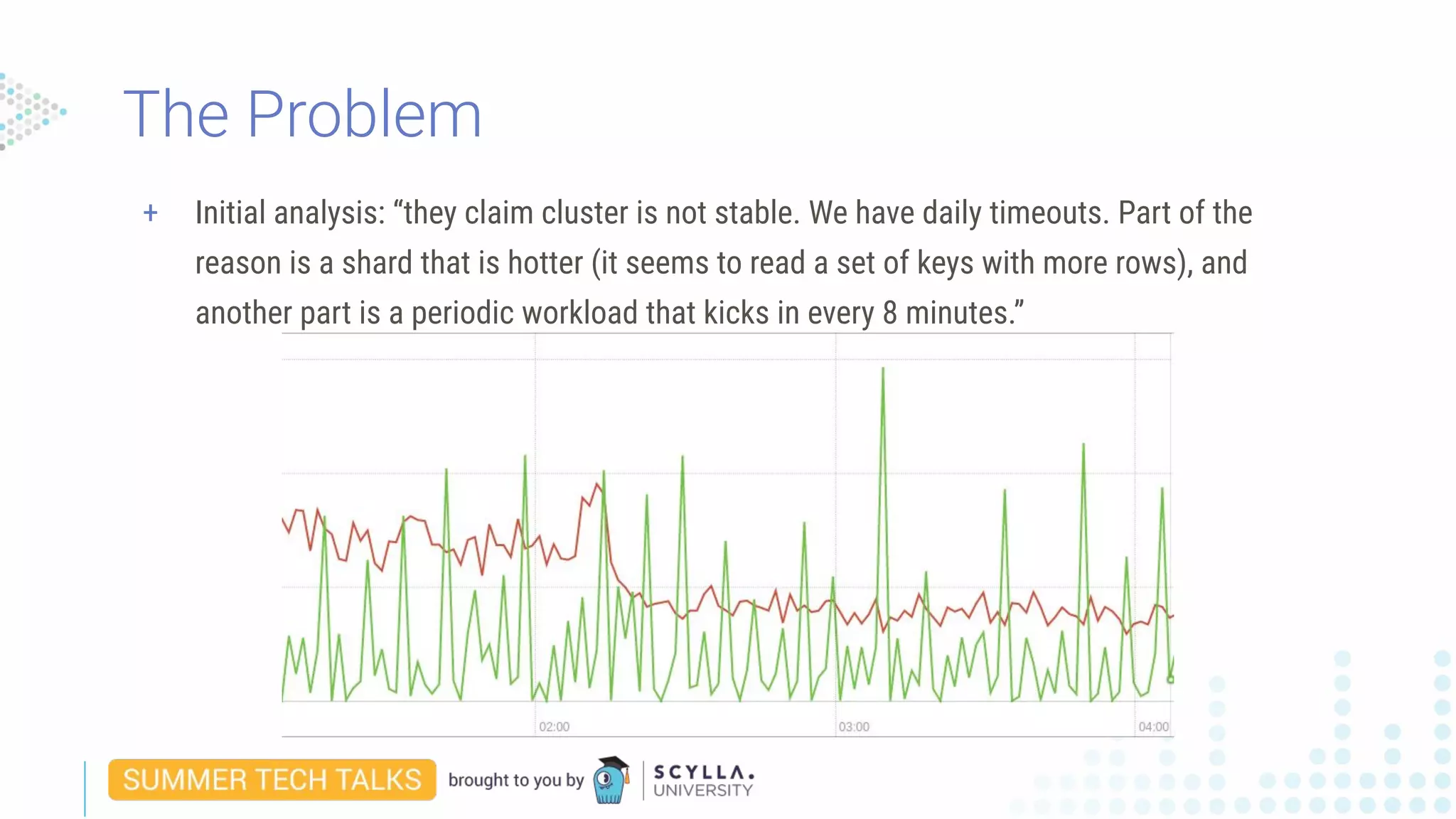
+ Initial analysis: “they claim cluster is not stable. We have daily timeouts. Part of the
reason is a shard that is hotter (it seems to read a set of keys with more rows), and
another part is a periodic workload that kicks in every 8 minutes.”
The Problem
+ Initial analysis: “they claim cluster is not stable. We have daily timeouts. Part of the
reason is a shard that is hotter (it seems to read a set of keys with more rows), and
another part is a periodic workload that kicks in every 8 minutes.”
+ Two type of clients:
+ The “normal” client making routine reads.
+ The “bursty” client that kicks in once every ~8-10 minutes and executes heavy scan queries
against the database.
The Problem
+ Set a different role (user name) to each type of client.
+ Set a different service level to each role -
+ For the normal client have him take precedence by granting a lot of shares.
+ For the bursty client give such an amount that will not starve it.
The Solution...
+ “Yes, they did move to a state where they had many timeouts to a state where the cluster
was stable”
+ “This changed with WLPrio, as the secondary queries are now in a different priority class
and do not interfere with their workload.”
Result...
+ Problem solved :)
Result...
Final words
An authenticator must be set for the feature to work:
+ For obvious reasons every client should identify itself by its
user name since this is what helps classify its workload.
Key points
Every user that doesn’t get an explicit service_level is automatically
assigned the default service level.
+ It has 1000 shares out of the box.
+ The default service level can be configured and doing so will affect
all unassigned users.
Key points
Shares are relative
+ Shares does not mean anything by themselfs, it is only how many
shares a specific workload have relative to other loads that
matters.
+ Only the trend is guaranteed, no specific ratios can be guaranteed
because shares are only compared between the loads that
competes for the resource.
Key points
Workload prioritization only applies for when there is a resource conflict.
+ A low priority workload will get as much of a resource as it needs as
long as there is no competition for it.
Key points
Workload prioritization does guarantee a trend of maintaining ratio of
resources between competing user workloads out of the available resources.
But...
Workload prioritization does not guarantee good performance on its own, nor does it guarantee
absolute throughput or latency.
+ A healthy, well sized cluster is needed for good performance.
+ From time to time background processes are running that can reduce overall cluster
throughput.
+ An example for such processes is repair or compaction.
+ The remaining available resources will still be divided according to priorities.
Key points
Workload prioritization is an enterprise only feature.
Key points
How to Bulletproof
Your Scylla Deployment
August 28, 2019 | 10:00 AM PT - 1:00 PM ET
Incremental Compaction
September 4, 2019 | 10:00 AM PT - 1:00 PM ET
Q&A
Stay in touch
eliransin@scylladb.com
United States
1900 Embarcadero Road
Palo Alto, CA 94303
Israel
11 Galgalei Haplada
Herzelia, Israel
www.scylladb.com
@scylladb
Thank you
+ CPU scheduler example
+ scheduling_group, a tag class that identifies tasks we want to run together
+ For each scheduling group, we create a task queue per shard
+ with_scheduling_group(sg, lambda)
+ Will just run lambda if in correct scheduling group
+ And the tasks lambda creates
+ And any task those tasks create…
+ Will queue lambda in sg’s task queue if not enough shares to run it now.
How does it work?
+ Using the CPU scheduler in code looks something like this:
● Create a place-holder for the scheduling group tag (global for the sake of example):
scheduling_group my_scheduling_group;
● create_scheduling_group(“my_important_sg”, 150).then([] (scheduling_group
new_sg) {
my_scheduling_group = new_sg;
}
Now we have the tag initialized and we can use it.
How does it work?
+ Using the CPU scheduler in code (cont):
● Assuming we have somewhere:
auto my_function = [] () {
… do some stuff ...
}
● We can now run my_function with our newly created priority tag:
future<> fut = with_scheduling_group(my_scheduling_group, my_function);
How does it work?

Webinar: How to Shrink Your Datacenter Footprint by 50%

  • 1.
    Eliran Sinvani -Software Team Leader How to Shrink Your Datacenter Footprint by 50%
  • 2.
    Presenter 2 Eliran Sinvani Eliran isa core team leader Scylla for the past year, before that, he had 6 years of experience developing real-time and Linux-based embedded systems. He started at Marvell as an L1 comm stack engineer and most recently was a low-level infrastructure team leader at Airspan where he was involved in the hardware and software planning and execution of the second generation of Sprint MagicBox. Eliran has a BSc in electronics and computer engineering. In his spare time, he creates simulations and games for VR systems and tinkers with open-source embedded projects.
  • 3.
    3 + The Real-TimeBig Data Database + Drop-in replacement for Cassandra + 10X the performance & low tail latency + New: Scylla Cloud, DBaaS + Open source and enterprise editions + Founded by the creators of KVM hypervisor + HQs: Palo Alto, CA; Herzelia, Israel About ScyllaDB
  • 4.
    Agenda + Theory: + Establishsome basic concepts + Define the problem + Technical Session: + Look at the most common 2 existing solutions + Overview of workload prioritization implementation + Configuring Workload prioritization overview + Practical session: + Commands example + Some examples + Real World example + Final words + Questions
  • 5.
  • 6.
    + Latency sensitiveloads + OLTP + Throughput oriented loads + OLAP Different type of loads
  • 7.
    OK, so whycan’t I simply do both? 7
  • 8.
    So…. no hopethen ?! 8 + Divide and conquer! + Division is space (Multi DC) + Division in time (off peak OLAP)
  • 9.
    And what ifI just try it?
  • 10.
    A closer lookat the common solutions Multi DC 10 + 2 DCs + Typically the OLAP DC is a little bit smaller, But not always.
  • 11.
    A closer lookat the common solutions Multi DC 11 + 2 DCs + Typically the OLAP DC is a little bit smaller, But not always. + Typical OLTP DC is mostly 40-60%
  • 12.
    A closer lookat the common solutions Multi DC 12 + 2 DCs + Typically the OLAP DC is a little bit smaller, But not always. + Typical OLTP DC is mostly 40-60% + Typical OLAP load is 80-90% but for short periods of Time or alternatively with long pauses.
  • 13.
    A closer lookat the common solutions Multi DC 13 + 2 DCs + Typically the OLAP DC is a little bit smaller, But not always. + Typical OLTP DC is mostly 40-60% + Typical OLAP load is 80-90% but for short periods of Time or alternatively with long pauses. + Both are up 100% of the time!!!
  • 14.
    A closer lookat the common solutions Time Division 14 + 1 DC
  • 15.
    A closer lookat the common solutions Time Division 15 + 1 DC + Typical OLTP load is, as before, mostly 40-60%
  • 16.
    A closer lookat the common solutions Time Division 16 + 1 DC + Typical OLTP load is, as before, mostly 40-60% + We will pick a time where OLTP at its minimum and...
  • 17.
    17 + 1 DC +Typical OLTP load is, as before, mostly 40-60% + We will pick a time where OLTP at its minimum and... + We will kick start the OLAP job in. A closer look at the common solutions Time Division
  • 18.
    A closer lookat the common solutions (price based on AWS i3.metal) Hardware Estimated waste % Estimated waste $ 1 DC (10 instances) USD 278,560.00 40% USD 167,136.00 2 DC (20 instances) USD 557,120.00 40% + 40% USD 334,272.00 Plus increased maintenance costs on admin and tuning! Total now is 20 instances Example: Capacity per instance: 15TB Minimum amount of instances: 10 Assumptions: Real time workload is latency sensitive. Only uses 60% of resources. Analytics don’t run constantly, therefore only uses 60% of resources.
  • 19.
  • 20.
    Making conflicting loadscoexist with workload prioritization https://www.scylladb.com/2019/05/23/workload-prioritization-running-oltp-and-olap-traffic-on-t he-same-superhighway/
  • 21.
    First, does thisactually work ??? 21
  • 22.
  • 23.
  • 24.
  • 25.
  • 26.
  • 27.
    Schedulers Basics -operation highlight + Shares are really all there is to it :)
  • 28.
    + Shares arereally all there is to it :) + Schedulers only kicks in when there is a conflict on the resource. Schedulers Basics - operation highlight
  • 29.
    + Shares arereally all there is to it :) + Schedulers only kicks in when there is a conflict on the resource. + Schedulers maintain fairness by trying to optimize ratios and not absolute throughput. Schedulers Basics - operation highlight
  • 30.
    + Shares arereally all there is to it :) + Schedulers only kicks in when there is a conflict on the resource. + Schedulers maintain fairness by trying to optimize ratios and not absolute throughput. + Schedulers can be dynamic - meaning you can change the amount of shares in real time. Schedulers Basics - operation highlight
  • 31.
    + Shares arereally all there is to it :) + Schedulers only kicks in when there is a conflict on the resource. + Schedulers maintain fairness by trying to optimize ratios and not absolute throughput. + Schedulers can be dynamic - meaning you can change the amount of shares in real time. + Limits the impact of one Share-Holder on another. Schedulers Basics - operation highlight
  • 32.
  • 33.
    workload changes: - automaticadjustment - new equilibrium Scylla controllers
  • 34.
    Advantages + Better systemutilization + Easier setup + Dynamic adjustment
  • 35.
    + Schedulers + Easyto configure + Dynamically adjusted + Doesn’t harm system utilization + Limits the impact between different loads. How does it work?
  • 36.
    + Schedulers + Convertingdata processing paths from serial to parallel How does it work?
  • 37.
    + Schedulers + Convertingdata processing paths from serial to parallel + Operation priority classification How does it work?
  • 38.
  • 39.
    Configuring Workload prioritization 1.Make users that generates the same workload be part of the same group. + Priorities are attached to groups or individual users. 39
  • 40.
    Configuring Workload prioritization 1.Make users that generates the same workload be part of the same group. + Priorities are attached to groups or individual users. 2. Create a service level for the workload and set its shares: + Share determine the amount of importance of the service level. + It is always relative to other service levels. 40
  • 41.
    Configuring Workload prioritization 1.Make users that generates the same workload be part of the same group. + Priorities are attached to groups or individual users. 2. Create a service level for the workload and set its shares: + Share determine the amount of importance of the service level. + It is always relative to other service levels. 3. Attach the service level to the group of users. + This will grant the shares to the group of users. + At that point the workload prioritization mechanizm will start to Treat their requests according to priorities. 41
  • 42.
    Configuring Workload prioritization 1.Make users that generates the same workload be part of the same group. + CREATE ROLE super_high_priority; + GRANT super_high_priority TO special_user; 2. Create a service level for the workload and set its shares: + CREATE SERVICE_LEVEL 'important_load' WITH SHARES=1000; 3. Attach the service level to the group of users: + ATTACH SERVICE_LEVEL 'important_load' TO ‘super_high_priority ; 42
  • 43.
    Making OLTP andOLAP coexist + To create the effect of - OLTP always get its way and OLAP takes all that is left: + OLTP gets 1000 shares and OLAP gets 10 shares. 43
  • 44.
    Prioritizing between someworkloads + Workload prioritization in general facilitates resource division between several loads. + There are a lot of effects that can be achieved. 44
  • 45.
    Prioritizing between someworkloads + Load1: 200 shares, Load2: 400 shares, Load3: 800 shares 45
  • 46.
    Prioritizing between someworkloads + Load1: 200 shares, Load2: 400 shares, Load3: 800 shares 46
  • 47.
  • 48.
    + Initial analysis:“they claim cluster is not stable. We have daily timeouts. Part of the reason is a shard that is hotter (it seems to read a set of keys with more rows), and another part is a periodic workload that kicks in every 8 minutes.” The Problem
  • 49.
    + Initial analysis:“they claim cluster is not stable. We have daily timeouts. Part of the reason is a shard that is hotter (it seems to read a set of keys with more rows), and another part is a periodic workload that kicks in every 8 minutes.” + Two type of clients: + The “normal” client making routine reads. + The “bursty” client that kicks in once every ~8-10 minutes and executes heavy scan queries against the database. The Problem
  • 50.
    + Set adifferent role (user name) to each type of client. + Set a different service level to each role - + For the normal client have him take precedence by granting a lot of shares. + For the bursty client give such an amount that will not starve it. The Solution...
  • 51.
    + “Yes, theydid move to a state where they had many timeouts to a state where the cluster was stable” + “This changed with WLPrio, as the secondary queries are now in a different priority class and do not interfere with their workload.” Result...
  • 52.
    + Problem solved:) Result...
  • 53.
  • 54.
    An authenticator mustbe set for the feature to work: + For obvious reasons every client should identify itself by its user name since this is what helps classify its workload. Key points
  • 55.
    Every user thatdoesn’t get an explicit service_level is automatically assigned the default service level. + It has 1000 shares out of the box. + The default service level can be configured and doing so will affect all unassigned users. Key points
  • 56.
    Shares are relative +Shares does not mean anything by themselfs, it is only how many shares a specific workload have relative to other loads that matters. + Only the trend is guaranteed, no specific ratios can be guaranteed because shares are only compared between the loads that competes for the resource. Key points
  • 57.
    Workload prioritization onlyapplies for when there is a resource conflict. + A low priority workload will get as much of a resource as it needs as long as there is no competition for it. Key points
  • 58.
    Workload prioritization doesguarantee a trend of maintaining ratio of resources between competing user workloads out of the available resources. But... Workload prioritization does not guarantee good performance on its own, nor does it guarantee absolute throughput or latency. + A healthy, well sized cluster is needed for good performance. + From time to time background processes are running that can reduce overall cluster throughput. + An example for such processes is repair or compaction. + The remaining available resources will still be divided according to priorities. Key points
  • 59.
    Workload prioritization isan enterprise only feature. Key points
  • 60.
    How to Bulletproof YourScylla Deployment August 28, 2019 | 10:00 AM PT - 1:00 PM ET Incremental Compaction September 4, 2019 | 10:00 AM PT - 1:00 PM ET
  • 61.
  • 62.
    United States 1900 EmbarcaderoRoad Palo Alto, CA 94303 Israel 11 Galgalei Haplada Herzelia, Israel www.scylladb.com @scylladb Thank you
  • 63.
    + CPU schedulerexample + scheduling_group, a tag class that identifies tasks we want to run together + For each scheduling group, we create a task queue per shard + with_scheduling_group(sg, lambda) + Will just run lambda if in correct scheduling group + And the tasks lambda creates + And any task those tasks create… + Will queue lambda in sg’s task queue if not enough shares to run it now. How does it work?
  • 64.
    + Using theCPU scheduler in code looks something like this: ● Create a place-holder for the scheduling group tag (global for the sake of example): scheduling_group my_scheduling_group; ● create_scheduling_group(“my_important_sg”, 150).then([] (scheduling_group new_sg) { my_scheduling_group = new_sg; } Now we have the tag initialized and we can use it. How does it work?
  • 65.
    + Using theCPU scheduler in code (cont): ● Assuming we have somewhere: auto my_function = [] () { … do some stuff ... } ● We can now run my_function with our newly created priority tag: future<> fut = with_scheduling_group(my_scheduling_group, my_function); How does it work?