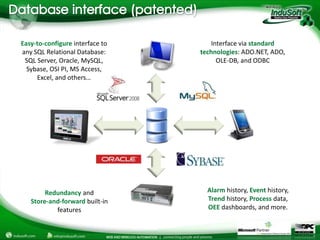
Easy-to-configure interface to       Interface via standard
any SQL Relational Database:     technologies: ADO.NET, ADO,
 SQL Server, Oracle, MySQL,            OLE-DB, and ODBC
  Sybase, OSI PI, MS Access,
     Excel, and others…


        Redundancy and             Alarm history, Event history,
   Store-and-forward built-in      Trend history, Process data,
           features                OEE dashboards, and more.
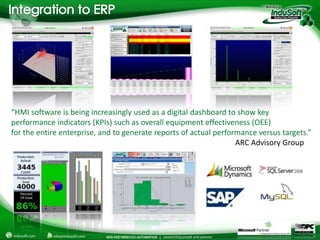
“HMI software is being increasingly used as a digital dashboard to show key
performance indicators (KPIs) such as overall equipment effectiveness (OEE)
for the entire enterprise, and to generate reports of actual performance versus targets.”
                                                                   ARC Advisory Group
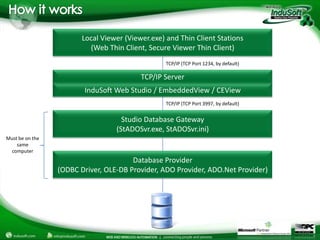
Local Viewer (Viewer.exe) and Thin Client Stations
                          (Web Thin Client, Secure Viewer Thin Client)
                                                  TCP/IP (TCP Port 1234, by default)

                                          TCP/IP Server
                        InduSoft Web Studio / EmbeddedView / CEView
                                                  TCP/IP (TCP Port 3997, by default)


                                    Studio Database Gateway
                                  (StADOSvr.exe, StADOSvr.ini)
Must be on the
    same
 computer
                                       Database Provider
                 (ODBC Driver, OLE-DB Provider, ADO Provider, ADO.Net Provider)
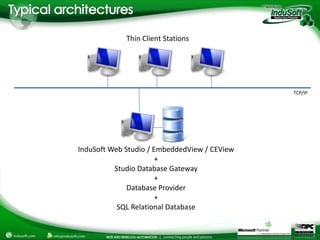
Thin Client Stations


                                              TCP/IP


InduSoft Web Studio / EmbeddedView / CEView
                       +
          Studio Database Gateway
                       +
              Database Provider
                       +
           SQL Relational Database
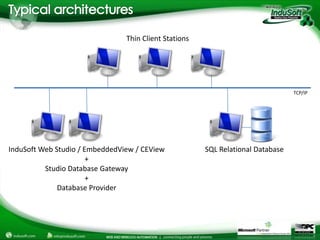
Thin Client Stations


                                                                                 TCP/IP


InduSoft Web Studio / EmbeddedView / CEView            SQL Relational Database
                       +
          Studio Database Gateway
                       +
              Database Provider
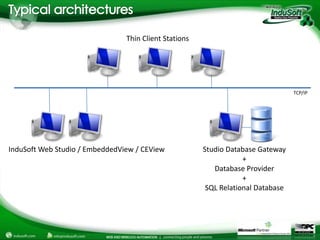
Thin Client Stations


                                                                                  TCP/IP


InduSoft Web Studio / EmbeddedView / CEView            Studio Database Gateway
                                                                   +
                                                          Database Provider
                                                                   +
                                                        SQL Relational Database
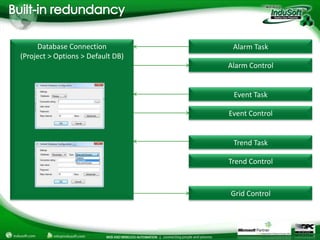
Database Connection            Alarm Task
(Project > Options > Default DB)
                                   Alarm Control


                                    Event Task

                                   Event Control


                                    Trend Task

                                   Trend Control


                                   Grid Control
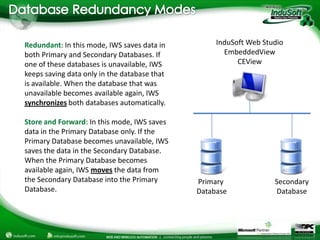
Redundant: In this mode, IWS saves data in         InduSoft Web Studio
both Primary and Secondary Databases. If             EmbeddedView
one of these databases is unavailable, IWS               CEView
keeps saving data only in the database that
is available. When the database that was
unavailable becomes available again, IWS
synchronizes both databases automatically.

Store and Forward: In this mode, IWS saves
data in the Primary Database only. If the
Primary Database becomes unavailable, IWS
saves the data in the Secondary Database.
When the Primary Database becomes
available again, IWS moves the data from
the Secondary Database into the Primary       Primary              Secondary
Database.                                     Database             Database
Email
   (US)           info@indusoft.com
   (Brazil)       info@indusoft.com.br
   (Germany)      info@indusoft-germany.de
                                                            USA
Support           support@indusoft.com
Web site
   (English)      www.indusoft.com
   (Portuguese)   www.indusoft.com.br
   (German)       www.indusoft-germany.de         Brazil
Phone             (512) 349-0334 (US)
                  +55-11-3293-9139 (Brazil)
                  +49 (0) 6227-732510 (Germany)            Germany
Toll-Free         877-INDUSOFT (877-463-8763)
Fax               (512) 349-0375

InduSoft Database Redundancy Webinar

  • 3.
    Easy-to-configure interface to Interface via standard any SQL Relational Database: technologies: ADO.NET, ADO, SQL Server, Oracle, MySQL, OLE-DB, and ODBC Sybase, OSI PI, MS Access, Excel, and others… Redundancy and Alarm history, Event history, Store-and-forward built-in Trend history, Process data, features OEE dashboards, and more.
  • 4.
    “HMI software isbeing increasingly used as a digital dashboard to show key performance indicators (KPIs) such as overall equipment effectiveness (OEE) for the entire enterprise, and to generate reports of actual performance versus targets.” ARC Advisory Group
  • 5.
    Local Viewer (Viewer.exe)and Thin Client Stations (Web Thin Client, Secure Viewer Thin Client) TCP/IP (TCP Port 1234, by default) TCP/IP Server InduSoft Web Studio / EmbeddedView / CEView TCP/IP (TCP Port 3997, by default) Studio Database Gateway (StADOSvr.exe, StADOSvr.ini) Must be on the same computer Database Provider (ODBC Driver, OLE-DB Provider, ADO Provider, ADO.Net Provider)
  • 6.
    Thin Client Stations TCP/IP InduSoft Web Studio / EmbeddedView / CEView + Studio Database Gateway + Database Provider + SQL Relational Database
  • 7.
    Thin Client Stations TCP/IP InduSoft Web Studio / EmbeddedView / CEView SQL Relational Database + Studio Database Gateway + Database Provider
  • 8.
    Thin Client Stations TCP/IP InduSoft Web Studio / EmbeddedView / CEView Studio Database Gateway + Database Provider + SQL Relational Database
  • 9.
    Database Connection Alarm Task (Project > Options > Default DB) Alarm Control Event Task Event Control Trend Task Trend Control Grid Control
  • 10.
    Redundant: In thismode, IWS saves data in InduSoft Web Studio both Primary and Secondary Databases. If EmbeddedView one of these databases is unavailable, IWS CEView keeps saving data only in the database that is available. When the database that was unavailable becomes available again, IWS synchronizes both databases automatically. Store and Forward: In this mode, IWS saves data in the Primary Database only. If the Primary Database becomes unavailable, IWS saves the data in the Secondary Database. When the Primary Database becomes available again, IWS moves the data from the Secondary Database into the Primary Primary Secondary Database. Database Database
  • 12.
    Email (US) info@indusoft.com (Brazil) info@indusoft.com.br (Germany) info@indusoft-germany.de USA Support support@indusoft.com Web site (English) www.indusoft.com (Portuguese) www.indusoft.com.br (German) www.indusoft-germany.de Brazil Phone (512) 349-0334 (US) +55-11-3293-9139 (Brazil) +49 (0) 6227-732510 (Germany) Germany Toll-Free 877-INDUSOFT (877-463-8763) Fax (512) 349-0375