Designing and Planning Webpages
(Session 1)
1
HTML
HTML is a computer language used to describe what is to appear on a web
page.
HTML stands for Hyper Text Markup Language.
You can view the HTML that makes up any web page by right-
clicking on the pages and selecting view source.
2
HTML
This is a sample HTML page
3
HTML
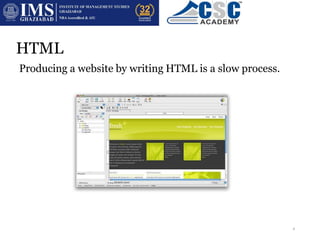
Producing a website by writing HTML is a slow process.
It’s more common to use WYSIWYG software to do this. They allow the user to
drag and drop and format content and then create the HTML source
automatically.
4
Browsers
A web browser is a program which lets you display the
information from websites.
Browsers interpret HTML to display correct web page
layout
Features:
● Favourites / Bookmarks
● History
● Preferences (zoom, print)
● Transfer of files across internet (FTP)
5
Browsers
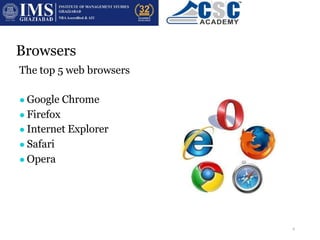
The top 5 web browsers are:
● Google Chrome
● Firefox
● Internet Explorer
● Safari
● Opera
6
URLs
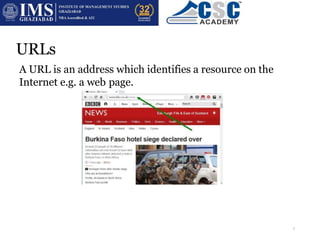
A URL is an address which identifies a resource on the
Internet e.g. a web page.
URL is short for Uniform Resource Locator
7
URLs
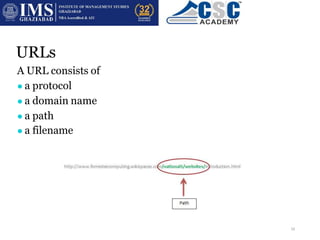
A URL consists of
● a protocol
● a domain name
● a path
● a filename
8
URLs
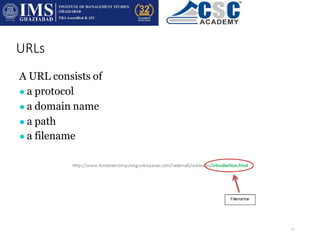
A URL consists of
● a protocol
● a domain name
● a path
● a filename
9
URLs
A URL consists of
● a protocol
● a domain name
● a path
● a filename
10
URLs
A URL consists of
● a protocol
● a domain name
● a path
● a filename
11
Hyperlinks
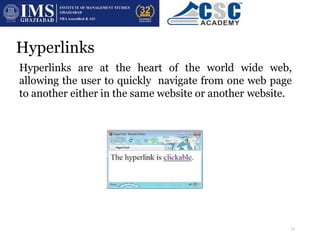
Hyperlinks are at the heart of the world wide web,
allowing the user to quickly navigate from one web page
to another either in the same website or another website.
12
Hyperlinks
Hyperlinks can be absolute or relative.
An absolute hyperlink uses a complete URL
e.g. http://forrestercomputing.wikispaces.com
13
Hyperlinks
Hyperlinks can be absolute or relative.
A relative hyperlink will describe the path from the
current file location to the destination file location.
e.g. a web page called news.html located in the same folder
as the current web page could be accessed by the relative
address /news.html
14
Hyperlinks
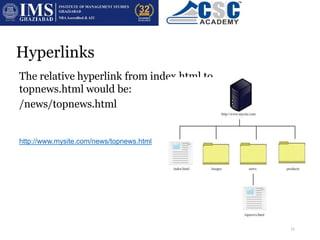
The relative hyperlink from index.html to
topnews.html would be:
/news/topnews.html
The absolute link would be:
http://www.mysite.com/news/topnews.html
15
Hotspots
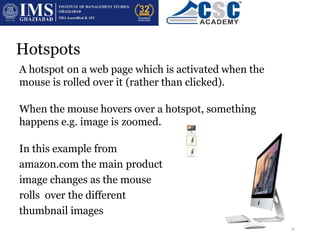
A hotspot on a web page which is activated when the
mouse is rolled over it (rather than clicked).
When the mouse hovers over a hotspot, something
happens e.g. image is zoomed.
In this example from
amazon.com the main product
image changes as the mouse
rolls over the different
thumbnail images
16
Navigation
There are a range of ways to navigate the internet using a web browser:
● Entering the URL of a web page
● Using a search engine to find a specific web page
● Using bookmarks to navigate to a favourite page
● Using history to navigate to a recently viewed page
● Clicking hyperlinks
● Clicking breadcrumbs to visit pages further up in the
structure
● Using forward and backward buttons on a browser
17

web1-intro-160116141157.pptx

  • 1.
    Designing and PlanningWebpages (Session 1) 1
  • 2.
    HTML HTML is acomputer language used to describe what is to appear on a web page. HTML stands for Hyper Text Markup Language. You can view the HTML that makes up any web page by right- clicking on the pages and selecting view source. 2
  • 3.
    HTML This is asample HTML page 3
  • 4.
    HTML Producing a websiteby writing HTML is a slow process. It’s more common to use WYSIWYG software to do this. They allow the user to drag and drop and format content and then create the HTML source automatically. 4
  • 5.
    Browsers A web browseris a program which lets you display the information from websites. Browsers interpret HTML to display correct web page layout Features: ● Favourites / Bookmarks ● History ● Preferences (zoom, print) ● Transfer of files across internet (FTP) 5
  • 6.
    Browsers The top 5web browsers are: ● Google Chrome ● Firefox ● Internet Explorer ● Safari ● Opera 6
  • 7.
    URLs A URL isan address which identifies a resource on the Internet e.g. a web page. URL is short for Uniform Resource Locator 7
  • 8.
    URLs A URL consistsof ● a protocol ● a domain name ● a path ● a filename 8
  • 9.
    URLs A URL consistsof ● a protocol ● a domain name ● a path ● a filename 9
  • 10.
    URLs A URL consistsof ● a protocol ● a domain name ● a path ● a filename 10
  • 11.
    URLs A URL consistsof ● a protocol ● a domain name ● a path ● a filename 11
  • 12.
    Hyperlinks Hyperlinks are atthe heart of the world wide web, allowing the user to quickly navigate from one web page to another either in the same website or another website. 12
  • 13.
    Hyperlinks Hyperlinks can beabsolute or relative. An absolute hyperlink uses a complete URL e.g. http://forrestercomputing.wikispaces.com 13
  • 14.
    Hyperlinks Hyperlinks can beabsolute or relative. A relative hyperlink will describe the path from the current file location to the destination file location. e.g. a web page called news.html located in the same folder as the current web page could be accessed by the relative address /news.html 14
  • 15.
    Hyperlinks The relative hyperlinkfrom index.html to topnews.html would be: /news/topnews.html The absolute link would be: http://www.mysite.com/news/topnews.html 15
  • 16.
    Hotspots A hotspot ona web page which is activated when the mouse is rolled over it (rather than clicked). When the mouse hovers over a hotspot, something happens e.g. image is zoomed. In this example from amazon.com the main product image changes as the mouse rolls over the different thumbnail images 16
  • 17.
    Navigation There are arange of ways to navigate the internet using a web browser: ● Entering the URL of a web page ● Using a search engine to find a specific web page ● Using bookmarks to navigate to a favourite page ● Using history to navigate to a recently viewed page ● Clicking hyperlinks ● Clicking breadcrumbs to visit pages further up in the structure ● Using forward and backward buttons on a browser 17