
By Sukanya Sen Sharma and
           Shaishavi Kashikar
     MBICT College
 Introduction
       1.Why Web Designing?
       2.What And Why?
       3.Web Standards


   HTML
   XML
   Comparison
Web design is the practice of creating presentations of
content (usually hypertext or hypermedia) that are
delivered to an end-user through the Worldwide
Web,using a Web browser or other Web-enabled
software. The intent of web design is to create a website²a
collection of electronic documents and applications that
reside on a Webserver/servers. The website may include
text, images, soundsand other content, and may be
interactive.
 Why                         Web designing –
1. First impression counts     3 important element
2. Professionalism           1. Colour and tone of
3. Competition
                                 website
                             2. Use of graphics
                             3. Quality of contents
 What is the use of web
  designing
1. Marketing
2. Advertisement
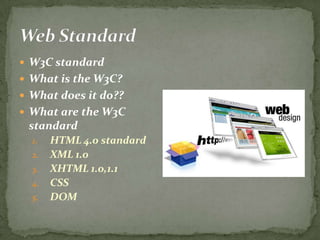
 W3C standard
 What is the W3C?
 What does it do??
 What are the W3C
 standard
  1.   HTML 4.0 standard
  2.   XML 1.0
  3.   XHTML 1.0,1.1
  4.   CSS
  5.   DOM
 An Webpage is best thought as a
  set of VIRTUAL ELEMENTS
  (paragraphs,titles,tables,list,ima
  ges).

 HTML(Hyper type Markup
  Language ) defines the structure
  and layout of elements of a Web
  page with a variety of TAGS.

 Each tag may have a set of
  attributes that modify the
  appearance and layout of the
  virtual elements contained by
  the tag.
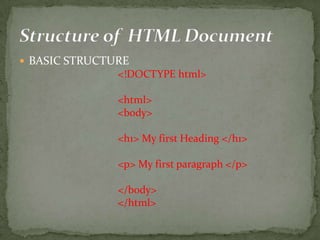
 BASIC STRUCTURE
               <!DOCTYPE html>

               <html>
               <body>

               <h1> My first Heading </h1>

               <p> My first paragraph </p>

               </body>
               </html>
 1. Used to display any type of document on the host
  computer.
 2. A versatile language and can be used on any
  platform.
 3. Used to make the text look attractive.
 4. Can link one document with another.


                                          8
~ Background
~Bgcolor
~size
~font
~color
~Left margin
~Top margin….etc
The above mentioned attributes are explained in the
  next section.

                                      9
10
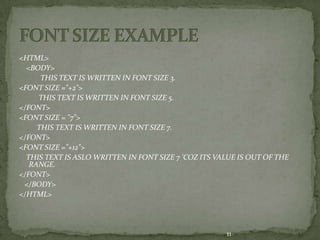
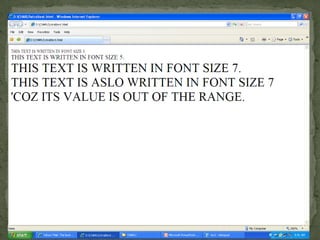
<HTML>
  <BODY>
      THIS TEXT IS WRITTEN IN FONT SIZE 3.
<FONT SIZE ="+2">
     THIS TEXT IS WRITTEN IN FONT SIZE 5.
</FONT>
<FONT SIZE = "7">
     THIS TEXT IS WRITTEN IN FONT SIZE 7.
</FONT>
<FONT SIZE ="+12">
  THIS TEXT IS ASLO WRITTEN IN FONT SIZE 7 'COZ ITS VALUE IS OUT OF THE
   RANGE.
</FONT>
 </BODY>
</HTML>


                                                      11
12
13
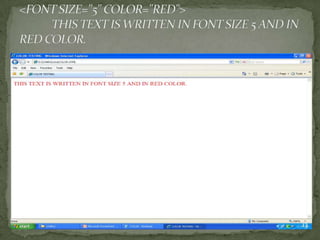
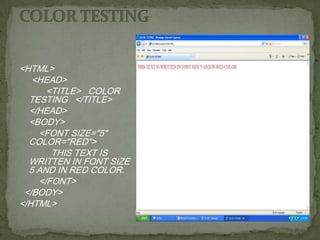
<HTML>
   <HEAD>
      <TITLE> COLOR
  TESTING </TITLE>
  </HEAD>
  <BODY>
    <FONT SIZE="5"
  COLOR="RED">
       THIS TEXT IS
  WRITTEN IN FONT SIZE
  5 AND IN RED COLOR.
    </FONT>
 </BODY>
</HTML>
HTML defines six levels of heading.
The heading element is written as:
             <Hn>………………………</Hn>
Where n - level of heading and can take values from 1
 to 6.
 H1 -- most prominent heading ,while
 H6 --least prominent heading.
 Headings are usually displayed in bolder and larger
 font than the normal text.
NOTE: (From the example next)- An extra line is
 generally inserted above and below the heading.
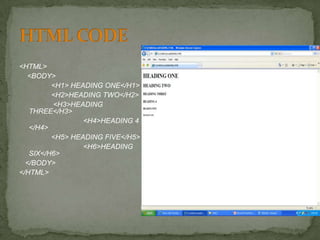
<HTML>
  <BODY>
         <H1> HEADING ONE</H1>
         <H2>HEADING TWO</H2>
         <H3>HEADING
   THREE</H3>
                 <H4>HEADING 4
   </H4>
         <H5> HEADING FIVE</H5>
                 <H6>HEADING
   SIX</H6>
  </BODY>
</HTML>
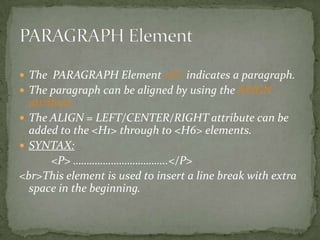
 The PARAGRAPH Element <P> indicates a paragraph.
 The paragraph can be aligned by using the ALIGN
  attribute.
 The ALIGN = LEFT/CENTER/RIGHT attribute can be
  added to the <H1> through to <H6> elements.
 SYNTAX:
       <P> ……………………………..</P>
<br>This element is used to insert a line break with extra
  space in the beginning.
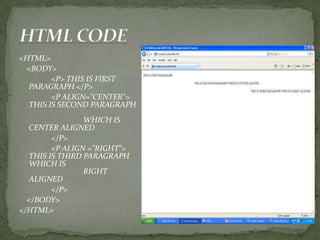
<HTML>
 <BODY>
        <P> THIS IS FIRST
  PARAGRAPH </P>
        <P ALIGN="CENTER">
  THIS IS SECOND PARAGRAPH
                WHICH IS
  CENTER ALIGNED
        </P>
        <P ALIGN ="RIGHT">
  THIS IS THIRD PARAGRAPH
  WHICH IS
                RIGHT
  ALIGNED
        </P>
  </BODY>
</HTML>
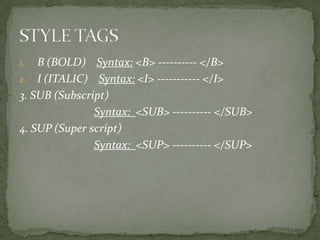
1.  B (BOLD) Syntax: <B> ---------- </B>
2. I (ITALIC) Syntax: <I> ----------- </I>
3. SUB (Subscript)
               Syntax: <SUB> ---------- </SUB>
4. SUP (Super script)
               Syntax: <SUP> ---------- </SUP>
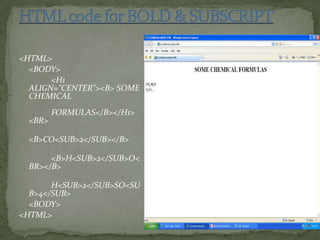
<HTML>
  <BODY>
       <H1
  ALIGN="CENTER"><B> SOME
  CHEMICAL
        FORMULAS</B></H1>
 <BR>

 <B>CO<SUB>2</SUB></B>

      <B>H<SUB>2</SUB>O<
 BR></B>

       H<SUB>2</SUB>SO<SU
  B>4</SUB>
  <BODY>
<HTML>
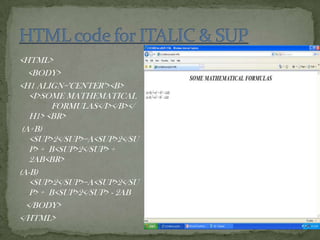
<HTML>
   <BODY>
<H1 ALIGN="CENTER"><B>
   <I>SOME MATHEMATICAL
         FORMULAS</I></B></
   H1> <BR>
 (A+B)
   <SUP>2</SUP>=A<SUP>2</SU
   P> + B<SUP>2</SUP> +
   2AB<BR>
(A-B)
   <SUP>2</SUP>=A<SUP>2</SU
   P> + B<SUP>2</SUP> - 2AB
  </BODY>
</HTML>
 eXtensible Markup Language
 Markup language for documents containing
  structured information
 Defined by four specifications:
   XML, the Extensible Markup Language
   XLL, the Extensible Linking Language
   XSL, the Extensible Style Language
   XUA, the XML User Agent
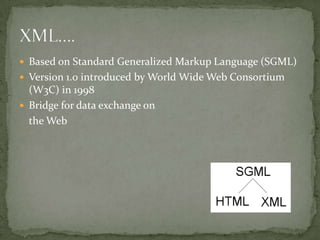
 Based on Standard Generalized Markup Language (SGML)
 Version 1.0 introduced by World Wide Web Consortium
  (W3C) in 1998
 Bridge for data exchange on
  the Web
 An XML element is made up of a start tag, an end tag,
    and data in between.
   Example:
      <director> Matthew Dunn </director>
   Example of another element with the same value:
      <actor> Matthew Dunn </actor>
   XML tags are case-sensitive:
       <CITY> <City> <city>
   XML can abbreviate empty elements, for example:
    <married> </married> can be abbreviated to
    <married/>
 An attribute is a name-value pair separated by an equal sign
  (=).
 Example:
    <City ZIP=“94608”> Emeryville </City>
 Attributes are used to attach additional, secondary
  information to an element.
 A basic XML document is an XML element that
  can, but might not, include nested XML elements.
 Example:
  <books>
     <book isbn=“123”>
        <title> Second Chance </title>
        <author> Matthew Dunn </author>
     </book>
  </books>
 Authoring guidelines:
   All elements must have an end tag.
   All elements must be cleanly nested (overlapping
    elements are not allowed).
   All attribute values must be enclosed in quotation
    marks.
   Each document must have a unique first element, the
    root node.
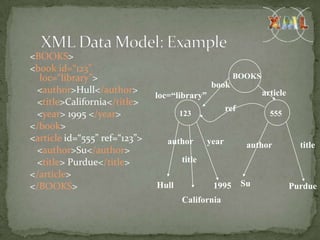
<BOOKS>
<book id=“123”
  loc=“library”>                                        BOOKS
                                                book
 <author>Hull</author>                                           article
                               loc=“library”
 <title>California</title>
                                                      ref
 <year> 1995 </year>                  123                          555
</book>
<article id=“555” ref=“123”>      author       year          author          title
 <author>Su</author>
 <title> Purdue</title>               title
</article>
</BOOKS>                       Hull             1995        Su             Purdue
                                      California
 A data island is an XML document that exists
 within an HTML page.

 The <XML> element marks the beginning of
 the data island, and its ID attribute provides a
 name that you can use to reference the data
 island.
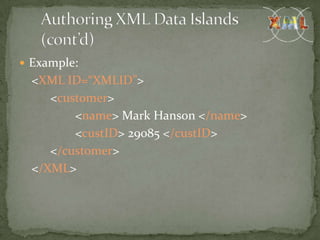
 Example:
  <XML ID=“XMLID”>
     <customer>
         <name> Mark Hanson </name>
         <custID> 29085 </custID>
     </customer>
  </XML>
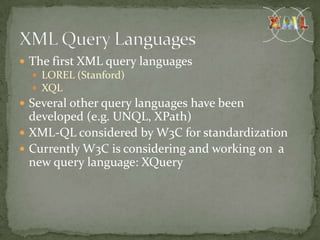
 The first XML query languages
    LOREL (Stanford)
    XQL
 Several other query languages have been
  developed (e.g. UNQL, XPath)
 XML-QL considered by W3C for standardization
 Currently W3C is considering and working on a
  new query language: XQuery
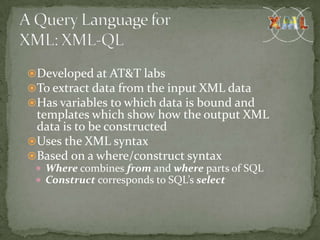
Developed at AT&T labs
To extract data from the input XML data
Has variables to which data is bound and
 templates which show how the output XML
 data is to be constructed
Uses the XML syntax
Based on a where/construct syntax
  Where combines from and where parts of SQL
  Construct corresponds to SQL’s select
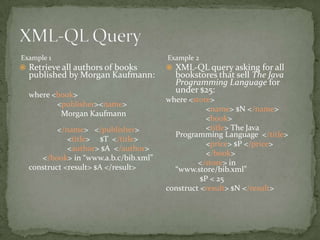
Example 1                             Example 2
 Retrieve all authors of books        XML-QL query asking for all
  published by Morgan Kaufmann:         bookstores that sell The Java
                                        Programming Language for
                                        under $25:
  where <book>
                                      where <store>
         <publisher><name>
                                                  <name> $N </name>
          Morgan Kaufmann
                                                  <book>
          </name> </publisher>                    <title> The Java
                                        Programming Language </title>
             <title> $T </title>
                                                  <price> $P </price>
             <author> $A </author>
                                                  </book>
     </book> in “www.a.b.c/bib.xml”
                                               </store> in
  construct <result> $A </result>       “www.store/bib.xml”
                                                $P < 25
                                      construct <result> $N </result>
 Semi structured data is often encountered in data exchange and
  integration
 At the sources the data may be structured (e.g. from relational
  databases)
 A mediator is complex software component that
  integrates and transforms data from one or several
  sources using a declarative specification
 Two main contexts:
    Data conversion: converts data between two different models
       e.g. by translating data from a relational database
        into XML
    Data integration: integrates data from different sources into a
     common view
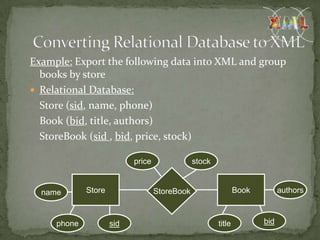
Example: Export the following data into XML and group
  books by store
 Relational Database:
  Store (sid, name, phone)
  Book (bid, title, authors)
  StoreBook (sid , bid, price, stock)

                           price               stock


  name       Store                 StoreBook                   Book         authors


     phone           sid                               title          bid
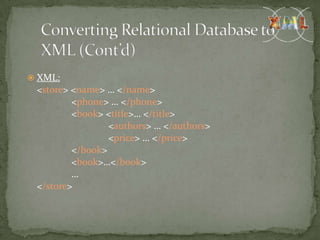
 XML:
 <store> <name> … </name>
         <phone> … </phone>
         <book> <title>… </title>
                 <authors> … </authors>
                 <price> … </price>
         </book>
         <book>…</book>
         …
 </store>
 Integration of data sharing


 Security
XML                           HTML
 XML fundamentally           HTML specifies
  separates contents (data    presentation.
  and informati0n) from
  presentation.
 XML allows tags and
                              HTML explicitly defines
  grammars to be used.        a set of legal tags as well
                              as grammar.
 BROWSER COMPATIBILITY


 NAMING CONVENSIONS


 QUALITY OF CONTENT


 GRAPHICS AND IMAGES
Web page concept  Basic

Web page concept Basic

  • 1.
    By Sukanya SenSharma and Shaishavi Kashikar MBICT College
  • 2.
     Introduction  1.Why Web Designing?  2.What And Why?  3.Web Standards  HTML  XML  Comparison
  • 3.
    Web design isthe practice of creating presentations of content (usually hypertext or hypermedia) that are delivered to an end-user through the Worldwide Web,using a Web browser or other Web-enabled software. The intent of web design is to create a website²a collection of electronic documents and applications that reside on a Webserver/servers. The website may include text, images, soundsand other content, and may be interactive.
  • 4.
     Why  Web designing – 1. First impression counts 3 important element 2. Professionalism 1. Colour and tone of 3. Competition website 2. Use of graphics 3. Quality of contents  What is the use of web designing 1. Marketing 2. Advertisement
  • 5.
     W3C standard What is the W3C?  What does it do??  What are the W3C standard 1. HTML 4.0 standard 2. XML 1.0 3. XHTML 1.0,1.1 4. CSS 5. DOM
  • 6.
     An Webpageis best thought as a set of VIRTUAL ELEMENTS (paragraphs,titles,tables,list,ima ges).  HTML(Hyper type Markup Language ) defines the structure and layout of elements of a Web page with a variety of TAGS.  Each tag may have a set of attributes that modify the appearance and layout of the virtual elements contained by the tag.
  • 7.
     BASIC STRUCTURE <!DOCTYPE html> <html> <body> <h1> My first Heading </h1> <p> My first paragraph </p> </body> </html>
  • 8.
     1. Usedto display any type of document on the host computer.  2. A versatile language and can be used on any platform.  3. Used to make the text look attractive.  4. Can link one document with another. 8
  • 9.
    ~ Background ~Bgcolor ~size ~font ~color ~Left margin ~Topmargin….etc The above mentioned attributes are explained in the next section. 9
  • 10.
  • 11.
    <HTML> <BODY> THIS TEXT IS WRITTEN IN FONT SIZE 3. <FONT SIZE ="+2"> THIS TEXT IS WRITTEN IN FONT SIZE 5. </FONT> <FONT SIZE = "7"> THIS TEXT IS WRITTEN IN FONT SIZE 7. </FONT> <FONT SIZE ="+12"> THIS TEXT IS ASLO WRITTEN IN FONT SIZE 7 'COZ ITS VALUE IS OUT OF THE RANGE. </FONT> </BODY> </HTML> 11
  • 12.
  • 13.
  • 14.
    <HTML> <HEAD> <TITLE> COLOR TESTING </TITLE> </HEAD> <BODY> <FONT SIZE="5" COLOR="RED"> THIS TEXT IS WRITTEN IN FONT SIZE 5 AND IN RED COLOR. </FONT> </BODY> </HTML>
  • 15.
    HTML defines sixlevels of heading. The heading element is written as: <Hn>………………………</Hn> Where n - level of heading and can take values from 1 to 6. H1 -- most prominent heading ,while H6 --least prominent heading. Headings are usually displayed in bolder and larger font than the normal text. NOTE: (From the example next)- An extra line is generally inserted above and below the heading.
  • 16.
    <HTML> <BODY> <H1> HEADING ONE</H1> <H2>HEADING TWO</H2> <H3>HEADING THREE</H3> <H4>HEADING 4 </H4> <H5> HEADING FIVE</H5> <H6>HEADING SIX</H6> </BODY> </HTML>
  • 17.
     The PARAGRAPHElement <P> indicates a paragraph.  The paragraph can be aligned by using the ALIGN attribute.  The ALIGN = LEFT/CENTER/RIGHT attribute can be added to the <H1> through to <H6> elements.  SYNTAX: <P> ……………………………..</P> <br>This element is used to insert a line break with extra space in the beginning.
  • 18.
    <HTML> <BODY> <P> THIS IS FIRST PARAGRAPH </P> <P ALIGN="CENTER"> THIS IS SECOND PARAGRAPH WHICH IS CENTER ALIGNED </P> <P ALIGN ="RIGHT"> THIS IS THIRD PARAGRAPH WHICH IS RIGHT ALIGNED </P> </BODY> </HTML>
  • 19.
    1. B(BOLD) Syntax: <B> ---------- </B> 2. I (ITALIC) Syntax: <I> ----------- </I> 3. SUB (Subscript) Syntax: <SUB> ---------- </SUB> 4. SUP (Super script) Syntax: <SUP> ---------- </SUP>
  • 20.
    <HTML> <BODY> <H1 ALIGN="CENTER"><B> SOME CHEMICAL FORMULAS</B></H1> <BR> <B>CO<SUB>2</SUB></B> <B>H<SUB>2</SUB>O< BR></B> H<SUB>2</SUB>SO<SU B>4</SUB> <BODY> <HTML>
  • 21.
    <HTML> <BODY> <H1 ALIGN="CENTER"><B> <I>SOME MATHEMATICAL FORMULAS</I></B></ H1> <BR> (A+B) <SUP>2</SUP>=A<SUP>2</SU P> + B<SUP>2</SUP> + 2AB<BR> (A-B) <SUP>2</SUP>=A<SUP>2</SU P> + B<SUP>2</SUP> - 2AB </BODY> </HTML>
  • 22.
     eXtensible MarkupLanguage  Markup language for documents containing structured information  Defined by four specifications:  XML, the Extensible Markup Language  XLL, the Extensible Linking Language  XSL, the Extensible Style Language  XUA, the XML User Agent
  • 23.
     Based onStandard Generalized Markup Language (SGML)  Version 1.0 introduced by World Wide Web Consortium (W3C) in 1998  Bridge for data exchange on the Web
  • 24.
     An XMLelement is made up of a start tag, an end tag, and data in between.  Example: <director> Matthew Dunn </director>  Example of another element with the same value: <actor> Matthew Dunn </actor>  XML tags are case-sensitive: <CITY> <City> <city>  XML can abbreviate empty elements, for example: <married> </married> can be abbreviated to <married/>
  • 25.
     An attributeis a name-value pair separated by an equal sign (=).  Example: <City ZIP=“94608”> Emeryville </City>  Attributes are used to attach additional, secondary information to an element.
  • 26.
     A basicXML document is an XML element that can, but might not, include nested XML elements.  Example: <books> <book isbn=“123”> <title> Second Chance </title> <author> Matthew Dunn </author> </book> </books>
  • 27.
     Authoring guidelines:  All elements must have an end tag.  All elements must be cleanly nested (overlapping elements are not allowed).  All attribute values must be enclosed in quotation marks.  Each document must have a unique first element, the root node.
  • 28.
    <BOOKS> <book id=“123” loc=“library”> BOOKS book <author>Hull</author> article loc=“library” <title>California</title> ref <year> 1995 </year> 123 555 </book> <article id=“555” ref=“123”> author year author title <author>Su</author> <title> Purdue</title> title </article> </BOOKS> Hull 1995 Su Purdue California
  • 29.
     A dataisland is an XML document that exists within an HTML page.  The <XML> element marks the beginning of the data island, and its ID attribute provides a name that you can use to reference the data island.
  • 30.
     Example: <XML ID=“XMLID”> <customer> <name> Mark Hanson </name> <custID> 29085 </custID> </customer> </XML>
  • 31.
     The firstXML query languages  LOREL (Stanford)  XQL  Several other query languages have been developed (e.g. UNQL, XPath)  XML-QL considered by W3C for standardization  Currently W3C is considering and working on a new query language: XQuery
  • 32.
    Developed at AT&Tlabs To extract data from the input XML data Has variables to which data is bound and templates which show how the output XML data is to be constructed Uses the XML syntax Based on a where/construct syntax  Where combines from and where parts of SQL  Construct corresponds to SQL’s select
  • 33.
    Example 1 Example 2  Retrieve all authors of books  XML-QL query asking for all published by Morgan Kaufmann: bookstores that sell The Java Programming Language for under $25: where <book> where <store> <publisher><name> <name> $N </name> Morgan Kaufmann <book> </name> </publisher> <title> The Java Programming Language </title> <title> $T </title> <price> $P </price> <author> $A </author> </book> </book> in “www.a.b.c/bib.xml” </store> in construct <result> $A </result> “www.store/bib.xml” $P < 25 construct <result> $N </result>
  • 34.
     Semi structureddata is often encountered in data exchange and integration  At the sources the data may be structured (e.g. from relational databases)  A mediator is complex software component that integrates and transforms data from one or several sources using a declarative specification  Two main contexts:  Data conversion: converts data between two different models  e.g. by translating data from a relational database into XML  Data integration: integrates data from different sources into a common view
  • 35.
    Example: Export thefollowing data into XML and group books by store  Relational Database: Store (sid, name, phone) Book (bid, title, authors) StoreBook (sid , bid, price, stock) price stock name Store StoreBook Book authors phone sid title bid
  • 36.
     XML: <store><name> … </name> <phone> … </phone> <book> <title>… </title> <authors> … </authors> <price> … </price> </book> <book>…</book> … </store>
  • 37.
     Integration ofdata sharing  Security
  • 38.
    XML HTML  XML fundamentally  HTML specifies separates contents (data presentation. and informati0n) from presentation.  XML allows tags and  HTML explicitly defines grammars to be used. a set of legal tags as well as grammar.
  • 39.
     BROWSER COMPATIBILITY NAMING CONVENSIONS  QUALITY OF CONTENT  GRAPHICS AND IMAGES