Tutorial - 7
• call, apply & bind
• pollyfill
• debouncing
• throttling
• currying
• debouncing examples
• currying examples
• async & defer
• event bubbling & Trickling
• event delegation
• prototype & prototypal
inheritance
• CORS, Prefflight request
• iterators
• generators
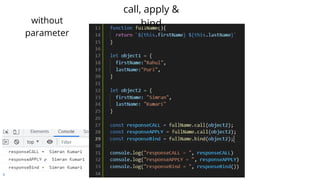
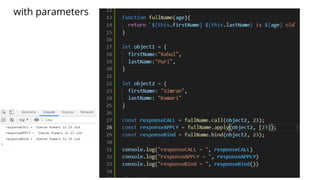
call, apply & bind
• They all are used for performing function
borrowing
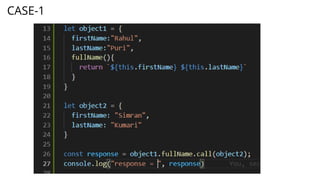
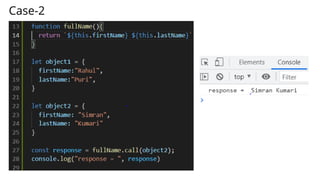
• Function borrowing happens between a
function and object
⚬ That function can exist inside another object
(CASE - 1) or outside all together (CASE-2)
CASE-1
Case-2
call, apply &
bind
without
parameter
with parameters
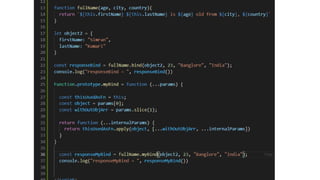
• Polyfill for bind:
⚬ is basically the methodology to make our own bind() function when our
browser doesn't support bind()
• Polyfill defination:
⚬ A polyfill is a piece of code that implements the features that you expect
the browser to support natively.
⚬ For better understanding :
■ https://javascript.info/polyfills
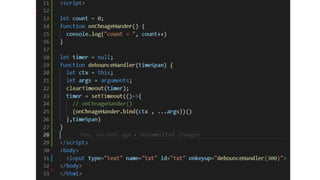
Debouncing
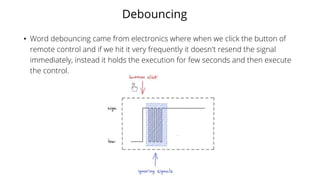
• Word debouncing came from electronics where when we click the button of
remote control and if we hit it very frequently it doesn't resend the signal
immediately, instead it holds the execution for few seconds and then execute
the control.
Debouncing in JS
• Similarly, when we have same kind of operation in
web-development, e.g. searching or scroll-event
or screen-resizing and if those operations are
associated with an API call, then we use
debouncing for improving browser performance.
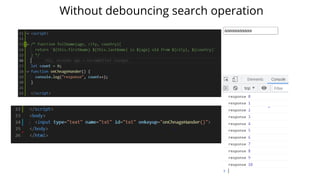
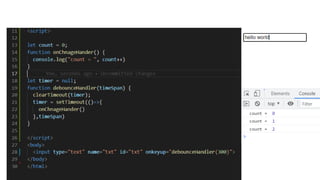
• Let's see the code effect:
Without debouncing search operation
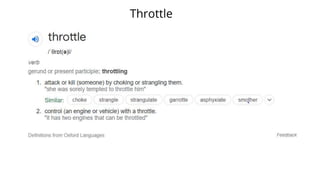
Throttle
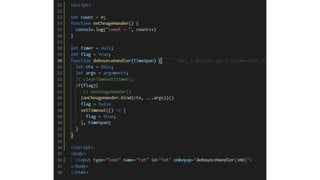
Throttle in JS
• Throttle in JS means when there is a scenario that there are many
requests aligned and with intention to optimize the browser
speed, we ignore all of the requests which are coming under a
given time span.
• e.g: We are searching "Samsung Note 8" in a search bar
⚬ As soon as we have started typing it with a time span of 300ms
then, we have typed S[amsun]g, so everything took for
example as 400ms and [amsung] took 300ms so, NO API
CALL will happen for [amsung], it will just be started with S
and when g will be typed then only a call will happen
Debouncing vs Throttling
• Lets consider time span of 300 ms in either cases, so
• Debouncing: means your request will occur with time gap of 300 ms, i.e. If you
are typing "Hello World", then
⚬ if you are typing it as Hello[pause of 300 ms] <space> World
• Hence if the user is taking a pause and that pause is >=300ms so in that time
being no API call will occur
• Throttling: means that when there are many requests e.g. user made
consecutive 100 requests and timespan is of 10ms so there will be any request
only after each 10 seconds only, hence in between requests are throttled or
cancelled or killed
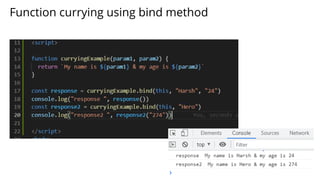
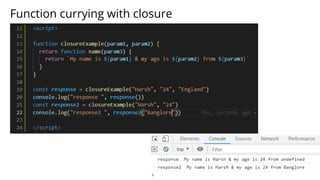
Function currying
• Function currying can be achieved by 2 ways in JS:
⚬ Using function's closures
⚬ Using bind()
• It basically means to execute a function of any other
function
• Its depth may reach to any extent, depending on
user requirement
Function currying using bind method
Function currying with closure
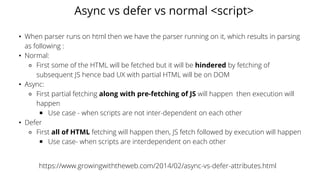
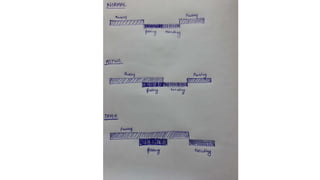
Async vs defer vs normal <script>
• When parser runs on html then we have the parser running on it, which results in parsing
as following :
• Normal:
⚬ First some of the HTML will be fetched but it will be hindered by fetching of
subsequent JS hence bad UX with partial HTML will be on DOM
• Async:
⚬ First partial fetching along with pre-fetching of JS will happen then execution will
happen
■ Use case - when scripts are not inter-dependent on each other
• Defer
⚬ First all of HTML fetching will happen then, JS fetch followed by execution will happen
■ Use case- when scripts are interdependent on each other
https://www.growingwiththeweb.com/2014/02/async-vs-defer-attributes.html
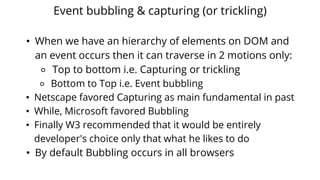
Event bubbling & capturing (or trickling)
• When we have an hierarchy of elements on DOM and
an event occurs then it can traverse in 2 motions only:
⚬ Top to bottom i.e. Capturing or trickling
⚬ Bottom to Top i.e. Event bubbling
• Netscape favored Capturing as main fundamental in past
• While, Microsoft favored Bubbling
• Finally W3 recommended that it would be entirely
developer's choice only that what he likes to do
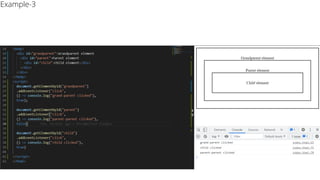
• By default Bubbling occurs in all browsers
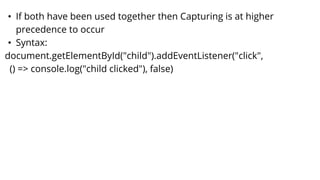
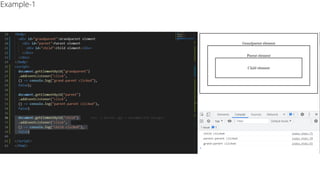
• If both have been used together then Capturing is at higher
precedence to occur
• Syntax:
document.getElementById("child").addEventListener("click",
() => console.log("child clicked"), false)
Example-1
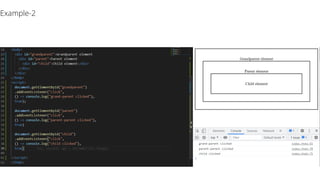
Example-2
Example-3
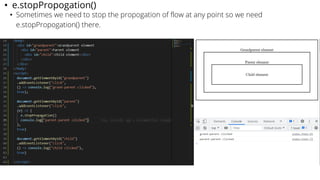
• e.stopPropogation()
• Sometimes we need to stop the propogation of flow at any point so we need
e.stopPropogation() there.
Event delegation
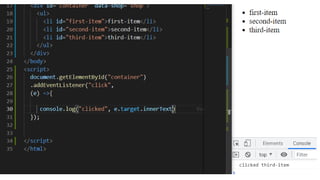
• Event delegation is the methodology according to which a component
uses Event bubbling and help us to let parent element's event-handler
listen any event occuring on any of that parent's children element.
• Hence, it helps in optimization w.r.t. (PROS)
⚬ Speed of our application
⚬ Saving memory
⚬ And letting us write readable code with less number of LOC
• Conditions to be considered while applying event delegation are: (CONS)
⚬ We must be aware about usage of stopPropagation()
⚬ Not all events are bubbled up hence not all events supports event
delegation too
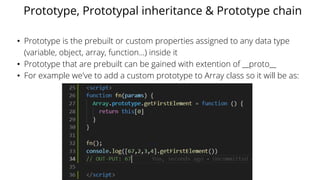
Prototype, Prototypal inheritance & Prototype chain
• Prototype is the prebuilt or custom properties assigned to any data type
(variable, object, array, function...) inside it
• Prototype that are prebuilt can be gained with extention of __proto__
• For example we've to add a custom prototype to Array class so it will be as:
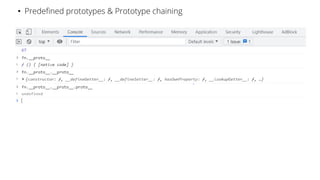
• Predefined prototypes & Prototype chaining
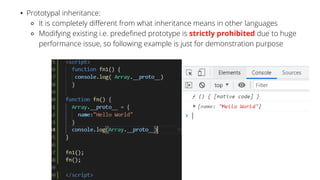
• Prototypal inheritance:
⚬ It is completely different from what inheritance means in other languages
⚬ Modifying existing i.e. predefined prototype is strictly prohibited due to huge
performance issue, so following example is just for demonstration purpose
CORS & Preflight Requests & OPTIONS Method
• CORS- Cross Origin Resource Sharing
• It helps to share various types of resources across several
origins
• By "origin" we mean platforms or hosts or domain of your
application
• CORS solves the problems like:
⚬ Resource sharing across different domains
⚬ Resource sharing across different subdomains
⚬ Resource sharing across different ports
⚬ Resource sharing across different protocols
How CORS Works actually
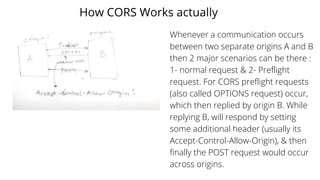
Whenever a communication occurs
between two separate origins A and B
then 2 major scenarios can be there :
1- normal request & 2- Preflight
request. For CORS preflight requests
(also called OPTIONS request) occur,
which then replied by origin B. While
replying B, will respond by setting
some additional header (usually its
Accept-Control-Allow-Origin), & then
finally the POST request would occur
across origins.
Iterators
Generators
• Generators are the functions that gives/yield any required value
without even considering the storage of the entire set of value
• Its is signified by usage of * between keyword function and that
function's name
• it gives value from the function by usage of keyword yield or
return
• But the only difference between yield and return is execution of
function continues after coming across yield in control flow and
that's not so with return keyword
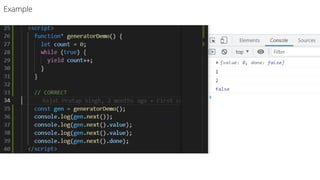
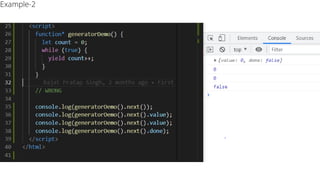
• Generator function on executing yield will give an object as:
⚬ {next:{ value: <whatever value>, done: <boolean>}}
Example
Example-2

Web development basics (Part-6)

  • 1.
    Tutorial - 7 •call, apply & bind • pollyfill • debouncing • throttling • currying • debouncing examples • currying examples • async & defer • event bubbling & Trickling • event delegation • prototype & prototypal inheritance • CORS, Prefflight request • iterators • generators
  • 2.
    call, apply &bind • They all are used for performing function borrowing • Function borrowing happens between a function and object ⚬ That function can exist inside another object (CASE - 1) or outside all together (CASE-2)
  • 3.
  • 4.
  • 5.
  • 6.
  • 7.
    • Polyfill forbind: ⚬ is basically the methodology to make our own bind() function when our browser doesn't support bind() • Polyfill defination: ⚬ A polyfill is a piece of code that implements the features that you expect the browser to support natively. ⚬ For better understanding : ■ https://javascript.info/polyfills
  • 9.
    Debouncing • Word debouncingcame from electronics where when we click the button of remote control and if we hit it very frequently it doesn't resend the signal immediately, instead it holds the execution for few seconds and then execute the control.
  • 10.
    Debouncing in JS •Similarly, when we have same kind of operation in web-development, e.g. searching or scroll-event or screen-resizing and if those operations are associated with an API call, then we use debouncing for improving browser performance. • Let's see the code effect:
  • 11.
  • 14.
  • 15.
    Throttle in JS •Throttle in JS means when there is a scenario that there are many requests aligned and with intention to optimize the browser speed, we ignore all of the requests which are coming under a given time span. • e.g: We are searching "Samsung Note 8" in a search bar ⚬ As soon as we have started typing it with a time span of 300ms then, we have typed S[amsun]g, so everything took for example as 400ms and [amsung] took 300ms so, NO API CALL will happen for [amsung], it will just be started with S and when g will be typed then only a call will happen
  • 17.
    Debouncing vs Throttling •Lets consider time span of 300 ms in either cases, so • Debouncing: means your request will occur with time gap of 300 ms, i.e. If you are typing "Hello World", then ⚬ if you are typing it as Hello[pause of 300 ms] <space> World • Hence if the user is taking a pause and that pause is >=300ms so in that time being no API call will occur • Throttling: means that when there are many requests e.g. user made consecutive 100 requests and timespan is of 10ms so there will be any request only after each 10 seconds only, hence in between requests are throttled or cancelled or killed
  • 18.
    Function currying • Functioncurrying can be achieved by 2 ways in JS: ⚬ Using function's closures ⚬ Using bind() • It basically means to execute a function of any other function • Its depth may reach to any extent, depending on user requirement
  • 19.
  • 20.
  • 21.
    Async vs defervs normal <script> • When parser runs on html then we have the parser running on it, which results in parsing as following : • Normal: ⚬ First some of the HTML will be fetched but it will be hindered by fetching of subsequent JS hence bad UX with partial HTML will be on DOM • Async: ⚬ First partial fetching along with pre-fetching of JS will happen then execution will happen ■ Use case - when scripts are not inter-dependent on each other • Defer ⚬ First all of HTML fetching will happen then, JS fetch followed by execution will happen ■ Use case- when scripts are interdependent on each other https://www.growingwiththeweb.com/2014/02/async-vs-defer-attributes.html
  • 23.
    Event bubbling &capturing (or trickling) • When we have an hierarchy of elements on DOM and an event occurs then it can traverse in 2 motions only: ⚬ Top to bottom i.e. Capturing or trickling ⚬ Bottom to Top i.e. Event bubbling • Netscape favored Capturing as main fundamental in past • While, Microsoft favored Bubbling • Finally W3 recommended that it would be entirely developer's choice only that what he likes to do • By default Bubbling occurs in all browsers
  • 24.
    • If bothhave been used together then Capturing is at higher precedence to occur • Syntax: document.getElementById("child").addEventListener("click", () => console.log("child clicked"), false)
  • 25.
  • 26.
  • 27.
  • 28.
    • e.stopPropogation() • Sometimeswe need to stop the propogation of flow at any point so we need e.stopPropogation() there.
  • 29.
    Event delegation • Eventdelegation is the methodology according to which a component uses Event bubbling and help us to let parent element's event-handler listen any event occuring on any of that parent's children element. • Hence, it helps in optimization w.r.t. (PROS) ⚬ Speed of our application ⚬ Saving memory ⚬ And letting us write readable code with less number of LOC • Conditions to be considered while applying event delegation are: (CONS) ⚬ We must be aware about usage of stopPropagation() ⚬ Not all events are bubbled up hence not all events supports event delegation too
  • 31.
    Prototype, Prototypal inheritance& Prototype chain • Prototype is the prebuilt or custom properties assigned to any data type (variable, object, array, function...) inside it • Prototype that are prebuilt can be gained with extention of __proto__ • For example we've to add a custom prototype to Array class so it will be as:
  • 32.
    • Predefined prototypes& Prototype chaining
  • 33.
    • Prototypal inheritance: ⚬It is completely different from what inheritance means in other languages ⚬ Modifying existing i.e. predefined prototype is strictly prohibited due to huge performance issue, so following example is just for demonstration purpose
  • 34.
    CORS & PreflightRequests & OPTIONS Method • CORS- Cross Origin Resource Sharing • It helps to share various types of resources across several origins • By "origin" we mean platforms or hosts or domain of your application • CORS solves the problems like: ⚬ Resource sharing across different domains ⚬ Resource sharing across different subdomains ⚬ Resource sharing across different ports ⚬ Resource sharing across different protocols
  • 35.
    How CORS Worksactually Whenever a communication occurs between two separate origins A and B then 2 major scenarios can be there : 1- normal request & 2- Preflight request. For CORS preflight requests (also called OPTIONS request) occur, which then replied by origin B. While replying B, will respond by setting some additional header (usually its Accept-Control-Allow-Origin), & then finally the POST request would occur across origins.
  • 36.
  • 37.
    Generators • Generators arethe functions that gives/yield any required value without even considering the storage of the entire set of value • Its is signified by usage of * between keyword function and that function's name • it gives value from the function by usage of keyword yield or return • But the only difference between yield and return is execution of function continues after coming across yield in control flow and that's not so with return keyword • Generator function on executing yield will give an object as: ⚬ {next:{ value: <whatever value>, done: <boolean>}}
  • 38.
  • 39.