PLAN
1. Intro to JS
2. JavaScript Integration with a html page
3. Js Variables
4. Js Operators
5. Js Functions
6. Loops
7. Switch
8. Js Events
9. Js Classes
WHY STUDY JAVASCRIPT?
JavaScript is one of the 3 languages all web
developers must learn:
1. HTML to define the content of web pages
2. CSS to specify the layout of web pages
3. JavaScript to program the behavior of web pages
EXAMPLES
INTRODUCTION
▪ JavaScript was designed to add interactivity to HTML pages
▪ JavaScript is a scripting language - a scripting language is a lightweight
programming language
▪ JavaScript is an interpreted language (means that scripts execute without
preliminary compilation)
▪ JavaScript is supported by all major browsers
▪ The language is dynamically typed
▪ No need to declare the type of a variable
▪ The type of a variable can change over time
JAVASCRIPT INTEGRATION WITH A HTML
PAGE
1. Inside the HTML File
2. As a external File
Inside Html File
▪ We can put js inside a script tag
▪ It can included in head or body
of the file
External Js file
• It separates HTML and code
• It makes HTML and JavaScript
easier to read and maintain
• Cached JavaScript files can speed
up page loads
• Use script tag and src attribute
HOW TO RUN JS
▪ Using browser developer tools(testing purpose only)
▪ Using html page
JS VARIABLES
Using var
▪ Variables defined with var can be
Redeclared.
▪ Variables defined with var can be
Declared after use.
▪ Variables defined with var do not
have a Block Scope.
Using let
▪ Variables defined
with let cannot be Redeclared.
▪ Variables defined with let must
be Declared before use.
▪ Variables defined with let have
Block Scope.
const
▪ Variables defined with const cannot be Redeclared.
▪ Variables defined with const cannot be Reassigned.
▪ Variables defined with const have Block Scope.
OPERATORS
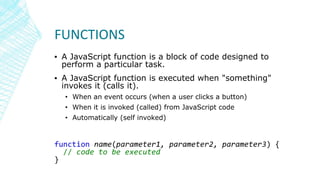
FUNCTIONS
▪ A JavaScript function is a block of code designed to
perform a particular task.
▪ A JavaScript function is executed when "something"
invokes it (calls it).
• When an event occurs (when a user clicks a button)
• When it is invoked (called) from JavaScript code
• Automatically (self invoked)
function name(parameter1, parameter2, parameter3) {
// code to be executed
}
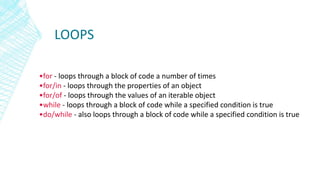
LOOPS
•for - loops through a block of code a number of times
•for/in - loops through the properties of an object
•for/of - loops through the values of an iterable object
•while - loops through a block of code while a specified condition is true
•do/while - also loops through a block of code while a specified condition is true
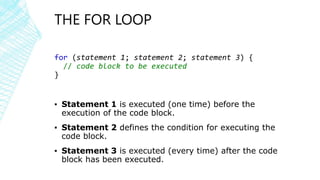
THE FOR LOOP
for (statement 1; statement 2; statement 3) {
// code block to be executed
}
▪ Statement 1 is executed (one time) before the
execution of the code block.
▪ Statement 2 defines the condition for executing the
code block.
▪ Statement 3 is executed (every time) after the code
block has been executed.
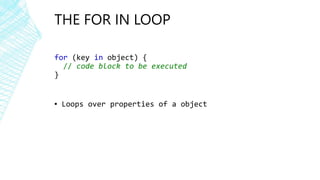
THE FOR IN LOOP
for (key in object) {
// code block to be executed
}
▪ Loops over properties of a object
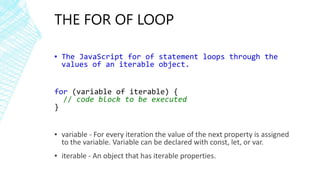
THE FOR OF LOOP
▪ The JavaScript for of statement loops through the
values of an iterable object.
for (variable of iterable) {
// code block to be executed
}
▪ variable - For every iteration the value of the next property is assigned
to the variable. Variable can be declared with const, let, or var.
▪ iterable - An object that has iterable properties.
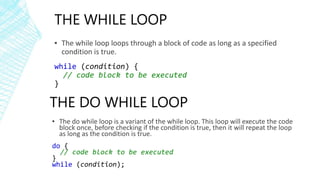
THE WHILE LOOP
▪ The while loop loops through a block of code as long as a specified
condition is true.
while (condition) {
// code block to be executed
}
THE DO WHILE LOOP
▪ The do while loop is a variant of the while loop. This loop will execute the code
block once, before checking if the condition is true, then it will repeat the loop
as long as the condition is true.
do {
// code block to be executed
}
while (condition);
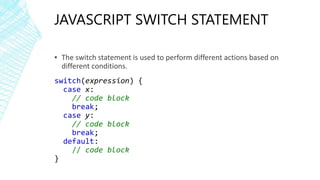
JAVASCRIPT SWITCH STATEMENT
▪ The switch statement is used to perform different actions based on
different conditions.
switch(expression) {
case x:
// code block
break;
case y:
// code block
break;
default:
// code block
}
JS EVENTS
▪ An HTML event can be something the browser does, or
something a user does.
▪ Ex-
• An HTML web page has finished loading
• An HTML input field was changed
• An HTML button was clicked
Refernce
https://www.w3schools.com/jsref/dom_obj_event.asp
JAVASCRIPT CLASSES
▪ Use the keyword class to create a class.
▪ Always add a method named constructor():
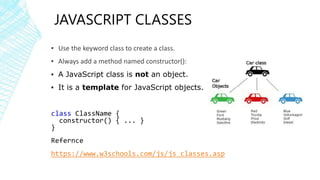
▪ A JavaScript class is not an object.
▪ It is a template for JavaScript objects.
class ClassName {
constructor() { ... }
}
Refernce
https://www.w3schools.com/js/js_classes.asp

JavaScript Basics

  • 2.
    PLAN 1. Intro toJS 2. JavaScript Integration with a html page 3. Js Variables 4. Js Operators 5. Js Functions 6. Loops 7. Switch 8. Js Events 9. Js Classes
  • 3.
    WHY STUDY JAVASCRIPT? JavaScriptis one of the 3 languages all web developers must learn: 1. HTML to define the content of web pages 2. CSS to specify the layout of web pages 3. JavaScript to program the behavior of web pages
  • 4.
  • 5.
    INTRODUCTION ▪ JavaScript wasdesigned to add interactivity to HTML pages ▪ JavaScript is a scripting language - a scripting language is a lightweight programming language ▪ JavaScript is an interpreted language (means that scripts execute without preliminary compilation) ▪ JavaScript is supported by all major browsers ▪ The language is dynamically typed ▪ No need to declare the type of a variable ▪ The type of a variable can change over time
  • 6.
    JAVASCRIPT INTEGRATION WITHA HTML PAGE 1. Inside the HTML File 2. As a external File
  • 7.
    Inside Html File ▪We can put js inside a script tag ▪ It can included in head or body of the file External Js file • It separates HTML and code • It makes HTML and JavaScript easier to read and maintain • Cached JavaScript files can speed up page loads • Use script tag and src attribute
  • 8.
    HOW TO RUNJS ▪ Using browser developer tools(testing purpose only) ▪ Using html page
  • 9.
    JS VARIABLES Using var ▪Variables defined with var can be Redeclared. ▪ Variables defined with var can be Declared after use. ▪ Variables defined with var do not have a Block Scope. Using let ▪ Variables defined with let cannot be Redeclared. ▪ Variables defined with let must be Declared before use. ▪ Variables defined with let have Block Scope.
  • 10.
    const ▪ Variables definedwith const cannot be Redeclared. ▪ Variables defined with const cannot be Reassigned. ▪ Variables defined with const have Block Scope.
  • 11.
  • 12.
    FUNCTIONS ▪ A JavaScriptfunction is a block of code designed to perform a particular task. ▪ A JavaScript function is executed when "something" invokes it (calls it). • When an event occurs (when a user clicks a button) • When it is invoked (called) from JavaScript code • Automatically (self invoked) function name(parameter1, parameter2, parameter3) { // code to be executed }
  • 13.
    LOOPS •for - loopsthrough a block of code a number of times •for/in - loops through the properties of an object •for/of - loops through the values of an iterable object •while - loops through a block of code while a specified condition is true •do/while - also loops through a block of code while a specified condition is true
  • 14.
    THE FOR LOOP for(statement 1; statement 2; statement 3) { // code block to be executed } ▪ Statement 1 is executed (one time) before the execution of the code block. ▪ Statement 2 defines the condition for executing the code block. ▪ Statement 3 is executed (every time) after the code block has been executed.
  • 15.
    THE FOR INLOOP for (key in object) { // code block to be executed } ▪ Loops over properties of a object
  • 16.
    THE FOR OFLOOP ▪ The JavaScript for of statement loops through the values of an iterable object. for (variable of iterable) { // code block to be executed } ▪ variable - For every iteration the value of the next property is assigned to the variable. Variable can be declared with const, let, or var. ▪ iterable - An object that has iterable properties.
  • 17.
    THE WHILE LOOP ▪The while loop loops through a block of code as long as a specified condition is true. while (condition) { // code block to be executed } THE DO WHILE LOOP ▪ The do while loop is a variant of the while loop. This loop will execute the code block once, before checking if the condition is true, then it will repeat the loop as long as the condition is true. do { // code block to be executed } while (condition);
  • 18.
    JAVASCRIPT SWITCH STATEMENT ▪The switch statement is used to perform different actions based on different conditions. switch(expression) { case x: // code block break; case y: // code block break; default: // code block }
  • 19.
    JS EVENTS ▪ AnHTML event can be something the browser does, or something a user does. ▪ Ex- • An HTML web page has finished loading • An HTML input field was changed • An HTML button was clicked Refernce https://www.w3schools.com/jsref/dom_obj_event.asp
  • 20.
    JAVASCRIPT CLASSES ▪ Usethe keyword class to create a class. ▪ Always add a method named constructor(): ▪ A JavaScript class is not an object. ▪ It is a template for JavaScript objects. class ClassName { constructor() { ... } } Refernce https://www.w3schools.com/js/js_classes.asp