Web Design
BY
CISCO MARK
Chapter 1: Introduction
HTML
HTML
 Hypertext Markup Language
HTML Documents describe webpages
HTML tags are keywords surrounded by angled brackets like <html>
HTML tags normally comes in pairs like <b> and </b>
The first tag in a pair is the start tag (opening tag)
The second tag in the pair is the end tag (closing tag)
Implementation
Where do we write html code?
1) Text Editor
◦ WordPad (in Windows OS)
◦ Gedit Text Editor (Ubuntu in Linux)
2) FrontPage or Dreamweaver
Where do we execute html code?
3) Double click that html file or
4) Right click ---- Open with Internet Explorer or any other browser.
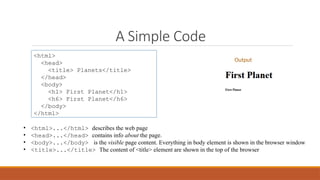
A Simple Code
<html>
<head>
<title> Planets</title>
</head>
<body>
<h1> First Planet</h1>
<h6> First Planet</h6>
</body>
</html>
• <html>...</html> describes the web page
• <head>...</head> contains info about the page.
• <body>...</body> is the visible page content. Everything in body element is shown in the browser window
• <title>...</title> The content of <title> element are shown in the top of the browser
Output
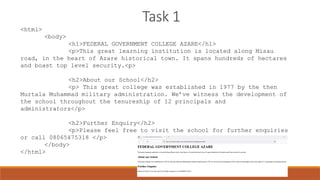
Task 1
<html>
<body>
<h1>FEDERAL GOVERNMENT COLLEGE AZARE</h1>
<p>This great learning institution is located along Misau
road, in the heart of Azare historical town. It spans hundreds of hectares
and boast top level security.<p>
<h2>About our School</h2>
<p> This great college was established in 1977 by the then
Murtala Muhammad military administration. We’ve witness the development of
the school throughout the tenureship of 12 principals and
administrators</p>
<h2>Further Enquiry</h2>
<p>Please feel free to visit the school for further enquiries
or call 08065475318 </p>
</body>
</html>
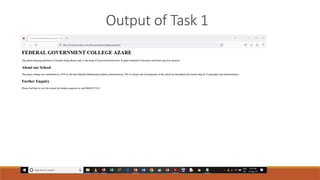
Output of Task 1
Web Design
BY
CISCO MARK
Chapter 2: Text
HTML Rules and Break
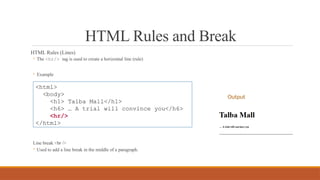
HTML Rules (Lines)
◦ The <hr/> tag is used to create a horizontal line (rule)
◦ Example
Line break <br />
◦ Used to add a line break in the middle of a paragraph.
<html>
<body>
<h1> Talba Mall</h1>
<h6> … A trial will convince you</h6>
<hr/>
</html>
Output
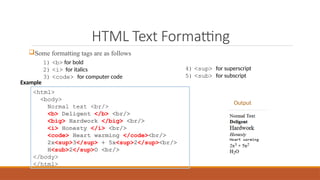
HTML Text Formatting
Some formatting tags are as follows
<html>
<body>
Normal text <br/>
<b> Deligent </b> <br/>
<big> Hardwork </big> <br/>
<i> Honesty </i> <br/>
<code> Heart warming </code><br/>
2x<sup>3</sup> + 5x<sup>2</sup><br/>
H<sub>2</sup>O <br/>
</body>
</html>
1) <b> for bold
2) <i> for italics
3) <code> for computer code
4) <sup> for superscript
5) <sub> for subscript
Output
Example
Attribute
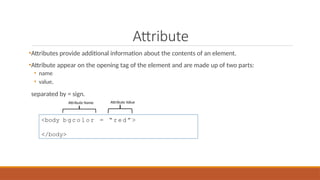
•Attributes provide additional information about the contents of an element.
•Attribute appear on the opening tag of the element and are made up of two parts:
• name
• value,
separated by = sign.
<body b g c o l o r = “ r e d ” >
</body>
Attribute Name Attribute Value
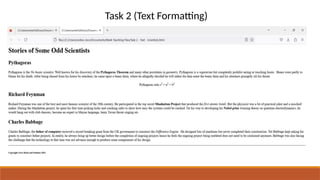
Task 2 (Text Formatting)
Web Design
BY
CISCO MARK
Chapter 3: Lists
HTML Lists
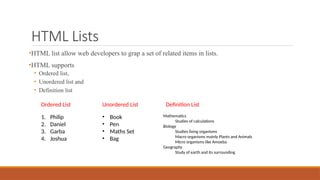
•HTML list allow web developers to grap a set of related items in lists.
•HTML supports
• Ordered list,
• Unordered list and
• Definition list
• Book
• Pen
• Maths Set
• Bag
1. Philip
2. Daniel
3. Garba
4. Joshua
Mathematics
Studies of calculations
Biology
Studies living organisms
Macro organisms mainly Plants and Animals
Micro organisms like Amoeba
Geography
Study of earth and its surrounding
Unordered List
Ordered List Definition List
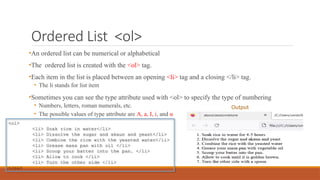
Ordered List <ol>
•An ordered list can be numerical or alphabetical
•The ordered list is created with the <ol> tag.
•Each item in the list is placed between an opening <li> tag and a closing </li> tag.
• The li stands for list item
•Sometimes you can see the type attribute used with <ol> to specify the type of numbering
• Numbers, letters, roman numerals, etc.
• The possible values of type attribute are A, a, I, i, and α
<ol>
<li> Soak rice in water</li>
<li> Dissolve the sugar and akaun and yeast</li>
<li> Combine the rice with the yeasted water</li>
<li> Grease masa pan with oil </li>
<li> Scoop your batter into the pan. </li>
<li> Allow to cook </li>
<li> Turn the other side </li>
</ol>
Output
Unordered List
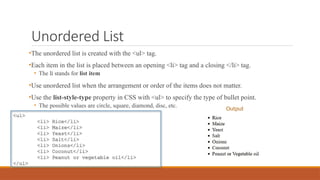
•The unordered list is created with the <ul> tag.
•Each item in the list is placed between an opening <li> tag and a closing </li> tag.
• The li stands for list item
•Use unordered list when the arrangement or order of the items does not matter.
•Use the list-style-type property in CSS with <ul> to specify the type of bullet point.
• The possible values are circle, square, diamond, disc, etc.
<ul>
<li> Rice</li>
<li> Maize</li>
<li> Yeast</li>
<li> Salt</li>
<li> Onions</li>
<li> Coconut</li>
<li> Peanut or vegetable oil</li>
</ul>
Output
Nested List
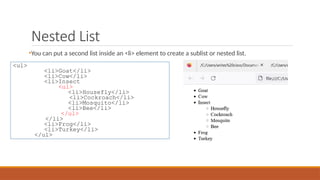
•You can put a second list inside an <li> element to create a sublist or nested list.
<ul>
<li>Goat</li>
<li>Cow</li>
<li>Insect
<ul>
<li>Housefly</li>
<li>Cockroach</li>
<li>Mosquito</li>
<li>Bee</li>
</ul>
</li>
<li>Frog</li>
<li>Turkey</li>
</ul>
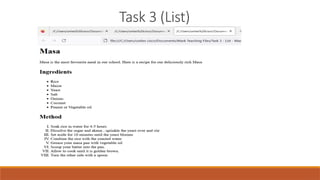
Task 3 (List)
Web Design
BY
CISCO MARK
Chapter 4: Links
HTML Links <a>
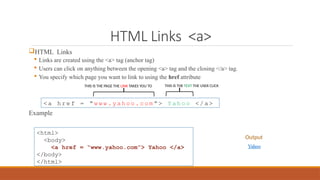
HTML Links
 Links are created using the <a> tag (anchor tag)
 Users can click on anything between the opening <a> tag and the closing </a> tag.
 You specify which page you want to link to using the href attribute
Example
< a h r e f = “ w w w . y a h o o . c o m ” > Y a h o o < / a >
<html>
<body>
<a href = “www.yahoo.com”> Yahoo </a>
</body>
</html>
Output
THIS IS THE PAGE THE LINK TAKES YOU TO THIS IS THE TEXT THE USER CLICK
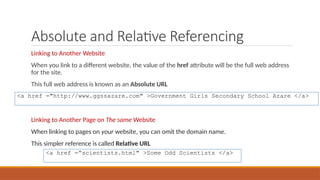
Absolute and Relative Referencing
Linking to Another Website
When you link to a different website, the value of the href attribute will be the full web address
for the site.
This full web address is known as an Absolute URL
Linking to Another Page on The same Website
When linking to pages on your website, you can omit the domain name.
This simpler reference is called Relative URL
<a href ="http://www.ggssazare.com" >Government Girls Secondary School Azare </a>
<a href =“scientists.html" >Some Odd Scientists </a>
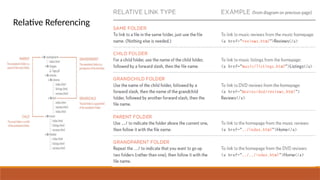
Relative Referencing
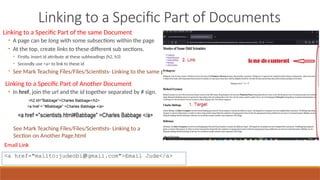
Linking to a Specific Part of Documents
Linking to a Specific Part of the same Document
• A page can be long with some subsections within the page
• At the top, create links to these different sub sections.
• Firstly, insert id attribute at these subheadings (h2, h3)
• Secondly use <a> to link to these id
◦ See Mark Teaching Files/Files/Scientists- Linking to the same page.html
Linking to a Specific Part of Another Document
• In href, join the url and the id together separated by # sign.
<a href="mailto:judeobi@gmail.com">Email Jude</a>
See Mark Teaching Files/Files/Scientists- Linking to a
Section on Another Page.html
Email Link
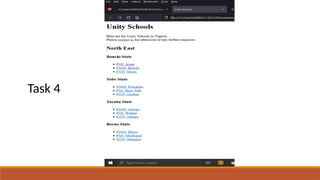
Task 4
Summary
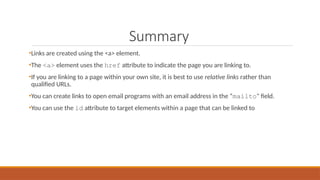
•Links are created using the <a> element.
•The <a> element uses the href attribute to indicate the page you are linking to.
•If you are linking to a page within your own site, it is best to use relative links rather than
qualified URLs.
•You can create links to open email programs with an email address in the “mailto" field.
•You can use the id attribute to target elements within a page that can be linked to
Web Design
BY
CISCO MARK
Chapter 5: Images
Image tag
HTML Images
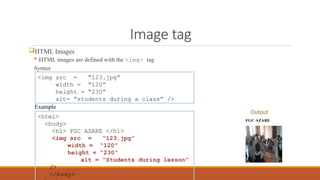
 HTML images are defined with the <img> tag
Syntax
<img src = “123.jpg”
width = “120”
height = “230”
alt= “students during a class” />
<html>
<body>
<h1> FGC AZARE </h1>
<img src = “123.jpg”
width = “120”
height = “230”
alt = “Students during lesson”
/>
</body>
Example
Output
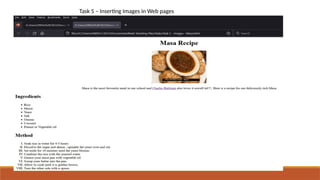
Task 5 – Inserting Images in Web pages
Web Design
BY
CISCO MARK
Chapter 6: Tables
HTML Tables
<table>
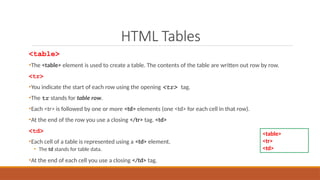
•The <table> element is used to create a table. The contents of the table are written out row by row.
<tr>
•You indicate the start of each row using the opening <tr> tag.
•The tr stands for table row.
•Each <tr> is followed by one or more <td> elements (one <td> for each cell in that row).
•At the end of the row you use a closing </tr> tag. <td>
<td>
•Each cell of a table is represented using a <td> element.
• The td stands for table data.
•At the end of each cell you use a closing </td> tag.
<table>
<tr>
<td>
HTML Tables
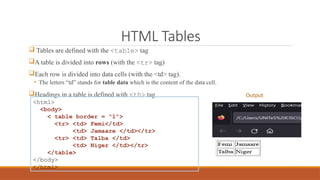
 Tables are defined with the <table> tag
A table is divided into rows (with the <tr> tag)
Each row is divided into data cells (with the <td> tag).
• The letters “td” stands for table data which is the content of the data cell.
Headings in a table is defined with <th> tag
<html>
<body>
< table border = "1">
<tr> <td> Femi</td>
<td> Jamaare </td></tr>
<tr> <td> Talba </td>
<td> Niger </td></tr>
</table>
</body>
</html>
Output
Table heading <th>
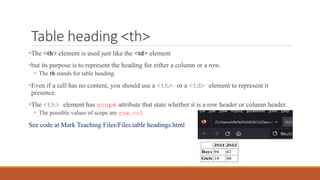
•The <th> element is used just like the <td> element
•but its purpose is to represent the heading for either a column or a row.
• The th stands for table heading.
•Even if a cell has no content, you should use a <th> or a <td> element to represent it
presence.
•The <th> element has scope attribute that state whether it is a row header or column header.
• The possible values of scope are row, col
See code at Mark Teaching Files/Files.table headings.html
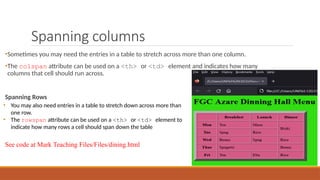
Spanning columns
•Sometimes you may need the entries in a table to stretch across more than one column.
•The colspan attribute can be used on a <th> or <td> element and indicates how many
columns that cell should run across.
Spanning Rows
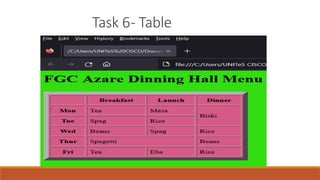
See code at Mark Teaching Files/Files/dining.html
• You may also need entries in a table to stretch down across more than
one row.
• The rowspan attribute can be used on a <th> or <td> element to
indicate how many rows a cell should span down the table
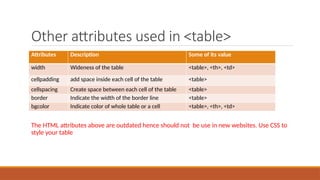
Other attributes used in <table>
The HTML attributes above are outdated hence should not be use in new websites. Use CSS to
style your table
Attributes Description Some of its value
width Wideness of the table <table>, <th>, <td>
cellpadding add space inside each cell of the table <table>
cellspacing Create space between each cell of the table <table>
border Indicate the width of the border line <table>
bgcolor Indicate color of whole table or a cell <table>, <th>, <td>
Task 6- Table
Summary
•The <table> element is used to add tables to a web page.
•A table is drawn out row by row. Each row is created with the <tr> element.
•Inside each row there are a number of cells represented by the <td> element (or <th> if it is a
header).
•You can make cells of a table span more than one row or column using the rowspan and
colspan attributes.
•For long tables you can split the table into a <thead>, <tbody>, and <tfoot>
Web Design
BY
CISCO MARK
Chapter 7: Forms
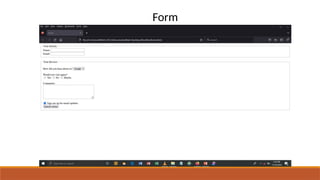
Form
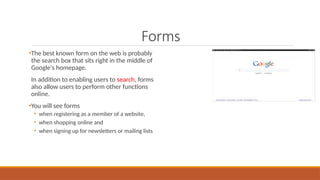
Forms
•The best known form on the web is probably
the search box that sits right in the middle of
Google's homepage.
In addition to enabling users to search, forms
also allow users to perform other functions
online.
•You will see forms
• when registering as a member of a website,
• when shopping online and
• when signing up for newsletters or mailing lists
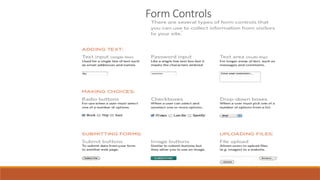
Form Controls
How Forms Work
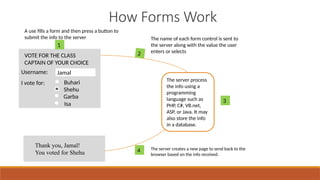
A use fills a form and then press a button to
submit the info to the server The name of each form control is sent to
the server along with the value the user
enters or selects
The server process
the info using a
programming
language such as
PHP, C#, VB.net,
ASP, or Java. It may
also store the info
in a database.
The server creates a new page to send back to the
browser based on the info received.
VOTE FOR THE CLASS
CAPTAIN OF YOUR CHOICE
Username: Jamal
I vote for: Buhari
Shehu
Garba
Isa
1
Thank you, Jamal!
You voted for Shehu
2
4
3
Forms
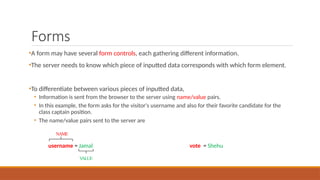
•A form may have several form controls, each gathering different information.
•The server needs to know which piece of inputted data corresponds with which form element.
•To differentiate between various pieces of inputted data,
• Information is sent from the browser to the server using name/value pairs.
• In this example, the form asks for the visitor's username and also for their favorite candidate for the
class captain position.
• The name/value pairs sent to the server are
username = Jamal vote = Shehu
NAME
V
ALUE
Form Structure
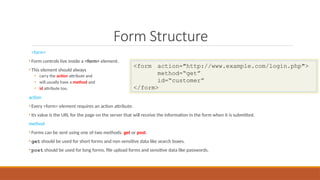
<form>
• Form controls live inside a <form> element.
• This element should always
• carry the action attribute and
• will usually have a method and
• id attribute too.
action
• Every <form> element requires an action attribute.
• Its value is the URL for the page on the server that will receive the information in the form when it is submitted.
method
• Forms can be sent using one of two methods: get or post.
• get should be used for short forms and non sensitive data like search boxes.
• post should be used for long forms, file upload forms and sensitive data like passwords.
<form action="http://www.example.com/login.php">
method=“get”
id=“customer”
</form>
Text input
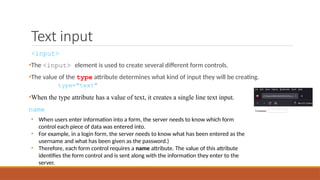
<input>
•The <input> element is used to create several different form controls.
•The value of the type attribute determines what kind of input they will be creating.
type="text"
•When the type attribute has a value of text, it creates a single line text input.
name
• When users enter information into a form, the server needs to know which form
control each piece of data was entered into.
• For example, in a login form, the server needs to know what has been entered as the
username and what has been given as the password.)
• Therefore, each form control requires a name attribute. The value of this attribute
identifies the form control and is sent along with the information they enter to the
server.
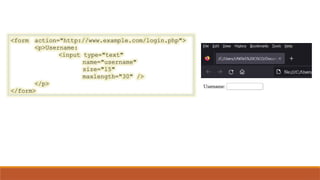
<form action="http://www.example.com/login.php">
<p>Username:
<input type="text"
name="username"
size="15"
maxlength="30" />
</p>
</form>
Password input
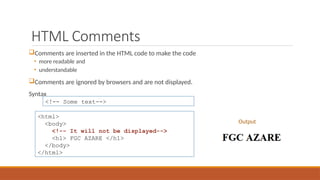
HTML Comments
Comments are inserted in the HTML code to make the code
• more readable and
• understandable
Comments are ignored by browsers and are not displayed.
Syntax
<!-- Some text-->
<html>
<body>
<!-- It will not be displayed-->
<h1> FGC AZARE </h1>
</body>
</html>
Output
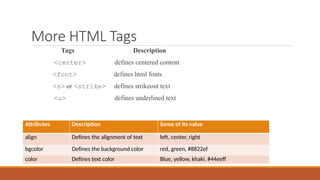
More HTML Tags
Tags Description
<center> defines centered content
<font> defines html fonts
<s> or <strike> defines strikeout text
<u> defines underlined text
Attributes Description Some of its value
align Defines the alignment of text left, center, right
bgcolor Defines the background color red, green, #8822ef
color Defines text color Blue, yellow, khaki, #44eeff
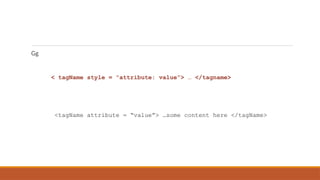
Gg
< tagName style = “attribute: value”> … </tagname>
<tagName attribute = “value”> …some content here </tagName>
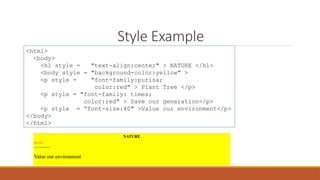
Style Example
<html>
<body>
<h1 style = "text-align:center" > NATURE </h1>
<body style = "background-color:yellow" >
<p style = "font-family:purisa;
color:red" > Plant Tree </p>
<p style = "font-family: times;
color:red" > Save our generation</p>
<p style = “font-size:40" >Value our environment</p>
</body>
</html>

Web Design HTML for beginners and advanced learners .pptx

  • 1.
  • 2.
    HTML HTML  Hypertext MarkupLanguage HTML Documents describe webpages HTML tags are keywords surrounded by angled brackets like <html> HTML tags normally comes in pairs like <b> and </b> The first tag in a pair is the start tag (opening tag) The second tag in the pair is the end tag (closing tag)
  • 3.
    Implementation Where do wewrite html code? 1) Text Editor ◦ WordPad (in Windows OS) ◦ Gedit Text Editor (Ubuntu in Linux) 2) FrontPage or Dreamweaver Where do we execute html code? 3) Double click that html file or 4) Right click ---- Open with Internet Explorer or any other browser.
  • 4.
    A Simple Code <html> <head> <title>Planets</title> </head> <body> <h1> First Planet</h1> <h6> First Planet</h6> </body> </html> • <html>...</html> describes the web page • <head>...</head> contains info about the page. • <body>...</body> is the visible page content. Everything in body element is shown in the browser window • <title>...</title> The content of <title> element are shown in the top of the browser Output
  • 5.
    Task 1 <html> <body> <h1>FEDERAL GOVERNMENTCOLLEGE AZARE</h1> <p>This great learning institution is located along Misau road, in the heart of Azare historical town. It spans hundreds of hectares and boast top level security.<p> <h2>About our School</h2> <p> This great college was established in 1977 by the then Murtala Muhammad military administration. We’ve witness the development of the school throughout the tenureship of 12 principals and administrators</p> <h2>Further Enquiry</h2> <p>Please feel free to visit the school for further enquiries or call 08065475318 </p> </body> </html>
  • 6.
  • 7.
  • 8.
    HTML Rules andBreak HTML Rules (Lines) ◦ The <hr/> tag is used to create a horizontal line (rule) ◦ Example Line break <br /> ◦ Used to add a line break in the middle of a paragraph. <html> <body> <h1> Talba Mall</h1> <h6> … A trial will convince you</h6> <hr/> </html> Output
  • 9.
    HTML Text Formatting Someformatting tags are as follows <html> <body> Normal text <br/> <b> Deligent </b> <br/> <big> Hardwork </big> <br/> <i> Honesty </i> <br/> <code> Heart warming </code><br/> 2x<sup>3</sup> + 5x<sup>2</sup><br/> H<sub>2</sup>O <br/> </body> </html> 1) <b> for bold 2) <i> for italics 3) <code> for computer code 4) <sup> for superscript 5) <sub> for subscript Output Example
  • 10.
    Attribute •Attributes provide additionalinformation about the contents of an element. •Attribute appear on the opening tag of the element and are made up of two parts: • name • value, separated by = sign. <body b g c o l o r = “ r e d ” > </body> Attribute Name Attribute Value
  • 11.
    Task 2 (TextFormatting)
  • 12.
  • 13.
    HTML Lists •HTML listallow web developers to grap a set of related items in lists. •HTML supports • Ordered list, • Unordered list and • Definition list • Book • Pen • Maths Set • Bag 1. Philip 2. Daniel 3. Garba 4. Joshua Mathematics Studies of calculations Biology Studies living organisms Macro organisms mainly Plants and Animals Micro organisms like Amoeba Geography Study of earth and its surrounding Unordered List Ordered List Definition List
  • 14.
    Ordered List <ol> •Anordered list can be numerical or alphabetical •The ordered list is created with the <ol> tag. •Each item in the list is placed between an opening <li> tag and a closing </li> tag. • The li stands for list item •Sometimes you can see the type attribute used with <ol> to specify the type of numbering • Numbers, letters, roman numerals, etc. • The possible values of type attribute are A, a, I, i, and α <ol> <li> Soak rice in water</li> <li> Dissolve the sugar and akaun and yeast</li> <li> Combine the rice with the yeasted water</li> <li> Grease masa pan with oil </li> <li> Scoop your batter into the pan. </li> <li> Allow to cook </li> <li> Turn the other side </li> </ol> Output
  • 15.
    Unordered List •The unorderedlist is created with the <ul> tag. •Each item in the list is placed between an opening <li> tag and a closing </li> tag. • The li stands for list item •Use unordered list when the arrangement or order of the items does not matter. •Use the list-style-type property in CSS with <ul> to specify the type of bullet point. • The possible values are circle, square, diamond, disc, etc. <ul> <li> Rice</li> <li> Maize</li> <li> Yeast</li> <li> Salt</li> <li> Onions</li> <li> Coconut</li> <li> Peanut or vegetable oil</li> </ul> Output
  • 16.
    Nested List •You canput a second list inside an <li> element to create a sublist or nested list. <ul> <li>Goat</li> <li>Cow</li> <li>Insect <ul> <li>Housefly</li> <li>Cockroach</li> <li>Mosquito</li> <li>Bee</li> </ul> </li> <li>Frog</li> <li>Turkey</li> </ul>
  • 17.
  • 18.
  • 19.
    HTML Links <a> HTMLLinks  Links are created using the <a> tag (anchor tag)  Users can click on anything between the opening <a> tag and the closing </a> tag.  You specify which page you want to link to using the href attribute Example < a h r e f = “ w w w . y a h o o . c o m ” > Y a h o o < / a > <html> <body> <a href = “www.yahoo.com”> Yahoo </a> </body> </html> Output THIS IS THE PAGE THE LINK TAKES YOU TO THIS IS THE TEXT THE USER CLICK
  • 20.
    Absolute and RelativeReferencing Linking to Another Website When you link to a different website, the value of the href attribute will be the full web address for the site. This full web address is known as an Absolute URL Linking to Another Page on The same Website When linking to pages on your website, you can omit the domain name. This simpler reference is called Relative URL <a href ="http://www.ggssazare.com" >Government Girls Secondary School Azare </a> <a href =“scientists.html" >Some Odd Scientists </a>
  • 21.
  • 22.
    Linking to aSpecific Part of Documents Linking to a Specific Part of the same Document • A page can be long with some subsections within the page • At the top, create links to these different sub sections. • Firstly, insert id attribute at these subheadings (h2, h3) • Secondly use <a> to link to these id ◦ See Mark Teaching Files/Files/Scientists- Linking to the same page.html Linking to a Specific Part of Another Document • In href, join the url and the id together separated by # sign. <a href="mailto:judeobi@gmail.com">Email Jude</a> See Mark Teaching Files/Files/Scientists- Linking to a Section on Another Page.html Email Link
  • 23.
  • 24.
    Summary •Links are createdusing the <a> element. •The <a> element uses the href attribute to indicate the page you are linking to. •If you are linking to a page within your own site, it is best to use relative links rather than qualified URLs. •You can create links to open email programs with an email address in the “mailto" field. •You can use the id attribute to target elements within a page that can be linked to
  • 25.
  • 26.
    Image tag HTML Images HTML images are defined with the <img> tag Syntax <img src = “123.jpg” width = “120” height = “230” alt= “students during a class” /> <html> <body> <h1> FGC AZARE </h1> <img src = “123.jpg” width = “120” height = “230” alt = “Students during lesson” /> </body> Example Output
  • 27.
    Task 5 –Inserting Images in Web pages
  • 28.
  • 29.
    HTML Tables <table> •The <table>element is used to create a table. The contents of the table are written out row by row. <tr> •You indicate the start of each row using the opening <tr> tag. •The tr stands for table row. •Each <tr> is followed by one or more <td> elements (one <td> for each cell in that row). •At the end of the row you use a closing </tr> tag. <td> <td> •Each cell of a table is represented using a <td> element. • The td stands for table data. •At the end of each cell you use a closing </td> tag. <table> <tr> <td>
  • 30.
    HTML Tables  Tablesare defined with the <table> tag A table is divided into rows (with the <tr> tag) Each row is divided into data cells (with the <td> tag). • The letters “td” stands for table data which is the content of the data cell. Headings in a table is defined with <th> tag <html> <body> < table border = "1"> <tr> <td> Femi</td> <td> Jamaare </td></tr> <tr> <td> Talba </td> <td> Niger </td></tr> </table> </body> </html> Output
  • 31.
    Table heading <th> •The<th> element is used just like the <td> element •but its purpose is to represent the heading for either a column or a row. • The th stands for table heading. •Even if a cell has no content, you should use a <th> or a <td> element to represent it presence. •The <th> element has scope attribute that state whether it is a row header or column header. • The possible values of scope are row, col See code at Mark Teaching Files/Files.table headings.html
  • 32.
    Spanning columns •Sometimes youmay need the entries in a table to stretch across more than one column. •The colspan attribute can be used on a <th> or <td> element and indicates how many columns that cell should run across. Spanning Rows See code at Mark Teaching Files/Files/dining.html • You may also need entries in a table to stretch down across more than one row. • The rowspan attribute can be used on a <th> or <td> element to indicate how many rows a cell should span down the table
  • 33.
    Other attributes usedin <table> The HTML attributes above are outdated hence should not be use in new websites. Use CSS to style your table Attributes Description Some of its value width Wideness of the table <table>, <th>, <td> cellpadding add space inside each cell of the table <table> cellspacing Create space between each cell of the table <table> border Indicate the width of the border line <table> bgcolor Indicate color of whole table or a cell <table>, <th>, <td>
  • 34.
  • 35.
    Summary •The <table> elementis used to add tables to a web page. •A table is drawn out row by row. Each row is created with the <tr> element. •Inside each row there are a number of cells represented by the <td> element (or <th> if it is a header). •You can make cells of a table span more than one row or column using the rowspan and colspan attributes. •For long tables you can split the table into a <thead>, <tbody>, and <tfoot>
  • 36.
  • 37.
  • 38.
    Forms •The best knownform on the web is probably the search box that sits right in the middle of Google's homepage. In addition to enabling users to search, forms also allow users to perform other functions online. •You will see forms • when registering as a member of a website, • when shopping online and • when signing up for newsletters or mailing lists
  • 39.
  • 40.
    How Forms Work Ause fills a form and then press a button to submit the info to the server The name of each form control is sent to the server along with the value the user enters or selects The server process the info using a programming language such as PHP, C#, VB.net, ASP, or Java. It may also store the info in a database. The server creates a new page to send back to the browser based on the info received. VOTE FOR THE CLASS CAPTAIN OF YOUR CHOICE Username: Jamal I vote for: Buhari Shehu Garba Isa 1 Thank you, Jamal! You voted for Shehu 2 4 3
  • 41.
    Forms •A form mayhave several form controls, each gathering different information. •The server needs to know which piece of inputted data corresponds with which form element. •To differentiate between various pieces of inputted data, • Information is sent from the browser to the server using name/value pairs. • In this example, the form asks for the visitor's username and also for their favorite candidate for the class captain position. • The name/value pairs sent to the server are username = Jamal vote = Shehu NAME V ALUE
  • 42.
    Form Structure <form> • Formcontrols live inside a <form> element. • This element should always • carry the action attribute and • will usually have a method and • id attribute too. action • Every <form> element requires an action attribute. • Its value is the URL for the page on the server that will receive the information in the form when it is submitted. method • Forms can be sent using one of two methods: get or post. • get should be used for short forms and non sensitive data like search boxes. • post should be used for long forms, file upload forms and sensitive data like passwords. <form action="http://www.example.com/login.php"> method=“get” id=“customer” </form>
  • 43.
    Text input <input> •The <input>element is used to create several different form controls. •The value of the type attribute determines what kind of input they will be creating. type="text" •When the type attribute has a value of text, it creates a single line text input. name • When users enter information into a form, the server needs to know which form control each piece of data was entered into. • For example, in a login form, the server needs to know what has been entered as the username and what has been given as the password.) • Therefore, each form control requires a name attribute. The value of this attribute identifies the form control and is sent along with the information they enter to the server.
  • 44.
  • 45.
  • 47.
    HTML Comments Comments areinserted in the HTML code to make the code • more readable and • understandable Comments are ignored by browsers and are not displayed. Syntax <!-- Some text--> <html> <body> <!-- It will not be displayed--> <h1> FGC AZARE </h1> </body> </html> Output
  • 48.
    More HTML Tags TagsDescription <center> defines centered content <font> defines html fonts <s> or <strike> defines strikeout text <u> defines underlined text Attributes Description Some of its value align Defines the alignment of text left, center, right bgcolor Defines the background color red, green, #8822ef color Defines text color Blue, yellow, khaki, #44eeff
  • 49.
    Gg < tagName style= “attribute: value”> … </tagname> <tagName attribute = “value”> …some content here </tagName>
  • 50.
    Style Example <html> <body> <h1 style= "text-align:center" > NATURE </h1> <body style = "background-color:yellow" > <p style = "font-family:purisa; color:red" > Plant Tree </p> <p style = "font-family: times; color:red" > Save our generation</p> <p style = “font-size:40" >Value our environment</p> </body> </html>

Editor's Notes

  • #4 Explain heading tags and <p> tag here now before next slide, <head> tag is omitted in our subsequent codes for simplicity until we start css
  • #5 For simplicity weare omitting <head>
  • #9 Let students type the code first without <br/> the insert the <br/> so they see its importance
  • #14 Values for type A, a, 1, I, I, α
  • #16 Add a heading “Examples of Animals” at the end of the lab session
  • #23 Assignment!!! Upgrade this to have links at the top to the various subsections as follows NE, NW, NC, SW, SE, SS
  • #25 How to add image to a webpage Choosing the right Format Optimizing image so pages load fast
  • #27 Open task 3 and (1) add image (2) center the <h1> <img and ,<p>
  • #30 Some browsers automatically draw lines around a table or around each cell. U will learn to control this in css
  • #31 Use th bcos (1) so screen readers and search engines can read ur site better. (2) u can use css to style ur table and it headings better.
  • #32 (1) Work this example life on board with the students from mon till thurs then they complete it themselves. (2) Emphasize the use of copy and paste of table rows
  • #34 Alternatively, they can create a class time table that has double periods. (use rowpan and colspan)
  • #38 Insert yahoo or facebook reg page here