INTERNET EXPLORER
USER INTERFACE
Understanding Web Browsers
• The ___________________ is a part
of the Internet containing linked Web
pages
• A _______________ is a software
program used to access and display
Web pages
• _______________is a popular Web
browser
Understanding Web Browsers
• The World Wide Web (the Web or
WWW) is a part of the Internet
containing linked Web pages
• A Web browser is a software
program used to access and display
Web pages
• Internet Explorer is a popular Web
browser
Understanding Web
Browsers
• A search engine is a special Web site
that helps find other Web sites
• A Web site is a group of Web pages
• Web pages contain highlighted text or
graphics called hyperlinks or links
 • Hyperlinks open other Web pages
 • Example:
www.questspecialtytravel.com
Understanding Web Browsers
Using Internet Explorer, you can:
• Display Web sites
• Play audio and video clips
• Search the Web for information and
save a list of favorite web pages
• Save, share, e-mail, or print Web
page text and graphics
Understanding Web Browsers
• A computer network
 • Two or more connected computers that
can share information
• The Internet is a network of connected
computers and computer networks located
around the world.
• Over 600 million computers connected
throughout the world
 • Connected using telephone lines,
cables, satellites, and other
telecommunications multimedia
Understanding Web Browsers
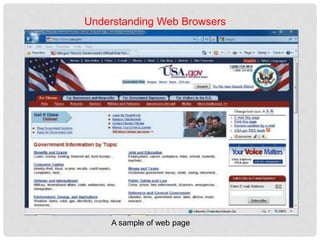
A sample of web page
Exploring the Browser
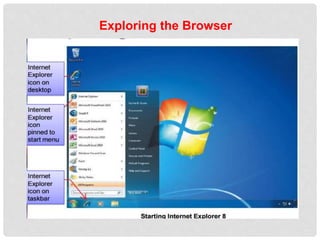
• Internet Explorer connects your computer to
the Web using an Internet connection
• Locate the Internet Explorer icon
 • Start menu or desktop icon
• Home page appears
 • A home page is the first page that opens
every time you start Internet Explorer
Exploring the Browser
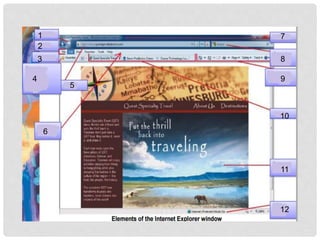
1
2
3
4
5
6
7
8
9
10
11
12
Exploring the Browser
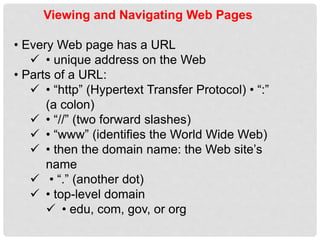
Viewing and Navigating Web Pages
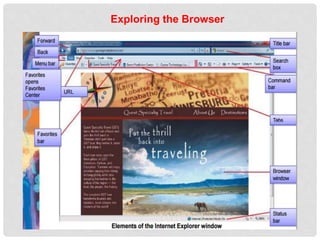
• Every Web page has a URL
 • unique address on the Web
• Parts of a URL:
 • “http” (Hypertext Transfer Protocol) • “:”
(a colon)
 • “//” (two forward slashes)
 • “www” (identifies the World Wide Web)
 • then the domain name: the Web site’s
name
 • “.” (another dot)
 • top-level domain
 • edu, com, gov, or org

Web browser

  • 1.
  • 2.
    Understanding Web Browsers •The ___________________ is a part of the Internet containing linked Web pages • A _______________ is a software program used to access and display Web pages • _______________is a popular Web browser
  • 3.
    Understanding Web Browsers •The World Wide Web (the Web or WWW) is a part of the Internet containing linked Web pages • A Web browser is a software program used to access and display Web pages • Internet Explorer is a popular Web browser
  • 4.
    Understanding Web Browsers • Asearch engine is a special Web site that helps find other Web sites • A Web site is a group of Web pages • Web pages contain highlighted text or graphics called hyperlinks or links  • Hyperlinks open other Web pages  • Example: www.questspecialtytravel.com
  • 5.
    Understanding Web Browsers UsingInternet Explorer, you can: • Display Web sites • Play audio and video clips • Search the Web for information and save a list of favorite web pages • Save, share, e-mail, or print Web page text and graphics
  • 6.
    Understanding Web Browsers •A computer network  • Two or more connected computers that can share information • The Internet is a network of connected computers and computer networks located around the world. • Over 600 million computers connected throughout the world  • Connected using telephone lines, cables, satellites, and other telecommunications multimedia
  • 7.
    Understanding Web Browsers Asample of web page
  • 8.
    Exploring the Browser •Internet Explorer connects your computer to the Web using an Internet connection • Locate the Internet Explorer icon  • Start menu or desktop icon • Home page appears  • A home page is the first page that opens every time you start Internet Explorer
  • 9.
  • 10.
  • 11.
  • 12.
    Viewing and NavigatingWeb Pages • Every Web page has a URL  • unique address on the Web • Parts of a URL:  • “http” (Hypertext Transfer Protocol) • “:” (a colon)  • “//” (two forward slashes)  • “www” (identifies the World Wide Web)  • then the domain name: the Web site’s name  • “.” (another dot)  • top-level domain  • edu, com, gov, or org