WATERMARKING
Content
 What is watermarking
 History
 Digital Watermarking
 Classification
 Visible And Invisible Watermarking
 Text And Image Watermarking
 Examples, Techniques And Applications

                                          2
What is Watermarking
   A watermark is a recognizable image or
    pattern in paper that appears as various shades
    of lightness/darkness when viewed by
    transmitted light (or when viewed by reflected
    light, a top a dark background), caused by
    thickness variations in the paper.


                                                      3
Watermarking History
   More than 700 years ago, watermarks were used in Italy to
    indicate the paper brand and the mill that produced it.
   By the 18th century watermarks began to be used as
    anticounterfeiting measures on money and other documents.
   The term watermark was introduced near the end of the 18th
    century.
   It was probably given because the marks resemble the effects
    of water on paper
   The first example of a technology similar to digital
    watermarking is a patent filed in 1954 by Emil Hembrooke for
    identifying music works.
   In 1988, Komatsu and Tominaga appear to be the first to use
                                                                 4
    the term “digital watermarking”.
Paper Watermarks

Paper Watermarks: Formed during the manufacturing

process of the paper when the paper is wet, so that fibers

can be disturbed according to the design of the watermark.


Used mainly for identification and authentication


                                                             5
Digital Watermarking

Definition: A digital watermark is a digital signal or pattern

inserted into a digital document such as text, graphics or

multimedia, and carries information unique to the copyright

owner, the creator of the document or the authorized

consumer.


                                                                 6
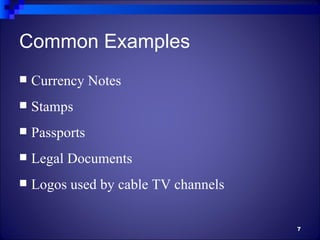
Common Examples
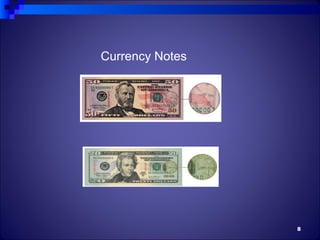
   Currency Notes
   Stamps
   Passports
   Legal Documents
   Logos used by cable TV channels

                                      7
Currency Notes


                 8
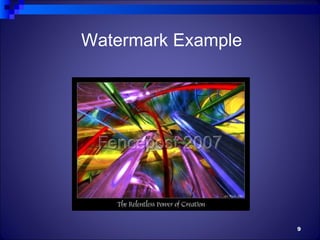
Watermark Example


                    9
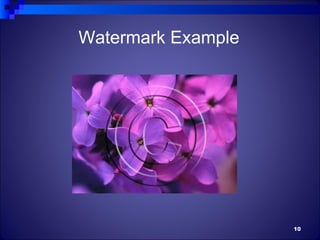
Watermark Example


                    10
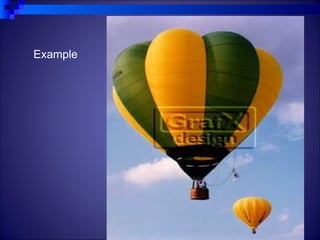
Example


          11
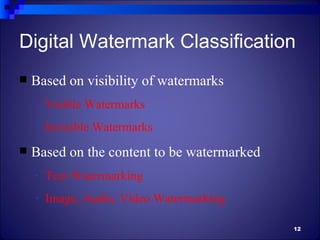
Digital Watermark Classification
   Based on visibility of watermarks
    -   Visible Watermarks
    -   Invisible Watermarks
   Based on the content to be watermarked
    -   Text Watermarking
    -   Image, Audio, Video Watermarking

                                             12
Visible Watermarking
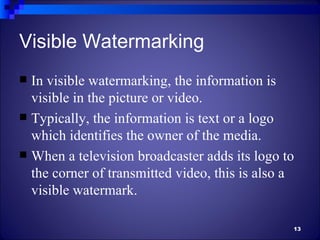
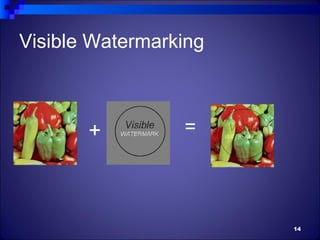
 In visible watermarking, the information is
  visible in the picture or video.
 Typically, the information is text or a logo
  which identifies the owner of the media.
 When a television broadcaster adds its logo to
  the corner of transmitted video, this is also a
  visible watermark.

                                                13
Visible Watermarking


       +         =


                       14
Invisible Watermarking
 In invisible watermarking, information is
  added as digital data to audio, picture or video,
  but it cannot be perceived as such (although it
  may be possible to detect that some amount of
  information is hidden).
 It is also possible to use hidden embedded
  information as a means of covert
  communication between individuals.
                                                 15
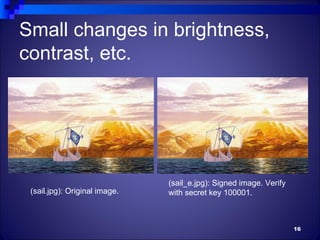
Small changes in brightness,
contrast, etc.


                               (sail_e.jpg): Signed image. Verify
 (sail.jpg): Original image.   with secret key 100001.


                                                                    16
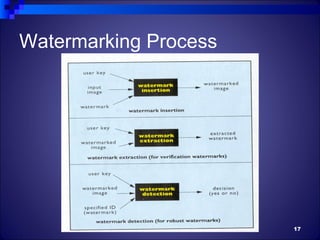
Watermarking Process


                       17
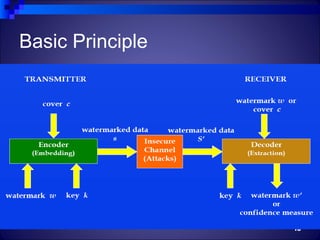
Basic Principle


                  18
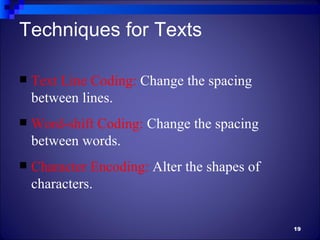
Techniques for Texts

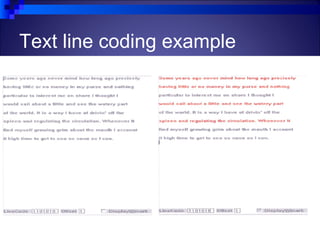
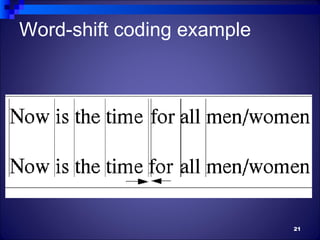
   Text Line Coding: Change the spacing
    between lines.
   Word-shift Coding: Change the spacing
    between words.
   Character Encoding: Alter the shapes of
    characters.

                                              19
Text line coding example


                           20
Word-shift coding example


                            21
Techniques for Images
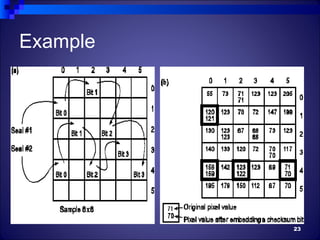
   Spatial Watermarking: Just change some of the
    values of the pixels in the lower bit plane; e.g.,
    Change some of the bits from 1 to 0 or 0 to 1.
   Frequency Domain Watermarking: First
    convert the image to the frequency domain and
    then apply the watermark in the low frequency
    regions.

                                                    22
Example


          23
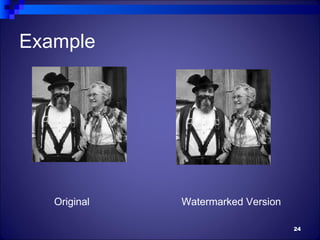
Example


   Original   Watermarked Version

                                    24
Watermarking Attacks
    Signal enhancement (sharpening, contrast enhancement,
    etc.)
    Additive and multiplicative noise (gaussian, uniform, etc.)
    Filtering (High pass, low pass, linear, nonlinear, etc.)
    Lossy compression (JPEG, MPEG-x, H.26x, etc.)
    Geometric transforms (translation, rotation, etc.)
    Data reduction (cropping, clipping, etc.)
    Transcoding (MPEG2 ⇒ H.263, etc.)
    D/A and A/D conversion (print-scan, etc.)
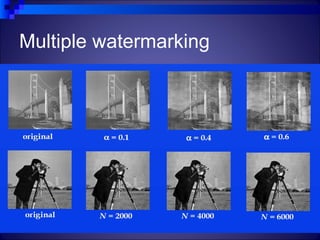
    Multiple watermarking
    Collusion attack

                                                                   25
Multiple watermarking


                        26
Characteristics of Digital Watermarks
   Unobtrusive: invisible enough not to degrade the data quality
    and to prevent an attacker from finding and deleting it.
   Readily Detectable: the data owner or an independent control
    authority should easily detect it.
   Unambiguous: retrieval of it should unambiguously identify
    the data owner.
   Innumerable: it should be possible to generate a large number
    of watermarks, all distinguishable.
   Robust: difficult to remove for an attacker, who would like to
    destroy it in order to counterfeit the copyright of the data.
    Moreover, removal of it should cause a considerable
    degradation in the quality of the data.
   Visible watermarks should be visible enough to discourage
    theft.
                                                                 27
Applications
   Embed information about the owner to prevent others
    from claiming copyright
   For example, a compliant DVD player will not
    playback or copy data that carry a “copy never”
    watermark
   This is useful to monitor or trace back illegally
    produced copies of the cover
   Used to avoid unauthorized duplication and
    distribution.
   Digital watermark inserted to indicate the number of
    copies permitted.
                                                       28
Thank You

Watermark

  • 1.
  • 2.
    Content  What iswatermarking  History  Digital Watermarking  Classification  Visible And Invisible Watermarking  Text And Image Watermarking  Examples, Techniques And Applications 2
  • 3.
    What is Watermarking  A watermark is a recognizable image or pattern in paper that appears as various shades of lightness/darkness when viewed by transmitted light (or when viewed by reflected light, a top a dark background), caused by thickness variations in the paper. 3
  • 4.
    Watermarking History  More than 700 years ago, watermarks were used in Italy to indicate the paper brand and the mill that produced it.  By the 18th century watermarks began to be used as anticounterfeiting measures on money and other documents.  The term watermark was introduced near the end of the 18th century.  It was probably given because the marks resemble the effects of water on paper  The first example of a technology similar to digital watermarking is a patent filed in 1954 by Emil Hembrooke for identifying music works.  In 1988, Komatsu and Tominaga appear to be the first to use 4 the term “digital watermarking”.
  • 5.
    Paper Watermarks Paper Watermarks:Formed during the manufacturing process of the paper when the paper is wet, so that fibers can be disturbed according to the design of the watermark. Used mainly for identification and authentication 5
  • 6.
    Digital Watermarking Definition: Adigital watermark is a digital signal or pattern inserted into a digital document such as text, graphics or multimedia, and carries information unique to the copyright owner, the creator of the document or the authorized consumer. 6
  • 7.
    Common Examples  Currency Notes  Stamps  Passports  Legal Documents  Logos used by cable TV channels 7
  • 8.
  • 9.
  • 10.
  • 11.
  • 12.
    Digital Watermark Classification  Based on visibility of watermarks - Visible Watermarks - Invisible Watermarks  Based on the content to be watermarked - Text Watermarking - Image, Audio, Video Watermarking 12
  • 13.
    Visible Watermarking  Invisible watermarking, the information is visible in the picture or video.  Typically, the information is text or a logo which identifies the owner of the media.  When a television broadcaster adds its logo to the corner of transmitted video, this is also a visible watermark. 13
  • 14.
  • 15.
    Invisible Watermarking  Ininvisible watermarking, information is added as digital data to audio, picture or video, but it cannot be perceived as such (although it may be possible to detect that some amount of information is hidden).  It is also possible to use hidden embedded information as a means of covert communication between individuals. 15
  • 16.
    Small changes inbrightness, contrast, etc. (sail_e.jpg): Signed image. Verify (sail.jpg): Original image. with secret key 100001. 16
  • 17.
  • 18.
  • 19.
    Techniques for Texts  Text Line Coding: Change the spacing between lines.  Word-shift Coding: Change the spacing between words.  Character Encoding: Alter the shapes of characters. 19
  • 20.
    Text line codingexample 20
  • 21.
  • 22.
    Techniques for Images  Spatial Watermarking: Just change some of the values of the pixels in the lower bit plane; e.g., Change some of the bits from 1 to 0 or 0 to 1.  Frequency Domain Watermarking: First convert the image to the frequency domain and then apply the watermark in the low frequency regions. 22
  • 23.
  • 24.
    Example Original Watermarked Version 24
  • 25.
    Watermarking Attacks  Signal enhancement (sharpening, contrast enhancement, etc.)  Additive and multiplicative noise (gaussian, uniform, etc.)  Filtering (High pass, low pass, linear, nonlinear, etc.)  Lossy compression (JPEG, MPEG-x, H.26x, etc.)  Geometric transforms (translation, rotation, etc.)  Data reduction (cropping, clipping, etc.)  Transcoding (MPEG2 ⇒ H.263, etc.)  D/A and A/D conversion (print-scan, etc.)  Multiple watermarking  Collusion attack 25
  • 26.
  • 27.
    Characteristics of DigitalWatermarks  Unobtrusive: invisible enough not to degrade the data quality and to prevent an attacker from finding and deleting it.  Readily Detectable: the data owner or an independent control authority should easily detect it.  Unambiguous: retrieval of it should unambiguously identify the data owner.  Innumerable: it should be possible to generate a large number of watermarks, all distinguishable.  Robust: difficult to remove for an attacker, who would like to destroy it in order to counterfeit the copyright of the data. Moreover, removal of it should cause a considerable degradation in the quality of the data.  Visible watermarks should be visible enough to discourage theft. 27
  • 28.
    Applications  Embed information about the owner to prevent others from claiming copyright  For example, a compliant DVD player will not playback or copy data that carry a “copy never” watermark  This is useful to monitor or trace back illegally produced copies of the cover  Used to avoid unauthorized duplication and distribution.  Digital watermark inserted to indicate the number of copies permitted. 28
  • 29.