W200 Teacher Website Checklist – Fall 2012
Teacher Website Elements (110 points) –
All required pages, files and elements are present in the website.

                                     General Information
                                                                           Possible Your
                                 Description
                                                                            Points points
     Welcome                                                                20
       Theme: Imagine that you are a teacher. You are communicating
           with your students, their parents and other teachers
       Welcome your visitors
       Explain PURPOSE of website
       Briefly explain the PAGES [e.g. all sub-pages under General
           Information, For students, For Parents] of your site
       Visually appealing
       Added touch: When you describe pages, consider adding
           internal links to them
     About Me                                                               10
       Professional picture of you or equivalent [Points deducted for
           cropped images and inappropriate images]
       Introduction of yourself (name, education, your subject area
           and grade level to teach – Again imagine that you became a
           teacher and this is your own teacher website)
       Week2: ICW#2: Xtranormal movie on Digital Natives, include a
           title that is hyperlinked, embedded movie, and description of
           the movie underneath the page
       Others: Answer to …
            o Why did you become a teacher?
            o What are your pedagogical beliefs as a teacher?
            o What are your beliefs about using technology in the
                 classroom?
     Calendar                                                               10
       Embed Google Calendar in this page
       Include at least 5 events for each remaining month of the
           semester
       Make sure ALL events are public and your calendar is published
     Tech Resources                                                         22
      All should have the following outline:
           o Title (Make sure to link it)
           o Screenshot
           o Description (Discuss how a teacher can use it)
           o Educational Value (Discuss 3 Es)
 Week 6: Hands on Activity - Content Exploration Tool
     Week 7: Hands on Activity - Free online Web 2.0 Production
     Week 8: Class Prep – Post the communication tool assigned to
        you by the instructor
     Week 8: ICW #8 – Function comparison matrix
     Week 9: Hands on Activity –InspireData
     Week 11: Hands on Activity-Netvibes
     Week 12: Hands on Activity-Facilitating Online Learning
     Week 14: Hands on Activity- Blio Review
     Week 14: ICW - iPad Tools for learning disabilities
   Collaboration                                                          3
     Week 8: Hands on Activity - Communication tasks and Content
        Exploration tasks
                                                      Content Total:       65

                                      For students
                                                                         Possible Your
                             Description
                                                                          Points points
   Student Projects                                                       10
     ICW#7: Production Project
     ICW#9: Data Collection/Analysis Station
     All components should be properly linked and accessible to the
        viewers
     Title should reflect the content of the projects
     Screenshot can be replaced with the embedded Google Docs
     Descriptions needs to be clear and explicit and should inform
        what the project is about, what tools are used, for whom it is
        for, etc.
   Assessment                                                              5
     ICW #10: Zoho Challenge Quiz, Results & Description
   Class Materials                                                        20
     ICW#4: Concept map (Inspiration/Kidspiration)
     ICW#6: Creating a webquest
       o Write using a “teacher voice.”
       o Create the iRubric for assessing what the students produce,
            embed it on the “evaluation” page, and complete the
            “evaluation” page.
       o Embed your sample student work on the Student Project
            page of your Teacher Website
     ICW#11: Digital identity presentation
     ICW#13: Cyberbullying presentation
                                                      Content Total:       35
                                       For Parents
Possible Your
                                  Description
                                                                                 Points   points
     Newsletter                                                                      5
       ICW #3 (Part I): Beginning of the semester teacher welcome
         message, contact information, about me (as a teacher),
         classroom expectations/rules, embedded school map
     School Website                                                                  5
       ICW#3 (Part II): Link to your school website (Remember that
         you became a teacher in one of your previous schools)
                                                            Content Total:           10

Overall Professionalism: Copyright, Formatting, Creativity and Writing
Mechanics (40 points) –
The teacher website is easy to read with appropriate use of fonts, point size, bullets, italics, bold,
and indentations for headings and sub-headings. The suggested navigational system is present
and active on all pages. The background and colors enhance the readability of the text.

                                    Overall Professionalism
                                                                                 Possible Your
                                  Description
                                                                                  Points Points
     Consistency of Formatting and Font                                             10
      Entire site uses the same
       font type
       font size
       color is consistent and readable for the following
            Titles
            Subheadings
            Body text and links
      Clean Formatting
       Spacing between blocks of text are not too big/small
       Uses headings/ subheadings to guide the readers
       Uses bullets/ numbers to list options & these are indented
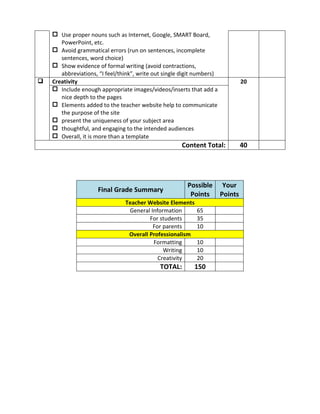
       Adds a text box in the navigation sidebar that includes “Creative
         Commons Logo”. See example below:


     Writing Mechanism                                                              10
       Avoid Spelling Errors by running text through MS Word
 Use proper nouns such as Internet, Google, SMART Board,
       PowerPoint, etc.
     Avoid grammatical errors (run on sentences, incomplete
       sentences, word choice)
     Show evidence of formal writing (avoid contractions,
       abbreviations, “I feel/think”, write out single digit numbers)
   Creativity                                                                   20
     Include enough appropriate images/videos/inserts that add a
       nice depth to the pages
     Elements added to the teacher website help to communicate
       the purpose of the site
     present the uniqueness of your subject area
     thoughtful, and engaging to the intended audiences
     Overall, it is more than a template
                                                      Content Total:             40


                                                         Possible        Your
                     Final Grade Summary
                                                          Points        Points
                                Teacher Website Elements
                                 General Information        65
                                         For students       35
                                          For parents       10
                                 Overall Professionalism
                                          Formatting        10
                                              Writing       10
                                            Creativity      20
                                              TOTAL:       150

W200 teacher website checklist – fall 2012

  • 1.
    W200 Teacher WebsiteChecklist – Fall 2012 Teacher Website Elements (110 points) – All required pages, files and elements are present in the website. General Information Possible Your  Description Points points  Welcome 20  Theme: Imagine that you are a teacher. You are communicating with your students, their parents and other teachers  Welcome your visitors  Explain PURPOSE of website  Briefly explain the PAGES [e.g. all sub-pages under General Information, For students, For Parents] of your site  Visually appealing  Added touch: When you describe pages, consider adding internal links to them  About Me 10  Professional picture of you or equivalent [Points deducted for cropped images and inappropriate images]  Introduction of yourself (name, education, your subject area and grade level to teach – Again imagine that you became a teacher and this is your own teacher website)  Week2: ICW#2: Xtranormal movie on Digital Natives, include a title that is hyperlinked, embedded movie, and description of the movie underneath the page  Others: Answer to … o Why did you become a teacher? o What are your pedagogical beliefs as a teacher? o What are your beliefs about using technology in the classroom?  Calendar 10  Embed Google Calendar in this page  Include at least 5 events for each remaining month of the semester  Make sure ALL events are public and your calendar is published  Tech Resources 22 All should have the following outline: o Title (Make sure to link it) o Screenshot o Description (Discuss how a teacher can use it) o Educational Value (Discuss 3 Es)
  • 2.
     Week 6:Hands on Activity - Content Exploration Tool  Week 7: Hands on Activity - Free online Web 2.0 Production  Week 8: Class Prep – Post the communication tool assigned to you by the instructor  Week 8: ICW #8 – Function comparison matrix  Week 9: Hands on Activity –InspireData  Week 11: Hands on Activity-Netvibes  Week 12: Hands on Activity-Facilitating Online Learning  Week 14: Hands on Activity- Blio Review  Week 14: ICW - iPad Tools for learning disabilities  Collaboration 3  Week 8: Hands on Activity - Communication tasks and Content Exploration tasks Content Total: 65 For students Possible Your  Description Points points  Student Projects 10  ICW#7: Production Project  ICW#9: Data Collection/Analysis Station  All components should be properly linked and accessible to the viewers  Title should reflect the content of the projects  Screenshot can be replaced with the embedded Google Docs  Descriptions needs to be clear and explicit and should inform what the project is about, what tools are used, for whom it is for, etc.  Assessment 5  ICW #10: Zoho Challenge Quiz, Results & Description  Class Materials 20  ICW#4: Concept map (Inspiration/Kidspiration)  ICW#6: Creating a webquest o Write using a “teacher voice.” o Create the iRubric for assessing what the students produce, embed it on the “evaluation” page, and complete the “evaluation” page. o Embed your sample student work on the Student Project page of your Teacher Website  ICW#11: Digital identity presentation  ICW#13: Cyberbullying presentation Content Total: 35 For Parents
  • 3.
    Possible Your  Description Points points  Newsletter 5  ICW #3 (Part I): Beginning of the semester teacher welcome message, contact information, about me (as a teacher), classroom expectations/rules, embedded school map  School Website 5  ICW#3 (Part II): Link to your school website (Remember that you became a teacher in one of your previous schools) Content Total: 10 Overall Professionalism: Copyright, Formatting, Creativity and Writing Mechanics (40 points) – The teacher website is easy to read with appropriate use of fonts, point size, bullets, italics, bold, and indentations for headings and sub-headings. The suggested navigational system is present and active on all pages. The background and colors enhance the readability of the text. Overall Professionalism Possible Your  Description Points Points  Consistency of Formatting and Font 10 Entire site uses the same  font type  font size  color is consistent and readable for the following  Titles  Subheadings  Body text and links Clean Formatting  Spacing between blocks of text are not too big/small  Uses headings/ subheadings to guide the readers  Uses bullets/ numbers to list options & these are indented  Adds a text box in the navigation sidebar that includes “Creative Commons Logo”. See example below:  Writing Mechanism 10  Avoid Spelling Errors by running text through MS Word
  • 4.
     Use propernouns such as Internet, Google, SMART Board, PowerPoint, etc.  Avoid grammatical errors (run on sentences, incomplete sentences, word choice)  Show evidence of formal writing (avoid contractions, abbreviations, “I feel/think”, write out single digit numbers)  Creativity 20  Include enough appropriate images/videos/inserts that add a nice depth to the pages  Elements added to the teacher website help to communicate the purpose of the site  present the uniqueness of your subject area  thoughtful, and engaging to the intended audiences  Overall, it is more than a template Content Total: 40 Possible Your Final Grade Summary Points Points Teacher Website Elements General Information 65 For students 35 For parents 10 Overall Professionalism Formatting 10 Writing 10 Creativity 20 TOTAL: 150