Chalermvong VijitpiyakulDeveloper Technical Specialist, Microsoft Most Valuable Professional - Visual Studio ALM Visual Studio 2010 RTM to SP1
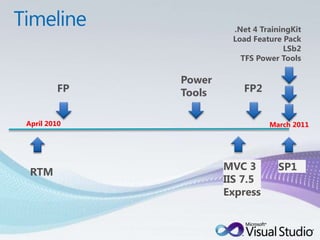
Timeline.Net 4 TrainingKitLoad Feature PackLSb2TFS Power ToolsPower ToolsFPFP2April 2010March 2011SP1MVC 3IIS 7.5 ExpressRTM
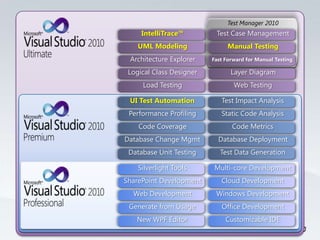
Test Manager 2010UML ModelingManual TestingLayer DiagramLoad TestingWeb TestingTest Case ManagementIntelliTrace™Architecture ExplorerLogical Class DesignerCloud DevelopmentOffice DevelopmentWindows DevelopmentNew WPF EditorCustomizable IDEMulti-core DevelopmentSilverlight ToolsWeb DevelopmentSharePoint DevelopmentGenerate from UsageStatic Code AnalysisDatabase DeploymentCode MetricsDatabase Unit TestingTest Data GenerationTest Impact AnalysisUI Test AutomationCode CoveragePerformance ProfilingDatabase Change MgmtFast Forward for Manual Testing
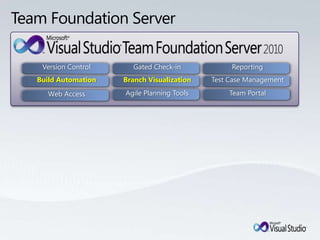
Team Foundation ServerReportingTeam PortalTest Case ManagementBranch VisualizationVersion ControlBuild AutomationGated Check-inAgile Planning ToolsWeb Access
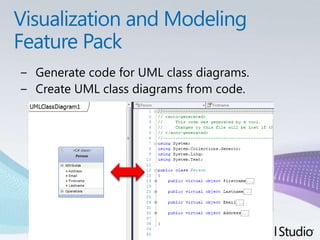
Visualization and Modeling Feature PackGenerate code for UML class diagrams.Create UML class diagrams from code.
Feature Pack 2Playback tests using the Mozilla Firefox browser supported version 3.5 and 3.6.Edit coded UI tests using the Coded UI Test Editor. Easier  modify your coded UI tests, view, edit test methods, UI actions and associated controls in the UI control map.You can create coded UI tests or action recordings for Silverlight 4 applications. Action recordings enable you to fast forward through steps in a manual test.Demo
IIS 7.5 Express not require an administrator account to run/debug applicationsSmall but full IIS feature set – e.g. SSL, URL Rewrite, Media Support, and all other IIS 7.x modulesSSLEnableDownload http://bit.ly/iis75exprDemo
Help Viewer 1.1To support developer productivity, a stand-alone application for viewing locally is installed in Visual Studio 2010 SP1. The following technology improvements are added in the new local Help viewer:Quick access menu bar icons: Quickly access other high-usage technology improvements or tools. This includes Help Library Manager, Print, Options, and Synchronize topic to table of contents (TOC)Search locally installed contentSearch for matching strings within topic
Visual Studio 2010 SP1Silverlight 4 is included in Visual Studio 2010 SP1.with OOB and debugging capabilities.Performance Wizard for SilverlightVisual Studio 2010 SP1 enables you to tune the Silverlight application performance by profiling the codethat help you can better determine which parts of the application consume time.IntelliTrace for 64-bit and SharePointVisual Studio 2010 SP1 enables the IntelliTrace debugging technology on 64-bit solutions and for Microsoft SharePoint farm solutions.
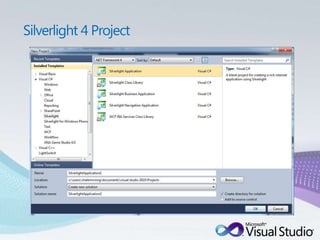
Silverlight 4 Project
Visual Studio 2010 SP1IIS 7.5 Express supportVisual Studio 2010 SP1 enables you to use the Internet Information Services (IIS) 7.5 Express as the local hosting server for the website and Web Application Projects. **Note : IIS 7.5 Express must download it separately.SQL Server CE 4 supportSQL Server Compact 4.0 SDF files enable for web projects. Additionally, ASP.NET Web Forms in a SQL data source control.http://weblogs.asp.net/scottgu/archive/2011/01/11/vs-2010-sp1-and-sql-ce.aspx
Visual Studio 2010 SP1HTML5 and CSS3 supportPreliminary support is added for HTML5 to the HTML editor so that you can obtain IntelliSense and validation for HTML elements and attributes. (**not entire HTML5).Performance Improvements for Large Models in EF4working with large EDM models. A large model (500 tables) can now be reverse-engineered within seconds.
Visual Studio 2010 SP1Fix for Windows XP usersSP1 will turn off hardware graphics acceleration only in Visual Studio 2010, that cause crashing behavior.Visual Basic Runtime embeddingA new Visual Basic compiler feature is added that enables Visual Basic developers to target their applications and libraries at platforms where the full Visual Basic Runtime is unavailable. Windows Phone Developer ToolsThe deployment of XAP files over 64 MB may fail for testing and debugging on physical telephone devices.
Visual Studio 2010 SP1WPF XAML Editor/DesignerGo To value definition, navigate directly from controls on a page to the styles that are applied to the controls. Quickly know "why that button on your application is red.“Style IntelliSense, IntelliSense for properties and their values in a style, easier modify styles in XAML. Data source selector,easily select and modify the data source information directly from the design surface.Advanced grid commands, easily add, remove, and reorder grid rows and columns.Thickness EditorSample bindings data at design time
TFS Power toolsBackup/Restore ToolsBackup and restore process become simplify steps through Wizard and less administration skill sets.Demo
Upcoming TechnologyVisual Studio LightSwitch Beta 2Visual Studio LightSwitch offers a simple way to develop line of business applications for the desktop and cloud.ASP.NET MVC 3Framework for building scalable, standards-based web applications using well-established design patterns and the power of ASP.NETVisual Studio Async*currently in CTP (not yet working with SP1)Framework that helps you develop asynchronous programming with less modified coding.
ResourcesVS2010 SP1 TrainingKitmarch 2011with Silverlight 4, Windows Azurehttp://bit.ly/vs2010sp1tkGeneral Update for .NET 4 in SP1http://support.microsoft.com/kb/2468871Visual Studio 2010 SP1 Full detailshttp://support.microsoft.com/kb/983509
© 2010 Microsoft Corporation. All rights reserved. Microsoft, Visual Studio, the Visual Studio logo, and [list other trademarks referenced] are trademarks of the Microsoft group of companies.  The information herein is for informational purposes only and represents the current view of Microsoft Corporation as of the date of this presentation. Because Microsoft must respond to changing market conditions,it should not be interpreted to be a commitment on the part of Microsoft, and Microsoft cannot guarantee the accuracy of any information provided after the date of this presentation.MICROSOFT MAKES NO WARRANTIES, EXPRESS, IMPLIED, OR STATUTORY, AS TO THE INFORMATION IN THIS PRESENTATION.

Visual Studio 2010 RTMtoSP1

  • 1.
    Chalermvong VijitpiyakulDeveloper TechnicalSpecialist, Microsoft Most Valuable Professional - Visual Studio ALM Visual Studio 2010 RTM to SP1
  • 2.
    Timeline.Net 4 TrainingKitLoadFeature PackLSb2TFS Power ToolsPower ToolsFPFP2April 2010March 2011SP1MVC 3IIS 7.5 ExpressRTM
  • 3.
    Test Manager 2010UMLModelingManual TestingLayer DiagramLoad TestingWeb TestingTest Case ManagementIntelliTrace™Architecture ExplorerLogical Class DesignerCloud DevelopmentOffice DevelopmentWindows DevelopmentNew WPF EditorCustomizable IDEMulti-core DevelopmentSilverlight ToolsWeb DevelopmentSharePoint DevelopmentGenerate from UsageStatic Code AnalysisDatabase DeploymentCode MetricsDatabase Unit TestingTest Data GenerationTest Impact AnalysisUI Test AutomationCode CoveragePerformance ProfilingDatabase Change MgmtFast Forward for Manual Testing
  • 4.
    Team Foundation ServerReportingTeamPortalTest Case ManagementBranch VisualizationVersion ControlBuild AutomationGated Check-inAgile Planning ToolsWeb Access
  • 5.
    Visualization and ModelingFeature PackGenerate code for UML class diagrams.Create UML class diagrams from code.
  • 6.
    Feature Pack 2Playbacktests using the Mozilla Firefox browser supported version 3.5 and 3.6.Edit coded UI tests using the Coded UI Test Editor. Easier modify your coded UI tests, view, edit test methods, UI actions and associated controls in the UI control map.You can create coded UI tests or action recordings for Silverlight 4 applications. Action recordings enable you to fast forward through steps in a manual test.Demo
  • 7.
    IIS 7.5 Expressnot require an administrator account to run/debug applicationsSmall but full IIS feature set – e.g. SSL, URL Rewrite, Media Support, and all other IIS 7.x modulesSSLEnableDownload http://bit.ly/iis75exprDemo
  • 8.
    Help Viewer 1.1Tosupport developer productivity, a stand-alone application for viewing locally is installed in Visual Studio 2010 SP1. The following technology improvements are added in the new local Help viewer:Quick access menu bar icons: Quickly access other high-usage technology improvements or tools. This includes Help Library Manager, Print, Options, and Synchronize topic to table of contents (TOC)Search locally installed contentSearch for matching strings within topic
  • 10.
    Visual Studio 2010SP1Silverlight 4 is included in Visual Studio 2010 SP1.with OOB and debugging capabilities.Performance Wizard for SilverlightVisual Studio 2010 SP1 enables you to tune the Silverlight application performance by profiling the codethat help you can better determine which parts of the application consume time.IntelliTrace for 64-bit and SharePointVisual Studio 2010 SP1 enables the IntelliTrace debugging technology on 64-bit solutions and for Microsoft SharePoint farm solutions.
  • 11.
  • 12.
    Visual Studio 2010SP1IIS 7.5 Express supportVisual Studio 2010 SP1 enables you to use the Internet Information Services (IIS) 7.5 Express as the local hosting server for the website and Web Application Projects. **Note : IIS 7.5 Express must download it separately.SQL Server CE 4 supportSQL Server Compact 4.0 SDF files enable for web projects. Additionally, ASP.NET Web Forms in a SQL data source control.http://weblogs.asp.net/scottgu/archive/2011/01/11/vs-2010-sp1-and-sql-ce.aspx
  • 13.
    Visual Studio 2010SP1HTML5 and CSS3 supportPreliminary support is added for HTML5 to the HTML editor so that you can obtain IntelliSense and validation for HTML elements and attributes. (**not entire HTML5).Performance Improvements for Large Models in EF4working with large EDM models. A large model (500 tables) can now be reverse-engineered within seconds.
  • 14.
    Visual Studio 2010SP1Fix for Windows XP usersSP1 will turn off hardware graphics acceleration only in Visual Studio 2010, that cause crashing behavior.Visual Basic Runtime embeddingA new Visual Basic compiler feature is added that enables Visual Basic developers to target their applications and libraries at platforms where the full Visual Basic Runtime is unavailable. Windows Phone Developer ToolsThe deployment of XAP files over 64 MB may fail for testing and debugging on physical telephone devices.
  • 15.
    Visual Studio 2010SP1WPF XAML Editor/DesignerGo To value definition, navigate directly from controls on a page to the styles that are applied to the controls. Quickly know "why that button on your application is red.“Style IntelliSense, IntelliSense for properties and their values in a style, easier modify styles in XAML. Data source selector,easily select and modify the data source information directly from the design surface.Advanced grid commands, easily add, remove, and reorder grid rows and columns.Thickness EditorSample bindings data at design time
  • 16.
    TFS Power toolsBackup/RestoreToolsBackup and restore process become simplify steps through Wizard and less administration skill sets.Demo
  • 17.
    Upcoming TechnologyVisual StudioLightSwitch Beta 2Visual Studio LightSwitch offers a simple way to develop line of business applications for the desktop and cloud.ASP.NET MVC 3Framework for building scalable, standards-based web applications using well-established design patterns and the power of ASP.NETVisual Studio Async*currently in CTP (not yet working with SP1)Framework that helps you develop asynchronous programming with less modified coding.
  • 18.
    ResourcesVS2010 SP1 TrainingKitmarch2011with Silverlight 4, Windows Azurehttp://bit.ly/vs2010sp1tkGeneral Update for .NET 4 in SP1http://support.microsoft.com/kb/2468871Visual Studio 2010 SP1 Full detailshttp://support.microsoft.com/kb/983509
  • 19.
    © 2010 MicrosoftCorporation. All rights reserved. Microsoft, Visual Studio, the Visual Studio logo, and [list other trademarks referenced] are trademarks of the Microsoft group of companies.  The information herein is for informational purposes only and represents the current view of Microsoft Corporation as of the date of this presentation. Because Microsoft must respond to changing market conditions,it should not be interpreted to be a commitment on the part of Microsoft, and Microsoft cannot guarantee the accuracy of any information provided after the date of this presentation.MICROSOFT MAKES NO WARRANTIES, EXPRESS, IMPLIED, OR STATUTORY, AS TO THE INFORMATION IN THIS PRESENTATION.

Editor's Notes

  • #4 Let me drill down into the capabilities in each product. For a more extensive list of capabilities, please go to www.microsoft.com.vstudio.Microsoft Visual Studio 2010 Professional is the essential tool for basic development tasks to allow developers to implement their ideas easily. This includes core capabilities for Windows, Web, and Office development, along with new capabilities for Cloud and SharePoint development. There are also new tools for Silverlight and Multi-core development. With Visual Studio 2010 the IDE and editor were refreshed using Microsoft Windows Presentation Foundation.[CLICK]Microsoft Visual Studio 2010 Premium is a complete toolset for developers to deliver scalable, high quality applications. This includes support for offline database development, unit testing and change management, static code analysis, performance profiling and code coverage and code metrics. New capabilities including UI test automation (aka Coded UI Tests) and Test Impact Analysis are available in premium.[CLICK]Microsoft Visual Studio 2010 Ultimate is the comprehensive suite of application lifecycle management tools for teams to ensure quality results from design to deployment. This includes IntelliTrace – the new historical debugger which enables debugging events that ran previously on your machine, or another machine. Microsoft Test Manager 2010 is included in Ultimate enabling complete Test Case Management and test execution. Additionally the new architecture and modeling tools are included in Ultimate, including support for authoring UML diagrams (Activity, Use Case, Sequence, Component and Class diagrams are supported).[CLICK]
  • #5 There are some additional products in the Visual Studio 2010 family.Team Foundation Server 2010 is the center of gravity – the hub for a development team. Team Foundation Server has a version control repository, a test case management database, a work item tracking and change management system, support of build automation and a comprehensive reporting solution built on SQL Server Reporting Services. Some of the new capabilities of Team Foundation Server include support for gated check-in, branch visualization and drag-n-drop merge, and new Agile Planning tools.[CLICK]Team Lab Management 2010 enables teams to configure and manage virtual lab environment. Team Lab Management works with System Center Virtual Machine Manage enabling teams to create environment templates, provision ring-fenced environments, and checkpoint those environments. Those checkpoints can be attached to bugs filed using the Test and Lab Manager enabling the person fixing the bug to open the environment right to the appropriate point in the application flow.[CLICK]Visual Studio Test Elements 2010 is the essential tool for anyone engaging in test case management or manual test execution in the development lifecycle. This tool is designed for the generalist tester – someone who tests applications, but who is not responsible for writing code. This product includes Microsoft Test and Lab Manager (the Visual Studio IDE is not included). [CLICK]
  • #7 Testing features:Use Microsoft Test Manager to capture and playback action recordings for Silverlight 4 applications.Create coded UI tests for Silverlight 4 applications with Visual Studio 2010 Premium or Visual Studio 2010 Ultimate.Edit coded UI tests using a graphical editor with Visual Studio 2010 Premium or Visual Studio 2010 Ultimate.Use action recordings to fast forward through manual tests that need to support Mozilla Firefox 3.5 and 3.6.Run coded UI tests for web applications using Mozilla Firefox 3.5 and 3.6 with Microsoft Visual Studio 2010 Premium or Visual Studio 2010 Ultimate.Code visualization and modeling features (requires Visual Studio 2010 Ultimate):Use the Generate Code command to generate skeleton code from elements on UML class diagrams. You can use the default transformations, or you can write custom transformations to translate UML types into code.Create UML class diagrams from existing code.Explore the organization and relationships in C, C++, and ASP.NET projects by generating dependency graphs.Import elements from UML sequence diagrams, class diagrams, and use case diagrams as XMI 2.1 files that are exported from other modeling tools.Create links and view links from work items to model elements.Create layer diagrams from C or C++ code and validate dependencies.Write code to modify layer diagrams and to validate code against layer diagrams
  • #11 Microsoft Silverlight 4 Tools for Visual Studio 2010 is included in Visual Studio 2010 SP1. This adds support for targeting Silverlight 4 in the Silverlight designer and project system. This also provides support for the new Silverlight 4 technology improvements. This new technology includes working with implicit styles and Silverlight 4 Out-of-Browser (OOB) applications. You can automatically start and debug your OOB application from inside the IDE, specify XAP signing for trusted OOB applications, and set the OOB window characteristics.IntelliTrace is the revolutionary new debugging technology in Visual Studio 2010 that enables you to move forward and backward through a debug session.