Visual Basic –User Interface-III
Visual Basic –User Interface-
IV
Govt. Polytechnic(W)
Faridabad
27th September 2016
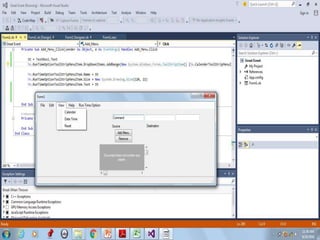
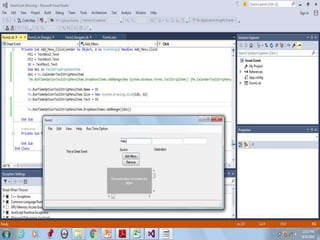
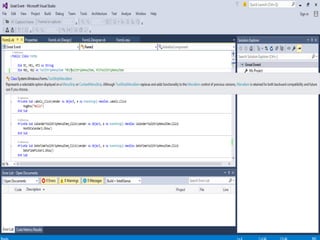
Public Class Form1
Dim St, Mt1, MT2 As String
Dim Mb1, Mb2, Mt1ToolStripMenuItem, MT2ToolStripMenuItem As ToolStripMenuItem
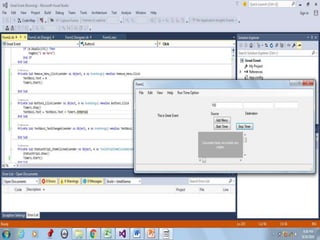
 Private Sub Add_Menu_Click(sender As
Object, e As EventArgs) Handles
Add_Menu.Click
 Mt1 = TextBox2.Text
 MT2 = TextBox3.Text
 St = TextBox1.Text
 Dim Ab1, Ab2 As
ToolStripDropDownItem
 Mb1 = ColorToolStripMenuItem
 Mb2 = CalenderToolStripMenuItem
 Ab1 = Me.Mb2
 Ab2 = Me.Mb1

Me.RunTimeOptionToolStripMenuItem.Na
me = St

Me.RunTimeOptionToolStripMenuItem.Siz
e = New System.Drawing.Size(120, 22)

Me.RunTimeOptionToolStripMenuItem.Te
xt = St

Me.RunTimeOptionToolStripMenuItem.Dr
opDownItems.AddRange({Ab1, Ab2})
 End Sub
CODE
 Mt1 = TextBox2.Text
 MT2 = TextBox3.Text
 St = TextBox1.Text
 Dim Ab1, Ab2 As ToolStripDropDownItem
 Me.Mt1ToolStripMenuItem = New
System.Windows.Forms.ToolStripMenuItem()
 Me.Mt1ToolStripMenuItem.Name = Mt1
 Me.Mt1ToolStripMenuItem.Size = New System.Drawing.Size(120, 22)
 Me.Mt1ToolStripMenuItem.Text = Mt1
 Me.MT2ToolStripMenuItem = New
System.Windows.Forms.ToolStripMenuItem()
 Me.MT2ToolStripMenuItem.Name = MT2
 Me.MT2ToolStripMenuItem.Size = New System.Drawing.Size(120, 22)
 Me.MT2ToolStripMenuItem.Text = MT2
 Mb1 = Mt1ToolStripMenuItem
 Mb2 = MT2ToolStripMenuItem
 Ab1 = Me.Mb2
 Ab2 = Me.Mb1
 Me.RunTimeOptionToolStripMenuItem.Name = St
 Me.RunTimeOptionToolStripMenuItem.Size = New System.Drawing.Size(120,
22)
 Me.RunTimeOptionToolStripMenuItem.Text = St
 Me.RunTimeOptionToolStripMenuItem.DropDownItems.AddRange({Ab1,
Ab2})
 End Sub
Code
 Private Sub
Start_Timer_Click(sender As
Object, e As EventArgs) Handles
Start_Timer.Click
 TextBox1.Text = 0
 Timer1.Start()
 End Sub
 Private Sub Button1_Click(sender
As Object, e As EventArgs) Handles
Button1.Click
 Timer1.Stop()
 TextBox1.Text = TextBox1.Text
+ Timer1.Interval
 End Sub
Codes
 Private Sub Add_Menu_Click(sender As Object, e As EventArgs)
Handles Add_Menu.Click
 Mt1 = TextBox2.Text
 MT2 = TextBox3.Text
 St = TextBox1.Text
 Me.Mt1ToolStripMenuItem = New
System.Windows.Forms.ToolStripMenuItem()
 Me.Mt1ToolStripMenuItem.Name = Mt1
 Me.Mt1ToolStripMenuItem.Size = New
System.Drawing.Size(120, 22)
 Me.Mt1ToolStripMenuItem.Text = Mt1
 Me.MT2ToolStripMenuItem = New
System.Windows.Forms.ToolStripMenuItem()
 'Friend WithEvents Mt1ToolStripMenuItem As
ToolStripMenuItem
 'Friend WithEvents MT2ToolStripMenuItem As
ToolStripMenuItem
 Me.MT2ToolStripMenuItem.Name = MT2
 Me.MT2ToolStripMenuItem.Size = New
System.Drawing.Size(120, 22)
 Me.MT2ToolStripMenuItem.Text = MT2
 Mb1 = Mt1ToolStripMenuItem
 Mb2 = MT2ToolStripMenuItem
 Ab1 = Me.Mb1
 Ab2 = Me.Mb2
 Me.RunTimeOptionToolStripMenuItem.Name = St
 Me.RunTimeOptionToolStripMenuItem.Size = New
System.Drawing.Size(120, 22)
 Me.RunTimeOptionToolStripMenuItem.Text = St

Me.RunTimeOptionToolStripMenuItem.DropDownItems.AddRa
nge({Ab1, Ab2})
 End Sub
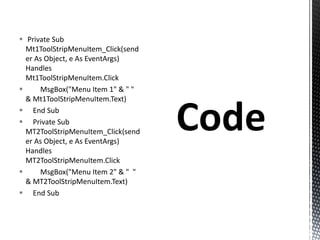
 Private Sub
Mt1ToolStripMenuItem_Click(send
er As Object, e As EventArgs)
Handles
Mt1ToolStripMenuItem.Click
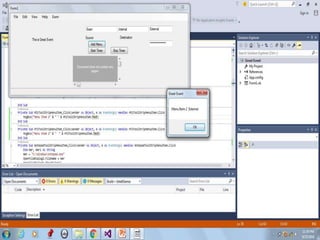
 MsgBox("Menu Item 1" & " "
& Mt1ToolStripMenuItem.Text)
 End Sub
 Private Sub
MT2ToolStripMenuItem_Click(send
er As Object, e As EventArgs)
Handles
MT2ToolStripMenuItem.Click
 MsgBox("Menu Item 2" & " "
& MT2ToolStripMenuItem.Text)
 End Sub
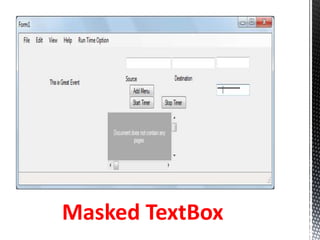
Masked TextBox
.NET framework offers a
myriad of languages which
puts us programmers into a
deepthought process about
which programming
language best suits our
needs.
A variable is a named
memory location. They
are programming
elements that can
change during program
execution.
Data that needs to be
stored in memory &
accessed at a later time
are stored in variables.
All the primitive types
such as int, double etc
are value type
variables.
The simple types
basically consist of
Boolean and Numeric
types, where Numeric
is further divided into
Integral and Floating
Point.
 Object type or reference type
variables are those, which are
allocated storage space in the
heap.
 Reference type objects can be null.
When a reference type is allocated
under the covers a value is
allocated on the heap and a
reference to that value is returned.
 There are basically four reference
types:
 classes,
 interfaces,
 delegates
 arrays.
 Class type consists of custom user
defined data types such as the
Class Employee.
 Class Employee
 Dim empid As Integer
 Dim empname As String
 Public Sub New()
 empid = 10
 empname = "Reshmi"
 End Sub
 End Class
 Overloading provides the ability to
create multiple methods or
properties with the same name,
but with different parameters
lists.
 This is a feature of polymorphism.
It is accomplished by using the
Overloads keyword in VB.NET.
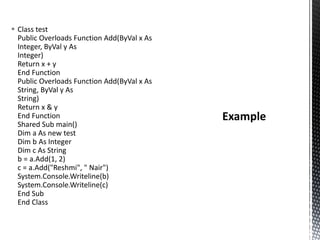
 Class test
Public Overloads Function Add(ByVal x As
Integer, ByVal y As
Integer)
Return x + y
End Function
Public Overloads Function Add(ByVal x As
String, ByVal y As
String)
Return x & y
End Function
Shared Sub main()
Dim a As new test
Dim b As Integer
Dim c As String
b = a.Add(1, 2)
c = a.Add("Reshmi", " Nair")
System.Console.Writeline(b)
System.Console.Writeline(c)
End Sub
End Class
In VB.NET by using
the Overridable
keyword with the
base class method
and the Overrides
keyword with the
derived class
method.
 Public Class shapes
 Public Overridable Sub display()
 Console.WriteLine("Shapes")
 End Sub
 End Class
 Public Class square
 Inherits shapes
 Public Overrides Sub display()
 Console.WriteLine("This is a
square")
 End Sub
 End Class
 Public Class rectangle
 Inherits shapes
 Public Overrides Sub display()
 Console.WriteLine("This is a
rectangle")
 End Sub
 End Class
Properties are named members
of classes, structs, and
interfaces.
They provide a flexible
mechanism to read, write, or
compute the values of private
fields through accessors.
 Structures are very similar to classes but there are
some restrictions present in the case of structures
that are absent in the case of classes.
 A structure allows to create own custom data
types and it contains one or more members that
can be of different data types.
 Namespaces are used in .Net to organize class libraries
into a hierarchical structure and reduce conflicts
between various identifiers in a program.
 Namespaces enables reusable components from
different companies to be used in the same program
without the worry of ambiguity caused by multiple
instances of the same identifier.
 Namespaces provide a logical organization for
programs to exist. Starting with a top level namespace,
sub-namespaces are created to further categorize
code, based upon its purpose.
 The base class library begins at the System namespace.
 Nested namespaces within the System namespace are
 System.Security
 System.IO
 System.Data
 System.Collection
 Boxing is the implicit conversion of a
 Value type to a reference type or
 To any interface type implemented by this value type.
 When boxing occurs, the contents of value type are
copied from the stack into the memory allocated on the
managed heap.
 The new reference type created contains a copy of the
value type and can be used by other types that expect
an object reference.
 UnBoxing is the explicit conversion from
 A reference type to a value type or
 From an interface type to a value type that implements
the interface.
 VB.Net does not support the
ability to explicitly unbox values.
 It relies on the helper functions in
the Microsoft.VisualBasic.Helpers
namespace to carry out unboxing.
 Enumerations are types that inherit from
System.Enum.
 The elements of an enumeration are expressed in
words rather than numbers, which makes it
convenient for understanding the meaning of the
value being used.
 Enumerations symbolically represent a set of values
of one of the primitive integral types.
 The type of the elements of an
enumeration can be Byte, Short,
Integer or Long.
 If no type is specified explicitly,
the default type is Integer.
Enumeration
Type
 The runtime supports constructs called delegates, which enable late-
bound operations such as method invocation and callback procedures.
 With delegates, a program can dynamically call different methods at
runtime.
 They are type safe, secure, managed objects that always point to a
valid object and cannot corrupt the memory of another object.
 The closest equivalent of a delegate in other languages is a function
pointer, but whereas a function pointer can only reference Shared
functions, a delegate can reference both Shared and instance
methods.
 Delegates are Marshal by Value Objects.
 The members of a delegate are the members inherited from class
System.Delegate.
 A delegate defines the signature and return type of a method. The
resulting delegate can reference any method with a matching
signature.
 Each instance of a delegate can forward a call to one or more methods
that take those parameters and return the same type.
 Once a method has been assigned to a delegate, it is called when the
delegate is invoked.
 When ByVal keyword is used, it causes the parameter to be passed
by value.
 In this case, a copy of the original parameter is passed to the called
module.
 Thus any changes made to the copy of the parameter do not affect
the original value of the parameter.
 When ByRef keyword is used, it sends a reference (pointer) to the
original value to the called module rather than its copy.
 Thus any changes made to the parameter in the
function/procedure will cause the original value to be modified.
 Ctype is a general cast keyword that coerces an expression into
any type.
 It returns the result of explicitly converting an expression to a
specified data type, object, structure, class, or interface.
 If no conversion exists from the type of the expression to the
specified type, a compile-time error occurs.
 When Ctype is used to perform explicit conversion, execution is
faster since it is compiled inline and hence no call to a procedure
is involved to perform the conversion.
Integer Type VB.NET CLR Type
 8-bit Integer Byte System.Byte
 16-bit Integer Short System.Int16
 32-bit Integer Integer System.Int32
 64-bit Integer Long System.Int64
 The .NET Framework provides a run-time environment called the
Common Language Runtime, which manages the execution of code
and provides services that make the development process easier.
 Compilers and tools expose the
runtime's functionality and enable
you to write code that benefits
from this managed execution
environment.
 Code developed with a language
compiler that targets the runtime
is called managed code.
 dotNET Tutorial for Beginners,
India Community Initiative
 Microsoft Visual Studio 2010
byMichael Halvorson, Microsoft
 Microsoft Visual Basic 6.0 by
Francesco Balena ,Microsoft Press
THANK YOU

Visual Basic User Interface -IV

  • 1.
    Visual Basic –UserInterface-III Visual Basic –User Interface- IV Govt. Polytechnic(W) Faridabad 27th September 2016
  • 9.
    Public Class Form1 DimSt, Mt1, MT2 As String Dim Mb1, Mb2, Mt1ToolStripMenuItem, MT2ToolStripMenuItem As ToolStripMenuItem
  • 10.
     Private SubAdd_Menu_Click(sender As Object, e As EventArgs) Handles Add_Menu.Click  Mt1 = TextBox2.Text  MT2 = TextBox3.Text  St = TextBox1.Text  Dim Ab1, Ab2 As ToolStripDropDownItem  Mb1 = ColorToolStripMenuItem  Mb2 = CalenderToolStripMenuItem  Ab1 = Me.Mb2  Ab2 = Me.Mb1  Me.RunTimeOptionToolStripMenuItem.Na me = St  Me.RunTimeOptionToolStripMenuItem.Siz e = New System.Drawing.Size(120, 22)  Me.RunTimeOptionToolStripMenuItem.Te xt = St  Me.RunTimeOptionToolStripMenuItem.Dr opDownItems.AddRange({Ab1, Ab2})  End Sub CODE
  • 14.
     Mt1 =TextBox2.Text  MT2 = TextBox3.Text  St = TextBox1.Text  Dim Ab1, Ab2 As ToolStripDropDownItem  Me.Mt1ToolStripMenuItem = New System.Windows.Forms.ToolStripMenuItem()  Me.Mt1ToolStripMenuItem.Name = Mt1  Me.Mt1ToolStripMenuItem.Size = New System.Drawing.Size(120, 22)  Me.Mt1ToolStripMenuItem.Text = Mt1  Me.MT2ToolStripMenuItem = New System.Windows.Forms.ToolStripMenuItem()  Me.MT2ToolStripMenuItem.Name = MT2  Me.MT2ToolStripMenuItem.Size = New System.Drawing.Size(120, 22)  Me.MT2ToolStripMenuItem.Text = MT2  Mb1 = Mt1ToolStripMenuItem  Mb2 = MT2ToolStripMenuItem  Ab1 = Me.Mb2  Ab2 = Me.Mb1  Me.RunTimeOptionToolStripMenuItem.Name = St  Me.RunTimeOptionToolStripMenuItem.Size = New System.Drawing.Size(120, 22)  Me.RunTimeOptionToolStripMenuItem.Text = St  Me.RunTimeOptionToolStripMenuItem.DropDownItems.AddRange({Ab1, Ab2})  End Sub Code
  • 18.
     Private Sub Start_Timer_Click(senderAs Object, e As EventArgs) Handles Start_Timer.Click  TextBox1.Text = 0  Timer1.Start()  End Sub  Private Sub Button1_Click(sender As Object, e As EventArgs) Handles Button1.Click  Timer1.Stop()  TextBox1.Text = TextBox1.Text + Timer1.Interval  End Sub Codes
  • 21.
     Private SubAdd_Menu_Click(sender As Object, e As EventArgs) Handles Add_Menu.Click  Mt1 = TextBox2.Text  MT2 = TextBox3.Text  St = TextBox1.Text  Me.Mt1ToolStripMenuItem = New System.Windows.Forms.ToolStripMenuItem()  Me.Mt1ToolStripMenuItem.Name = Mt1  Me.Mt1ToolStripMenuItem.Size = New System.Drawing.Size(120, 22)  Me.Mt1ToolStripMenuItem.Text = Mt1  Me.MT2ToolStripMenuItem = New System.Windows.Forms.ToolStripMenuItem()  'Friend WithEvents Mt1ToolStripMenuItem As ToolStripMenuItem  'Friend WithEvents MT2ToolStripMenuItem As ToolStripMenuItem  Me.MT2ToolStripMenuItem.Name = MT2  Me.MT2ToolStripMenuItem.Size = New System.Drawing.Size(120, 22)  Me.MT2ToolStripMenuItem.Text = MT2  Mb1 = Mt1ToolStripMenuItem  Mb2 = MT2ToolStripMenuItem  Ab1 = Me.Mb1  Ab2 = Me.Mb2  Me.RunTimeOptionToolStripMenuItem.Name = St  Me.RunTimeOptionToolStripMenuItem.Size = New System.Drawing.Size(120, 22)  Me.RunTimeOptionToolStripMenuItem.Text = St  Me.RunTimeOptionToolStripMenuItem.DropDownItems.AddRa nge({Ab1, Ab2})  End Sub
  • 25.
     Private Sub Mt1ToolStripMenuItem_Click(send erAs Object, e As EventArgs) Handles Mt1ToolStripMenuItem.Click  MsgBox("Menu Item 1" & " " & Mt1ToolStripMenuItem.Text)  End Sub  Private Sub MT2ToolStripMenuItem_Click(send er As Object, e As EventArgs) Handles MT2ToolStripMenuItem.Click  MsgBox("Menu Item 2" & " " & MT2ToolStripMenuItem.Text)  End Sub
  • 28.
  • 33.
    .NET framework offersa myriad of languages which puts us programmers into a deepthought process about which programming language best suits our needs.
  • 34.
    A variable isa named memory location. They are programming elements that can change during program execution. Data that needs to be stored in memory & accessed at a later time are stored in variables.
  • 35.
    All the primitivetypes such as int, double etc are value type variables. The simple types basically consist of Boolean and Numeric types, where Numeric is further divided into Integral and Floating Point.
  • 36.
     Object typeor reference type variables are those, which are allocated storage space in the heap.  Reference type objects can be null. When a reference type is allocated under the covers a value is allocated on the heap and a reference to that value is returned.  There are basically four reference types:  classes,  interfaces,  delegates  arrays.
  • 37.
     Class typeconsists of custom user defined data types such as the Class Employee.  Class Employee  Dim empid As Integer  Dim empname As String  Public Sub New()  empid = 10  empname = "Reshmi"  End Sub  End Class
  • 38.
     Overloading providesthe ability to create multiple methods or properties with the same name, but with different parameters lists.  This is a feature of polymorphism. It is accomplished by using the Overloads keyword in VB.NET.
  • 39.
     Class test PublicOverloads Function Add(ByVal x As Integer, ByVal y As Integer) Return x + y End Function Public Overloads Function Add(ByVal x As String, ByVal y As String) Return x & y End Function Shared Sub main() Dim a As new test Dim b As Integer Dim c As String b = a.Add(1, 2) c = a.Add("Reshmi", " Nair") System.Console.Writeline(b) System.Console.Writeline(c) End Sub End Class
  • 40.
    In VB.NET byusing the Overridable keyword with the base class method and the Overrides keyword with the derived class method.
  • 41.
     Public Classshapes  Public Overridable Sub display()  Console.WriteLine("Shapes")  End Sub  End Class  Public Class square  Inherits shapes  Public Overrides Sub display()  Console.WriteLine("This is a square")  End Sub  End Class  Public Class rectangle  Inherits shapes  Public Overrides Sub display()  Console.WriteLine("This is a rectangle")  End Sub  End Class
  • 42.
    Properties are namedmembers of classes, structs, and interfaces. They provide a flexible mechanism to read, write, or compute the values of private fields through accessors.
  • 43.
     Structures arevery similar to classes but there are some restrictions present in the case of structures that are absent in the case of classes.  A structure allows to create own custom data types and it contains one or more members that can be of different data types.
  • 44.
     Namespaces areused in .Net to organize class libraries into a hierarchical structure and reduce conflicts between various identifiers in a program.  Namespaces enables reusable components from different companies to be used in the same program without the worry of ambiguity caused by multiple instances of the same identifier.  Namespaces provide a logical organization for programs to exist. Starting with a top level namespace, sub-namespaces are created to further categorize code, based upon its purpose.
  • 45.
     The baseclass library begins at the System namespace.  Nested namespaces within the System namespace are  System.Security  System.IO  System.Data  System.Collection
  • 46.
     Boxing isthe implicit conversion of a  Value type to a reference type or  To any interface type implemented by this value type.  When boxing occurs, the contents of value type are copied from the stack into the memory allocated on the managed heap.  The new reference type created contains a copy of the value type and can be used by other types that expect an object reference.
  • 47.
     UnBoxing isthe explicit conversion from  A reference type to a value type or  From an interface type to a value type that implements the interface.
  • 48.
     VB.Net doesnot support the ability to explicitly unbox values.  It relies on the helper functions in the Microsoft.VisualBasic.Helpers namespace to carry out unboxing.
  • 49.
     Enumerations aretypes that inherit from System.Enum.  The elements of an enumeration are expressed in words rather than numbers, which makes it convenient for understanding the meaning of the value being used.  Enumerations symbolically represent a set of values of one of the primitive integral types.
  • 50.
     The typeof the elements of an enumeration can be Byte, Short, Integer or Long.  If no type is specified explicitly, the default type is Integer. Enumeration Type
  • 51.
     The runtimesupports constructs called delegates, which enable late- bound operations such as method invocation and callback procedures.  With delegates, a program can dynamically call different methods at runtime.  They are type safe, secure, managed objects that always point to a valid object and cannot corrupt the memory of another object.  The closest equivalent of a delegate in other languages is a function pointer, but whereas a function pointer can only reference Shared functions, a delegate can reference both Shared and instance methods.  Delegates are Marshal by Value Objects.  The members of a delegate are the members inherited from class System.Delegate.  A delegate defines the signature and return type of a method. The resulting delegate can reference any method with a matching signature.  Each instance of a delegate can forward a call to one or more methods that take those parameters and return the same type.  Once a method has been assigned to a delegate, it is called when the delegate is invoked.
  • 52.
     When ByValkeyword is used, it causes the parameter to be passed by value.  In this case, a copy of the original parameter is passed to the called module.  Thus any changes made to the copy of the parameter do not affect the original value of the parameter.
  • 53.
     When ByRefkeyword is used, it sends a reference (pointer) to the original value to the called module rather than its copy.  Thus any changes made to the parameter in the function/procedure will cause the original value to be modified.
  • 54.
     Ctype isa general cast keyword that coerces an expression into any type.  It returns the result of explicitly converting an expression to a specified data type, object, structure, class, or interface.  If no conversion exists from the type of the expression to the specified type, a compile-time error occurs.  When Ctype is used to perform explicit conversion, execution is faster since it is compiled inline and hence no call to a procedure is involved to perform the conversion.
  • 55.
    Integer Type VB.NETCLR Type  8-bit Integer Byte System.Byte  16-bit Integer Short System.Int16  32-bit Integer Integer System.Int32  64-bit Integer Long System.Int64
  • 57.
     The .NETFramework provides a run-time environment called the Common Language Runtime, which manages the execution of code and provides services that make the development process easier.
  • 58.
     Compilers andtools expose the runtime's functionality and enable you to write code that benefits from this managed execution environment.  Code developed with a language compiler that targets the runtime is called managed code.
  • 59.
     dotNET Tutorialfor Beginners, India Community Initiative  Microsoft Visual Studio 2010 byMichael Halvorson, Microsoft  Microsoft Visual Basic 6.0 by Francesco Balena ,Microsoft Press
  • 60.