• Virtual Reality(VR) and Computer
Graphics (CG) are closely related fields
that focus on creating immersive digital
experiences.
• VR relies heavily on advanced computer
graphics techniques to simulate realistic
environments and interactive experiences.
3.
What is VirtualReality (VR)?
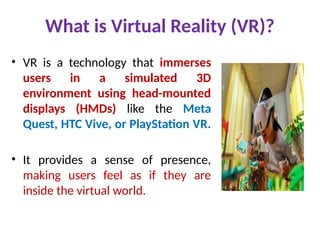
• VR is a technology that immerses
users in a simulated 3D
environment using head-mounted
displays (HMDs) like the Meta
Quest, HTC Vive, or PlayStation VR.
• It provides a sense of presence,
making users feel as if they are
inside the virtual world.
4.
Role of ComputerGraphics in VR
• 3D Modeling – Creating virtual objects and
environments using tools like Blender, Maya, or 3ds
Max.
• Rendering – Converting 3D models into high-quality
images or real-time graphics using engines like
Unreal Engine and Unity.
• Lighting & Shading – Simulating how light interacts
with surfaces to create realism.
• Physics Simulation – Adding real-world physics like
gravity, collision, and fluid dynamics for realism.
• Real-Time Rendering – Generating visuals instantly
to ensure smooth VR experiences.
5.
Key Technologies inVR Computer Graphics
1.Game Engines – Unity, Unreal Engine, and CryEngine
power most VR applications.
2.Graphics APIs – OpenGL, Vulkan, and DirectX help in
rendering VR graphics efficiently.
3.Shaders & Textures – Enhance visual details and
realism.
4.AI & Machine Learning – Improve realism in
animations, physics, and procedural generation.
6.
Applications of VR& Computer Graphics
1.Gaming & Entertainment – Immersive VR
games and simulations.
2.Healthcare – VR training for surgeons, therapy,
and rehabilitation.
3.Education & Training – Virtual labs, flight
simulators, and industrial training.
4.Architecture & Design – Virtual walkthroughs
of buildings before construction.
5.Metaverse & Social VR – Virtual social spaces
and online collaboration.
• Real-time computergraphics refers to the
process of generating and rendering images
instantly, typically at high frame rates, to
create smooth and interactive visual
experiences.
• This technology is widely used in video
games, virtual reality (VR), augmented
reality (AR), simulations, and interactive
applications.
9.
Key Features ofReal-Time Graphics
• High Performance – Needs fast rendering (often
30-120 frames per second) to ensure smooth
visuals.
• Low Latency – Critical for VR, gaming, and
interactive applications to provide instant
feedback.
• Realistic or Stylized Rendering – Uses advanced
lighting, shading, and physics to enhance visuals.
• Optimized for Hardware – Runs on GPUs
(Graphics Processing Units) like NVIDIA, AMD, or
Intel GPUs.
10.
Core Technologies inReal-Time Rendering
1. Game Engines & Graphics Engines
• Unreal Engine – High-quality real-time
rendering with photorealistic graphics.
• Unity – Popular for games, VR/AR, and
simulations.
• CryEngine – Known for advanced lighting and
realistic environments.
• Godot – Open-source engine for 2D/3D game
development.
11.
Core Technologies inReal-Time Rendering
2. Graphics APIs (Application Programming
Interfaces)
• DirectX (by Microsoft) – Used in Windows and
Xbox game development.
• OpenGL – Cross-platform API for real-time
graphics.
• Vulkan – Low-level API with better
performance and efficiency.
• Metal (by Apple) – Optimized for macOS and
iOS graphics.
12.
Core Technologies inReal-Time Rendering
3. Rendering Techniques
• Rasterization – Fast rendering method used in
most real-time applications.
• Ray Tracing – Advanced technique for realistic
lighting, but computationally expensive (used
in modern GPUs with hardware acceleration).
• Global Illumination – Simulates realistic light
behavior (bounce lighting, reflections,
shadows).
13.
Applications of Real-TimeComputer Graphics
• Gaming – 3D games with high frame rates for smooth
player interaction.
• Virtual & Augmented Reality (VR/AR) – Immersive
experiences requiring real-time rendering.
• Simulation & Training – Flight simulators, medical
training, and architectural visualization.
• Movies & Animation – Some real-time rendering
techniques are used for previsualization.
• Metaverse & AI-Driven Graphics – Interactive virtual
environments and real-time AI-generated assets.
• Flight simulationin virtual reality (VR) is one of
the most immersive ways to experience flying,
whether for casual fun, serious training, or
combat missions.
• VR allows you to feel like you're truly inside
the cockpit, looking around naturally and
interacting with controls more intuitively.
• With a VR headset, you can look around freely,
interact with controls using motion controllers
or physical peripherals, and get a much greater
sense of depth and scale compared to a
standard monitor setup.
16.
Key Aspects ofVR Flight Simulation
Immersion & Realism
• 360-degree head tracking allows you to look
around the cockpit naturally.
• Depth perception improves situational
awareness, making landings and maneuvers
more intuitive.
• Instruments, controls, and switches feel
more natural to interact with in VR.
17.
Key Aspects ofVR Flight Simulation
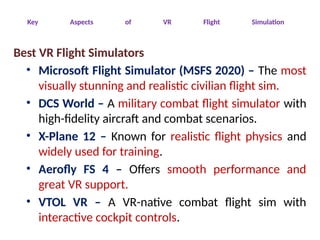
Best VR Flight Simulators
• Microsoft Flight Simulator (MSFS 2020) – The most
visually stunning and realistic civilian flight sim.
• DCS World – A military combat flight simulator with
high-fidelity aircraft and combat scenarios.
• X-Plane 12 – Known for realistic flight physics and
widely used for training.
• Aerofly FS 4 – Offers smooth performance and
great VR support.
• VTOL VR – A VR-native combat flight sim with
interactive cockpit controls.
18.
Key Aspects ofVR Flight Simulation
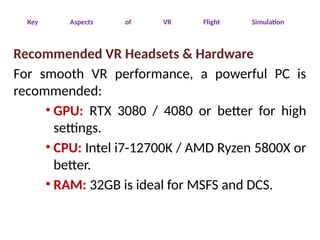
Recommended VR Headsets & Hardware
For smooth VR performance, a powerful PC is
recommended:
• GPU: RTX 3080 / 4080 or better for high
settings.
• CPU: Intel i7-12700K / AMD Ryzen 5800X or
better.
• RAM: 32GB is ideal for MSFS and DCS.
19.
Key Aspects ofVR Flight Simulation
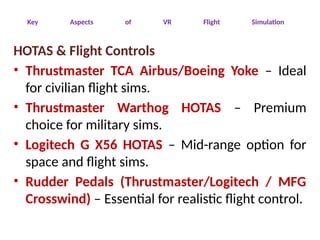
HOTAS & Flight Controls
• Thrustmaster TCA Airbus/Boeing Yoke – Ideal
for civilian flight sims.
• Thrustmaster Warthog HOTAS – Premium
choice for military sims.
• Logitech G X56 HOTAS – Mid-range option for
space and flight sims.
• Rudder Pedals (Thrustmaster/Logitech / MFG
Crosswind) – Essential for realistic flight control.
20.
Key Aspects ofVR Flight Simulation
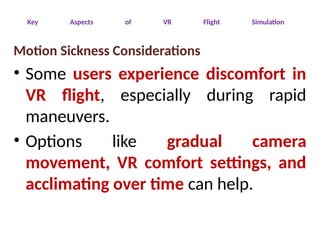
Motion Sickness Considerations
• Some users experience discomfort in
VR flight, especially during rapid
maneuvers.
• Options like gradual camera
movement, VR comfort settings, and
acclimating over time can help.
• A virtualworld space in virtual reality
(VR) refers to a fully immersive 3D
environment where users can move,
interact, and explore as if they were
physically present.
• This concept is used in various
applications, from gaming and
simulations to social interactions,
professional training, and the metaverse.
23.
Key Features ofVirtual World Space in VR
Immersive 3D Environments
• Users experience depth, scale, and
presence in a simulated world.
• Virtual spaces can be as small as a room
or as large as an entire galaxy.
• Some worlds are static (fixed
environments), while others are
dynamic (changing over time).
24.
Key Features ofVirtual World Space in VR
Interaction & Navigation
• 6DoF (Six Degrees of Freedom): Move in all
directions (up/down, left/right,
forward/backward) and rotate your head
naturally.
• Hand-tracking / Motion Controllers: Interact
with objects and other users intuitively.
• Teleportation & Locomotion Options: Walk,
fly, or teleport inside the VR space to avoid
motion sickness.
25.
Common Applications ofVirtual World Spaces
• Gaming & Entertainment
• Flight & Space Simulation
• Social & Metaverse
• Architecture & Design
• Training & Education
26.
Hardware for VRWorld Spaces
• VR Headsets: Meta Quest 3, HTC Vive Pro 2,
Valve Index, Pimax, HP Reverb G2.
• Tracking & Input: Full-body tracking, hand
tracking, VR gloves, or haptic suits for
deeper immersion.
• Computing Power: High-end GPUs (RTX
3080+ recommended) and strong CPUs for
smooth performance in expansive VR
environments.
27.
The Future ofVirtual Worlds in VR
• Metaverse Expansion: Persistent,
interconnected digital spaces for work, play,
and socializing.
• AI-Powered Worlds: Procedural generation
and AI-driven Non-Playable Characters
(NPCs) to create dynamic experiences.
• Haptic Feedback & Smell Tech: Deeper
sensory immersion using haptic vests,
gloves, and even scent simulation.
• “Positioning theVirtual Observer” in
virtual reality (VR) refers to
determining where and how the
user's perspective is placed within a
virtual environment.
• This positioning impacts immersion,
interaction, and overall user
experience.
30.
Key Aspects ofVirtual Observer Positioning in VR
First-Person vs. Third-Person View
• First-Person Perspective: The observer
sees through the eyes of the virtual
character (e.g., cockpit view in a flight
sim).
• Third-Person Perspective: The observer
sees their avatar from an external
viewpoint (common in VR social apps).
31.
Key Aspects ofVirtual Observer Positioning in VR
Tracking & Head Movement
• 6DoF (Six Degrees of Freedom): Allows
movement in all directions and head
rotation.
• Positional Tracking: Determines where the
user is in the virtual space using inside-out
(camera-based) or outside-in (external
sensor) tracking.
32.
Key Aspects ofVirtual Observer Positioning in VR
Locomotion & Comfort Considerations
• Teleportation: Reduces motion sickness by
allowing instant movement.
• Smooth Locomotion: Simulates walking but may
cause discomfort in some users.
• Seated vs. Room-Scale VR: Some experiences
require full-room movement, while others are
designed for seated users (like racing and flight
sims).
33.
Key Aspects ofVirtual Observer Positioning in VR
Applications in Flight Simulation & Virtual
Environments
• Flight Sims (MSFS, DCS, X-Plane): The observer
is typically inside a fixed cockpit but can lean and
move within the space.
• Architectural Visualization: The observer moves
through a virtual building to explore layouts.
• VR Training & Simulations: Positioning is crucial
for safety training, medical simulations, and
military applications.
What is Perspectiveprojection?
• Perspective projection is a technique used in
computer graphics to simulate how objects
appear smaller as they move further from the
observer.
• This mimics real-world depth perception,
creating a sense of three-dimensionality on a
two-dimensional display.
• In VR, perspective projection plays a crucial role
in rendering realistic environments.
36.
How Perspective projectionworks in VR?
• VR systems use perspective projection to
transform 3D scenes into 2D images displayed
on the headset’s screens.
• The main components involved include:
– Field of View (FoV)
– Projection Matrix
– Depth Perception
– Head Tracking & Camera Positioning
37.
How Perspective projectionworks in VR?
1. Field of View (FoV):
– Defines the extent of the virtual world visible to the
user.
– A wider FoV enhances immersion by replicating
human vision.
2. Projection Matrix:
– Converts 3D coordinates into 2D screen
coordinates.
– Uses depth information to maintain proper
proportions and depth cues.
38.
How Perspective projectionworks in VR?
3. Depth Perception:
– Objects farther away appear smaller, creating a
realistic sense of space.
– Depth cues, such as shading and occlusion, reinforce
3D perception.
4. Head Tracking & Camera Positioning:
– The virtual camera adjusts dynamically based on
head movements.
– Ensures a natural viewing experience as the
perspective shifts accordingly.
39.
Importance of Perspectiveprojection in VR?
• Enhances Immersion:
– Makes virtual worlds feel more natural and engaging.
• Improves Spatial Awareness:
– Helps users judge distances accurately.
• Supports Interaction:
– Essential for realistic object manipulation and
navigation.
Human Vision inVirtual Reality (VR)
• Virtual reality aims to replicate human vision as
closely as possible to create an immersive
experience.
• This involves simulating how the human eye
perceives depth, movement, and spatial
relationships.
• Several factors contribute to how VR mimics
human vision.
42.
1.Field of View(FoV)
• The human eye has a natural field of view of
about 200–220 degrees, with both eyes
combined.
• However, most VR headsets provide a narrower
FoV of 90–120 degrees, limiting peripheral vision.
Effect in VR:
• A wider FoV enhances immersion but
requires better hardware and rendering.
• Limited FoV in VR may cause a "tunnel
vision" effect.
43.
2. Stereoscopic Vision& Depth Perception
• Humans perceive depth using binocular disparity
—the difference in images between the two eyes.
• VR headsets use stereoscopic rendering by
displaying slightly different images to each eye,
mimicking real-world depth perception.
Effect in VR:
• Enhances the feeling of distance and scale in the
virtual environment.
• Essential for interactions like grabbing objects
or navigating virtual spaces.
44.
3. Motion Parallax& Head Tracking
• In the real world, objects closer to us move
faster than distant objects when we move our
heads.
• VR headsets track head movements to adjust
the perspective in real time, creating motion
parallax similar to real-world vision.
Effect in VR:
• Provides realistic depth cues when moving
around.
• Enhances spatial awareness and immersion.
45.
4. Frame Rate& Motion Sickness
• The human eye perceives motion smoothly at frame
rates of 60 FPS and above.
• VR headsets typically aim for 90–120 FPS to prevent lag
and motion sickness.
• Lower frame rates can cause latency, making movement
feel unnatural and potentially leading to dizziness.
Effect in VR:
• Higher frame rates reduce motion sickness and
discomfort.
• Smooth motion ensures natural interaction and
reduces disorientation.
46.
5. Peripheral Vision& Foveated Rendering
• Most VR headsets don’t fully replicate human
peripheral vision.
• However, foveated rendering is a technique
that prioritizes rendering details in the center
of vision while reducing detail in peripheral
areas.
Effect in VR:
• Improves performance by optimizing GPU usage.
• Can be combined with eye-tracking to enhance
realism.
47.
6. Accommodation &Vergence Conflict
• In the real world, our eyes focus
(accommodation) and converge at the same
distance.
• However, in VR, the screen is fixed at a set
distance, which can cause an unnatural conflict.
Effect in VR:
• May cause eye strain over long periods.
• Newer VR technologies aim to introduce
varifocal displays to reduce this issue.
What is StereoPerspective Projection?
• Stereo perspective projection is a technique
used in VR to create a 3D effect by
rendering two slightly different images—
one for each eye.
• These images simulate the way human
eyes perceive depth, leading to a realistic
and immersive virtual experience.
50.
How it worksin VR?
Binocular Disparity:
• Each eye sees the world from a slightly different
angle.
• The brain merges these images to perceive depth.
Dual-Viewport Rendering:
• VR headsets generate two distinct views of a scene:
one for the left eye and one for the right.
• These views are offset based on the user's
interpupillary distance (IPD).
51.
How it worksin VR?
Projection Matrices:
• Two different projection matrices transform 3D
objects into 2D screen images for each eye.
• The slight variation in these projections creates a
stereoscopic effect.
Head Tracking Integration:
• As the user moves their head, both images adjust
dynamically.
• This ensures a consistent perspective and enhances
immersion.
52.
Why Is StereoPerspective Projection
Important in VR?
• Enhances Depth Perception – Objects appear at
realistic distances.
• Improves Spatial Awareness – Helps users navigate
and interact naturally.
• Essential for Immersion – Makes virtual
environments feel real.
• Supports Hand and Object Interaction – Crucial for
grabbing or manipulating virtual objects.
• 3D clippingin virtual reality (VR) is a
process that determines which parts of a
3D scene should be rendered or discarded
based on their position relative to the
camera's view.
• This helps improve performance and
maintain immersion by preventing
unnecessary rendering.
55.
key aspects of3D clipping in VR
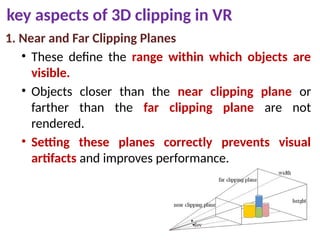
1. Near and Far Clipping Planes
• These define the range within which objects are
visible.
• Objects closer than the near clipping plane or
farther than the far clipping plane are not
rendered.
• Setting these planes correctly prevents visual
artifacts and improves performance.
56.
key aspects of3D clipping in VR
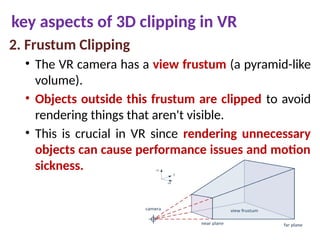
2. Frustum Clipping
• The VR camera has a view frustum (a pyramid-like
volume).
• Objects outside this frustum are clipped to avoid
rendering things that aren't visible.
• This is crucial in VR since rendering unnecessary
objects can cause performance issues and motion
sickness.
57.
key aspects of3D clipping in VR
3. Clipping and Stereo Rendering
• VR requires rendering two images (one for each
eye).
• Clipping must be applied consistently across both
views to avoid inconsistencies that could break
immersion.
• Special care is needed to prevent "disocclusion"
artifacts where one eye sees a clipped object
while the other doesn’t.
58.
key aspects of3D clipping in VR
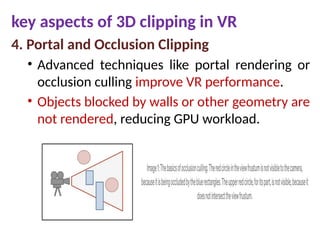
4. Portal and Occlusion Clipping
• Advanced techniques like portal rendering or
occlusion culling improve VR performance.
• Objects blocked by walls or other geometry are
not rendered, reducing GPU workload.
59.
key aspects of3D clipping in VR
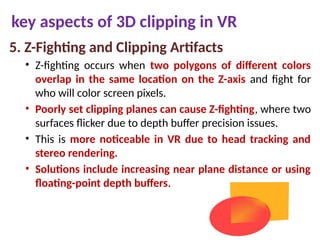
5. Z-Fighting and Clipping Artifacts
• Z-fighting occurs when two polygons of different colors
overlap in the same location on the Z-axis and fight for
who will color screen pixels.
• Poorly set clipping planes can cause Z-fighting, where two
surfaces flicker due to depth buffer precision issues.
• This is more noticeable in VR due to head tracking and
stereo rendering.
• Solutions include increasing near plane distance or using
floating-point depth buffers.
60.
key aspects of3D clipping in VR
6. User-Driven Clipping (Hands & Controllers)
• In VR, users may move their hands or
controllers through objects.
• Proper clipping or depth-based masking is
needed to ensure realism
• Some engines use stencil buffers or depth
culling to improve hand-object
interactions.
• Color theoryplays a crucial role in VR,
influencing immersion, usability, and
emotional impact.
• Because VR is an interactive 3D
environment, colors not only affect
aesthetics but also impact depth
perception, focus, and comfort.
63.
Color and DepthPerception in VR
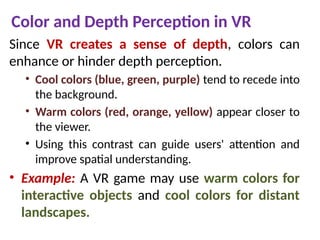
Since VR creates a sense of depth, colors can
enhance or hinder depth perception.
• Cool colors (blue, green, purple) tend to recede into
the background.
• Warm colors (red, orange, yellow) appear closer to
the viewer.
• Using this contrast can guide users' attention and
improve spatial understanding.
• Example: A VR game may use warm colors for
interactive objects and cool colors for distant
landscapes.
64.
Contrast and Readability
Textand UI elements in VR must be highly
readable to prevent strain.
• High contrast (black/white, complementary colors)
improves visibility.
• Low contrast can make objects blend into the
environment, which might be useful for subtle UI
elements.
• Avoid pure white, as it can cause glare in VR
headsets.
• Example: A VR menu should have sufficient
contrast without being too bright to avoid eye
fatigue.
65.
Psychological and EmotionalImpact
Colors influence emotions, which is crucial in
immersive VR storytelling.
• Red → Intensity, urgency, danger.
• Blue → Calm, trust, stability.
• Green → Nature, health, safety.
• Yellow → Energy, caution, optimism.
• Example: A VR meditation app might use soft
blues and greens, while a horror game might
rely on deep reds and shadows.
66.
Avoiding Motion Sicknesswith Color
Poor color choices can contribute to VR motion
sickness.
• Avoid high-contrast patterns (e.g., black-and-
white stripes) that can cause discomfort.
• Reduce blue light intensity to prevent eye strain.
• Use muted, natural colors for backgrounds to
create a more comfortable viewing experience.
• Example: A VR roller coaster game should
avoid excessive flashing colors or rapid
contrast shifts.
67.
Color in Lightingand Shadows
• Lighting is essential for realism and mood in VR.
• Soft lighting creates a more natural and
comfortable environment.
• Directional lighting with warm and cool tones
enhances realism.
• Shadows should be soft and dynamic to help with
depth perception.
• Example: A VR sunset scene should mix warm
oranges and cool purples to mimic real-world
lighting.
68.
UI & UXDesign with Color in VR
Traditional UI color rules don’t always work in VR
because users interact in 3D space.
• Use bold, easily distinguishable colors for
interface elements.
• Avoid overwhelming users with too many bright or
saturated colors.
• Make sure UI elements remain visible against
different backgrounds.
• Example: A floating VR menu should use semi-
transparent panels with soft color gradients for
better integration with the scene.
• Creating 3Dmodels in VR is an intuitive
and immersive way to design objects.
• Instead of using a traditional 2D screen
and mouse, you can sculpt, draw, and
manipulate 3D shapes directly in a
virtual space.
71.
🛠 VR 3DModeling Tools
• There are several user-friendly VR applications for
modeling:
• Gravity Sketch – Great for freehand sketching and 3D design.
• Tilt Brush (by Google) – Originally for painting in 3D, but useful
for sketching forms.
• Adobe Substance Modeler – Focuses on VR sculpting and
organic modeling.
• Medium by Adobe – Ideal for sculpting with clay-like tools.
• Masterpiece Studio – Good for both sculpting and rigging
models.
• These tools allow you to create models in VR and
export them for further use in game engines like
Unity or Unreal.
72.
🏗 Basic ModelingTechniques
• Primitive Shapes – Start with basic cubes, spheres, and
cylinders, then reshape them.
• Sculpting – Push, pull, smooth, and carve virtual clay for
organic forms.
• Extrusion – Pull faces or edges of a shape to extend
them.
• Lathe Modeling – Spin a shape around an axis to create
objects like vases or wheels.
• Layering & Assembly – Combine multiple pieces to build
complex objects.
• Example: To make a chair, start with a cube for the seat,
cylinders for the legs, and a rectangle for the backrest.
73.
✋Interacting with 3DModels in VR
• In VR, your hands (or controllers) become tools for:
🖌 Drawing & Sculpting – Create organic shapes with freehand
strokes.
🔄 Scaling & Rotating – Easily resize or spin objects with gestures.
📏 Snapping & Grid Aligning – Helps in making precise, structured
designs.
🎭 Texturing & Painting – Some apps allow you to color models
directly in VR.
74.
Exporting Models forFurther Use
• Once your model is ready, you can export it
in formats like:
• OBJ / FBX – Standard 3D formats for Unity,
Blender, Unreal Engine.
• GLTF / USDZ – Good for AR/VR applications
and web compatibility.
• Example: You can create a simple VR model,
export it, and import it into a Unity VR
game.