9/29/2008


     Upgrading and Migrating to
  Exchange 2007 and Windows 2008


                                  Dejan Foro
                     dejan.foro@exchangemaster.net


DISCLAIMER:

All the content given in this presentation comes "as is" without warranty or guarantee
of any kind and you use it at your own risk.
Microsoft, Windows, Exchange, Outlook, Office Communications Server, Office
Communicator and their logos are registered trademarks of Microsoft Corporation in
the United States and/or other countries .


                                                                                                1
9/29/2008


                     Speaker
          • 15 years of years of experience with MS
            technologies
          • MCP, MCP+I, MCSE NT40, MCSE+I, MCSE
            2000, MCSE 2000:Messaging, MCSA 2003,
            MCSA 2003:Messaging, MCSE 2003, MCT
          • Member of MCP Hall of Fame
          • Microsoft Exchange MVP
          • Founder of Exchange User Group Europe
          • Works as consultant @ British Telecom
            Global Services , Zurich


                     Agenda
•   Introduction
•   Migration paths, constrains, sources
•   Planning
•   CASE:
    Achieving site resiliency by using Exchange 2007
      SP1 and Windows 2008
• tips and tricks
• Additional resources
• Q&A


                                                              2
9/29/2008


                   Introduction
• Previous presentations
  – Exchange 2007 and Outlook 2007 Overview
  – Windows 2008 - What's new
  www.exchangemaster.net under Presentations


                Migration paths
• Exchange 5.5 → Exchange 2007
  – Not supported
  – Solution:
     • Exchange 5.5 → Exchange 2003→ Exchange 2007
     • 3rd party tools – Quest Migration wizard
• Inplace upgrade from Exchange 2000 or 2003 to
  Exchange 2007 not possible (64bit)
  – Solution:
     • New server (64-bit hardware)
     • add into existing Exchange org,
     • move resources to new servers


                                                            3
9/29/2008


                             Migration
  Continued from previous page
       • Moving resources from old to new server
            –   Mailboxes (move mailbox wizard or powershell)
            –   Public folders
            –   RUS – Recipient update Service
            –   Offline Address Book
            –   Update MX records
            –   Connectors
• TIP: for migrating large number of public
  folders you can use the PFMigrate utility
  http://support.microsoft.com/kb/822895


                      Migration paths
• Ex 2007/Win 2003 → Ex2007 SP1/Win 2008
  – Inplace upgrade not possible
       • Migraton path
            –   New machine
            –   Install Windows 2008
            –   Install Exchange 2007 SP1
            –   Move resources
  – Rolling upgrade of cluster – not possible
       • Migration path
            – New cluster
            – Windows 2008
            – Exchange 2007 SP1


                                                                       4
9/29/2008


         Enviroment prerequsites
• No Exchange 5.5 servers in the org
• Exchange 2000 SP3
• Exchange 2003 SP2
• Organisation switched to Exchange 2000
  native mode
• Windows 2003 domain controllers at SP1 level
  (schema, global catalog, Dc in site where
  exchange 2007 will be installed)


         Enviroment prerequsites
• Additional constrains
    – Exchange 2000 does not work with Windows 2008
      Active Directory
    – If you use Windows 2008 AD, writable DC must be
      available in the site

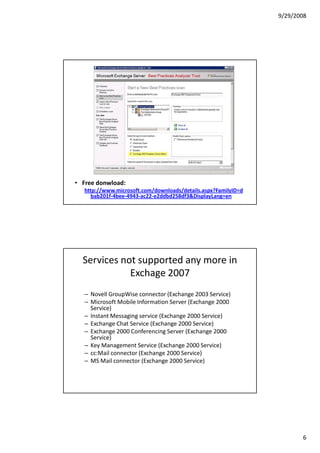
• TIP: you can run Exchange Best Practices
  Analyzer tool (ExBPA) to check the enviroment
  for Exchange 2007 prerequisites


                                                               5
9/29/2008


• Free donwload:
   http://www.microsoft.com/downloads/details.aspx?FamilyID=d
     bab201f-4bee-4943-ac22-e2ddbd258df3&DisplayLang=en


  Services not supported any more in
             Exchage 2007
   – Novell GroupWise connector (Exchange 2003 Service)
   – Microsoft Mobile Information Server (Exchange 2000
     Service)
   – Instant Messaging service (Exchange 2000 Service)
   – Exchange Chat Service (Exchange 2000 Service)
   – Exchange 2000 Conferencing Server (Exchange 2000
     Service)
   – Key Management Service (Exchange 2000 Service)
   – cc:Mail connector (Exchange 2000 Service)
   – MS Mail connector (Exchange 2000 Service)


                                                                       6
9/29/2008


           Reading before upgrade
 • Upgrading to Exchange 2007
    http://technet.microsoft.com/en-us/library/bb124008.aspx
 • How to Upgrade to Exchange 2007 SP1
    http://technet.microsoft.com/en-us/library/bb629489.aspx
 • Exchange Server and Windows Server 2008
    http://msexchangeteam.com/archive/2007/08/16/446709.aspx
 • Mission Impossible: In-Place Upgrading Microsoft Exchange
   Server 2007 from Windows Server 2003 to Windows Server
   2008
    http://msexchangeteam.com/archive/2007/10/04/447188.aspx
 • Transitioning from Exchange 2000/2003 to Exchange Server
   2007
    http://www.msexchange.org/tutorials/Transitioning-Exchange-2000-
       2003-Exchange-Server-2007-Part1.html


       Planning for Exchange 2007
• Things to have in mind (continued)
   – Virtualization:
      • Weak support from Microsoft (“best effort”)
      • Hardware has to support 64 bit guests
          – Intel VT and XD (eXecute Disable)
          – AMD AMD-V and NX (No eXecute)
          – This is requirement for both MS and VMWare virtualization
            products
      • Performance impact because of virtualization (disk)
      • Limitations of virtualization software
          – Max amount of RAM,
          – max number of processors,
          – network card teaming


                                                                               7
9/29/2008


         Planning for Exchange 2007
• Things to have in mind (continued)
  – IPv6
     •   Exchange UM role is not supported on IPv6
     •   Operating systems that fully support it - Win2008 and Vista
     •   IPv6 is not supported on ISA 2006 server
     •   Networking hardware (routers, firewall, switches)
           – Hint: you can use Routing services in Win2008
     • Mobile devices
  – IPv6 Support in Exchange 2007 SP1
     http://technet.microsoft.com/en-us/library/bb629624.aspx


         Planning for Exchange 2007
 • Things to have in mind :
    – Exchange 2007 SP1 required
    – Exchange 2007 is 64-bit – therefore your Windows
      Server 2008 also has to be 64 bit
    – Exchange 2007 can not be run on Windows 2008
      Server Core
    – Only Exchange mailbox role can be clustered in a
      CCR cluster, plan for additional servers to hold
      other roles


                                                                              8
9/29/2008


    Achievening site resilience with
   Exchange 2007 SP1 and Windows
                2008


            New technologies
• Exchange 2007
  – New high availability model – Clustered
    Continuous Replication
• Exchange 2007 SP1
  – Support for Windows 2008 Server
• Windows 2008
  – New clustering technology


                                                     9
9/29/2008


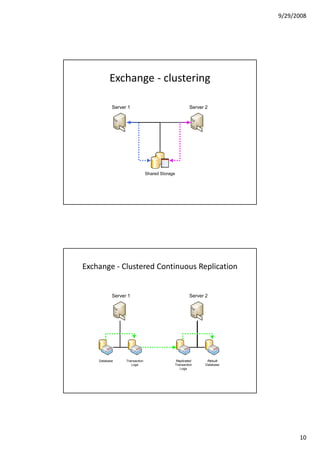
          Exchange - clustering

           Server 1                                  Server 2


                               Shared Storage


Exchange - Clustered Continuous Replication


           Server 1                                  Server 2


    Database     Transaction                Replicated       Rebuilt
                    Logs                    Transaction     Database
                                               Logs


                                                                             10
9/29/2008


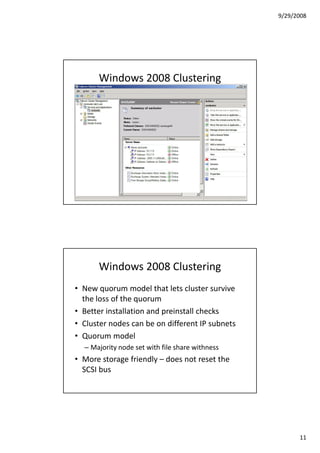
      Windows 2008 Clustering


      Windows 2008 Clustering
• New quorum model that lets cluster survive
  the loss of the quorum
• Better installation and preinstall checks
• Cluster nodes can be on different IP subnets
• Quorum model
  – Majority node set with file share withness
• More storage friendly – does not reset the
  SCSI bus


                                                       11
9/29/2008


       Windows 2008 Clustering
• NETBIOS not used any more
• Heart beat uses RPC/TCP not RPC/UDP
• Configurable heartbeats – good for
  geoclustering


                 Clustering
• Security changes
  – Local system account instead of clustering account
  – Kerberos instead of NTLM
  – Authentication with machine instead of user account
• Compatibility / support requirements
  – HCL changes – cluster does not have to be on the HCL
  – Components still have to be
  – Validation wizard comes in windows to validate the
    configuration


                                                                 12
9/29/2008


                   Clustering
• Support for IP version 6
• Suported in Enterprise and Datacenter Edition
• No inplace upgrade from Windows 2003
  cluster
• Wizard for migrating resources built-in


Configuring Exchange CCR cluster that
   streaches over 2 physical sites
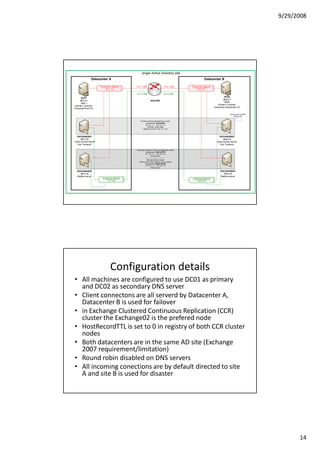
• EXAMPLE
  – Proof of concept lab done for ---


                                                        13
9/29/2008


                                                    single Active Directory site
                Datacenter A                                                                                Datacenter B

                       Production network     10.1.1.200                        10.2.1.200      Production network
                            10.1.1.0                                                                 10.2.1.0

                                              10.1.4.200                       10.2.4.200
                                                                                                                                DC02
      DC01
                                                                                                                               10.2.1.1
     10.1.1.1                                                  ROUTER
                                                                                                                                DNS2
      DNS 1
                                                                                                                          Domain Controller
Domain Controller
                                                                                                                      Enterprise subordinate CA
Enterprise Root CA

                                                                                                                                     Majority Node Set (MNS)
                                                                                                                                          Witness share


                                                  Windows network load balancing cluster
                                                        Clustername: EXCHANGE
                                                       IP1 10.1.1.7 IP2 10.2.1.7
                                                          Multicast, afinity single
                                                     Balanced ports 25, 443, 110, 143


   EXCHANGE01                                                                                                              EXCHANGE03
      10.1.1.2                                                                                                                 10.2.1.2
Client Access Server                                                                                                    Client Access Server
   Hub Transport                                                                                                            Hub Transport

                                              Exchange Clustered Continuous Replication (CCR)
                                                        Clustername: EXCLUSTER
                                                         IP1 10.1.1.5 IP2 10.2.1.5
                                                                  IPv6 dynamic
                                                         ------------------------------------
                                                           Windows failover cluster
                                                 (Node and file share majority quorum model)
                                                        Clustername: WINCLUSTER
                                                         IP1 10.1.1.4 IP2 10.2.1.4
                                                                  IPv6 dynamic

  EXCHANGE02                                                                                                                EXCHANGE04
    10.1.1.3                                                                                                                  10.2.1.3
  Mailbox server                                                                                                            Mailbox server
                         clustering network                                                      clustering network
                              10.1.4.0                                                                10.2.4.0


                                Configuration details
• All machines are configured to use DC01 as primary
  and DC02 as secondary DNS server
• Client connectons are all serverd by Datacenter A,
  Datacenter B is used for failover
• in Exchange Clustered Continuous Replication (CCR)
  cluster the Exchange02 is the prefered node
• HostRecordTTL is set to 0 in registry of both CCR cluster
  nodes
• Both datacenters are in the same AD site (Exchange
  2007 requirement/limitation)
• Round robin disabled on DNS servers
• All incoming conections are by default directed to site
  A and site B is used for disaster


                                                                                                                                                                     14
9/29/2008


                For site resiliance
• Do not forget resilience for services which are
  important for Exchange:
   –   DNS
   –   Active directory
   –   Certification authority
   –   Load balancing of Client Access Server (CAS) roles
       Exchange servers
• Constrains
   – Exchange server requires all the Exchange server in
     CCR cluster to be in the same AD site


         Glitches you may run into
• FAQ 000041 - Passive node setup fails when
  installing Exchange 2007 CCR
   http://www.exchangemaster.net/index.php?option=
     com_content&task=view&id=72&Itemid=57
• FAQ 000042 - Outlook clients unable to
  connect to an Exchange CCR cluster after
  failover
   http://www.exchangemaster.net/index.php?option=
     com_content&task=view&id=73&Itemid=57


                                                                  15
9/29/2008


            Additional Resources
• Cluster Continuous Replication
  http://technet.microsoft.com/en-
    us/library/bb124521.aspx
• Installing Cluster Continuous Replication on
  Windows Server 2008
  http://technet.microsoft.com/en-
    us/library/bb629714.aspx
• IPv6 technology center on Technet
  http://technet.microsoft.com/en-
    us/network/bb530961.aspx


             Additional resources
• Webcasts
   http://www.microsoft.com/events/series/windowsserver200
     8.aspx?tab=webcasts
• Virtual labs
   http://www.microsoft.com/events/series/windowsserver200
     8.aspx?tab=virtuallabs
• Microsoft Exchange Team Blog (You had me at EHLO)
   http://msexchangeteam.com


                                                                   16
9/29/2008


               Shopping tip ☺


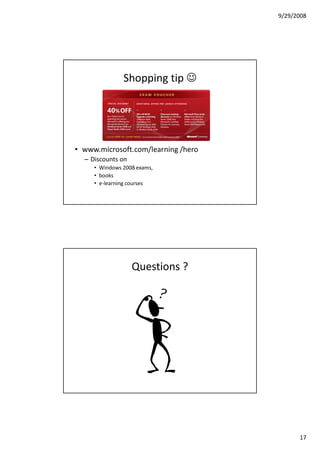
• www.microsoft.com/learning /hero
  – Discounts on
     • Windows 2008 exams,
     • books
     • e-learning courses


                   Questions ?


                                           17
9/29/2008


                   Contact:
• E-mail:
  dejan.foro@exchangemaster.net

• LinkedIn:
  http://www.linkedin.com/in/dejanforo

• Xing (OpenBC):
  http://www.xing.com/profile/Dejan_Foro


• This and other presentations are available for
  download from:

              www.exchangemaster.net
                www.swissitpro.ch


                                                         18
9/29/2008


      Next Swiss IT Pro meeting
• 1.7.2008 @ Digicomp Academy, Zurich
        http://www.digicomp.ch/sitpug


             Speakers wanted


• Wanna be a speaker at Swiss IT Pro group
  meeting ?
• Contact Mr. Desmond Lee
  desmond.lee@swissitpro.ch


                                                   19
9/29/2008


And a big Thank You to our partner Digicomp Academy AG for providing us
                     with space, apero and logistics


                   http://www.digicomp.ch/sitpug


                                                                                20

Upgrading_and_Migrating_to_Exchange_Server_2007_and_Windows_2008

  • 1.
    9/29/2008 Upgrading and Migrating to Exchange 2007 and Windows 2008 Dejan Foro dejan.foro@exchangemaster.net DISCLAIMER: All the content given in this presentation comes "as is" without warranty or guarantee of any kind and you use it at your own risk. Microsoft, Windows, Exchange, Outlook, Office Communications Server, Office Communicator and their logos are registered trademarks of Microsoft Corporation in the United States and/or other countries . 1
  • 2.
    9/29/2008 Speaker • 15 years of years of experience with MS technologies • MCP, MCP+I, MCSE NT40, MCSE+I, MCSE 2000, MCSE 2000:Messaging, MCSA 2003, MCSA 2003:Messaging, MCSE 2003, MCT • Member of MCP Hall of Fame • Microsoft Exchange MVP • Founder of Exchange User Group Europe • Works as consultant @ British Telecom Global Services , Zurich Agenda • Introduction • Migration paths, constrains, sources • Planning • CASE: Achieving site resiliency by using Exchange 2007 SP1 and Windows 2008 • tips and tricks • Additional resources • Q&A 2
  • 3.
    9/29/2008 Introduction • Previous presentations – Exchange 2007 and Outlook 2007 Overview – Windows 2008 - What's new www.exchangemaster.net under Presentations Migration paths • Exchange 5.5 → Exchange 2007 – Not supported – Solution: • Exchange 5.5 → Exchange 2003→ Exchange 2007 • 3rd party tools – Quest Migration wizard • Inplace upgrade from Exchange 2000 or 2003 to Exchange 2007 not possible (64bit) – Solution: • New server (64-bit hardware) • add into existing Exchange org, • move resources to new servers 3
  • 4.
    9/29/2008 Migration Continued from previous page • Moving resources from old to new server – Mailboxes (move mailbox wizard or powershell) – Public folders – RUS – Recipient update Service – Offline Address Book – Update MX records – Connectors • TIP: for migrating large number of public folders you can use the PFMigrate utility http://support.microsoft.com/kb/822895 Migration paths • Ex 2007/Win 2003 → Ex2007 SP1/Win 2008 – Inplace upgrade not possible • Migraton path – New machine – Install Windows 2008 – Install Exchange 2007 SP1 – Move resources – Rolling upgrade of cluster – not possible • Migration path – New cluster – Windows 2008 – Exchange 2007 SP1 4
  • 5.
    9/29/2008 Enviroment prerequsites • No Exchange 5.5 servers in the org • Exchange 2000 SP3 • Exchange 2003 SP2 • Organisation switched to Exchange 2000 native mode • Windows 2003 domain controllers at SP1 level (schema, global catalog, Dc in site where exchange 2007 will be installed) Enviroment prerequsites • Additional constrains – Exchange 2000 does not work with Windows 2008 Active Directory – If you use Windows 2008 AD, writable DC must be available in the site • TIP: you can run Exchange Best Practices Analyzer tool (ExBPA) to check the enviroment for Exchange 2007 prerequisites 5
  • 6.
    9/29/2008 • Free donwload: http://www.microsoft.com/downloads/details.aspx?FamilyID=d bab201f-4bee-4943-ac22-e2ddbd258df3&DisplayLang=en Services not supported any more in Exchage 2007 – Novell GroupWise connector (Exchange 2003 Service) – Microsoft Mobile Information Server (Exchange 2000 Service) – Instant Messaging service (Exchange 2000 Service) – Exchange Chat Service (Exchange 2000 Service) – Exchange 2000 Conferencing Server (Exchange 2000 Service) – Key Management Service (Exchange 2000 Service) – cc:Mail connector (Exchange 2000 Service) – MS Mail connector (Exchange 2000 Service) 6
  • 7.
    9/29/2008 Reading before upgrade • Upgrading to Exchange 2007 http://technet.microsoft.com/en-us/library/bb124008.aspx • How to Upgrade to Exchange 2007 SP1 http://technet.microsoft.com/en-us/library/bb629489.aspx • Exchange Server and Windows Server 2008 http://msexchangeteam.com/archive/2007/08/16/446709.aspx • Mission Impossible: In-Place Upgrading Microsoft Exchange Server 2007 from Windows Server 2003 to Windows Server 2008 http://msexchangeteam.com/archive/2007/10/04/447188.aspx • Transitioning from Exchange 2000/2003 to Exchange Server 2007 http://www.msexchange.org/tutorials/Transitioning-Exchange-2000- 2003-Exchange-Server-2007-Part1.html Planning for Exchange 2007 • Things to have in mind (continued) – Virtualization: • Weak support from Microsoft (“best effort”) • Hardware has to support 64 bit guests – Intel VT and XD (eXecute Disable) – AMD AMD-V and NX (No eXecute) – This is requirement for both MS and VMWare virtualization products • Performance impact because of virtualization (disk) • Limitations of virtualization software – Max amount of RAM, – max number of processors, – network card teaming 7
  • 8.
    9/29/2008 Planning for Exchange 2007 • Things to have in mind (continued) – IPv6 • Exchange UM role is not supported on IPv6 • Operating systems that fully support it - Win2008 and Vista • IPv6 is not supported on ISA 2006 server • Networking hardware (routers, firewall, switches) – Hint: you can use Routing services in Win2008 • Mobile devices – IPv6 Support in Exchange 2007 SP1 http://technet.microsoft.com/en-us/library/bb629624.aspx Planning for Exchange 2007 • Things to have in mind : – Exchange 2007 SP1 required – Exchange 2007 is 64-bit – therefore your Windows Server 2008 also has to be 64 bit – Exchange 2007 can not be run on Windows 2008 Server Core – Only Exchange mailbox role can be clustered in a CCR cluster, plan for additional servers to hold other roles 8
  • 9.
    9/29/2008 Achievening site resilience with Exchange 2007 SP1 and Windows 2008 New technologies • Exchange 2007 – New high availability model – Clustered Continuous Replication • Exchange 2007 SP1 – Support for Windows 2008 Server • Windows 2008 – New clustering technology 9
  • 10.
    9/29/2008 Exchange - clustering Server 1 Server 2 Shared Storage Exchange - Clustered Continuous Replication Server 1 Server 2 Database Transaction Replicated Rebuilt Logs Transaction Database Logs 10
  • 11.
    9/29/2008 Windows 2008 Clustering Windows 2008 Clustering • New quorum model that lets cluster survive the loss of the quorum • Better installation and preinstall checks • Cluster nodes can be on different IP subnets • Quorum model – Majority node set with file share withness • More storage friendly – does not reset the SCSI bus 11
  • 12.
    9/29/2008 Windows 2008 Clustering • NETBIOS not used any more • Heart beat uses RPC/TCP not RPC/UDP • Configurable heartbeats – good for geoclustering Clustering • Security changes – Local system account instead of clustering account – Kerberos instead of NTLM – Authentication with machine instead of user account • Compatibility / support requirements – HCL changes – cluster does not have to be on the HCL – Components still have to be – Validation wizard comes in windows to validate the configuration 12
  • 13.
    9/29/2008 Clustering • Support for IP version 6 • Suported in Enterprise and Datacenter Edition • No inplace upgrade from Windows 2003 cluster • Wizard for migrating resources built-in Configuring Exchange CCR cluster that streaches over 2 physical sites • EXAMPLE – Proof of concept lab done for --- 13
  • 14.
    9/29/2008 single Active Directory site Datacenter A Datacenter B Production network 10.1.1.200 10.2.1.200 Production network 10.1.1.0 10.2.1.0 10.1.4.200 10.2.4.200 DC02 DC01 10.2.1.1 10.1.1.1 ROUTER DNS2 DNS 1 Domain Controller Domain Controller Enterprise subordinate CA Enterprise Root CA Majority Node Set (MNS) Witness share Windows network load balancing cluster Clustername: EXCHANGE IP1 10.1.1.7 IP2 10.2.1.7 Multicast, afinity single Balanced ports 25, 443, 110, 143 EXCHANGE01 EXCHANGE03 10.1.1.2 10.2.1.2 Client Access Server Client Access Server Hub Transport Hub Transport Exchange Clustered Continuous Replication (CCR) Clustername: EXCLUSTER IP1 10.1.1.5 IP2 10.2.1.5 IPv6 dynamic ------------------------------------ Windows failover cluster (Node and file share majority quorum model) Clustername: WINCLUSTER IP1 10.1.1.4 IP2 10.2.1.4 IPv6 dynamic EXCHANGE02 EXCHANGE04 10.1.1.3 10.2.1.3 Mailbox server Mailbox server clustering network clustering network 10.1.4.0 10.2.4.0 Configuration details • All machines are configured to use DC01 as primary and DC02 as secondary DNS server • Client connectons are all serverd by Datacenter A, Datacenter B is used for failover • in Exchange Clustered Continuous Replication (CCR) cluster the Exchange02 is the prefered node • HostRecordTTL is set to 0 in registry of both CCR cluster nodes • Both datacenters are in the same AD site (Exchange 2007 requirement/limitation) • Round robin disabled on DNS servers • All incoming conections are by default directed to site A and site B is used for disaster 14
  • 15.
    9/29/2008 For site resiliance • Do not forget resilience for services which are important for Exchange: – DNS – Active directory – Certification authority – Load balancing of Client Access Server (CAS) roles Exchange servers • Constrains – Exchange server requires all the Exchange server in CCR cluster to be in the same AD site Glitches you may run into • FAQ 000041 - Passive node setup fails when installing Exchange 2007 CCR http://www.exchangemaster.net/index.php?option= com_content&task=view&id=72&Itemid=57 • FAQ 000042 - Outlook clients unable to connect to an Exchange CCR cluster after failover http://www.exchangemaster.net/index.php?option= com_content&task=view&id=73&Itemid=57 15
  • 16.
    9/29/2008 Additional Resources • Cluster Continuous Replication http://technet.microsoft.com/en- us/library/bb124521.aspx • Installing Cluster Continuous Replication on Windows Server 2008 http://technet.microsoft.com/en- us/library/bb629714.aspx • IPv6 technology center on Technet http://technet.microsoft.com/en- us/network/bb530961.aspx Additional resources • Webcasts http://www.microsoft.com/events/series/windowsserver200 8.aspx?tab=webcasts • Virtual labs http://www.microsoft.com/events/series/windowsserver200 8.aspx?tab=virtuallabs • Microsoft Exchange Team Blog (You had me at EHLO) http://msexchangeteam.com 16
  • 17.
    9/29/2008 Shopping tip ☺ • www.microsoft.com/learning /hero – Discounts on • Windows 2008 exams, • books • e-learning courses Questions ? 17
  • 18.
    9/29/2008 Contact: • E-mail: dejan.foro@exchangemaster.net • LinkedIn: http://www.linkedin.com/in/dejanforo • Xing (OpenBC): http://www.xing.com/profile/Dejan_Foro • This and other presentations are available for download from: www.exchangemaster.net www.swissitpro.ch 18
  • 19.
    9/29/2008 Next Swiss IT Pro meeting • 1.7.2008 @ Digicomp Academy, Zurich http://www.digicomp.ch/sitpug Speakers wanted • Wanna be a speaker at Swiss IT Pro group meeting ? • Contact Mr. Desmond Lee desmond.lee@swissitpro.ch 19
  • 20.
    9/29/2008 And a bigThank You to our partner Digicomp Academy AG for providing us with space, apero and logistics http://www.digicomp.ch/sitpug 20