

UIVIEW
                          употреба, хитрости и задължения


Thursday, January 5, 12
UIVIEW


    • defines              a rectangular region on the screen

    • drawing             and touch events

    • placement              and sizing of other views


Thursday, January 5, 12
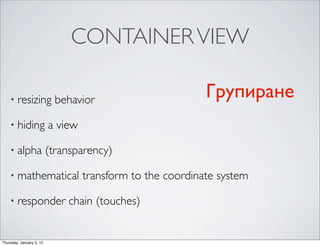
CONTAINER VIEW

    • resizing              behavior                        Групиране
    • hiding              a view

    • alpha               (transparency)

    • mathematical                 transform to the coordinate system

    • responder               chain (touches)


Thursday, January 5, 12
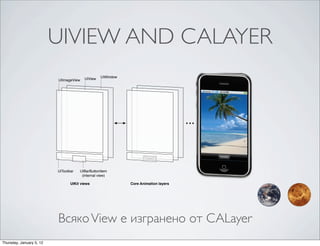
UIVIEW AND CALAYER
                          CHAPTER 1
                          View and Window Architecture


                          Figure 1-1      Architecture of the views in a sample application


                                         UIView    UIWindow
                           UIImageView


                          UIToolbar    UIBarButtonItem
                                        (internal view)

                                 UIKit views                      Core Animation layers


                          The use of Core Animation layer objects has important implications for performance. The actual drawing
                          code of a view object is called as little as possible, and when the code is called, the results are cached by
                          Core Animation and reused as much as possible later. Reusing already-‐rendered content eliminates the

                          Всяко View е изгранено от CALayer
                          expensive drawing cycle usually needed to update views. Reuse of this content is especially important during
                          animations, where the existing content can be manipulated. Such reuse is much less expensive than creating
                          new content.


Thursday, January 5, 12
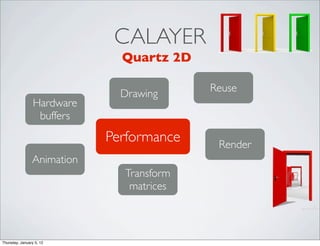
CALAYER
                              Quartz 2D

                                          Reuse
                              Drawing
                 Hardware
                  buffers
                            Performance    Render
                Animation
                              Transform
                               matrices


Thursday, January 5, 12
CHAPTER 1


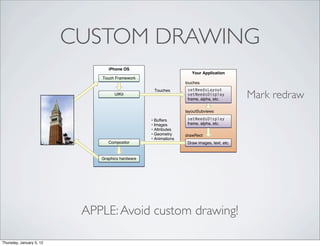
                              CUSTOM DRAWING
                     View and Window Architecture


                     Figure 1-7      UIKit interactions with your view objects

                                                      iPhone OS
                                                                                              Your Application
                                                   Touch Framework
                                                                                           touches
                                                                                            setNeedsLayout
                                                                                                                         Mark redraw
                                                                            Touches
                                                         UIKit                              setNeedsDisplay
                                                                                            frame, alpha, etc.

                                                                                           layoutSubviews

                                                                           • Buffers        setNeedsDisplay
                                                                           • Images         frame, alpha, etc.
                                                                           • Attributes
                                                                           • Geometry      drawRect
                                                                           • Animations
                                                      Compositor                            Draw images, text, etc.


                                                   Graphics hardware


                     The following steps break the event sequence in Figure 1-‐7 (page 23) down even further and explain what
                     happens at each stage and how you might want your application to react in response.

                     1.   The user touches the screen.

                     2.                  APPLE: Avoid custom drawing!
                          The hardware reports the touch event to the UIKit framework.

                     3.   The UIKit framework packages the touch into a UIEvent object and dispatches it to the appropriate
                          view. (For a detailed explanation of how UIKit delivers events to your views, see Event Handling Guide
                          for iOS.)
Thursday, January 5, 12
CHAPTER 1
                                                                                             View and Window Architecture


      CHAPTER 1
      Overview of Quartz 2D
                                                                  UIKIT                      Figure 1-‐4 shows this coordinate system r
                                                                                             windows and views define their own loca
                                                                                             to the view or window origin instead of r

                                                                                             Figure 1-4      Coordinate system orient
      Figure 1-5
                  Quartz 2D                                           UIKit
                          Modifying the coordinate system creates a mirrored image.

              y                                       (0,0)
                                                                                         x
                                                                                             (0,0)
                                                                                                                                x


      (0,0)
                                                              y
                                              x
                     Default Coordinates                          Modified Coordinates


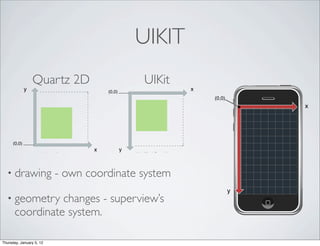
  • drawing                  - own coordinate system
                                                                                                     y
  • geometry     changes - superview’s
       coordinate system.
                        flipped_coordinates.eps
                                                  Cocoa Drawing
                                                  Apple Computer, Inc.
                                                  February 9, 2006                           Because every view and window defines
Thursday, January 5, 12                                                                      coordinate system is in effect at any given
UIVIEW АМИНАЦИИ

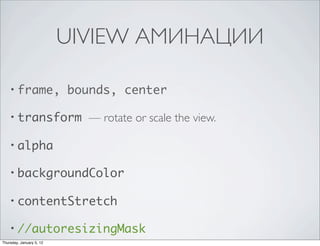
    • frame,              bounds, center

    • transform             — rotate or scale the view.

    • alpha

    • backgroundColor

    • contentStretch

    • //autoresizingMask
Thursday, January 5, 12
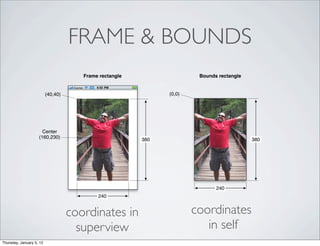
FRAME & BOUNDS
                                       Frame rectangle                  Bounds rectangle


                          (40,40)                              (0,0)


                      Center
                    (160,230)                            380                               380


                                                                              240
                                            240


                                    coordinates in                     coordinates
                                      superview                           in self
Thursday, January 5, 12
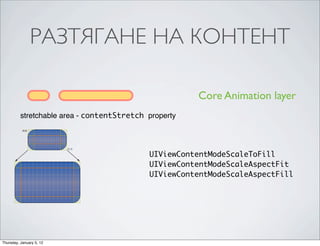
РАЗТЯГАНЕ НА КОНТЕНТ
          CHAPTER 1
          View and Window Architecture


          Stretchable Views
          You can designate a portion of a view as stretchable so that when the size of the view changes only the
          content in the stretchable portion is affected. You typically use stretchable areas for buttons or other views
          where part of the view defines a repeatable pattern. The stretchable area you specify can allow for stretching
                                                                                                                                          Core Animation layer
          along one or both axes of the view. Of course, when stretching a view along two axes, the edges of the view
          must also define a repeatable pattern to avoid any distortion. Figure 1-‐3 shows how this distortion manifests

               stretchable area - contentStretch property
          itself in a view. The color from each of the view’s original pixels is replicated to fill the corresponding area in
          the larger view.

          Figure 1-3      Stretching the background of a button

                (0,0)


                                                         (1,1)

                                                                                                                                UIViewContentModeScaleToFill
                                                                                                                                UIViewContentModeScaleAspectFit
                                                                                                                                UIViewContentModeScaleAspectFill


          You specify the stretchable area of a view using the contentStretch property. This property accepts a
          rectangle whose values are normalized to the range 0.0 to 1.0. When stretching the view, the system
          multiplies these normalized values by the view’s current bounds and scale factor to determine which pixel
          or pixels need to be stretched. The use of normalized values alleviates the need for you to update the
          contentStretch property every time the bounds of your view change.

      The view’s content mode also plays a role in determining how the view’s stretchable area is used. Stretchable
      areas are only used when the content mode would cause the view’s content to be scaled. This means that
      stretchable views are supported only with the UIViewContentModeScaleToFill,
      UIViewContentModeScaleAspectFit, and UIViewContentModeScaleAspectFill content modes. If
Thursday, January 5, 12
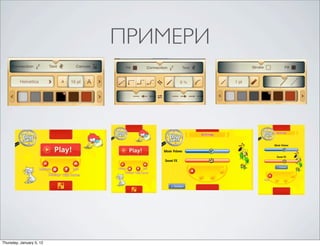
ПРИМЕРИ


Thursday, January 5, 12
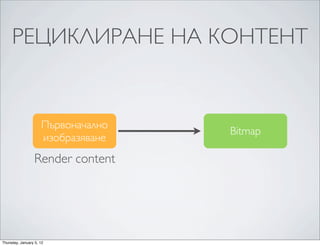
РЕЦИКЛИРАНЕ НА КОНТЕНТ


                     Първоначално
                                    Bitmap
                     изобразяване
                  Render content


Thursday, January 5, 12
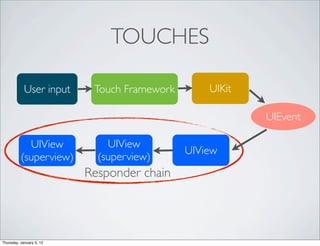
TOUCHES

            User input     Touch Framework       UIKit

                                                         UIEvent

            UIView            UIView
                                             UIView
          (superview)       (superview)
                          Responder chain


Thursday, January 5, 12
PERFORMANCE

    • ViewControllers            - колко и за какво се използват

    • Избягвайте             да чертаете сами

    • Използвайте              contentModes & AutoResizingMask

    • aView.opaque             = YES; когато е възможно

    • Scrolling           optimisation


Thursday, January 5, 12
CUSTOM VIEWS


    •   initWithFrame:                 Не забравяй!
    •   dealloc

    •   autoresizingMask

    •   addGestureRecognizer: or touchesBegan:withEvent:


Thursday, January 5, 12
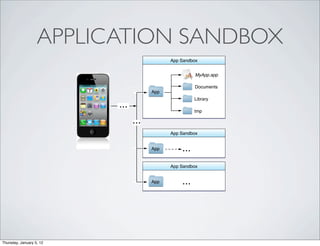
APPENDIX A
                          The iOS Environment


                   APPLICATION SANDBOX
                          Figure A-1      Sandbox directories in iOS

                                                                         App Sandbox


                                                                                      MyApp.app

                                                                                      Documents
                                                                App
                                                                                     Library
                                               ...
                                                                                     tmp

                                                      ...
                                                                         App Sandbox


                                                                App            ...
                                                                         App Sandbox


                                                                App            ...

                          Important: The purpose of a sandbox is to limit the damage that a compromised app can cause to the
                          system. Sandboxes do not prevent attacks from happening to a particular app and it is still your responsibility
                          to code defensively to prevent attacks. For example, if your app does not validate user input and there is an
                          exploitable buffer overflow in your input-‐handling code, an attacker could still hijack your app or cause it to
                          crash. The sandbox only prevents the hijacked app from affecting other apps and other parts of the system.
Thursday, January 5, 12

iOS Views

  • 1.
    UIVIEW употреба, хитрости и задължения Thursday, January 5, 12
  • 2.
    UIVIEW • defines a rectangular region on the screen • drawing and touch events • placement and sizing of other views Thursday, January 5, 12
  • 3.
    CONTAINER VIEW • resizing behavior Групиране • hiding a view • alpha (transparency) • mathematical transform to the coordinate system • responder chain (touches) Thursday, January 5, 12
  • 4.
    UIVIEW AND CALAYER CHAPTER 1 View and Window Architecture Figure 1-1 Architecture of the views in a sample application UIView UIWindow UIImageView UIToolbar UIBarButtonItem (internal view) UIKit views Core Animation layers The use of Core Animation layer objects has important implications for performance. The actual drawing code of a view object is called as little as possible, and when the code is called, the results are cached by Core Animation and reused as much as possible later. Reusing already-‐rendered content eliminates the Всяко View е изгранено от CALayer expensive drawing cycle usually needed to update views. Reuse of this content is especially important during animations, where the existing content can be manipulated. Such reuse is much less expensive than creating new content. Thursday, January 5, 12
  • 5.
    CALAYER Quartz 2D Reuse Drawing Hardware buffers Performance Render Animation Transform matrices Thursday, January 5, 12
  • 6.
    CHAPTER 1 CUSTOM DRAWING View and Window Architecture Figure 1-7 UIKit interactions with your view objects iPhone OS Your Application Touch Framework touches setNeedsLayout Mark redraw Touches UIKit setNeedsDisplay frame, alpha, etc. layoutSubviews • Buffers setNeedsDisplay • Images frame, alpha, etc. • Attributes • Geometry drawRect • Animations Compositor Draw images, text, etc. Graphics hardware The following steps break the event sequence in Figure 1-‐7 (page 23) down even further and explain what happens at each stage and how you might want your application to react in response. 1. The user touches the screen. 2. APPLE: Avoid custom drawing! The hardware reports the touch event to the UIKit framework. 3. The UIKit framework packages the touch into a UIEvent object and dispatches it to the appropriate view. (For a detailed explanation of how UIKit delivers events to your views, see Event Handling Guide for iOS.) Thursday, January 5, 12
  • 7.
    CHAPTER 1 View and Window Architecture CHAPTER 1 Overview of Quartz 2D UIKIT Figure 1-‐4 shows this coordinate system r windows and views define their own loca to the view or window origin instead of r Figure 1-4 Coordinate system orient Figure 1-5 Quartz 2D UIKit Modifying the coordinate system creates a mirrored image. y (0,0) x (0,0) x (0,0) y x Default Coordinates Modified Coordinates • drawing - own coordinate system y • geometry changes - superview’s coordinate system. flipped_coordinates.eps Cocoa Drawing Apple Computer, Inc. February 9, 2006 Because every view and window defines Thursday, January 5, 12 coordinate system is in effect at any given
  • 8.
    UIVIEW АМИНАЦИИ • frame, bounds, center • transform — rotate or scale the view. • alpha • backgroundColor • contentStretch • //autoresizingMask Thursday, January 5, 12
  • 9.
    FRAME & BOUNDS Frame rectangle Bounds rectangle (40,40) (0,0) Center (160,230) 380 380 240 240 coordinates in coordinates superview in self Thursday, January 5, 12
  • 10.
    РАЗТЯГАНЕ НА КОНТЕНТ CHAPTER 1 View and Window Architecture Stretchable Views You can designate a portion of a view as stretchable so that when the size of the view changes only the content in the stretchable portion is affected. You typically use stretchable areas for buttons or other views where part of the view defines a repeatable pattern. The stretchable area you specify can allow for stretching Core Animation layer along one or both axes of the view. Of course, when stretching a view along two axes, the edges of the view must also define a repeatable pattern to avoid any distortion. Figure 1-‐3 shows how this distortion manifests stretchable area - contentStretch property itself in a view. The color from each of the view’s original pixels is replicated to fill the corresponding area in the larger view. Figure 1-3 Stretching the background of a button (0,0) (1,1) UIViewContentModeScaleToFill UIViewContentModeScaleAspectFit UIViewContentModeScaleAspectFill You specify the stretchable area of a view using the contentStretch property. This property accepts a rectangle whose values are normalized to the range 0.0 to 1.0. When stretching the view, the system multiplies these normalized values by the view’s current bounds and scale factor to determine which pixel or pixels need to be stretched. The use of normalized values alleviates the need for you to update the contentStretch property every time the bounds of your view change. The view’s content mode also plays a role in determining how the view’s stretchable area is used. Stretchable areas are only used when the content mode would cause the view’s content to be scaled. This means that stretchable views are supported only with the UIViewContentModeScaleToFill, UIViewContentModeScaleAspectFit, and UIViewContentModeScaleAspectFill content modes. If Thursday, January 5, 12
  • 11.
  • 12.
    РЕЦИКЛИРАНЕ НА КОНТЕНТ Първоначално Bitmap изобразяване Render content Thursday, January 5, 12
  • 13.
    TOUCHES User input Touch Framework UIKit UIEvent UIView UIView UIView (superview) (superview) Responder chain Thursday, January 5, 12
  • 14.
    PERFORMANCE • ViewControllers - колко и за какво се използват • Избягвайте да чертаете сами • Използвайте contentModes & AutoResizingMask • aView.opaque = YES; когато е възможно • Scrolling optimisation Thursday, January 5, 12
  • 15.
    CUSTOM VIEWS • initWithFrame: Не забравяй! • dealloc • autoresizingMask • addGestureRecognizer: or touchesBegan:withEvent: Thursday, January 5, 12
  • 16.
    APPENDIX A The iOS Environment APPLICATION SANDBOX Figure A-1 Sandbox directories in iOS App Sandbox MyApp.app Documents App Library ... tmp ... App Sandbox App ... App Sandbox App ... Important: The purpose of a sandbox is to limit the damage that a compromised app can cause to the system. Sandboxes do not prevent attacks from happening to a particular app and it is still your responsibility to code defensively to prevent attacks. For example, if your app does not validate user input and there is an exploitable buffer overflow in your input-‐handling code, an attacker could still hijack your app or cause it to crash. The sandbox only prevents the hijacked app from affecting other apps and other parts of the system. Thursday, January 5, 12