Vim -  "Vi Improved" Ankit Malik [email_address]
Where Does Your Text Go? Where Does Your Text Go? A   Word   Processor   ? -  computer application used for the production of any sort of printable material. A Text Editor – A Program to write and edit plain text files. Eg. Notepad, Gedit, Kate, Nano, Pico, Emacs....Vim!
Vim Vim – Vi-Improved  Vi + lots of features = Vim! First public release in November 1992.
Simple But Powerful Simple to get started with. Powerful beast. Powerful – do more with less.
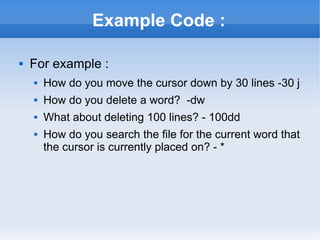
Example Code : For example : How do you move the cursor down by 30 lines -30 j How do you delete a word?  -dw What about deleting 100 lines? - 100dd How do you search the file for the current word that the cursor is currently placed on? - *
Optimises Hand Movements Doesn't require a mouse. Commands are (mostly) alpha – numeric characters. Optimisation helps in the long run. Compare with GUI  text editors.
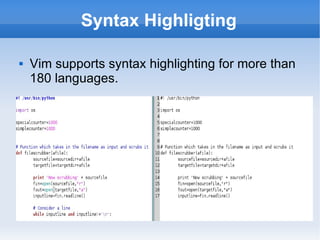
Syntax Highligting Vim supports syntax highlighting for more than 180 languages.
Extensible Vim is extensible. One can write macros, plugins, scripts to extend Vim's functionality.
More Uses  Powerful searching : regular expressions. Auto indentation : useful for programmers. Split windows / tab windows. Multiple language support. And more...
Word of Caution  Getting started – beginner stuff – easy. Intermediate level – takes time and patience. Can be frustrating. But efficiency gained in the long run is worth the effort. So don't give up, if you plan to type a lot!
Hands-On-Session
Recap – Some Commands 1. Modes – i, ESC 2. Navigation – h,j,k,l, w, } 3. Cut/Copy/Paste – d,y,p  4. Searching - /<searchword> , n,p 5. (Not) Saving – w,q, wq, q!
The End Where to go from here? Vim Tutor - $ vimtutor 'A Byte of Vim' -  http://www.swaroopch.com/notes/Vim Questions? Feedback? Errata?

Vi

  • 1.
    Vim - &quot;Vi Improved&quot; Ankit Malik [email_address]
  • 2.
    Where Does YourText Go? Where Does Your Text Go? A Word Processor ? - computer application used for the production of any sort of printable material. A Text Editor – A Program to write and edit plain text files. Eg. Notepad, Gedit, Kate, Nano, Pico, Emacs....Vim!
  • 3.
    Vim Vim –Vi-Improved Vi + lots of features = Vim! First public release in November 1992.
  • 4.
    Simple But PowerfulSimple to get started with. Powerful beast. Powerful – do more with less.
  • 5.
    Example Code :For example : How do you move the cursor down by 30 lines -30 j How do you delete a word? -dw What about deleting 100 lines? - 100dd How do you search the file for the current word that the cursor is currently placed on? - *
  • 6.
    Optimises Hand MovementsDoesn't require a mouse. Commands are (mostly) alpha – numeric characters. Optimisation helps in the long run. Compare with GUI text editors.
  • 7.
    Syntax Highligting Vimsupports syntax highlighting for more than 180 languages.
  • 8.
    Extensible Vim isextensible. One can write macros, plugins, scripts to extend Vim's functionality.
  • 9.
    More Uses Powerful searching : regular expressions. Auto indentation : useful for programmers. Split windows / tab windows. Multiple language support. And more...
  • 10.
    Word of Caution Getting started – beginner stuff – easy. Intermediate level – takes time and patience. Can be frustrating. But efficiency gained in the long run is worth the effort. So don't give up, if you plan to type a lot!
  • 11.
  • 12.
    Recap – SomeCommands 1. Modes – i, ESC 2. Navigation – h,j,k,l, w, } 3. Cut/Copy/Paste – d,y,p 4. Searching - /<searchword> , n,p 5. (Not) Saving – w,q, wq, q!
  • 13.
    The End Whereto go from here? Vim Tutor - $ vimtutor 'A Byte of Vim' - http://www.swaroopch.com/notes/Vim Questions? Feedback? Errata?

Editor's Notes

  • #2 Good morning, everybody – this is Ankit Malik, I am a 2 nd year student of the Mathematics department here at IITD. And I am here to give a presentation on Vim. Well, so a bit on the presentation - Well so I will start with a bit of introduction on text editors, then move on the main topic – Vim. I will talk about its features, its advantages, its disadvantages. Then I will end up with how to get started with using VIM. What I won&apos;t be discussing is the syntactic details of Vim.That is what command does what, pressing what keys give me what...So this is a presentation for beginners, so if you know what Vim is, well have fun spotting some errors!