Linux Video Tools
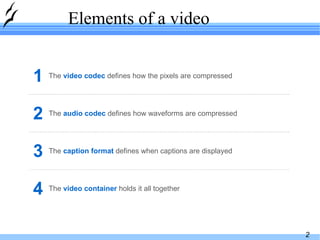
Elements of a video The  video container  holds it all together 4 The  caption format   defines when captions are displayed 3 The  audio codec   defines how waveforms are compressed 2 The  video codec  defines how the pixels are compressed 1
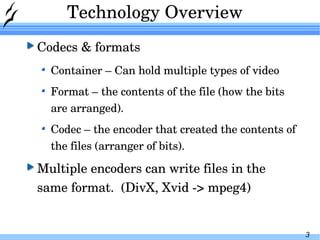
Technology Overview Codecs & formats Container – Can hold multiple types of video Format – the contents of the file (how the bits are arranged). Codec – the encoder that created the contents of the files (arranger of bits). Multiple encoders can write files in the same format.  (DivX, Xvid -> mpeg4)
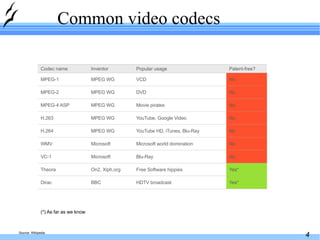
Common video codecs (*) As far as we know Source: Wikipedia No YouTube, Google Video MPEG WG H.263 HDTV broadcast Free Software hippies Blu-Ray Microsoft world domination YouTube HD, iTunes, Blu-Ray Movie pirates DVD VCD Popular usage Yes* On2, Xiph.org Theora No Microsoft VC-1 Yes* BBC Dirac No Microsoft WMV No MPEG WG MPEG-2 No MPEG WG MPEG-1 No MPEG WG H.264 No MPEG WG MPEG-4 ASP Patent-free? Inventor Codec name
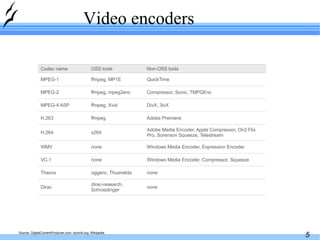
Video encoders Source: DigitalContentProducer.com, doom9.org, Wikipedia Adobe Premiere ffmpeg H.263 none none Windows Media Encoder, Compressor, Squeeze Windows Media Encoder, Expression Encoder Adobe Media Encoder, Apple Compressor, On2 Flix Pro, Sorenson Squeeze, Telestream DivX, 3ivX Compressor, Sonic, TMPGEnc QuickTime Non-OSS tools oggenc, Thusnelda Theora none VC-1 dirac-research, Schroedinger Dirac none WMV ffmpeg, mpeg2enc MPEG-2 ffmpeg, MP1E MPEG-1 x264 H.264 ffmpeg, Xvid MPEG-4 ASP OSS tools Codec name
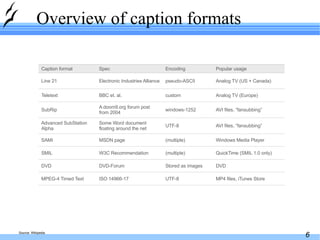
Overview of caption formats Source: Wikipedia DVD Stored as images DVD-Forum DVD Analog TV (Europe) custom BBC et. al. Teletext Analog TV (US + Canada) pseudo-ASCII Electronic Industries Alliance Line 21 UTF-8 (multiple) (multiple) UTF-8 windows-1252 Encoding Windows Media Player MSDN page SAMI MP4 files, iTunes Store QuickTime (SMIL 1.0 only) AVI files, “fansubbing” AVI files, “fansubbing” Popular usage ISO 14966-17 MPEG-4 Timed Text A doom9.org forum post from 2004 SubRip W3C Recommendation SMIL Some Word document floating around the net Advanced SubStation Alpha Spec Caption format
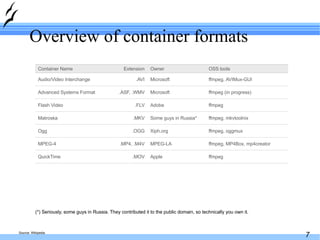
Overview of container formats (*) Seriously, some guys in Russia. They contributed it to the public domain, so technically you own it. Source: Wikipedia ffmpeg, MP4Box, mp4creator MPEG-LA .MP4, .M4V MPEG-4 ffmpeg Apple .MOV QuickTime ffmpeg, oggmux Xiph.org .OGG Ogg ffmpeg (in progress) Microsoft .ASF, .WMV Advanced Systems Format ffmpeg,  AVIMux-GUI Microsoft .AVI Audio/Video Interchange ffmpeg, mkvtoolnix Some guys in Russia* .MKV Matroska ffmpeg Adobe .FLV Flash Video OSS tools Owner Extension Container Name
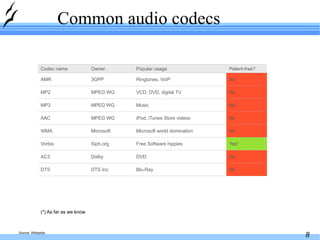
Common audio codecs (*) As far as we know Source: Wikipedia No iPod, iTunes Store videos MPEG WG AAC Blu-Ray DVD Free Software hippies Microsoft world domination Music VCD, DVD, digital TV Ringtones, VoIP Popular usage No DTS Inc. DTS No Dolby AC3 Yes* Xiph.org Vorbis No MPEG WG MP2 No 3GPP AMR No Microsoft WMA No MPEG WG MP3 Patent-free? Owner Codec name
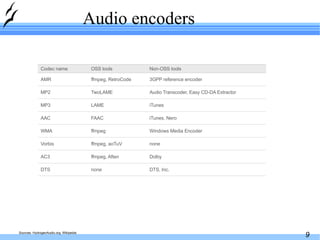
Audio encoders Sources: HydrogenAudio.org, Wikipedia iTunes, Nero FAAC AAC DTS, Inc. Dolby none Windows Media Encoder iTunes Audio Transcoder, Easy CD-DA Extractor 3GPP reference encoder Non-OSS tools none DTS ffmpeg, Aften AC3 ffmpeg, aoTuV Vorbis TwoLAME MP2 ffmpeg, RetroCode AMR ffmpeg WMA LAME MP3 OSS tools Codec name
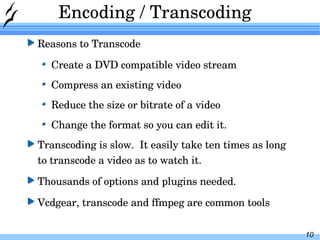
Encoding / Transcoding Reasons to Transcode Create a DVD compatible video stream Compress an existing video Reduce the size or bitrate of a video Change the format so you can edit it. Transcoding is slow.  It easily take ten times as long to transcode a video as to watch it. Thousands of options and plugins needed. Vcdgear, transcode and ffmpeg are common tools
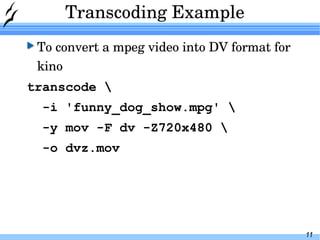
Transcoding Example To convert a mpeg video into DV format for kino transcode \ -i 'funny_dog_show.mpg' \ -y mov -F dv -Z720x480 \ -o dvz.mov
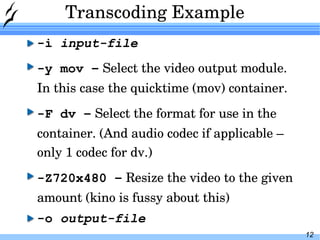
Transcoding Example -i  input-file -y mov –   Select the video output module.  In this case the quicktime (mov) container. -F dv –   Select the format for use in the container. (And audio codec if applicable – only 1 codec for dv.) -Z720x480 –   Resize the video to the given amount (kino is fussy about this) -o  output-file
Transcoding Example Time to process a 1 hour television show: 2 hours. (AMD Athlon(tm) XP 2400+) Size of input: 877M Size of output: 13G
Video Editing Editing tasks Cutting a clip out of a television show Making DVD from a camcorder tape
Editors kino lve lives cinerama Avidemix2 ffmpeg can be used for some editing as well!
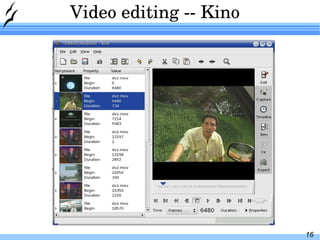
Video editing -- Kino
Video editing -- Kino Works well for DV (camcorder files) Very limited input support otherwise (annoying) Works fast enough to not be annoying Vi like keyboard controls. Simple edits – No complex transitions or sound editing. Good choice for home Camcorder to DVD projects
Video editing -- Lve
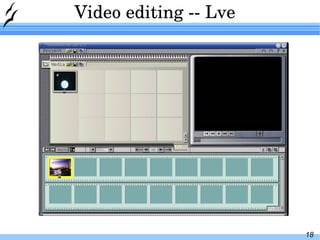
Video editing -- Lve Fast Works well with mpeg files Better input / output support No documentation to speak of Suggest avidmux2 instead.  Does more and is documented.
Video editing -- Lives
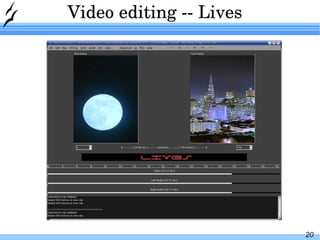
Video editing -- Lives Appears to be full featured. Very slow open speed. Does not import the whole file by default. Sound does work with my system. (ALSA only?)
Video editing -- cinelerra
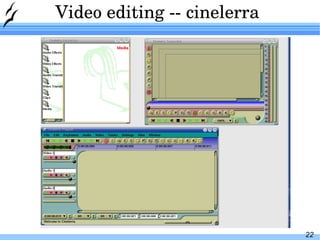
Video editing -- cinelerra Supposed to be a professional class editing system. Documentation 186 page manual Never could figure it out.
Video editing -- avidemix2
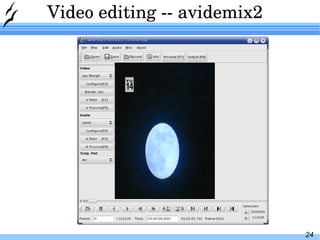
Video editing -- avidemix2 Fast Full set of features Find black feature –  Commercial  Skip Scripting features
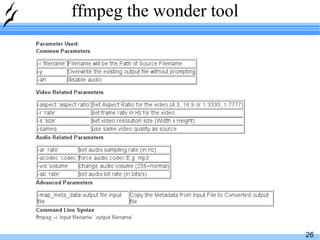
ffmpeg the wonder tool
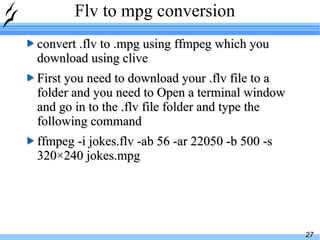
Flv to mpg conversion convert .flv to .mpg using ffmpeg which you download using clive First you need to download your .flv file to a folder and you need to Open a terminal window and go in to the .flv file folder and type the following command ffmpeg -i jokes.flv -ab 56 -ar 22050 -b 500 -s 320×240 jokes.mpg
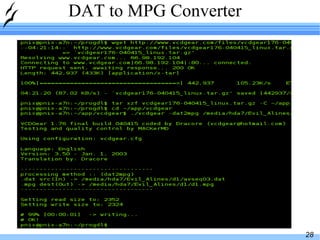
DAT to MPG Converter
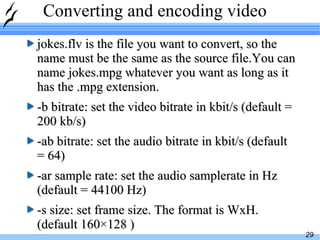
Converting and encoding video jokes.flv is the file you want to convert, so the name must be the same as the source file.You can name jokes.mpg whatever you want as long as it has the .mpg extension. -b bitrate: set the video bitrate in kbit/s (default = 200 kb/s) -ab bitrate: set the audio bitrate in kbit/s (default = 64) -ar sample rate: set the audio samplerate in Hz (default = 44100 Hz) -s size: set frame size. The format is WxH. (default 160×128 )
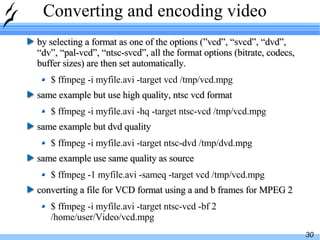
Converting and encoding video by selecting a format as one of the options (”vcd”, “svcd”, “dvd”, “dv”, “pal-vcd”, “ntsc-svcd”, all the format options (bitrate, codecs, buffer sizes) are then set automatically. $ ffmpeg -i myfile.avi -target vcd /tmp/vcd.mpg same example but use high quality, ntsc vcd format $ ffmpeg -i myfile.avi -hq -target ntsc-vcd /tmp/vcd.mpg same example but dvd quality $ ffmpeg -i myfile.avi -target ntsc-dvd /tmp/dvd.mpg same example use same quality as source $ ffmpeg -1 myfile.avi -sameq -target vcd /tmp/vcd.mpg converting a file for VCD format using a and b frames for MPEG 2 $ ffmpeg -i myfile.avi -target ntsc-vcd -bf 2 /home/user/Video/vcd.mpg
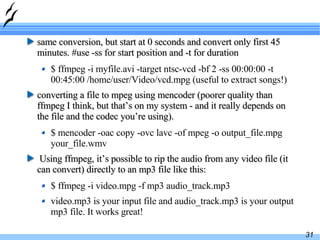
same conversion, but start at 0 seconds and convert only first 45 minutes. #use -ss for start position and -t for duration $ ffmpeg -i myfile.avi -target ntsc-vcd -bf 2 -ss 00:00:00 -t 00:45:00 /home/user/Video/vcd.mpg (useful to extract songs!) converting a file to mpeg using mencoder (poorer quality than ffmpeg I think, but that’s on my system - and it really depends on the file and the codec you’re using).  $ mencoder -oac copy -ovc lavc -of mpeg -o output_file.mpg your_file.wmv Using ffmpeg, it’s possible to rip the audio from any video file (it can convert) directly to an mp3 file like this: $ ffmpeg -i video.mpg -f mp3 audio_track.mp3 video.mp3 is your input file and audio_track.mp3 is your output mp3 file. It works great!
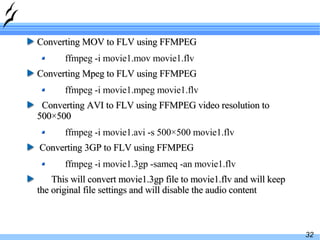
Converting MOV to FLV using FFMPEG ffmpeg -i movie1.mov movie1.flv Converting Mpeg to FLV using FFMPEG ffmpeg -i movie1.mpeg movie1.flv Converting AVI to FLV using FFMPEG video resolution to 500×500 ffmpeg -i movie1.avi -s 500×500 movie1.flv Converting 3GP to FLV using FFMPEG ffmpeg -i movie1.3gp -sameq -an movie1.flv This will convert movie1.3gp file to movie1.flv and will keep the original file settings and will disable the audio content
Audio tips and tricks
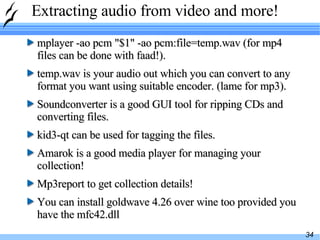
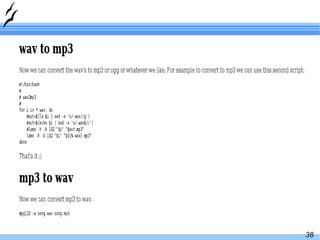
Extracting audio from video and more! mplayer -ao pcm "$1" -ao pcm:file=temp.wav (for mp4 files can be done with faad!).  temp.wav is your audio out which you can convert to any format you want using suitable encoder. (lame for mp3).  Soundconverter is a good GUI tool for ripping CDs and converting files.  kid3-qt can be used for tagging the files. Amarok is a good media player for managing your collection! Mp3report to get collection details! You can install goldwave 4.26 over wine too provided you have the mfc42.dll
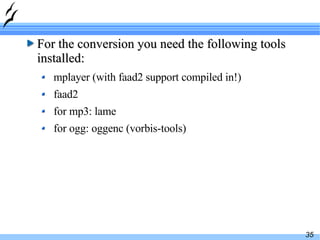
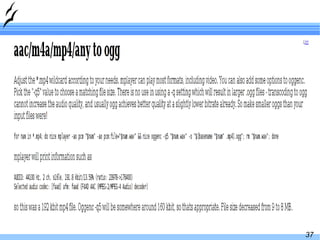
For the conversion you need the following tools installed: mplayer (with faad2 support compiled in!) faad2 for mp3: lame for ogg: oggenc (vorbis-tools)
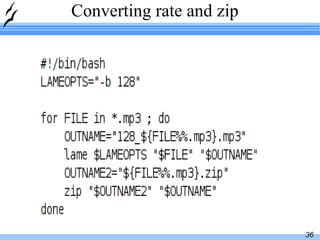
Converting rate and zip
 
 
ffmpeg for audio 1 Converting aac to mp3 using FFMPEG with MetaData ffmpeg -i audio1.aac -ar 22050 -ab 32 -map_meta_data audio1.mp3:audio1.aac audio1.mp3 This will convert audio1.aac to audio1.mp3 having audio rate 22.05 Khz and Audio BitRate 32Khz and will copy the meta data from .aac file to .mp3 file Converting WMV to MP3 using FFMPEG ffmpeg -i audio1.wmv audio1.mp3 This will convert audio1.wmv file to audio1.mp3
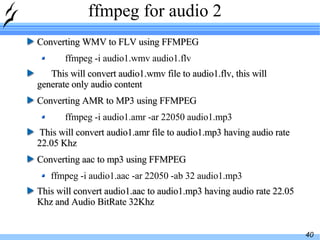
ffmpeg for audio 2 Converting WMV to FLV using FFMPEG ffmpeg -i audio1.wmv audio1.flv This will convert audio1.wmv file to audio1.flv, this will generate only audio content Converting AMR to MP3 using FFMPEG ffmpeg -i audio1.amr -ar 22050 audio1.mp3 This will convert audio1.amr file to audio1.mp3 having audio rate 22.05 Khz Converting aac to mp3 using FFMPEG ffmpeg -i audio1.aac -ar 22050 -ab 32 audio1.mp3 This will convert audio1.aac to audio1.mp3 having audio rate 22.05 Khz and Audio BitRate 32Khz
Mp3 to flv + making slideshow! ffmpeg -y -i /home/song.mp3 -f flv -acodec mp3 -ab 64 -ac 1 /home/song.flv Just puts the mp3 as flv file I have two pics, pic1.jpg and pic2. jpg, and two audio clips, Boat_Of_Car_1.mp3 (5 seconds long) and Boat_Of_Car_2.mpr (6 seconds long). ffmpeg/ffmpeg -y -loop_input -i jpgs/pic1.jpg -t 5 -i Boat_Of_Car_1.mp3 pic1.mpg ffmpeg/ffmpeg -y -loop_input -i jpgs/pic2.jpg -t 6 -i Boat_Of_Car_2.mp3 pic2.mpg cat pic[12].mpg>pic.mpg ffmpeg/ffmpeg -y -s 600x450 -i pic.mpg -s 600x450 -f flv p.flv p.flv is a video of pic1.jpg and pic2.jpg with Boat_Of_Car_1.mp3 and  Boat_Of_Car_2.mp3 as background audio.
DVDs on Linux
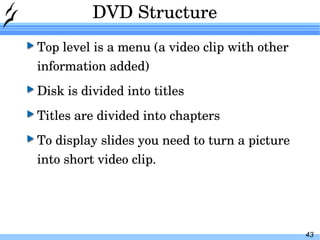
DVD Structure Top level is a menu (a video clip with other information added) Disk is divided into titles Titles are divided into chapters To display slides you need to turn a picture  into short video clip.
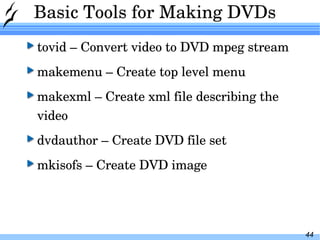
Basic Tools for Making DVDs tovid – Convert video to DVD mpeg stream makemenu – Create top level menu makexml – Create xml file describing the video dvdauthor – Create DVD file set mkisofs – Create DVD image
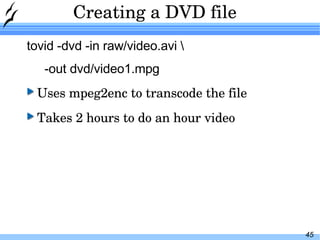
Creating a DVD file tovid -dvd -in raw/video.avi \ -out dvd/video1.mpg Uses mpeg2enc to transcode the file Takes 2 hours to do an hour video
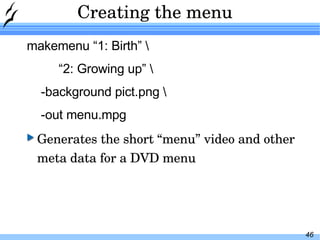
Creating the menu makemenu “1: Birth” \ “ 2: Growing up” \ -background pict.png \ -out menu.mpg Generates the short “menu” video and other meta data for a DVD menu
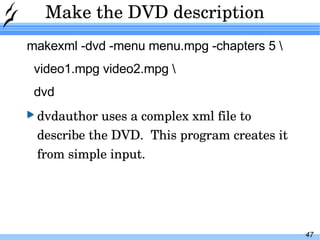
Make the DVD description makexml -dvd -menu menu.mpg -chapters 5 \ video1.mpg video2.mpg \ dvd dvdauthor uses a complex xml file to describe the DVD.  This program creates it from simple input.
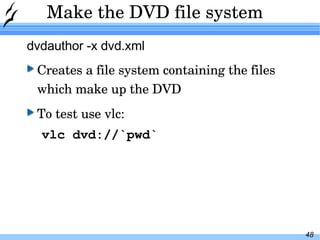
Make the DVD file system dvdauthor -x dvd.xml Creates a file system containing the files which make up the DVD To test use vlc: vlc dvd://`pwd`
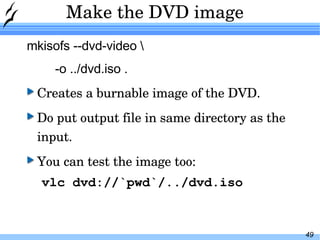
Make the DVD image mkisofs --dvd-video \ -o ../dvd.iso . Creates a burnable image of the DVD. Do put output file in same directory as the input. You can test the image too: vlc dvd://`pwd`/../dvd.iso
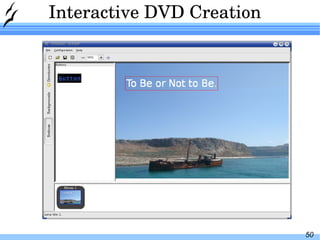
Interactive DVD Creation
Interactive DVD Creation Handles menu creation Adding clips to the DVD Multiple Menus Background images for menus Front end to dvdauthor

video tools

  • 1.
  • 2.
    Elements of avideo The video container holds it all together 4 The caption format defines when captions are displayed 3 The audio codec defines how waveforms are compressed 2 The video codec defines how the pixels are compressed 1
  • 3.
    Technology Overview Codecs& formats Container – Can hold multiple types of video Format – the contents of the file (how the bits are arranged). Codec – the encoder that created the contents of the files (arranger of bits). Multiple encoders can write files in the same format. (DivX, Xvid -> mpeg4)
  • 4.
    Common video codecs(*) As far as we know Source: Wikipedia No YouTube, Google Video MPEG WG H.263 HDTV broadcast Free Software hippies Blu-Ray Microsoft world domination YouTube HD, iTunes, Blu-Ray Movie pirates DVD VCD Popular usage Yes* On2, Xiph.org Theora No Microsoft VC-1 Yes* BBC Dirac No Microsoft WMV No MPEG WG MPEG-2 No MPEG WG MPEG-1 No MPEG WG H.264 No MPEG WG MPEG-4 ASP Patent-free? Inventor Codec name
  • 5.
    Video encoders Source:DigitalContentProducer.com, doom9.org, Wikipedia Adobe Premiere ffmpeg H.263 none none Windows Media Encoder, Compressor, Squeeze Windows Media Encoder, Expression Encoder Adobe Media Encoder, Apple Compressor, On2 Flix Pro, Sorenson Squeeze, Telestream DivX, 3ivX Compressor, Sonic, TMPGEnc QuickTime Non-OSS tools oggenc, Thusnelda Theora none VC-1 dirac-research, Schroedinger Dirac none WMV ffmpeg, mpeg2enc MPEG-2 ffmpeg, MP1E MPEG-1 x264 H.264 ffmpeg, Xvid MPEG-4 ASP OSS tools Codec name
  • 6.
    Overview of captionformats Source: Wikipedia DVD Stored as images DVD-Forum DVD Analog TV (Europe) custom BBC et. al. Teletext Analog TV (US + Canada) pseudo-ASCII Electronic Industries Alliance Line 21 UTF-8 (multiple) (multiple) UTF-8 windows-1252 Encoding Windows Media Player MSDN page SAMI MP4 files, iTunes Store QuickTime (SMIL 1.0 only) AVI files, “fansubbing” AVI files, “fansubbing” Popular usage ISO 14966-17 MPEG-4 Timed Text A doom9.org forum post from 2004 SubRip W3C Recommendation SMIL Some Word document floating around the net Advanced SubStation Alpha Spec Caption format
  • 7.
    Overview of containerformats (*) Seriously, some guys in Russia. They contributed it to the public domain, so technically you own it. Source: Wikipedia ffmpeg, MP4Box, mp4creator MPEG-LA .MP4, .M4V MPEG-4 ffmpeg Apple .MOV QuickTime ffmpeg, oggmux Xiph.org .OGG Ogg ffmpeg (in progress) Microsoft .ASF, .WMV Advanced Systems Format ffmpeg, AVIMux-GUI Microsoft .AVI Audio/Video Interchange ffmpeg, mkvtoolnix Some guys in Russia* .MKV Matroska ffmpeg Adobe .FLV Flash Video OSS tools Owner Extension Container Name
  • 8.
    Common audio codecs(*) As far as we know Source: Wikipedia No iPod, iTunes Store videos MPEG WG AAC Blu-Ray DVD Free Software hippies Microsoft world domination Music VCD, DVD, digital TV Ringtones, VoIP Popular usage No DTS Inc. DTS No Dolby AC3 Yes* Xiph.org Vorbis No MPEG WG MP2 No 3GPP AMR No Microsoft WMA No MPEG WG MP3 Patent-free? Owner Codec name
  • 9.
    Audio encoders Sources:HydrogenAudio.org, Wikipedia iTunes, Nero FAAC AAC DTS, Inc. Dolby none Windows Media Encoder iTunes Audio Transcoder, Easy CD-DA Extractor 3GPP reference encoder Non-OSS tools none DTS ffmpeg, Aften AC3 ffmpeg, aoTuV Vorbis TwoLAME MP2 ffmpeg, RetroCode AMR ffmpeg WMA LAME MP3 OSS tools Codec name
  • 10.
    Encoding / TranscodingReasons to Transcode Create a DVD compatible video stream Compress an existing video Reduce the size or bitrate of a video Change the format so you can edit it. Transcoding is slow. It easily take ten times as long to transcode a video as to watch it. Thousands of options and plugins needed. Vcdgear, transcode and ffmpeg are common tools
  • 11.
    Transcoding Example Toconvert a mpeg video into DV format for kino transcode \ -i 'funny_dog_show.mpg' \ -y mov -F dv -Z720x480 \ -o dvz.mov
  • 12.
    Transcoding Example -i input-file -y mov – Select the video output module. In this case the quicktime (mov) container. -F dv – Select the format for use in the container. (And audio codec if applicable – only 1 codec for dv.) -Z720x480 – Resize the video to the given amount (kino is fussy about this) -o output-file
  • 13.
    Transcoding Example Timeto process a 1 hour television show: 2 hours. (AMD Athlon(tm) XP 2400+) Size of input: 877M Size of output: 13G
  • 14.
    Video Editing Editingtasks Cutting a clip out of a television show Making DVD from a camcorder tape
  • 15.
    Editors kino lvelives cinerama Avidemix2 ffmpeg can be used for some editing as well!
  • 16.
  • 17.
    Video editing --Kino Works well for DV (camcorder files) Very limited input support otherwise (annoying) Works fast enough to not be annoying Vi like keyboard controls. Simple edits – No complex transitions or sound editing. Good choice for home Camcorder to DVD projects
  • 18.
  • 19.
    Video editing --Lve Fast Works well with mpeg files Better input / output support No documentation to speak of Suggest avidmux2 instead. Does more and is documented.
  • 20.
  • 21.
    Video editing --Lives Appears to be full featured. Very slow open speed. Does not import the whole file by default. Sound does work with my system. (ALSA only?)
  • 22.
  • 23.
    Video editing --cinelerra Supposed to be a professional class editing system. Documentation 186 page manual Never could figure it out.
  • 24.
  • 25.
    Video editing --avidemix2 Fast Full set of features Find black feature – Commercial Skip Scripting features
  • 26.
  • 27.
    Flv to mpgconversion convert .flv to .mpg using ffmpeg which you download using clive First you need to download your .flv file to a folder and you need to Open a terminal window and go in to the .flv file folder and type the following command ffmpeg -i jokes.flv -ab 56 -ar 22050 -b 500 -s 320×240 jokes.mpg
  • 28.
    DAT to MPGConverter
  • 29.
    Converting and encodingvideo jokes.flv is the file you want to convert, so the name must be the same as the source file.You can name jokes.mpg whatever you want as long as it has the .mpg extension. -b bitrate: set the video bitrate in kbit/s (default = 200 kb/s) -ab bitrate: set the audio bitrate in kbit/s (default = 64) -ar sample rate: set the audio samplerate in Hz (default = 44100 Hz) -s size: set frame size. The format is WxH. (default 160×128 )
  • 30.
    Converting and encodingvideo by selecting a format as one of the options (”vcd”, “svcd”, “dvd”, “dv”, “pal-vcd”, “ntsc-svcd”, all the format options (bitrate, codecs, buffer sizes) are then set automatically. $ ffmpeg -i myfile.avi -target vcd /tmp/vcd.mpg same example but use high quality, ntsc vcd format $ ffmpeg -i myfile.avi -hq -target ntsc-vcd /tmp/vcd.mpg same example but dvd quality $ ffmpeg -i myfile.avi -target ntsc-dvd /tmp/dvd.mpg same example use same quality as source $ ffmpeg -1 myfile.avi -sameq -target vcd /tmp/vcd.mpg converting a file for VCD format using a and b frames for MPEG 2 $ ffmpeg -i myfile.avi -target ntsc-vcd -bf 2 /home/user/Video/vcd.mpg
  • 31.
    same conversion, butstart at 0 seconds and convert only first 45 minutes. #use -ss for start position and -t for duration $ ffmpeg -i myfile.avi -target ntsc-vcd -bf 2 -ss 00:00:00 -t 00:45:00 /home/user/Video/vcd.mpg (useful to extract songs!) converting a file to mpeg using mencoder (poorer quality than ffmpeg I think, but that’s on my system - and it really depends on the file and the codec you’re using). $ mencoder -oac copy -ovc lavc -of mpeg -o output_file.mpg your_file.wmv Using ffmpeg, it’s possible to rip the audio from any video file (it can convert) directly to an mp3 file like this: $ ffmpeg -i video.mpg -f mp3 audio_track.mp3 video.mp3 is your input file and audio_track.mp3 is your output mp3 file. It works great!
  • 32.
    Converting MOV toFLV using FFMPEG ffmpeg -i movie1.mov movie1.flv Converting Mpeg to FLV using FFMPEG ffmpeg -i movie1.mpeg movie1.flv Converting AVI to FLV using FFMPEG video resolution to 500×500 ffmpeg -i movie1.avi -s 500×500 movie1.flv Converting 3GP to FLV using FFMPEG ffmpeg -i movie1.3gp -sameq -an movie1.flv This will convert movie1.3gp file to movie1.flv and will keep the original file settings and will disable the audio content
  • 33.
  • 34.
    Extracting audio fromvideo and more! mplayer -ao pcm "$1" -ao pcm:file=temp.wav (for mp4 files can be done with faad!). temp.wav is your audio out which you can convert to any format you want using suitable encoder. (lame for mp3). Soundconverter is a good GUI tool for ripping CDs and converting files. kid3-qt can be used for tagging the files. Amarok is a good media player for managing your collection! Mp3report to get collection details! You can install goldwave 4.26 over wine too provided you have the mfc42.dll
  • 35.
    For the conversionyou need the following tools installed: mplayer (with faad2 support compiled in!) faad2 for mp3: lame for ogg: oggenc (vorbis-tools)
  • 36.
  • 37.
  • 38.
  • 39.
    ffmpeg for audio1 Converting aac to mp3 using FFMPEG with MetaData ffmpeg -i audio1.aac -ar 22050 -ab 32 -map_meta_data audio1.mp3:audio1.aac audio1.mp3 This will convert audio1.aac to audio1.mp3 having audio rate 22.05 Khz and Audio BitRate 32Khz and will copy the meta data from .aac file to .mp3 file Converting WMV to MP3 using FFMPEG ffmpeg -i audio1.wmv audio1.mp3 This will convert audio1.wmv file to audio1.mp3
  • 40.
    ffmpeg for audio2 Converting WMV to FLV using FFMPEG ffmpeg -i audio1.wmv audio1.flv This will convert audio1.wmv file to audio1.flv, this will generate only audio content Converting AMR to MP3 using FFMPEG ffmpeg -i audio1.amr -ar 22050 audio1.mp3 This will convert audio1.amr file to audio1.mp3 having audio rate 22.05 Khz Converting aac to mp3 using FFMPEG ffmpeg -i audio1.aac -ar 22050 -ab 32 audio1.mp3 This will convert audio1.aac to audio1.mp3 having audio rate 22.05 Khz and Audio BitRate 32Khz
  • 41.
    Mp3 to flv+ making slideshow! ffmpeg -y -i /home/song.mp3 -f flv -acodec mp3 -ab 64 -ac 1 /home/song.flv Just puts the mp3 as flv file I have two pics, pic1.jpg and pic2. jpg, and two audio clips, Boat_Of_Car_1.mp3 (5 seconds long) and Boat_Of_Car_2.mpr (6 seconds long). ffmpeg/ffmpeg -y -loop_input -i jpgs/pic1.jpg -t 5 -i Boat_Of_Car_1.mp3 pic1.mpg ffmpeg/ffmpeg -y -loop_input -i jpgs/pic2.jpg -t 6 -i Boat_Of_Car_2.mp3 pic2.mpg cat pic[12].mpg>pic.mpg ffmpeg/ffmpeg -y -s 600x450 -i pic.mpg -s 600x450 -f flv p.flv p.flv is a video of pic1.jpg and pic2.jpg with Boat_Of_Car_1.mp3 and Boat_Of_Car_2.mp3 as background audio.
  • 42.
  • 43.
    DVD Structure Toplevel is a menu (a video clip with other information added) Disk is divided into titles Titles are divided into chapters To display slides you need to turn a picture into short video clip.
  • 44.
    Basic Tools forMaking DVDs tovid – Convert video to DVD mpeg stream makemenu – Create top level menu makexml – Create xml file describing the video dvdauthor – Create DVD file set mkisofs – Create DVD image
  • 45.
    Creating a DVDfile tovid -dvd -in raw/video.avi \ -out dvd/video1.mpg Uses mpeg2enc to transcode the file Takes 2 hours to do an hour video
  • 46.
    Creating the menumakemenu “1: Birth” \ “ 2: Growing up” \ -background pict.png \ -out menu.mpg Generates the short “menu” video and other meta data for a DVD menu
  • 47.
    Make the DVDdescription makexml -dvd -menu menu.mpg -chapters 5 \ video1.mpg video2.mpg \ dvd dvdauthor uses a complex xml file to describe the DVD. This program creates it from simple input.
  • 48.
    Make the DVDfile system dvdauthor -x dvd.xml Creates a file system containing the files which make up the DVD To test use vlc: vlc dvd://`pwd`
  • 49.
    Make the DVDimage mkisofs --dvd-video \ -o ../dvd.iso . Creates a burnable image of the DVD. Do put output file in same directory as the input. You can test the image too: vlc dvd://`pwd`/../dvd.iso
  • 50.
  • 51.
    Interactive DVD CreationHandles menu creation Adding clips to the DVD Multiple Menus Background images for menus Front end to dvdauthor