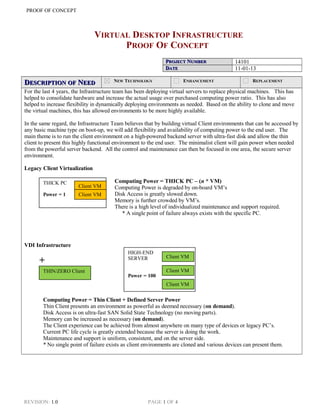
THICK PC
Power = 1
HIGH-END
SERVER
Power = 100
THIN/ZERO Client
PROOF OF CONCEPT
VIRTUAL DESKTOP INFRASTRUCTURE
PROOF OF CONCEPT
PPROJECTROJECT NNUMBERUMBER 14101
DDATEATE 11-01-13
DDESCRIPTIONESCRIPTION OFOF NNEEDEED NEW TECHNOLOGY ENHANCEMENT REPLACEMENT
For the last 4 years, the Infrastructure team has been deploying virtual servers to replace physical machines. This has
helped to consolidate hardware and increase the actual usage over purchased computing power ratio. This has also
helped to increase flexibility in dynamically deploying environments as needed. Based on the ability to clone and move
the virtual machines, this has allowed environments to be more highly available.
In the same regard, the Infrastructure Team believes that by building virtual Client environments that can be accessed by
any basic machine type on boot-up, we will add flexibility and availability of computing power to the end user. The
main theme is to run the client environment on a high-powered backend server with ultra-fast disk and allow the thin
client to present this highly functional environment to the end user. The minimalist client will gain power when needed
from the powerful server backend. All the control and maintenance can then be focused in one area, the secure server
environment.
Legacy Client Virtualization
Computing Power = THICK PC – (n * VM)
Computing Power is degraded by on-board VM’s
Disk Access is greatly slowed down.
Memory is further crowded by VM’s.
There is a high level of individualized maintenance and support required.
* A single point of failure always exists with the specific PC.
VDI Infrastructure
+
Computing Power = Thin Client + Defined Server Power
Thin Client presents an environment as powerful as deemed necessary (on demand).
Disk Access is on ultra-fast SAN Solid State Technology (no moving parts).
Memory can be increased as necessary (on demand).
The Client experience can be achieved from almost anywhere on many type of devices or legacy PC’s.
Current PC life cycle is greatly extended because the server is doing the work.
Maintenance and support is uniform, consistent, and on the server side.
* No single point of failure exists as client environments are cloned and various devices can present them.
REVISION: 1.0 PAGE 1 OF 4
Client VM
Client VM
Client VM
Client VM
Client VM
PROOF OF CONCEPT 2
CCONCEPTONCEPT//THEORYTHEORY TOTO MMEETEET NNEEDEED
1. CLIENT: To help accommodate the client presentation needs explained above, the Infrastructure Team has
decided to utilize HP’s Thin/Zero Client Technology to use in place of Dell “thick” clients. Current PC’s will
also be used to verify existing equipment will be effective until PC end-of-life is reached.
2. SERVER: For the Server backend environment, we have decided to leverage two existing Bank systems, EMC
VMWare and Citrix. VMWare will provide the robust virtual machine infrastructure that has been proven for
our server environment. Citrix VDI-in-a-Box will enhance our current Citrix environment by supplying the
ability for the Thin Client to boot to a server based VM.
PPLANNEDLANNED STARTSTART DATEDATE 10/15/13 PPLANNEDLANNED ENDEND DATEDATE 11/20/13
RRESOURCEESOURCE IIMPACTMPACT
SPECIFIC TO ONE IT AREA DEPARTMENT WIDE WORKGROUP
EEQUIPMENTQUIPMENT CCOSTOST (IF PURCHASE
REQUIRED)
CCAPITALAPITAL:: OPERATING:OPERATING:
PPEOPLEEOPLE
NNAMEAME: R: ROBOB JJONESONES HOURS:HOURS: 40 TTERMERM:: 1.5 months
NNAMEAME: D: DUDEUDE JJACKSONACKSON HOURS:HOURS: 40 TTERMERM:: 1.5 Months
NNAMEAME:: HOURS:HOURS: TTERMERM::
CCONCEPTONCEPT BBACKGROUNDACKGROUND
The HP Smart Zero and Thin Pro clients are focused on presenting the server based virtual environment and can do this
in a number of ways:
1. Direct boot – similar to current client experience.
2. Browser-based remote control
3. Citrix direct remote control
4. Remote Desktop Connection
The HP Smart Zero and Thin Pro clients come with all network, video, audio, and USB connection to mimic the current
PC experience. This client also has enough internal memory and cache space to operate and make use of the access
server-based virtual environment. The cost of the device is roughly 25% of the cost of a PC.
The VMWare virtual server environment is a robust enterprise solution that has been used at the Bank since 2009 to
securely and cost-effectively deploy virtual machines for business computing needs. VMWare offers high-availability,
flexibility, and scalability that is endorsed industry wide. We currently use VMware at Grant St. and Vista sites, and we
have positioned it to allow for our initial VDI testing.
Citrix is a tool that has been in use at the Bank since 2001. Citrix provides a secure way to take control of Windows PC
or application and use it like it was the installed on your current PC. In the VDI scenario, Citrix provides the means to
connect the client and the server. The Citrix VDI-in-a-Box solution will allow the Thin Client to be presented with a
server-based virtual machine running on VMware. This virtual PC will appear to the end user as a fully Thick PC
would normally function.
WWORKORK PPERFORMEDERFORMED
REVISION: 1.0 PAGE 2 OF 4
PROOF OF CONCEPT 3
Server:
Citrix VDI-in-a-Box deployed
Pools configured
Dedicated Virtual Desktops configured
Client:
HP Smart Zero and Thin Pro Clients configured pointing to server
Demo Planned and Scripted:
Show HP Smart Clients attach and run Pooled VM
Show HP Smart Clients attach and run Dedicated VM
Show Expired Life-Cycle Dell Desktop attach and run Pooled VM
Show Expired Life-Cycle Dell Desktop attach and run Dedicated VM
Demo Presented To CIO:
Proof of Concept successfully executed for CIO
CIO complementary of structure demo
CIO convinced solution viable
REVISION: 1.0 PAGE 3 OF 4
PROOF OF CONCEPT 4
OOBSERVATIONSBSERVATIONS
1. Fairly easy solution to configure
2. HP Thin Client very versatile
3. Old hardware also viable option
4. Access to pooled or dedicated desktop seamless
IIMPACTMPACT ONON EENVIRONMENTNVIRONMENT
ENTERPRISE WIDE DEPARTMENT WIDE WORKGROUP
OVERALL ARCHITECTURAL IMPACT
LOW Impact
Solution Parallel deployment to existing infrastructure
Migration will occur in phased approach
RRECOMMENDATIONECOMMENDATION ANDAND PPROPOSEDROPOSED NNEXTEXT SSTEPSTEPS
1. Create Capital Budget Item to Implement Base Environment at Main Site and Recovery Site
2. Layout Phased Plan to create a complementary, dynamically accessed VDI environment
REVISION: 1.0 PAGE 4 OF 4

VDI-POC

  • 1.
    THICK PC Power =1 HIGH-END SERVER Power = 100 THIN/ZERO Client PROOF OF CONCEPT VIRTUAL DESKTOP INFRASTRUCTURE PROOF OF CONCEPT PPROJECTROJECT NNUMBERUMBER 14101 DDATEATE 11-01-13 DDESCRIPTIONESCRIPTION OFOF NNEEDEED NEW TECHNOLOGY ENHANCEMENT REPLACEMENT For the last 4 years, the Infrastructure team has been deploying virtual servers to replace physical machines. This has helped to consolidate hardware and increase the actual usage over purchased computing power ratio. This has also helped to increase flexibility in dynamically deploying environments as needed. Based on the ability to clone and move the virtual machines, this has allowed environments to be more highly available. In the same regard, the Infrastructure Team believes that by building virtual Client environments that can be accessed by any basic machine type on boot-up, we will add flexibility and availability of computing power to the end user. The main theme is to run the client environment on a high-powered backend server with ultra-fast disk and allow the thin client to present this highly functional environment to the end user. The minimalist client will gain power when needed from the powerful server backend. All the control and maintenance can then be focused in one area, the secure server environment. Legacy Client Virtualization Computing Power = THICK PC – (n * VM) Computing Power is degraded by on-board VM’s Disk Access is greatly slowed down. Memory is further crowded by VM’s. There is a high level of individualized maintenance and support required. * A single point of failure always exists with the specific PC. VDI Infrastructure + Computing Power = Thin Client + Defined Server Power Thin Client presents an environment as powerful as deemed necessary (on demand). Disk Access is on ultra-fast SAN Solid State Technology (no moving parts). Memory can be increased as necessary (on demand). The Client experience can be achieved from almost anywhere on many type of devices or legacy PC’s. Current PC life cycle is greatly extended because the server is doing the work. Maintenance and support is uniform, consistent, and on the server side. * No single point of failure exists as client environments are cloned and various devices can present them. REVISION: 1.0 PAGE 1 OF 4 Client VM Client VM Client VM Client VM Client VM
  • 2.
    PROOF OF CONCEPT2 CCONCEPTONCEPT//THEORYTHEORY TOTO MMEETEET NNEEDEED 1. CLIENT: To help accommodate the client presentation needs explained above, the Infrastructure Team has decided to utilize HP’s Thin/Zero Client Technology to use in place of Dell “thick” clients. Current PC’s will also be used to verify existing equipment will be effective until PC end-of-life is reached. 2. SERVER: For the Server backend environment, we have decided to leverage two existing Bank systems, EMC VMWare and Citrix. VMWare will provide the robust virtual machine infrastructure that has been proven for our server environment. Citrix VDI-in-a-Box will enhance our current Citrix environment by supplying the ability for the Thin Client to boot to a server based VM. PPLANNEDLANNED STARTSTART DATEDATE 10/15/13 PPLANNEDLANNED ENDEND DATEDATE 11/20/13 RRESOURCEESOURCE IIMPACTMPACT SPECIFIC TO ONE IT AREA DEPARTMENT WIDE WORKGROUP EEQUIPMENTQUIPMENT CCOSTOST (IF PURCHASE REQUIRED) CCAPITALAPITAL:: OPERATING:OPERATING: PPEOPLEEOPLE NNAMEAME: R: ROBOB JJONESONES HOURS:HOURS: 40 TTERMERM:: 1.5 months NNAMEAME: D: DUDEUDE JJACKSONACKSON HOURS:HOURS: 40 TTERMERM:: 1.5 Months NNAMEAME:: HOURS:HOURS: TTERMERM:: NNAMEAME:: HOURS:HOURS: TTERMERM:: CCONCEPTONCEPT BBACKGROUNDACKGROUND The HP Smart Zero and Thin Pro clients are focused on presenting the server based virtual environment and can do this in a number of ways: 1. Direct boot – similar to current client experience. 2. Browser-based remote control 3. Citrix direct remote control 4. Remote Desktop Connection The HP Smart Zero and Thin Pro clients come with all network, video, audio, and USB connection to mimic the current PC experience. This client also has enough internal memory and cache space to operate and make use of the access server-based virtual environment. The cost of the device is roughly 25% of the cost of a PC. The VMWare virtual server environment is a robust enterprise solution that has been used at the Bank since 2009 to securely and cost-effectively deploy virtual machines for business computing needs. VMWare offers high-availability, flexibility, and scalability that is endorsed industry wide. We currently use VMware at Grant St. and Vista sites, and we have positioned it to allow for our initial VDI testing. Citrix is a tool that has been in use at the Bank since 2001. Citrix provides a secure way to take control of Windows PC or application and use it like it was the installed on your current PC. In the VDI scenario, Citrix provides the means to connect the client and the server. The Citrix VDI-in-a-Box solution will allow the Thin Client to be presented with a server-based virtual machine running on VMware. This virtual PC will appear to the end user as a fully Thick PC would normally function. WWORKORK PPERFORMEDERFORMED REVISION: 1.0 PAGE 2 OF 4
  • 3.
    PROOF OF CONCEPT3 Server: Citrix VDI-in-a-Box deployed Pools configured Dedicated Virtual Desktops configured Client: HP Smart Zero and Thin Pro Clients configured pointing to server Demo Planned and Scripted: Show HP Smart Clients attach and run Pooled VM Show HP Smart Clients attach and run Dedicated VM Show Expired Life-Cycle Dell Desktop attach and run Pooled VM Show Expired Life-Cycle Dell Desktop attach and run Dedicated VM Demo Presented To CIO: Proof of Concept successfully executed for CIO CIO complementary of structure demo CIO convinced solution viable REVISION: 1.0 PAGE 3 OF 4
  • 4.
    PROOF OF CONCEPT4 OOBSERVATIONSBSERVATIONS 1. Fairly easy solution to configure 2. HP Thin Client very versatile 3. Old hardware also viable option 4. Access to pooled or dedicated desktop seamless IIMPACTMPACT ONON EENVIRONMENTNVIRONMENT ENTERPRISE WIDE DEPARTMENT WIDE WORKGROUP OVERALL ARCHITECTURAL IMPACT LOW Impact Solution Parallel deployment to existing infrastructure Migration will occur in phased approach RRECOMMENDATIONECOMMENDATION ANDAND PPROPOSEDROPOSED NNEXTEXT SSTEPSTEPS 1. Create Capital Budget Item to Implement Base Environment at Main Site and Recovery Site 2. Layout Phased Plan to create a complementary, dynamically accessed VDI environment REVISION: 1.0 PAGE 4 OF 4