vAcademia
                     Virtual Spaces LLC, Russia

Educational Virtual World with 3D
           Recording


                                        presented by Mikhail Fominykh
                       Norwegian University of Science and Technology, Norway

    International Society for Technology in Education (ISTE), 15 January 2013
3D Virtual Worlds

•   Multiuser
•   Synchronous
•   Persistent
•   Facilitated by networked computers
•   Each user is represented by a single avatar
     • Three-dimensional graphical interphase
     • Social Worlds/Game Worlds
3D Virtual Worlds

•   Multiuser
•   Synchronous?
•   Persistent?
•   Facilitated by networked computers
•   Each user is represented by a single avatar?
     • Three-dimensional graphical interphase
     • Social Worlds/Game Worlds
3D Virtual Worlds
       as learning environments

• Low cost and high safety
• Three-dimensional representation of learners
  and objects
• Interaction in simulated contexts
• Sense of presence
• Variety of tools
Why 3D recording?
   Challenge
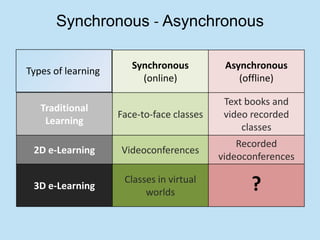
Synchronous - Asynchronous

                       Synchronous          Asynchronous
Types of learning
                         (online)              (offline)

                                            Text books and
   Traditional
                    Face-to-face classes    video recorded
    Learning
                                                classes
                                               Recorded
 2D e-Learning      Videoconferences
                                           videoconferences

 3D e-Learning
                     Classes in virtual
                          worlds                 ?
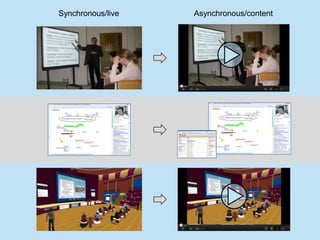
Synchronous/live   Asynchronous/content
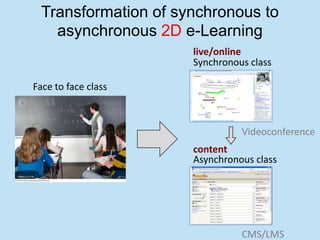
Transformation of synchronous to
    asynchronous 2D e-Learning
                      live/online
                      Synchronous class

Face to face class


                                Videoconference
                      content
                      Asynchronous class


                                CMS/LMS
3D recording
 Proposal
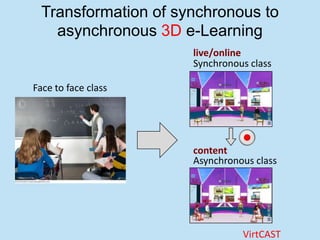
Transformation of synchronous to
    asynchronous 3D e-Learning
                      live/online
                      Synchronous class

Face to face class


                      content
                      Asynchronous class


                                VirtCAST
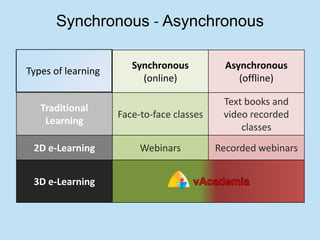
Synchronous - Asynchronous

                       Synchronous           Asynchronous
Types of learning
                         (online)               (offline)

                                            Text books and
   Traditional
                    Face-to-face classes    video recorded
    Learning
                                                classes
 2D e-Learning           Webinars          Recorded webinars


 3D e-Learning
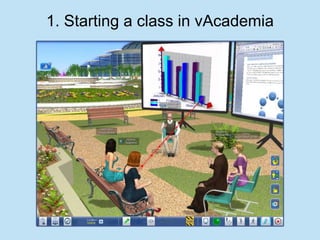
1. Starting a class in vAcademia
2. Press Recording button
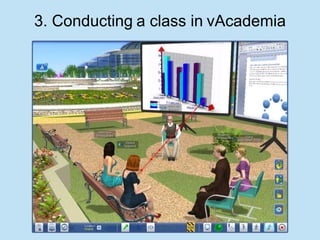
3. Conducting a class in vAcademia
4. Press Stop button
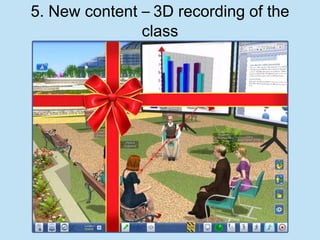
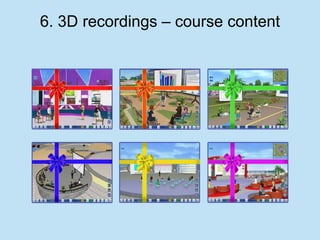
5. New content – 3D recording of the
               class
6. 3D recordings – course content
3D recording
        Previous Work?

•   Asynchronous Virtual Classroom (1999)
•   N*Vector (2000)
•   MASSIVE-3 (2002)
•   Wonderland
Teaching tools
• Interactive whiteboard
• Content storages
• Control and feedback tools
Teaching tools
• Interactive whiteboard
  ′   Sharing of an application window
  ′   Sharing screen area
  ′   Sharing web-camera image
  ″   Drawing figures and typing text on the whiteboard
  ″   Inserting text from the clipboard
  ‴   Slide presentations
  ‴   Area print screen
  ‴   Pasting images from clipboard on a whiteboard
• Content storages
• Control and feedback tools
Teaching tools
• Interactive whiteboard
• Content storages
  o Object Gallery (standard classroom objects)
  o Resource collection (user objects PPT, PDF, PNG, JPEG, test
    templates in XML, test results in CSV, Collada, and 3DS)
• Control and feedback tools
Teaching tools
• Interactive whiteboard
• Content storages
• Control and feedback tools
  o   Class Control
  o   Notes (text, sound, and graphics)
  o   Backchannel
  o   Clicker
Interactive whiteboard
                   Real world   vAcademia
                                            Drawing on
Chalk and board
                                            white boards

 [Laser] pointer                            Pointer for each
                                            user
     Slide show                             Slide show
  presentations                             presentations

   Web camera                               Web camera
                                            sharing

       Desktop                              Desktop sharing
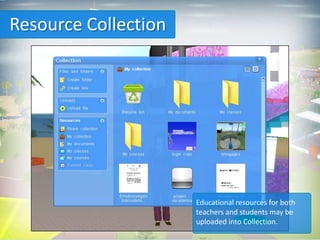
Resource Collection


                      Educational resources for both
                      teachers and students may be
                      uploaded into Collection.
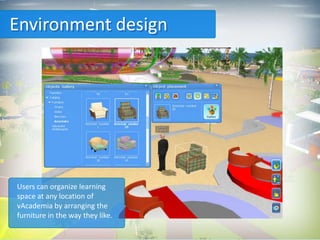
Environment design


Users can organize learning
space at any location of
vAcademia by arranging the
furniture in the way they like.
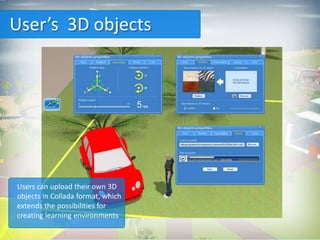
User’s 3D objects


Users can upload their own 3D
objects in Collada format, which
extends the possibilities for
creating learning environments
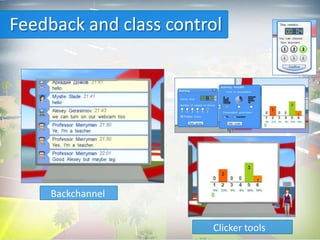
Feedback and class control


     Backchannel


                        Clicker tools
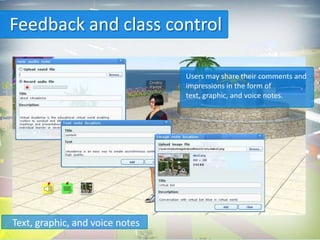
Feedback and class control

                                 Users may share their comments and
                                 impressions in the form of
                                 text, graphic, and voice notes.


Text, graphic, and voice notes
Locations
• Common Space, Temporary, and Standard locations
• Locations “My Home”
• Communication areas


                   Navigation
•   Large and mini maps
•   Visitors menu
•   Invitation to scheduled classes
•   Notification about nearby open classes
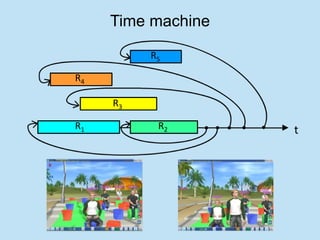
Time machine

          R5

R4

     R3

R1         R2       t
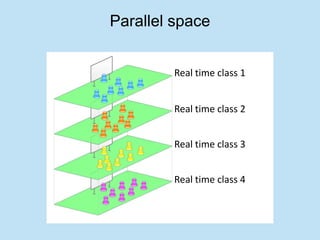
Parallel space


        Real time class 1


        Real time class 2


        Real time class 3


        Real time class 4
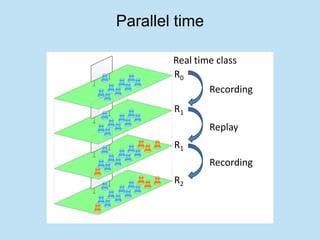
Parallel time

        Real time class
        R0
                Recording
        R1
                Replay
        R1
                Recording
        R2
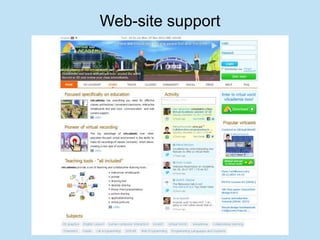
Web-site support
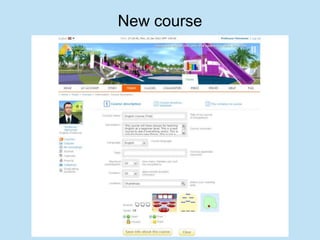
New course
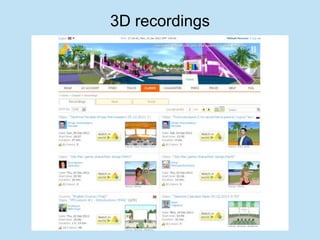
3D recordings
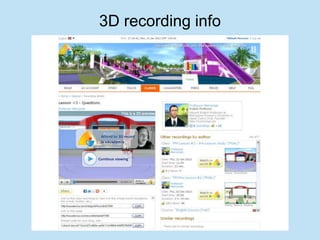
3D recording info
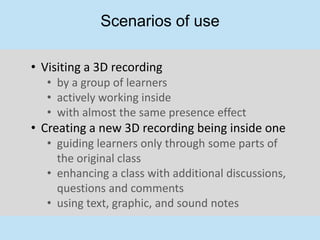
Scenarios of use

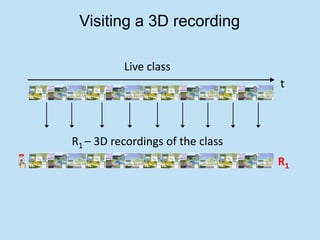
• Visiting a 3D recording
   • by a group of learners
   • actively working inside
   • with almost the same presence effect
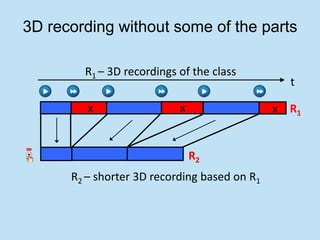
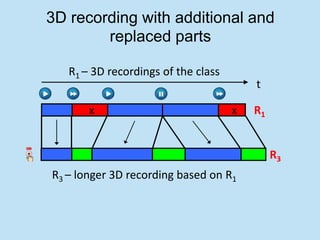
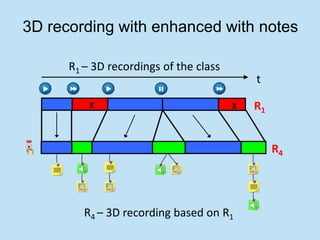
• Creating a new 3D recording being inside one
   • guiding learners only through some parts of
     the original class
   • enhancing a class with additional discussions,
     questions and comments
   • using text, graphic, and sound notes
Visiting a 3D recording

          Live class
                                  t


R1 – 3D recordings of the class
                                  R1
3D recording without some of the parts

        R1 – 3D recordings of the class
                                                t

         x                 x                  x R1


                               R2
      R2 – shorter 3D recording based on R1
3D recording with additional and
        replaced parts

   R1 – 3D recordings of the class
                                         t

       x                             x   R1


                                              R3
R3 – longer 3D recording based on R1
3D recording with enhanced with notes

      R1 – 3D recordings of the class
                                            t

          x                             x   R1


                                                 R4


         R4 – 3D recording based on R1
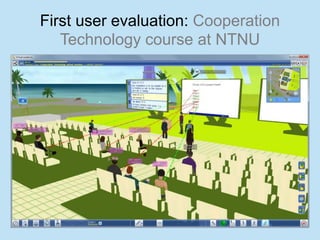
First user evaluation: Cooperation
   Technology course at NTNU
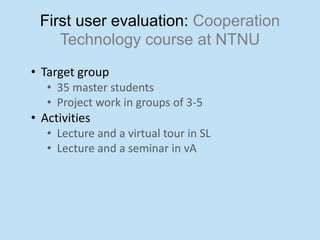
First user evaluation: Cooperation
    Technology course at NTNU
• Target group
   • 35 master students
   • Project work in groups of 3-5
• Activities
   • Lecture and a virtual tour in SL
   • Lecture and a seminar in vA
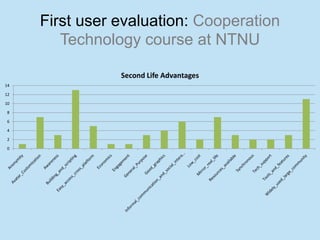
First user evaluation: Cooperation
        Technology course at NTNU

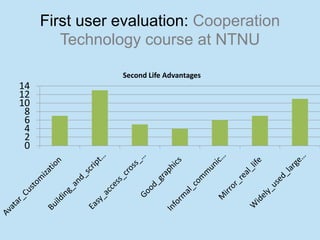
                Second Life Advantages
14

12

10

8

6

4

2

0
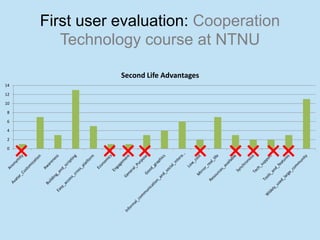
First user evaluation: Cooperation
        Technology course at NTNU

                Second Life Advantages
14

12

10

 8

 6

 4

 2

 0
First user evaluation: Cooperation
        Technology course at NTNU

                Second Life Advantages
14
12
10
 8
 6
 4
 2
 0
First user evaluation: Cooperation
        Technology course at NTNU

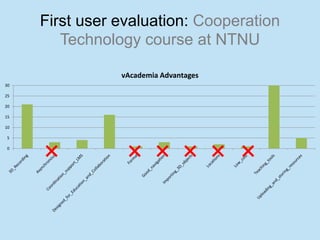
                vAcademia Advantages
30

25

20

15

10

5

0
First user evaluation: Cooperation
        Technology course at NTNU

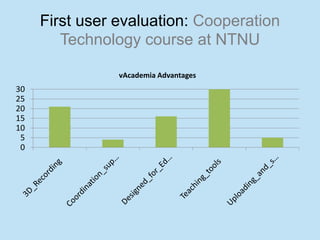
                vAcademia Advantages
30
25
20
15
10
 5
 0
First user evaluation: Cooperation
   Technology course at NTNU

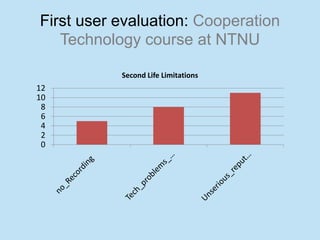
           Second Life Limitations
12
10
 8
 6
 4
 2
 0
First user evaluation: Cooperation
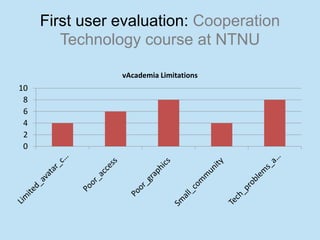
        Technology course at NTNU

                vAcademia Limitations
10
 8
 6
 4
 2
 0
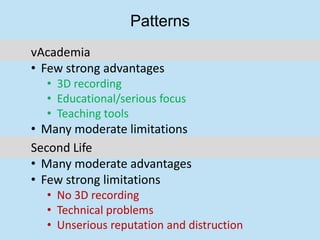
Patterns
vAcademia
• Few strong advantages
  • 3D recording
  • Educational/serious focus
  • Teaching tools
• Many moderate limitations
Second Life
• Many moderate advantages
• Few strong limitations
  • No 3D recording
  • Technical problems
  • Unserious reputation and distruction
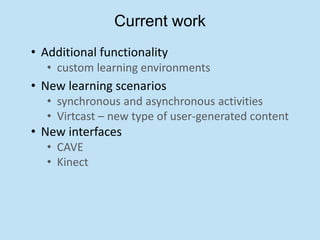
Current work
• Additional functionality
   • custom learning environments
• New learning scenarios
   • synchronous and asynchronous activities
   • Virtcast – new type of user-generated content
• New interfaces
   • CAVE
   • Kinect
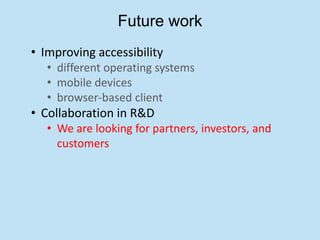
Future work
• Improving accessibility
   • different operating systems
   • mobile devices
   • browser-based client
• Collaboration in R&D
   • We are looking for partners, investors, and
     customers
Thank you!
presented by   Mikhail Fominykh
                                 mikhail.fominykh@ntnu.no

http://www.idi.ntnu.no/~fominykh/
http://www.linkedin.com/in/fominykh
http://slideshare.net/mfominykh/
http://vacademia.com/userprofile/show/id/808


                             Educational virtual world   vAcademia
                                           info@vacademia.com

http://vacademia.com
http://www.facebook.com/vAcademia
@vacademia_info
http://www.slideshare.net/vacademia

vAcademia presentation for ISTE

  • 1.
    vAcademia Virtual Spaces LLC, Russia Educational Virtual World with 3D Recording presented by Mikhail Fominykh Norwegian University of Science and Technology, Norway International Society for Technology in Education (ISTE), 15 January 2013
  • 2.
    3D Virtual Worlds • Multiuser • Synchronous • Persistent • Facilitated by networked computers • Each user is represented by a single avatar • Three-dimensional graphical interphase • Social Worlds/Game Worlds
  • 3.
    3D Virtual Worlds • Multiuser • Synchronous? • Persistent? • Facilitated by networked computers • Each user is represented by a single avatar? • Three-dimensional graphical interphase • Social Worlds/Game Worlds
  • 4.
    3D Virtual Worlds as learning environments • Low cost and high safety • Three-dimensional representation of learners and objects • Interaction in simulated contexts • Sense of presence • Variety of tools
  • 5.
  • 6.
    Synchronous - Asynchronous Synchronous Asynchronous Types of learning (online) (offline) Text books and Traditional Face-to-face classes video recorded Learning classes Recorded 2D e-Learning Videoconferences videoconferences 3D e-Learning Classes in virtual worlds ?
  • 7.
    Synchronous/live Asynchronous/content
  • 8.
    Transformation of synchronousto asynchronous 2D e-Learning live/online Synchronous class Face to face class Videoconference content Asynchronous class CMS/LMS
  • 9.
  • 10.
    Transformation of synchronousto asynchronous 3D e-Learning live/online Synchronous class Face to face class content Asynchronous class VirtCAST
  • 11.
    Synchronous - Asynchronous Synchronous Asynchronous Types of learning (online) (offline) Text books and Traditional Face-to-face classes video recorded Learning classes 2D e-Learning Webinars Recorded webinars 3D e-Learning
  • 12.
    1. Starting aclass in vAcademia
  • 13.
  • 14.
    3. Conducting aclass in vAcademia
  • 15.
  • 16.
    5. New content– 3D recording of the class
  • 17.
    6. 3D recordings– course content
  • 18.
    3D recording Previous Work? • Asynchronous Virtual Classroom (1999) • N*Vector (2000) • MASSIVE-3 (2002) • Wonderland
  • 19.
    Teaching tools • Interactivewhiteboard • Content storages • Control and feedback tools
  • 20.
    Teaching tools • Interactivewhiteboard ′ Sharing of an application window ′ Sharing screen area ′ Sharing web-camera image ″ Drawing figures and typing text on the whiteboard ″ Inserting text from the clipboard ‴ Slide presentations ‴ Area print screen ‴ Pasting images from clipboard on a whiteboard • Content storages • Control and feedback tools
  • 21.
    Teaching tools • Interactivewhiteboard • Content storages o Object Gallery (standard classroom objects) o Resource collection (user objects PPT, PDF, PNG, JPEG, test templates in XML, test results in CSV, Collada, and 3DS) • Control and feedback tools
  • 22.
    Teaching tools • Interactivewhiteboard • Content storages • Control and feedback tools o Class Control o Notes (text, sound, and graphics) o Backchannel o Clicker
  • 23.
    Interactive whiteboard Real world vAcademia Drawing on Chalk and board white boards [Laser] pointer Pointer for each user Slide show Slide show presentations presentations Web camera Web camera sharing Desktop Desktop sharing
  • 24.
    Resource Collection Educational resources for both teachers and students may be uploaded into Collection.
  • 25.
    Environment design Users canorganize learning space at any location of vAcademia by arranging the furniture in the way they like.
  • 26.
    User’s 3D objects Userscan upload their own 3D objects in Collada format, which extends the possibilities for creating learning environments
  • 27.
    Feedback and classcontrol Backchannel Clicker tools
  • 28.
    Feedback and classcontrol Users may share their comments and impressions in the form of text, graphic, and voice notes. Text, graphic, and voice notes
  • 29.
    Locations • Common Space,Temporary, and Standard locations • Locations “My Home” • Communication areas Navigation • Large and mini maps • Visitors menu • Invitation to scheduled classes • Notification about nearby open classes
  • 30.
    Time machine R5 R4 R3 R1 R2 t
  • 31.
    Parallel space Real time class 1 Real time class 2 Real time class 3 Real time class 4
  • 32.
    Parallel time Real time class R0 Recording R1 Replay R1 Recording R2
  • 33.
  • 34.
  • 35.
  • 36.
  • 37.
    Scenarios of use •Visiting a 3D recording • by a group of learners • actively working inside • with almost the same presence effect • Creating a new 3D recording being inside one • guiding learners only through some parts of the original class • enhancing a class with additional discussions, questions and comments • using text, graphic, and sound notes
  • 38.
    Visiting a 3Drecording Live class t R1 – 3D recordings of the class R1
  • 39.
    3D recording withoutsome of the parts R1 – 3D recordings of the class t x x x R1 R2 R2 – shorter 3D recording based on R1
  • 40.
    3D recording withadditional and replaced parts R1 – 3D recordings of the class t x x R1 R3 R3 – longer 3D recording based on R1
  • 41.
    3D recording withenhanced with notes R1 – 3D recordings of the class t x x R1 R4 R4 – 3D recording based on R1
  • 42.
    First user evaluation:Cooperation Technology course at NTNU
  • 43.
    First user evaluation:Cooperation Technology course at NTNU • Target group • 35 master students • Project work in groups of 3-5 • Activities • Lecture and a virtual tour in SL • Lecture and a seminar in vA
  • 44.
    First user evaluation:Cooperation Technology course at NTNU Second Life Advantages 14 12 10 8 6 4 2 0
  • 45.
    First user evaluation:Cooperation Technology course at NTNU Second Life Advantages 14 12 10 8 6 4 2 0
  • 46.
    First user evaluation:Cooperation Technology course at NTNU Second Life Advantages 14 12 10 8 6 4 2 0
  • 47.
    First user evaluation:Cooperation Technology course at NTNU vAcademia Advantages 30 25 20 15 10 5 0
  • 48.
    First user evaluation:Cooperation Technology course at NTNU vAcademia Advantages 30 25 20 15 10 5 0
  • 49.
    First user evaluation:Cooperation Technology course at NTNU Second Life Limitations 12 10 8 6 4 2 0
  • 50.
    First user evaluation:Cooperation Technology course at NTNU vAcademia Limitations 10 8 6 4 2 0
  • 51.
    Patterns vAcademia • Few strongadvantages • 3D recording • Educational/serious focus • Teaching tools • Many moderate limitations Second Life • Many moderate advantages • Few strong limitations • No 3D recording • Technical problems • Unserious reputation and distruction
  • 52.
    Current work • Additionalfunctionality • custom learning environments • New learning scenarios • synchronous and asynchronous activities • Virtcast – new type of user-generated content • New interfaces • CAVE • Kinect
  • 53.
    Future work • Improvingaccessibility • different operating systems • mobile devices • browser-based client • Collaboration in R&D • We are looking for partners, investors, and customers
  • 54.
  • 55.
    presented by Mikhail Fominykh mikhail.fominykh@ntnu.no http://www.idi.ntnu.no/~fominykh/ http://www.linkedin.com/in/fominykh http://slideshare.net/mfominykh/ http://vacademia.com/userprofile/show/id/808 Educational virtual world vAcademia info@vacademia.com http://vacademia.com http://www.facebook.com/vAcademia @vacademia_info http://www.slideshare.net/vacademia