Putting PowerPoint to Work  for You A 10 Step Program  of sorts …
Admitting that there is a problem … Putting PowerPoint to Work  for You
Putting PowerPoint to Work  for You
Putting PowerPoint to Work  for You A 10 Step Program  of sorts … Step 1:   Hold up your end with “compelling material”.
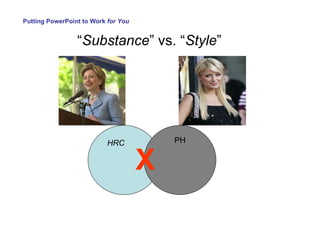
“ Substance ” vs. “ Style ” Putting PowerPoint to Work  for You
“ Substance ” vs. “ Style ” Putting PowerPoint to Work  for You HRC PH X
 
Putting PowerPoint to Work  for You A 10 Step Program  of sorts … Step 1:  Hold up your end with compelling material. Step 2:  Keep it simple.
Putting PowerPoint to Work  for You Ooooouuuuu…. Aaaaaahhhhhhhhhhhhhhh… LOOK @ ME… I am  Special … with a capital  S …
Putting PowerPoint to Work  for You
Putting PowerPoint to Work  for You If you utilize slide transition animations: Be consistent from start to finish Shy away from sounds  And…
Putting PowerPoint to Work  for You A 10 Step Program  of sorts … Step 1:  Hold up your end with compelling material. Step 2:  Keep it simple. Step 3:  Minimize the number of slides & text.
Putting PowerPoint to Work  for You The competition is rough...
Putting PowerPoint to Work  for You Then…  Constructing a  PowerPoint  presentation… is like  preparing for a  backpacking  expedition. Plan ahead.  Review your goals. Plan for emergencies.
Putting PowerPoint to Work  for You TEXT:  Less  > More... Sentences :o( Bullet Points  :o) Consistent Style Key Idea Only
Putting PowerPoint to Work  for You 6 X 6
Putting PowerPoint to Work  for You Where are we going and why? Outline the itinerary.  Give some background info. Get the tour bus moving.  Don’t be afraid to  pull the bus over.   Bring it back to the beginning. Think APA writing format… Think tour bus…
Putting PowerPoint to Work  for You A 10 Step Program  of sorts … Step 1:  Hold up your end with compelling material. Step 2:  Keep it simple. Step 3:  Minimize the number of slides and text. Step 4:  Don’t parrot PowerPoint.

Putting PowerPoint to Work  for You Step 4:  Don’t parrot PowerPoint.

Putting PowerPoint to Work  for You A 10 Step Program  of sorts … Step 1:  Hold up your end with compelling material. Step 2:  Keep it simple. Step 3:  Minimize the number of slides and text. Step 4:  Don’t parrot PowerPoint. Step 5:  Time your remarks.
Putting PowerPoint to Work  for You About 100 words per minute… Repeat  questions posed to you… It is  OK  to pause before you answer a question… Keep a healthy pace but keep in mind that if the audience senses that you are rushing...  Time  your  remarks …
Putting PowerPoint to Work  for You A 10 Step Program  of sorts … Step 1:  Hold up your end with compelling material. Step 2:  Keep it simple. Step 3:  Minimize the number of slides and text. Step 4:  Don’t parrot PowerPoint. Step 5:  Time your remarks. Step 6:  Give it a rest.
 
Putting PowerPoint to Work  for You A 10 Step Program  of sorts … Step 1:  Hold up your end with compelling material. Step 2:  Keep it simple. Step 3:  Minimize the number of slides and text. Step 4:  Don’t parrot PowerPoint. Step 5:  Time your remarks. Step 6:  Give it a rest. Step 7:  Careful with fonts and backgrounds.
Some fonts are:   really ugly hard to read and annoying suitable for comics More science fiction than scientific Careful with fonts styles… Putting PowerPoint to Work  for You
Putting PowerPoint to Work  for You Arial  Sans Serif Times New Roman The Big 3
Putting PowerPoint to Work  for You Oh so temping…
You  don’t  design ads for Putting PowerPoint to Work  for You
Putting PowerPoint to Work  for You Backgrounds Ask yourself: Does it help the presentation? Work with my text & graphics? Does it seem out of place? Will they wonder if I forgot to take my meds?
Making PowerPoint work  for you. A 10 Step Program  of sorts
Putting PowerPoint to Work  for You The competition for the audience’s attention is rough. Don’t give them  another excuse  to tune you out!
Are You Kidding Me?
Putting PowerPoint to Work  for You The beauty of “white space”… Clean & crisp Text pops off the page Keeps the focus on your message
Putting PowerPoint to Work  for You
Putting PowerPoint to Work  for You Final word on backgrounds … Ok, white space is  not   always  best Think contrasting colors Think readability & clarity Then…  Try it out
Putting PowerPoint to Work  for You A 10 Step Program  of sorts … Step 1:  Hold up your end with compelling material. Step 2:  Keep it simple. Step 3:  Minimize the number of slides and text. Step 4:  Don’t parrot PowerPoint. Step 5:  Time your remarks. Step 6:  Give it a rest. Step 7:  Careful with backgrounds and fonts. Step 8:  Import images, graphics and other media
Putting PowerPoint to Work  for You Thank you, Al Gore …
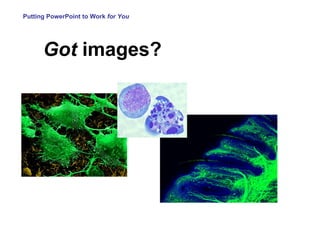
Putting PowerPoint to Work  for You Got  images?
Putting PowerPoint to Work  for You RE: Graphs... 2-D vs. 3-D Adios grid-lines Contrast with color Wider is better Provide the punch-line
Putting PowerPoint to Work  for You For entering students N = 36 in 2006 N = 33 in 2007 It took centuries to decipher the Rosetta stone…   Your audience has 1 minute…
Putting PowerPoint to Work  for You Good slide vs. poor slide… Sometimes…  the difference is subtle…
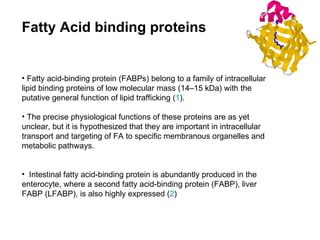
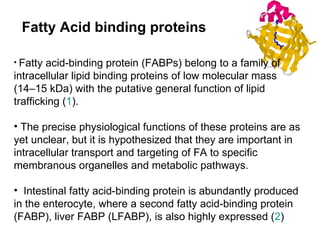
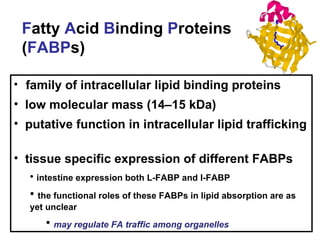
Fatty acid-binding protein (FABPs) belong to a family of intracellular lipid binding proteins of low molecular mass (14–15 kDa) with the putative general function of lipid trafficking ( 1 ).  The precise physiological functions of these proteins are as yet unclear, but it is hypothesized that they are important in intracellular transport and targeting of FA to specific membranous organelles and metabolic pathways.  Intestinal fatty acid-binding protein is abundantly produced in the enterocyte, where a second fatty acid-binding protein (FABP), liver FABP (LFABP), is also highly expressed ( 2 )  Fatty Acid binding proteins
family of intracellular lipid binding proteins  low molecular mass (14–15 kDa)  putative function in intracellular lipid trafficking  tissue specific expression of different FABPs intestine expression both L-FABP and I-FABP the functional roles of these FABPs in lipid absorption are as yet unclear may regulate FA traffic among organelles F atty  A cid  B inding  P roteins ( FABP s)
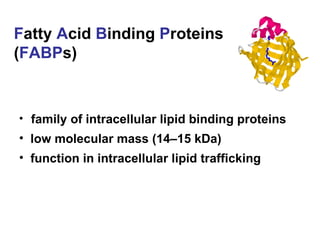
family of intracellular lipid binding proteins  low molecular mass (14–15 kDa)  function in intracellular lipid trafficking F atty  A cid  B inding  P roteins ( FABP s)
Putting PowerPoint to Work  for You It a scary world out there… In our lecture halls…
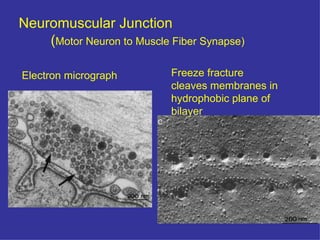
Neuromuscular Junction ( Motor Neuron to Muscle Fiber Synapse) Freeze fracture  cleaves membranes in hydrophobic plane of   bilayer Electron micrograph
Vesicle Trafficking and Exocytosis Learning Objectives: Systems used to study vesicle fusion & exocytosis a.  Yeast secretory mutants b.*  C. elegans  movement mutants (uncoordinated) c.*  Drosophila  mutants d.  Cell free Golgi vesicle trafficking assay e.  Protein purification, antibodies, interacting proteins  [synaptic preps:  Torpedo, brain] f.  Synaptic preparations for electrophysiology  - squid giant synapse SNARE hypothesis a.  NSF, SNAPs  and SNAP Receptors Identity of  t- and v- SNA RES SNARE zipper mechanism (postdocking) Role of NSF & SNAPs Very rapid, Ca-dependent exocytosis at synapses Ca sensor:  Synaptotagmin
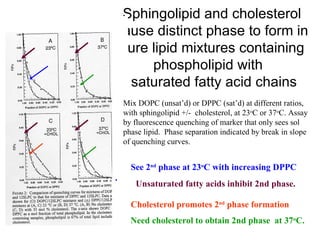
Sphingolipid and cholesterol cause distinct phase to form in pure lipid mixtures containing phospholipid with   saturated fatty acid chains Mix DOPC (unsat’d) or DPPC (sat’d) at different ratios, with sphingolipid +/-  cholesterol, at 23 o C or 37 o C. Assay by fluorescence quenching of marker that only sees sol phase lipid.  Phase separation indicated by break in slope of quenching curves.  Unsaturated fatty acids inhibit 2nd phase. See 2 nd  phase at 23 o C with increasing DPPC .  Need cholesterol to obtain 2nd phase  at 37 o C. Cholesterol promotes 2 nd  phase formation
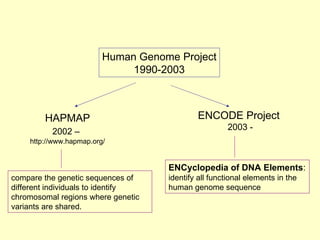
Human Genome Project 1990-2003 HAPMAP 2002 –   http://www.hapmap.org/ ENCODE Project  2003 - ENCyclopedia of DNA Elements : identify all functional elements in the human genome sequence  compare the genetic sequences of different individuals to identify chromosomal regions where genetic variants are shared.
3: Examine Region Chromosome-wide summary data is shown in overview Default tracks show HapMap genotyped SNPs, named genes from Entrez, and alternative mRNA splicing patterns
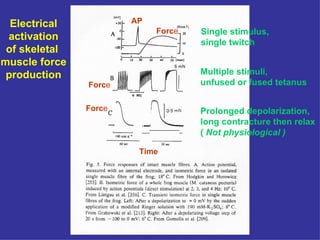
Electrical activation of skeletal  muscle force production Single stimulus,  single twitch Multiple stimuli,  unfused or fused tetanus Prolonged depolarization, long contracture then relax (  Not physiological ) Forc e  Forc e Forc e AP Time
Putting PowerPoint to Work  for You There  is  hope.
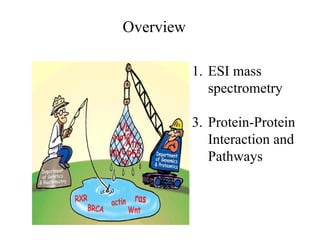
Overview ESI mass spectrometry Protein-Protein Interaction and Pathways
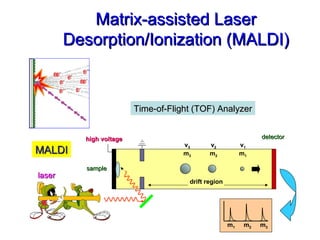
high voltage sample m 1   m 2   m 3 detector drift region laser Matrix-assisted Laser Desorption/Ionization (MALDI) Time-of-Flight (TOF) Analyzer MALDI v 1 m 1 v 2 m 2 v 3 m 3
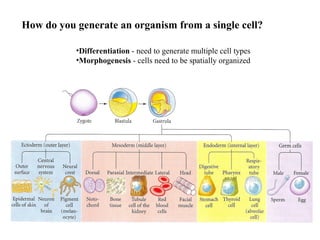
Differentiation  - need to generate multiple cell types Morphogenesis  - cells need to be spatially organized How do you generate an organism from a single cell?
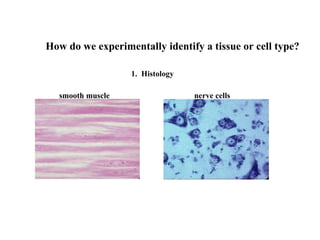
in situ immuno How do we experimentally identify a tissue or cell type? 1.  Histology smooth muscle nerve cells
Putting PowerPoint to Work  for You A 10 Step Program  of sorts … Step 1:  Hold up your end with compelling material. Step 2:  Keep it simple. Step 3:  Minimize the number of slides and text. Step 4:  Don’t parrot PowerPoint. Step 5:  Time your remarks. Step 6: Give it a rest. Step 7:  Careful with backgrounds and fonts. Step 8:  Import other images, graphics and other media. Step 9:  Distribute handouts at the end.
Putting PowerPoint to Work  for You A 10 Step Program  of sorts … Step 1:  Hold up your end with compelling material. Step 2:  Keep it simple. Step 3:  Minimize the number of slides and text. Step 4:  Don’t parrot PowerPoint. Step 5:  Time your remarks. Step 6:  Give it a rest. Step 7:  Careful with backgrounds and fonts. Step 8:  Import other images, graphics and other media. Step 9:  Distribute handouts at the end. Step 10:  Edit ruthlessly before presenting.
Putting PowerPoint to Work  for You Get acquainted with the F7 key. Employ the eyes of others .  If your not sure…  cut it out.   Don't speak without rehearsing.   Even Seinfeld rehearses and… He has nothing to say…
 
Promoting Excellence in  Biomedical Education lifesciences.umaryland.edu

Utilizing PowerPoint Effectively

  • 1.
  • 2.
    Putting PowerPoint toWork for You A 10 Step Program of sorts …
  • 3.
    Admitting that thereis a problem … Putting PowerPoint to Work for You
  • 4.
  • 5.
    Putting PowerPoint toWork for You A 10 Step Program of sorts … Step 1: Hold up your end with “compelling material”.
  • 6.
    “ Substance ”vs. “ Style ” Putting PowerPoint to Work for You
  • 7.
    “ Substance ”vs. “ Style ” Putting PowerPoint to Work for You HRC PH X
  • 8.
  • 9.
    Putting PowerPoint toWork for You A 10 Step Program of sorts … Step 1: Hold up your end with compelling material. Step 2: Keep it simple.
  • 10.
    Putting PowerPoint toWork for You Ooooouuuuu…. Aaaaaahhhhhhhhhhhhhhh… LOOK @ ME… I am Special … with a capital S …
  • 11.
  • 12.
    Putting PowerPoint toWork for You If you utilize slide transition animations: Be consistent from start to finish Shy away from sounds And…
  • 13.
    Putting PowerPoint toWork for You A 10 Step Program of sorts … Step 1: Hold up your end with compelling material. Step 2: Keep it simple. Step 3: Minimize the number of slides & text.
  • 14.
    Putting PowerPoint toWork for You The competition is rough...
  • 15.
    Putting PowerPoint toWork for You Then… Constructing a PowerPoint presentation… is like preparing for a backpacking expedition. Plan ahead. Review your goals. Plan for emergencies.
  • 16.
    Putting PowerPoint toWork for You TEXT: Less > More... Sentences :o( Bullet Points :o) Consistent Style Key Idea Only
  • 17.
    Putting PowerPoint toWork for You 6 X 6
  • 18.
    Putting PowerPoint toWork for You Where are we going and why? Outline the itinerary. Give some background info. Get the tour bus moving. Don’t be afraid to pull the bus over. Bring it back to the beginning. Think APA writing format… Think tour bus…
  • 19.
    Putting PowerPoint toWork for You A 10 Step Program of sorts … Step 1: Hold up your end with compelling material. Step 2: Keep it simple. Step 3: Minimize the number of slides and text. Step 4: Don’t parrot PowerPoint.
  • 20.
    Putting PowerPoint toWork for You Step 4: Don’t parrot PowerPoint.
  • 21.
    Putting PowerPoint toWork for You A 10 Step Program of sorts … Step 1: Hold up your end with compelling material. Step 2: Keep it simple. Step 3: Minimize the number of slides and text. Step 4: Don’t parrot PowerPoint. Step 5: Time your remarks.
  • 22.
    Putting PowerPoint toWork for You About 100 words per minute… Repeat questions posed to you… It is OK to pause before you answer a question… Keep a healthy pace but keep in mind that if the audience senses that you are rushing... Time your remarks …
  • 23.
    Putting PowerPoint toWork for You A 10 Step Program of sorts … Step 1: Hold up your end with compelling material. Step 2: Keep it simple. Step 3: Minimize the number of slides and text. Step 4: Don’t parrot PowerPoint. Step 5: Time your remarks. Step 6: Give it a rest.
  • 24.
  • 25.
    Putting PowerPoint toWork for You A 10 Step Program of sorts … Step 1: Hold up your end with compelling material. Step 2: Keep it simple. Step 3: Minimize the number of slides and text. Step 4: Don’t parrot PowerPoint. Step 5: Time your remarks. Step 6: Give it a rest. Step 7: Careful with fonts and backgrounds.
  • 26.
    Some fonts are: really ugly hard to read and annoying suitable for comics More science fiction than scientific Careful with fonts styles… Putting PowerPoint to Work for You
  • 27.
    Putting PowerPoint toWork for You Arial Sans Serif Times New Roman The Big 3
  • 28.
    Putting PowerPoint toWork for You Oh so temping…
  • 29.
    You don’t design ads for Putting PowerPoint to Work for You
  • 30.
    Putting PowerPoint toWork for You Backgrounds Ask yourself: Does it help the presentation? Work with my text & graphics? Does it seem out of place? Will they wonder if I forgot to take my meds?
  • 31.
    Making PowerPoint work for you. A 10 Step Program of sorts
  • 32.
    Putting PowerPoint toWork for You The competition for the audience’s attention is rough. Don’t give them another excuse to tune you out!
  • 33.
  • 34.
    Putting PowerPoint toWork for You The beauty of “white space”… Clean & crisp Text pops off the page Keeps the focus on your message
  • 35.
  • 36.
  • 37.
  • 38.
    Putting PowerPoint toWork for You Final word on backgrounds … Ok, white space is not always best Think contrasting colors Think readability & clarity Then… Try it out
  • 39.
    Putting PowerPoint toWork for You A 10 Step Program of sorts … Step 1: Hold up your end with compelling material. Step 2: Keep it simple. Step 3: Minimize the number of slides and text. Step 4: Don’t parrot PowerPoint. Step 5: Time your remarks. Step 6: Give it a rest. Step 7: Careful with backgrounds and fonts. Step 8: Import images, graphics and other media
  • 40.
    Putting PowerPoint toWork for You Thank you, Al Gore …
  • 41.
    Putting PowerPoint toWork for You Got images?
  • 42.
    Putting PowerPoint toWork for You RE: Graphs... 2-D vs. 3-D Adios grid-lines Contrast with color Wider is better Provide the punch-line
  • 43.
    Putting PowerPoint toWork for You For entering students N = 36 in 2006 N = 33 in 2007 It took centuries to decipher the Rosetta stone…  Your audience has 1 minute…
  • 44.
    Putting PowerPoint toWork for You Good slide vs. poor slide… Sometimes… the difference is subtle…
  • 45.
    Fatty acid-binding protein(FABPs) belong to a family of intracellular lipid binding proteins of low molecular mass (14–15 kDa) with the putative general function of lipid trafficking ( 1 ). The precise physiological functions of these proteins are as yet unclear, but it is hypothesized that they are important in intracellular transport and targeting of FA to specific membranous organelles and metabolic pathways. Intestinal fatty acid-binding protein is abundantly produced in the enterocyte, where a second fatty acid-binding protein (FABP), liver FABP (LFABP), is also highly expressed ( 2 ) Fatty Acid binding proteins
  • 46.
    Fatty acid-binding protein(FABPs) belong to a family of intracellular lipid binding proteins of low molecular mass (14–15 kDa) with the putative general function of lipid trafficking ( 1 ). The precise physiological functions of these proteins are as yet unclear, but it is hypothesized that they are important in intracellular transport and targeting of FA to specific membranous organelles and metabolic pathways. Intestinal fatty acid-binding protein is abundantly produced in the enterocyte, where a second fatty acid-binding protein (FABP), liver FABP (LFABP), is also highly expressed ( 2 ) Fatty Acid binding proteins
  • 47.
    family of intracellularlipid binding proteins low molecular mass (14–15 kDa) putative function in intracellular lipid trafficking tissue specific expression of different FABPs intestine expression both L-FABP and I-FABP the functional roles of these FABPs in lipid absorption are as yet unclear may regulate FA traffic among organelles F atty A cid B inding P roteins ( FABP s)
  • 48.
    family of intracellularlipid binding proteins low molecular mass (14–15 kDa) function in intracellular lipid trafficking F atty A cid B inding P roteins ( FABP s)
  • 49.
    Putting PowerPoint toWork for You It a scary world out there… In our lecture halls…
  • 50.
    Neuromuscular Junction (Motor Neuron to Muscle Fiber Synapse) Freeze fracture cleaves membranes in hydrophobic plane of bilayer Electron micrograph
  • 51.
    Vesicle Trafficking andExocytosis Learning Objectives: Systems used to study vesicle fusion & exocytosis a. Yeast secretory mutants b.* C. elegans movement mutants (uncoordinated) c.* Drosophila mutants d. Cell free Golgi vesicle trafficking assay e. Protein purification, antibodies, interacting proteins [synaptic preps: Torpedo, brain] f. Synaptic preparations for electrophysiology - squid giant synapse SNARE hypothesis a. NSF, SNAPs and SNAP Receptors Identity of t- and v- SNA RES SNARE zipper mechanism (postdocking) Role of NSF & SNAPs Very rapid, Ca-dependent exocytosis at synapses Ca sensor: Synaptotagmin
  • 52.
    Sphingolipid and cholesterolcause distinct phase to form in pure lipid mixtures containing phospholipid with saturated fatty acid chains Mix DOPC (unsat’d) or DPPC (sat’d) at different ratios, with sphingolipid +/- cholesterol, at 23 o C or 37 o C. Assay by fluorescence quenching of marker that only sees sol phase lipid. Phase separation indicated by break in slope of quenching curves. Unsaturated fatty acids inhibit 2nd phase. See 2 nd phase at 23 o C with increasing DPPC . Need cholesterol to obtain 2nd phase at 37 o C. Cholesterol promotes 2 nd phase formation
  • 53.
    Human Genome Project1990-2003 HAPMAP 2002 – http://www.hapmap.org/ ENCODE Project 2003 - ENCyclopedia of DNA Elements : identify all functional elements in the human genome sequence compare the genetic sequences of different individuals to identify chromosomal regions where genetic variants are shared.
  • 54.
    3: Examine RegionChromosome-wide summary data is shown in overview Default tracks show HapMap genotyped SNPs, named genes from Entrez, and alternative mRNA splicing patterns
  • 55.
    Electrical activation ofskeletal muscle force production Single stimulus, single twitch Multiple stimuli, unfused or fused tetanus Prolonged depolarization, long contracture then relax ( Not physiological ) Forc e Forc e Forc e AP Time
  • 56.
    Putting PowerPoint toWork for You There is hope.
  • 57.
    Overview ESI massspectrometry Protein-Protein Interaction and Pathways
  • 58.
    high voltage samplem 1 m 2 m 3 detector drift region laser Matrix-assisted Laser Desorption/Ionization (MALDI) Time-of-Flight (TOF) Analyzer MALDI v 1 m 1 v 2 m 2 v 3 m 3
  • 59.
    Differentiation -need to generate multiple cell types Morphogenesis - cells need to be spatially organized How do you generate an organism from a single cell?
  • 60.
    in situ immunoHow do we experimentally identify a tissue or cell type? 1. Histology smooth muscle nerve cells
  • 61.
    Putting PowerPoint toWork for You A 10 Step Program of sorts … Step 1: Hold up your end with compelling material. Step 2: Keep it simple. Step 3: Minimize the number of slides and text. Step 4: Don’t parrot PowerPoint. Step 5: Time your remarks. Step 6: Give it a rest. Step 7: Careful with backgrounds and fonts. Step 8: Import other images, graphics and other media. Step 9: Distribute handouts at the end.
  • 62.
    Putting PowerPoint toWork for You A 10 Step Program of sorts … Step 1: Hold up your end with compelling material. Step 2: Keep it simple. Step 3: Minimize the number of slides and text. Step 4: Don’t parrot PowerPoint. Step 5: Time your remarks. Step 6: Give it a rest. Step 7: Careful with backgrounds and fonts. Step 8: Import other images, graphics and other media. Step 9: Distribute handouts at the end. Step 10: Edit ruthlessly before presenting.
  • 63.
    Putting PowerPoint toWork for You Get acquainted with the F7 key. Employ the eyes of others . If your not sure… cut it out. Don't speak without rehearsing. Even Seinfeld rehearses and… He has nothing to say…
  • 64.
  • 65.
    Promoting Excellence in Biomedical Education lifesciences.umaryland.edu