

Using Yammer to improve
      collaboration between
           organizations
27.12.2010 Richard von Kaufmann // co-founder // concepting director
What is Yammer?
This presentation explains what Yammer is and how it helps.
And it will specifically focus on how it can be used to quickly
create an inter-organizational collaboration space.

And it will use examples from the OSKE collaboration
environment project currently being undertaken by Zipipop for
the Finnish Ministry of Employment and the Economy (TEM).
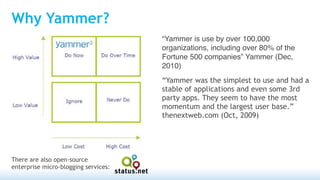
Why Yammer?
                                      “Yammer is use by over 100,000
                                      organizations, including over 80% of the
                                      Fortune 500 companies” Yammer (Dec,
                                      2010)
                                      “Yammer was the simplest to use and had a
                                      stable of applications and even some 3rd
                                      party apps. They seem to have the most
                                      momentum and the largest user base.”
                                      thenextweb.com (Oct, 2009)


There are also open-source
enterprise micro-blogging services:
Enterprise Micro-blogging
Yammer is one of the post popular enterprise micro-blogging
services.

Enterprise micro-blogging uses conventions developed from
consumer social media: most notably Facebook and Twitter.

The difference is that enterprise micro-blogging services are
closed and invite only.
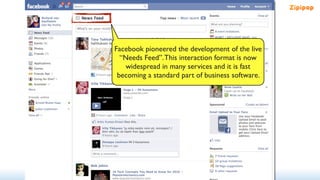
Facebook pioneered the development of the live
  “Needs Feed”. This interaction format is now
    widespread in many services and it is fast
 becoming a standard part of business software.
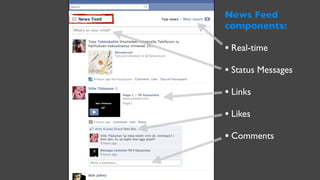
News Feed
components:

• Real-time
• Status Messages
• Links
• Likes
• Comments
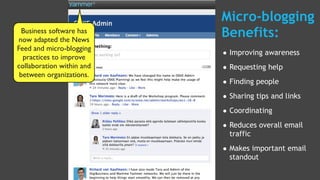
Micro-blogging
  Business software has
now adapted the News
                           Benefits:
Feed and micro-blogging
  practices to improve     • Improving awareness
collaboration within and   • Requesting help
 between organizations.
                           • Finding people
                           • Sharing tips and links
                           • Coordinating
                           • Reduces overall email
                             traffic

                           • Makes important email
                             standout
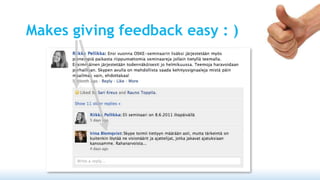
Without an audience,
we are not motivated…   http://www.besser20.de/english
Makes giving feedback easy : )
Usage Rules
Yammer is highly likely to fail if you do not define the usage rules in advance.
The number one problem is if people start having private discussions in the
middle of a large Yammer network, as this quickly makes the space feel spammy.
However, if the right usage rules are set in advance, it is fine to have detailed
discussions in smaller networks.
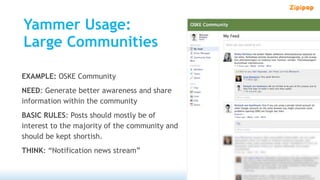
Yammer Usage:
Large Communities

EXAMPLE: OSKE Community
NEED: Generate better awareness and share
information within the community
BASIC RULES: Posts should mostly be of
interest to the majority of the community and
should be kept shortish.
THINK: “Notification news stream”
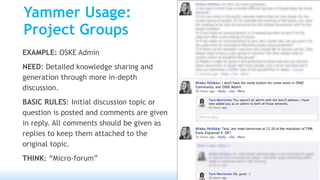
Yammer Usage:
Project Groups
EXAMPLE: OSKE Admin
NEED: Detailed knowledge sharing and
generation through more in-depth
discussion.
BASIC RULES: Initial discussion topic or
question is posted and comments are given
in reply. All comments should be given as
replies to keep them attached to the
original topic.
THINK: “Micro-forum”
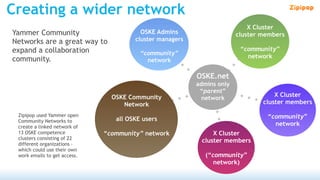
Creating a wider network
                                                                            X Cluster
Yammer Community                         OSKE Admins                    cluster members
Networks are a great way to            cluster managers
expand a collaboration                                                   “community”
                                         “community”
community.                                                                 network
                                           network

                                                          OSKE.net
                                                          admins only
                                                           “parent”
                                OSKE Community                                      X Cluster
                                                            network
                                   Network                                      cluster members

 Zipipop used Yammer open                                                        “community”
 Community Networks to           all OSKE users
 create a linked network of
                                                                                   network
 13 OSKE competence           “community” network              X Cluster
 clusters consisting of 22
                                                           cluster members
 different organizations –
 which could use their own
 work emails to get access.                                  (“community”
                                                                network)
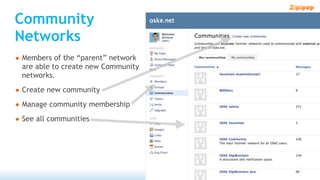
Community
Networks
• Members of the “parent” network
  are able to create new Community
  networks.

• Create new community
• Manage community membership
• See all communities
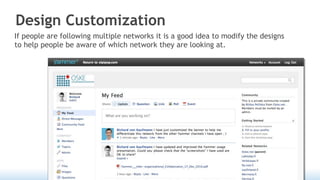
Design Customization
If people are following multiple networks it is a good idea to modify the designs
to help people be aware of which network they are looking at.
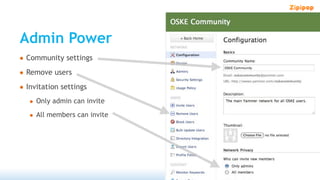
Admin Power
• Community settings
• Remove users
• Invitation settings
  • Only admin can invite
  • All members can invite
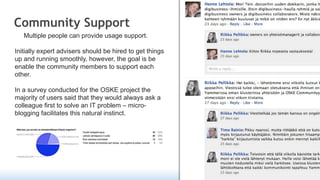
Community Support
   Multiple people can provide usage support.

Initially expert advisers should be hired to get things
up and running smoothly, however, the goal is be
enable the community members to support each
other.

In a survey conducted for the OSKE project the
majority of users said that they would always ask a
colleague first to solve an IT problem – micro-
blogging facilitates this natural instinct.
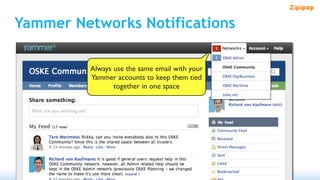
Yammer Networks Notifications

         Always use the same email with your
         Yammer accounts to keep them tied
                together in one space
Thanks!
Richard von Kaufmann
Concepting Director, Co-founder
+358 45 11 222 73
richard@zipipop.com
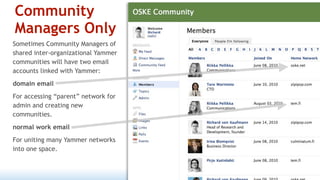
Community
Managers Only
Sometimes Community Managers of
shared inter-organizational Yammer
communities will have two email
accounts linked with Yammer:
domain email
For accessing “parent” network for
admin and creating new
communities.
normal work email
For uniting many Yammer networks
into one space.

Yammer & inter-organizational collaboration 8 Dec 2010

  • 1.
    Using Yammer toimprove collaboration between organizations 27.12.2010 Richard von Kaufmann // co-founder // concepting director
  • 2.
    What is Yammer? Thispresentation explains what Yammer is and how it helps. And it will specifically focus on how it can be used to quickly create an inter-organizational collaboration space. And it will use examples from the OSKE collaboration environment project currently being undertaken by Zipipop for the Finnish Ministry of Employment and the Economy (TEM).
  • 3.
    Why Yammer? “Yammer is use by over 100,000 organizations, including over 80% of the Fortune 500 companies” Yammer (Dec, 2010) “Yammer was the simplest to use and had a stable of applications and even some 3rd party apps. They seem to have the most momentum and the largest user base.” thenextweb.com (Oct, 2009) There are also open-source enterprise micro-blogging services:
  • 4.
    Enterprise Micro-blogging Yammer isone of the post popular enterprise micro-blogging services. Enterprise micro-blogging uses conventions developed from consumer social media: most notably Facebook and Twitter. The difference is that enterprise micro-blogging services are closed and invite only.
  • 5.
    Facebook pioneered thedevelopment of the live “Needs Feed”. This interaction format is now widespread in many services and it is fast becoming a standard part of business software.
  • 6.
    News Feed components: • Real-time •Status Messages • Links • Likes • Comments
  • 7.
    Micro-blogging Businesssoftware has now adapted the News Benefits: Feed and micro-blogging practices to improve • Improving awareness collaboration within and • Requesting help between organizations. • Finding people • Sharing tips and links • Coordinating • Reduces overall email traffic • Makes important email standout
  • 8.
    Without an audience, weare not motivated… http://www.besser20.de/english
  • 9.
  • 10.
    Usage Rules Yammer ishighly likely to fail if you do not define the usage rules in advance. The number one problem is if people start having private discussions in the middle of a large Yammer network, as this quickly makes the space feel spammy. However, if the right usage rules are set in advance, it is fine to have detailed discussions in smaller networks.
  • 11.
    Yammer Usage: Large Communities EXAMPLE:OSKE Community NEED: Generate better awareness and share information within the community BASIC RULES: Posts should mostly be of interest to the majority of the community and should be kept shortish. THINK: “Notification news stream”
  • 12.
    Yammer Usage: Project Groups EXAMPLE:OSKE Admin NEED: Detailed knowledge sharing and generation through more in-depth discussion. BASIC RULES: Initial discussion topic or question is posted and comments are given in reply. All comments should be given as replies to keep them attached to the original topic. THINK: “Micro-forum”
  • 13.
    Creating a widernetwork X Cluster Yammer Community OSKE Admins cluster members Networks are a great way to cluster managers expand a collaboration “community” “community” community. network network OSKE.net admins only “parent” OSKE Community X Cluster network Network cluster members Zipipop used Yammer open “community” Community Networks to all OSKE users create a linked network of network 13 OSKE competence “community” network X Cluster clusters consisting of 22 cluster members different organizations – which could use their own work emails to get access. (“community” network)
  • 14.
    Community Networks • Members ofthe “parent” network are able to create new Community networks. • Create new community • Manage community membership • See all communities
  • 15.
    Design Customization If peopleare following multiple networks it is a good idea to modify the designs to help people be aware of which network they are looking at.
  • 16.
    Admin Power • Communitysettings • Remove users • Invitation settings • Only admin can invite • All members can invite
  • 17.
    Community Support Multiple people can provide usage support. Initially expert advisers should be hired to get things up and running smoothly, however, the goal is be enable the community members to support each other. In a survey conducted for the OSKE project the majority of users said that they would always ask a colleague first to solve an IT problem – micro- blogging facilitates this natural instinct.
  • 18.
    Yammer Networks Notifications Always use the same email with your Yammer accounts to keep them tied together in one space
  • 19.
    Thanks! Richard von Kaufmann ConceptingDirector, Co-founder +358 45 11 222 73 richard@zipipop.com
  • 20.
    Community Managers Only Sometimes CommunityManagers of shared inter-organizational Yammer communities will have two email accounts linked with Yammer: domain email For accessing “parent” network for admin and creating new communities. normal work email For uniting many Yammer networks into one space.