Randomization using Excel
Workshop on Research and Extension Proposal Preparation
January 26 to 28, 2022
SSU-Castilla Campus
Mayon, Castilla, Sorsogon
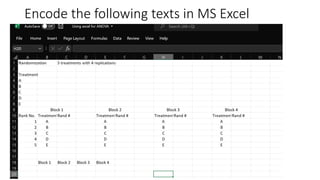
Encode the following texts in MS Excel
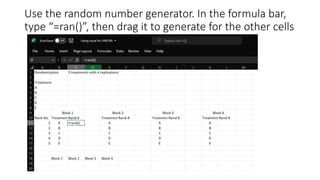
Use the random number generator. In the formula bar,
type “=ran()”, then drag it to generate for the other cells
Highlight the columns “treatment” and “Rand #”, then
click “home”, “sort and filter” and select “filter”.
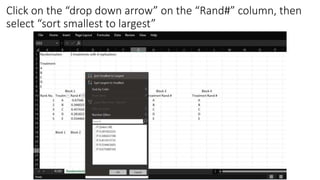
Click on the “drop down arrow” on the “Rand#” column, then
select “sort smallest to largest”
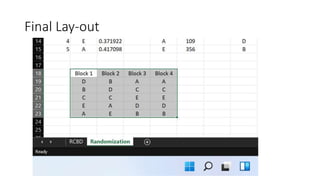
Select the column “treatments” and paste it as a “link” on the table.
Final Lay-out
Repeat the same process, but changing the range of
values ex. “randbetween(1,500)” etc..

Using excel for randomization 1

  • 1.
    Randomization using Excel Workshopon Research and Extension Proposal Preparation January 26 to 28, 2022 SSU-Castilla Campus Mayon, Castilla, Sorsogon
  • 2.
    Encode the followingtexts in MS Excel
  • 3.
    Use the randomnumber generator. In the formula bar, type “=ran()”, then drag it to generate for the other cells
  • 4.
    Highlight the columns“treatment” and “Rand #”, then click “home”, “sort and filter” and select “filter”.
  • 5.
    Click on the“drop down arrow” on the “Rand#” column, then select “sort smallest to largest”
  • 6.
    Select the column“treatments” and paste it as a “link” on the table.
  • 7.
  • 8.
    Repeat the sameprocess, but changing the range of values ex. “randbetween(1,500)” etc..