Using Buildout to
Develop and Deploy
 Python Projects
        Clayton Parker
         PyOhio 2009


              nowhere to go but
             open source
     s ix fe e tup . co m / i mm e rs e
Who am I?


•   Lead Developer at Six Feet Up, Inc.
•   claytron on IRC


                                          s ixf eet up. c om/ i mme r se
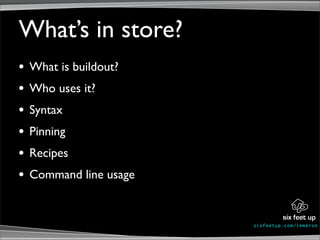
What’s in store?
•   What is buildout?
•   Who uses it?
•   Syntax
•   Pinning
•   Recipes
•   Command line usage


                         s ixf eet up. c om/ i mme r se
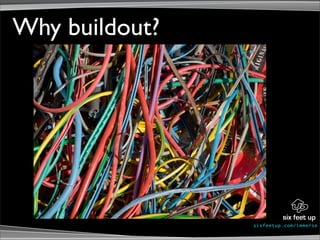
Why buildout?


                s ixf eet up. c om/ i mme r se
Eliminate Confusion


                      s ixf eet up. c om/ i mme r se
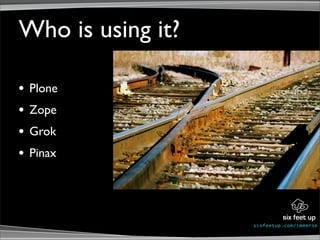
Who is using it?

•   Plone
•   Zope
•   Grok
•   Pinax


                   s ixf eet up. c om/ i mme r se
s ixf eet up. c om/ i mme r se
Lingo


 s ixf eet up. c om/ i mme r se
Syntax
   [buildout]
   parts = zope2 instance

   # copied from dist.plone.org/release
   extends = plone-versions.cfg
   versions = versions

   [zope2]
   recipe = plone.recipe.zope2install
   url = ${versions:zope2-url}
   fake-zope-eggs = True
   additional-fake-eggs = ZODB3 ZConfig

   [instance]
   recipe = plone.recipe.zope2instance
   zope2-location = ${zope2:location}
   user = admin:admin
   eggs = Plone
                                          s ixf eet up. c om/ i mme r se
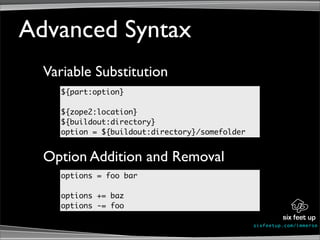
Advanced Syntax
  Variable Substitution
     ${part:option}

     ${zope2:location}
     ${buildout:directory}
     option = ${buildout:directory}/somefolder


  Option Addition and Removal
     options = foo bar

     options += baz
     options -= foo

                                                 s ixf eet up. c om/ i mme r se
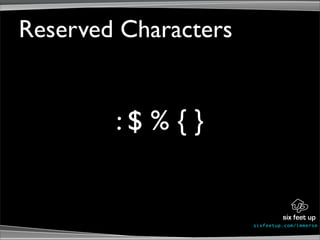
Reserved Characters


        :$ % { }


                      s ixf eet up. c om/ i mme r se
Pinning


          s ixf eet up. c om/ i mme r se
[buildout]
...
extensions = buildout.dumppickedversions
dump-picked-versions-file = dumped-versions.cfg
overwrite-picked-versions-file = True

# tell buildout to use our versions part
versions = versions

[versions]
SQLAlchemy = 0.5.5


                                                  s ixf eet up. c om/ i mme r se
Recipes


          s ixf eet up. c om/ i mme r se
[plonesite]
recipe = collective.recipe.plonesite
instance = instance
zeoserver = zeoserver
site-id = Plone
admin-user = admin
products =
profiles-initial = my.package:initial
profiles = my.package:default


                                        s ixf eet up. c om/ i mme r se
[omelette]
recipe = collective.recipe.omelette
eggs = ${instance:eggs}
ignore-develop = True
ignores = setuptools
# uncomment the line below to have the whole
# zope stack available in the omelette
packages =
    ${zope2:location}/lib/python zope2


                                               s ixf eet up. c om/ i mme r se
# add the /opt path for local dev so that the egg
# can find mysql_config
[sql-env]
PATH = %(PATH)s:/opt/local/lib/mysql5/bin/:/opt/local/lib/mysql/bin/

[MySQL-python]
recipe = zc.recipe.egg:custom
egg = MySQL-python
environment = sql-env


                                                       s ixf eet up. c om/ i mme r se
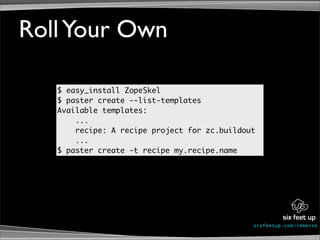
Roll Your Own

   $ easy_install ZopeSkel
   $ paster create --list-templates
   Available templates:
       ...
       recipe: A recipe project for zc.buildout
       ...
   $ paster create -t recipe my.recipe.name


                                              s ixf eet up. c om/ i mme r se
Command Line


               s ixf eet up. c om/ i mme r se
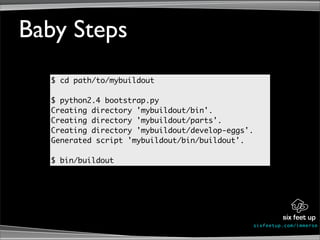
Baby Steps
  $ cd path/to/mybuildout

  $ python2.4 bootstrap.py
  Creating directory 'mybuildout/bin'.
  Creating directory 'mybuildout/parts'.
  Creating directory 'mybuildout/develop-eggs'.
  Generated script 'mybuildout/bin/buildout'.

  $ bin/buildout


                                                  s ixf eet up. c om/ i mme r se
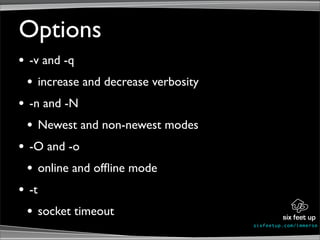
Options
•   -v and -q
    •    increase and decrease verbosity
•   -n and -N
    •    Newest and non-newest modes
•   -O and -o
    •    online and offline mode
•   -t
    •    socket timeout
                                           s ixf eet up. c om/ i mme r se
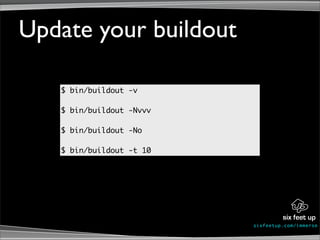
Update your buildout

   $ bin/buildout -v

   $ bin/buildout -Nvvv

   $ bin/buildout -No

   $ bin/buildout -t 10


                          s ixf eet up. c om/ i mme r se
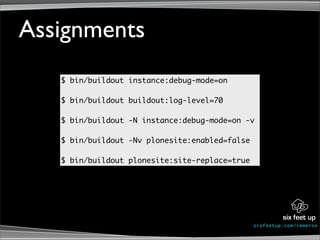
Assignments
   $ bin/buildout instance:debug-mode=on

   $ bin/buildout buildout:log-level=70

   $ bin/buildout -N instance:debug-mode=on -v

   $ bin/buildout -Nv plonesite:enabled=false

   $ bin/buildout plonesite:site-replace=true


                                                s ixf eet up. c om/ i mme r se
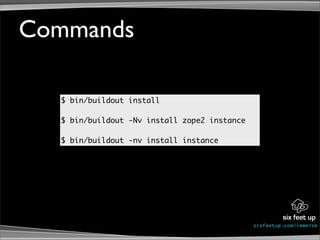
Commands

  $ bin/buildout install

  $ bin/buildout -Nv install zope2 instance

  $ bin/buildout -nv install instance


                                              s ixf eet up. c om/ i mme r se
Default Settings
                ~/.buildout/default.cfg
  [buildout]
  eggs-directory = /Users/clayton/.buildout/eggs
  download-cache = /Users/clayton/.buildout/downloads

  zope-directory = /Users/clayton/.buildout/zope


                                                   s ixf eet up. c om/ i mme r se
Helpful Tools

•   http://pypi.python.org/pypi/collective.eggproxy
•   http://pypi.python.org/pypi/collective.dist
•   Fabric or Paver


                                                  s ixf eet up. c om/ i mme r se
What did we learn?
•   What is buildout?
•   Who is using it?
•   Syntax
•   Pinning
•   Recipes
•   Command line usage


                         s ixf eet up. c om/ i mme r se
Links
•   http://buildout.org
•   http://pypi.python.org/pypi/zc.buildout
•   http://www.sixfeetup.com/swag/buildout-quick-reference-card
•   http://pypi.python.org
•   Plone Specific:
•   https://svn.sixfeetup.com/svn/public/examples/PyOhio09
•   http://plone.org/documentation/tutorial/buildout
•   https://svn.sixfeetup.com/svn/public/buildout/debug.cfg
                                                       s ixf eet up. c om/ i mme r se
Learn Plone by building a website from A to Z
1 non-profit project • 10 workshops • 14 mentors • 3 days


      s ixf eetup.com/im merse
Photo Credits
•   http://flickr.com/photos/monsieurlam/2645956083/
•   http://flickr.com/photos/_boris/2796908072/
•   http://flickr.com/photos/b-tal/163450213/
•   http://flickr.com/photos/bullish1974/2648544508/
•   http://flickr.com/photos/haydnseek/87432002/
•   http://flickr.com/photos/disowned/1158260369/
•   http://flickr.com/photos/7603557@N08/2662531345/
•   http://flickr.com/photos/julishannon/2151986631/
•   http://flickr.com/photos/julishannon/2152778524/
•   http://flickr.com/photos/lollyknit/1155225799/
•   http://flickr.com/photos/binary_koala/86227485/
•   http://flickr.com/photos/marcoveringa/2951042391


                                                      s ixf eet up. c om/ i mme r se

Using Buildout to Develop and Deploy Python Projects

  • 1.
    Using Buildout to Developand Deploy Python Projects Clayton Parker PyOhio 2009 nowhere to go but open source s ix fe e tup . co m / i mm e rs e
  • 2.
    Who am I? • Lead Developer at Six Feet Up, Inc. • claytron on IRC s ixf eet up. c om/ i mme r se
  • 3.
    What’s in store? • What is buildout? • Who uses it? • Syntax • Pinning • Recipes • Command line usage s ixf eet up. c om/ i mme r se
  • 4.
    Why buildout? s ixf eet up. c om/ i mme r se
  • 5.
    Eliminate Confusion s ixf eet up. c om/ i mme r se
  • 6.
    Who is usingit? • Plone • Zope • Grok • Pinax s ixf eet up. c om/ i mme r se
  • 7.
    s ixf eetup. c om/ i mme r se
  • 8.
    Lingo s ixfeet up. c om/ i mme r se
  • 9.
    Syntax [buildout] parts = zope2 instance # copied from dist.plone.org/release extends = plone-versions.cfg versions = versions [zope2] recipe = plone.recipe.zope2install url = ${versions:zope2-url} fake-zope-eggs = True additional-fake-eggs = ZODB3 ZConfig [instance] recipe = plone.recipe.zope2instance zope2-location = ${zope2:location} user = admin:admin eggs = Plone s ixf eet up. c om/ i mme r se
  • 10.
    Advanced Syntax Variable Substitution ${part:option} ${zope2:location} ${buildout:directory} option = ${buildout:directory}/somefolder Option Addition and Removal options = foo bar options += baz options -= foo s ixf eet up. c om/ i mme r se
  • 11.
    Reserved Characters :$ % { } s ixf eet up. c om/ i mme r se
  • 12.
    Pinning s ixf eet up. c om/ i mme r se
  • 13.
    [buildout] ... extensions = buildout.dumppickedversions dump-picked-versions-file= dumped-versions.cfg overwrite-picked-versions-file = True # tell buildout to use our versions part versions = versions [versions] SQLAlchemy = 0.5.5 s ixf eet up. c om/ i mme r se
  • 14.
    Recipes s ixf eet up. c om/ i mme r se
  • 15.
    [plonesite] recipe = collective.recipe.plonesite instance= instance zeoserver = zeoserver site-id = Plone admin-user = admin products = profiles-initial = my.package:initial profiles = my.package:default s ixf eet up. c om/ i mme r se
  • 16.
    [omelette] recipe = collective.recipe.omelette eggs= ${instance:eggs} ignore-develop = True ignores = setuptools # uncomment the line below to have the whole # zope stack available in the omelette packages = ${zope2:location}/lib/python zope2 s ixf eet up. c om/ i mme r se
  • 17.
    # add the/opt path for local dev so that the egg # can find mysql_config [sql-env] PATH = %(PATH)s:/opt/local/lib/mysql5/bin/:/opt/local/lib/mysql/bin/ [MySQL-python] recipe = zc.recipe.egg:custom egg = MySQL-python environment = sql-env s ixf eet up. c om/ i mme r se
  • 18.
    Roll Your Own $ easy_install ZopeSkel $ paster create --list-templates Available templates: ... recipe: A recipe project for zc.buildout ... $ paster create -t recipe my.recipe.name s ixf eet up. c om/ i mme r se
  • 19.
    Command Line s ixf eet up. c om/ i mme r se
  • 20.
    Baby Steps $ cd path/to/mybuildout $ python2.4 bootstrap.py Creating directory 'mybuildout/bin'. Creating directory 'mybuildout/parts'. Creating directory 'mybuildout/develop-eggs'. Generated script 'mybuildout/bin/buildout'. $ bin/buildout s ixf eet up. c om/ i mme r se
  • 21.
    Options • -v and -q • increase and decrease verbosity • -n and -N • Newest and non-newest modes • -O and -o • online and offline mode • -t • socket timeout s ixf eet up. c om/ i mme r se
  • 22.
    Update your buildout $ bin/buildout -v $ bin/buildout -Nvvv $ bin/buildout -No $ bin/buildout -t 10 s ixf eet up. c om/ i mme r se
  • 23.
    Assignments $ bin/buildout instance:debug-mode=on $ bin/buildout buildout:log-level=70 $ bin/buildout -N instance:debug-mode=on -v $ bin/buildout -Nv plonesite:enabled=false $ bin/buildout plonesite:site-replace=true s ixf eet up. c om/ i mme r se
  • 24.
    Commands $bin/buildout install $ bin/buildout -Nv install zope2 instance $ bin/buildout -nv install instance s ixf eet up. c om/ i mme r se
  • 25.
    Default Settings ~/.buildout/default.cfg [buildout] eggs-directory = /Users/clayton/.buildout/eggs download-cache = /Users/clayton/.buildout/downloads zope-directory = /Users/clayton/.buildout/zope s ixf eet up. c om/ i mme r se
  • 26.
    Helpful Tools • http://pypi.python.org/pypi/collective.eggproxy • http://pypi.python.org/pypi/collective.dist • Fabric or Paver s ixf eet up. c om/ i mme r se
  • 27.
    What did welearn? • What is buildout? • Who is using it? • Syntax • Pinning • Recipes • Command line usage s ixf eet up. c om/ i mme r se
  • 28.
    Links • http://buildout.org • http://pypi.python.org/pypi/zc.buildout • http://www.sixfeetup.com/swag/buildout-quick-reference-card • http://pypi.python.org • Plone Specific: • https://svn.sixfeetup.com/svn/public/examples/PyOhio09 • http://plone.org/documentation/tutorial/buildout • https://svn.sixfeetup.com/svn/public/buildout/debug.cfg s ixf eet up. c om/ i mme r se
  • 29.
    Learn Plone bybuilding a website from A to Z 1 non-profit project • 10 workshops • 14 mentors • 3 days s ixf eetup.com/im merse
  • 30.
    Photo Credits • http://flickr.com/photos/monsieurlam/2645956083/ • http://flickr.com/photos/_boris/2796908072/ • http://flickr.com/photos/b-tal/163450213/ • http://flickr.com/photos/bullish1974/2648544508/ • http://flickr.com/photos/haydnseek/87432002/ • http://flickr.com/photos/disowned/1158260369/ • http://flickr.com/photos/7603557@N08/2662531345/ • http://flickr.com/photos/julishannon/2151986631/ • http://flickr.com/photos/julishannon/2152778524/ • http://flickr.com/photos/lollyknit/1155225799/ • http://flickr.com/photos/binary_koala/86227485/ • http://flickr.com/photos/marcoveringa/2951042391 s ixf eet up. c om/ i mme r se