

Selenium With Axe
Using Axe to Add Accessibility Checks
to Your Existing Selenium Tests
Troy Walsh
October 2020
22
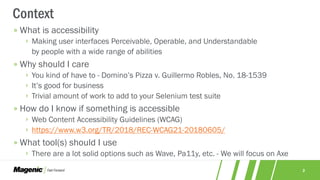
» What is accessibility
› Making user interfaces Perceivable, Operable, and Understandable
by people with a wide range of abilities
» Why should I care
› You kind of have to - Domino’s Pizza v. Guillermo Robles, No. 18-1539
› It’s good for business
› Trivial amount of work to add to your Selenium test suite
» How do I know if something is accessible
› Web Content Accessibility Guidelines (WCAG)
› https://www.w3.org/TR/2018/REC-WCAG21-20180605/
» What tool(s) should I use
› There are a lot solid options such as Wave, Pa11y, etc. - We will focus on Axe
Context
33
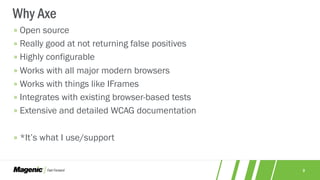
» Open source
» Really good at not returning false positives
» Highly configurable
» Works with all major modern browsers
» Works with things like IFrames
» Integrates with existing browser-based tests
» Extensive and detailed WCAG documentation
» *It’s what I use/support
Why Axe
44
» Basically just some JavaScript
*Axe-Core
» Runs in browser
› Chrome, Firefox, Safari, Edge and IE
» Crawls the entire DOM
› Including IFrames
» Compare web page elements to predefined rules
› Up to WCAG 2.1
» JSON result format
› *This is kind of why you want a library
What is Axe Exactly
55
» Try the browser extension first
› Web Accessibility Testing
› Accessibility Insights for Web
» Get to know the API
› https://www.deque.com/axe/axe-for-web/documentation/api-documentation/
» Find the extension that works for you
› Java, Ruby, Python, C#, JavaScript
› We will be using https://www.nuget.org/packages/Selenium.Axe/
How To Get Started
66
» Add an Axe library to your Selenium tests
› https://www.nuget.org/packages/Selenium.Axe/
› https://search.maven.org/artifact/com.deque.html.axe-core/selenium/4.0.0/jar
› https://www.npmjs.com/package/axe-webdriverjs
» Navigate to your page
» Create an AxeBuilder *Optional
» Set any options and/or rules *Optional
» Run the analyzer
› Uses Selenium to run the Axe-Core JS
› Axe-Core JS return results in a JSON format
» Report results
Adding Axe to Your Automation
77
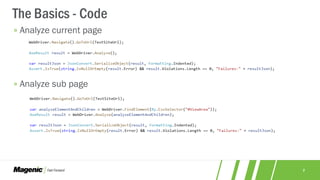
» Analyze current page
» Analyze sub page
The Basics - Code
88
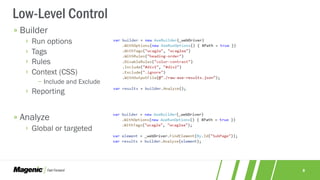
» Builder
› Run options
› Tags
› Rules
› Context (CSS)
− Include and Exclude
› Reporting
» Analyze
› Global or targeted
Low-Level Control
99
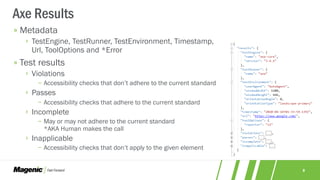
» Metadata
› TestEngine, TestRunner, TestEnvironment, Timestamp,
Url, ToolOptions and *Error
» Test results
› Violations
− Accessibility checks that don’t adhere to the current standard
› Passes
− Accessibility checks that adhere to the current standard
› Incomplete
− May or may not adhere to the current standard
*AKA Human makes the call
› Inapplicable
− Accessibility checks that don’t apply to the given element
Axe Results
1010
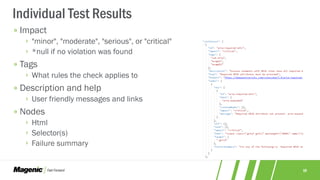
» Impact
› "minor", "moderate", "serious", or "critical"
› *null if no violation was found
» Tags
› What rules the check applies to
» Description and help
› User friendly messages and links
» Nodes
› Html
› Selector(s)
› Failure summary
Individual Test Results
1111
Demo/Hands-on
https://github.com/TroyWalshProf/AccessibilityDemo
1212
Questions
877.277.1044 / magenic.com // 13
THANK YOU
877.277.1044 / magenic.com // 13
THANK YOU

Using Axe to Add Accessibility Checks to Your Existing Selenium Tests

  • 1.
    Selenium With Axe UsingAxe to Add Accessibility Checks to Your Existing Selenium Tests Troy Walsh October 2020
  • 2.
    22 » What isaccessibility › Making user interfaces Perceivable, Operable, and Understandable by people with a wide range of abilities » Why should I care › You kind of have to - Domino’s Pizza v. Guillermo Robles, No. 18-1539 › It’s good for business › Trivial amount of work to add to your Selenium test suite » How do I know if something is accessible › Web Content Accessibility Guidelines (WCAG) › https://www.w3.org/TR/2018/REC-WCAG21-20180605/ » What tool(s) should I use › There are a lot solid options such as Wave, Pa11y, etc. - We will focus on Axe Context
  • 3.
    33 » Open source »Really good at not returning false positives » Highly configurable » Works with all major modern browsers » Works with things like IFrames » Integrates with existing browser-based tests » Extensive and detailed WCAG documentation » *It’s what I use/support Why Axe
  • 4.
    44 » Basically justsome JavaScript *Axe-Core » Runs in browser › Chrome, Firefox, Safari, Edge and IE » Crawls the entire DOM › Including IFrames » Compare web page elements to predefined rules › Up to WCAG 2.1 » JSON result format › *This is kind of why you want a library What is Axe Exactly
  • 5.
    55 » Try thebrowser extension first › Web Accessibility Testing › Accessibility Insights for Web » Get to know the API › https://www.deque.com/axe/axe-for-web/documentation/api-documentation/ » Find the extension that works for you › Java, Ruby, Python, C#, JavaScript › We will be using https://www.nuget.org/packages/Selenium.Axe/ How To Get Started
  • 6.
    66 » Add anAxe library to your Selenium tests › https://www.nuget.org/packages/Selenium.Axe/ › https://search.maven.org/artifact/com.deque.html.axe-core/selenium/4.0.0/jar › https://www.npmjs.com/package/axe-webdriverjs » Navigate to your page » Create an AxeBuilder *Optional » Set any options and/or rules *Optional » Run the analyzer › Uses Selenium to run the Axe-Core JS › Axe-Core JS return results in a JSON format » Report results Adding Axe to Your Automation
  • 7.
    77 » Analyze currentpage » Analyze sub page The Basics - Code
  • 8.
    88 » Builder › Runoptions › Tags › Rules › Context (CSS) − Include and Exclude › Reporting » Analyze › Global or targeted Low-Level Control
  • 9.
    99 » Metadata › TestEngine,TestRunner, TestEnvironment, Timestamp, Url, ToolOptions and *Error » Test results › Violations − Accessibility checks that don’t adhere to the current standard › Passes − Accessibility checks that adhere to the current standard › Incomplete − May or may not adhere to the current standard *AKA Human makes the call › Inapplicable − Accessibility checks that don’t apply to the given element Axe Results
  • 10.
    1010 » Impact › "minor","moderate", "serious", or "critical" › *null if no violation was found » Tags › What rules the check applies to » Description and help › User friendly messages and links » Nodes › Html › Selector(s) › Failure summary Individual Test Results
  • 11.
  • 12.
  • 13.
    877.277.1044 / magenic.com// 13 THANK YOU 877.277.1044 / magenic.com // 13 THANK YOU