User Story Splitting
by Example
How and Why to Split User Stories for a Team
Trish Lynch
John Tobin
Who Builds Stories?
● Product owner
● Also, everyone else on the team
● Whoever is involved in the story discussion!
User Story
Basics
What’s a User Story?
● Short simple description of a feature
● Always told from the perspective of user or customer
● A collaboration tool
● Are written throughout the life cycle of the product
● Contain Acceptance Criteria or “conditions of satisfaction”
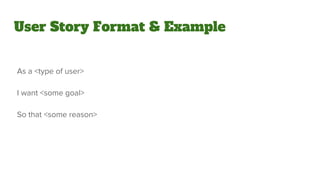
User Story Format & Example
As a <type of user>
I want <some goal>
So that <some reason>
User Story Format & Example
As a <type of user>
I want <some goal>
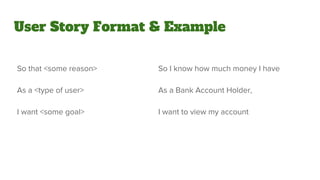
User Story Format & Example
So that <some reason>
As a <type of user>
I want <some goal>
So I know how much money I have
As a Bank Account Holder,
I want to view my account
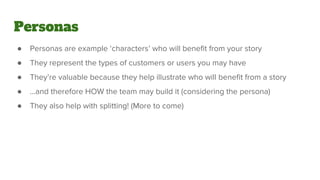
Personas
● Personas are example ‘characters’ who will benefit from your story
● They represent the types of customers or users you may have
● They’re valuable because they help illustrate who will benefit from a story
● ...and therefore HOW the team may build it (considering the persona)
● They also help with splitting! (More to come)
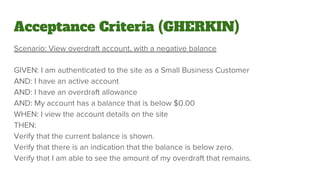
Acceptance Criteria (GHERKIN)
Scenario: View overdraft account, with a negative balance
GIVEN: I am authenticated to the site as a Small Business Customer
AND: I have an active account
AND: I have an overdraft allowance
AND: My account has a balance that is below $0.00
WHEN: I view the account details on the site
THEN:
Verify that the current balance is shown.
Verify that there is an indication that the balance is below zero.
Verify that I am able to see the amount of my overdraft that remains.
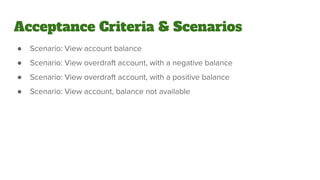
● Scenario: View account balance
● Scenario: View overdraft account, with a negative balance
● Scenario: View overdraft account, with a positive balance
● Scenario: View account, balance not available
Acceptance Criteria & Scenarios
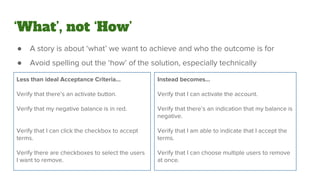
‘What’, not ‘How’
● A story is about ‘what’ we want to achieve and who the outcome is for
● Avoid spelling out the ‘how’ of the solution, especially technically
Less than ideal Acceptance Criteria...
Verify that there’s an activate button.
Verify that my negative balance is in red.
Verify that I can click the checkbox to accept
terms.
Verify there are checkboxes to select the users
I want to remove.

Instead becomes...
Verify that I can activate the account.
Verify that there’s an indication that my balance is
negative.
Verify that I am able to indicate that I accept the
terms.
Verify that I can choose multiple users to remove
at once.
INVEST
● Independant
● Negotiable
● Valuable
● Estimable
● Small
● Testable
Why Small?
Why Small?
“Fits in the sprint”
The Value of Small (or Why Small Is Beautiful)
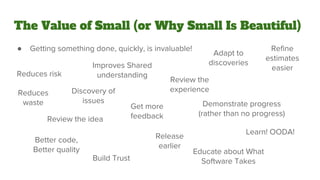
● Getting something done, quickly, is invaluable!
Reduces risk
Discovery of
issues
Review the idea
Review the
experience
Get more
feedback
Demonstrate progress
(rather than no progress)
Build Trust
Educate about What
Software Takes
Learn! OODA!
Better code,
Better quality
Refine
estimates
easier
Adapt to
discoveries
Reduces
waste
Release
earlier
Improves Shared
understanding
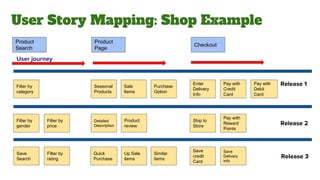
User Story Mapping: Shop Example
Product
Search
Save
credit
Card
Ship to
Store
Save
Delivery
info
Product
Page
Checkout
User journey
Release 1
Release 2
Release 3
Pay with
Reward
Points
Enter
Delivery
Info
Pay with
Debit
Card
Pay with
Credit
Card
Filter by
category
Save
Search
Filter by
rating
Filter by
gender
Filter by
price
Quick
Purchase
Seasonal
Products
Similar
items
Detailed
Description
Sale
Items
Purchase
Option
Up Sale
items
Product
review
Pay with
Debit
Card
Pay with
Reward
Points
How Do I Split?
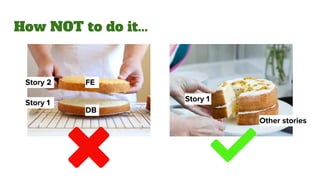
How NOT to do it...
Story 2
Story 1 Story 1
Other stories
DB
FE
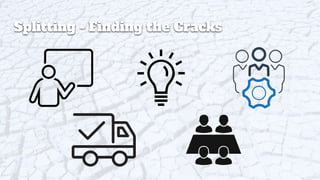
Splitting - Finding the Cracks
Splitting
Techniques
Workflow
Splitting by Workflow
So I can access my accounts online,
As a Business Banking Customer,
I want to be able to register on the self service web site.
● Scenario...
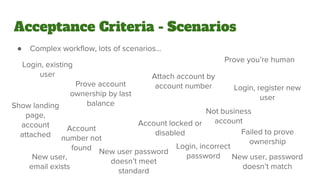
Acceptance Criteria - Scenarios
● Complex workflow, lots of scenarios...
Login, existing
user
Prove account
ownership by last
balance
Account
number not
found
Attach account by
account number
Account locked or
disabled
Login, register new
user
New user password
doesn’t meet
standard
Login, incorrect
password
Failed to prove
ownership
New user,
email exists
Prove you’re human
New user, password
doesn’t match
Show landing
page,
account
attached
Not business
account
Happy Path FTW, Unhappy In Steps
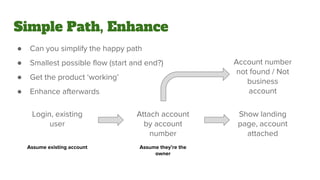
Simple Path, Enhance
● Can you simplify the happy path
● Smallest possible flow (start and end?)
● Get the product ‘working’
● Enhance afterwards
Attach account
by account
number
Login, existing
user
Show landing
page, account
attached
Assume existing account Assume they’re the
owner
Account number
not found / Not
business
account
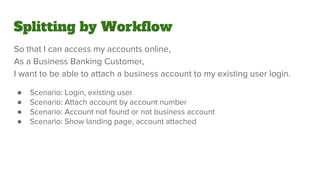
So that I can access my accounts online,
As a Business Banking Customer,
I want to be able to attach a business account to my existing user login.
● Scenario: Login, existing user
● Scenario: Attach account by account number
● Scenario: Account not found or not business account
● Scenario: Show landing page, account attached
Splitting by Workflow
Unhappy path only!
Business Rule
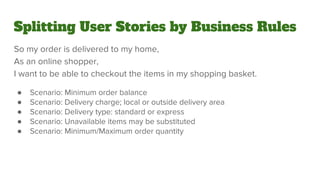
Splitting User Stories by Business Rules
So my order is delivered to my home,
As an online shopper,
I want to be able to checkout the items in my shopping basket.
● Scenario: Minimum order balance
● Scenario: Delivery charge; local or outside delivery area
● Scenario: Delivery type: standard or express
● Scenario: Unavailable items may be substituted
● Scenario: Minimum/Maximum order quantity
Rule Guidelines
● Listing the scenarios helps identify all the rules
● Prioritize most important rules first
● Defer complexity
● Learn about the basic rules before getting complicated
● Really common and important technique
Splitting User Stories by Business Rules
So my order is delivered to my home,
As an online shopper,
I want to be able to checkout the items in my shopping basket.
● Scenario: Minimum order balance
● Scenario: Delivery charge; local
● Scenario: Delivery type: standard
Operations
Splitting by Operations
So that I can add and remove viewing profiles for my family,
As a Netflix Account Owner,
I want to be able to manage the viewing profiles on my account.
● Scenario: See my list of viewing profiles
● Scenario: Add a viewing profile
● Scenario: Remove a viewing profile
● Scenario: Change the name of a viewing profile
Break up the CRUD
● Create
● Read
● Update
● Delete
- Make a profile
- Show a profile
- Change or edit a profile (name, picture)
- Remove a profile
Other Operational Thoughts
● Starting with ‘create’ (and read) allows other stories to follow
● Typically, ‘create’ (and read) are foundational capabilities of a product
● Maybe read without adding is possible
● Delete can sometimes take the place of change (delete and create new)
● Delete might allow for testability of the system
Splitting by Operations
So that I can add and remove viewing profiles for my family,
As a Netflix Account Owner,
I want to be able to manage the viewing profiles on my account.
● Scenario: See my list of viewing profiles
● Scenario: Add a viewing profile
● Scenario: Remove a viewing profile
● Scenario: Change the name of a viewing profile
Splitting by Operations
So that my family member can have a different list to me,
As a Netflix Account Owner,
I want to be able to add a viewing profile for my family member.
● Scenario: Add profile successfully
● Scenario: Error creating profile
● Scenario: Add with invalid profile name
Data
Splitting by Data
So I can decide what to order for dinner tonight,
As a Foodie,
I want to view menu item information.
● Scenario: view dish name and description
● Scenario: view dish ingredients
● Scenario: view dish nutritional information
● Scenario: view pictures of the dish
Reasons for Data Splitting
● Allows the team to determine what is essential now
● Prioritize and deliver other data later or not at all
● Data sources may trigger complex integrations
● Data may be messy or unavailable
● Data may need to be created by the team
● Data imports may require transformation, or to support a complex format
● External data dependencies can be complexities in the story
Splitting by Data
So I can decide what to order for dinner tonight,
As a Foodie,
I want to view menu item information.
● Scenario: view dish name and description
Performance
Splitting by Performance
So that I can backup my photos,
As a Photographer,
I want to upload my photos to my space on the backup site.
Performance can be a series of things:
● Volume: “only so many photos at once”
● Limits: “only so many photos in total”
● Response time: “they should be quick to upload”
● Scalability: “many users could do this at once”
● “Non-functional” requirements
Performance?
Defer Performance
● Learn by building something simple and basic that works
● Applies to lots of types of story
● Good split where the team has to do a lot of work to cope with ‘more’
● How will my solution perform? Find out!
● Learn about the feature, before optimization
● Don’t ‘sell’ to thousands before you’ve ‘sold’ to a few
● Defer this to later, knowing it might take a lot to ‘scale up’ (tech debt)
Splitting by Performance
So that I can backup my photos,
As a Photographer,
I want to upload my photos to my space on the backup site.
Splitting by Performance
So that I can backup my photos,
As a Photographer,
I want to upload 100 of my photos to my space on the backup site.
Interface
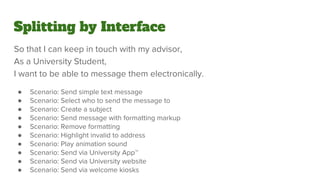
Splitting by Interface
So that I can keep in touch with my advisor,
As a University Student,
I want to be able to message them electronically.
● Scenario: Send simple text message
● Scenario: Select who to send the message to
● Scenario: Create a subject
● Scenario: Send message with formatting markup
● Scenario: Remove formatting
● Scenario: Highlight invalid to address
● Scenario: Play animation sound
● Scenario: Send via University App™
● Scenario: Send via University website
● Scenario: Send via welcome kiosks
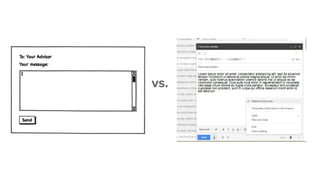
Simple vs Complex
● KISS: Keep It Simple, Stupid - Keep the Interface Simple Stupid
● Simple presentation: No animations
● Simple layout: All on one screen
● Simple controls: No filtered or interacting drop downs
● Simple controls: No hidden buttons
● Simple feedback: Error message only appear after submitting data
vs.
Split by Interface Type
Pick one first, do the others later:
● Mobile vs. web (vs. desktop app, kiosk?)
● Screen resolution or size - mobile first web
● iPhone vs. Android (vs. Windows Mobile, Blackberry, Bada, webOS?!)
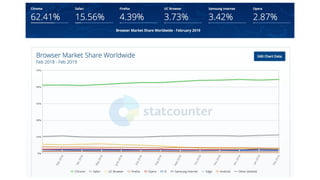
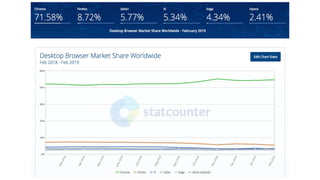
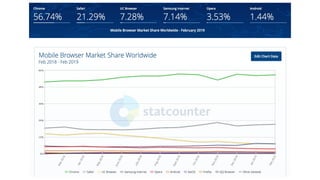
● Browser type: Chrome and Safari (vs. Firefox, Edge, Internet Explorer?!)
Splitting by Interface
So that I can keep in touch with my advisor,
As a University Student,
I want to be able to message them electronically.
● Scenario: Send simple text message
● Scenario: Select who to send the message to
● Scenario: Create a subject
● Scenario: Send message with formatting markup
● Scenario: Remove formatting
● Scenario: Highlight invalid to address
● Scenario: Play animation sound
● Scenario: Send via University App™
● Scenario: Send via University website
● Scenario: Send via welcome kiosks
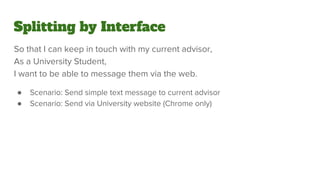
Splitting by Interface
So that I can keep in touch with my current advisor,
As a University Student,
I want to be able to message them via the web.
● Scenario: Send simple text message to current advisor
● Scenario: Send via University website (Chrome only)
What Else?
Other Splitting Ideas
● Simple / complex
● Split by persona (role)
● Defer external or complex integrations
● Split on language, usability, accessibility, or design
If All Else Fails
Link to Agileforall.com
http://agileforall.com/wp-content/uploads/2018/02/Story-Splitting-Flowchart.pdf
How to Split a User Story poster
Trish Lynch
https://www.linkedin.com/in/trishly/
John Tobin
https://www.linkedin.com/in/johntobin/
@johntobin

User Story Splitting

  • 1.
    User Story Splitting byExample How and Why to Split User Stories for a Team Trish Lynch John Tobin
  • 2.
    Who Builds Stories? ●Product owner ● Also, everyone else on the team ● Whoever is involved in the story discussion!
  • 3.
  • 4.
    What’s a UserStory? ● Short simple description of a feature ● Always told from the perspective of user or customer ● A collaboration tool ● Are written throughout the life cycle of the product ● Contain Acceptance Criteria or “conditions of satisfaction”
  • 5.
    User Story Format& Example As a <type of user> I want <some goal> So that <some reason>
  • 6.
    User Story Format& Example As a <type of user> I want <some goal>
  • 7.
    User Story Format& Example So that <some reason> As a <type of user> I want <some goal> So I know how much money I have As a Bank Account Holder, I want to view my account
  • 8.
    Personas ● Personas areexample ‘characters’ who will benefit from your story ● They represent the types of customers or users you may have ● They’re valuable because they help illustrate who will benefit from a story ● ...and therefore HOW the team may build it (considering the persona) ● They also help with splitting! (More to come)
  • 9.
    Acceptance Criteria (GHERKIN) Scenario:View overdraft account, with a negative balance GIVEN: I am authenticated to the site as a Small Business Customer AND: I have an active account AND: I have an overdraft allowance AND: My account has a balance that is below $0.00 WHEN: I view the account details on the site THEN: Verify that the current balance is shown. Verify that there is an indication that the balance is below zero. Verify that I am able to see the amount of my overdraft that remains.
  • 10.
    ● Scenario: Viewaccount balance ● Scenario: View overdraft account, with a negative balance ● Scenario: View overdraft account, with a positive balance ● Scenario: View account, balance not available Acceptance Criteria & Scenarios
  • 11.
    ‘What’, not ‘How’ ●A story is about ‘what’ we want to achieve and who the outcome is for ● Avoid spelling out the ‘how’ of the solution, especially technically Less than ideal Acceptance Criteria... Verify that there’s an activate button. Verify that my negative balance is in red. Verify that I can click the checkbox to accept terms. Verify there are checkboxes to select the users I want to remove. Instead becomes... Verify that I can activate the account. Verify that there’s an indication that my balance is negative. Verify that I am able to indicate that I accept the terms. Verify that I can choose multiple users to remove at once.
  • 12.
    INVEST ● Independant ● Negotiable ●Valuable ● Estimable ● Small ● Testable
  • 13.
  • 14.
    Why Small? “Fits inthe sprint”
  • 15.
    The Value ofSmall (or Why Small Is Beautiful) ● Getting something done, quickly, is invaluable! Reduces risk Discovery of issues Review the idea Review the experience Get more feedback Demonstrate progress (rather than no progress) Build Trust Educate about What Software Takes Learn! OODA! Better code, Better quality Refine estimates easier Adapt to discoveries Reduces waste Release earlier Improves Shared understanding
  • 16.
    User Story Mapping:Shop Example Product Search Save credit Card Ship to Store Save Delivery info Product Page Checkout User journey Release 1 Release 2 Release 3 Pay with Reward Points Enter Delivery Info Pay with Debit Card Pay with Credit Card Filter by category Save Search Filter by rating Filter by gender Filter by price Quick Purchase Seasonal Products Similar items Detailed Description Sale Items Purchase Option Up Sale items Product review Pay with Debit Card Pay with Reward Points
  • 17.
    How Do ISplit?
  • 18.
    How NOT todo it... Story 2 Story 1 Story 1 Other stories DB FE
  • 19.
  • 20.
  • 21.
  • 22.
  • 23.
    Splitting by Workflow SoI can access my accounts online, As a Business Banking Customer, I want to be able to register on the self service web site. ● Scenario...
  • 24.
    Acceptance Criteria -Scenarios ● Complex workflow, lots of scenarios... Login, existing user Prove account ownership by last balance Account number not found Attach account by account number Account locked or disabled Login, register new user New user password doesn’t meet standard Login, incorrect password Failed to prove ownership New user, email exists Prove you’re human New user, password doesn’t match Show landing page, account attached Not business account
  • 25.
    Happy Path FTW,Unhappy In Steps
  • 26.
    Simple Path, Enhance ●Can you simplify the happy path ● Smallest possible flow (start and end?) ● Get the product ‘working’ ● Enhance afterwards Attach account by account number Login, existing user Show landing page, account attached Assume existing account Assume they’re the owner Account number not found / Not business account
  • 27.
    So that Ican access my accounts online, As a Business Banking Customer, I want to be able to attach a business account to my existing user login. ● Scenario: Login, existing user ● Scenario: Attach account by account number ● Scenario: Account not found or not business account ● Scenario: Show landing page, account attached Splitting by Workflow
  • 28.
  • 29.
  • 30.
    Splitting User Storiesby Business Rules So my order is delivered to my home, As an online shopper, I want to be able to checkout the items in my shopping basket. ● Scenario: Minimum order balance ● Scenario: Delivery charge; local or outside delivery area ● Scenario: Delivery type: standard or express ● Scenario: Unavailable items may be substituted ● Scenario: Minimum/Maximum order quantity
  • 31.
    Rule Guidelines ● Listingthe scenarios helps identify all the rules ● Prioritize most important rules first ● Defer complexity ● Learn about the basic rules before getting complicated ● Really common and important technique
  • 32.
    Splitting User Storiesby Business Rules So my order is delivered to my home, As an online shopper, I want to be able to checkout the items in my shopping basket. ● Scenario: Minimum order balance ● Scenario: Delivery charge; local ● Scenario: Delivery type: standard
  • 33.
  • 34.
    Splitting by Operations Sothat I can add and remove viewing profiles for my family, As a Netflix Account Owner, I want to be able to manage the viewing profiles on my account. ● Scenario: See my list of viewing profiles ● Scenario: Add a viewing profile ● Scenario: Remove a viewing profile ● Scenario: Change the name of a viewing profile
  • 35.
    Break up theCRUD ● Create ● Read ● Update ● Delete - Make a profile - Show a profile - Change or edit a profile (name, picture) - Remove a profile
  • 36.
    Other Operational Thoughts ●Starting with ‘create’ (and read) allows other stories to follow ● Typically, ‘create’ (and read) are foundational capabilities of a product ● Maybe read without adding is possible ● Delete can sometimes take the place of change (delete and create new) ● Delete might allow for testability of the system
  • 37.
    Splitting by Operations Sothat I can add and remove viewing profiles for my family, As a Netflix Account Owner, I want to be able to manage the viewing profiles on my account. ● Scenario: See my list of viewing profiles ● Scenario: Add a viewing profile ● Scenario: Remove a viewing profile ● Scenario: Change the name of a viewing profile
  • 38.
    Splitting by Operations Sothat my family member can have a different list to me, As a Netflix Account Owner, I want to be able to add a viewing profile for my family member. ● Scenario: Add profile successfully ● Scenario: Error creating profile ● Scenario: Add with invalid profile name
  • 39.
  • 40.
    Splitting by Data SoI can decide what to order for dinner tonight, As a Foodie, I want to view menu item information. ● Scenario: view dish name and description ● Scenario: view dish ingredients ● Scenario: view dish nutritional information ● Scenario: view pictures of the dish
  • 41.
    Reasons for DataSplitting ● Allows the team to determine what is essential now ● Prioritize and deliver other data later or not at all ● Data sources may trigger complex integrations ● Data may be messy or unavailable ● Data may need to be created by the team ● Data imports may require transformation, or to support a complex format ● External data dependencies can be complexities in the story
  • 42.
    Splitting by Data SoI can decide what to order for dinner tonight, As a Foodie, I want to view menu item information. ● Scenario: view dish name and description
  • 43.
  • 44.
    Splitting by Performance Sothat I can backup my photos, As a Photographer, I want to upload my photos to my space on the backup site.
  • 45.
    Performance can bea series of things: ● Volume: “only so many photos at once” ● Limits: “only so many photos in total” ● Response time: “they should be quick to upload” ● Scalability: “many users could do this at once” ● “Non-functional” requirements Performance?
  • 46.
    Defer Performance ● Learnby building something simple and basic that works ● Applies to lots of types of story ● Good split where the team has to do a lot of work to cope with ‘more’ ● How will my solution perform? Find out! ● Learn about the feature, before optimization ● Don’t ‘sell’ to thousands before you’ve ‘sold’ to a few ● Defer this to later, knowing it might take a lot to ‘scale up’ (tech debt)
  • 47.
    Splitting by Performance Sothat I can backup my photos, As a Photographer, I want to upload my photos to my space on the backup site.
  • 48.
    Splitting by Performance Sothat I can backup my photos, As a Photographer, I want to upload 100 of my photos to my space on the backup site.
  • 49.
  • 50.
    Splitting by Interface Sothat I can keep in touch with my advisor, As a University Student, I want to be able to message them electronically. ● Scenario: Send simple text message ● Scenario: Select who to send the message to ● Scenario: Create a subject ● Scenario: Send message with formatting markup ● Scenario: Remove formatting ● Scenario: Highlight invalid to address ● Scenario: Play animation sound ● Scenario: Send via University App™ ● Scenario: Send via University website ● Scenario: Send via welcome kiosks
  • 51.
    Simple vs Complex ●KISS: Keep It Simple, Stupid - Keep the Interface Simple Stupid ● Simple presentation: No animations ● Simple layout: All on one screen ● Simple controls: No filtered or interacting drop downs ● Simple controls: No hidden buttons ● Simple feedback: Error message only appear after submitting data
  • 52.
  • 53.
    Split by InterfaceType Pick one first, do the others later: ● Mobile vs. web (vs. desktop app, kiosk?) ● Screen resolution or size - mobile first web ● iPhone vs. Android (vs. Windows Mobile, Blackberry, Bada, webOS?!) ● Browser type: Chrome and Safari (vs. Firefox, Edge, Internet Explorer?!)
  • 57.
    Splitting by Interface Sothat I can keep in touch with my advisor, As a University Student, I want to be able to message them electronically. ● Scenario: Send simple text message ● Scenario: Select who to send the message to ● Scenario: Create a subject ● Scenario: Send message with formatting markup ● Scenario: Remove formatting ● Scenario: Highlight invalid to address ● Scenario: Play animation sound ● Scenario: Send via University App™ ● Scenario: Send via University website ● Scenario: Send via welcome kiosks
  • 58.
    Splitting by Interface Sothat I can keep in touch with my current advisor, As a University Student, I want to be able to message them via the web. ● Scenario: Send simple text message to current advisor ● Scenario: Send via University website (Chrome only)
  • 59.
  • 60.
    Other Splitting Ideas ●Simple / complex ● Split by persona (role) ● Defer external or complex integrations ● Split on language, usability, accessibility, or design
  • 61.
  • 62.
  • 63.