USER AND SYSTEM
PROGRAMS
PRESENTED BY: SOHAIL AFRIDI
USER PROGRAMS
• User programs perform a particular function directly for the
users.
• Some of the common application programs include Email, web
browsers, gaming software, word processors, graphics
software, media player etc.
• All of these programs provide an application to the end users,
so they are known as application programs.
• For example: a web browser is used to find information while a
gaming software is used to play games.
USER PROGRAM TYPES
Command-line Interface (CLI)
Batch Interface
Graphics User Interface (GUI)
COMMAND LINE INTERFACE (CLI)
• Command line interface is user program in which user uses
text commands and a method for entering them (say, a
keyboard for typing in commands in a specific format with
specific options).
• Example: The MS-DOS operating system and
the command shell in the Windows operating system
are examples of command line interfaces
BATCH INTERFACE
• Batch interfaces are non-interactive user interfaces, where the
user specifies all the details of the batch job in advance
to batch processing, and receives the output when all the
processing is done.
• The computer does not prompt for further input after the
processing has started.
GRAPHICS USER INTERFACE (GUI)
• The interface is a window system with a pointing device to
direct I/O,
choose from menus, and make selections and a keyboard to
enter text.
• Example: Web Browsers, Word Processors, Spreadsheets,
Database Systems and Games.
SYSTEM PROGRAMS
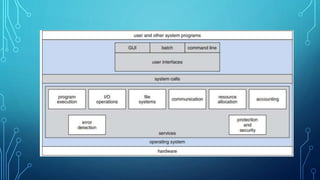
• System programs provide an environment where programs can
be developed and executed.
• In the simplest sense, system programs also provide a bridge
between the user interface and system calls.
• Example: Operating System, Networking System, Web Site
Server and Data Backup Server.
CATEGORIES OF SYSTEM PROGRAM
• File Management
• Status Information
• File Modification
• Programming-language Support
• Program Loading and Execution
• Communication
• Background Services.
FILE MANAGEMENT.
• These programs create, delete, copy, rename, print,
dump, list, and generally manipulate files and directories.
STATUS INFORMATION
• Some programs simply ask the system for the date, time,
amount of available memory or disk space, number of users, or
similar status information.
• Providing detailed performance, logging, and debugging
information.
• These programs format and print the output to the terminal or
other output devices or files or display it in a window of the
GUI.
FILE MODIFICATION.
• Several text editors may be available to create and
modify the content of files stored on disk or other storage
devices.
PROGRAMMING-LANGUAGE SUPPORT
• Compilers, assemblers, debuggers, and
interpreters for common programming languages (such as C,
C++, Java,
and PERL) are often provided with the operating system or
available as a
separate download.
PROGRAM LOADING AND EXECUTION
• Once a program is assembled or compiled, it must be loaded
into memory to be executed. The system may provide absolute
loaders, relocatable loaders, linkage editors, and overlay
loaders.
• Debugging systems for either higher-level languages or
machine language are needed as well.
COMMUNICATIONS
• These programs provide the mechanism for creating
virtual connections among processes, users, and computer
systems.
• They allow users to send messages to one another’s screens, to
browse Web
pages, to send e-mail messages, to log in remotely, or to
transfer files from
one machine to another.
BACKGROUND SERVICES.
• All general-purpose systems have methods for launching
certain system-program processes at boot time.
• Other examples include process schedulers that start processes
according to a specified schedule, system error monitoring
services, and print servers.
THANKS

User and system programs

  • 1.
  • 2.
    USER PROGRAMS • Userprograms perform a particular function directly for the users. • Some of the common application programs include Email, web browsers, gaming software, word processors, graphics software, media player etc. • All of these programs provide an application to the end users, so they are known as application programs. • For example: a web browser is used to find information while a gaming software is used to play games.
  • 4.
    USER PROGRAM TYPES Command-lineInterface (CLI) Batch Interface Graphics User Interface (GUI)
  • 5.
    COMMAND LINE INTERFACE(CLI) • Command line interface is user program in which user uses text commands and a method for entering them (say, a keyboard for typing in commands in a specific format with specific options). • Example: The MS-DOS operating system and the command shell in the Windows operating system are examples of command line interfaces
  • 6.
    BATCH INTERFACE • Batchinterfaces are non-interactive user interfaces, where the user specifies all the details of the batch job in advance to batch processing, and receives the output when all the processing is done. • The computer does not prompt for further input after the processing has started.
  • 7.
    GRAPHICS USER INTERFACE(GUI) • The interface is a window system with a pointing device to direct I/O, choose from menus, and make selections and a keyboard to enter text. • Example: Web Browsers, Word Processors, Spreadsheets, Database Systems and Games.
  • 8.
    SYSTEM PROGRAMS • Systemprograms provide an environment where programs can be developed and executed. • In the simplest sense, system programs also provide a bridge between the user interface and system calls. • Example: Operating System, Networking System, Web Site Server and Data Backup Server.
  • 9.
    CATEGORIES OF SYSTEMPROGRAM • File Management • Status Information • File Modification • Programming-language Support • Program Loading and Execution • Communication • Background Services.
  • 10.
    FILE MANAGEMENT. • Theseprograms create, delete, copy, rename, print, dump, list, and generally manipulate files and directories.
  • 11.
    STATUS INFORMATION • Someprograms simply ask the system for the date, time, amount of available memory or disk space, number of users, or similar status information. • Providing detailed performance, logging, and debugging information. • These programs format and print the output to the terminal or other output devices or files or display it in a window of the GUI.
  • 12.
    FILE MODIFICATION. • Severaltext editors may be available to create and modify the content of files stored on disk or other storage devices.
  • 13.
    PROGRAMMING-LANGUAGE SUPPORT • Compilers,assemblers, debuggers, and interpreters for common programming languages (such as C, C++, Java, and PERL) are often provided with the operating system or available as a separate download.
  • 14.
    PROGRAM LOADING ANDEXECUTION • Once a program is assembled or compiled, it must be loaded into memory to be executed. The system may provide absolute loaders, relocatable loaders, linkage editors, and overlay loaders. • Debugging systems for either higher-level languages or machine language are needed as well.
  • 15.
    COMMUNICATIONS • These programsprovide the mechanism for creating virtual connections among processes, users, and computer systems. • They allow users to send messages to one another’s screens, to browse Web pages, to send e-mail messages, to log in remotely, or to transfer files from one machine to another.
  • 16.
    BACKGROUND SERVICES. • Allgeneral-purpose systems have methods for launching certain system-program processes at boot time. • Other examples include process schedulers that start processes according to a specified schedule, system error monitoring services, and print servers.
  • 17.