System Calls
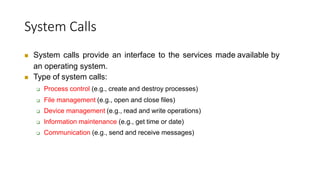
 System calls provide an interface to the services made available by
an operating system.
 Type of system calls:
 Process control (e.g., create and destroy processes)
 File management (e.g., open and close files)
 Device management (e.g., read and write operations)
 lnformation maintenance (e.g., get time or date)
 Communication (e.g., send and receive messages)
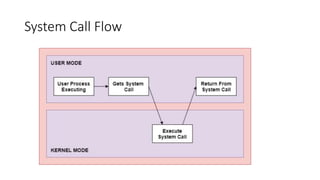
System Call Flow
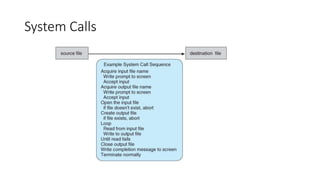
System Calls
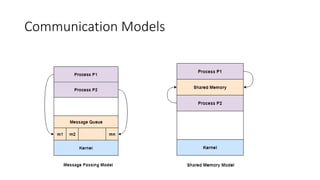
Communication Models
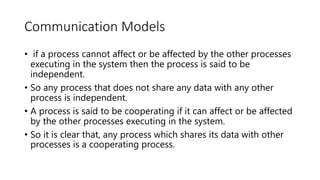
• if a process cannot affect or be affected by the other processes
executing in the system then the process is said to be
independent.
• So any process that does not share any data with any other
process is independent.
• A process is said to be cooperating if it can affect or be affected
by the other processes executing in the system.
• So it is clear that, any process which shares its data with other
processes is a cooperating process.
• Cooperating processes need an inter-process communication
(IPC) mechanism that will allow them to exchange data and
information.
• Two basic models of inter-process communication are there:
shared memory and message passing.
• A region of memory that is shared by cooperating processes is
established, in shared-memory model.
• Processes can then exchange their information by reading and
writing data to the shared region.
• In message-passing model, communication takes place by
means of messages exchanged between the cooperating
processes.
Communication Models
System Programs in Operating
System
• System Programming can be defined as the act of building
Systems Software using System Programming Languages.
• System Programs can be divided into these categories :
• File Management
• Status Information
• File Modification
• Programming-Language support
• Program Loading and Execution
• Communications
• File Management –
• A file is a collection of specific information stored in the memory
of a computer system.
• File management is defined as the process of manipulating
files in the computer system, its management includes the
process of creating, modifying and deleting files.
• Status Information –
Information like date, time amount of available memory, or disk
space is asked by some users.
• Others providing detailed performance, logging, and debugging
information which is more complex.
• All this information is formatted and displayed on output devices
or printed.
• Terminal or other output devices or files or a window of GUI is
used for showing the output of programs.
• File Modification –
For modifying the contents of files we use this.
• For Files stored on disks or other storage devices, we used
different types of editors.
• For searching contents of files or perform transformations of
files we use special commands.
• Programming-Language support –
For common programming languages, we use Compilers,
Assemblers, Debuggers, and interpreters which are already
provided to users.
• It provides all support to users. We can run any programming
language.
• Program Loading and Execution –
When the program is ready after Assembling and compilation, it must
be loaded into memory for execution.
• A loader is part of an operating system that is responsible for loading
programs and libraries. It is one of the essential stages for starting a
program.
• Communications –
Virtual connections among processes, users, and computer systems
are provided by programs.
• Users can send messages to another user on their screen, User can
send e-mail, browsing on web pages, remote login, the
transformation of files from one user to another.
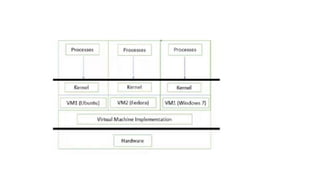
Virtual Machines
• A virtual machine is an execution of computer system within our
physical personal computer.
• A virtual machine allows users to install and run multiple operating
systems in a single PC thereby making an illusion that each separate
execution environment is running its own private computer.
• Here resources of computer system are shared to each OS running by
virtual machine.
Advantages
• Virtual machines provide higher degree of protection to various
resources of the system because if any of the OS corrupted or
malfunctioned leads to affect only that relevant virtual machine
• Other users of virtual machine can continue their routine operations
without being disturbed.
• Various OS can be run concurrently to serve the different needs of
various users
• Multiple OS environment can exists simultaneously on the same
machine isolated from each other
• Easy maintenance, availability and convenient recovery.
THANKYOU

System calls in OS.pptx

  • 2.
    System Calls  Systemcalls provide an interface to the services made available by an operating system.  Type of system calls:  Process control (e.g., create and destroy processes)  File management (e.g., open and close files)  Device management (e.g., read and write operations)  lnformation maintenance (e.g., get time or date)  Communication (e.g., send and receive messages)
  • 3.
  • 4.
  • 5.
    Communication Models • ifa process cannot affect or be affected by the other processes executing in the system then the process is said to be independent. • So any process that does not share any data with any other process is independent. • A process is said to be cooperating if it can affect or be affected by the other processes executing in the system. • So it is clear that, any process which shares its data with other processes is a cooperating process.
  • 6.
    • Cooperating processesneed an inter-process communication (IPC) mechanism that will allow them to exchange data and information. • Two basic models of inter-process communication are there: shared memory and message passing.
  • 7.
    • A regionof memory that is shared by cooperating processes is established, in shared-memory model. • Processes can then exchange their information by reading and writing data to the shared region. • In message-passing model, communication takes place by means of messages exchanged between the cooperating processes.
  • 8.
  • 9.
    System Programs inOperating System • System Programming can be defined as the act of building Systems Software using System Programming Languages. • System Programs can be divided into these categories : • File Management • Status Information • File Modification • Programming-Language support • Program Loading and Execution • Communications
  • 10.
    • File Management– • A file is a collection of specific information stored in the memory of a computer system. • File management is defined as the process of manipulating files in the computer system, its management includes the process of creating, modifying and deleting files.
  • 11.
    • Status Information– Information like date, time amount of available memory, or disk space is asked by some users. • Others providing detailed performance, logging, and debugging information which is more complex. • All this information is formatted and displayed on output devices or printed. • Terminal or other output devices or files or a window of GUI is used for showing the output of programs.
  • 12.
    • File Modification– For modifying the contents of files we use this. • For Files stored on disks or other storage devices, we used different types of editors. • For searching contents of files or perform transformations of files we use special commands.
  • 13.
    • Programming-Language support– For common programming languages, we use Compilers, Assemblers, Debuggers, and interpreters which are already provided to users. • It provides all support to users. We can run any programming language.
  • 14.
    • Program Loadingand Execution – When the program is ready after Assembling and compilation, it must be loaded into memory for execution. • A loader is part of an operating system that is responsible for loading programs and libraries. It is one of the essential stages for starting a program. • Communications – Virtual connections among processes, users, and computer systems are provided by programs. • Users can send messages to another user on their screen, User can send e-mail, browsing on web pages, remote login, the transformation of files from one user to another.
  • 15.
    Virtual Machines • Avirtual machine is an execution of computer system within our physical personal computer. • A virtual machine allows users to install and run multiple operating systems in a single PC thereby making an illusion that each separate execution environment is running its own private computer. • Here resources of computer system are shared to each OS running by virtual machine.
  • 17.
    Advantages • Virtual machinesprovide higher degree of protection to various resources of the system because if any of the OS corrupted or malfunctioned leads to affect only that relevant virtual machine • Other users of virtual machine can continue their routine operations without being disturbed. • Various OS can be run concurrently to serve the different needs of various users • Multiple OS environment can exists simultaneously on the same machine isolated from each other • Easy maintenance, availability and convenient recovery.
  • 18.