Consistency, Clarity & Control:
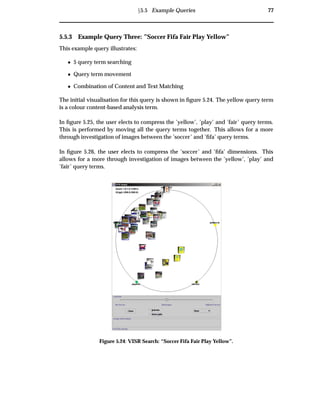
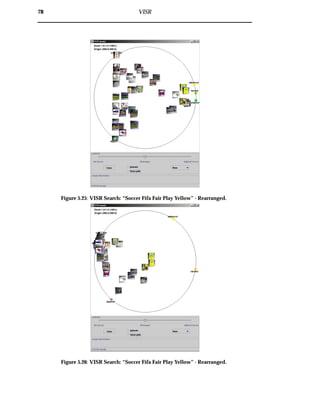
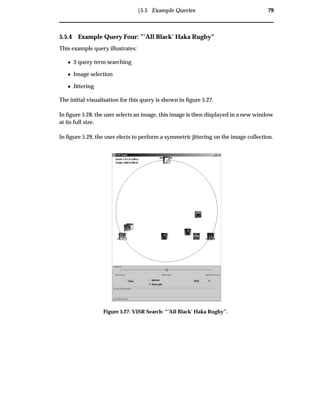
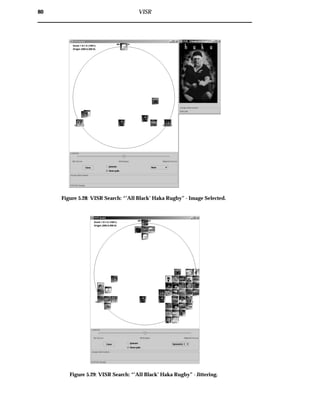
Development of a new approach to
WWW image retrieval
Trystan Upstill
A subthesis submitted in partial fulfillment of the degree of
Bachelor of Information Technology (Honours) at
The Department of Computer Science
Australian National University
November 2000
c­ Trystan Upstill
Typeset in Palatino by TEX and LATEX 2 .
Except where otherwise indicated, this thesis is my own original work.
Trystan Upstill
24 November 2000
Acknowledgements
I would like to thank the ANU for providing financial support for my honours year
through the Paul Thistlewaite memorial scholarship. Paul was an inspiring lecturer
and I am privileged to have received a scholarship in his honour.
Thanks to my supervisors, Raj Nagappan, Nick Craswell and Chris Johnson, for the
continual flow of great ideas and support throughout the year.
Thankyou AltaVista, for not banning my IP address, following my constant and un-
relenting barrage on your image search engine.
Thanks to the honours gang, Vij, Nige, Matt, Derek, Mick, Tom, Mel, Pete & Jason,1
for a fun and eventful time during a long and taxing year. I wish you all the best for
the future and hope to keep in touch.
Thanks to all those from 5263, Bodhi, Nick, Andy, Andy, Ben, Jake, Josh, Josh & Jonno,
for making my life marginally less 5263.
Thanks to my other fellow compatriots, Carla, Jenny, Fiona, Tam & Nils for constantly
reminding me what a geek I am, and reminding me that some members of the human
race are female.
Thanks to my family, Mum, Dad and Detts, who somehow managed to put up with
me all year. Your support during my education has been immeasurable and my
achievements owe a lot to you.
And finally, last but not least, thankyou Beth. Your tremendous support and under-
standing has allowed me to maintain a degree of sanity throughout the year — now
lets go to the beach.
1
Honourary Member
v
Abstract
The number of digital images is expanding rapidly and the World-Wide Web (WWW)
has become the predominant medium for their transferral. Consequently, there ex-
ists a requirement for effective WWW image retrieval. While several systems exist,
they lack the facility for expressive queries and provide an uninformative and non-
interactive grid interface.
This thesis surveys image retrieval techniques and identifies three problem areas in
current systems: consistency, clarity and control. A novel WWW image retrieval ap-
proach is presented which addresses these problems. This approach incorporates
client-side image analysis, visualisation of results and an interactive interface. The
implementation of this approach, the VISR or Visualisation of Image Search Results tool
is then discussed and evaluated using new effectiveness measures.
VISR offers several improvements over current systems. Consistency is aided through
consistent image analysis and result visualisation. Clarity is improved through a vi-
sualisation, which makes it clear why images were returned and how they matched
the query. Control is improved by allowing users to specify expressive queries and
enhancing system interaction.
The new effectiveness measures include a measure of visualisation precision and vi-
sualisation entropy. The visualisation precision measure illustrates how VISR clusters
images more effectively than a thumbnail grid. The visualisation entropy measure
demonstrates the stability of VISR over changing data sets. In addition to these mea-
sures, a small user study is performed. It shows that the spring-based visualisation
metaphor, upon which VISR’s display is based, can generally be easily understood.
vii
viii
Contents
Acknowledgements v
Abstract vii
1 Introduction 1
1.1 Motivation . . . . . . . . . . . . . . . . . . . . . . . . . . . . . . . . . . . . 1
1.2 Approach . . . . . . . . . . . . . . . . . . . . . . . . . . . . . . . . . . . . . 3
1.3 Contribution . . . . . . . . . . . . . . . . . . . . . . . . . . . . . . . . . . . 3
1.4 Organisation . . . . . . . . . . . . . . . . . . . . . . . . . . . . . . . . . . . 3
2 Domain 5
2.1 Overview . . . . . . . . . . . . . . . . . . . . . . . . . . . . . . . . . . . . . 5
2.2 Glossary of Terms . . . . . . . . . . . . . . . . . . . . . . . . . . . . . . . . 5
2.3 Information Retrieval . . . . . . . . . . . . . . . . . . . . . . . . . . . . . . 6
2.4 Information Need . . . . . . . . . . . . . . . . . . . . . . . . . . . . . . . . 8
2.5 Query Creation . . . . . . . . . . . . . . . . . . . . . . . . . . . . . . . . . 9
2.6 Query Processing . . . . . . . . . . . . . . . . . . . . . . . . . . . . . . . . 10
2.7 Document Analysis and Retrieval . . . . . . . . . . . . . . . . . . . . . . . 11
2.7.1 Ranking . . . . . . . . . . . . . . . . . . . . . . . . . . . . . . . . . 11
2.8 Result Visualisation . . . . . . . . . . . . . . . . . . . . . . . . . . . . . . . 15
2.8.1 Linear Lists and Thumbnail Grids . . . . . . . . . . . . . . . . . . 15
2.8.1.1 Image Representation . . . . . . . . . . . . . . . . . . . . 19
2.8.2 Information Visualisations . . . . . . . . . . . . . . . . . . . . . . . 19
2.8.2.1 Example Information Visualisation Systems . . . . . . . 21
2.9 Relevance Judgements . . . . . . . . . . . . . . . . . . . . . . . . . . . . . 22
2.9.1 Information Foraging . . . . . . . . . . . . . . . . . . . . . . . . . 23
2.10 Chapter Summary . . . . . . . . . . . . . . . . . . . . . . . . . . . . . . . . 24
3 Survey of Image Retrieval Techniques 25
3.1 Overview . . . . . . . . . . . . . . . . . . . . . . . . . . . . . . . . . . . . . 25
3.2 WWW Image Retrieval . . . . . . . . . . . . . . . . . . . . . . . . . . . . . 25
3.2.1 WWW Image Retrieval Problems . . . . . . . . . . . . . . . . . . . 26
3.2.2 Differences between WWW Image Retrieval and Traditional Im-
age Retrieval . . . . . . . . . . . . . . . . . . . . . . . . . . . . . . 28
3.3 Lessons to Learn: Previous Approaches to Image Retrieval . . . . . . . . 28
3.3.1 Phase 1: Early Image Retrieval . . . . . . . . . . . . . . . . . . . . 28
3.3.2 Phase 2: Expressive Query Languages . . . . . . . . . . . . . . . . 30
ix
x Contents
3.3.2.1 Content-Based Image Retrieval Systems . . . . . . . . . 32
3.3.2.2 Phase 2 Summary . . . . . . . . . . . . . . . . . . . . . . 34
3.3.3 Phase 3: Scalability through the Combination of Techniques . . . 35
3.3.3.1 Text and Content-Based Image Retrieval Systems . . . . 37
3.3.3.2 Phase 3 Summary . . . . . . . . . . . . . . . . . . . . . . 37
3.3.4 Phase 4: Clarity through User Understanding and Interaction . . 38
3.3.4.1 Image Retrieval Information Visualisation Systems . . . 38
3.3.4.2 Phase 4 Summary . . . . . . . . . . . . . . . . . . . . . . 39
3.3.5 Other Approaches to WWW Image Retrieval . . . . . . . . . . . . 40
3.4 Summary . . . . . . . . . . . . . . . . . . . . . . . . . . . . . . . . . . . . . 40
4 Improving the WWW Image Searching Process 43
4.1 Overview . . . . . . . . . . . . . . . . . . . . . . . . . . . . . . . . . . . . . 43
4.2 Flexible Image Retrieval and Analysis Module . . . . . . . . . . . . . . . 46
4.3 Transparent Cluster Visualisation Module . . . . . . . . . . . . . . . . . . 46
4.4 Dynamic Query Modification Module . . . . . . . . . . . . . . . . . . . . 46
4.5 Proposed Solutions to Consistency, Clarity and Control . . . . . . . . . . 47
4.5.1 Consistency . . . . . . . . . . . . . . . . . . . . . . . . . . . . . . . 47
4.5.2 Clarity . . . . . . . . . . . . . . . . . . . . . . . . . . . . . . . . . . 47
4.5.3 Control: Inexpressive Query Language . . . . . . . . . . . . . . . 48
4.5.4 Control: Coarse Grained Interaction . . . . . . . . . . . . . . . . . 48
4.6 Summary . . . . . . . . . . . . . . . . . . . . . . . . . . . . . . . . . . . . . 49
5 VISR 51
5.1 Overview . . . . . . . . . . . . . . . . . . . . . . . . . . . . . . . . . . . . . 51
5.2 Flexible Image Retrieval and Analysis Module . . . . . . . . . . . . . . . 55
5.2.1 Retrieval Plugin Manager . . . . . . . . . . . . . . . . . . . . . . . 55
5.2.1.1 Retrieval Plugin Stack . . . . . . . . . . . . . . . . . . . . 55
5.2.2 Analysis Plugin Manager . . . . . . . . . . . . . . . . . . . . . . . 55
5.2.2.1 Analysis Plugin Stack . . . . . . . . . . . . . . . . . . . . 55
5.2.3 Web Document Retriever . . . . . . . . . . . . . . . . . . . . . . . 59
5.2.4 Adjustment Translator . . . . . . . . . . . . . . . . . . . . . . . . . 59
5.3 Transparent Cluster Visualisation Module . . . . . . . . . . . . . . . . . . 60
5.3.1 Spring-based Image Position Calculator . . . . . . . . . . . . . . . 60
5.3.1.1 Vector Sum vs. Spring Metaphor . . . . . . . . . . . . . 60
5.3.2 Image Location Conflict Resolver . . . . . . . . . . . . . . . . . . . 63
5.3.2.1 Jittering . . . . . . . . . . . . . . . . . . . . . . . . . . . . 64
5.3.2.2 Animation . . . . . . . . . . . . . . . . . . . . . . . . . . 65
5.3.3 Display Generator . . . . . . . . . . . . . . . . . . . . . . . . . . . 65
5.4 Dynamic Query Modification Module . . . . . . . . . . . . . . . . . . . . 66
5.4.1 Process Query Term Addition . . . . . . . . . . . . . . . . . . . . . 66
5.4.2 Process Analysis Modifications . . . . . . . . . . . . . . . . . . . . 66
5.4.3 Process Filter Modifications . . . . . . . . . . . . . . . . . . . . . . 69
5.4.4 Process Query Term Location Modification . . . . . . . . . . . . . 69
Contents xi
5.4.5 Process Zoom Modification . . . . . . . . . . . . . . . . . . . . . . 69
5.5 Example Queries . . . . . . . . . . . . . . . . . . . . . . . . . . . . . . . . 72
5.5.1 Example Query One: ”Eiffel ’Object Oriented’ Book” . . . . . . . 72
5.5.2 Example Query Two: ”Clown Circus Tent” . . . . . . . . . . . . . 75
5.5.3 Example Query Three: ”Soccer Fifa Fair Play Yellow” . . . . . . . 77
5.5.4 Example Query Four: ”’All Black’ Haka Rugby” . . . . . . . . . . 79
5.6 Summary . . . . . . . . . . . . . . . . . . . . . . . . . . . . . . . . . . . . . 81
6 Experiments & Results 83
6.1 Overview . . . . . . . . . . . . . . . . . . . . . . . . . . . . . . . . . . . . . 83
6.2 Evaluation Framework . . . . . . . . . . . . . . . . . . . . . . . . . . . . . 83
6.2.1 Visualisation Entropy . . . . . . . . . . . . . . . . . . . . . . . . . 83
6.2.2 Visualisation Precision . . . . . . . . . . . . . . . . . . . . . . . . . 84
6.2.3 User Study Framework . . . . . . . . . . . . . . . . . . . . . . . . 87
6.3 VISR Experiments and Results . . . . . . . . . . . . . . . . . . . . . . . . 87
6.3.1 Visualisation Entropy Experiment . . . . . . . . . . . . . . . . . . 87
6.3.2 Visualisation Precision Experiments . . . . . . . . . . . . . . . . . 90
6.3.2.1 Most Relevant Cluster Evaluation . . . . . . . . . . . . . 90
6.3.2.2 Multiple Cluster Evaluation . . . . . . . . . . . . . . . . 92
6.3.3 Visualisation User Study . . . . . . . . . . . . . . . . . . . . . . . . 97
6.3.4 Combined Evidence Image Retrieval Experiments . . . . . . . . . 97
6.4 Summary . . . . . . . . . . . . . . . . . . . . . . . . . . . . . . . . . . . . . 98
7 Discussion 101
7.1 Consistency . . . . . . . . . . . . . . . . . . . . . . . . . . . . . . . . . . . 101
7.2 Clarity . . . . . . . . . . . . . . . . . . . . . . . . . . . . . . . . . . . . . . 102
7.3 Control . . . . . . . . . . . . . . . . . . . . . . . . . . . . . . . . . . . . . . 103
7.3.1 Inexpressive Query Language . . . . . . . . . . . . . . . . . . . . 103
7.3.2 Coarse Grained Interaction . . . . . . . . . . . . . . . . . . . . . . 103
8 Conclusion 105
8.1 Contributions . . . . . . . . . . . . . . . . . . . . . . . . . . . . . . . . . . 105
8.2 Further Work . . . . . . . . . . . . . . . . . . . . . . . . . . . . . . . . . . 106
8.2.1 Further Evaluations . . . . . . . . . . . . . . . . . . . . . . . . . . 107
A Example Information Visualisation Systems 109
A.1 Spring-based Information Visualisations . . . . . . . . . . . . . . . . . . . 109
A.2 Venn-diagram based Information Visualisations . . . . . . . . . . . . . . 111
A.3 Terrain-based Information Visualisations . . . . . . . . . . . . . . . . . . 112
A.4 Other Information Visualisations . . . . . . . . . . . . . . . . . . . . . . . 112
B Numerical Test Results 115
B.1 Visualisation Entropy Test Results . . . . . . . . . . . . . . . . . . . . . . 115
B.2 Visualisation User Study Test Results . . . . . . . . . . . . . . . . . . . . . 116
B.3 Multiple Cluster Results . . . . . . . . . . . . . . . . . . . . . . . . . . . . 117
xii Contents
C Sample Visualisation User Study 121
Bibliography 129
Chapter 1
Introduction
“What information consumes is rather obvious: it consumes the attention of its
recipients. Hence a wealth of information creates a poverty of attention, and a
need to allocate that attention efficiently among the overabundance of information
sources that might consume it.”
– H.A Simon
1.1 Motivation
Recently, there has been a huge increase in the number of images available on-line.
This can be attributed, in part, to the popularity of digital imaging technologies and
the growing importance of the World-Wide Web in today’s society. The WWW pro-
vides a platform for users to share millions of files with a global audience. Further-
more, digital imaging is becoming widespread through burgeoning consumer usage
of digital cameras, scanners and clip-art libraries [16]. As a consequence of these de-
velopments, there has been a surge of interest in new methods for the archiving and
retrieval of digital images.
While retrieving text documents presents its own problems, finding and retrieving
images adds a layer of complexity. The image retrieval process is hindered by dif-
ficulties involved with image description. When outlining image needs, users may
provide subjective, associative1 or incomplete descriptions. For example figure 1.1
may be described objectively as “a cat”, or “a cat with a bird on its head”. It could be
described bibliographically, as “Paul Klee”, the painter. Alternatively, it could be de-
scribed subjectively as “a happy colourful picture” or “a naughty cat”. It could also be
described associatively as “find the bird” or “the new cat-food commercial”. Each of
these queries arguably provide equally valid image descriptions. However, generally
Web page authors, when describing images, provide just a few of the permutations
describing image content.
1
describing an action portrayed by the image, rather than image content
1
2 Introduction
Figure 1.1: Example Image: “cat and bird” by Paul Klee.
Current commercial WWW image search engines provide a limited facility for image
retrieval. These engines are based on existing document retrieval infrastructure, with
minor modifications to the underlying architecture. An example of a current approach
to WWW image retrieval is the AltaVista [3] image search engine. AltaVista incorpo-
rates a text-based image search, allowing users to enter textual criteria for an image.
The retrieved results are then displayed in a thumbnail grid as shown in figure 1.2.
However, there is scope for improvement. Current WWW image retrieval systems
are limited to using textual descriptions of image content to retrieve images, with no
capabilities for retrieving images using visual features. Further, the image search re-
sults are presented in an uninformative and non-interactive thumbnail grid.
Figure 1.2: Altavista example grid. For the query “Trystan Upstill”.
Ü1.2 Approach 3
1.2 Approach
This dissertation presents a new approach to resolve weaknesses observed in current
WWW image retrieval systems. This new approach is implemented in the VISR (Vi-
sualisation of Image Search Results) tool.
A survey of current image retrieval systems reveals three key problem areas: consis-
tency, clarity and control. This thesis aims to find solutions to these problems through
a new architecture:
¯ consistency: through client-side image analysis and result visualisation.
¯ clarity: through a visualisation, which makes it clear why images were returned
and how they matched the query.
¯ control: by allowing users to specify expressive queries and enhancing system
interaction.
Using new effectiveness measures, the resulting architecture is compared against tra-
ditional approaches to WWW image retrieval.
1.3 Contribution
This thesis contributes knowledge to several domains: WWW information retrieval,
image retrieval, information visualisation and information foraging.
Contributions are made through:
1. The identification of the problem areas of consistency, clarity and control, from
current literature.
2. The creation of a new approach to WWW image retrieval and an effectiveness
comparison with the existing approach.
3. The implementation of a tool based on the new approach, VISR.
4. The proposal of two new evaluation measures: visualisation precision and visu-
alisation entropy.
5. The analysis of the VISR tool with respect to consistency, clarity and control and
the effectiveness measures.
1.4 Organisation
Chapter 2 introduces the domain of information retrieval. A framework that describes
traditional information retrieval is presented. A glossary of terms is provided.
4 Introduction
Chapter 3 presents a survey of current image retrieval systems. It contains an overview
of WWW image retrieval problems organised into logical phases.
Chapter 4 outlines novel modifications to the information retrieval process model.
This chapter introduces new system modules, their purposes and how they address
limitations outlined in chapter 3.
Chapter 5 describes the VISR tool. Example use cases are explored.
Chapter 6 presents evaluation criteria to measure the effectiveness of the VISR tool.
New evaluation techniques are presented, and an evaluation of system effectiveness
is performed.
Chapter 7 discusses the implications of the experimental results in Chapter 6 with
respect to WWW image retrieval problems.
Chapter 8 contains the conclusion. Contributions are described and future work is
proposed.
Appendix A contains a discussion of surveyed information visualisation systems.
Appendix B provides tables containing the full numerical results from the experi-
ments performed.
Appendix C contains a sample user study, used during the evaluation of the VISR
tool.
Chapter 2
Domain
“To look backward for a while is to refresh the eye, to restore it, and to render it
more fit for its prime function of looking forward. ”
– Margaret Fairless Barber
2.1 Overview
This dissertation is based in the domain of information retrieval. The process of com-
puter based information retrieval is complex and has been the focus of much research
over the last 50 years. This chapter contains a summary of this research as it relates to
this thesis, and a conceptual framework for the analysis of the information retrieval
process.
2.2 Glossary of Terms
document: any form of stored encapsulated data.
user: a person wishing to retrieve documents.
expert user: a professional information retriever wishing to retrieve documents (e.g.
a librarian).
visualisation: is the process of representing data graphically.
Information Visualisation: is the visualisation of document information.
cognitive process: is thinking or conscious mental processing in a user. It relates
specifically to our ability to think, learn and comprehend.
information need: the requirement to find information in response to a current prob-
lem [35].
query: an articulation of an information need [35].
Information Retrieval: the process of finding and presenting documents deduced
from a query.
5
6 Domain
relevance: user’s judgement of satisfaction of an information need.
match: system concept of document-query similarity.
professional description: a well described document, with thorough, complete and
correct textual meta-data.
layperson description: a non-professionally described document, potentially sub-
jective, incomplete or incorrect, this can be attributed to a lack of knowledge of
the retrieval process.
Information Foraging: a theory developed to understand the usage of strategies
and technologies for information seeking, gathering, and consumption in a fluid
information environment [51]. See section 2.9.1 for a concrete description.
recall: is the proportion of all relevant documents that are retrieved.
precision: is the proportion of all documents retrieved that are relevant.
clustering: is partitioning data into a number of groups in which each group collects
together elements with similar properties [18].
image: a document containing visual information.
image data: is the actual image.
image meta-data: is text which is associated with an image.
2.3 Information Retrieval
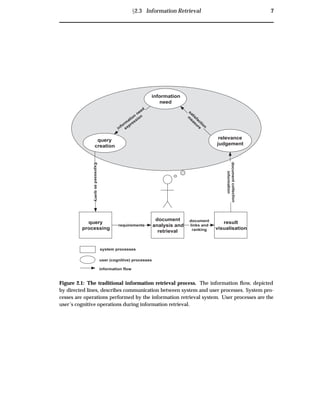
This thesis’ depiction of the traditional information retrieval model is given in figure 2.1.
In the initial stage of the retrieval process, the user has some information need. The user
then formalises this information need, through query creation. The query is submitted
to the system for query processing, where it is parsed by the system to deduce the doc-
ument requirements. Document index analysis and retrieval then begins, with the goal
of retrieving documents of relevance to the query. The documents are subsequently
presented to the user in a result visualisation, aiming to facilitate user identification of
relevant documents. The user then performs a relevance judgment as to whether the
retrieved document collection contains relevant documents. If the user’s information
need is satisfied, the retrieval process is finished. Conversely, if the user is not satis-
fied with the retrieved document collection, they may refine their original information
need, and the entire process is re-executed.
Ü2.3 Information Retrieval 7
query
processing
document
analysis and
retrieval
result
visualisation
information
need
Expressedasquery
relevance
judgement
documentcollection
information
document
links and
ranking
requirements
system processes
user (cognitive) processes
information flow
query
creation
satisfaction
m
easure
inform
ation
need
expression
Figure 2.1: The traditional information retrieval process. The information flow, depicted
by directed lines, describes communication between system and user processes. System pro-
cesses are operations performed by the information retrieval system. User processes are the
user’s cognitive operations during information retrieval.
8 Domain
2.4 Information Need
query
processing
document
analysis and
retrieval
result
visualisation
information
need
Expressedasquery
relevance
judgement
documentcollection
information
datarequirements
system processes
user (cognitive) processes
information flow
query
creation
satisfaction
m
easureinform
ation
need
expression
Figure 2.2: Information Need Analysis.
An information need occurs when a user desires information. To characterise poten-
tial information needs, we must appreciate why users are searching for documents,
what use they are making of these documents and how they make decisions on which
documents are relevant [16].
This thesis identifies several example information needs:
Specific need (answer or document): where one result will do.
Spread of documents: a collection of documents related to a specific purpose.
All documents in an area: a collection of all documents that match the criteria.
Clip need: a less specific need, where users desire a document that somehow relates
to a passage of text.
Specific needs
Example: ‘I want a map of Sydney’
In this situation a single comprehensive map of Sydney will do. If the retrieval en-
gine is accurate, the first document will fulfill the information need. Therefore, the
emphasis is on having the correct answer as the first retrieved result — high precision
at position 1.
Ü2.5 Query Creation 9
Spread of Documents
Example: ‘I want some Sydney attractions’
In this situation the user desires a collection of Sydney attractions, potentially in clus-
tered groups for quick browsing. The emphasis is on both high recall, to try and
present the user with all Sydney attractions, and clustering, to relate similar images.
All documents in an area
Example: ‘Give me all your documents concerning the Sydney Opera House’
In this situation the user wants the entire collection of documents containing the Syd-
ney Opera House. The emphasis in this case is on high recall, potentially sacrificing
precision.
Clip need
Example: ‘I want a picture for my story about Sydney Opera House being a model anti-racism
employer’
In this situation the user desires something to do with the Sydney Opera House and
race issues as an insert for their story. In this case, users are not necessarily interested
in relevance, but rather fringe documents that may catch a reader’s eye.
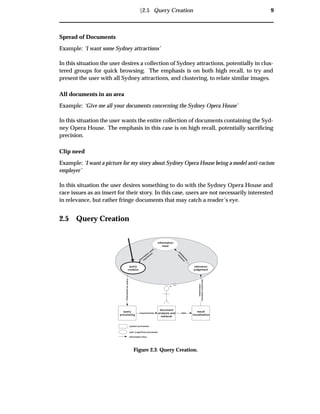
2.5 Query Creation
query
processing
document
analysis and
retrieval
result
visualisation
information
need
Expressedasquery
relevance
judgement
documentcollection
information
datarequirements
system processes
user (cognitive) processes
information flow
query
creation
satisfaction
m
easure
inform
ation
need
expression
Figure 2.3: Query Creation.
10 Domain
Following the formation of an information need, the user must express this need as a
query. A query may contain several query terms, where each term represents criteria
for the target documents. Web search engine users generally do not provide detailed
queries, with average queries containing 2.4 terms [30].
If a user is looking for documents regarding petroleum refining on the Falkland Is-
lands, they may express their information need as:
Falkland Islands petrol
While an expert user may have a better understanding of how the retrieval system
works and thus express their query as:
+“Falkland Islands” petroleum oil refining
The query processing must take these factors into account and cater to both groups of
users.
2.6 Query Processing
query
processing
document
analysis and
retrieval
result
visualisation
information
need
Expressedasquery
relevance
judgement
documentcollection
information
datarequirements
system processes
user (cognitive) processes
information flow
query
creation
satisfaction
m
easure
inform
ation
need
expression
Figure 2.4: Query Processing.
System query processing is the parsing and encoding of a user’s query into a system-
compatible form. At this stage, common words may be stripped out and the query
expanded, adding term synonyms.
Ü2.7 Document Analysis and Retrieval 11
query
processing
document
analysis and
retrieval
result
visualisation
information
need
Expressedasquery
relevance
judgement
documentcollection
information
datarequirements
system processes
user (cognitive) processes
information flow
query
creation
satisfaction
m
easureinform
ation
need
expression
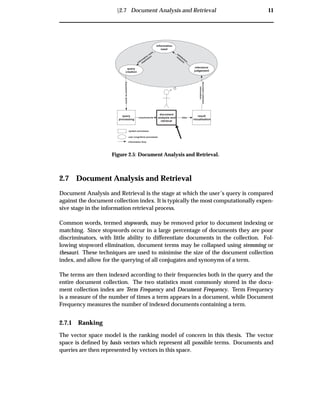
Figure 2.5: Document Analysis and Retrieval.
2.7 Document Analysis and Retrieval
Document Analysis and Retrieval is the stage at which the user’s query is compared
against the document collection index. It is typically the most computationally expen-
sive stage in the information retrieval process.
Common words, termed stopwords, may be removed prior to document indexing or
matching. Since stopwords occur in a large percentage of documents they are poor
discriminators, with little ability to differentiate documents in the collection. Fol-
lowing stopword elimination, document terms may be collapsed using stemming or
thesauri. These techniques are used to minimise the size of the document collection
index, and allow for the querying of all conjugates and synonyms of a term.
The terms are then indexed according to their frequencies both in the query and the
entire document collection. The two statistics most commonly stored in the docu-
ment collection index are Term Frequency and Document Frequency. Term Frequency
is a measure of the number of times a term appears in a document, while Document
Frequency measures the number of indexed documents containing a term.
2.7.1 Ranking
The vector space model is the ranking model of concern in this thesis. The vector
space is defined by basis vectors which represent all possible terms. Documents and
queries are then represented by vectors in this space.
12 Domain
For example, if we have three very short documents:
Document 1: ‘Robot dogs’
Document 2: ‘Robot dog ankle-biting’
Document 3: ‘Subdued robot dogs’
Using the basis vectors:
‘Robot dog’ [1, 0, 0]
‘ankle-biting’ [0, 1, 0]
‘Subdued’ [0, 0, 1]
We can create three document vectors weighted by term frequency:
Document 1 = [1, 0, 0]
Document 2 = [1, 1, 0]
Document 3 = [1, 0, 1]
The vector space for these documents is depicted in figure 2.6.
robot dog
ankle-biting
subdued
document 1
docum
ent 2
docum
ent 3
Figure 2.6: Unweighted Vector Space. Since document 1 only contains “robot dog”, its vector
lies on the “robot dog” axes. Document 2 contains both “robot dog” and “ankle-biting”, as
such its vector lies between those axes. Document 3 contains “subdued” and “robot dog”, its
vector lies between those axes.
The alternative TF/DF weighting of the vectors space is:
Document 1 = [1/3, 0 , 0]
Document 2 = [1/3, 1/1, 0]
Document 3 = [1/3, 0 , 1/1]
Ü2.7 Document Analysis and Retrieval 13
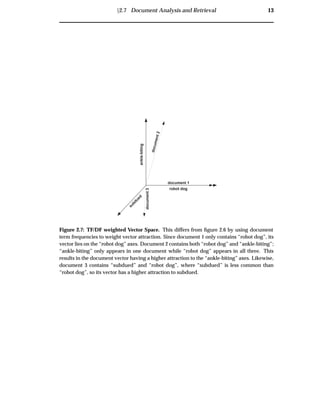
robot dog
ankle-biting
subdued
document 1
document2
document3
Figure 2.7: TF/DF weighted Vector Space. This differs from figure 2.6 by using document
term frequencies to weight vector attraction. Since document 1 only contains “robot dog”, its
vector lies on the “robot dog” axes. Document 2 contains both “robot dog” and “ankle-biting”;
“ankle-biting” only appears in one document while “robot dog” appears in all three. This
results in the document vector having a higher attraction to the “ankle-biting” axes. Likewise,
document 3 contains “subdued” and “robot dog”, where “subdued” is less common than
“robot dog”, so its vector has a higher attraction to subdued.
14 Domain
The TF/DF weighted vector space for these documents is depicted in figure 2.7.
In the vector space model, document similarity is measured by calculating the degree
of separation between documents. The degree of separation is measured by calculat-
ing the angle difference, usually using the cosine rule. In these calculations a smaller
angle implies a higher degree of relevance. As such, similar documents are co-located
in the space, as shown in figure 2.8. Conceptually this leads to a clustering of inter-
related documents in the vector space [55].
document 3
sourcedocument
document1
document 2
basis vector 1
basisvector2
Figure 2.8: Vector Space Document Similarity Ranking. The vector space model implies that
document 1 is the most similar to the source document, while document 2 is the next most
similar, and document 3 the least. When querying a vector space model, the query becomes
the source document vector and documents with similar vectors are retrieved.
It is also possible not to generate basis vectors directly from all unique document
terms. Documents can be indexed according to a small number of basis vectors. This
is an application of synonym matching, but where partial synonyms are admitted. An
example of this is to index document 2 on the basis vectors ‘Irritating’ and ‘Friendly’,
as is depicted in figure 2.9.
One of the difficulties involved in vector space ranking is that it can be unclear which
terms matched the document and the extent of the matching. In image retrieval this
drawback, combined with the fact that images are associated with potentially arbi-
trary text, can lead to user confusion regarding why images were retrieved, see section 3.2.1.
Ü2.8 Result Visualisation 15
Friendly
Irritating
"robot dog"
ankle-biting
document2
Figure 2.9: Vector Space with basis vectors ‘Friendly’ and ‘Irritating’. In the example in
figure 2.9, prior to the ranking we know that “robot dog”s are moderately friendly and ankle-
biting is extremely irritating. Query terms are ranked in the vector space against partial syn-
onyms.
Other Models
Other models, which are not within the scope of this thesis are thoroughly described
in general information retrieval literature [55, 5, 20, 35]. These include Boolean, Ex-
tended Boolean and Probabilistic models.
2.8 Result Visualisation
Result visualisation in information retrieval is often overlooked in favour of improv-
ing document analysis and retrieval techniques. It is, however, an integral part of the
information retrieval process [7]. Information retrieval systems typically use linear list
result visualisations.
2.8.1 Linear Lists and Thumbnail Grids
Linear lists present a sorted list of retrieved documents ranked from most to least
matching. Thumbnail grids are often used for viewing retrieved image collections.
Thumbnail grids are linear lists split horizontally between rows, a process which is
analogous to words wrapping on a page of text . This representation is used to max-
imise screen real-estate. Images positioned horizontally next to each other are adjacent
in the ranking, while vertically adjacent images are separated by N ranks (where N
is the width of the grid). Thus, although the grid is a two dimensional construct,
thumbnail grids only represent a single dimension — the system’s ranking of images.
16 Domain
query
processing
document
analysis and
retrieval
result
visualisation
information
need
Expressedasquery
relevance
judgement
documentcollection
information
datarequirements
system processes
user (cognitive) processes
information flow
query
creation
satisfaction
m
easure
inform
ation
need
expression
Figure 2.10: Result Visualisation.
Later it is shown that having no relationship between sequential images, and no query
transparency causes problems in current image retrieval systems 3.2.1.
To further maximise screen real-estate, zooming image browsers can be used. Combs
and Bederson’s [12] zooming image browser incorporates a thumbnail grid with a
large number of images at a low resolution. Users select interesting areas of the grid
and zoom in to find relevant images. The zooming image browser did not outperform
other image browsers in evaluation. Frequently users selected incorrect images at the
highest level of zoom. Users were not prepared to zoom in to verify selections and
incur a zooming time penalty.
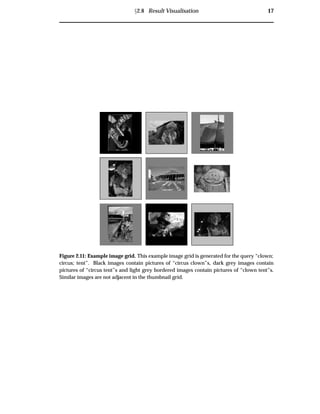
When using a vector space model with a thumbnail grid visualisation, vector evidence
is discarded. Figure 2.11 depicts a hypothetical thumbnail grid retrieved by an image
retrieval engine for the query “clown, circus, tent”. In this grid, black images are pic-
tures of “circus clown”s, dark grey images are pictures of “circus tent”s and light grey
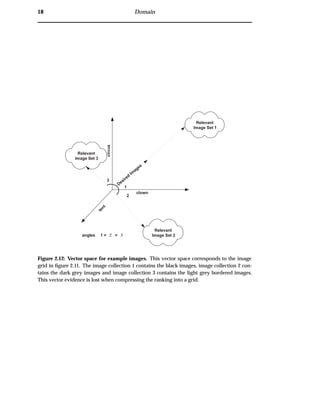
images with borders are pictures of “clown tent”s. Figure 2.12 depicts the vector space
from which the images were taken. There are three clusters, each containing multiple
images, located at angles of equal distance from the query vector. When compressing
this evidence the ranking algorithm selects images in order of their proximity until
the linear list is full. This discards image vector details, and leads to a thumbnail grid
where similar images are not adjacent.
Ü2.8 Result Visualisation 17
Figure 2.11: Example image grid. This example image grid is generated for the query “clown;
circus; tent”. Black images contain pictures of “circus clown”s, dark grey images contain
pictures of “circus tent”s and light grey bordered images contain pictures of “clown tent”s.
Similar images are not adjacent in the thumbnail grid.
18 Domain
Relevant
Image Set 2
Relevant
Image Set 1
Relevant
Image Set 3
1
2
3
Desired
Im
ages
angles 1 = 2 = 3
clown
circus
tent
Figure 2.12: Vector space for example images. This vector space corresponds to the image
grid in figure 2.11. The image collection 1 contains the black images, image collection 2 con-
tains the dark grey images and image collection 3 contains the light grey bordered images.
This vector evidence is lost when compressing the ranking into a grid.
Ü2.8 Result Visualisation 19
2.8.1.1 Image Representation
Humans process objects and shapes at a much greater speed than text. Exploitation
of this capability can facilitate the identification of relevant images. Further, when
presenting images for inspection there is no substitute for the images themselves. As
such, it is important, when using an information visualisation for image search results,
to summarise images using their thumbnails.
2.8.2 Information Visualisations
Information visualisations are intended to strengthen the relationship between the
user and the system during the information retrieval process. They attempt to over-
come the limitations of linear rankings by providing further attributes to facilitate user
determination of relevant documents.
As cited by Stuart Card in 1996, ‘If Information access is a “killer app” for the 1990s [and
2000s] Information Visualisation will play an important role in its success”.
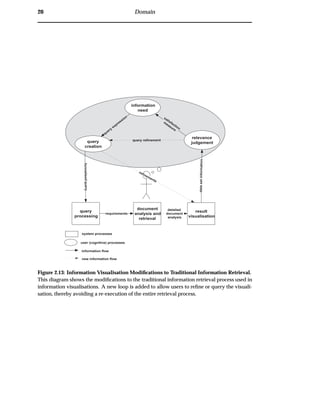
The traditional information retrieval process model, figure 2.1, is revised for informa-
tion visualisation. The model of information retrieval adapted for information visu-
alisation, is shown in figure 2.13. This model creates a new loop between the result
visualisation, relevance judgement and query creation. This enables users to swiftly
refine their query and receive immediate feedback from the result visualisation. This
new interaction loop can provide improved clarity and system-user interaction during
searching.
Displaying Multi-dimensional data
When representing multi-dimensional data, such as search results, it is desirable to
maximise the data dimensions displayed without confusing the user. Typically, vi-
sualisations are required to handle over three dimensions of data. This requires the
flattening of the data to a two or three dimensional graphical display.
The LyberWorld system [25] suggests that information visualisations created prior to
its inception, in 1994, were ‘limited’ to 2D graphics, as computer graphics systems
could not cope with 3D graphics. Hemmje argued that 3D graphics allow for “the
highest degree of freedom to visually communicate information” and that such vi-
sualisations are “highly demanded”. Indeed, recent research into visualisation has
adopted the development of 3D interfaces. However, problems have arisen from this
practice. This is due, in part, to the requirement that users have the spatial abilities
required to interpret a 3D system. Another drawback, is the user’s inability to view
the entire visualisation at once — the graphics at the front of the visualisation often
obscures the data at the back.
NIST [58] recently conducted a study into the time it takes users to retrieve documents
20 Domain
query
processing
document
analysis and
retrieval
result
visualisation
information
need
formalisedquery
relevance
judgement
datasetinformation
refinements
requirements
system processes
user (cognitive) processes
information flow
query
creation
satisfaction
m
easure
query
expression
query refinement
new information flow
detailed
document
analysis
Figure 2.13: Information Visualisation Modifications to Traditional Information Retrieval.
This diagram shows the modifications to the traditional information retrieval process used in
information visualisations. A new loop is added to allow users to refine or query the visuali-
sation, thereby avoiding a re-execution of the entire retrieval process.
Ü2.8 Result Visualisation 21
from equivalent text, 2D and 3D systems. Results from this experiment illustrate that
there is a significant learning curve for users starting with a 3D interface. During the
experiment the 3D interface proved the slowest method for users accessing the data.
Swan et al. [63] also had problems with their 3D interface, citing that “[they] found
no evidence of usefulness for the[ir] 3-D visualisation”. The argument for and against
the use of 3 dimensions in information visualisations is not within the scope of this
thesis.
Interactive Interfaces
A dynamic visualisation interface can be used to aid in the comprehension of the in-
formation presented in a visualisation. Dynamic Queries and Filters are two ways of
achieving such an interface.
Dynamic Queries [1, 69] allow users to change parameters in a visualisation, with
immediate updates to reflect the changes. This direct-manipulation interface to queries
can be seen as an adoption of the WYSIWYG (What you see is what you get) model,
where a tight coupling between user action and displayed documents exist.
Filters are similar to Dynamic Queries; they allow users to provide extra document
criteria to the information visualisation. Documents that fulfill the criteria are then
highlighted.
2.8.2.1 Example Information Visualisation Systems
While there are many differing information visualisations for information retrieval
results, there are three prominent models: spring-based, Venn-based and terrain map
based. These models are described below.
Spring-based models separate documents using document discriminators [14]. Each
discriminator is attached to documents by springs which attract matching documents
— the degree of attraction is proportional to the degree of match. This clusters the
documents according to common discriminators. In this model the dimensions are
compressed using springs, with each spring representing a dimension. An in-depth
description of spring-based models is given is section 5.3.1. An example is shown
in figure 2.14. Systems that use this model include the VIBE system [49, 15, 36, 23],
WebVIBE [45, 43, 44], LyberWorld [25, 24], Bead [9] and Mitre [33]. A survey of these
visualisations is provided in appendix A.1.
Venn-based models are a class of information visualisations that allow users to in-
terpret or provide Boolean queries and results. In this model, the dimensions are
compressed using Venn diagram set relationships. Systems that use this model in-
clude InfoCrystal [61] and VQuery [31]. A survey of these visualisations is provided
in appendix A.2.
22 Domain
Terrain map models are information visualisations that illustrate the structure of the
document collection by showing different types of geography on a map. These visu-
alisations are based on Kohonen’s feature map algorithm [54]. Dimensions are com-
pressed into map features such as mountain ranges and valleys. An example visual-
isation is shown in figure 2.15. Two systems that use this model are: SOM [38] and
ThemeScapes [42]. A survey of these visualisations is provided in appendix A.3.
Other information visualisation models also exist:
¯ Clustering Models: depict relationships between clusters of documents [58, 13].
¯ Histographic Models: seek to visualise a large number of document attributes at
once [22, 68, 67].
¯ Graphical Plot Models: allow for a comparison of two document attributes [47,
62].
Systems that illustrate these visualisation properties can be found in the appendix A.4.
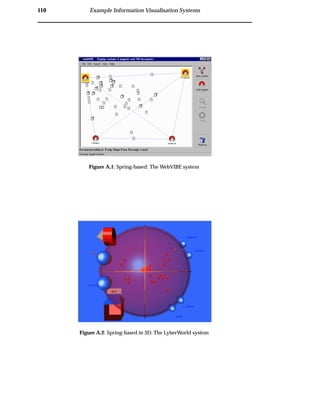
Figure 2.14: Spring-based Example: The VIBE System. In this example VIBE is being used
to visualise the “president; europe; student; children; economy” query. Documents are rep-
resented by different sized rectangles, with high concentration clusters in the visualisation
represented by large rectangles.
2.9 Relevance Judgements
Only a user can judge the relevance of images in the retrieved document collection.
Document Analysis and Retrieval systems do not understand relevance, only match-
ing documents to a request. Therefore, the final stage of information retrieval is the
cognitive user process of discovering relevant documents in the retrieved document
collection. The cognitive knowledge derived from searching through the retrieved
document collection for relevant documents can lead to a refinement of the visual-
isation, or to a refinement of the original information need. This demonstrates the
Ü2.9 Relevance Judgements 23
Figure 2.15: Terrain Map Example: The ThemeScapes system. In this example ThemeScapes
is being used to generate the geography of a document collection. The peaks represent topics
contained in many documents. Conversely, valleys represent topics contained in only a few
documents
iterative nature of information retrieval — the process is repeated until the user is sat-
isfied with the retrieved document collection.
Information foraging theory, developed by Pirolli et al. [50, 51], is a new approach
to examining the synergy between a user and a visualisation during relevance judge-
ment.
2.9.1 Information Foraging
Humans display foraging behaviour when looking for information. Information for-
aging behaviour is used to the study how users invest time to retrieve information.
Information foraging theory suggests that information foraging is analogous to food
foraging. The optimal information forager is the forager that achieves the best ratio of
benefits to cost [51]. Thus, it is important to allow the user to allocate their time to the
most relevant documents [50].
Foraging activity is broken up into two types of interaction: within-patch and between-
patch. Patches are sources of co-related information. Conceptually patches could be
piles of papers on a desk or clustered collections of documents. Between-patch anal-
ysis examines how users navigate from one source of information to another, while
within-patch analysis examines how users maximize the use of relevant information
within a pile.
24 Domain
Chapter 3
Survey of Image Retrieval
Techniques
“Those who do not remember the past are condemned to repeat it.”
– George Santayana
3.1 Overview
Image retrieval is a specialisation of the information retrieval process, outlined in
chapter 2. This chapter presents a survey of current approaches to image retrieval.
This analysis enables an identification of core problems in current WWW image re-
trieval systems.
3.2 WWW Image Retrieval
Three of the large commercial WWW search engines; AltaVista, Yahoo and Lycos,
have recently introduced text-based image search engines. The following observa-
tions are based on direct experience with these engines.
¯ AltaVista [3] has developed the AltaVista Photo and Media Finder. This image re-
trieval engine provides a simple text-based interface (section 3.3.1) to an image
collection indexed from the general WWW community and AltaVista’s image
database partners. Their retrieval engine is based on the technology incorpo-
rated into their text document search engine. Modifications to this architecture
have been made to associate sections of Web page text to images, in order to
obtain image descriptions.
¯ Yahoo! [70] has developed the Image Surfer. This image retrieval engine contains
images categorised into a topic hierarchy. To retrieve images, users can navigate
this topic hierarchy, or perform find similar content-based (section 3.3.2) searches.
As with Yahoo!’s text document topic hierarchy, all images in the system are cat-
egorised manually. This reliance on image classification makes extensive WWW
image indexing intractable.
25
26 Survey of Image Retrieval Techniques
¯ Lycos [40] has incorporated image retrieval through a simple extension to their
text document retrieval engine. Following a user query, Lycos checks to see
whether retrieved pages contain image references. If so, the images are retrieved
and displayed to the user.
3.2.1 WWW Image Retrieval Problems
The WWW image retrieval problems have been grouped into three key areas: consis-
tency, clarity and control.
The citations in this section are to papers in the fields of image retrieval, information
visualisation and information foraging. The problems this thesis identifies in WWW
image retrieval are similar to problems in these fields.
¯ Consistency:
– System Heterogeneity
When executing a query over multiple search engines, or repeatedly over
the same search engine, users typically retrieve differing search results.
This is due to continual changes in the image collections and ranking al-
gorithms used. All WWW search engines use differing, confidential algo-
rithms to rank images. Further, these algorithms sometimes vary according
to image collection properties or system load. These continual changes can
lead to confusing inconsistencies in image search results.
– Unstructured and Uncoordinated Data
The image meta-data used by WWW image retrieval engines to perform
text-based image retrieval is unreliable. Most WWW meta-data is not pro-
fessionally described, and as such, may be incomplete, subjective or incor-
rect.
¯ Clarity:
– No Transparency
The linear result visualisations used by WWW image retrieval engines do
not transparently reveal why images are being retrieved [34, 28]. This limits
the user’s ability to refine their query expression. This situation is amplified
if the meta-data upon which the ranking takes place is misleading.
– No Relationships
Ü3.2 WWW Image Retrieval 27
– Reliance on Ranking Algorithms
WWW image retrieval systems incorporate confidential algorithms to com-
press multi-dimensional query-document relationship information (section
2.8.1) into a linear list. These algorithms are not well understood by users,
particularly algorithms that incorporate different types of evidence, e.g. a
combination of text and content analysis [2, 34, 28].
¯ Control:
– Inexpressive Query Language
£ Lack of Data Scalability
The large number of images indexed by WWW image retrieval engines
makes content-based image analysis techniques (section 3.3.2) difficult
to apply. Advanced image analysis techniques are computationally ex-
pensive to run. Further, the effectiveness of these algorithms declines
when used over a collection with a large breadth of content [56].
£ Lack of Expression
Existing infrastructure used by WWW search engines to perform im-
age retrieval provides a limited capacity for users to specify their pre-
cise image needs. Current systems allow only for text-based image
queries [2, 28].
– Coarse Grained Interaction:
£ Coarse Grained Interaction
In providing a search service over a high latency network, current
WWW image retrieval systems are limited to providing coarse grained
interaction. In current systems, users must submit a query, retrieve
results and then choose either to restate the query or perform a find
similar search. Searching is an iterative process, requiring continual re-
finement and feedback [28, 16]. These interfaces do not facilitate the
high degrees of user interaction required during the image retrieval
process.
£ Lack of Foraging Interaction
To enable effective information foraging, a result visualisation must al-
low users to locate patches of relevant information and then perform
detailed analysis of the information contained within a patch [51]. In
current WWW image retrieval engines, there is no grouping of like im-
ages, this prohibits any between patch foraging. Further there is no
way for users to view a subset of the retrieved information. Thus in-
formation foraging (see section 2.9.1) is not encouraged through the
visualisation.
28 Survey of Image Retrieval Techniques
3.2.2 Differences between WWW Image Retrieval and Traditional Image
Retrieval
There are several differences between image retrieval on the WWW and traditional
image retrieval systems. As opposed to WWW systems, in traditional systems:
¯ Consistency is a lesser concern
All systems incorporate an internally consistent matching algorithm, and re-
trieve images from a controlled image collection. Since a user interacting with
the system is always dealing with the same image matching tools, consistency
is a lesser concern.
¯ Quality descriptions are assured
As the retrieval system retrieves images from a controlled database, meta-data
quality is assured.
¯ No Communication Latencies
As the retrieval systems are generally co-located with the images and the user,
there is no penalty associated with search iterations.
3.3 Lessons to Learn: Previous Approaches to Image Retrieval
It is convenient for the analysis to group the progress of image retrieval into logical
phases. The phases of image retrieval development are shown in figure 3.1. Although
the progression is not entirely linear, the phases do represent distinct stages in the
evolution of image retrieval.
3.3.1 Phase 1: Early Image Retrieval
The earliest form of image retrieval is Text-Based Image Retrieval. These engines rely
solely on image meta-data to retrieve images, e.g. current WWW image search en-
gines [3, 40]. Traditional document retrieval techniques, such as vector space ranking,
are used to determine matching meta-data, and hence find images. For more informa-
tion on database text-based image retrieval systems refer to [10].
Examples of text-based queries are:
‘Sydney Olympic Games’
‘Sir William Deane opening the Sydney Olympic Games’
‘Torch relay running in front of the ANU’
‘Happy Olympic Punters’
‘Pictures of Trystan Upstill, by the Honours Gang, taken during the Olympic Games’
Ü3.3 Lessons to Learn: Previous Approaches to Image Retrieval 29
Phase 1:
Early Image
Retrieval
Phase 2:
Expressive Query
Languages
Phase 3:
Scalabilitythrough
the Combination of
Techniques
Phase 4:
Clarity through
User Understanding
and Interaction
Image Retrieval
Research
Phase 1: Can we
perform Image
Retrieval on the
World-Wide Web?
World-Wide Web
Image Retrieval
Phase 2: ?
Figure 3.1: The development of image retrieval This diagram shows the logical phases in
the information retrieval process. The section is structured according to these phases.
Although text-based image retrieval is the most primitive of all retrieval techniques,
it does posses useful traits. If professionally described image meta-data is available
during retrieval and analysis it can provide a comprehensive abstraction of a scene.
Additionally, since text-based image retrieval uses existing document retrieval tech-
niques, many different ranking and indexing models are already available. Further,
existing infrastructure can be used to perform image indexing and retrieval — an at-
tractive proposition for current WWW search engines.
Improvements
¯ Ability to Retrieve Images: provides a simple mechanism for image access and
retrieval.
Further Problems
¯ Consistency:
– Unstructured and Uncoordinated data: image retrieval effectiveness relies
on the quality of image descriptions [48]. Further, as it can be unclear which
sections of a WWW page are related to an image’s contents, problems arise
when trying to associate meta-data to images on WWW pages.
¯ Control:
30 Survey of Image Retrieval Techniques
– Inexpressive Query Language:
£ Lack of Expression: text-based querying may not allow the user to
specify a precise image need. There is no way to convey visual image
features to the image search engine.
3.3.2 Phase 2: Expressive Query Languages
Content-Based Image Retrieval enables users to specify graphical queries. The theory
behind its inception is that users have a precise mental picture of a desired image,
and as such, they should be able to accurately express this need [52]. Further, it is hy-
pothesised that this removed reliance on image meta-data minimises retrieval using
potentially incorrect, incomplete or subjective data.
Examples of content-based queries are:
Image properties: ‘Red Pictures’, ‘Pictures with this texture’
Image shapes: ‘Arched doorway’, ‘Shaped like an elephant’
Objects in image: ‘Pictures of elephants’, ‘Generic elephants’
Image sections: ‘Red section in top corner’, ‘Elephant shape in centre’
The six most frequently used query types in content-based image retrieval are:
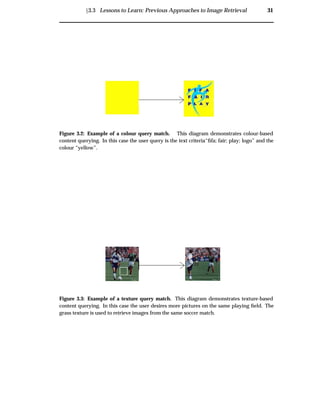
Colour allows users to query an image’s global colour features. An example of
colour-based content querying is shown in figure 3.2. According to Rui et al.
[28], colour histograms are the most commonly used feature representation.
Other methods include Colour Sets which facilitate fast searching with an ap-
proximation to Histograms, and Colour Moments, to overcome the quantization
effects in Colour Histograms. To improve Colour Histograms, Ioka and Niblack
et al. provide methods for evaluating similar but not exact colours and Stricker
and Orengo propose cumulative colour histograms to reduce noise [28].
Texture is a visual pattern that approximates the appearance of a tactile surface. This
allows the user to specify whether an image appears rough and how much seg-
mentation there an image exhibits. An example of texture-based content query-
ing is shown in figure 3.3. According to Rui et al. [28], texture recognition can be
achieved using Haralick et al.’s co-occurrence matrix representations, Tamura et
al.’s computational approximations to visual texture properties or Simon and
Chang’s Wavelet transforms.
Colour Layout is advanced colour measurement, whereby users are given the ability
to show how colours are related to each other in a scene [48]. For example, a
query containing a gradient from orange to yellow could be used to retrieve a
sunset.
Ü3.3 Lessons to Learn: Previous Approaches to Image Retrieval 31
Figure 3.2: Example of a colour query match. This diagram demonstrates colour-based
content querying. In this case the user query is the text criteria“fifa; fair; play; logo” and the
colour “yellow”.
Figure 3.3: Example of a texture query match. This diagram demonstrates texture-based
content querying. In this case the user desires more pictures on the same playing field. The
grass texture is used to retrieve images from the same soccer match.
32 Survey of Image Retrieval Techniques
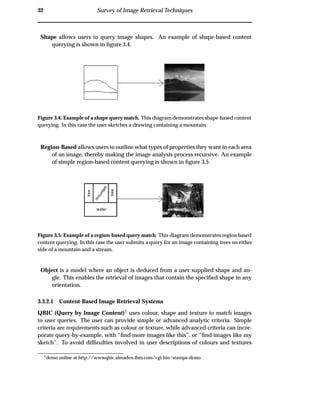
Shape allows users to query image shapes. An example of shape-based content
querying is shown in figure 3.4.
Figure 3.4: Example of a shape query match. This diagram demonstrates shape-based content
querying. In this case the user sketches a drawing containing a mountain.
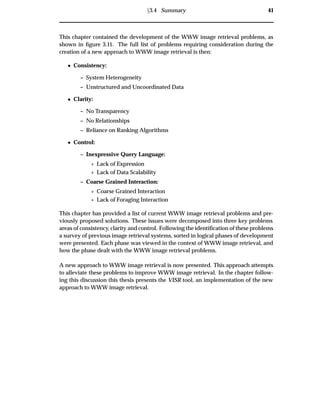
Region-Based allows users to outline what types of properties they want in each area
of an image, thereby making the image analysis process recursive. An example
of simple region-based content querying is shown in figure 3.5.
Figure 3.5: Example of a region-based query match. This diagram demonstrates region based
content querying. In this case the user submits a query for an image containing trees on either
side of a mountain and a stream.
Object is a model where an object is deduced from a user supplied shape and an-
gle. This enables the retrieval of images that contain the specified shape in any
orientation.
3.3.2.1 Content-Based Image Retrieval Systems
QBIC (Query by Image Content)1 uses colour, shape and texture to match images
to user queries. The user can provide simple or advanced analytic criteria. Simple
criteria are requirements such as colour or texture, while advanced criteria can incor-
porate query-by-example, with “find more images like this”, or “find images like my
sketch”. To avoid difficulties involved in user descriptions of colours and textures
1
demo online at http://wwwqbic.almaden.ibm.com/cgi-bin/stamps-demo
Ü3.3 Lessons to Learn: Previous Approaches to Image Retrieval 33
QBIC contains a texture and colour library. This enables users to select colours, colour
distributions or choose desired textures as queries [19, 29].
NETRA allows users to navigate through categories of images. The query is refined
through a user selection of relevant image content properties. [16, 28, 41].
Excalibur is a query-by-example system. Users provide candidate images which are
matched using pattern recognition technology. Excalibur is a commercial application
development tool rather than a complete retrieval application. The Yahoo! web search
engine uses this technology to find similar images (section 3.2) [16, 28, 17].
Blobworld breaks images into blobs (see figure 3.6). By browsing a thumbnail grid
and specifying which blobs of images to keep, the user identifies blobs of interest and
areas of disinterest. This is used to refine the query [8, 66].
Figure 3.6: The Blobworld System. This screenshot from the Blobworld system illustrates the
process of picking relevant image blobs.
EPIC allows users to draw rectangles and label what they would like in each section
of the image, as shown in figure 3.7 [32].
34 Survey of Image Retrieval Techniques
Figure 3.7: The EPIC System. This screenshot illustrates the EPIC system’s query process.
Users describe their image need through labelled rectangles in the query window on the left.
ImageSearch allows users to place icons representing objects in regions of an im-
age. Users can also sketch pictures if they want a higher degree of control [37]. See
figure 3.8.
3.3.2.2 Phase 2 Summary
Improvements
¯ Consistency:
– Discard unstructured and uncoordinated data: since image meta-data
is never used to index or retrieve the images, problems relating to incom-
plete, incorrect or subjective descriptions are avoided. Further enrichment
is obtained through the ability to use content-based image analysis to query
many differing artifacts in an image.
¯ Control:
– Inexpressive Query Language:
£ New Expression through Content-based Image Retrieval: through
the expressive nature of content-based image retrieval, more thorough
image criteria can be gained from the user. This provides the system
with more information with which to judge image relevance.
Further Problems
¯ Clarity:
Ü3.3 Lessons to Learn: Previous Approaches to Image Retrieval 35
Figure 3.8: The ImageSearch system. This screenshot illustrates the ImageSearch system’s
query process. The user positions icons symbolising what they would like in that region of an
image.
– Complex Interfaces: there is a comparatively large user cost incurred with
the creation of content-based queries. If users are required to produce a
sketch or an outline of the desired images, the time or skill required can
prove prohibitive.
¯ Control:
– Inexpressive Query Language:
£ Content-based Image Retrieval algorithms do not scale well: content-
based image retrieval is less effective on large-breadth collections. Since
there are many definitions of similarity and discrimination, their power
degrades when using large breadth image collections as shown in fig-
ure 3.9 [2, 28, 16]
3.3.3 Phase 3: Scalability through the Combination of Techniques
Bearing in mind the limitations of content-based image retrieval on large breadth im-
age collections, several systems have combined both text and content-based image
retrieval. It is hypothesized that content-based analysis can be used on larger image
collections when combined with text-based analysis. The rationale for this is that text-
based techniques can be used to specify a general abstraction of image contents, while
content-based criteria can be used to identify relevant images in the domain.
36 Survey of Image Retrieval Techniques
Figure 3.9: Misleading shape and texture . The first image in this example is the query-by-
example image used as a content-based query. The other images in the grid were retrieved
through matching of shape, texture and colour (image from [56]).
Ü3.3 Lessons to Learn: Previous Approaches to Image Retrieval 37
3.3.3.1 Text and Content-Based Image Retrieval Systems
The combination of analysis techniques can either occur during initial query creation,
allowing users to initially specify both text and content-based image criteria, or after
retrieving a collection of images, allowing users to refine the image collection.
Text with Content Relevance Feedback: in these systems, the user initially provides
a text query. Using content-based image retrieval, they then tag relevant images
to retrieve more images like them.
Text and Content Searching: in these systems, both text and content retrieval occurs
at the same time. The user may express both text and content criteria in their
initial query.
Text with Content Relevance Feedback
Chabot, 2 developed by Ogle and Stonebraker, uses simplistic content and text anal-
ysis to retrieve images. Text criteria is used to retrieve an initial collection of images,
followed by content criteria to refine the image collection [48].
MARS is a system that learns from user interactions. The user begins by issuing a
text-based query, and then marks images in the retrieved thumbnail grid as either
relevant or irrelevant. The system uses these image judgements to find more relevant
images. The benefit of this approach is that it relieves the user from having to describe
desirable image features. Users only have to pick interesting image features [27].
Text and Content Searching
Virage incorporates plugin primitives that allow the system to be adapted to specific
image searching requirements. The Virage plugin creation engine is open-source,
therefore plugins can be created by end-users to suit their domain. The Virage en-
gine includes several “universal primitives” that perform colour, texture and shape
matching [16, 28].
Lu and Williams have incorporated both basic colour and text analysis into their im-
age retrieval system with encouraging results using a small database. One of their
major problems was in finding methods to combine evidence from colour and text
matching [39].
3.3.3.2 Phase 3 Summary
Improvements
2
This system has recently been renamed Cypress
38 Survey of Image Retrieval Techniques
¯ Consistency:
– Reduce effects of Unstructured and Uncoordinated data: the image meta-
data is only partially used to retrieve the images, with content-based image
retrieval used as a second criteria for the image analysis.
¯ Control:
– Inexpressive Query Language:
£ Improved Expression: users can enter criteria for images through tex-
tual descriptions and visual appearance. Incorporating both text and
content-based image analysis allows for the consideration of all image
data during retrieval.
£ Improving the scalability of Content-based Image Retrieval: when
combining text-based analysis with content-based analysis, difficulties
involved in performing content-based image retrieval on large breadth
image collections are partially alleviated.
Further Problems
¯ Clarity:
– Reliance on Ranking Algorithms: combining rankings from several dif-
ferent types of analysis engines into a thumbnail grid can be difficult [2, 16,
4, 27].
– No Transparency: when using several analysis techniques it can be hard
for users to understand why images were matched. Without this evidence,
it may be difficult for users to ascertain faults in their query.
3.3.4 Phase 4: Clarity through User Understanding and Interaction
In response to the problems associated with the user understanding of retrieved im-
age collections, several systems have attempted to improve the clarity of the image re-
trieval process. These systems have incorporated information visualisations, outlined
in section 2.8.2, to convey image matching. It is in this light that phase 4 attempts to
improve system transparency, relationship maintenance and to reduce the reliance on
ranking algorithms.
3.3.4.1 Image Retrieval Information Visualisation Systems
The two projects examined in this section provide spring-based visualisations, similar
to the VIBE system in section A.1.
MageVIBE: uses a simplistic approach to image retrieval, implementing text-based
only querying of a medical database. Images in this visualisation are represented by
dots. The full image can be displayed by selecting a dot [36].
Ü3.3 Lessons to Learn: Previous Approaches to Image Retrieval 39
Figure 3.10: The ImageVIBE system. This screenshot illustrates the ImageVIBE visualisation
for a user query for an aeroplane in flight. Several modification query terms, such as vertical
and horizontal, are used to describe the orientation of the plane.
ImageVIBE: uses text-based and shape-based querying, but otherwise does not differ
from the original VIBE. ImageVIBE allows users to refine their text queries using con-
tent criteria, such as shapes, orientation and colour [11]. An ImageVIBE screenshot
depicting a search for an aircraft image is shown in figure 3.10.
There is yet to be any evaluation of the effectiveness of these systems.
3.3.4.2 Phase 4 Summary
Improvements
¯ Improved Transparency: providing a dimension for each aspect of the ranking,
enables users to deduce how the image matching occurred.
¯ Relationship Maintenance: the query term relationships between images are
maintained — images that are related to the same query terms, by the same
magnitude, are co-located.
¯ User Relevance Judgements: users select relevant images from the retrieved
image collection, rather than relying on a combination of evidence algorithm to
determine the best match.
Further Problems
¯ Complex Interfaces: systems must be simple. It has been shown that the tradi-
tional VIBE interface is too complex for general users [45, 43, 44].
40 Survey of Image Retrieval Techniques
3.3.5 Other Approaches to WWW Image Retrieval
The WWW has recently become the focus of phase 2 research in image retrieval. Two
such research systems are ImageRover and WebSEEK.
ImageRover is a system that spiders and indexes WWW images. A vector space
model of image features is created from the retrieved images [64, 57]. In this system
users browse topic hierarchies and can perform content-based find similar searches.
The system has encountered index size and retrieval speed difficulties.
WebSEEK searches the Web for images and videos by extracting keywords from the
URL and associated image text, and generating a colour histogram. Category trees
are created using all rare keywords indexed in the system. Users can query the sys-
tem using colour requirements, providing keywords or by navigating a category tree
[59, 60].
3.4 Summary
Phase 1: Early Image
Retrieval
goal
search for images
problems
Unstructured +
Uncoordinated data
Lack of Expression
Phase 2: Expressive
Query Languages
problems
CBIR unscalable
Complex interfaces
Phase 1
Problems
Phase 3:Scalability
through technique
combination
Phase 2
Problems
goals
Phase 4: Clarity
through user
understanding
Phase 3
Problems
problems
problems
problems
goals
goals
transparency
combination of
evidence
Current WWW
Image Search Engines
goal
problems
search for images
WWW Retrieval
Issues
Chapter 4: Improving WWW
Image Retrieval
goals
complex
interfaces
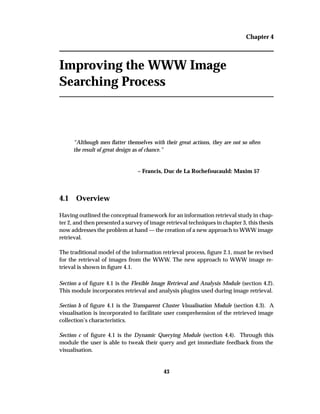
(found in section 3.4.1)
Figure 3.11: Development of WWW Image Retrieval Problems. This diagram illustrates the
development of the WWW Image Retrieval problems as covered in this chapter. The problems
from each phase, and extra WWW retrieval issues must be addressed to create an effective
WWW image retrieval system.
Ü3.4 Summary 41
This chapter contained the development of the WWW image retrieval problems, as
shown in figure 3.11. The full list of problems requiring consideration during the
creation of a new approach to WWW image retrieval is then:
¯ Consistency:
– System Heterogeneity
– Unstructured and Uncoordinated Data
¯ Clarity:
– No Transparency
– No Relationships
– Reliance on Ranking Algorithms
¯ Control:
– Inexpressive Query Language:
£ Lack of Expression
£ Lack of Data Scalability
– Coarse Grained Interaction:
£ Coarse Grained Interaction
£ Lack of Foraging Interaction
This chapter has provided a list of current WWW image retrieval problems and pre-
viously proposed solutions. These issues were decomposed into three key problems
areas of consistency, clarity and control. Following the identification of these problems
a survey of previous image retrieval systems, sorted in logical phases of development
were presented. Each phase was viewed in the context of WWW image retrieval, and
how the phase dealt with the WWW image retrieval problems.
A new approach to WWW image retrieval is now presented. This approach attempts
to alleviate these problems to improve WWW image retrieval. In the chapter follow-
ing this discussion this thesis presents the VISR tool, an implementation of the new
approach to WWW image retrieval.
42 Survey of Image Retrieval Techniques
Chapter 4
Improving the WWW Image
Searching Process
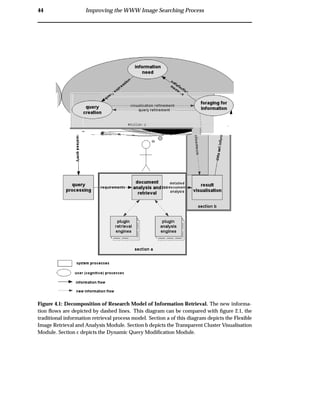
“Although men flatter themselves with their great actions, they are not so often
the result of great design as of chance.”
– Francis, Duc de La Rochefoucauld: Maxim 57
4.1 Overview
Having outlined the conceptual framework for an information retrieval study in chap-
ter 2, and then presented a survey of image retrieval techniques in chapter 3, this thesis
now addresses the problem at hand — the creation of a new approach to WWW image
retrieval.
The traditional model of the information retrieval process, figure 2.1, must be revised
for the retrieval of images from the WWW. The new approach to WWW image re-
trieval is shown in figure 4.1.
Section a of figure 4.1 is the Flexible Image Retrieval and Analysis Module (section 4.2).
This module incorporates retrieval and analysis plugins used during image retrieval.
Section b of figure 4.1 is the Transparent Cluster Visualisation Module (section 4.3). A
visualisation is incorporated to facilitate user comprehension of the retrieved image
collection’s characteristics.
Section c of figure 4.1 is the Dynamic Querying Module (section 4.4). Through this
module the user is able to tweak their query and get immediate feedback from the
visualisation.
43
44 Improving the WWW Image Searching Process
Figure 4.1: Decomposition of Research Model of Information Retrieval. The new informa-
tion flows are depicted by dashed lines. This diagram can be compared with figure 2.1, the
traditional information retrieval process model. Section a of this diagram depicts the Flexible
Image Retrieval and Analysis Module. Section b depicts the Transparent Cluster Visualisation
Module. Section c depicts the Dynamic Query Modification Module.
Ü4.1 Overview 45
;;;;
;;;;
;;;;
;;;;;;;
;;;;;;;
;;;;;;;
query
processing
document
analysis and
retrieval
result
visualisation
information
need
formalquery
foraging for
Information
datasetinformation
refinements
requirements
system processes
user (cognitive) processes
information flow
query
creation
visualisation refinement
satisfaction
m
easure
query
expression
query refinement
G
plugin
analysis
enginesG
plugin
retrieval
engines
detailed
document
analysis
;;
;;
;;user cognitive area
server-side
client-side
Figure 4.2: Research Model with Process Locations. The flexible image retrieval and analysis
module resides on the client-side. To retrieve images, this module connects to several WWW
image search servers, via retrieval plugins, and downloads retrieved image collections. The
images are then pooled prior to analysis. This pool of images forms the image domain. The
transparent cluster visualisation and dynamic query modification modules also reside on the
client-side. This improves interaction available with current non-distributed visualisations,
where the whole information retrieval process has to be re-executed before the image collec-
tion is updated with user modifications.
46 Improving the WWW Image Searching Process
4.2 Flexible Image Retrieval and Analysis Module
This module separates the retrieval and analysis responsibilities, thereby allowing for
more flexible and consistent image analysis.
This module resides on the client-side (see figure 4.2). A retrieval plugin is used to
retrieve an initial collection of images from a WWW image search engine. These im-
age are downloaded to the client machine and form the image domain. The image
domain is then analysed by user specified analysis plugins. This pluggable interface
allows for any number of specified retrieval or analysis engines to be used during the
image retrieval and analysis phase. For example, a collection of image meta-data and
image content analysis techniques may be provided.
The design of this module in the VISR tool implementation is provided in section 5.2.
4.3 Transparent Cluster Visualisation Module
This module visualises the relationships between retrieved images and their corre-
sponding search terms. This removes the requirement for the combination of evidence
by providing a transparent visualisation. Furthermore, to allow for easy identification
of images, thumbnails are used to provide image overviews. Users click on the thumb-
nails to view the full image. To alleviate visualisation latencies, this module resides
on the client-side (see figure 4.2).
The design of this module in the VISR tool implementation is provided in section 5.3.
Screenshots of the VISR transparent cluster visualisation are provided in section 5.5.
4.4 Dynamic Query Modification Module
The dynamic query module allows users to modify queries and immediately view the
resulting changes in the visualisation. This provides a facility for the re-weighting of
query terms, the tweaking of analysis parameters, the zooming of the visualisation
and the application of filters to the image collection.
Experiments have shown that users will only continue to forage for data if the search
continues to be profitable [51]. Thus it is important to have low latencies for query
modifications and system interaction. WWW image retrieval system interaction suf-
fers from high latencies. Distributing the system as shown in figure 4.2 provides lower
interaction latencies.
The design of this module in the VISR tool implementation is provided in section 5.4.
Ü4.5 Proposed Solutions to Consistency, Clarity and Control 47
4.5 Proposed Solutions to Consistency, Clarity and Control
4.5.1 Consistency
Current WWW search engines use varied ranking techniques on meta-data which is
often incomplete or incorrect. This can confuse users.
System Heterogeneity
The flexible image retrieval and analysis module provides a consistent well-understood
set of tools for image analysis. When results from these tools are incorporated into the
transparent cluster visualisation, images are always displayed in the same manner.
This implies that if two search engines returned the same image, the images would be
co-located in the display.
Unstructured and Uncoordinated data
The flexible image retrieval and analysis module does not accommodate noisy meta-
data. It does, however, deal with it in a consistent fashion. The use of consistent
plugins and the transparent cluster visualisation may allow for swift identification of
noise in the image collection.
4.5.2 Clarity
Current WWW search engines provide thumbnail grid result visualisations. Thumb-
nail grids do not express why images were retrieved or how retrieved images are
related and thereby make it harder to find relevant images [34, 15].
No Transparency
The transparent cluster visualisation facilitates user understanding of why images are
retrieved and which query terms matched which documents. This assists the user in
deciphering the rationale for the retrieved image collection and avoids user frustra-
tion by facilitating the “what to do next” decision. A key issue in image retrieval is how
images are perceived by users [28]. Educating users about the retrieval process assists
them to understand how the system is matching their queries, and thereby how they
should form and refine their queries.
No Relationships
The maintenance of image relationships enables the clustering of related images. This
allows users to find similar images quickly.
Reliance on Ranking Algorithms
The maintenance of per-term ranking information, reduces the reliance on ranking
algorithms. When using the transparent cluster visualisation there is no combination
of evidence except in the search engine, which is only required to derive an initial
quality rating, either matching or not so.
48 Improving the WWW Image Searching Process
4.5.3 Control: Inexpressive Query Language
Current WWW search engines limit the user’s ability to specify their exact image need.
For example, because image analysis is costly, most systems do not allow users to
specify image content criteria. Further, a reduction of effectiveness is observed during
the scaling of these techniques across large breadth collections [56].
Lack of Expression
The client-side distribution of the analysis task in the flexible retrieval and analysis
module reduces WWW search engine analysis costs. Through the use of the image
domain, expensive content-based image retrieval techniques and other analysis is per-
formed over a smaller image collection. Further, the use of these techniques does not
require modifications to the underlying WWW search engine infrastructure.
Lack of Data Scalability
In the proposed flexible analysis module, the user is able to nominate several analysis
techniques that operate concurrently during image matching. Through third-party
analysis plugins, users can perform any type of analysis.
4.5.4 Control: Coarse Grained Interaction
Current WWW search engines provide non-interactive interfaces to the retrieval pro-
cess. This provides users with minimal insight into how the retrieval process occurs
and renders them unable to focus a search on an interesting area of the result visuali-
sation.
Coarse Grained Interaction
New modes of interaction and lower latencies are achieved through the use of client-
side analysis, visualisation and interface. When interacting with the dynamic query
modification module the user’s changes are reflected immediately in the visualisation.
All tasks that do not require new documents to be retrieved are completed with low
latencies. Thus, features such as dynamic filters, query re-weighting and zooming can
be implemented effectively.
Lack of Foraging Interaction
Foraging interaction is encouraged though the transparent cluster visualisation’s abil-
ity to cluster and zoom. Between-patch foraging is aided through the grouping of
similar images. Within-patch foraging is facilitated through the ability to examine a
single cluster in greater detail. Through zooming, users are able to perform a more
thorough investigation of the images contained within a cluster. An example of this
practice is shown in figure 4.3.
Ü4.6 Summary 49
r r
between-patch scanning identifies relevant patch within-patch scanning identifies relevant image
Figure 4.3: Foraging Concentration.. The user scans all clusters of images to locate the rel-
evant image cluster. In this case the black, light grey and dark grey squares are all checked
for relevance. This process is termed between-patch foraging. Following the selection of a po-
tentially relevant patch, the user begins within-patch foraging. This is shown in the zoomed
window. Through within-patch foraging the user is able to locate the relevant image.
4.6 Summary
This chapter proposed a new approach to WWW image retrieval. Using the frame-
work outlined in chapter 2, solutions were proposed to the image retrieval problems
identified in chapter 3. These solutions shape the new approach to WWW image
retrieval. The new approach contained three theoretical modules: flexible image re-
trieval and analysis, transparent cluster visualisation and the dynamic query modifi-
cation. The flexible image retrieval and analysis module provided a new mechanism
for comprehensive, extensible image retrieval on the WWW. The transparent cluster
visualisation provided a new approach to visualising retrieved document collections.
The dynamic query modification module provides new mechanisms for user inter-
action during the retrieval process. Following the description of these modules this
section presented theoretical evidence to support the use of these modules to alleviate
the WWW image retrieval problems.
The next chapters cover the implementation of these modules in the VISR tool and
effectiveness evaluation experiments.
50 Improving the WWW Image Searching Process
Chapter 5
VISR
“Always design a thing by considering it in its next larger context — a chair in
a room, a room in a house, a house in an environment, an environment in a city
plan.”
– Eliel Saarinen
5.1 Overview
This chapter introduces the architecture of the VISR tool. The three conceptual mod-
ules, described in chapter 4 are now implemented. This chapter is broken down into
the design of each of these modules: the flexible image retrieval and analysis mod-
ule is section 5.2, the transparent cluster visualisation module is section 5.3 and the
dynamic query modification module is section 5.4. Following the description of the
module designs, a series of use cases demonstrate the functionality of the VISR tool.
The figures in this chapter follow the conventions outlined in the diagrams below.
Figure 5.1 is the legend for the information flow diagrams and figure 5.2 is the legend
for the state transition diagrams.
implemented
module
optional
module
data
store
data
flow
internal
operation
multiple
operations
Figure 5.1: Information Flow Diagram Legend.
51
52 VISR
string internal state
state change
string external state
Figure 5.2: State Transition Diagram Legend.
The information flow of the VISR tool is shown in figure 5.3, while the state transition
diagram, figure 5.4, describes the flow of system execution.
Ü5.1 Overview 53
Flexible Image
Retrieval and
Analysis Module
(section 5.2)
Query Processor
Transparent Cluster
Visualisation
Module
(section 5.3)
Dynamic
Query Module
(section 5.4)
query
queryterms
document analysis
data
User
WWW Search
Engines
Web Data
The Internet
request id
+
analysis
data
+
docum
ent data
request id +
query terms
requestid
analysis
data
+
docum
entdata
visualisation
modifications
analysis
modifications
query
modifications
analysisdata+
documentdata+
queryterms
searchrequest
webdatalinks
requestwebdata
webdata
Figure 5.3: VISR Architecture Information Flow Diagram. This figure illustrates the data
flow between modules in the VISR tool. The section numbers marked in the figure repre-
sent sections in this chapter discussing those processes. Note: no link is required from dy-
namic query module to query processor because all input into dynamic query module is in a
machine-readable form.
54 VISR
Query Processing
Image Retrieval
and Analysis
Transparent Cluster
VisualisationCreation
Dynamic Query
Mode
Termination
search
request
query
processing
complete
retrieval
and analysis
complete
visualisation
displayed
analysis
modification
request
visualisation
modification
request
user
satisfied
Figure 5.4: VISR Architecture State Transition Diagram. This figure illustrates the flow of
execution of top-level tasks in the VISR tool. VISR is initialised when a search request is
received. The query is processed and image retrieval and analysis occurs. This is the process
of retrieving and analysing an image collection using query criteria. Following the completion
of retrieval and analysis, the transparent cluster visualisation is created. After the visualisation
is displayed, the system enters dynamic query mode where the user may choose to modify the
visualisation or the retrieval and analysis criteria. When the user is satisfied with the results,
VISR terminates.
Ü5.2 Flexible Image Retrieval and Analysis Module 55
5.2 Flexible Image Retrieval and Analysis Module
The information flow diagram for the Flexible Image Retrieval and Analysis Module
is shown in figure 5.5, while the state transition diagram is shown in figure 5.6. The
structure of this section is illustrated by the information flow diagram, while the state
transition diagram illustrates the flow of execution.
5.2.1 Retrieval Plugin Manager
The Retrieval Plugin Manager manages all system retrieval plugins. Upon a search
request, the plugin manager determines which retrieval plugins are able to fulfill the
request, either in whole or in part, and sends the appropriate query terms to the re-
trieval engines. Following the completion of retrieval, the retrieved image collection
is pooled. This pool of images forms the image domain.
5.2.1.1 Retrieval Plugin Stack
The plugins connect to their corresponding retrieval engine, translate queries into a
format acceptable to the engine and submit the query. The links retrieved from the
engines are pooled by the plugin, and sent to the Web document retriever for retrieval.
This uses existing Web search infrastructure to retrieve from a large collection of im-
ages.
Implemented Retrieval Plugins
VISR contains a WWW retrieval plugin for the AltaVista image search engine [3]. Al-
taVista only supports text-based image retrieval, as such, queries must contain at least
one text analysis criteria, this may however, be accompanied by multiple content cri-
teria.
5.2.2 Analysis Plugin Manager
The Analysis Plugin Manager manages all the analysis plugins in the system. The
query terms are analysed by their corresponding analysis plugins.
If there is no plugin for a given query type, the system can be set to default to text, or
to ignore the query term. If one plugin services multiple query terms, they are queued
at the desired analysis plugin.
5.2.2.1 Analysis Plugin Stack
The plugins access the search document repository and retrieve the document collec-
tion stored by Web document retriever. The documents are analysed on a per query-
56 VISR
QueryProcessor
Retrieval
Plugin
Manager
(section5.2.1)
query terms
+ request id
Analysis
Plugin
Manager
(section5.2.2)
Retrieval
PluginStack
(section5.2.1.1)
queryterms+ requestid
SearchEngine
Interface1
WWWSearch
Engines
TheInternet
searchdata
repository
queryterms
+requestid
Analysis
PluginStack
(section5.2.2.1)
docum
ents
requestid
query terms
+
request id
+
analysis parameters
TransparentCluster
Visualisation
Module
(section5.3)
queryterms
+requestid
analysisdata
repository
query
term
s
+
analysis
param
eters
WebDocument
Retriever
(section5.2.3)
documentlinks
documentlinks
queryterms
DynamicQuery
Module
(section5.4)
section5.2section5.3
section5.4
User
request id +
query term
+ ranking
requestid+ documents
Adjustment
Translator
(section5.2.4)
newqueryterms
newanalysis
parameters
documentlinks
documents
Overview
cacheddocument
repository
documentlinks
documents
Figure5.5:FlexibleImageRetrieval&AnalysisModuleInformationFlowDiagram.Thisfigureillustratesthedataflowbetweenprocesses
intheVISRFlexibleImageRetrievalandAnalysisModule.Thisfigureisadetailedillustrationofthismodule.Itsrelationtotherestofthe
VISRtool,figure5.3,isillustratedinthetoplefthandcorner.
Ü5.2 Flexible Image Retrieval and Analysis Module 57
RetrievalPluginsExecution
AnalysisPluginsExecution
Query
Processing
ImageRetrieval
andAnalysis
TransparentCluster
VisualisationCreation
DynamicQuery
Mode
Termination
QueryProcessing
TransparentCluster
VisualisationCreation
retrieval
complete
DynamicQuery
Mode
DetermineModification
Requirements
analysis
complete
retrieval
modification
required
retrievalnot
required
query
modification
desired
Overview
Figure5.6:FlexibleImageRetrieval&AnalysisModuleStateTransitionDiagram.ThisfigureillustratestheflowofexecutionoftheFlexible
ImageRetrievalandAnalysistasks.Followingqueryprocessing,theImageRetrievalandAnalysistaskiscalled.Thisstageexecutesthe
retrievalplugins,followingthecompletionofretrievaltheanalysispluginsareexecuted.Followingthecomputationofanalysisrankingsthe
resultvisualisationisnotified.Iftheuserselectstomodifytheanalysisthroughthedynamicquerymodule,thenewanalysisrequirementsare
analysed.Ifthemodificationrequiresanewimagedomain,theretrievalpluginsarere-executedwiththenewqueryterms.Ifthemodification
doesnotrequireanewimagedomain,theanalysispluginisre-executedwithdifferentanalysissettings.
58 VISR
Source Quality
Image URL 34%
Image Name 50%
Title 62%
Alt text 86%
Anchor text 87%
Heading 54%
Surrounding text 34%
Entire text 33%
Table 5.1: Keyword source qualities from [46]
term basis; with each query term ranked individually and stored in the analysis data
repository.
One of the key problems in performing text-based image analysis on the WWW is
how to associate Web page text to images. The association of HTML meta-data to im-
ages retrieved from Web pages is a complex problem. This task becomes even more
arduous because HTML meta-data can be incomplete or incorrect. When using multi-
ple tags in HTML documents to rank images it is important to take the quality of each
source into account when indexing an image.
Lu and Williams [39] use bibliographic data from HTML documents to derive im-
age text relevance. They use a simple product based on unfounded quality measures
to calculate the relevance of document sections to an image. They provide no experi-
mental evidence to support their rankings.
Mukherjea and Cho [46] use a combination of bibliographic and structural informa-
tion embedded in the HTML document to find image relevant text. They then ex-
perimentally determine the quality of each image source. The ratings they found are
presented in table 5.1.
The text-based analysis plugin in the VISR tool uses all sections of the HTML docu-
ment to associate meta-data. Mukherjea and Cho’s text quality measures are used to
scale document section meta-data relevance.
Content-based Analysis Plugin
VISR contains a colour content-based image analysis plugin. This plugin performs a
simple colour analysis of images, given a user specified colour. This plugin provides
proof-of-concept content-based analysis. Other content-based analysis plugins to per-
form more advanced analysis can be incorporated into the system.
Colour analysis is performed using basic histographic analysis, where image colour
Ü5.2 Flexible Image Retrieval and Analysis Module 59
components are separated into a specified number of buckets. The higher the number
of buckets, the more accurate the colour comparison. The ranking algorithm matches
red, green and blue levels between images. The retrieved image with the highest
number of pixels of the specified colour is used to normalise the ranking for all other
images.
5.2.3 Web Document Retriever
Given a URL, the Web document retriever downloads Web pages using a utility called
GNU wget. Prior to downloading, the locally cached Web page and image library is
checked to see whether the pages have been previously retrieved, if not, downloading
begins. After the Web pages are downloaded, they are parsed to find image URLs. If
the image or the Web page no longer exists, the Web document retriever discards
page information. If the image link exists in the page, the Web document retriever
downloads the image for further analysis.
5.2.4 Adjustment Translator
The Adjustment Translator takes incoming adjustment requests and determines whether
the adjustment requires a re-retrieval of documents or the re-analysis of the image col-
lection.
60 VISR
5.3 Transparent Cluster Visualisation Module
The information flow diagram for the Transparent Cluster Visualisation module is
shown in figure 5.7, while the state transition diagram is shown in figure 5.8. The
structure of this section is illustrated by the information flow diagram, while the state
transition diagram illustrates the flow of execution.
5.3.1 Spring-based Image Position Calculator
Given query term matching analysis data, the spring-based image position calculator
positions images in the visualisation. The visualisation is based on a spring model
developed by Olsen and Korfhage [49] for the original VIBE. This was formalised by
Hoffman to produce the Radial Visualization (RadViz) [26]. In RadViz, reference
points are equally spaced around the perimeter of a circle. The data set is then dis-
tributed in the circle according to its attraction to the reference points.
In VISR, the distribution occurs thorough query terms applying forces to the images in
the collection. Springs are attached such that each image is connected to every query
term, and images are independent of each other. The query terms remain static while
the images are pulled towards the query terms according to how relevant the query
terms are to the image. When these forces reach an equilibrium, the images are in their
final positions. The conceptual model of this visualisation can be seen in figure 5.9.
Image Space
Ü5.3 Transparent Cluster Visualisation Module 61
FlexibleImage
Retrievaland
Analysis
(section5.2)
queryterms
+requestid
analysisdata
repository
requestid
docum
entsand
rankings
section5.2section5.3
section5.4
User
DynamicQuery
Modification
(section5.4)
visualisation
context
Spring-basedImage
PositionCalculator
(section5.3.1)
ImageLocation
ConflictResolver
(section5.3.2)
Display
Generator
(section5.3.3)
User
inform
ation
space
(analysis
data
+
docum
entdata
+
query
term
s)visualisation
modifications
requestid
requestid+
imagelocations+
visualisation
settings
querytermslocation+
imagelocation+
zoom
factor
visualisation
settings
imagelocations
Figure5.7:TransparentClusterVisualisationModuleInformationFlowDiagram.Thisfigureillustratesthedataflowbetweenprocessesin
theVISRTransparentClusterVisualisationModule.Thisfigureisadetailedlookatthismodule.ItsrelationtotherestoftheVISRtool,figure
5.3,isillustratedinthetoplefthandcorner.
62 VISR
DetermineImageLocations
ResolveImageConflicts
Query
Processing
ImageRetrieval
andAnalysis
TransparentCluster
VisualisationCreation
DynamicQuery
Mode
Termination
ImageRetrieval
andAnalysis
retrievaland
analysis
complete
DynamicQuery
Mode
GenerateDisplay
visualisation
settings
changed
imagelocations
determined
imagelocation
conflicts
resolved
visualisation
displayed
Figure5.8:TransparentClusterVisualisationModuleStateTransitionDiagram.ThisfigureillustratestheflowofexecutionoftheTranspar-
entClusterVisualisationModuletasks.Followingthecompletionofretrievalandanalysis,theimagelocationsaredetermined.Followingthe
calculationofimagelocations,overlappingimagesareresolvedandthedisplayisgenerated.Iftheuserchoosestomodifythevisualisationin
dynamicquerymode,thevisualisationmustre-calculateimagepositions.
Ü5.3 Transparent Cluster Visualisation Module 63
ondly, the spring metaphor, where images have no attraction to the centre of the vi-
sualisation, and are pulled freely towards whatever query terms they contain. The
query terms can be represented as vectors leaving the centre of the circle.
Vector Sum Metaphor:
ÔÚ×
Ò
½
ØÓØ Ð´ µÕ (5.1)
Where
ÔÚ× is the vector position of an image
Ò is the number of query terms
is the scalar attraction to query term
Õ is the vector position of query term
ØÓØ Ð´ µ is the total attraction the image has to query terms
Spring Metaphor:
Ô××Ù Ø Ø
Ò
½
´ Ô×  Õ µ ¼ (5.2)
Where
Ô× is the vector position of an image.
Ô×  Õ is the net force . This force moves Ô× until converges to 0. This gives the
final value of Ô×.
The system is able to be configured to use either the spring or vector sum metaphor.
The vector sum metaphor is less useful than the spring metaphor because there are
less unique positions for image and there tends to be a large cluster of images located
near the centre of the display. Vector sum visualisations are more useful for picking
out interesting query terms or outlying images in the image collection, rather than
clusters of images.
5.3.2 Image Location Conflict Resolver
The image location conflict resolver incorporates techniques that allow the user to
view all images, even if they overlap. This process examines the visualisation context,
checking for overlapping images. Overlapping images are indicated by a blue border
as shown in figure 5.11. This thesis presents two techniques to deal with overlapping
images: Jittering, where images are separated from each other, and Animation, where
overlapping images are animated, with a specified delay, from one overlapping image
64 VISR
vector sum spring
Figure 5.10: Vector Sum and Spring Metaphor Graphical Comparison. In the vector sum
model, the image is attracted to the centre of the circle, whereas in the spring model images
have no such attraction. In the example shown above both images exhibit the same attraction
to the light grey and black reference point. Neither of the images are attracted to the dark grey
reference point.
to the next.
Figure 5.11: Overlapping Image Border. Note the small black border around the example
image, this symbolises that it has other images beneath it.
Additionally, zooming can be used to further alleviate the problems of image location
conflicts, see section 5.4.5.
5.3.2.1 Jittering
Jittering separates overlapping images in the visualisation by relocating overlapping
images next to each other. When adding new image thumbnails to the screen, the lo-
cation of all previous images drawn on the screen must be checked. If all the images
are drawn from highest ranked to lowest ranked images, the positions of the highest
ranked images will be closest to their original position, while lesser ranked images are
distributed farther. If an image is to be drawn on top of another image, the recursive
Ü5.3 Transparent Cluster Visualisation Module 65
task of finding a vacant position begins. Jittering is effective on a sparse visualisa-
tion, however, it is less effective in dense visualisations as clusters can overlap. VISR
provides two different jittering methods.
(a) random jittering
When using random jittering, a breadth first search occurs to attempt to find an image
position. Each time an image cannot be placed, a random adjacent position is picked.
The random jitter keeps track of visited positions to avoid backtracking. A random
jittering of 48 images is illustrated in figure 5.12.
(b) symmetric jittering
When using symmetric jittering, each time an image cannot be placed, an adjacent
position is picked using a symmetric algorithm. A symmetric jittering of 48 images is
illustrated in figure 5.12.
random symmetric
Figure 5.12: A Random and Symmetric Jittering of 48 images. The jittering is performed
in numerical order as shown above. The random jitter is just one of many possible random
jitters.
5.3.2.2 Animation
As an alternative to moving overlapping images, an animation can cycle all overlap-
ping images, flipping them at a user specified interval. This allows the user to view
all images in the visualisation.
5.3.3 Display Generator
The Display Generator takes visualisation preferences and the search context, and
generates the visualisation shown in figure 5.13. The images in the collection are rep-
resented by their thumbnails and distributed in the spring visualisation with query
terms placed at specified distances around the circumference of the circle. If no dis-
tances have been specified query terms are located evenly around the circle
66 VISR
Figure 5.13: Output from Display Generator. In the example the example image has the most
relation to term 3, and an equal, lesser attraction to terms 1 and 2.
5.4 Dynamic Query Modification Module
The information flow diagram for the Dynamic Query Modification module is shown
in figure 5.14, while the state transition diagram is shown in figure 5.15. The structure
of this section is illustrated by the information flow diagram, while the state transition
diagram illustrates the flow of execution.
5.4.1 Process Query Term Addition
This process handles the addition or removal of query terms from the visualisation.
When adding or removing a query term, the user specifies whether to create a new
domain for the query, thereby requesting a new image collection, or to retain the do-
main, re-examining the image collection for occurrences of the new query term. This
multi-faceted approach to searching allows users to maintain search context between
queries.
5.4.2 Process Analysis Modifications
This process deals with the modification of parameters to the plugin analysis engines.
Changes to plugin analysis parameters are submitted by the user through graphical
widgets such as slider bars or drop down menus. These widgets are packaged with
their respective analysis plugin and allow for the modification of characteristics such
Ü5.4 Dynamic Query Modification Module 67
FlexibleImage
Retrievaland
Analysis
(section5.2)
section5.2section5.3
section5.4
User
User
ProcessFilter
Settings
(section5.4.3)
Transparent
Cluster
Visualisation
(section5.3)
Overview
ProcessQuery
TermLocation
Modification
(section5.4.4)
ProcessZoom
Modification
(section5.4.5)
ProcessQuery
Term
Addition
(section5.4.1)
ProcessAnalysis
Modifications
(section5.4.2)
zoom
factor
querytermlocation
filtersettings
analysissettings
new
queryterm
s
newqueryterms
analysis
m
odifications
filter
modifications
queryterm
locations
selectedarea
Figure5.14:DynamicQueryModificationModuleInformationFlowDiagram.Thisfigureillustratesthedataflowbetweenprocessesinthe
VISRDynamicQueryModificationModule.Thisfigureisadetailedlookatthismodule.ItsrelationtotherestoftheVISRtool,figure5.3,is
illustratedinthetoplefthandcorner.
68 VISR
CheckStatus
Query
Processing
ImageRetrieval
andAnalysis
TransparentCluster
VisualisationCreation
DynamicQuery
Mode
Termination
TransparentCluster
VisualisationCreation
Termination
AnalyzeQueryTerm
AdditionWidget
application
termination
request
ImageRetrieval
andAnalysis
Overview
AddQueryTerm
AnalyzePluginAnalysis
Widgets
ChangeAnalysisValues
AnalyzeFilterSettings
AnalyzeQueryTerm
Locations
AnalyzeSelectedArea
ChangeVisualisation
Settings
ChangeQueryTerm
Locations
changed
changed
changed
changed
additioncomplete
analysiscomplete
visualisationupdated
ZoomSelectedAreachanged
visualisation
generated
Idle
change
fired
processing
request
unchanged
unchanged
unchanged
unchanged
changes
processed
changesprocessed
unchanged
Figure5.15:DynamicQueryModificationModuleStateTransitionDiagram.ThisfigureillustratestheflowofexecutionofDynamicQuery
Modificationtasks.Followingthecreationofthevisualisation,themoduleremainsidleuntilaninterfacechangeisfired.Thechangeis
checked,ifitisanapplicationterminationrequest,VISRterminates.Ifitisaprocessingrequestallwidgetsareanalysed.Changesinthe
widgetstriggerachangeineithertheTransparentClusterVisualisationorFlexibleImageRetrievalandAnalysisModules.
Ü5.4 Dynamic Query Modification Module 69
as weight, colour and texture refinement.
For example, in the context of a colour-based content analysis, users can specify the
accuracy of colour matching used in the algorithm. This changes the number of buck-
ets used in the colour analysis (see section 5.2.2.1).
5.4.3 Process Filter Modifications
This process handles the modification of visualisation filters. Using these filters, users
may specify further image criteria. For example, users are able to view images based
on their initial ranking. Using the filter, users may specify a minimum, or maximum,
image matching criteria which is checked before images are displayed.
In VISR this is implemented through a slider bar as shown in figure 5.16.
Figure 5.16: VISR slider bar filter. Users may modify the slider bar filter value by clicking
and dragging.
5.4.4 Process Query Term Location Modification
This process handles the modification of query term locations. Users are able to move
query terms around the circumference of the visualisation circle. When placed, the
query terms snap-to the closest position on the circumference of the circle. The snap-to
location is established through the examination of the angle generated by the query
term movement. The visualisation is regenerated immediately after query term move-
ment to reflect the new visualisation. The movement of query terms can be used to
compress dimensions. This is demonstrated by the example use case in section 5.5.3.
An example of query term movement is shown in figure 5.17.
5.4.5 Process Zoom Modification
Users are able to view zoomed visualisation windows. To zoom, the user selects an
area of the visualisation and a new window is created with the selected area max-
imised. The zoom factor is determined by the area selected by the user. The new
70 VISR
Figure 5.17: VISR query term movement. Here the user elects to move query term 3, they
click on it and drag it to the top left hand corner of the circle. The visualisation then updates
immediately, with the example image moving to the top of the circle.
origin of the visualisation becomes the centre of the box drawn by the user. An exam-
ple of zooming is shown in figure 5.18.
When zooming, the image size is scaled by a lesser zoom factor than the area. This
provides increased separation between images in the selected area, while maintaining
visualisation accuracy.
Zoom Equation:
Ò
Ï
Ë
£ Ó (5.3)
Where:
Ò is the new zoom factor
Ó is the old zoom factor
Ï is the visualisation window size
Ë is the user selected area
Ü5.4 Dynamic Query Modification Module 71
Figure 5.18: VISR zooming example. Here, users find and select an interesting area of the
visualisation by clicking and dragging a rectangle. A new visualisation window is then cre-
ated with the selected region zoomed to fill the entire display. Note that the images have been
separated further in the zoomed window.
72 VISR
5.5 Example Queries
In the following section this thesis presents four sample queries to illustrate the func-
tionality of the VISR tool.
5.5.1 Example Query One: ”Eiffel ’Object Oriented’ Book”
This example query illustrates:
¯ 3 query term searching
¯ Multi-level zooming
¯ Multiple visualisation windows
The initial visualisation for this query is shown in figure 5.19.
In figure 5.20, the user selects the area surrounding the ’Eiffel’ query term. The se-
lected area is highlighted and a new visualisation window is created. The new vi-
sualisation window contains all images in the selected area, magnified with a larger
spread.
A second level of zoom, which duplicates the process at a higher level, is illustrated
in figure 5.21.
Ü5.5 Example Queries 73
Figure 5.19: VISR Search: “Eiffel ’Object Oriented’ Book”.
74 VISR
Figure 5.20: VISR Search: “Eiffel ’Object Oriented’ Book” - First Level Zoom.
Figure 5.21: VISR Search: “Eiffel ’Object Oriented’ Book” - Second Level Zoom.
Ü5.5 Example Queries 75
5.5.2 Example Query Two: ”Clown Circus Tent”
This example query illustrates:
¯ 3 query term searching
¯ Zooming
¯ Multiple visualisation windows
¯ Filtering
The initial visualisation for this query is shown in figure 5.22.
In figure 5.23, the user selects an area between ’clown’ and ’circus’. The selected area
is highlighted and a new visualisation window is created. In the new window a filter
is applied to view only highly ranked images in that area.
76 VISR
Figure 5.22: VISR Search: “Clown Circus Tent”
Figure 5.23: VISR Search: “Clown Circus Tent” - Zoom Filter
Ü5.5 Example Queries 77
5.5.3 Example Query Three: ”Soccer Fifa Fair Play Yellow”
This example query illustrates:
¯ 5 query term searching
¯ Query term movement
¯ Combination of Content and Text Matching
The initial visualisation for this query is shown in figure 5.24. The yellow query term
is a colour content-based analysis term.
In figure 5.25, the user elects to compress the ’yellow’, ’play’ and ’fair’ query terms.
This is performed by moving all the query terms together. This allows for a more
through investigation of images between the ’soccer’ and ’fifa’ query terms.
In figure 5.26, the user elects to compress the ’soccer’ and ’fifa’ dimensions. This
allows for a more through investigation of images between the ’yellow’, ’play’ and
’fair’ query terms.
Figure 5.24: VISR Search: “Soccer Fifa Fair Play Yellow”.
78 VISR
Figure 5.25: VISR Search: “Soccer Fifa Fair Play Yellow” - Rearranged.
Figure 5.26: VISR Search: “Soccer Fifa Fair Play Yellow” - Rearranged.
Ü5.5 Example Queries 79
5.5.4 Example Query Four: ”’All Black’ Haka Rugby”
This example query illustrates:
¯ 3 query term searching
¯ Image selection
¯ Jittering
The initial visualisation for this query is shown in figure 5.27.
In figure 5.28, the user selects an image, this image is then displayed in a new window
at its full size.
In figure 5.29, the user elects to perform a symmetric jittering on the image collection.
Figure 5.27: VISR Search: “’All Black’ Haka Rugby”.
80 VISR
Figure 5.28: VISR Search: “’All Black’ Haka Rugby” - Image Selected.
Figure 5.29: VISR Search: “’All Black’ Haka Rugby” - Jittering.
Ü5.6 Summary 81
5.6 Summary
This chapter explored the design of an implementation of the new approach to WWW
image retrieval described in chapter 4. Additionally, several use cases were explored
that demonstrated the capabilities of the VISR tool.
This thesis now embarks on preliminary evaluations of the VISR tool. These experi-
ments relate to the WWW image retrieval problems, outlined in chapter 3. Following
the evaluation of the tool is a discussion of results, the implications of these results
and further investigations.
82 VISR
Chapter 6
Experiments & Results
6.1 Overview
To evaluate the new WWW image retrieval architecture a number of effectiveness
measures are proposed. These new measures are loosely based on proven effective-
ness measures in information retrieval, information foraging and information visual-
isation.
This chapter presents these new effectiveness measures, and uses them to perform
preliminary evaluations of the VISR tool.
6.2 Evaluation Framework
6.2.1 Visualisation Entropy
Visualisation Entropy is used to gauge the consistency of a visualisation after changes
to underlying document collection. An increase in entropy implies an increase in vari-
ation between visualisations.
The Visualisation Entropy formula is:
ÈÒ
½ Ú½  Ú¾
Ò
(6.1)
Where
is the visualisation entropy in terms of image positions moved
Ò is the number of images common to both visualisations
Ú½ is the position of image in the first visualisation
Ú¾ is the position of image in the second visualisation
83
84 Experiments & Results
6.2.2 Visualisation Precision
Visualisation Precision is an extension of the precision ranking measure in document
retrieval, as used in TREC evaluations [65], to that of clustered information visualisa-
tion. Rather than measuring precision of relevant retrieved documents, this measure
aims to gauge the precision of the clustering algorithm.
Definitions:
Ö
is the number of images relevant to a user in a cluster space
is the number of images irrelevant to a user in a cluster space
The cluster space is evaluated by performing a minimum bounding of all images in a
visualisation that are relevant to the user. The cluster space is then all images within
this minimum bounding, both relevant and irrelevant.
Thus, the Visualisation Precision is: the number of relevant images in a cluster, Ö
di-
vided by the total number of images in the cluster Ö
· . This is similar to the measure
of document cluster precision by Pirolli and Card [50]. An example calculation of Vi-
sualisation Precision is shown in figure 6.1.
Î
Ö
Ö
· (6.2)
This measure is now extended to include partial clusters. Given Ö
as the total num-
ber of relevant images in the cluster space, Ö
Ô is now introduced as number of relevant
images at a percentage Ô of the cluster space. An example of the calculation of visual-
isation precision for Ô ½¼¼±, Ô ¼± and Ô ¼± is illustrated in figure 6.2.
The revised formula for visualisation precision is then:
ÎÔ
Ö
Ô
Ö
Ô · Ô
(6.3)
Where
Ô percentage of relevant images
ÎÔ is the visualisation precision at percentage Ô
Ö
Ô number of relevant images at percentage Ô
Ô is the number of irrelevant images in the cluster at percentage Ô
This measure is useful for determining the effectiveness of clustering on noisy data.
The best profitability can be found by shrinking the bounding box and discarding
outlying images.
Ü6.2 Evaluation Framework 85
;;;;;;;;;;
;;;;;R
R
R
R
R
R
R
R
R
R
R relevant images
irrelevant images
;cluster space
Figure 6.1: Cluster Space Example. Relevant images are represented by white boxes marked
with an ‘R’, while irrelevant images are depicted as grey boxes. A minimum bounding box is
drawn around all relevant images in the visualisation. This box represents the cluster space.
In this example Ö
½¼and ¿, therefore Î ½¼
½¿ .
86 Experiments & Results
;;;;;;;
;
Ü6.3 VISR Experiments and Results 87
6.2.3 User Study Framework
It is difficult to objectively compare visualisation techniques using user studies [21].
Aesthetic visualisation properties make it hard to separate user subjective evaluations
from objective analysis. As a result, much information visualisation research neglects
comprehensive user evaluation. Previous work has shown that testing user interac-
tion with an interface is not a coherent measure of visualisation clarity, but rather,
interface usability [44]. Morse and Lewis evaluated the performance of core visual-
isation features through the use of de-featured interfaces and had positive results [45].
These de-featured interfaces tested the underlying visualisation metaphors through a
paper-based user study. Users were not required to interact with the system.
The user studies pertaining to the VISR tool are paper-based. This is used to decouple
the examination of the visualisation clarity and the interaction effectiveness.
6.3 VISR Experiments and Results
6.3.1 Visualisation Entropy Experiment
This visualisation entropy experiment is used to compare the consistency of the VISR
and thumbnail grid visualisations. A thumbnail grid and VISR visualisation were
generated for two document collections retrieved using the same query at different
times. The image collection indexed by the WWW image retrieval engine is contin-
ually changing, as such, the two retrieved document collections contained differing
documents.
Method:
1. Document collection retrieved on Thursday the 31st of August 2000 at 6:27:07
PM.
2. Document collection retrieved using the same query on Saturday the 4th of
November 2000 at 8:04:23 PM.
3. Visualisation Entropy formula used to determine visualisation consistency.
The thumbnail grids and VISR visualisations are illustrated in figures 6.3 and 6.4 re-
spectively.
The summarised results for this experiment are shown in table 6.1. Full results are
reported in the appendix B.1.
88 Experiments & Results
Figure 6.3: Two thumbnail grids for the ”All+Black; Haka; Rugby” query. Note the changes
in position of common thumbnails. The top thumbnail grid was retrieved on the 31st of Au-
gust, while the bottom thumbnail grid was retrieved on the 4th of November. The thumbnail
grids only contain the first 20 images retrieved. The full image collections contained 46 and 44
images respectively.
Ü6.3 VISR Experiments and Results 89
Figure 6.4: Two VISR visualisations for ”All+Black; Haka; Rugby” query. The top VISR
visualisation was generated on the 31st of August, while the bottom VISR visualisation was
generated on the 4th of November. Note that the positioning of images common to both
visualisations is identical.
90 Experiments & Results
Visualisation Method Visualisation Entropy
Thumbnail Grid 7.2
VISR Visualisation 0
Table 6.1: Summary of Visualisation Entropy Results. The full results for this experiment are
reported in the appendix, table B.1.
The position of common images in the thumbnail grids changed, while remaining
constant in the VISR visualisation. In the VISR visualisation all images are ranked
independently, with image rankings not affecting each other. However, in thumbnail
grids when the position of one image changes, the change is propagated to all images
below1 that image.
These results demonstrate VISR’s consistent ranking of images compared to the thumb-
nail grid’s volatile ranking.
6.3.2 Visualisation Precision Experiments
6.3.2.1 Most Relevant Cluster Evaluation
The most relevant cluster evaluation measures the effectiveness of the VISR tool in
creating a cluster containing all the images of relevance to the user. This evaluation
is useful in measuring the advantage of VISR over the traditional thumbnail grid for
specific information needs. Theoretically, if a thumbnail grid is accurately ranking
images, the most relevant images should be the first few in the ranking order.
Method:
1. A thumbnail grid is created from the original WWW search engine rankings
with 5 images displayed per line.
2. Most relevant image in retrieved image collection judged. This becomes the
candidate image.
3. Binary judgment of all other images in the image collection as either relevant or
irrelevant to the candidate image.
4. A VISR visualisation is generated for the image collection.
5. A cluster space is created for all images marked relevant in both the visualisation
and the thumbnail grid.
The visualisation precision is calculated at a cluster space of p=100, 90, 80, 70, 60 and
50%. The evaluation was performed for 3 and 5 query term queries and then graphed
1
to the left or underneath
Ü6.3 VISR Experiments and Results 91
30
40
50
60
70
80
90
100
50 55 60 65 70 75 80 85 90 95 100
%ofrelevantimageswithincluster
% of total relevant images
3 query term VISR
5 query term VISR
average thumbnail grid
Figure 6.5:
92 Experiments & Results
against the average thumbnail grid for 3, 4 and 5 term queries. The results are shown
in figure 6.5. The graph shows that the 3 query term VISR visualisation had the best
visualisation precision, with 79% precision at 100% of relevant images, and 100% pre-
cision at 50% of relevant images. The least effective visualisation was the thumbnail
grid, with 39% precision at 100% of relevant images, and 32% precision at 50% of im-
ages.
The thumbnail clustering oscillated and was dependant on how many images there
were in the cluster. Thus, in the thumbnail grid the precision for large clusters is rela-
tively high, because they form a large proportion of the images retrieved.
It is interesting to note that in this evaluation relevant images were not grouped at
the top of the thumbnail grid. This illustrates deficiencies in the ranking algorithms
used to generate the thumbnail grids.
6.3.2.2 Multiple Cluster Evaluation
The multiple cluster evaluation measures the effectiveness of the VISR tool in cluster-
ing all the image groups in the retrieved collection.
Method:
1. A thumbnail grid is created from the original WWW search engine rankings
with 5 images displayed per line.
2. Cluster representative candidate images are selected from the image collection.
An example selection of candidate images for the query: ”Eiffel; ’Object Ori-
ented’; Book” is illustrated in figure 6.6.
3. Binary judgment of all other images in the image collection as either relevant or
irrelevant to the candidate cluster representative images. Clusters are created
for each candidate image.
4. A VISR visualisation is generated for the image collection.
5. Bounding boxes are drawn around the clusters of images in both the visualisa-
tion and the thumbnail grid. Clusters are disregarded if they contain less than
5 images. Figure 6.7 contains the selection of the light grey image cluster for
evaluation in both the thumbnail grid and the visualisation.
The visualisation precision is calculated at a cluster space of p=100, 90, 80, 70, 60
and 50%. This evaluation was performed for 3, 4 and 5 query term queries and then
graphed against the thumbnail grid for 3, 4 and 5 query term queries. The results
for this experiment are shown in figure 6.8. This graph shows that visualisation with
the best precision incorporated 3 query terms, with 81% precision at 100% of relevant
images, and 100% precision at 50% of relevant images. The least effective visualisa-
tion was the thumbnail grid, with 30% precision at 100% of relevant images, and 34%
Ü6.3 VISR Experiments and Results 93
Figure 6.6: Eiffel ’Object Oriented’ Book Candidate Images. The first image group contains
pictures of the eiffel tower. The second image group contains pictures of object oriented books
that are not eiffel books. The third image group contains pictures of object oriented objects,
not related to books or eiffel. The fourth image group contains pictures of eiffel object oriented
books.
;;;;
;;;;;;;;
;;;;;;
;;;;;;
;;;;;;
;
;;
;;;;;;
;
;;
;
;;;;;
;;;;;
;;area containing relevant images
Figure 6.7: Evaluation of Light Grey Image Cluster. The shaded box is drawn around the
light grey image cluster in the thumbnail grid and VISR visualisation.
94 Experiments & Results
precision at 50% of images.
20
30
40
50
60
70
80
90
100
50 55 60 65 70 75 80 85 90 95 100
%ofrelevantimageswithincluster
% of total relevant images
3 query term VISR
4 query term VISR
5 query term VISR
3 query term thumbnail grid
4 query term thumbnail grid
5 query term thumbnail grid
Figure 6.8: Multiple Cluster Evaluation Results. Note that all gradients decrease between
90 and 100% indicating noisy images are present in the image collection. Figures 6.9 and 6.10
graph the gradients of the lines for the VISR visualisation and thumbnail grid. Full numerical
results are available in the appendix in section B.3.
To examine the profitability of the retrieval process, figure 6.9 contains the gradients
for the VISR visualisation, while figure 6.10 contains the gradients for the thumbnail
grid. The optimal profitability is achieved before a steep descent, as this indicates a
loss of profitability. The plots from the VISR visualisation reveal little differentiation
between profitability and time spent, until 90-100% where performance suffers for all
query terms due to noise. For the evaluation of document collections, search prof-
itability is maximized by bounding 90% of the relevant images. The grid, however,
has a fairly random cluster structure, where the gradient oscillates thereby implying
that there is no profitable search pattern.
Ü6.3 VISR Experiments and Results 95
-1.8
-1.6
-1.4
-1.2
-1
-0.8
-0.6
-0.4
-0.2
0
60 65 70 75 80 85 90 95 100
%ofrelevantimageswithincluster
% of total relevant images
3 query term VISR
4 query term VISR
5 query term VISR
Figure 6.9: Gradient Results for VISR. Note that all gradients decrease between 90 and 100%
indicating noisy images are present in the image collection.
96 Experiments & Results
-1
-0.8
-0.6
-0.4
-0.2
0
0.2
60 65 70 75 80 85 90 95 100
%ofrelevantimageswithincluster
% of total relevant images
3 query term thumbnail grid
4 query term thumbnail grid
5 query term thumbnail grid
Figure 6.10: Gradient Results for the Thumbnail Grid. Note the gradients have no clear
patterns.
Ü6.3 VISR Experiments and Results 97
3 Terms 4 Terms 5 Terms
All 88% 79% 39%
Not 82% 76% 52%
Most 100% 100% 97%
Table 6.2: Summary of User Study Results. The full user study results are available in the
appendix in table B.2. The user survey is available in the appendix C.
6.3.3 Visualisation User Study
This experiment provides a preliminary evaluation as to whether users can under-
stand the visualisation metaphor used in the VISR tool.
Three measures are tested for 3, 4 and 5 query terms:
¯ A complete user determination of all of an image’s query term matches (all).
¯ User determination of unrelated query terms (not).
¯ User determination of most related query terms (most).
Eleven representative users were given an open-ended survey with 9 generated VISR
visualisations, the full survey is available in appendix C. In each VISR visualisation
three random images were highlighted, all surveys were unique. Users were asked to
draw conclusions as to the above measures. Table 6.2 contains the accuracy of image
query relation responses to each of the tasks, while figure 6.11 contains a histogram of
the results. A full table of results is provided in the appendix, table B.2.
The preliminary results show that users’ performance degrades with an increase in
query terms. However, users were able to determine the most strongly matching
query term for an image, irrespective of query term number.
An interesting aspect of this experiment was that different people interpreted the sys-
tem as a spring, while other people thought it was a vector sum. Much of the errors
in the results were from users misinterpreting the results as vector sum results.
This study demonstrated an increase in visualisation clarity. However, a large sample
size is required for conclusive findings.
6.3.4 Combined Evidence Image Retrieval Experiments
The combined evidence image retrieval experiment provides a proof-of-concept demon-
stration aimed at providing a preliminary evaluation as to whether content and text-
based image retrieval can be combined successfully in the VISR tool.
98 Experiments & Results
Figure 6.11: Bar graph of user study results. For each number of query terms users were able
to determine the most relevant images. When dealing with over four query terms identifica-
tion of relevant query terms dropped by 40%.
Results from preliminary experiments reveal that colour based content-matching is
effective. Figures 5.24, 5.25, 5.26 in chapter 5 represent the text and content query
”Fifa; Fair; Play; Soccer; Yellow”. The colour content criteria was matched by the
three relevant images, which were separated into a distinct cluster.
However, due to the lack of effective WWW content-based retrieval engines, there
are currently no retrieval plugins for content-based image search engines. The image
domain for content-based searching must be retrieved through an initial text-based
query.
Further evaluation of the evidence combination aspects is required for more conclu-
sive findings, but preliminary experiments are promising.
6.4 Summary
The results in this chapter have provided provisional measures of the effectiveness
of the VISR tool in comparison to the conventional thumbnail grid. There were no
existing metrics for such a comparison, so this chapter proposed two new evalua-
tion measures: Visualisation Entropy and Visualisation Precision. This chapter then
applied these new measures in several evaluations of the system. These evaluations
have provided encouraging results for the VISR WWW image retrieval tool.
Ü6.4 Summary 99
The following chapter presents a discussion of these results in the context of the
WWW image retrieval problems as outlined in chapter 3.
100 Experiments & Results
Chapter 7
Discussion
This section discusses the new approach to WWW image retrieval with respect to the
problems identified in chapter 3.
Identification of
WWW image
retrieval problems
(chapter 3)
Proposed approach
to WWW image
retrieval problems
(chapter 4)
Discussion of VISR
with respect to WWW
image retrieval
problems
(chapter 7)
VISR tool
implementation
(chapter 5)
Evaluation of
VISR tool
effectiveness
(chapter 6)
Figure 7.1: Development of WWW image retrieval problems and solutions. The original
problems were outlined in section 3.2.1. The proposed approaches to these problems were
outlined in section 4.5.
7.1 Consistency
Current WWW search engines use varied ranking techniques on meta-data which is often in-
complete or incorrect. This can confuse users. (from section 4.5.1)
System Heterogeneity
Through the use of consistent plugins for retrieval and analysis, and the transparent
101
102 Discussion
cluster visualisation, the VISR tool reduces the effects of system heterogeneity. The vi-
sualisation entropy experiment showed how common images were displayed in the
same location after changes to the underlying image collection. In the VISR tool, doc-
uments are always ranked in the same manner and placed at the same position in the
visualisation.
Unstructured and Uncoordinated Data
The effects of unstructured and uncoordinated data are minimised through a main-
tenance of transparency during retrieval. The visualisation user study showed that
users were able to determine query term associations for retrieved images. This poten-
tially allows users to refine their query to remove unwanted images by understanding
why they were retrieved.
7.2 Clarity
Current WWW search engines provide thumbnail grid result visualisations. Thumbnail grids
do not express why images were retrieved or how retrieved images are related and thereby make
it harder to find relevant images [34, 15]. (from section 4.5.2)
No Transparency
Through the pooling of documents prior to analysis and the transparency cluster vi-
sualisation, system transparency has been improved. The visualisation user study
showed that users are able to interpret image collections using the VISR tool. A large
percentage of users were successful in determining complete image associations for
3 and 4 query terms. Queries that contain more than 4 query terms can be viewed
transparently through the movement of query terms, dynamically compressing di-
mensions.
No Relationships
Through the pooling of documents prior to analysis and the use of a transparent clus-
ter visualisation, the maintenance of document relationships has been improved. The
effectiveness of clustering is shown through the most relevant cluster and multiple
cluster evaluations. In these evaluations the VISR tool outperformed the traditional
approach. In both cases VISR clustered images with a visualisation precision of over
100% more than the thumbnail grid.
Reliance on Ranking Algorithms
Ranking all evidence individually serves to remove reliance on complex WWW image
retrieval ranking algorithms. This has shown to allow for different types of evidence
to be combined without complex algorithms. A proof-of-concept evidence combina-
tion experiment using text and colour content matching demonstrated the combina-
tion of the content and text-based techniques into the single visualisation. The sample
query separated and clustered the desired images using both content and text-based
Ü7.3 Control 103
matching.
7.3 Control
7.3.1 Inexpressive Query Language
Current WWW search engines limit the user’s ability to specify their exact image need. For
example, because image analysis is costly, most systems do not allow users to specify image
content criteria. Further, a reduction of effectiveness is observed during the scaling of these
techniques across large breadth collections [56]. (from section 4.5.3)
Lack of Expression
The issue of data scalability is diminished by retrieving image domains for analysis.
The proof-of-concept evidence combination experiment demonstrated data scalability
using image domains.
Lack of Data Scalability
Through the flexible image retrieval and analysis module users are able to provide
analysis plugins. These plugins allow for the expression of any type of information.
The proof-of-concept evidence combination experiment demonstrates the use of mul-
tiple types of query criteria.
7.3.2 Coarse Grained Interaction
Current WWW search engines provide non-interactive interfaces to the retrieval process. This
provides users with minimal insight into how the retrieval process occurs and renders them
unable to focus a search on an interesting area of the result visualisation. (from section 4.5.4)
Coarse Grained Interaction
Finer grained interaction is facilitated through client-side analysis, visualisation and
interface. By locating the visualisation on the client-side, and using image domains,
the user’s changes are immediately reflected in the visualisation. Further evaluations
are required to evaluate the effectiveness of the dynamic query modification module.
Lack of Foraging Interaction
The transparent cluster visualisation and dynamic query interface enables users to
forage through the data set. Clustering has been shown to be more effective in VISR
than in tradition thumbnail grid implementations. This creates a number of groups of
images in the visualisation. When combined with the visualisation zooming capabili-
ties, these properties enable between and within patch foraging through the images.
104 Discussion
Chapter 8
Conclusion
“No problem can stand the assault of sustained thinking”
– Voltaire
8.1 Contributions
As image retrieval becomes increasingly important, new approaches to retrieving im-
ages are essential. WWW image retrieval, in its current commercial form exhibits
problems in the areas of consistency, clarity and control. This thesis has presented a
novel approach to overcome these difficulties, thereby advancing the understanding
of WWW image retrieval.
On the basis of a detailed review of image retrieval literature, it was argued that cur-
rent approaches do not offer the level of service required for effective image retrieval.
The key weaknesses were a lack of consistency and clarity of search results and a lack
of control over the search process.
In an attempt to resolve these difficulties, a new approach to WWW image retrieval
was presented. Consistency was aided through consistent image analysis and result
visualisation. Clarity was improved through a new result visualisation, which eluci-
dates why images are returned and how they matched the query. Control was im-
proved by allowing users to specify expressive queries and by enhancing user-system
interaction.
The VISR tool provided an implementation of this new approach. VISR built on the
existing WWW image retrieval infrastructure by using WWW retrieval engines to pro-
vide an image domain for detailed client-side analysis.
There were no existing metrics for the evaluation of such a system. Thus, this thesis
proposed two new evaluation measures: visualisation entropy and visualisation pre-
cision. Visualisation entropy was created to measure visualisation consistency. The
visualisation precision measure was created to determine cluster accuracy.
105
106 Conclusion
The preliminary results using these new measures showed that the VISR tool im-
proved upon traditional WWW image retrieval systems. The clustering evaluations
using visualisation precision, showed how VISR clustered images more effectively
than the thumbnail grid. The visualisation entropy experiment demonstrated the sta-
bility of VISR over changing data sets. A small visualisation user study demonstrated
that the spring-based visualisation metaphor, upon which VISR is based, can gener-
ally be easily understood. Further, a proof-of-concept experiment combining evidence
from text and content plugins demonstrated the potential for transparent evidence
combination in the VISR tool.
These results confirmed VISR’s stability over changing document collections, thereby
demonstrating an improvement in consistency. Furthermore, they show that effective
image clustering and a comprehensible visualisation metaphor improved system clar-
ity and allowed for further control through user interaction. The transparent evidence
combination and potential for third-party plugins facilitated an expressive query lan-
guage, enhancing user control.
8.2 Further Work
There are many areas for the further development of the new WWW image retrieval
architecture and the VISR tool.
The provision of more analysis plugins would provide further measures of system
effectiveness. A new text analysis plugin that picked useful visualisation discrim-
inators could increase visualisation effectiveness. Similarly, the creation of further
content-based analysis techniques, such as shape, texture, location and colour layout
would allow for a more thorough evaluation of the effectiveness of the removal of
ranking algorithms. Further, to enhance the plugin support, a centralised broker for
plugin distribution could be created, distributing plugins according to information
needs.
New visualisation effectiveness could be achieved through an automation of the dis-
play, incorporating automated area of interest selection. Using a conventional rank-
ing algorithm, the system would identify the most likely relevant image or the largest
cluster of highest ranked images. The visualisation could then be initially zoomed in
on this area, allowing for immediate within-patch foraging. If the patch is irrelevant
to the user, they could zoom out and perform between-patch foraging to find other
potentially relevant clusters.
Finally, the addition of a comprehensive query processing module would add to the
value of the VISR tool. The query processing incorporated in the system is rudimen-
tary, only removing stopwords and performing stemming. A new query processor
would be analysis plugin dependant and so form part of the analysis plugin.
Ü8.2 Further Work 107
8.2.1 Further Evaluations
There are several evaluations that are required to further evaluate the effectiveness of
the new WWW image retrieval architecture.
It would be of interest to perform an experiment to deduce the maximum number
of images scanned before finding a relevant cluster. This would involve calculating
the number of unique clusters in the VISR visualisation, and the number of images
required to scan from the top of the thumbnail grid before finding a relevant cluster.
Further user studies that evaluate whether the vector sum or spring metaphor is bet-
ter understood would be useful in determining which visualisation technique is the
most effective. Likewise, the evaluation of the most appropriate image separation
technique, through measures of the effectiveness of zooming, and jittering techniques
would be interesting.
The interaction involved with the dynamic query modification still requires evalua-
tion. Such evaluation would determine the usefulness of the VISR tool for interactive
query refinement, as opposed to the thumbnail grid.
Finally, following the incorporation of more content-based plugins, further evalua-
tion could be performed regarding the effectiveness of the combination of text and
content plugins.
108 Conclusion
Appendix A
Example Information Visualisation
Systems
A.1 Spring-based Information Visualisations
¯ VIBE: is a 2d spring-based cluster system that has been used for everything from
text-document viewing to plant-species clustering [49, 15, 36, 23]. VIBE allows
users to place keywords, documents or queries as vertices, or springs, in the vi-
sualisation, producing a query-to-document space. Problems arise with the po-
sition of a document in the space with over 3 vertices. Positions of documents in
the space are not unique, in that different combinations of forces could result in
them being at the same place in the system. To resolve these problems a dynamic
interface was created. However, this can cause user confusion. Korfhage [34] of-
fers criticism on his model and admits that it results in a loss of information in
return for greater control. Evaluations have shown that users have problems
interacting with the system and understanding its behaviour [45, 43, 44]. VIBE
was extended to 3d in the VR-VIBE project [6].
– WebVIBE is a cut-down version of VIBE, shown to be more effective un-
der user evaluation than previous VIBE models [45, 43, 44]. It supports
several WWW retrieval engines and runs as a client. The system uses vi-
sual metaphors, such as magnetism and animation, to aid user compre-
hension. WebVIBE is currently one of the only visualisations that runs in
a distributed client-server environment. A client-side java applet interacts
with current World-Wide Web search engines. Figure A.1 contains a screen-
shot from the WebVIBE system.
¯ LyberWorld is a 3d visualisation that was created in an attempt to rectify some of
the problems of the VIBE model [25, 24]. This visualisation combines cone-trees,
to view the conceptual query-to-query space [53], and a spring-based visuali-
sation, to view the query-to-document space. To extend the model offered by
VIBE, LyberWorld created a sphere upon which terms are placed. They argue
109
110 Example Information Visualisation Systems
Figure A.1: Spring-based: The WebVIBE system
Figure A.2: Spring-based in 3D: The LyberWorld system
ÜA.2 Venn-diagram based Information Visualisations 111
that this is an easier model for a user to understand, which allows for a higher
degree of freedom when moving around terms, and lessens the likelihood of
documents being misrepresented by adding an extra graphical dimension. Ly-
berWorld incorporates a dynamic query filter, based on the Bead relevance sphere
[9], that greys out less relevant documents. Figure A.2 contains a screenshot
from the LyberWorld system.
¯ Mitre [33] propose a 3d system that is similar to VIBE and LyberWorld. Their
system is based on a cube. Where the user adds keywords or document to its
sides. The documents are then plotted within the cube. There has been no eval-
uation of this system.
¯ Bead [9] represents documents as particles in 3d-space. Query terms defined
on Axes are used to differentiate documents. Interdocument similarity is calcu-
lated, with documents being repelled from each other unless they are related.
An interesting addition to the system is the sphere of interest dynamic query
interface. This enables users to decide which section of the system contains rel-
evant documents. Documents (particles) located outside the sphere are reduced
in intensity, so they are “noticeable but not imposing”.
A.2 Venn-diagram based Information Visualisations
Figure A.3: Venn Diagram Based Example: The InfoCrystal system. In this example In-
foCrystal is being used to visualise the “A; B; C; D” query. Documents represented by a square
are related to all four query terms, while documents represented by triangles are related to
three query terms, rectangles two, and circles one.
¯ InfoCrystal [61] is the most popular Venn Diagram cluster model. InfoCrystal is
a 2D model that maintains the basic paradigm of vertexes having gravitational
112 Example Information Visualisation Systems
forces attached to them, presenting a query-to-document space. InfoCrystal ex-
tends this gravity model by showing how the relative forces from each node af-
fect the objects in the space. The InfoCrystal system extends the basic dynamic
query metaphor by allowing users to create and modify queries dynamically.
¯ VQuery [31] attempts to build on the InfoCrystal query generation system by
making the structure less complicated. VQuery implements a “Bookmarking”
like system, allowing the user to retrieve previously created query-sets.
A.3 Terrain-based Information Visualisations
¯ SOM is the acronym for a self-organizing semantic map. This visualisation uses
artificial neural networks to generate a map that shows the contents and struc-
ture of the document collection. This is similar to other cluster visualisations,
with a different dimension compression technique.
¯ ThemeScapes represents the clusters of documents as peaks in a terrain map.
Mountains represent dominant themes while valleys represent weak themes
[42]. Once again, this is similar to other cluster visualisations, with a different
dimension compression technique.
A.4 Other Information Visualisations
Figure A.4: The 3D version of the NIRVE system
ÜA.4 Other Information Visualisations 113
Figure A.5: The TileBars System
Figure A.6: The Envision system
114 Example Information Visualisation Systems
¯ Clustering Models:
NIRVE maps clusters of concepts onto a globe. The user maps related query
keywords into a concept (i.e ship, boat, freighter). Clusters are then created from
the document collection where documents that contain the same patterns of con-
cepts (depicted by a bar graph) are placed in the cluster. These cluster icons are
then represented on a globe where their latitude is determined by the number
of concepts contained in cluster (cluster containing most concepts placed at the
north pole). The cluster icons are then connected by an arc the colour of which is
determined by the term which makes them different. This visualisation shows
the query-to-document and conceptual document-to-document space. This sys-
tem does not allow for any dynamic queries.
¯ Histographic Models:
TileBars[22] is a histogram based visualisation, with each bar in the graph rep-
resenting the size of a document, and consisting of squares signifying the docu-
ment subsections. The frequency of terms appearing in each section is indicated
by the intensity of each tile. Hearst claims that by reducing the document into
its subsections the user can find, not only the related documents, but the re-
lated sections of the documents quickly. Veerasamy and Heikes [68, 67] present
a similar system to Hearst’s TileBars. Like TileBars, their Information Visual-
isation provides visual feedback from query results using a collection of bars.
However, unlike in TileBars, where bars are divided into document sections,
these bars signify the frequency of a query term in the entire document. The
bars are lined up against the query terms, to maximise screen usage.
¯ Graphical Plotting Models:
Envision[47, 62] is an interface that plots an x-y plane with evaluation criteria
placed on each axis. The shapes, sizes and colour of icons all represent quanti-
tative properties about the documents.
Appendix B
Numerical Test Results
Several queries were used during the evaluation of the VISR system:
¯ eiffel “eiffel ‘object oriented’ book”
¯ haka “ ‘all black’ rugby haka”
¯ clown “clown circus tent”
¯ TGV “TGV train france”
¯ baggio “roberto baggio soccer penalty”
¯ Winnie “ ‘winnie the pooh’ tigger tiger bouncing orange”
¯ kick “soccer kick ball grass field”
¯ Fifa “soccer fifa fair play yellow”
B.1 Visualisation Entropy Test Results
Query Total Images Common Images Total Changes Average Position Change
Eiffel-4 40 15 115 7.666666667
Haka-4 44 27 86 3.185185185
Clown-4 43 28 301 10.75
Average 7.200617284
Table B.1: Visualisation Entropy Test Results for Thumbnail Grid.
Query Total Images Common Images Total Changes Average Position Change
Eiffel-4 40 15 0 0
Haka-4 44 27 0 0
Clown-4 43 28 0 0
Average 0
Table B.2: Consistency Test Results for the VISR tool.
115
116 Numerical Test Results
B.2 Visualisation User Study Test Results
Term # All Not Most Total
3 100% 100% 100% 100%
4 100% 100% 100% 100%
5 100% 100% 100% 100%
3 67% 100% 100% 89%
4 67% 100% 100% 89%
5 33% 67% 67% 56%
3 100% 100% 100% 100%
4 100% 100% 100% 100%
5 67% 100% 100% 89%
3 67% 33% 100% 67%
4 100% 67% 100% 89%
5 67% 33% 100% 67%
3 100% 100% 100% 100%
4 100% 100% 100% 100%
5 33% 33% 100% 55%
3 100% 67% 100% 89%
4 67% 0% 100% 56%
5 33% 33% 100% 55%
3 33% 33% 100% 55%
4 67% 33% 100% 67%
5 0% 67% 100% 56%
3 100% 100% 100% 100%
4 67% 100% 100% 89%
5 33% 0% 100% 44%
3 100% 100% 100% 100%
4 67% 100% 100% 89%
5 0% 67% 100% 56%
3 100% 100% 100% 100%
4 67% 67% 100% 78%
5 67% 67% 100% 78%
3 100% 67% 100% 89%
4 67% 67% 100% 78%
5 0% 0% 100% 33%
Table B.3: Survey Test Results. Note that all tests per cluster size required a judgement for
three images.
ÜB.3 Multiple Cluster Results 117
B.3 Multiple Cluster Results
Image Set Cluster # Rel # 100% 90% 80% 70% 60% 50%
eiffel 1 70 100 100 100 100 100 100
eiffel 2+ 5 100 100* 100 100* 100 100*
eiffel 3 9 90 89.01 87.8 100 100 100
clown 1 49 79.03 78.6 86.72 100 100 100
clown 2+ 29 85.29 89.69 100 100 100 100
clown 3 5 22.72 62.75* 80 90 100 100
TGV 1+ 31 83.78 90.29 96.12 95.59 100 100
TGV 2 8 100 100 100 100 100 100
TGV 3 8 30.77 70.59 76.19 73.68 70.58 100
Haka 1+ 14 48.28 53.39 55.45 62.03 73.68 100
Haka 3 8 100 100 100 100 100 100
Haka 4 5 100 100 100 100 100 100
Average 78.32 85.73 90.19 93.13 95.35 100
SD 28.32 15.75 13.94 13.67 10.87 0
Std Err. 8.54 5.57 4.20 4.56 3.28 0
Gradient -0.74 -0.45 -0.29 -0.22 -0.46
Table B.4: Multiple Cluster Results for 3 term queries on VISR. . A ‘+’ is used to mark
clusters that were judged in the most relevant cluster evaluation
Image Set Cluster # Rel # 100% 90% 80% 70% 60% 50%
baggio 1 61 79.22 79.69 87.46 87.68 94.82 100
baggio 2 7 87.5 100 100 100 100 100
baggio 3 8 61.53 70.59 68.08 73.68 82.76 100
Average 76.08 83.43 85.18 87.12 92.53 100
SD 13.27 15.06 16.08 13.17 8.85 0
Std Err. 7.66 8.69 9.28 7.60 5.11 0
Gradient -0.73 -0.17 -0.194 -0.54 -0.75
Table B.5: Multiple Cluster Results for 4 term queries on VISR. Note: the most relevant
cluster was disregarded because it contained under 5 images.
118 Numerical Test Results
Image Set Cluster # Rel # 100% 90% 80% 70% 60% 50%
Winnie 2 11 44 58.58 59.46 65.81 86.84 84.62
Winnie 3 16 36.36 78.26 81.01 78.87 90.57 100
Winnie 4+ 11 37.93 71.22 74.58 71.96 86.84 73.33
Winnie 5 14 56 55.75 55.45 58.33 73.68 100
kick 1+ 12 85.71 84.37 82.76 89.63 87.8 100
kick 2 24 100 100 100 100 100 100
Fifa 1 41 62.12 82.18 82.41 90.53 100 100
Fifa 2 13 54.17 62.57 63.41 90.1 100 100
Fifa 3 22 54.17 100 100 100 100 100
Average 58.94 76.99 77.68 82.80 91.75 95.33
SD 21.33 16.48 16.18 14.88 9.11 9.69
Std Err. 7.98 5.83 5.60 5.26 2.99 3.08
Gradient -1.80 -0.07 -0.52 -0.89 -0.358
Table B.6: Multiple Cluster Results for 5 term queries on VISR. A ‘+’ is used to mark clusters
that were judged in the most relevant cluster evaluation. Note that the Fifa query does not
have a most relevant cluster, it was disregarded because it contained under 5 images.
Image Set Cluster # Rel # 100% 90% 80% 70% 60% 50%
clown 1 49 50.51 47.88 48.28 44.95 41.76 44.95
clown 2 29 32.58 30.31 33.05 41.18 37.5 33.33
clown 3 5 7.35 10.57* 13.79 16.90* 20 23.15*
Average 30.15 29.59 31.71 34.34 33.09 33.81
Gradient 0.056 -0.212 -0.263 0.125 -0.073
Table B.7: Multiple Cluster Results for 3 term queries in Thumbnail Grid . A * represents an
estimated value. Due to a small cluster size, this percentage of images could not be calculated.
Therefore it is estimated as the mean of the two surrounding results.
Image Set Cluster # Rel # 100% 90% 80% 70% 60% 50%
baggio 1 61 71.76 69.58 67.03 74 70.93 70.14
baggio 2 7 8.13 38.65 35.9 32.89 41.18 44.71
baggio 3 8 9.52 9.33 9.09 8.05 6.98 5.88
Average 29.80 39.19 37.34 38.31 39.70 40.24
Gradient -0.939 0.185 -0.097 -0.139 -0.054
Table B.8: Multiple Cluster Results for 4 term queries in Thumbnail Grid.
ÜB.3 Multiple Cluster Results 119
Image Set Cluster # Rel # 100% 90% 80% 70% 60% 50%
Fifa 1 41 65.08 73.94 71.62 74.16 71.1 67.21
Fifa 2 17 17.17 15.72 18.23 17.53 17.23 14.78
Fifa 3 22 22.9 21.11 19.21 17.23 15.13 12.94
Fifa 4 10 17.85 17.64 18.18 16.67 14.63 15.38
Average 30.75 32.10 31.81 31.40 29.52 27.57
Gradient -0.135 0.029 0.041 0.188 0.195
Table B.9: Multiple Cluster Results for 5 term queries in Thumbnail Grid.
120 Numerical Test Results
Appendix C
Sample Visualisation User Study
This section of the appendix contains the user study used in evaluating the VISR tool.
Unlike the survey contained in this appendix, the paper survey had 3 random images
highlighted per screen-grab.
121
122 Sample Visualisation User Study
Question 1
Which query terms are the highlighted images related to?
123
Which query terms are the highlighted images related to?
124 Sample Visualisation User Study
Question 2
Which query terms are the highlighted images not related to?
125
Which query terms are the highlighted images not related to?
126 Sample Visualisation User Study
Question 3
Which query terms are the highlighted images related to the most?
127
Which query terms are the highlighted images related to the most?
128 Sample Visualisation User Study
Bibliography
1. AHLBERG, C., WILLIAMSON, C., AND SHNEIDERMAN, B. Dynamic Queries for
Information Exploration: An Implementation and Evaluation. In Proceedings of the
CHI’92 Conference (May 1992), pp. 619–626.
2. AIGRAIN, P., ZHANG, H., AND PETKOVIC, D. Content-based representation and
retrieval of visual media: A state-of-the-art review. In Multimedia tools and applica-
tions (1996), vol. 3, pp. 179–202.
3. ALTAVISTA COMPANY. Altavista, 2000. http://www.altavista.com/ ac-
cessed on the 29th October 2000.
4. ASLANDOGAN, Y. A., AND YU, C. T. Multiple Evidence Combination in Im-
age Retrieval: Diogenes Searches for People on the Web. In Proceedings of the
twenty-third annual international ACM/SIGIR conference on research and development
in information retrieval (June 2000), pp. 88–95.
5. BAEZA-YATES, R., AND RIBEIRO-NETO, B. Modern Information Retrieval. ACM
Press, 1999.
6. BROWN, C., BENFORD, S., AND SNOWDON, D. Collaborative Visualization of
Large Scale Hypermedia Databases. In Proceedings of the ERCIM workshop on
CSCW and the Web (February 1996).
7. CARD, S. K. Visualizing Retrieved Information: A Survey. In IEEE Computer
Graphics and Applications (March 1996), pp. 63–67.
8. CARSON, C., THOMAS, M., BELONGIE, S., HELLERSTEIN, J., AND MALIK, J.
Blobworld: A system for region-based image indexing and retrieval. In Proceed-
ings of the Int. Conf. Visual Inf. Sys. (1999).
9. CHALMERS, M., AND CHITSON, P. Bead: Explorations in Information Visual-
ization. In Proceedings of the fifteenth annual international ACM/SIGIR conference on
Research and development in information retrieval (June 1992), pp. 330–337.
10. CHANG, S.-K., AND HSU, A. Image information systems: Where do we go from
here? IEEE Transactions on Knowledge and Data Engineering 4, 5 (1992), 431–442.
11. CINQUE, L., LEVIALDI, S., MALIZIA, A., AND OLSEN, K. A. A Multidimensional
Image Browser. Journal of Visual Languages and Computing 9 (1998), 103–117.
12. COMBS, T. T. A., AND BEDERSON, B. B. Does zooming improve image browsing?
In Proceedings of the fourth ACM conference on Digital libraries (1999), pp. 130–137.
129
130 Bibliography
13. CUGINI, J., AND PIATKO, C. Document clustering in concept space: The nist
information retrieval visualization engine (nirve). Tech. rep., National Institute of
Standards and Technology, 1999.
14. DUBIN, D. Document Analysis for Visualization. In Proceedings of the eighteenth
annual international ACM/SIGIR conference on research and development in information
retrieval (1995), pp. 199–204.
15. DUBIN, D. Structure in Document Browsing Spaces. PhD thesis, University of Pitts-
burgh, 1996.
16. EAKINS, J. P., AND GRAHAM, M. E. Content-based Image Retrieval: A report
to the JISC Technology Applications Programme. Tech. rep., Institute for Image
Data Research, University of Northumbria at Newcastle, January 1999.
17. EXCALIBUR TECHNOLOGIES CORPORATION. Excalibur Products: Excalibur
Visual RetrievalWare, 2000. http://www.excalib.com/products/vrw/
index.shtml accessed on the 28th October 2000.
18. FAYYAD, U. M., PIATETSKY-SHAPIRO, G., AND SMYTH, P. Data Mining to Knowl-
edge Discovery: An Overview. The MIT Press, 1996.
19. FLICKNER, M., SAWHNEY, H., NIBLACK, W., SAHLEY, J., HUANG, Q., DOM, B.,
GORKANI, M., HAFNER, J., LEE, D., PETKOVIC, D., STEELE, D., AND YANKER,
P. Query by image and video content: The QBIC system. IEEE Computer 28, 9
(1995), 23–32.
20. FRAKES, W. B., AND BAEZA-YATES, R. Information Retrieval: Data Structures and
Algorithms. Prentice-hall, 1992.
21. GLOBUS, A., AND USELTON, S. Evaluation of visualization software. Computer
Graphics 29, 2 (1995), 41–44.
22. HEARST, M. A. TileBars: Visualization of Term Distribution Information in Full
Text Information Access. In Proceedings of the CHI’95 conference (May 1995).
23. HEIDORN, P. B. Development and Testing of a Visual Information Retrieval En-
vironment. Tech. rep., Graduate School of Library and Information Science, Uni-
versity of Illinois, 1998.
24. HEMMJE, M. LyberWorld - A 3D Graphical User Interface for Fulltext Retrieval.
In Proceedings of the CHI’95 conference (May 1995), pp. 417–418.
25. HEMMJE, M., KUNKEL, C., AND WILLETT, A. LyberWorld - A Visualization User
Interface Supporting Fulltext Retrieval. In Proceedings of the seventeenth annual in-
ternational ACM/SIGIR conference on Research and development in information retrieval
(1994), pp. 249–259.
Bibliography 131
26. HOFFMAN, P., GRINSTEIN, G., MARX, K., GROSSE, I., AND STANLEY, E. DNA
Visual And Analytical Data Mining. In Proceedings of the 8th IEEE Visualization ’97
Conference (1997).
27. HUANG, T., MEHROTRA, S., AND RAMCHANDRAN, K. Multimedia analysis and
retrieval system (MARS) project. In Proceedings of the 33rd Annual Clinic on Library
Application of Data Processing - Digital Image Access and Retrieval (1996).
28. HUANG, T., AND RUI, Y. Image Retrieval: Past, Present, and Future. In Proc. of
Int. Symposium on Multimedia Information Processing (December 1997).
29. IBM. QBIC home page, 2000. http://wwwqbic.almaden.ibm.com/accessed
on the 28th October 2000.
30. JANSEN, B. J., SPINK, A., BATEMAN, J., AND SARACEVIC, T. Real life information
retrieval: A study of user queries on the Web. ACM SIGIR Forum 32, 1 (1998), 5–
17.
31. JONES, S. Graphical Query Specification and Dynamic Result Previews for a Dig-
ital Library. In UIST’98 Proceedings (1998), pp. 143–151.
32. JOSE, J. M., FURNER, J., AND HARPER, D. J. Spatial querying for image re-
trieval: a user-oriented evaluation. In Proceedings of the twenty-first annual inter-
national ACM/SIGIR conference on research and development in information retrieval
(July 1998).
33. KONCHADY, M., D’AMORE, R., AND VALLEY, G. A Web Based Visualization for
Documents. In Proceedings of NPIV’98 (1998), pp. 13–19.
34. KORFHAGE, R. R. To see, or Not to See - Is That the Query. In Proceedings of the
fourteenth annual international ACM/SIGIR conference on Research and development in
information retrieval (1991), pp. 134–141.
35. KORFHAGE, R. R. Information Storage and Retrieval. John Wiley & Sons, New York,
1997.
36. KORFHAGE, R. R., AND KOLLURI, V. MageVIBE: A Multimedia Database
Browser. Tech. rep., Visual Information Retrieval Interfaces Lab, Department of
Information Science, University of Pittsburgh, 1996.
37. LEW, M., LEMPINEN, K., AND HUIJSMANS, N. Webcrawling using sketches. In
Proceedings of the Second International Conference on Visual Information Systems (De-
cember 1997), pp. 77–84.
38. LIN, X., SOERGEL, D., AND MARCHIONINI, G. A Self-organizing Semantic
Map for Information Retrieval. In Proceedings of the fourteenth annual international
ACM/SIGIR conference on research and development in information retrieval (1991),
pp. 262–269.
132 Bibliography
39. LU, G., AND WILLIAMS, B. An Integrated WWW Image Retrieval System. In
Proceedings of AusWeb99 the Fifth Australian World Wide Web Conference (1999).
40. LYCOS INCORPORATED. Lycos, 2000. http://www.lycos.com/ accessed on
the 29th October 2000.
41. MA, W.-Y. NETRA: A Content-based Image Retrieval System, 1997. http://
maya.ece.ucsb.edu/Netra/ accessed on the 28th October 2000.
42. MILLER, N., HETZLER, B., NAKAMURA, G., AND WHITNEY, P. The Need for
Metrics in Visual Information Analysis. In Proceedings of the workshop on New
Paradigms in Information Visualization and manipulation (November 1997), pp. 24–
28.
43. MORSE, E., LEWIS, M., KORFHAGE, R., AND OLSEN, K. Evaluation of Text,
Numeric and Graphical Presentations for Information Retrieval Interfaces: User
Preference and Task Performance Measures. In Proceedings of the 1998 IEEE Inter-
national Conference on Systems, Man, and Cybernetics (October 1998), pp. 1026–1031.
44. MORSE, E. L. Evaluation of Visual Information Browsing Displays. PhD thesis,
School of Information Sciences, University of Pittsburgh, 1999.
45. MORSE, E. L., AND LEWIS, M. Why Information Retrieval Visualizations Some-
times Fail. In Proceedings of the 1997 IEEE International Conference on Systems, Man,
and Cybernetics (October 1997), pp. 1680–1685.
46. MUKHERJEA, S., AND CHO, J. Automatically Determining Semantics for World
Wide Web Multimedia Information Retrieval. Journal of Visual Languages and Com-
puting 10 (1999), 585–606.
47. NOWELL, L. T., FRANCE, R. K., HIX, D., HEATH, L. S., AND FOX, E. A. Vi-
sualizing Search Results: Some Alternatives To Query-Document Similarity. In
Proceedings of the nineteenth annual international ACM/SIGIR conference on research
and development in information retrieval (August 1996).
48. OGLE, V. E., AND STONEBRAKER, M. Chabot: Retrieval from a Relational
Database of Images. IEEE Computer 28, 9 (September 1995).
49. OLSEN, K., KORFHAGE, R., SPRING, M., SOCHATS, K., AND WILLIAMS, J. Vi-
sualization of a Document Collection with Implicit and Explicit Links: The VIBE
System. The Scandinavian Journal of Information Systems (August 1993), 79–95.
50. PIROLLI, P., AND CARD, S. Information Foraging in Information Access Envi-
ronments. In Conference proceedings on Human factors in computing systems CHI’95
(1995).
51. PIROLLI, P., AND CARD, S. K. Information Foraging. In Psychological Review
(January 1999).
Bibliography 133
52. RAVELA, S., AND MANMATHA, R. Image retrieval by appearance. In Proceedings
of the 20th annual international ACM/SIGIR conference on research and development in
information retrieval (July 1997).
53. ROBERTSON, G. G., MACKINLAY, J. D., AND CARD, S. K. Cone Trees: animated
3D visualizations of hierarchical information. In Proceedings Human factors in com-
puting systems conference proceedings on Reaching through technology (1991), pp. 189–
194.
54. ROUSSINOV, D., TOLLE, K., RAMSEY, M., MCQUAID, M., AND CHEN, H. Visual-
izing internet search results with adaptive self-organising maps. In Proceedings of
the twentieth annual international ACM/SIGIR conference on research and development
in information retrieval (1998), p. 336.
55. SALTON, G., AND MCGILL, M. J. Introduction to Modern Information Retrieval.
McGraw-Hill Book Company, 1983.
56. SANTINI, S., AND JAIN, R. Integrated browsing and querying of image databases.
IEEE Multimedia Magazine (1999).
57. SCLAROFF, S., TAYCHER, L., AND CASCIA, M. ImageRover: A content-based im-
age browser for the World Wide Web. In Proceedings of IEEE Workshop on Content-
based Access of Image and Video Libraries (1997).
58. SEBRECHTS, M. M., CUGINI, J. V., LASKOWSKI, S. J., VASILAKIS, J., AND MILLER,
M. S. Visualization of search results: a comparative evaluation of text, 2D, and
3D interfaces. In Proceedings of the twenty-second annual international ACM/SIGIR
conference on research and development in information retrieval (August 1999), pp. 3–
10.
59. SMITH, J. R., AND CHANG, S.-F. Searching for Image and Videos on the World-
Wide Web. Tech. Rep. 458-96-25, Department of Electrical Engineering and Center
for Image Technology for New Media, Columbia University, New York, August
1996.
60. SMITH, J. R., AND CHANG, S.-F. WebSeek: Content-based Image and Video
Search and Catalog Tool for the Web, 1996. http://www.ctr.columbia.edu/
webseek/ accessed on the 29th October 2000.
61. SPOERRI, A. InfoCrystal: a visual tool for information retrieval management. In
Proceedings of the second international conference on Information and knowledge man-
agement (November 1993), pp. 11–20.
62. SWAN, R. C., AND ALLAN, J. Improving Interactive Information Retrieval Effec-
tiveness with 3-D Graphics: Technical Report IR-100. Tech. rep., Department of
Computer Science, University of Massachusetts, 1996.
134 Bibliography
63. SWAN, R. C., AND ALLAN, J. Aspect Windows, 3-D Visualizations and Indirect
Comparisons of Information Retrieval Systems. In Proceedings of the twenty-first
annual international ACM/SIGIR conference on research and development in information
retrieval (July 1998).
64. TAYCHER, L., CASCIA, M., AND SCLARO, S. Image digestion and relevance feed-
back in the imageRover WWW search engine. In Proceedings of International Con-
ference on Visual Information (1997).
65. TREC. Trec overview, August 2000. http://trec.nist.gov/overview.
html accessed on the 29th of October, 2000.
66. UNIVERSITY OF CALIFORNIA, BERKELEY. Sample starting images for blobworld,
2000. http://elib.cs.berkeley.edu/photos/blobworld/start.html
accessed on the 29th October 2000.
67. VEERASAMY, A., AND HEIKES, R. Effectiveness of a graphical display of retrieval
results. In Proceedings of the twentieth annual international ACM/SIGIR conference on
research and development in information retrieval (1997), pp. 236–245.
68. VEERASAMY, A., HUDSON, S., AND NAVATHE, S. Querying, Navigating and
Visualizing an Online Library Catalog. In Proceedings of the Second International
Conference on the Theory and Practice of Digital Libraries (January 1995).
69. WILLIAMSON, C., AND SHNEIDERMAN, B. The Dynamic Homefinder: Evaluat-
ing Dynamic Queries in a Real-Estate Information Exploration System. In Pro-
ceedings of the fifteenth annual international ACM/SIGIR conference on research and
development in information retrieval (June 1992), pp. 338–346.
70. YAHOO! INCORPORATED. Yahoo! picture gallery, 2000. http://gallery.
yahoo.com/ accessed on the 29th October 2000.

Upstill_thesis_2000

  • 1.
    Consistency, Clarity &Control: Development of a new approach to WWW image retrieval Trystan Upstill A subthesis submitted in partial fulfillment of the degree of Bachelor of Information Technology (Honours) at The Department of Computer Science Australian National University November 2000
  • 2.
    c­ Trystan Upstill Typesetin Palatino by TEX and LATEX 2 .
  • 3.
    Except where otherwiseindicated, this thesis is my own original work. Trystan Upstill 24 November 2000
  • 5.
    Acknowledgements I would liketo thank the ANU for providing financial support for my honours year through the Paul Thistlewaite memorial scholarship. Paul was an inspiring lecturer and I am privileged to have received a scholarship in his honour. Thanks to my supervisors, Raj Nagappan, Nick Craswell and Chris Johnson, for the continual flow of great ideas and support throughout the year. Thankyou AltaVista, for not banning my IP address, following my constant and un- relenting barrage on your image search engine. Thanks to the honours gang, Vij, Nige, Matt, Derek, Mick, Tom, Mel, Pete & Jason,1 for a fun and eventful time during a long and taxing year. I wish you all the best for the future and hope to keep in touch. Thanks to all those from 5263, Bodhi, Nick, Andy, Andy, Ben, Jake, Josh, Josh & Jonno, for making my life marginally less 5263. Thanks to my other fellow compatriots, Carla, Jenny, Fiona, Tam & Nils for constantly reminding me what a geek I am, and reminding me that some members of the human race are female. Thanks to my family, Mum, Dad and Detts, who somehow managed to put up with me all year. Your support during my education has been immeasurable and my achievements owe a lot to you. And finally, last but not least, thankyou Beth. Your tremendous support and under- standing has allowed me to maintain a degree of sanity throughout the year — now lets go to the beach. 1 Honourary Member v
  • 7.
    Abstract The number ofdigital images is expanding rapidly and the World-Wide Web (WWW) has become the predominant medium for their transferral. Consequently, there ex- ists a requirement for effective WWW image retrieval. While several systems exist, they lack the facility for expressive queries and provide an uninformative and non- interactive grid interface. This thesis surveys image retrieval techniques and identifies three problem areas in current systems: consistency, clarity and control. A novel WWW image retrieval ap- proach is presented which addresses these problems. This approach incorporates client-side image analysis, visualisation of results and an interactive interface. The implementation of this approach, the VISR or Visualisation of Image Search Results tool is then discussed and evaluated using new effectiveness measures. VISR offers several improvements over current systems. Consistency is aided through consistent image analysis and result visualisation. Clarity is improved through a vi- sualisation, which makes it clear why images were returned and how they matched the query. Control is improved by allowing users to specify expressive queries and enhancing system interaction. The new effectiveness measures include a measure of visualisation precision and vi- sualisation entropy. The visualisation precision measure illustrates how VISR clusters images more effectively than a thumbnail grid. The visualisation entropy measure demonstrates the stability of VISR over changing data sets. In addition to these mea- sures, a small user study is performed. It shows that the spring-based visualisation metaphor, upon which VISR’s display is based, can generally be easily understood. vii
  • 8.
  • 9.
    Contents Acknowledgements v Abstract vii 1Introduction 1 1.1 Motivation . . . . . . . . . . . . . . . . . . . . . . . . . . . . . . . . . . . . 1 1.2 Approach . . . . . . . . . . . . . . . . . . . . . . . . . . . . . . . . . . . . . 3 1.3 Contribution . . . . . . . . . . . . . . . . . . . . . . . . . . . . . . . . . . . 3 1.4 Organisation . . . . . . . . . . . . . . . . . . . . . . . . . . . . . . . . . . . 3 2 Domain 5 2.1 Overview . . . . . . . . . . . . . . . . . . . . . . . . . . . . . . . . . . . . . 5 2.2 Glossary of Terms . . . . . . . . . . . . . . . . . . . . . . . . . . . . . . . . 5 2.3 Information Retrieval . . . . . . . . . . . . . . . . . . . . . . . . . . . . . . 6 2.4 Information Need . . . . . . . . . . . . . . . . . . . . . . . . . . . . . . . . 8 2.5 Query Creation . . . . . . . . . . . . . . . . . . . . . . . . . . . . . . . . . 9 2.6 Query Processing . . . . . . . . . . . . . . . . . . . . . . . . . . . . . . . . 10 2.7 Document Analysis and Retrieval . . . . . . . . . . . . . . . . . . . . . . . 11 2.7.1 Ranking . . . . . . . . . . . . . . . . . . . . . . . . . . . . . . . . . 11 2.8 Result Visualisation . . . . . . . . . . . . . . . . . . . . . . . . . . . . . . . 15 2.8.1 Linear Lists and Thumbnail Grids . . . . . . . . . . . . . . . . . . 15 2.8.1.1 Image Representation . . . . . . . . . . . . . . . . . . . . 19 2.8.2 Information Visualisations . . . . . . . . . . . . . . . . . . . . . . . 19 2.8.2.1 Example Information Visualisation Systems . . . . . . . 21 2.9 Relevance Judgements . . . . . . . . . . . . . . . . . . . . . . . . . . . . . 22 2.9.1 Information Foraging . . . . . . . . . . . . . . . . . . . . . . . . . 23 2.10 Chapter Summary . . . . . . . . . . . . . . . . . . . . . . . . . . . . . . . . 24 3 Survey of Image Retrieval Techniques 25 3.1 Overview . . . . . . . . . . . . . . . . . . . . . . . . . . . . . . . . . . . . . 25 3.2 WWW Image Retrieval . . . . . . . . . . . . . . . . . . . . . . . . . . . . . 25 3.2.1 WWW Image Retrieval Problems . . . . . . . . . . . . . . . . . . . 26 3.2.2 Differences between WWW Image Retrieval and Traditional Im- age Retrieval . . . . . . . . . . . . . . . . . . . . . . . . . . . . . . 28 3.3 Lessons to Learn: Previous Approaches to Image Retrieval . . . . . . . . 28 3.3.1 Phase 1: Early Image Retrieval . . . . . . . . . . . . . . . . . . . . 28 3.3.2 Phase 2: Expressive Query Languages . . . . . . . . . . . . . . . . 30 ix
  • 10.
    x Contents 3.3.2.1 Content-BasedImage Retrieval Systems . . . . . . . . . 32 3.3.2.2 Phase 2 Summary . . . . . . . . . . . . . . . . . . . . . . 34 3.3.3 Phase 3: Scalability through the Combination of Techniques . . . 35 3.3.3.1 Text and Content-Based Image Retrieval Systems . . . . 37 3.3.3.2 Phase 3 Summary . . . . . . . . . . . . . . . . . . . . . . 37 3.3.4 Phase 4: Clarity through User Understanding and Interaction . . 38 3.3.4.1 Image Retrieval Information Visualisation Systems . . . 38 3.3.4.2 Phase 4 Summary . . . . . . . . . . . . . . . . . . . . . . 39 3.3.5 Other Approaches to WWW Image Retrieval . . . . . . . . . . . . 40 3.4 Summary . . . . . . . . . . . . . . . . . . . . . . . . . . . . . . . . . . . . . 40 4 Improving the WWW Image Searching Process 43 4.1 Overview . . . . . . . . . . . . . . . . . . . . . . . . . . . . . . . . . . . . . 43 4.2 Flexible Image Retrieval and Analysis Module . . . . . . . . . . . . . . . 46 4.3 Transparent Cluster Visualisation Module . . . . . . . . . . . . . . . . . . 46 4.4 Dynamic Query Modification Module . . . . . . . . . . . . . . . . . . . . 46 4.5 Proposed Solutions to Consistency, Clarity and Control . . . . . . . . . . 47 4.5.1 Consistency . . . . . . . . . . . . . . . . . . . . . . . . . . . . . . . 47 4.5.2 Clarity . . . . . . . . . . . . . . . . . . . . . . . . . . . . . . . . . . 47 4.5.3 Control: Inexpressive Query Language . . . . . . . . . . . . . . . 48 4.5.4 Control: Coarse Grained Interaction . . . . . . . . . . . . . . . . . 48 4.6 Summary . . . . . . . . . . . . . . . . . . . . . . . . . . . . . . . . . . . . . 49 5 VISR 51 5.1 Overview . . . . . . . . . . . . . . . . . . . . . . . . . . . . . . . . . . . . . 51 5.2 Flexible Image Retrieval and Analysis Module . . . . . . . . . . . . . . . 55 5.2.1 Retrieval Plugin Manager . . . . . . . . . . . . . . . . . . . . . . . 55 5.2.1.1 Retrieval Plugin Stack . . . . . . . . . . . . . . . . . . . . 55 5.2.2 Analysis Plugin Manager . . . . . . . . . . . . . . . . . . . . . . . 55 5.2.2.1 Analysis Plugin Stack . . . . . . . . . . . . . . . . . . . . 55 5.2.3 Web Document Retriever . . . . . . . . . . . . . . . . . . . . . . . 59 5.2.4 Adjustment Translator . . . . . . . . . . . . . . . . . . . . . . . . . 59 5.3 Transparent Cluster Visualisation Module . . . . . . . . . . . . . . . . . . 60 5.3.1 Spring-based Image Position Calculator . . . . . . . . . . . . . . . 60 5.3.1.1 Vector Sum vs. Spring Metaphor . . . . . . . . . . . . . 60 5.3.2 Image Location Conflict Resolver . . . . . . . . . . . . . . . . . . . 63 5.3.2.1 Jittering . . . . . . . . . . . . . . . . . . . . . . . . . . . . 64 5.3.2.2 Animation . . . . . . . . . . . . . . . . . . . . . . . . . . 65 5.3.3 Display Generator . . . . . . . . . . . . . . . . . . . . . . . . . . . 65 5.4 Dynamic Query Modification Module . . . . . . . . . . . . . . . . . . . . 66 5.4.1 Process Query Term Addition . . . . . . . . . . . . . . . . . . . . . 66 5.4.2 Process Analysis Modifications . . . . . . . . . . . . . . . . . . . . 66 5.4.3 Process Filter Modifications . . . . . . . . . . . . . . . . . . . . . . 69 5.4.4 Process Query Term Location Modification . . . . . . . . . . . . . 69
  • 11.
    Contents xi 5.4.5 ProcessZoom Modification . . . . . . . . . . . . . . . . . . . . . . 69 5.5 Example Queries . . . . . . . . . . . . . . . . . . . . . . . . . . . . . . . . 72 5.5.1 Example Query One: ”Eiffel ’Object Oriented’ Book” . . . . . . . 72 5.5.2 Example Query Two: ”Clown Circus Tent” . . . . . . . . . . . . . 75 5.5.3 Example Query Three: ”Soccer Fifa Fair Play Yellow” . . . . . . . 77 5.5.4 Example Query Four: ”’All Black’ Haka Rugby” . . . . . . . . . . 79 5.6 Summary . . . . . . . . . . . . . . . . . . . . . . . . . . . . . . . . . . . . . 81 6 Experiments & Results 83 6.1 Overview . . . . . . . . . . . . . . . . . . . . . . . . . . . . . . . . . . . . . 83 6.2 Evaluation Framework . . . . . . . . . . . . . . . . . . . . . . . . . . . . . 83 6.2.1 Visualisation Entropy . . . . . . . . . . . . . . . . . . . . . . . . . 83 6.2.2 Visualisation Precision . . . . . . . . . . . . . . . . . . . . . . . . . 84 6.2.3 User Study Framework . . . . . . . . . . . . . . . . . . . . . . . . 87 6.3 VISR Experiments and Results . . . . . . . . . . . . . . . . . . . . . . . . 87 6.3.1 Visualisation Entropy Experiment . . . . . . . . . . . . . . . . . . 87 6.3.2 Visualisation Precision Experiments . . . . . . . . . . . . . . . . . 90 6.3.2.1 Most Relevant Cluster Evaluation . . . . . . . . . . . . . 90 6.3.2.2 Multiple Cluster Evaluation . . . . . . . . . . . . . . . . 92 6.3.3 Visualisation User Study . . . . . . . . . . . . . . . . . . . . . . . . 97 6.3.4 Combined Evidence Image Retrieval Experiments . . . . . . . . . 97 6.4 Summary . . . . . . . . . . . . . . . . . . . . . . . . . . . . . . . . . . . . . 98 7 Discussion 101 7.1 Consistency . . . . . . . . . . . . . . . . . . . . . . . . . . . . . . . . . . . 101 7.2 Clarity . . . . . . . . . . . . . . . . . . . . . . . . . . . . . . . . . . . . . . 102 7.3 Control . . . . . . . . . . . . . . . . . . . . . . . . . . . . . . . . . . . . . . 103 7.3.1 Inexpressive Query Language . . . . . . . . . . . . . . . . . . . . 103 7.3.2 Coarse Grained Interaction . . . . . . . . . . . . . . . . . . . . . . 103 8 Conclusion 105 8.1 Contributions . . . . . . . . . . . . . . . . . . . . . . . . . . . . . . . . . . 105 8.2 Further Work . . . . . . . . . . . . . . . . . . . . . . . . . . . . . . . . . . 106 8.2.1 Further Evaluations . . . . . . . . . . . . . . . . . . . . . . . . . . 107 A Example Information Visualisation Systems 109 A.1 Spring-based Information Visualisations . . . . . . . . . . . . . . . . . . . 109 A.2 Venn-diagram based Information Visualisations . . . . . . . . . . . . . . 111 A.3 Terrain-based Information Visualisations . . . . . . . . . . . . . . . . . . 112 A.4 Other Information Visualisations . . . . . . . . . . . . . . . . . . . . . . . 112 B Numerical Test Results 115 B.1 Visualisation Entropy Test Results . . . . . . . . . . . . . . . . . . . . . . 115 B.2 Visualisation User Study Test Results . . . . . . . . . . . . . . . . . . . . . 116 B.3 Multiple Cluster Results . . . . . . . . . . . . . . . . . . . . . . . . . . . . 117
  • 12.
    xii Contents C SampleVisualisation User Study 121 Bibliography 129
  • 13.
    Chapter 1 Introduction “What informationconsumes is rather obvious: it consumes the attention of its recipients. Hence a wealth of information creates a poverty of attention, and a need to allocate that attention efficiently among the overabundance of information sources that might consume it.” – H.A Simon 1.1 Motivation Recently, there has been a huge increase in the number of images available on-line. This can be attributed, in part, to the popularity of digital imaging technologies and the growing importance of the World-Wide Web in today’s society. The WWW pro- vides a platform for users to share millions of files with a global audience. Further- more, digital imaging is becoming widespread through burgeoning consumer usage of digital cameras, scanners and clip-art libraries [16]. As a consequence of these de- velopments, there has been a surge of interest in new methods for the archiving and retrieval of digital images. While retrieving text documents presents its own problems, finding and retrieving images adds a layer of complexity. The image retrieval process is hindered by dif- ficulties involved with image description. When outlining image needs, users may provide subjective, associative1 or incomplete descriptions. For example figure 1.1 may be described objectively as “a cat”, or “a cat with a bird on its head”. It could be described bibliographically, as “Paul Klee”, the painter. Alternatively, it could be de- scribed subjectively as “a happy colourful picture” or “a naughty cat”. It could also be described associatively as “find the bird” or “the new cat-food commercial”. Each of these queries arguably provide equally valid image descriptions. However, generally Web page authors, when describing images, provide just a few of the permutations describing image content. 1 describing an action portrayed by the image, rather than image content 1
  • 14.
    2 Introduction Figure 1.1:Example Image: “cat and bird” by Paul Klee. Current commercial WWW image search engines provide a limited facility for image retrieval. These engines are based on existing document retrieval infrastructure, with minor modifications to the underlying architecture. An example of a current approach to WWW image retrieval is the AltaVista [3] image search engine. AltaVista incorpo- rates a text-based image search, allowing users to enter textual criteria for an image. The retrieved results are then displayed in a thumbnail grid as shown in figure 1.2. However, there is scope for improvement. Current WWW image retrieval systems are limited to using textual descriptions of image content to retrieve images, with no capabilities for retrieving images using visual features. Further, the image search re- sults are presented in an uninformative and non-interactive thumbnail grid. Figure 1.2: Altavista example grid. For the query “Trystan Upstill”.
  • 15.
    Ü1.2 Approach 3 1.2Approach This dissertation presents a new approach to resolve weaknesses observed in current WWW image retrieval systems. This new approach is implemented in the VISR (Vi- sualisation of Image Search Results) tool. A survey of current image retrieval systems reveals three key problem areas: consis- tency, clarity and control. This thesis aims to find solutions to these problems through a new architecture: ¯ consistency: through client-side image analysis and result visualisation. ¯ clarity: through a visualisation, which makes it clear why images were returned and how they matched the query. ¯ control: by allowing users to specify expressive queries and enhancing system interaction. Using new effectiveness measures, the resulting architecture is compared against tra- ditional approaches to WWW image retrieval. 1.3 Contribution This thesis contributes knowledge to several domains: WWW information retrieval, image retrieval, information visualisation and information foraging. Contributions are made through: 1. The identification of the problem areas of consistency, clarity and control, from current literature. 2. The creation of a new approach to WWW image retrieval and an effectiveness comparison with the existing approach. 3. The implementation of a tool based on the new approach, VISR. 4. The proposal of two new evaluation measures: visualisation precision and visu- alisation entropy. 5. The analysis of the VISR tool with respect to consistency, clarity and control and the effectiveness measures. 1.4 Organisation Chapter 2 introduces the domain of information retrieval. A framework that describes traditional information retrieval is presented. A glossary of terms is provided.
  • 16.
    4 Introduction Chapter 3presents a survey of current image retrieval systems. It contains an overview of WWW image retrieval problems organised into logical phases. Chapter 4 outlines novel modifications to the information retrieval process model. This chapter introduces new system modules, their purposes and how they address limitations outlined in chapter 3. Chapter 5 describes the VISR tool. Example use cases are explored. Chapter 6 presents evaluation criteria to measure the effectiveness of the VISR tool. New evaluation techniques are presented, and an evaluation of system effectiveness is performed. Chapter 7 discusses the implications of the experimental results in Chapter 6 with respect to WWW image retrieval problems. Chapter 8 contains the conclusion. Contributions are described and future work is proposed. Appendix A contains a discussion of surveyed information visualisation systems. Appendix B provides tables containing the full numerical results from the experi- ments performed. Appendix C contains a sample user study, used during the evaluation of the VISR tool.
  • 17.
    Chapter 2 Domain “To lookbackward for a while is to refresh the eye, to restore it, and to render it more fit for its prime function of looking forward. ” – Margaret Fairless Barber 2.1 Overview This dissertation is based in the domain of information retrieval. The process of com- puter based information retrieval is complex and has been the focus of much research over the last 50 years. This chapter contains a summary of this research as it relates to this thesis, and a conceptual framework for the analysis of the information retrieval process. 2.2 Glossary of Terms document: any form of stored encapsulated data. user: a person wishing to retrieve documents. expert user: a professional information retriever wishing to retrieve documents (e.g. a librarian). visualisation: is the process of representing data graphically. Information Visualisation: is the visualisation of document information. cognitive process: is thinking or conscious mental processing in a user. It relates specifically to our ability to think, learn and comprehend. information need: the requirement to find information in response to a current prob- lem [35]. query: an articulation of an information need [35]. Information Retrieval: the process of finding and presenting documents deduced from a query. 5
  • 18.
    6 Domain relevance: user’sjudgement of satisfaction of an information need. match: system concept of document-query similarity. professional description: a well described document, with thorough, complete and correct textual meta-data. layperson description: a non-professionally described document, potentially sub- jective, incomplete or incorrect, this can be attributed to a lack of knowledge of the retrieval process. Information Foraging: a theory developed to understand the usage of strategies and technologies for information seeking, gathering, and consumption in a fluid information environment [51]. See section 2.9.1 for a concrete description. recall: is the proportion of all relevant documents that are retrieved. precision: is the proportion of all documents retrieved that are relevant. clustering: is partitioning data into a number of groups in which each group collects together elements with similar properties [18]. image: a document containing visual information. image data: is the actual image. image meta-data: is text which is associated with an image. 2.3 Information Retrieval This thesis’ depiction of the traditional information retrieval model is given in figure 2.1. In the initial stage of the retrieval process, the user has some information need. The user then formalises this information need, through query creation. The query is submitted to the system for query processing, where it is parsed by the system to deduce the doc- ument requirements. Document index analysis and retrieval then begins, with the goal of retrieving documents of relevance to the query. The documents are subsequently presented to the user in a result visualisation, aiming to facilitate user identification of relevant documents. The user then performs a relevance judgment as to whether the retrieved document collection contains relevant documents. If the user’s information need is satisfied, the retrieval process is finished. Conversely, if the user is not satis- fied with the retrieved document collection, they may refine their original information need, and the entire process is re-executed.
  • 19.
    Ü2.3 Information Retrieval7 query processing document analysis and retrieval result visualisation information need Expressedasquery relevance judgement documentcollection information document links and ranking requirements system processes user (cognitive) processes information flow query creation satisfaction m easure inform ation need expression Figure 2.1: The traditional information retrieval process. The information flow, depicted by directed lines, describes communication between system and user processes. System pro- cesses are operations performed by the information retrieval system. User processes are the user’s cognitive operations during information retrieval.
  • 20.
    8 Domain 2.4 InformationNeed query processing document analysis and retrieval result visualisation information need Expressedasquery relevance judgement documentcollection information datarequirements system processes user (cognitive) processes information flow query creation satisfaction m easureinform ation need expression Figure 2.2: Information Need Analysis. An information need occurs when a user desires information. To characterise poten- tial information needs, we must appreciate why users are searching for documents, what use they are making of these documents and how they make decisions on which documents are relevant [16]. This thesis identifies several example information needs: Specific need (answer or document): where one result will do. Spread of documents: a collection of documents related to a specific purpose. All documents in an area: a collection of all documents that match the criteria. Clip need: a less specific need, where users desire a document that somehow relates to a passage of text. Specific needs Example: ‘I want a map of Sydney’ In this situation a single comprehensive map of Sydney will do. If the retrieval en- gine is accurate, the first document will fulfill the information need. Therefore, the emphasis is on having the correct answer as the first retrieved result — high precision at position 1.
  • 21.
    Ü2.5 Query Creation9 Spread of Documents Example: ‘I want some Sydney attractions’ In this situation the user desires a collection of Sydney attractions, potentially in clus- tered groups for quick browsing. The emphasis is on both high recall, to try and present the user with all Sydney attractions, and clustering, to relate similar images. All documents in an area Example: ‘Give me all your documents concerning the Sydney Opera House’ In this situation the user wants the entire collection of documents containing the Syd- ney Opera House. The emphasis in this case is on high recall, potentially sacrificing precision. Clip need Example: ‘I want a picture for my story about Sydney Opera House being a model anti-racism employer’ In this situation the user desires something to do with the Sydney Opera House and race issues as an insert for their story. In this case, users are not necessarily interested in relevance, but rather fringe documents that may catch a reader’s eye. 2.5 Query Creation query processing document analysis and retrieval result visualisation information need Expressedasquery relevance judgement documentcollection information datarequirements system processes user (cognitive) processes information flow query creation satisfaction m easure inform ation need expression Figure 2.3: Query Creation.
  • 22.
    10 Domain Following theformation of an information need, the user must express this need as a query. A query may contain several query terms, where each term represents criteria for the target documents. Web search engine users generally do not provide detailed queries, with average queries containing 2.4 terms [30]. If a user is looking for documents regarding petroleum refining on the Falkland Is- lands, they may express their information need as: Falkland Islands petrol While an expert user may have a better understanding of how the retrieval system works and thus express their query as: +“Falkland Islands” petroleum oil refining The query processing must take these factors into account and cater to both groups of users. 2.6 Query Processing query processing document analysis and retrieval result visualisation information need Expressedasquery relevance judgement documentcollection information datarequirements system processes user (cognitive) processes information flow query creation satisfaction m easure inform ation need expression Figure 2.4: Query Processing. System query processing is the parsing and encoding of a user’s query into a system- compatible form. At this stage, common words may be stripped out and the query expanded, adding term synonyms.
  • 23.
    Ü2.7 Document Analysisand Retrieval 11 query processing document analysis and retrieval result visualisation information need Expressedasquery relevance judgement documentcollection information datarequirements system processes user (cognitive) processes information flow query creation satisfaction m easureinform ation need expression Figure 2.5: Document Analysis and Retrieval. 2.7 Document Analysis and Retrieval Document Analysis and Retrieval is the stage at which the user’s query is compared against the document collection index. It is typically the most computationally expen- sive stage in the information retrieval process. Common words, termed stopwords, may be removed prior to document indexing or matching. Since stopwords occur in a large percentage of documents they are poor discriminators, with little ability to differentiate documents in the collection. Fol- lowing stopword elimination, document terms may be collapsed using stemming or thesauri. These techniques are used to minimise the size of the document collection index, and allow for the querying of all conjugates and synonyms of a term. The terms are then indexed according to their frequencies both in the query and the entire document collection. The two statistics most commonly stored in the docu- ment collection index are Term Frequency and Document Frequency. Term Frequency is a measure of the number of times a term appears in a document, while Document Frequency measures the number of indexed documents containing a term. 2.7.1 Ranking The vector space model is the ranking model of concern in this thesis. The vector space is defined by basis vectors which represent all possible terms. Documents and queries are then represented by vectors in this space.
  • 24.
    12 Domain For example,if we have three very short documents: Document 1: ‘Robot dogs’ Document 2: ‘Robot dog ankle-biting’ Document 3: ‘Subdued robot dogs’ Using the basis vectors: ‘Robot dog’ [1, 0, 0] ‘ankle-biting’ [0, 1, 0] ‘Subdued’ [0, 0, 1] We can create three document vectors weighted by term frequency: Document 1 = [1, 0, 0] Document 2 = [1, 1, 0] Document 3 = [1, 0, 1] The vector space for these documents is depicted in figure 2.6. robot dog ankle-biting subdued document 1 docum ent 2 docum ent 3 Figure 2.6: Unweighted Vector Space. Since document 1 only contains “robot dog”, its vector lies on the “robot dog” axes. Document 2 contains both “robot dog” and “ankle-biting”, as such its vector lies between those axes. Document 3 contains “subdued” and “robot dog”, its vector lies between those axes. The alternative TF/DF weighting of the vectors space is: Document 1 = [1/3, 0 , 0] Document 2 = [1/3, 1/1, 0] Document 3 = [1/3, 0 , 1/1]
  • 25.
    Ü2.7 Document Analysisand Retrieval 13 robot dog ankle-biting subdued document 1 document2 document3 Figure 2.7: TF/DF weighted Vector Space. This differs from figure 2.6 by using document term frequencies to weight vector attraction. Since document 1 only contains “robot dog”, its vector lies on the “robot dog” axes. Document 2 contains both “robot dog” and “ankle-biting”; “ankle-biting” only appears in one document while “robot dog” appears in all three. This results in the document vector having a higher attraction to the “ankle-biting” axes. Likewise, document 3 contains “subdued” and “robot dog”, where “subdued” is less common than “robot dog”, so its vector has a higher attraction to subdued.
  • 26.
    14 Domain The TF/DFweighted vector space for these documents is depicted in figure 2.7. In the vector space model, document similarity is measured by calculating the degree of separation between documents. The degree of separation is measured by calculat- ing the angle difference, usually using the cosine rule. In these calculations a smaller angle implies a higher degree of relevance. As such, similar documents are co-located in the space, as shown in figure 2.8. Conceptually this leads to a clustering of inter- related documents in the vector space [55]. document 3 sourcedocument document1 document 2 basis vector 1 basisvector2 Figure 2.8: Vector Space Document Similarity Ranking. The vector space model implies that document 1 is the most similar to the source document, while document 2 is the next most similar, and document 3 the least. When querying a vector space model, the query becomes the source document vector and documents with similar vectors are retrieved. It is also possible not to generate basis vectors directly from all unique document terms. Documents can be indexed according to a small number of basis vectors. This is an application of synonym matching, but where partial synonyms are admitted. An example of this is to index document 2 on the basis vectors ‘Irritating’ and ‘Friendly’, as is depicted in figure 2.9. One of the difficulties involved in vector space ranking is that it can be unclear which terms matched the document and the extent of the matching. In image retrieval this drawback, combined with the fact that images are associated with potentially arbi- trary text, can lead to user confusion regarding why images were retrieved, see section 3.2.1.
  • 27.
    Ü2.8 Result Visualisation15 Friendly Irritating "robot dog" ankle-biting document2 Figure 2.9: Vector Space with basis vectors ‘Friendly’ and ‘Irritating’. In the example in figure 2.9, prior to the ranking we know that “robot dog”s are moderately friendly and ankle- biting is extremely irritating. Query terms are ranked in the vector space against partial syn- onyms. Other Models Other models, which are not within the scope of this thesis are thoroughly described in general information retrieval literature [55, 5, 20, 35]. These include Boolean, Ex- tended Boolean and Probabilistic models. 2.8 Result Visualisation Result visualisation in information retrieval is often overlooked in favour of improv- ing document analysis and retrieval techniques. It is, however, an integral part of the information retrieval process [7]. Information retrieval systems typically use linear list result visualisations. 2.8.1 Linear Lists and Thumbnail Grids Linear lists present a sorted list of retrieved documents ranked from most to least matching. Thumbnail grids are often used for viewing retrieved image collections. Thumbnail grids are linear lists split horizontally between rows, a process which is analogous to words wrapping on a page of text . This representation is used to max- imise screen real-estate. Images positioned horizontally next to each other are adjacent in the ranking, while vertically adjacent images are separated by N ranks (where N is the width of the grid). Thus, although the grid is a two dimensional construct, thumbnail grids only represent a single dimension — the system’s ranking of images.
  • 28.
    16 Domain query processing document analysis and retrieval result visualisation information need Expressedasquery relevance judgement documentcollection information datarequirements systemprocesses user (cognitive) processes information flow query creation satisfaction m easure inform ation need expression Figure 2.10: Result Visualisation. Later it is shown that having no relationship between sequential images, and no query transparency causes problems in current image retrieval systems 3.2.1. To further maximise screen real-estate, zooming image browsers can be used. Combs and Bederson’s [12] zooming image browser incorporates a thumbnail grid with a large number of images at a low resolution. Users select interesting areas of the grid and zoom in to find relevant images. The zooming image browser did not outperform other image browsers in evaluation. Frequently users selected incorrect images at the highest level of zoom. Users were not prepared to zoom in to verify selections and incur a zooming time penalty. When using a vector space model with a thumbnail grid visualisation, vector evidence is discarded. Figure 2.11 depicts a hypothetical thumbnail grid retrieved by an image retrieval engine for the query “clown, circus, tent”. In this grid, black images are pic- tures of “circus clown”s, dark grey images are pictures of “circus tent”s and light grey images with borders are pictures of “clown tent”s. Figure 2.12 depicts the vector space from which the images were taken. There are three clusters, each containing multiple images, located at angles of equal distance from the query vector. When compressing this evidence the ranking algorithm selects images in order of their proximity until the linear list is full. This discards image vector details, and leads to a thumbnail grid where similar images are not adjacent.
  • 29.
    Ü2.8 Result Visualisation17 Figure 2.11: Example image grid. This example image grid is generated for the query “clown; circus; tent”. Black images contain pictures of “circus clown”s, dark grey images contain pictures of “circus tent”s and light grey bordered images contain pictures of “clown tent”s. Similar images are not adjacent in the thumbnail grid.
  • 30.
    18 Domain Relevant Image Set2 Relevant Image Set 1 Relevant Image Set 3 1 2 3 Desired Im ages angles 1 = 2 = 3 clown circus tent Figure 2.12: Vector space for example images. This vector space corresponds to the image grid in figure 2.11. The image collection 1 contains the black images, image collection 2 con- tains the dark grey images and image collection 3 contains the light grey bordered images. This vector evidence is lost when compressing the ranking into a grid.
  • 31.
    Ü2.8 Result Visualisation19 2.8.1.1 Image Representation Humans process objects and shapes at a much greater speed than text. Exploitation of this capability can facilitate the identification of relevant images. Further, when presenting images for inspection there is no substitute for the images themselves. As such, it is important, when using an information visualisation for image search results, to summarise images using their thumbnails. 2.8.2 Information Visualisations Information visualisations are intended to strengthen the relationship between the user and the system during the information retrieval process. They attempt to over- come the limitations of linear rankings by providing further attributes to facilitate user determination of relevant documents. As cited by Stuart Card in 1996, ‘If Information access is a “killer app” for the 1990s [and 2000s] Information Visualisation will play an important role in its success”. The traditional information retrieval process model, figure 2.1, is revised for informa- tion visualisation. The model of information retrieval adapted for information visu- alisation, is shown in figure 2.13. This model creates a new loop between the result visualisation, relevance judgement and query creation. This enables users to swiftly refine their query and receive immediate feedback from the result visualisation. This new interaction loop can provide improved clarity and system-user interaction during searching. Displaying Multi-dimensional data When representing multi-dimensional data, such as search results, it is desirable to maximise the data dimensions displayed without confusing the user. Typically, vi- sualisations are required to handle over three dimensions of data. This requires the flattening of the data to a two or three dimensional graphical display. The LyberWorld system [25] suggests that information visualisations created prior to its inception, in 1994, were ‘limited’ to 2D graphics, as computer graphics systems could not cope with 3D graphics. Hemmje argued that 3D graphics allow for “the highest degree of freedom to visually communicate information” and that such vi- sualisations are “highly demanded”. Indeed, recent research into visualisation has adopted the development of 3D interfaces. However, problems have arisen from this practice. This is due, in part, to the requirement that users have the spatial abilities required to interpret a 3D system. Another drawback, is the user’s inability to view the entire visualisation at once — the graphics at the front of the visualisation often obscures the data at the back. NIST [58] recently conducted a study into the time it takes users to retrieve documents
  • 32.
    20 Domain query processing document analysis and retrieval result visualisation information need formalisedquery relevance judgement datasetinformation refinements requirements systemprocesses user (cognitive) processes information flow query creation satisfaction m easure query expression query refinement new information flow detailed document analysis Figure 2.13: Information Visualisation Modifications to Traditional Information Retrieval. This diagram shows the modifications to the traditional information retrieval process used in information visualisations. A new loop is added to allow users to refine or query the visuali- sation, thereby avoiding a re-execution of the entire retrieval process.
  • 33.
    Ü2.8 Result Visualisation21 from equivalent text, 2D and 3D systems. Results from this experiment illustrate that there is a significant learning curve for users starting with a 3D interface. During the experiment the 3D interface proved the slowest method for users accessing the data. Swan et al. [63] also had problems with their 3D interface, citing that “[they] found no evidence of usefulness for the[ir] 3-D visualisation”. The argument for and against the use of 3 dimensions in information visualisations is not within the scope of this thesis. Interactive Interfaces A dynamic visualisation interface can be used to aid in the comprehension of the in- formation presented in a visualisation. Dynamic Queries and Filters are two ways of achieving such an interface. Dynamic Queries [1, 69] allow users to change parameters in a visualisation, with immediate updates to reflect the changes. This direct-manipulation interface to queries can be seen as an adoption of the WYSIWYG (What you see is what you get) model, where a tight coupling between user action and displayed documents exist. Filters are similar to Dynamic Queries; they allow users to provide extra document criteria to the information visualisation. Documents that fulfill the criteria are then highlighted. 2.8.2.1 Example Information Visualisation Systems While there are many differing information visualisations for information retrieval results, there are three prominent models: spring-based, Venn-based and terrain map based. These models are described below. Spring-based models separate documents using document discriminators [14]. Each discriminator is attached to documents by springs which attract matching documents — the degree of attraction is proportional to the degree of match. This clusters the documents according to common discriminators. In this model the dimensions are compressed using springs, with each spring representing a dimension. An in-depth description of spring-based models is given is section 5.3.1. An example is shown in figure 2.14. Systems that use this model include the VIBE system [49, 15, 36, 23], WebVIBE [45, 43, 44], LyberWorld [25, 24], Bead [9] and Mitre [33]. A survey of these visualisations is provided in appendix A.1. Venn-based models are a class of information visualisations that allow users to in- terpret or provide Boolean queries and results. In this model, the dimensions are compressed using Venn diagram set relationships. Systems that use this model in- clude InfoCrystal [61] and VQuery [31]. A survey of these visualisations is provided in appendix A.2.
  • 34.
    22 Domain Terrain mapmodels are information visualisations that illustrate the structure of the document collection by showing different types of geography on a map. These visu- alisations are based on Kohonen’s feature map algorithm [54]. Dimensions are com- pressed into map features such as mountain ranges and valleys. An example visual- isation is shown in figure 2.15. Two systems that use this model are: SOM [38] and ThemeScapes [42]. A survey of these visualisations is provided in appendix A.3. Other information visualisation models also exist: ¯ Clustering Models: depict relationships between clusters of documents [58, 13]. ¯ Histographic Models: seek to visualise a large number of document attributes at once [22, 68, 67]. ¯ Graphical Plot Models: allow for a comparison of two document attributes [47, 62]. Systems that illustrate these visualisation properties can be found in the appendix A.4. Figure 2.14: Spring-based Example: The VIBE System. In this example VIBE is being used to visualise the “president; europe; student; children; economy” query. Documents are rep- resented by different sized rectangles, with high concentration clusters in the visualisation represented by large rectangles. 2.9 Relevance Judgements Only a user can judge the relevance of images in the retrieved document collection. Document Analysis and Retrieval systems do not understand relevance, only match- ing documents to a request. Therefore, the final stage of information retrieval is the cognitive user process of discovering relevant documents in the retrieved document collection. The cognitive knowledge derived from searching through the retrieved document collection for relevant documents can lead to a refinement of the visual- isation, or to a refinement of the original information need. This demonstrates the
  • 35.
    Ü2.9 Relevance Judgements23 Figure 2.15: Terrain Map Example: The ThemeScapes system. In this example ThemeScapes is being used to generate the geography of a document collection. The peaks represent topics contained in many documents. Conversely, valleys represent topics contained in only a few documents iterative nature of information retrieval — the process is repeated until the user is sat- isfied with the retrieved document collection. Information foraging theory, developed by Pirolli et al. [50, 51], is a new approach to examining the synergy between a user and a visualisation during relevance judge- ment. 2.9.1 Information Foraging Humans display foraging behaviour when looking for information. Information for- aging behaviour is used to the study how users invest time to retrieve information. Information foraging theory suggests that information foraging is analogous to food foraging. The optimal information forager is the forager that achieves the best ratio of benefits to cost [51]. Thus, it is important to allow the user to allocate their time to the most relevant documents [50]. Foraging activity is broken up into two types of interaction: within-patch and between- patch. Patches are sources of co-related information. Conceptually patches could be piles of papers on a desk or clustered collections of documents. Between-patch anal- ysis examines how users navigate from one source of information to another, while within-patch analysis examines how users maximize the use of relevant information within a pile.
  • 36.
  • 37.
    Chapter 3 Survey ofImage Retrieval Techniques “Those who do not remember the past are condemned to repeat it.” – George Santayana 3.1 Overview Image retrieval is a specialisation of the information retrieval process, outlined in chapter 2. This chapter presents a survey of current approaches to image retrieval. This analysis enables an identification of core problems in current WWW image re- trieval systems. 3.2 WWW Image Retrieval Three of the large commercial WWW search engines; AltaVista, Yahoo and Lycos, have recently introduced text-based image search engines. The following observa- tions are based on direct experience with these engines. ¯ AltaVista [3] has developed the AltaVista Photo and Media Finder. This image re- trieval engine provides a simple text-based interface (section 3.3.1) to an image collection indexed from the general WWW community and AltaVista’s image database partners. Their retrieval engine is based on the technology incorpo- rated into their text document search engine. Modifications to this architecture have been made to associate sections of Web page text to images, in order to obtain image descriptions. ¯ Yahoo! [70] has developed the Image Surfer. This image retrieval engine contains images categorised into a topic hierarchy. To retrieve images, users can navigate this topic hierarchy, or perform find similar content-based (section 3.3.2) searches. As with Yahoo!’s text document topic hierarchy, all images in the system are cat- egorised manually. This reliance on image classification makes extensive WWW image indexing intractable. 25
  • 38.
    26 Survey ofImage Retrieval Techniques ¯ Lycos [40] has incorporated image retrieval through a simple extension to their text document retrieval engine. Following a user query, Lycos checks to see whether retrieved pages contain image references. If so, the images are retrieved and displayed to the user. 3.2.1 WWW Image Retrieval Problems The WWW image retrieval problems have been grouped into three key areas: consis- tency, clarity and control. The citations in this section are to papers in the fields of image retrieval, information visualisation and information foraging. The problems this thesis identifies in WWW image retrieval are similar to problems in these fields. ¯ Consistency: – System Heterogeneity When executing a query over multiple search engines, or repeatedly over the same search engine, users typically retrieve differing search results. This is due to continual changes in the image collections and ranking al- gorithms used. All WWW search engines use differing, confidential algo- rithms to rank images. Further, these algorithms sometimes vary according to image collection properties or system load. These continual changes can lead to confusing inconsistencies in image search results. – Unstructured and Uncoordinated Data The image meta-data used by WWW image retrieval engines to perform text-based image retrieval is unreliable. Most WWW meta-data is not pro- fessionally described, and as such, may be incomplete, subjective or incor- rect. ¯ Clarity: – No Transparency The linear result visualisations used by WWW image retrieval engines do not transparently reveal why images are being retrieved [34, 28]. This limits the user’s ability to refine their query expression. This situation is amplified if the meta-data upon which the ranking takes place is misleading. – No Relationships
  • 39.
    Ü3.2 WWW ImageRetrieval 27 – Reliance on Ranking Algorithms WWW image retrieval systems incorporate confidential algorithms to com- press multi-dimensional query-document relationship information (section 2.8.1) into a linear list. These algorithms are not well understood by users, particularly algorithms that incorporate different types of evidence, e.g. a combination of text and content analysis [2, 34, 28]. ¯ Control: – Inexpressive Query Language £ Lack of Data Scalability The large number of images indexed by WWW image retrieval engines makes content-based image analysis techniques (section 3.3.2) difficult to apply. Advanced image analysis techniques are computationally ex- pensive to run. Further, the effectiveness of these algorithms declines when used over a collection with a large breadth of content [56]. £ Lack of Expression Existing infrastructure used by WWW search engines to perform im- age retrieval provides a limited capacity for users to specify their pre- cise image needs. Current systems allow only for text-based image queries [2, 28]. – Coarse Grained Interaction: £ Coarse Grained Interaction In providing a search service over a high latency network, current WWW image retrieval systems are limited to providing coarse grained interaction. In current systems, users must submit a query, retrieve results and then choose either to restate the query or perform a find similar search. Searching is an iterative process, requiring continual re- finement and feedback [28, 16]. These interfaces do not facilitate the high degrees of user interaction required during the image retrieval process. £ Lack of Foraging Interaction To enable effective information foraging, a result visualisation must al- low users to locate patches of relevant information and then perform detailed analysis of the information contained within a patch [51]. In current WWW image retrieval engines, there is no grouping of like im- ages, this prohibits any between patch foraging. Further there is no way for users to view a subset of the retrieved information. Thus in- formation foraging (see section 2.9.1) is not encouraged through the visualisation.
  • 40.
    28 Survey ofImage Retrieval Techniques 3.2.2 Differences between WWW Image Retrieval and Traditional Image Retrieval There are several differences between image retrieval on the WWW and traditional image retrieval systems. As opposed to WWW systems, in traditional systems: ¯ Consistency is a lesser concern All systems incorporate an internally consistent matching algorithm, and re- trieve images from a controlled image collection. Since a user interacting with the system is always dealing with the same image matching tools, consistency is a lesser concern. ¯ Quality descriptions are assured As the retrieval system retrieves images from a controlled database, meta-data quality is assured. ¯ No Communication Latencies As the retrieval systems are generally co-located with the images and the user, there is no penalty associated with search iterations. 3.3 Lessons to Learn: Previous Approaches to Image Retrieval It is convenient for the analysis to group the progress of image retrieval into logical phases. The phases of image retrieval development are shown in figure 3.1. Although the progression is not entirely linear, the phases do represent distinct stages in the evolution of image retrieval. 3.3.1 Phase 1: Early Image Retrieval The earliest form of image retrieval is Text-Based Image Retrieval. These engines rely solely on image meta-data to retrieve images, e.g. current WWW image search en- gines [3, 40]. Traditional document retrieval techniques, such as vector space ranking, are used to determine matching meta-data, and hence find images. For more informa- tion on database text-based image retrieval systems refer to [10]. Examples of text-based queries are: ‘Sydney Olympic Games’ ‘Sir William Deane opening the Sydney Olympic Games’ ‘Torch relay running in front of the ANU’ ‘Happy Olympic Punters’ ‘Pictures of Trystan Upstill, by the Honours Gang, taken during the Olympic Games’
  • 41.
    Ü3.3 Lessons toLearn: Previous Approaches to Image Retrieval 29 Phase 1: Early Image Retrieval Phase 2: Expressive Query Languages Phase 3: Scalabilitythrough the Combination of Techniques Phase 4: Clarity through User Understanding and Interaction Image Retrieval Research Phase 1: Can we perform Image Retrieval on the World-Wide Web? World-Wide Web Image Retrieval Phase 2: ? Figure 3.1: The development of image retrieval This diagram shows the logical phases in the information retrieval process. The section is structured according to these phases. Although text-based image retrieval is the most primitive of all retrieval techniques, it does posses useful traits. If professionally described image meta-data is available during retrieval and analysis it can provide a comprehensive abstraction of a scene. Additionally, since text-based image retrieval uses existing document retrieval tech- niques, many different ranking and indexing models are already available. Further, existing infrastructure can be used to perform image indexing and retrieval — an at- tractive proposition for current WWW search engines. Improvements ¯ Ability to Retrieve Images: provides a simple mechanism for image access and retrieval. Further Problems ¯ Consistency: – Unstructured and Uncoordinated data: image retrieval effectiveness relies on the quality of image descriptions [48]. Further, as it can be unclear which sections of a WWW page are related to an image’s contents, problems arise when trying to associate meta-data to images on WWW pages. ¯ Control:
  • 42.
    30 Survey ofImage Retrieval Techniques – Inexpressive Query Language: £ Lack of Expression: text-based querying may not allow the user to specify a precise image need. There is no way to convey visual image features to the image search engine. 3.3.2 Phase 2: Expressive Query Languages Content-Based Image Retrieval enables users to specify graphical queries. The theory behind its inception is that users have a precise mental picture of a desired image, and as such, they should be able to accurately express this need [52]. Further, it is hy- pothesised that this removed reliance on image meta-data minimises retrieval using potentially incorrect, incomplete or subjective data. Examples of content-based queries are: Image properties: ‘Red Pictures’, ‘Pictures with this texture’ Image shapes: ‘Arched doorway’, ‘Shaped like an elephant’ Objects in image: ‘Pictures of elephants’, ‘Generic elephants’ Image sections: ‘Red section in top corner’, ‘Elephant shape in centre’ The six most frequently used query types in content-based image retrieval are: Colour allows users to query an image’s global colour features. An example of colour-based content querying is shown in figure 3.2. According to Rui et al. [28], colour histograms are the most commonly used feature representation. Other methods include Colour Sets which facilitate fast searching with an ap- proximation to Histograms, and Colour Moments, to overcome the quantization effects in Colour Histograms. To improve Colour Histograms, Ioka and Niblack et al. provide methods for evaluating similar but not exact colours and Stricker and Orengo propose cumulative colour histograms to reduce noise [28]. Texture is a visual pattern that approximates the appearance of a tactile surface. This allows the user to specify whether an image appears rough and how much seg- mentation there an image exhibits. An example of texture-based content query- ing is shown in figure 3.3. According to Rui et al. [28], texture recognition can be achieved using Haralick et al.’s co-occurrence matrix representations, Tamura et al.’s computational approximations to visual texture properties or Simon and Chang’s Wavelet transforms. Colour Layout is advanced colour measurement, whereby users are given the ability to show how colours are related to each other in a scene [48]. For example, a query containing a gradient from orange to yellow could be used to retrieve a sunset.
  • 43.
    Ü3.3 Lessons toLearn: Previous Approaches to Image Retrieval 31 Figure 3.2: Example of a colour query match. This diagram demonstrates colour-based content querying. In this case the user query is the text criteria“fifa; fair; play; logo” and the colour “yellow”. Figure 3.3: Example of a texture query match. This diagram demonstrates texture-based content querying. In this case the user desires more pictures on the same playing field. The grass texture is used to retrieve images from the same soccer match.
  • 44.
    32 Survey ofImage Retrieval Techniques Shape allows users to query image shapes. An example of shape-based content querying is shown in figure 3.4. Figure 3.4: Example of a shape query match. This diagram demonstrates shape-based content querying. In this case the user sketches a drawing containing a mountain. Region-Based allows users to outline what types of properties they want in each area of an image, thereby making the image analysis process recursive. An example of simple region-based content querying is shown in figure 3.5. Figure 3.5: Example of a region-based query match. This diagram demonstrates region based content querying. In this case the user submits a query for an image containing trees on either side of a mountain and a stream. Object is a model where an object is deduced from a user supplied shape and an- gle. This enables the retrieval of images that contain the specified shape in any orientation. 3.3.2.1 Content-Based Image Retrieval Systems QBIC (Query by Image Content)1 uses colour, shape and texture to match images to user queries. The user can provide simple or advanced analytic criteria. Simple criteria are requirements such as colour or texture, while advanced criteria can incor- porate query-by-example, with “find more images like this”, or “find images like my sketch”. To avoid difficulties involved in user descriptions of colours and textures 1 demo online at http://wwwqbic.almaden.ibm.com/cgi-bin/stamps-demo
  • 45.
    Ü3.3 Lessons toLearn: Previous Approaches to Image Retrieval 33 QBIC contains a texture and colour library. This enables users to select colours, colour distributions or choose desired textures as queries [19, 29]. NETRA allows users to navigate through categories of images. The query is refined through a user selection of relevant image content properties. [16, 28, 41]. Excalibur is a query-by-example system. Users provide candidate images which are matched using pattern recognition technology. Excalibur is a commercial application development tool rather than a complete retrieval application. The Yahoo! web search engine uses this technology to find similar images (section 3.2) [16, 28, 17]. Blobworld breaks images into blobs (see figure 3.6). By browsing a thumbnail grid and specifying which blobs of images to keep, the user identifies blobs of interest and areas of disinterest. This is used to refine the query [8, 66]. Figure 3.6: The Blobworld System. This screenshot from the Blobworld system illustrates the process of picking relevant image blobs. EPIC allows users to draw rectangles and label what they would like in each section of the image, as shown in figure 3.7 [32].
  • 46.
    34 Survey ofImage Retrieval Techniques Figure 3.7: The EPIC System. This screenshot illustrates the EPIC system’s query process. Users describe their image need through labelled rectangles in the query window on the left. ImageSearch allows users to place icons representing objects in regions of an im- age. Users can also sketch pictures if they want a higher degree of control [37]. See figure 3.8. 3.3.2.2 Phase 2 Summary Improvements ¯ Consistency: – Discard unstructured and uncoordinated data: since image meta-data is never used to index or retrieve the images, problems relating to incom- plete, incorrect or subjective descriptions are avoided. Further enrichment is obtained through the ability to use content-based image analysis to query many differing artifacts in an image. ¯ Control: – Inexpressive Query Language: £ New Expression through Content-based Image Retrieval: through the expressive nature of content-based image retrieval, more thorough image criteria can be gained from the user. This provides the system with more information with which to judge image relevance. Further Problems ¯ Clarity:
  • 47.
    Ü3.3 Lessons toLearn: Previous Approaches to Image Retrieval 35 Figure 3.8: The ImageSearch system. This screenshot illustrates the ImageSearch system’s query process. The user positions icons symbolising what they would like in that region of an image. – Complex Interfaces: there is a comparatively large user cost incurred with the creation of content-based queries. If users are required to produce a sketch or an outline of the desired images, the time or skill required can prove prohibitive. ¯ Control: – Inexpressive Query Language: £ Content-based Image Retrieval algorithms do not scale well: content- based image retrieval is less effective on large-breadth collections. Since there are many definitions of similarity and discrimination, their power degrades when using large breadth image collections as shown in fig- ure 3.9 [2, 28, 16] 3.3.3 Phase 3: Scalability through the Combination of Techniques Bearing in mind the limitations of content-based image retrieval on large breadth im- age collections, several systems have combined both text and content-based image retrieval. It is hypothesized that content-based analysis can be used on larger image collections when combined with text-based analysis. The rationale for this is that text- based techniques can be used to specify a general abstraction of image contents, while content-based criteria can be used to identify relevant images in the domain.
  • 48.
    36 Survey ofImage Retrieval Techniques Figure 3.9: Misleading shape and texture . The first image in this example is the query-by- example image used as a content-based query. The other images in the grid were retrieved through matching of shape, texture and colour (image from [56]).
  • 49.
    Ü3.3 Lessons toLearn: Previous Approaches to Image Retrieval 37 3.3.3.1 Text and Content-Based Image Retrieval Systems The combination of analysis techniques can either occur during initial query creation, allowing users to initially specify both text and content-based image criteria, or after retrieving a collection of images, allowing users to refine the image collection. Text with Content Relevance Feedback: in these systems, the user initially provides a text query. Using content-based image retrieval, they then tag relevant images to retrieve more images like them. Text and Content Searching: in these systems, both text and content retrieval occurs at the same time. The user may express both text and content criteria in their initial query. Text with Content Relevance Feedback Chabot, 2 developed by Ogle and Stonebraker, uses simplistic content and text anal- ysis to retrieve images. Text criteria is used to retrieve an initial collection of images, followed by content criteria to refine the image collection [48]. MARS is a system that learns from user interactions. The user begins by issuing a text-based query, and then marks images in the retrieved thumbnail grid as either relevant or irrelevant. The system uses these image judgements to find more relevant images. The benefit of this approach is that it relieves the user from having to describe desirable image features. Users only have to pick interesting image features [27]. Text and Content Searching Virage incorporates plugin primitives that allow the system to be adapted to specific image searching requirements. The Virage plugin creation engine is open-source, therefore plugins can be created by end-users to suit their domain. The Virage en- gine includes several “universal primitives” that perform colour, texture and shape matching [16, 28]. Lu and Williams have incorporated both basic colour and text analysis into their im- age retrieval system with encouraging results using a small database. One of their major problems was in finding methods to combine evidence from colour and text matching [39]. 3.3.3.2 Phase 3 Summary Improvements 2 This system has recently been renamed Cypress
  • 50.
    38 Survey ofImage Retrieval Techniques ¯ Consistency: – Reduce effects of Unstructured and Uncoordinated data: the image meta- data is only partially used to retrieve the images, with content-based image retrieval used as a second criteria for the image analysis. ¯ Control: – Inexpressive Query Language: £ Improved Expression: users can enter criteria for images through tex- tual descriptions and visual appearance. Incorporating both text and content-based image analysis allows for the consideration of all image data during retrieval. £ Improving the scalability of Content-based Image Retrieval: when combining text-based analysis with content-based analysis, difficulties involved in performing content-based image retrieval on large breadth image collections are partially alleviated. Further Problems ¯ Clarity: – Reliance on Ranking Algorithms: combining rankings from several dif- ferent types of analysis engines into a thumbnail grid can be difficult [2, 16, 4, 27]. – No Transparency: when using several analysis techniques it can be hard for users to understand why images were matched. Without this evidence, it may be difficult for users to ascertain faults in their query. 3.3.4 Phase 4: Clarity through User Understanding and Interaction In response to the problems associated with the user understanding of retrieved im- age collections, several systems have attempted to improve the clarity of the image re- trieval process. These systems have incorporated information visualisations, outlined in section 2.8.2, to convey image matching. It is in this light that phase 4 attempts to improve system transparency, relationship maintenance and to reduce the reliance on ranking algorithms. 3.3.4.1 Image Retrieval Information Visualisation Systems The two projects examined in this section provide spring-based visualisations, similar to the VIBE system in section A.1. MageVIBE: uses a simplistic approach to image retrieval, implementing text-based only querying of a medical database. Images in this visualisation are represented by dots. The full image can be displayed by selecting a dot [36].
  • 51.
    Ü3.3 Lessons toLearn: Previous Approaches to Image Retrieval 39 Figure 3.10: The ImageVIBE system. This screenshot illustrates the ImageVIBE visualisation for a user query for an aeroplane in flight. Several modification query terms, such as vertical and horizontal, are used to describe the orientation of the plane. ImageVIBE: uses text-based and shape-based querying, but otherwise does not differ from the original VIBE. ImageVIBE allows users to refine their text queries using con- tent criteria, such as shapes, orientation and colour [11]. An ImageVIBE screenshot depicting a search for an aircraft image is shown in figure 3.10. There is yet to be any evaluation of the effectiveness of these systems. 3.3.4.2 Phase 4 Summary Improvements ¯ Improved Transparency: providing a dimension for each aspect of the ranking, enables users to deduce how the image matching occurred. ¯ Relationship Maintenance: the query term relationships between images are maintained — images that are related to the same query terms, by the same magnitude, are co-located. ¯ User Relevance Judgements: users select relevant images from the retrieved image collection, rather than relying on a combination of evidence algorithm to determine the best match. Further Problems ¯ Complex Interfaces: systems must be simple. It has been shown that the tradi- tional VIBE interface is too complex for general users [45, 43, 44].
  • 52.
    40 Survey ofImage Retrieval Techniques 3.3.5 Other Approaches to WWW Image Retrieval The WWW has recently become the focus of phase 2 research in image retrieval. Two such research systems are ImageRover and WebSEEK. ImageRover is a system that spiders and indexes WWW images. A vector space model of image features is created from the retrieved images [64, 57]. In this system users browse topic hierarchies and can perform content-based find similar searches. The system has encountered index size and retrieval speed difficulties. WebSEEK searches the Web for images and videos by extracting keywords from the URL and associated image text, and generating a colour histogram. Category trees are created using all rare keywords indexed in the system. Users can query the sys- tem using colour requirements, providing keywords or by navigating a category tree [59, 60]. 3.4 Summary Phase 1: Early Image Retrieval goal search for images problems Unstructured + Uncoordinated data Lack of Expression Phase 2: Expressive Query Languages problems CBIR unscalable Complex interfaces Phase 1 Problems Phase 3:Scalability through technique combination Phase 2 Problems goals Phase 4: Clarity through user understanding Phase 3 Problems problems problems problems goals goals transparency combination of evidence Current WWW Image Search Engines goal problems search for images WWW Retrieval Issues Chapter 4: Improving WWW Image Retrieval goals complex interfaces (found in section 3.4.1) Figure 3.11: Development of WWW Image Retrieval Problems. This diagram illustrates the development of the WWW Image Retrieval problems as covered in this chapter. The problems from each phase, and extra WWW retrieval issues must be addressed to create an effective WWW image retrieval system.
  • 53.
    Ü3.4 Summary 41 Thischapter contained the development of the WWW image retrieval problems, as shown in figure 3.11. The full list of problems requiring consideration during the creation of a new approach to WWW image retrieval is then: ¯ Consistency: – System Heterogeneity – Unstructured and Uncoordinated Data ¯ Clarity: – No Transparency – No Relationships – Reliance on Ranking Algorithms ¯ Control: – Inexpressive Query Language: £ Lack of Expression £ Lack of Data Scalability – Coarse Grained Interaction: £ Coarse Grained Interaction £ Lack of Foraging Interaction This chapter has provided a list of current WWW image retrieval problems and pre- viously proposed solutions. These issues were decomposed into three key problems areas of consistency, clarity and control. Following the identification of these problems a survey of previous image retrieval systems, sorted in logical phases of development were presented. Each phase was viewed in the context of WWW image retrieval, and how the phase dealt with the WWW image retrieval problems. A new approach to WWW image retrieval is now presented. This approach attempts to alleviate these problems to improve WWW image retrieval. In the chapter follow- ing this discussion this thesis presents the VISR tool, an implementation of the new approach to WWW image retrieval.
  • 54.
    42 Survey ofImage Retrieval Techniques
  • 55.
    Chapter 4 Improving theWWW Image Searching Process “Although men flatter themselves with their great actions, they are not so often the result of great design as of chance.” – Francis, Duc de La Rochefoucauld: Maxim 57 4.1 Overview Having outlined the conceptual framework for an information retrieval study in chap- ter 2, and then presented a survey of image retrieval techniques in chapter 3, this thesis now addresses the problem at hand — the creation of a new approach to WWW image retrieval. The traditional model of the information retrieval process, figure 2.1, must be revised for the retrieval of images from the WWW. The new approach to WWW image re- trieval is shown in figure 4.1. Section a of figure 4.1 is the Flexible Image Retrieval and Analysis Module (section 4.2). This module incorporates retrieval and analysis plugins used during image retrieval. Section b of figure 4.1 is the Transparent Cluster Visualisation Module (section 4.3). A visualisation is incorporated to facilitate user comprehension of the retrieved image collection’s characteristics. Section c of figure 4.1 is the Dynamic Querying Module (section 4.4). Through this module the user is able to tweak their query and get immediate feedback from the visualisation. 43
  • 56.
    44 Improving theWWW Image Searching Process Figure 4.1: Decomposition of Research Model of Information Retrieval. The new informa- tion flows are depicted by dashed lines. This diagram can be compared with figure 2.1, the traditional information retrieval process model. Section a of this diagram depicts the Flexible Image Retrieval and Analysis Module. Section b depicts the Transparent Cluster Visualisation Module. Section c depicts the Dynamic Query Modification Module.
  • 57.
    Ü4.1 Overview 45 ;;;; ;;;; ;;;; ;;;;;;; ;;;;;;; ;;;;;;; query processing document analysisand retrieval result visualisation information need formalquery foraging for Information datasetinformation refinements requirements system processes user (cognitive) processes information flow query creation visualisation refinement satisfaction m easure query expression query refinement G plugin analysis enginesG plugin retrieval engines detailed document analysis ;; ;; ;;user cognitive area server-side client-side Figure 4.2: Research Model with Process Locations. The flexible image retrieval and analysis module resides on the client-side. To retrieve images, this module connects to several WWW image search servers, via retrieval plugins, and downloads retrieved image collections. The images are then pooled prior to analysis. This pool of images forms the image domain. The transparent cluster visualisation and dynamic query modification modules also reside on the client-side. This improves interaction available with current non-distributed visualisations, where the whole information retrieval process has to be re-executed before the image collec- tion is updated with user modifications.
  • 58.
    46 Improving theWWW Image Searching Process 4.2 Flexible Image Retrieval and Analysis Module This module separates the retrieval and analysis responsibilities, thereby allowing for more flexible and consistent image analysis. This module resides on the client-side (see figure 4.2). A retrieval plugin is used to retrieve an initial collection of images from a WWW image search engine. These im- age are downloaded to the client machine and form the image domain. The image domain is then analysed by user specified analysis plugins. This pluggable interface allows for any number of specified retrieval or analysis engines to be used during the image retrieval and analysis phase. For example, a collection of image meta-data and image content analysis techniques may be provided. The design of this module in the VISR tool implementation is provided in section 5.2. 4.3 Transparent Cluster Visualisation Module This module visualises the relationships between retrieved images and their corre- sponding search terms. This removes the requirement for the combination of evidence by providing a transparent visualisation. Furthermore, to allow for easy identification of images, thumbnails are used to provide image overviews. Users click on the thumb- nails to view the full image. To alleviate visualisation latencies, this module resides on the client-side (see figure 4.2). The design of this module in the VISR tool implementation is provided in section 5.3. Screenshots of the VISR transparent cluster visualisation are provided in section 5.5. 4.4 Dynamic Query Modification Module The dynamic query module allows users to modify queries and immediately view the resulting changes in the visualisation. This provides a facility for the re-weighting of query terms, the tweaking of analysis parameters, the zooming of the visualisation and the application of filters to the image collection. Experiments have shown that users will only continue to forage for data if the search continues to be profitable [51]. Thus it is important to have low latencies for query modifications and system interaction. WWW image retrieval system interaction suf- fers from high latencies. Distributing the system as shown in figure 4.2 provides lower interaction latencies. The design of this module in the VISR tool implementation is provided in section 5.4.
  • 59.
    Ü4.5 Proposed Solutionsto Consistency, Clarity and Control 47 4.5 Proposed Solutions to Consistency, Clarity and Control 4.5.1 Consistency Current WWW search engines use varied ranking techniques on meta-data which is often incomplete or incorrect. This can confuse users. System Heterogeneity The flexible image retrieval and analysis module provides a consistent well-understood set of tools for image analysis. When results from these tools are incorporated into the transparent cluster visualisation, images are always displayed in the same manner. This implies that if two search engines returned the same image, the images would be co-located in the display. Unstructured and Uncoordinated data The flexible image retrieval and analysis module does not accommodate noisy meta- data. It does, however, deal with it in a consistent fashion. The use of consistent plugins and the transparent cluster visualisation may allow for swift identification of noise in the image collection. 4.5.2 Clarity Current WWW search engines provide thumbnail grid result visualisations. Thumb- nail grids do not express why images were retrieved or how retrieved images are related and thereby make it harder to find relevant images [34, 15]. No Transparency The transparent cluster visualisation facilitates user understanding of why images are retrieved and which query terms matched which documents. This assists the user in deciphering the rationale for the retrieved image collection and avoids user frustra- tion by facilitating the “what to do next” decision. A key issue in image retrieval is how images are perceived by users [28]. Educating users about the retrieval process assists them to understand how the system is matching their queries, and thereby how they should form and refine their queries. No Relationships The maintenance of image relationships enables the clustering of related images. This allows users to find similar images quickly. Reliance on Ranking Algorithms The maintenance of per-term ranking information, reduces the reliance on ranking algorithms. When using the transparent cluster visualisation there is no combination of evidence except in the search engine, which is only required to derive an initial quality rating, either matching or not so.
  • 60.
    48 Improving theWWW Image Searching Process 4.5.3 Control: Inexpressive Query Language Current WWW search engines limit the user’s ability to specify their exact image need. For example, because image analysis is costly, most systems do not allow users to specify image content criteria. Further, a reduction of effectiveness is observed during the scaling of these techniques across large breadth collections [56]. Lack of Expression The client-side distribution of the analysis task in the flexible retrieval and analysis module reduces WWW search engine analysis costs. Through the use of the image domain, expensive content-based image retrieval techniques and other analysis is per- formed over a smaller image collection. Further, the use of these techniques does not require modifications to the underlying WWW search engine infrastructure. Lack of Data Scalability In the proposed flexible analysis module, the user is able to nominate several analysis techniques that operate concurrently during image matching. Through third-party analysis plugins, users can perform any type of analysis. 4.5.4 Control: Coarse Grained Interaction Current WWW search engines provide non-interactive interfaces to the retrieval pro- cess. This provides users with minimal insight into how the retrieval process occurs and renders them unable to focus a search on an interesting area of the result visuali- sation. Coarse Grained Interaction New modes of interaction and lower latencies are achieved through the use of client- side analysis, visualisation and interface. When interacting with the dynamic query modification module the user’s changes are reflected immediately in the visualisation. All tasks that do not require new documents to be retrieved are completed with low latencies. Thus, features such as dynamic filters, query re-weighting and zooming can be implemented effectively. Lack of Foraging Interaction Foraging interaction is encouraged though the transparent cluster visualisation’s abil- ity to cluster and zoom. Between-patch foraging is aided through the grouping of similar images. Within-patch foraging is facilitated through the ability to examine a single cluster in greater detail. Through zooming, users are able to perform a more thorough investigation of the images contained within a cluster. An example of this practice is shown in figure 4.3.
  • 61.
    Ü4.6 Summary 49 rr between-patch scanning identifies relevant patch within-patch scanning identifies relevant image Figure 4.3: Foraging Concentration.. The user scans all clusters of images to locate the rel- evant image cluster. In this case the black, light grey and dark grey squares are all checked for relevance. This process is termed between-patch foraging. Following the selection of a po- tentially relevant patch, the user begins within-patch foraging. This is shown in the zoomed window. Through within-patch foraging the user is able to locate the relevant image. 4.6 Summary This chapter proposed a new approach to WWW image retrieval. Using the frame- work outlined in chapter 2, solutions were proposed to the image retrieval problems identified in chapter 3. These solutions shape the new approach to WWW image retrieval. The new approach contained three theoretical modules: flexible image re- trieval and analysis, transparent cluster visualisation and the dynamic query modifi- cation. The flexible image retrieval and analysis module provided a new mechanism for comprehensive, extensible image retrieval on the WWW. The transparent cluster visualisation provided a new approach to visualising retrieved document collections. The dynamic query modification module provides new mechanisms for user inter- action during the retrieval process. Following the description of these modules this section presented theoretical evidence to support the use of these modules to alleviate the WWW image retrieval problems. The next chapters cover the implementation of these modules in the VISR tool and effectiveness evaluation experiments.
  • 62.
    50 Improving theWWW Image Searching Process
  • 63.
    Chapter 5 VISR “Always designa thing by considering it in its next larger context — a chair in a room, a room in a house, a house in an environment, an environment in a city plan.” – Eliel Saarinen 5.1 Overview This chapter introduces the architecture of the VISR tool. The three conceptual mod- ules, described in chapter 4 are now implemented. This chapter is broken down into the design of each of these modules: the flexible image retrieval and analysis mod- ule is section 5.2, the transparent cluster visualisation module is section 5.3 and the dynamic query modification module is section 5.4. Following the description of the module designs, a series of use cases demonstrate the functionality of the VISR tool. The figures in this chapter follow the conventions outlined in the diagrams below. Figure 5.1 is the legend for the information flow diagrams and figure 5.2 is the legend for the state transition diagrams. implemented module optional module data store data flow internal operation multiple operations Figure 5.1: Information Flow Diagram Legend. 51
  • 64.
    52 VISR string internalstate state change string external state Figure 5.2: State Transition Diagram Legend. The information flow of the VISR tool is shown in figure 5.3, while the state transition diagram, figure 5.4, describes the flow of system execution.
  • 65.
    Ü5.1 Overview 53 FlexibleImage Retrieval and Analysis Module (section 5.2) Query Processor Transparent Cluster Visualisation Module (section 5.3) Dynamic Query Module (section 5.4) query queryterms document analysis data User WWW Search Engines Web Data The Internet request id + analysis data + docum ent data request id + query terms requestid analysis data + docum entdata visualisation modifications analysis modifications query modifications analysisdata+ documentdata+ queryterms searchrequest webdatalinks requestwebdata webdata Figure 5.3: VISR Architecture Information Flow Diagram. This figure illustrates the data flow between modules in the VISR tool. The section numbers marked in the figure repre- sent sections in this chapter discussing those processes. Note: no link is required from dy- namic query module to query processor because all input into dynamic query module is in a machine-readable form.
  • 66.
    54 VISR Query Processing ImageRetrieval and Analysis Transparent Cluster VisualisationCreation Dynamic Query Mode Termination search request query processing complete retrieval and analysis complete visualisation displayed analysis modification request visualisation modification request user satisfied Figure 5.4: VISR Architecture State Transition Diagram. This figure illustrates the flow of execution of top-level tasks in the VISR tool. VISR is initialised when a search request is received. The query is processed and image retrieval and analysis occurs. This is the process of retrieving and analysing an image collection using query criteria. Following the completion of retrieval and analysis, the transparent cluster visualisation is created. After the visualisation is displayed, the system enters dynamic query mode where the user may choose to modify the visualisation or the retrieval and analysis criteria. When the user is satisfied with the results, VISR terminates.
  • 67.
    Ü5.2 Flexible ImageRetrieval and Analysis Module 55 5.2 Flexible Image Retrieval and Analysis Module The information flow diagram for the Flexible Image Retrieval and Analysis Module is shown in figure 5.5, while the state transition diagram is shown in figure 5.6. The structure of this section is illustrated by the information flow diagram, while the state transition diagram illustrates the flow of execution. 5.2.1 Retrieval Plugin Manager The Retrieval Plugin Manager manages all system retrieval plugins. Upon a search request, the plugin manager determines which retrieval plugins are able to fulfill the request, either in whole or in part, and sends the appropriate query terms to the re- trieval engines. Following the completion of retrieval, the retrieved image collection is pooled. This pool of images forms the image domain. 5.2.1.1 Retrieval Plugin Stack The plugins connect to their corresponding retrieval engine, translate queries into a format acceptable to the engine and submit the query. The links retrieved from the engines are pooled by the plugin, and sent to the Web document retriever for retrieval. This uses existing Web search infrastructure to retrieve from a large collection of im- ages. Implemented Retrieval Plugins VISR contains a WWW retrieval plugin for the AltaVista image search engine [3]. Al- taVista only supports text-based image retrieval, as such, queries must contain at least one text analysis criteria, this may however, be accompanied by multiple content cri- teria. 5.2.2 Analysis Plugin Manager The Analysis Plugin Manager manages all the analysis plugins in the system. The query terms are analysed by their corresponding analysis plugins. If there is no plugin for a given query type, the system can be set to default to text, or to ignore the query term. If one plugin services multiple query terms, they are queued at the desired analysis plugin. 5.2.2.1 Analysis Plugin Stack The plugins access the search document repository and retrieve the document collec- tion stored by Web document retriever. The documents are analysed on a per query-
  • 68.
    56 VISR QueryProcessor Retrieval Plugin Manager (section5.2.1) query terms +request id Analysis Plugin Manager (section5.2.2) Retrieval PluginStack (section5.2.1.1) queryterms+ requestid SearchEngine Interface1 WWWSearch Engines TheInternet searchdata repository queryterms +requestid Analysis PluginStack (section5.2.2.1) docum ents requestid query terms + request id + analysis parameters TransparentCluster Visualisation Module (section5.3) queryterms +requestid analysisdata repository query term s + analysis param eters WebDocument Retriever (section5.2.3) documentlinks documentlinks queryterms DynamicQuery Module (section5.4) section5.2section5.3 section5.4 User request id + query term + ranking requestid+ documents Adjustment Translator (section5.2.4) newqueryterms newanalysis parameters documentlinks documents Overview cacheddocument repository documentlinks documents Figure5.5:FlexibleImageRetrieval&AnalysisModuleInformationFlowDiagram.Thisfigureillustratesthedataflowbetweenprocesses intheVISRFlexibleImageRetrievalandAnalysisModule.Thisfigureisadetailedillustrationofthismodule.Itsrelationtotherestofthe VISRtool,figure5.3,isillustratedinthetoplefthandcorner.
  • 69.
    Ü5.2 Flexible ImageRetrieval and Analysis Module 57 RetrievalPluginsExecution AnalysisPluginsExecution Query Processing ImageRetrieval andAnalysis TransparentCluster VisualisationCreation DynamicQuery Mode Termination QueryProcessing TransparentCluster VisualisationCreation retrieval complete DynamicQuery Mode DetermineModification Requirements analysis complete retrieval modification required retrievalnot required query modification desired Overview Figure5.6:FlexibleImageRetrieval&AnalysisModuleStateTransitionDiagram.ThisfigureillustratestheflowofexecutionoftheFlexible ImageRetrievalandAnalysistasks.Followingqueryprocessing,theImageRetrievalandAnalysistaskiscalled.Thisstageexecutesthe retrievalplugins,followingthecompletionofretrievaltheanalysispluginsareexecuted.Followingthecomputationofanalysisrankingsthe resultvisualisationisnotified.Iftheuserselectstomodifytheanalysisthroughthedynamicquerymodule,thenewanalysisrequirementsare analysed.Ifthemodificationrequiresanewimagedomain,theretrievalpluginsarere-executedwiththenewqueryterms.Ifthemodification doesnotrequireanewimagedomain,theanalysispluginisre-executedwithdifferentanalysissettings.
  • 70.
    58 VISR Source Quality ImageURL 34% Image Name 50% Title 62% Alt text 86% Anchor text 87% Heading 54% Surrounding text 34% Entire text 33% Table 5.1: Keyword source qualities from [46] term basis; with each query term ranked individually and stored in the analysis data repository. One of the key problems in performing text-based image analysis on the WWW is how to associate Web page text to images. The association of HTML meta-data to im- ages retrieved from Web pages is a complex problem. This task becomes even more arduous because HTML meta-data can be incomplete or incorrect. When using multi- ple tags in HTML documents to rank images it is important to take the quality of each source into account when indexing an image. Lu and Williams [39] use bibliographic data from HTML documents to derive im- age text relevance. They use a simple product based on unfounded quality measures to calculate the relevance of document sections to an image. They provide no experi- mental evidence to support their rankings. Mukherjea and Cho [46] use a combination of bibliographic and structural informa- tion embedded in the HTML document to find image relevant text. They then ex- perimentally determine the quality of each image source. The ratings they found are presented in table 5.1. The text-based analysis plugin in the VISR tool uses all sections of the HTML docu- ment to associate meta-data. Mukherjea and Cho’s text quality measures are used to scale document section meta-data relevance. Content-based Analysis Plugin VISR contains a colour content-based image analysis plugin. This plugin performs a simple colour analysis of images, given a user specified colour. This plugin provides proof-of-concept content-based analysis. Other content-based analysis plugins to per- form more advanced analysis can be incorporated into the system. Colour analysis is performed using basic histographic analysis, where image colour
  • 71.
    Ü5.2 Flexible ImageRetrieval and Analysis Module 59 components are separated into a specified number of buckets. The higher the number of buckets, the more accurate the colour comparison. The ranking algorithm matches red, green and blue levels between images. The retrieved image with the highest number of pixels of the specified colour is used to normalise the ranking for all other images. 5.2.3 Web Document Retriever Given a URL, the Web document retriever downloads Web pages using a utility called GNU wget. Prior to downloading, the locally cached Web page and image library is checked to see whether the pages have been previously retrieved, if not, downloading begins. After the Web pages are downloaded, they are parsed to find image URLs. If the image or the Web page no longer exists, the Web document retriever discards page information. If the image link exists in the page, the Web document retriever downloads the image for further analysis. 5.2.4 Adjustment Translator The Adjustment Translator takes incoming adjustment requests and determines whether the adjustment requires a re-retrieval of documents or the re-analysis of the image col- lection.
  • 72.
    60 VISR 5.3 TransparentCluster Visualisation Module The information flow diagram for the Transparent Cluster Visualisation module is shown in figure 5.7, while the state transition diagram is shown in figure 5.8. The structure of this section is illustrated by the information flow diagram, while the state transition diagram illustrates the flow of execution. 5.3.1 Spring-based Image Position Calculator Given query term matching analysis data, the spring-based image position calculator positions images in the visualisation. The visualisation is based on a spring model developed by Olsen and Korfhage [49] for the original VIBE. This was formalised by Hoffman to produce the Radial Visualization (RadViz) [26]. In RadViz, reference points are equally spaced around the perimeter of a circle. The data set is then dis- tributed in the circle according to its attraction to the reference points. In VISR, the distribution occurs thorough query terms applying forces to the images in the collection. Springs are attached such that each image is connected to every query term, and images are independent of each other. The query terms remain static while the images are pulled towards the query terms according to how relevant the query terms are to the image. When these forces reach an equilibrium, the images are in their final positions. The conceptual model of this visualisation can be seen in figure 5.9. Image Space
  • 73.
    Ü5.3 Transparent ClusterVisualisation Module 61 FlexibleImage Retrievaland Analysis (section5.2) queryterms +requestid analysisdata repository requestid docum entsand rankings section5.2section5.3 section5.4 User DynamicQuery Modification (section5.4) visualisation context Spring-basedImage PositionCalculator (section5.3.1) ImageLocation ConflictResolver (section5.3.2) Display Generator (section5.3.3) User inform ation space (analysis data + docum entdata + query term s)visualisation modifications requestid requestid+ imagelocations+ visualisation settings querytermslocation+ imagelocation+ zoom factor visualisation settings imagelocations Figure5.7:TransparentClusterVisualisationModuleInformationFlowDiagram.Thisfigureillustratesthedataflowbetweenprocessesin theVISRTransparentClusterVisualisationModule.Thisfigureisadetailedlookatthismodule.ItsrelationtotherestoftheVISRtool,figure 5.3,isillustratedinthetoplefthandcorner.
  • 74.
    62 VISR DetermineImageLocations ResolveImageConflicts Query Processing ImageRetrieval andAnalysis TransparentCluster VisualisationCreation DynamicQuery Mode Termination ImageRetrieval andAnalysis retrievaland analysis complete DynamicQuery Mode GenerateDisplay visualisation settings changed imagelocations determined imagelocation conflicts resolved visualisation displayed Figure5.8:TransparentClusterVisualisationModuleStateTransitionDiagram.ThisfigureillustratestheflowofexecutionoftheTranspar- entClusterVisualisationModuletasks.Followingthecompletionofretrievalandanalysis,theimagelocationsaredetermined.Followingthe calculationofimagelocations,overlappingimagesareresolvedandthedisplayisgenerated.Iftheuserchoosestomodifythevisualisationin dynamicquerymode,thevisualisationmustre-calculateimagepositions.
  • 75.
    Ü5.3 Transparent ClusterVisualisation Module 63 ondly, the spring metaphor, where images have no attraction to the centre of the vi- sualisation, and are pulled freely towards whatever query terms they contain. The query terms can be represented as vectors leaving the centre of the circle. Vector Sum Metaphor: ÔÚ× Ò ½ ØÓØ Ð´ µÕ (5.1) Where ÔÚ× is the vector position of an image Ò is the number of query terms is the scalar attraction to query term Õ is the vector position of query term ØÓØ Ð´ µ is the total attraction the image has to query terms Spring Metaphor: Ô××Ù Ø Ø Ò ½ ´ Ô×  Õ µ ¼ (5.2) Where Ô× is the vector position of an image. Ô×  Õ is the net force . This force moves Ô× until converges to 0. This gives the final value of Ô×. The system is able to be configured to use either the spring or vector sum metaphor. The vector sum metaphor is less useful than the spring metaphor because there are less unique positions for image and there tends to be a large cluster of images located near the centre of the display. Vector sum visualisations are more useful for picking out interesting query terms or outlying images in the image collection, rather than clusters of images. 5.3.2 Image Location Conflict Resolver The image location conflict resolver incorporates techniques that allow the user to view all images, even if they overlap. This process examines the visualisation context, checking for overlapping images. Overlapping images are indicated by a blue border as shown in figure 5.11. This thesis presents two techniques to deal with overlapping images: Jittering, where images are separated from each other, and Animation, where overlapping images are animated, with a specified delay, from one overlapping image
  • 76.
    64 VISR vector sumspring Figure 5.10: Vector Sum and Spring Metaphor Graphical Comparison. In the vector sum model, the image is attracted to the centre of the circle, whereas in the spring model images have no such attraction. In the example shown above both images exhibit the same attraction to the light grey and black reference point. Neither of the images are attracted to the dark grey reference point. to the next. Figure 5.11: Overlapping Image Border. Note the small black border around the example image, this symbolises that it has other images beneath it. Additionally, zooming can be used to further alleviate the problems of image location conflicts, see section 5.4.5. 5.3.2.1 Jittering Jittering separates overlapping images in the visualisation by relocating overlapping images next to each other. When adding new image thumbnails to the screen, the lo- cation of all previous images drawn on the screen must be checked. If all the images are drawn from highest ranked to lowest ranked images, the positions of the highest ranked images will be closest to their original position, while lesser ranked images are distributed farther. If an image is to be drawn on top of another image, the recursive
  • 77.
    Ü5.3 Transparent ClusterVisualisation Module 65 task of finding a vacant position begins. Jittering is effective on a sparse visualisa- tion, however, it is less effective in dense visualisations as clusters can overlap. VISR provides two different jittering methods. (a) random jittering When using random jittering, a breadth first search occurs to attempt to find an image position. Each time an image cannot be placed, a random adjacent position is picked. The random jitter keeps track of visited positions to avoid backtracking. A random jittering of 48 images is illustrated in figure 5.12. (b) symmetric jittering When using symmetric jittering, each time an image cannot be placed, an adjacent position is picked using a symmetric algorithm. A symmetric jittering of 48 images is illustrated in figure 5.12. random symmetric Figure 5.12: A Random and Symmetric Jittering of 48 images. The jittering is performed in numerical order as shown above. The random jitter is just one of many possible random jitters. 5.3.2.2 Animation As an alternative to moving overlapping images, an animation can cycle all overlap- ping images, flipping them at a user specified interval. This allows the user to view all images in the visualisation. 5.3.3 Display Generator The Display Generator takes visualisation preferences and the search context, and generates the visualisation shown in figure 5.13. The images in the collection are rep- resented by their thumbnails and distributed in the spring visualisation with query terms placed at specified distances around the circumference of the circle. If no dis- tances have been specified query terms are located evenly around the circle
  • 78.
    66 VISR Figure 5.13:Output from Display Generator. In the example the example image has the most relation to term 3, and an equal, lesser attraction to terms 1 and 2. 5.4 Dynamic Query Modification Module The information flow diagram for the Dynamic Query Modification module is shown in figure 5.14, while the state transition diagram is shown in figure 5.15. The structure of this section is illustrated by the information flow diagram, while the state transition diagram illustrates the flow of execution. 5.4.1 Process Query Term Addition This process handles the addition or removal of query terms from the visualisation. When adding or removing a query term, the user specifies whether to create a new domain for the query, thereby requesting a new image collection, or to retain the do- main, re-examining the image collection for occurrences of the new query term. This multi-faceted approach to searching allows users to maintain search context between queries. 5.4.2 Process Analysis Modifications This process deals with the modification of parameters to the plugin analysis engines. Changes to plugin analysis parameters are submitted by the user through graphical widgets such as slider bars or drop down menus. These widgets are packaged with their respective analysis plugin and allow for the modification of characteristics such
  • 79.
    Ü5.4 Dynamic QueryModification Module 67 FlexibleImage Retrievaland Analysis (section5.2) section5.2section5.3 section5.4 User User ProcessFilter Settings (section5.4.3) Transparent Cluster Visualisation (section5.3) Overview ProcessQuery TermLocation Modification (section5.4.4) ProcessZoom Modification (section5.4.5) ProcessQuery Term Addition (section5.4.1) ProcessAnalysis Modifications (section5.4.2) zoom factor querytermlocation filtersettings analysissettings new queryterm s newqueryterms analysis m odifications filter modifications queryterm locations selectedarea Figure5.14:DynamicQueryModificationModuleInformationFlowDiagram.Thisfigureillustratesthedataflowbetweenprocessesinthe VISRDynamicQueryModificationModule.Thisfigureisadetailedlookatthismodule.ItsrelationtotherestoftheVISRtool,figure5.3,is illustratedinthetoplefthandcorner.
  • 80.
    68 VISR CheckStatus Query Processing ImageRetrieval andAnalysis TransparentCluster VisualisationCreation DynamicQuery Mode Termination TransparentCluster VisualisationCreation Termination AnalyzeQueryTerm AdditionWidget application termination request ImageRetrieval andAnalysis Overview AddQueryTerm AnalyzePluginAnalysis Widgets ChangeAnalysisValues AnalyzeFilterSettings AnalyzeQueryTerm Locations AnalyzeSelectedArea ChangeVisualisation Settings ChangeQueryTerm Locations changed changed changed changed additioncomplete analysiscomplete visualisationupdated visualisationupdated ZoomSelectedAreachanged visualisation generated Idle change fired processing request unchanged unchanged unchanged unchanged changes processed changesprocessed unchanged Figure5.15:DynamicQueryModificationModuleStateTransitionDiagram.ThisfigureillustratestheflowofexecutionofDynamicQuery Modificationtasks.Followingthecreationofthevisualisation,themoduleremainsidleuntilaninterfacechangeisfired.Thechangeis checked,ifitisanapplicationterminationrequest,VISRterminates.Ifitisaprocessingrequestallwidgetsareanalysed.Changesinthe widgetstriggerachangeineithertheTransparentClusterVisualisationorFlexibleImageRetrievalandAnalysisModules.
  • 81.
    Ü5.4 Dynamic QueryModification Module 69 as weight, colour and texture refinement. For example, in the context of a colour-based content analysis, users can specify the accuracy of colour matching used in the algorithm. This changes the number of buck- ets used in the colour analysis (see section 5.2.2.1). 5.4.3 Process Filter Modifications This process handles the modification of visualisation filters. Using these filters, users may specify further image criteria. For example, users are able to view images based on their initial ranking. Using the filter, users may specify a minimum, or maximum, image matching criteria which is checked before images are displayed. In VISR this is implemented through a slider bar as shown in figure 5.16. Figure 5.16: VISR slider bar filter. Users may modify the slider bar filter value by clicking and dragging. 5.4.4 Process Query Term Location Modification This process handles the modification of query term locations. Users are able to move query terms around the circumference of the visualisation circle. When placed, the query terms snap-to the closest position on the circumference of the circle. The snap-to location is established through the examination of the angle generated by the query term movement. The visualisation is regenerated immediately after query term move- ment to reflect the new visualisation. The movement of query terms can be used to compress dimensions. This is demonstrated by the example use case in section 5.5.3. An example of query term movement is shown in figure 5.17. 5.4.5 Process Zoom Modification Users are able to view zoomed visualisation windows. To zoom, the user selects an area of the visualisation and a new window is created with the selected area max- imised. The zoom factor is determined by the area selected by the user. The new
  • 82.
    70 VISR Figure 5.17:VISR query term movement. Here the user elects to move query term 3, they click on it and drag it to the top left hand corner of the circle. The visualisation then updates immediately, with the example image moving to the top of the circle. origin of the visualisation becomes the centre of the box drawn by the user. An exam- ple of zooming is shown in figure 5.18. When zooming, the image size is scaled by a lesser zoom factor than the area. This provides increased separation between images in the selected area, while maintaining visualisation accuracy. Zoom Equation: Ò Ï Ë £ Ó (5.3) Where: Ò is the new zoom factor Ó is the old zoom factor Ï is the visualisation window size Ë is the user selected area
  • 83.
    Ü5.4 Dynamic QueryModification Module 71 Figure 5.18: VISR zooming example. Here, users find and select an interesting area of the visualisation by clicking and dragging a rectangle. A new visualisation window is then cre- ated with the selected region zoomed to fill the entire display. Note that the images have been separated further in the zoomed window.
  • 84.
    72 VISR 5.5 ExampleQueries In the following section this thesis presents four sample queries to illustrate the func- tionality of the VISR tool. 5.5.1 Example Query One: ”Eiffel ’Object Oriented’ Book” This example query illustrates: ¯ 3 query term searching ¯ Multi-level zooming ¯ Multiple visualisation windows The initial visualisation for this query is shown in figure 5.19. In figure 5.20, the user selects the area surrounding the ’Eiffel’ query term. The se- lected area is highlighted and a new visualisation window is created. The new vi- sualisation window contains all images in the selected area, magnified with a larger spread. A second level of zoom, which duplicates the process at a higher level, is illustrated in figure 5.21.
  • 85.
    Ü5.5 Example Queries73 Figure 5.19: VISR Search: “Eiffel ’Object Oriented’ Book”.
  • 86.
    74 VISR Figure 5.20:VISR Search: “Eiffel ’Object Oriented’ Book” - First Level Zoom. Figure 5.21: VISR Search: “Eiffel ’Object Oriented’ Book” - Second Level Zoom.
  • 87.
    Ü5.5 Example Queries75 5.5.2 Example Query Two: ”Clown Circus Tent” This example query illustrates: ¯ 3 query term searching ¯ Zooming ¯ Multiple visualisation windows ¯ Filtering The initial visualisation for this query is shown in figure 5.22. In figure 5.23, the user selects an area between ’clown’ and ’circus’. The selected area is highlighted and a new visualisation window is created. In the new window a filter is applied to view only highly ranked images in that area.
  • 88.
    76 VISR Figure 5.22:VISR Search: “Clown Circus Tent” Figure 5.23: VISR Search: “Clown Circus Tent” - Zoom Filter
  • 89.
    Ü5.5 Example Queries77 5.5.3 Example Query Three: ”Soccer Fifa Fair Play Yellow” This example query illustrates: ¯ 5 query term searching ¯ Query term movement ¯ Combination of Content and Text Matching The initial visualisation for this query is shown in figure 5.24. The yellow query term is a colour content-based analysis term. In figure 5.25, the user elects to compress the ’yellow’, ’play’ and ’fair’ query terms. This is performed by moving all the query terms together. This allows for a more through investigation of images between the ’soccer’ and ’fifa’ query terms. In figure 5.26, the user elects to compress the ’soccer’ and ’fifa’ dimensions. This allows for a more through investigation of images between the ’yellow’, ’play’ and ’fair’ query terms. Figure 5.24: VISR Search: “Soccer Fifa Fair Play Yellow”.
  • 90.
    78 VISR Figure 5.25:VISR Search: “Soccer Fifa Fair Play Yellow” - Rearranged. Figure 5.26: VISR Search: “Soccer Fifa Fair Play Yellow” - Rearranged.
  • 91.
    Ü5.5 Example Queries79 5.5.4 Example Query Four: ”’All Black’ Haka Rugby” This example query illustrates: ¯ 3 query term searching ¯ Image selection ¯ Jittering The initial visualisation for this query is shown in figure 5.27. In figure 5.28, the user selects an image, this image is then displayed in a new window at its full size. In figure 5.29, the user elects to perform a symmetric jittering on the image collection. Figure 5.27: VISR Search: “’All Black’ Haka Rugby”.
  • 92.
    80 VISR Figure 5.28:VISR Search: “’All Black’ Haka Rugby” - Image Selected. Figure 5.29: VISR Search: “’All Black’ Haka Rugby” - Jittering.
  • 93.
    Ü5.6 Summary 81 5.6Summary This chapter explored the design of an implementation of the new approach to WWW image retrieval described in chapter 4. Additionally, several use cases were explored that demonstrated the capabilities of the VISR tool. This thesis now embarks on preliminary evaluations of the VISR tool. These experi- ments relate to the WWW image retrieval problems, outlined in chapter 3. Following the evaluation of the tool is a discussion of results, the implications of these results and further investigations.
  • 94.
  • 95.
    Chapter 6 Experiments &Results 6.1 Overview To evaluate the new WWW image retrieval architecture a number of effectiveness measures are proposed. These new measures are loosely based on proven effective- ness measures in information retrieval, information foraging and information visual- isation. This chapter presents these new effectiveness measures, and uses them to perform preliminary evaluations of the VISR tool. 6.2 Evaluation Framework 6.2.1 Visualisation Entropy Visualisation Entropy is used to gauge the consistency of a visualisation after changes to underlying document collection. An increase in entropy implies an increase in vari- ation between visualisations. The Visualisation Entropy formula is: ÈÒ ½ Ú½  Ú¾ Ò (6.1) Where is the visualisation entropy in terms of image positions moved Ò is the number of images common to both visualisations Ú½ is the position of image in the first visualisation Ú¾ is the position of image in the second visualisation 83
  • 96.
    84 Experiments &Results 6.2.2 Visualisation Precision Visualisation Precision is an extension of the precision ranking measure in document retrieval, as used in TREC evaluations [65], to that of clustered information visualisa- tion. Rather than measuring precision of relevant retrieved documents, this measure aims to gauge the precision of the clustering algorithm. Definitions: Ö is the number of images relevant to a user in a cluster space is the number of images irrelevant to a user in a cluster space The cluster space is evaluated by performing a minimum bounding of all images in a visualisation that are relevant to the user. The cluster space is then all images within this minimum bounding, both relevant and irrelevant. Thus, the Visualisation Precision is: the number of relevant images in a cluster, Ö di- vided by the total number of images in the cluster Ö · . This is similar to the measure of document cluster precision by Pirolli and Card [50]. An example calculation of Vi- sualisation Precision is shown in figure 6.1. Î Ö Ö · (6.2) This measure is now extended to include partial clusters. Given Ö as the total num- ber of relevant images in the cluster space, Ö Ô is now introduced as number of relevant images at a percentage Ô of the cluster space. An example of the calculation of visual- isation precision for Ô ½¼¼±, Ô ¼± and Ô ¼± is illustrated in figure 6.2. The revised formula for visualisation precision is then: ÎÔ Ö Ô Ö Ô · Ô (6.3) Where Ô percentage of relevant images ÎÔ is the visualisation precision at percentage Ô Ö Ô number of relevant images at percentage Ô Ô is the number of irrelevant images in the cluster at percentage Ô This measure is useful for determining the effectiveness of clustering on noisy data. The best profitability can be found by shrinking the bounding box and discarding outlying images.
  • 97.
    Ü6.2 Evaluation Framework85 ;;;;;;;;;; ;;;;;R R R R R R R R R R R relevant images irrelevant images ;cluster space Figure 6.1: Cluster Space Example. Relevant images are represented by white boxes marked with an ‘R’, while irrelevant images are depicted as grey boxes. A minimum bounding box is drawn around all relevant images in the visualisation. This box represents the cluster space. In this example Ö ½¼and ¿, therefore Î ½¼ ½¿ .
  • 98.
    86 Experiments &Results ;;;;;;; ;
  • 99.
    Ü6.3 VISR Experimentsand Results 87 6.2.3 User Study Framework It is difficult to objectively compare visualisation techniques using user studies [21]. Aesthetic visualisation properties make it hard to separate user subjective evaluations from objective analysis. As a result, much information visualisation research neglects comprehensive user evaluation. Previous work has shown that testing user interac- tion with an interface is not a coherent measure of visualisation clarity, but rather, interface usability [44]. Morse and Lewis evaluated the performance of core visual- isation features through the use of de-featured interfaces and had positive results [45]. These de-featured interfaces tested the underlying visualisation metaphors through a paper-based user study. Users were not required to interact with the system. The user studies pertaining to the VISR tool are paper-based. This is used to decouple the examination of the visualisation clarity and the interaction effectiveness. 6.3 VISR Experiments and Results 6.3.1 Visualisation Entropy Experiment This visualisation entropy experiment is used to compare the consistency of the VISR and thumbnail grid visualisations. A thumbnail grid and VISR visualisation were generated for two document collections retrieved using the same query at different times. The image collection indexed by the WWW image retrieval engine is contin- ually changing, as such, the two retrieved document collections contained differing documents. Method: 1. Document collection retrieved on Thursday the 31st of August 2000 at 6:27:07 PM. 2. Document collection retrieved using the same query on Saturday the 4th of November 2000 at 8:04:23 PM. 3. Visualisation Entropy formula used to determine visualisation consistency. The thumbnail grids and VISR visualisations are illustrated in figures 6.3 and 6.4 re- spectively. The summarised results for this experiment are shown in table 6.1. Full results are reported in the appendix B.1.
  • 100.
    88 Experiments &Results Figure 6.3: Two thumbnail grids for the ”All+Black; Haka; Rugby” query. Note the changes in position of common thumbnails. The top thumbnail grid was retrieved on the 31st of Au- gust, while the bottom thumbnail grid was retrieved on the 4th of November. The thumbnail grids only contain the first 20 images retrieved. The full image collections contained 46 and 44 images respectively.
  • 101.
    Ü6.3 VISR Experimentsand Results 89 Figure 6.4: Two VISR visualisations for ”All+Black; Haka; Rugby” query. The top VISR visualisation was generated on the 31st of August, while the bottom VISR visualisation was generated on the 4th of November. Note that the positioning of images common to both visualisations is identical.
  • 102.
    90 Experiments &Results Visualisation Method Visualisation Entropy Thumbnail Grid 7.2 VISR Visualisation 0 Table 6.1: Summary of Visualisation Entropy Results. The full results for this experiment are reported in the appendix, table B.1. The position of common images in the thumbnail grids changed, while remaining constant in the VISR visualisation. In the VISR visualisation all images are ranked independently, with image rankings not affecting each other. However, in thumbnail grids when the position of one image changes, the change is propagated to all images below1 that image. These results demonstrate VISR’s consistent ranking of images compared to the thumb- nail grid’s volatile ranking. 6.3.2 Visualisation Precision Experiments 6.3.2.1 Most Relevant Cluster Evaluation The most relevant cluster evaluation measures the effectiveness of the VISR tool in creating a cluster containing all the images of relevance to the user. This evaluation is useful in measuring the advantage of VISR over the traditional thumbnail grid for specific information needs. Theoretically, if a thumbnail grid is accurately ranking images, the most relevant images should be the first few in the ranking order. Method: 1. A thumbnail grid is created from the original WWW search engine rankings with 5 images displayed per line. 2. Most relevant image in retrieved image collection judged. This becomes the candidate image. 3. Binary judgment of all other images in the image collection as either relevant or irrelevant to the candidate image. 4. A VISR visualisation is generated for the image collection. 5. A cluster space is created for all images marked relevant in both the visualisation and the thumbnail grid. The visualisation precision is calculated at a cluster space of p=100, 90, 80, 70, 60 and 50%. The evaluation was performed for 3 and 5 query term queries and then graphed 1 to the left or underneath
  • 103.
    Ü6.3 VISR Experimentsand Results 91 30 40 50 60 70 80 90 100 50 55 60 65 70 75 80 85 90 95 100 %ofrelevantimageswithincluster % of total relevant images 3 query term VISR 5 query term VISR average thumbnail grid Figure 6.5:
  • 104.
    92 Experiments &Results against the average thumbnail grid for 3, 4 and 5 term queries. The results are shown in figure 6.5. The graph shows that the 3 query term VISR visualisation had the best visualisation precision, with 79% precision at 100% of relevant images, and 100% pre- cision at 50% of relevant images. The least effective visualisation was the thumbnail grid, with 39% precision at 100% of relevant images, and 32% precision at 50% of im- ages. The thumbnail clustering oscillated and was dependant on how many images there were in the cluster. Thus, in the thumbnail grid the precision for large clusters is rela- tively high, because they form a large proportion of the images retrieved. It is interesting to note that in this evaluation relevant images were not grouped at the top of the thumbnail grid. This illustrates deficiencies in the ranking algorithms used to generate the thumbnail grids. 6.3.2.2 Multiple Cluster Evaluation The multiple cluster evaluation measures the effectiveness of the VISR tool in cluster- ing all the image groups in the retrieved collection. Method: 1. A thumbnail grid is created from the original WWW search engine rankings with 5 images displayed per line. 2. Cluster representative candidate images are selected from the image collection. An example selection of candidate images for the query: ”Eiffel; ’Object Ori- ented’; Book” is illustrated in figure 6.6. 3. Binary judgment of all other images in the image collection as either relevant or irrelevant to the candidate cluster representative images. Clusters are created for each candidate image. 4. A VISR visualisation is generated for the image collection. 5. Bounding boxes are drawn around the clusters of images in both the visualisa- tion and the thumbnail grid. Clusters are disregarded if they contain less than 5 images. Figure 6.7 contains the selection of the light grey image cluster for evaluation in both the thumbnail grid and the visualisation. The visualisation precision is calculated at a cluster space of p=100, 90, 80, 70, 60 and 50%. This evaluation was performed for 3, 4 and 5 query term queries and then graphed against the thumbnail grid for 3, 4 and 5 query term queries. The results for this experiment are shown in figure 6.8. This graph shows that visualisation with the best precision incorporated 3 query terms, with 81% precision at 100% of relevant images, and 100% precision at 50% of relevant images. The least effective visualisa- tion was the thumbnail grid, with 30% precision at 100% of relevant images, and 34%
  • 105.
    Ü6.3 VISR Experimentsand Results 93 Figure 6.6: Eiffel ’Object Oriented’ Book Candidate Images. The first image group contains pictures of the eiffel tower. The second image group contains pictures of object oriented books that are not eiffel books. The third image group contains pictures of object oriented objects, not related to books or eiffel. The fourth image group contains pictures of eiffel object oriented books. ;;;; ;;;;;;;; ;;;;;; ;;;;;; ;;;;;; ; ;; ;;;;;; ; ;; ; ;;;;; ;;;;; ;;area containing relevant images Figure 6.7: Evaluation of Light Grey Image Cluster. The shaded box is drawn around the light grey image cluster in the thumbnail grid and VISR visualisation.
  • 106.
    94 Experiments &Results precision at 50% of images. 20 30 40 50 60 70 80 90 100 50 55 60 65 70 75 80 85 90 95 100 %ofrelevantimageswithincluster % of total relevant images 3 query term VISR 4 query term VISR 5 query term VISR 3 query term thumbnail grid 4 query term thumbnail grid 5 query term thumbnail grid Figure 6.8: Multiple Cluster Evaluation Results. Note that all gradients decrease between 90 and 100% indicating noisy images are present in the image collection. Figures 6.9 and 6.10 graph the gradients of the lines for the VISR visualisation and thumbnail grid. Full numerical results are available in the appendix in section B.3. To examine the profitability of the retrieval process, figure 6.9 contains the gradients for the VISR visualisation, while figure 6.10 contains the gradients for the thumbnail grid. The optimal profitability is achieved before a steep descent, as this indicates a loss of profitability. The plots from the VISR visualisation reveal little differentiation between profitability and time spent, until 90-100% where performance suffers for all query terms due to noise. For the evaluation of document collections, search prof- itability is maximized by bounding 90% of the relevant images. The grid, however, has a fairly random cluster structure, where the gradient oscillates thereby implying that there is no profitable search pattern.
  • 107.
    Ü6.3 VISR Experimentsand Results 95 -1.8 -1.6 -1.4 -1.2 -1 -0.8 -0.6 -0.4 -0.2 0 60 65 70 75 80 85 90 95 100 %ofrelevantimageswithincluster % of total relevant images 3 query term VISR 4 query term VISR 5 query term VISR Figure 6.9: Gradient Results for VISR. Note that all gradients decrease between 90 and 100% indicating noisy images are present in the image collection.
  • 108.
    96 Experiments &Results -1 -0.8 -0.6 -0.4 -0.2 0 0.2 60 65 70 75 80 85 90 95 100 %ofrelevantimageswithincluster % of total relevant images 3 query term thumbnail grid 4 query term thumbnail grid 5 query term thumbnail grid Figure 6.10: Gradient Results for the Thumbnail Grid. Note the gradients have no clear patterns.
  • 109.
    Ü6.3 VISR Experimentsand Results 97 3 Terms 4 Terms 5 Terms All 88% 79% 39% Not 82% 76% 52% Most 100% 100% 97% Table 6.2: Summary of User Study Results. The full user study results are available in the appendix in table B.2. The user survey is available in the appendix C. 6.3.3 Visualisation User Study This experiment provides a preliminary evaluation as to whether users can under- stand the visualisation metaphor used in the VISR tool. Three measures are tested for 3, 4 and 5 query terms: ¯ A complete user determination of all of an image’s query term matches (all). ¯ User determination of unrelated query terms (not). ¯ User determination of most related query terms (most). Eleven representative users were given an open-ended survey with 9 generated VISR visualisations, the full survey is available in appendix C. In each VISR visualisation three random images were highlighted, all surveys were unique. Users were asked to draw conclusions as to the above measures. Table 6.2 contains the accuracy of image query relation responses to each of the tasks, while figure 6.11 contains a histogram of the results. A full table of results is provided in the appendix, table B.2. The preliminary results show that users’ performance degrades with an increase in query terms. However, users were able to determine the most strongly matching query term for an image, irrespective of query term number. An interesting aspect of this experiment was that different people interpreted the sys- tem as a spring, while other people thought it was a vector sum. Much of the errors in the results were from users misinterpreting the results as vector sum results. This study demonstrated an increase in visualisation clarity. However, a large sample size is required for conclusive findings. 6.3.4 Combined Evidence Image Retrieval Experiments The combined evidence image retrieval experiment provides a proof-of-concept demon- stration aimed at providing a preliminary evaluation as to whether content and text- based image retrieval can be combined successfully in the VISR tool.
  • 110.
    98 Experiments &Results Figure 6.11: Bar graph of user study results. For each number of query terms users were able to determine the most relevant images. When dealing with over four query terms identifica- tion of relevant query terms dropped by 40%. Results from preliminary experiments reveal that colour based content-matching is effective. Figures 5.24, 5.25, 5.26 in chapter 5 represent the text and content query ”Fifa; Fair; Play; Soccer; Yellow”. The colour content criteria was matched by the three relevant images, which were separated into a distinct cluster. However, due to the lack of effective WWW content-based retrieval engines, there are currently no retrieval plugins for content-based image search engines. The image domain for content-based searching must be retrieved through an initial text-based query. Further evaluation of the evidence combination aspects is required for more conclu- sive findings, but preliminary experiments are promising. 6.4 Summary The results in this chapter have provided provisional measures of the effectiveness of the VISR tool in comparison to the conventional thumbnail grid. There were no existing metrics for such a comparison, so this chapter proposed two new evalua- tion measures: Visualisation Entropy and Visualisation Precision. This chapter then applied these new measures in several evaluations of the system. These evaluations have provided encouraging results for the VISR WWW image retrieval tool.
  • 111.
    Ü6.4 Summary 99 Thefollowing chapter presents a discussion of these results in the context of the WWW image retrieval problems as outlined in chapter 3.
  • 112.
  • 113.
    Chapter 7 Discussion This sectiondiscusses the new approach to WWW image retrieval with respect to the problems identified in chapter 3. Identification of WWW image retrieval problems (chapter 3) Proposed approach to WWW image retrieval problems (chapter 4) Discussion of VISR with respect to WWW image retrieval problems (chapter 7) VISR tool implementation (chapter 5) Evaluation of VISR tool effectiveness (chapter 6) Figure 7.1: Development of WWW image retrieval problems and solutions. The original problems were outlined in section 3.2.1. The proposed approaches to these problems were outlined in section 4.5. 7.1 Consistency Current WWW search engines use varied ranking techniques on meta-data which is often in- complete or incorrect. This can confuse users. (from section 4.5.1) System Heterogeneity Through the use of consistent plugins for retrieval and analysis, and the transparent 101
  • 114.
    102 Discussion cluster visualisation,the VISR tool reduces the effects of system heterogeneity. The vi- sualisation entropy experiment showed how common images were displayed in the same location after changes to the underlying image collection. In the VISR tool, doc- uments are always ranked in the same manner and placed at the same position in the visualisation. Unstructured and Uncoordinated Data The effects of unstructured and uncoordinated data are minimised through a main- tenance of transparency during retrieval. The visualisation user study showed that users were able to determine query term associations for retrieved images. This poten- tially allows users to refine their query to remove unwanted images by understanding why they were retrieved. 7.2 Clarity Current WWW search engines provide thumbnail grid result visualisations. Thumbnail grids do not express why images were retrieved or how retrieved images are related and thereby make it harder to find relevant images [34, 15]. (from section 4.5.2) No Transparency Through the pooling of documents prior to analysis and the transparency cluster vi- sualisation, system transparency has been improved. The visualisation user study showed that users are able to interpret image collections using the VISR tool. A large percentage of users were successful in determining complete image associations for 3 and 4 query terms. Queries that contain more than 4 query terms can be viewed transparently through the movement of query terms, dynamically compressing di- mensions. No Relationships Through the pooling of documents prior to analysis and the use of a transparent clus- ter visualisation, the maintenance of document relationships has been improved. The effectiveness of clustering is shown through the most relevant cluster and multiple cluster evaluations. In these evaluations the VISR tool outperformed the traditional approach. In both cases VISR clustered images with a visualisation precision of over 100% more than the thumbnail grid. Reliance on Ranking Algorithms Ranking all evidence individually serves to remove reliance on complex WWW image retrieval ranking algorithms. This has shown to allow for different types of evidence to be combined without complex algorithms. A proof-of-concept evidence combina- tion experiment using text and colour content matching demonstrated the combina- tion of the content and text-based techniques into the single visualisation. The sample query separated and clustered the desired images using both content and text-based
  • 115.
    Ü7.3 Control 103 matching. 7.3Control 7.3.1 Inexpressive Query Language Current WWW search engines limit the user’s ability to specify their exact image need. For example, because image analysis is costly, most systems do not allow users to specify image content criteria. Further, a reduction of effectiveness is observed during the scaling of these techniques across large breadth collections [56]. (from section 4.5.3) Lack of Expression The issue of data scalability is diminished by retrieving image domains for analysis. The proof-of-concept evidence combination experiment demonstrated data scalability using image domains. Lack of Data Scalability Through the flexible image retrieval and analysis module users are able to provide analysis plugins. These plugins allow for the expression of any type of information. The proof-of-concept evidence combination experiment demonstrates the use of mul- tiple types of query criteria. 7.3.2 Coarse Grained Interaction Current WWW search engines provide non-interactive interfaces to the retrieval process. This provides users with minimal insight into how the retrieval process occurs and renders them unable to focus a search on an interesting area of the result visualisation. (from section 4.5.4) Coarse Grained Interaction Finer grained interaction is facilitated through client-side analysis, visualisation and interface. By locating the visualisation on the client-side, and using image domains, the user’s changes are immediately reflected in the visualisation. Further evaluations are required to evaluate the effectiveness of the dynamic query modification module. Lack of Foraging Interaction The transparent cluster visualisation and dynamic query interface enables users to forage through the data set. Clustering has been shown to be more effective in VISR than in tradition thumbnail grid implementations. This creates a number of groups of images in the visualisation. When combined with the visualisation zooming capabili- ties, these properties enable between and within patch foraging through the images.
  • 116.
  • 117.
    Chapter 8 Conclusion “No problemcan stand the assault of sustained thinking” – Voltaire 8.1 Contributions As image retrieval becomes increasingly important, new approaches to retrieving im- ages are essential. WWW image retrieval, in its current commercial form exhibits problems in the areas of consistency, clarity and control. This thesis has presented a novel approach to overcome these difficulties, thereby advancing the understanding of WWW image retrieval. On the basis of a detailed review of image retrieval literature, it was argued that cur- rent approaches do not offer the level of service required for effective image retrieval. The key weaknesses were a lack of consistency and clarity of search results and a lack of control over the search process. In an attempt to resolve these difficulties, a new approach to WWW image retrieval was presented. Consistency was aided through consistent image analysis and result visualisation. Clarity was improved through a new result visualisation, which eluci- dates why images are returned and how they matched the query. Control was im- proved by allowing users to specify expressive queries and by enhancing user-system interaction. The VISR tool provided an implementation of this new approach. VISR built on the existing WWW image retrieval infrastructure by using WWW retrieval engines to pro- vide an image domain for detailed client-side analysis. There were no existing metrics for the evaluation of such a system. Thus, this thesis proposed two new evaluation measures: visualisation entropy and visualisation pre- cision. Visualisation entropy was created to measure visualisation consistency. The visualisation precision measure was created to determine cluster accuracy. 105
  • 118.
    106 Conclusion The preliminaryresults using these new measures showed that the VISR tool im- proved upon traditional WWW image retrieval systems. The clustering evaluations using visualisation precision, showed how VISR clustered images more effectively than the thumbnail grid. The visualisation entropy experiment demonstrated the sta- bility of VISR over changing data sets. A small visualisation user study demonstrated that the spring-based visualisation metaphor, upon which VISR is based, can gener- ally be easily understood. Further, a proof-of-concept experiment combining evidence from text and content plugins demonstrated the potential for transparent evidence combination in the VISR tool. These results confirmed VISR’s stability over changing document collections, thereby demonstrating an improvement in consistency. Furthermore, they show that effective image clustering and a comprehensible visualisation metaphor improved system clar- ity and allowed for further control through user interaction. The transparent evidence combination and potential for third-party plugins facilitated an expressive query lan- guage, enhancing user control. 8.2 Further Work There are many areas for the further development of the new WWW image retrieval architecture and the VISR tool. The provision of more analysis plugins would provide further measures of system effectiveness. A new text analysis plugin that picked useful visualisation discrim- inators could increase visualisation effectiveness. Similarly, the creation of further content-based analysis techniques, such as shape, texture, location and colour layout would allow for a more thorough evaluation of the effectiveness of the removal of ranking algorithms. Further, to enhance the plugin support, a centralised broker for plugin distribution could be created, distributing plugins according to information needs. New visualisation effectiveness could be achieved through an automation of the dis- play, incorporating automated area of interest selection. Using a conventional rank- ing algorithm, the system would identify the most likely relevant image or the largest cluster of highest ranked images. The visualisation could then be initially zoomed in on this area, allowing for immediate within-patch foraging. If the patch is irrelevant to the user, they could zoom out and perform between-patch foraging to find other potentially relevant clusters. Finally, the addition of a comprehensive query processing module would add to the value of the VISR tool. The query processing incorporated in the system is rudimen- tary, only removing stopwords and performing stemming. A new query processor would be analysis plugin dependant and so form part of the analysis plugin.
  • 119.
    Ü8.2 Further Work107 8.2.1 Further Evaluations There are several evaluations that are required to further evaluate the effectiveness of the new WWW image retrieval architecture. It would be of interest to perform an experiment to deduce the maximum number of images scanned before finding a relevant cluster. This would involve calculating the number of unique clusters in the VISR visualisation, and the number of images required to scan from the top of the thumbnail grid before finding a relevant cluster. Further user studies that evaluate whether the vector sum or spring metaphor is bet- ter understood would be useful in determining which visualisation technique is the most effective. Likewise, the evaluation of the most appropriate image separation technique, through measures of the effectiveness of zooming, and jittering techniques would be interesting. The interaction involved with the dynamic query modification still requires evalua- tion. Such evaluation would determine the usefulness of the VISR tool for interactive query refinement, as opposed to the thumbnail grid. Finally, following the incorporation of more content-based plugins, further evalua- tion could be performed regarding the effectiveness of the combination of text and content plugins.
  • 120.
  • 121.
    Appendix A Example InformationVisualisation Systems A.1 Spring-based Information Visualisations ¯ VIBE: is a 2d spring-based cluster system that has been used for everything from text-document viewing to plant-species clustering [49, 15, 36, 23]. VIBE allows users to place keywords, documents or queries as vertices, or springs, in the vi- sualisation, producing a query-to-document space. Problems arise with the po- sition of a document in the space with over 3 vertices. Positions of documents in the space are not unique, in that different combinations of forces could result in them being at the same place in the system. To resolve these problems a dynamic interface was created. However, this can cause user confusion. Korfhage [34] of- fers criticism on his model and admits that it results in a loss of information in return for greater control. Evaluations have shown that users have problems interacting with the system and understanding its behaviour [45, 43, 44]. VIBE was extended to 3d in the VR-VIBE project [6]. – WebVIBE is a cut-down version of VIBE, shown to be more effective un- der user evaluation than previous VIBE models [45, 43, 44]. It supports several WWW retrieval engines and runs as a client. The system uses vi- sual metaphors, such as magnetism and animation, to aid user compre- hension. WebVIBE is currently one of the only visualisations that runs in a distributed client-server environment. A client-side java applet interacts with current World-Wide Web search engines. Figure A.1 contains a screen- shot from the WebVIBE system. ¯ LyberWorld is a 3d visualisation that was created in an attempt to rectify some of the problems of the VIBE model [25, 24]. This visualisation combines cone-trees, to view the conceptual query-to-query space [53], and a spring-based visuali- sation, to view the query-to-document space. To extend the model offered by VIBE, LyberWorld created a sphere upon which terms are placed. They argue 109
  • 122.
    110 Example InformationVisualisation Systems Figure A.1: Spring-based: The WebVIBE system Figure A.2: Spring-based in 3D: The LyberWorld system
  • 123.
    ÜA.2 Venn-diagram basedInformation Visualisations 111 that this is an easier model for a user to understand, which allows for a higher degree of freedom when moving around terms, and lessens the likelihood of documents being misrepresented by adding an extra graphical dimension. Ly- berWorld incorporates a dynamic query filter, based on the Bead relevance sphere [9], that greys out less relevant documents. Figure A.2 contains a screenshot from the LyberWorld system. ¯ Mitre [33] propose a 3d system that is similar to VIBE and LyberWorld. Their system is based on a cube. Where the user adds keywords or document to its sides. The documents are then plotted within the cube. There has been no eval- uation of this system. ¯ Bead [9] represents documents as particles in 3d-space. Query terms defined on Axes are used to differentiate documents. Interdocument similarity is calcu- lated, with documents being repelled from each other unless they are related. An interesting addition to the system is the sphere of interest dynamic query interface. This enables users to decide which section of the system contains rel- evant documents. Documents (particles) located outside the sphere are reduced in intensity, so they are “noticeable but not imposing”. A.2 Venn-diagram based Information Visualisations Figure A.3: Venn Diagram Based Example: The InfoCrystal system. In this example In- foCrystal is being used to visualise the “A; B; C; D” query. Documents represented by a square are related to all four query terms, while documents represented by triangles are related to three query terms, rectangles two, and circles one. ¯ InfoCrystal [61] is the most popular Venn Diagram cluster model. InfoCrystal is a 2D model that maintains the basic paradigm of vertexes having gravitational
  • 124.
    112 Example InformationVisualisation Systems forces attached to them, presenting a query-to-document space. InfoCrystal ex- tends this gravity model by showing how the relative forces from each node af- fect the objects in the space. The InfoCrystal system extends the basic dynamic query metaphor by allowing users to create and modify queries dynamically. ¯ VQuery [31] attempts to build on the InfoCrystal query generation system by making the structure less complicated. VQuery implements a “Bookmarking” like system, allowing the user to retrieve previously created query-sets. A.3 Terrain-based Information Visualisations ¯ SOM is the acronym for a self-organizing semantic map. This visualisation uses artificial neural networks to generate a map that shows the contents and struc- ture of the document collection. This is similar to other cluster visualisations, with a different dimension compression technique. ¯ ThemeScapes represents the clusters of documents as peaks in a terrain map. Mountains represent dominant themes while valleys represent weak themes [42]. Once again, this is similar to other cluster visualisations, with a different dimension compression technique. A.4 Other Information Visualisations Figure A.4: The 3D version of the NIRVE system
  • 125.
    ÜA.4 Other InformationVisualisations 113 Figure A.5: The TileBars System Figure A.6: The Envision system
  • 126.
    114 Example InformationVisualisation Systems ¯ Clustering Models: NIRVE maps clusters of concepts onto a globe. The user maps related query keywords into a concept (i.e ship, boat, freighter). Clusters are then created from the document collection where documents that contain the same patterns of con- cepts (depicted by a bar graph) are placed in the cluster. These cluster icons are then represented on a globe where their latitude is determined by the number of concepts contained in cluster (cluster containing most concepts placed at the north pole). The cluster icons are then connected by an arc the colour of which is determined by the term which makes them different. This visualisation shows the query-to-document and conceptual document-to-document space. This sys- tem does not allow for any dynamic queries. ¯ Histographic Models: TileBars[22] is a histogram based visualisation, with each bar in the graph rep- resenting the size of a document, and consisting of squares signifying the docu- ment subsections. The frequency of terms appearing in each section is indicated by the intensity of each tile. Hearst claims that by reducing the document into its subsections the user can find, not only the related documents, but the re- lated sections of the documents quickly. Veerasamy and Heikes [68, 67] present a similar system to Hearst’s TileBars. Like TileBars, their Information Visual- isation provides visual feedback from query results using a collection of bars. However, unlike in TileBars, where bars are divided into document sections, these bars signify the frequency of a query term in the entire document. The bars are lined up against the query terms, to maximise screen usage. ¯ Graphical Plotting Models: Envision[47, 62] is an interface that plots an x-y plane with evaluation criteria placed on each axis. The shapes, sizes and colour of icons all represent quanti- tative properties about the documents.
  • 127.
    Appendix B Numerical TestResults Several queries were used during the evaluation of the VISR system: ¯ eiffel “eiffel ‘object oriented’ book” ¯ haka “ ‘all black’ rugby haka” ¯ clown “clown circus tent” ¯ TGV “TGV train france” ¯ baggio “roberto baggio soccer penalty” ¯ Winnie “ ‘winnie the pooh’ tigger tiger bouncing orange” ¯ kick “soccer kick ball grass field” ¯ Fifa “soccer fifa fair play yellow” B.1 Visualisation Entropy Test Results Query Total Images Common Images Total Changes Average Position Change Eiffel-4 40 15 115 7.666666667 Haka-4 44 27 86 3.185185185 Clown-4 43 28 301 10.75 Average 7.200617284 Table B.1: Visualisation Entropy Test Results for Thumbnail Grid. Query Total Images Common Images Total Changes Average Position Change Eiffel-4 40 15 0 0 Haka-4 44 27 0 0 Clown-4 43 28 0 0 Average 0 Table B.2: Consistency Test Results for the VISR tool. 115
  • 128.
    116 Numerical TestResults B.2 Visualisation User Study Test Results Term # All Not Most Total 3 100% 100% 100% 100% 4 100% 100% 100% 100% 5 100% 100% 100% 100% 3 67% 100% 100% 89% 4 67% 100% 100% 89% 5 33% 67% 67% 56% 3 100% 100% 100% 100% 4 100% 100% 100% 100% 5 67% 100% 100% 89% 3 67% 33% 100% 67% 4 100% 67% 100% 89% 5 67% 33% 100% 67% 3 100% 100% 100% 100% 4 100% 100% 100% 100% 5 33% 33% 100% 55% 3 100% 67% 100% 89% 4 67% 0% 100% 56% 5 33% 33% 100% 55% 3 33% 33% 100% 55% 4 67% 33% 100% 67% 5 0% 67% 100% 56% 3 100% 100% 100% 100% 4 67% 100% 100% 89% 5 33% 0% 100% 44% 3 100% 100% 100% 100% 4 67% 100% 100% 89% 5 0% 67% 100% 56% 3 100% 100% 100% 100% 4 67% 67% 100% 78% 5 67% 67% 100% 78% 3 100% 67% 100% 89% 4 67% 67% 100% 78% 5 0% 0% 100% 33% Table B.3: Survey Test Results. Note that all tests per cluster size required a judgement for three images.
  • 129.
    ÜB.3 Multiple ClusterResults 117 B.3 Multiple Cluster Results Image Set Cluster # Rel # 100% 90% 80% 70% 60% 50% eiffel 1 70 100 100 100 100 100 100 eiffel 2+ 5 100 100* 100 100* 100 100* eiffel 3 9 90 89.01 87.8 100 100 100 clown 1 49 79.03 78.6 86.72 100 100 100 clown 2+ 29 85.29 89.69 100 100 100 100 clown 3 5 22.72 62.75* 80 90 100 100 TGV 1+ 31 83.78 90.29 96.12 95.59 100 100 TGV 2 8 100 100 100 100 100 100 TGV 3 8 30.77 70.59 76.19 73.68 70.58 100 Haka 1+ 14 48.28 53.39 55.45 62.03 73.68 100 Haka 3 8 100 100 100 100 100 100 Haka 4 5 100 100 100 100 100 100 Average 78.32 85.73 90.19 93.13 95.35 100 SD 28.32 15.75 13.94 13.67 10.87 0 Std Err. 8.54 5.57 4.20 4.56 3.28 0 Gradient -0.74 -0.45 -0.29 -0.22 -0.46 Table B.4: Multiple Cluster Results for 3 term queries on VISR. . A ‘+’ is used to mark clusters that were judged in the most relevant cluster evaluation Image Set Cluster # Rel # 100% 90% 80% 70% 60% 50% baggio 1 61 79.22 79.69 87.46 87.68 94.82 100 baggio 2 7 87.5 100 100 100 100 100 baggio 3 8 61.53 70.59 68.08 73.68 82.76 100 Average 76.08 83.43 85.18 87.12 92.53 100 SD 13.27 15.06 16.08 13.17 8.85 0 Std Err. 7.66 8.69 9.28 7.60 5.11 0 Gradient -0.73 -0.17 -0.194 -0.54 -0.75 Table B.5: Multiple Cluster Results for 4 term queries on VISR. Note: the most relevant cluster was disregarded because it contained under 5 images.
  • 130.
    118 Numerical TestResults Image Set Cluster # Rel # 100% 90% 80% 70% 60% 50% Winnie 2 11 44 58.58 59.46 65.81 86.84 84.62 Winnie 3 16 36.36 78.26 81.01 78.87 90.57 100 Winnie 4+ 11 37.93 71.22 74.58 71.96 86.84 73.33 Winnie 5 14 56 55.75 55.45 58.33 73.68 100 kick 1+ 12 85.71 84.37 82.76 89.63 87.8 100 kick 2 24 100 100 100 100 100 100 Fifa 1 41 62.12 82.18 82.41 90.53 100 100 Fifa 2 13 54.17 62.57 63.41 90.1 100 100 Fifa 3 22 54.17 100 100 100 100 100 Average 58.94 76.99 77.68 82.80 91.75 95.33 SD 21.33 16.48 16.18 14.88 9.11 9.69 Std Err. 7.98 5.83 5.60 5.26 2.99 3.08 Gradient -1.80 -0.07 -0.52 -0.89 -0.358 Table B.6: Multiple Cluster Results for 5 term queries on VISR. A ‘+’ is used to mark clusters that were judged in the most relevant cluster evaluation. Note that the Fifa query does not have a most relevant cluster, it was disregarded because it contained under 5 images. Image Set Cluster # Rel # 100% 90% 80% 70% 60% 50% clown 1 49 50.51 47.88 48.28 44.95 41.76 44.95 clown 2 29 32.58 30.31 33.05 41.18 37.5 33.33 clown 3 5 7.35 10.57* 13.79 16.90* 20 23.15* Average 30.15 29.59 31.71 34.34 33.09 33.81 Gradient 0.056 -0.212 -0.263 0.125 -0.073 Table B.7: Multiple Cluster Results for 3 term queries in Thumbnail Grid . A * represents an estimated value. Due to a small cluster size, this percentage of images could not be calculated. Therefore it is estimated as the mean of the two surrounding results. Image Set Cluster # Rel # 100% 90% 80% 70% 60% 50% baggio 1 61 71.76 69.58 67.03 74 70.93 70.14 baggio 2 7 8.13 38.65 35.9 32.89 41.18 44.71 baggio 3 8 9.52 9.33 9.09 8.05 6.98 5.88 Average 29.80 39.19 37.34 38.31 39.70 40.24 Gradient -0.939 0.185 -0.097 -0.139 -0.054 Table B.8: Multiple Cluster Results for 4 term queries in Thumbnail Grid.
  • 131.
    ÜB.3 Multiple ClusterResults 119 Image Set Cluster # Rel # 100% 90% 80% 70% 60% 50% Fifa 1 41 65.08 73.94 71.62 74.16 71.1 67.21 Fifa 2 17 17.17 15.72 18.23 17.53 17.23 14.78 Fifa 3 22 22.9 21.11 19.21 17.23 15.13 12.94 Fifa 4 10 17.85 17.64 18.18 16.67 14.63 15.38 Average 30.75 32.10 31.81 31.40 29.52 27.57 Gradient -0.135 0.029 0.041 0.188 0.195 Table B.9: Multiple Cluster Results for 5 term queries in Thumbnail Grid.
  • 132.
  • 133.
    Appendix C Sample VisualisationUser Study This section of the appendix contains the user study used in evaluating the VISR tool. Unlike the survey contained in this appendix, the paper survey had 3 random images highlighted per screen-grab. 121
  • 134.
    122 Sample VisualisationUser Study Question 1 Which query terms are the highlighted images related to? Which query terms are the highlighted images related to?
  • 135.
    123 Which query termsare the highlighted images related to?
  • 136.
    124 Sample VisualisationUser Study Question 2 Which query terms are the highlighted images not related to? Which query terms are the highlighted images not related to?
  • 137.
    125 Which query termsare the highlighted images not related to?
  • 138.
    126 Sample VisualisationUser Study Question 3 Which query terms are the highlighted images related to the most? Which query terms are the highlighted images related to the most?
  • 139.
    127 Which query termsare the highlighted images related to the most?
  • 140.
  • 141.
    Bibliography 1. AHLBERG, C.,WILLIAMSON, C., AND SHNEIDERMAN, B. Dynamic Queries for Information Exploration: An Implementation and Evaluation. In Proceedings of the CHI’92 Conference (May 1992), pp. 619–626. 2. AIGRAIN, P., ZHANG, H., AND PETKOVIC, D. Content-based representation and retrieval of visual media: A state-of-the-art review. In Multimedia tools and applica- tions (1996), vol. 3, pp. 179–202. 3. ALTAVISTA COMPANY. Altavista, 2000. http://www.altavista.com/ ac- cessed on the 29th October 2000. 4. ASLANDOGAN, Y. A., AND YU, C. T. Multiple Evidence Combination in Im- age Retrieval: Diogenes Searches for People on the Web. In Proceedings of the twenty-third annual international ACM/SIGIR conference on research and development in information retrieval (June 2000), pp. 88–95. 5. BAEZA-YATES, R., AND RIBEIRO-NETO, B. Modern Information Retrieval. ACM Press, 1999. 6. BROWN, C., BENFORD, S., AND SNOWDON, D. Collaborative Visualization of Large Scale Hypermedia Databases. In Proceedings of the ERCIM workshop on CSCW and the Web (February 1996). 7. CARD, S. K. Visualizing Retrieved Information: A Survey. In IEEE Computer Graphics and Applications (March 1996), pp. 63–67. 8. CARSON, C., THOMAS, M., BELONGIE, S., HELLERSTEIN, J., AND MALIK, J. Blobworld: A system for region-based image indexing and retrieval. In Proceed- ings of the Int. Conf. Visual Inf. Sys. (1999). 9. CHALMERS, M., AND CHITSON, P. Bead: Explorations in Information Visual- ization. In Proceedings of the fifteenth annual international ACM/SIGIR conference on Research and development in information retrieval (June 1992), pp. 330–337. 10. CHANG, S.-K., AND HSU, A. Image information systems: Where do we go from here? IEEE Transactions on Knowledge and Data Engineering 4, 5 (1992), 431–442. 11. CINQUE, L., LEVIALDI, S., MALIZIA, A., AND OLSEN, K. A. A Multidimensional Image Browser. Journal of Visual Languages and Computing 9 (1998), 103–117. 12. COMBS, T. T. A., AND BEDERSON, B. B. Does zooming improve image browsing? In Proceedings of the fourth ACM conference on Digital libraries (1999), pp. 130–137. 129
  • 142.
    130 Bibliography 13. CUGINI,J., AND PIATKO, C. Document clustering in concept space: The nist information retrieval visualization engine (nirve). Tech. rep., National Institute of Standards and Technology, 1999. 14. DUBIN, D. Document Analysis for Visualization. In Proceedings of the eighteenth annual international ACM/SIGIR conference on research and development in information retrieval (1995), pp. 199–204. 15. DUBIN, D. Structure in Document Browsing Spaces. PhD thesis, University of Pitts- burgh, 1996. 16. EAKINS, J. P., AND GRAHAM, M. E. Content-based Image Retrieval: A report to the JISC Technology Applications Programme. Tech. rep., Institute for Image Data Research, University of Northumbria at Newcastle, January 1999. 17. EXCALIBUR TECHNOLOGIES CORPORATION. Excalibur Products: Excalibur Visual RetrievalWare, 2000. http://www.excalib.com/products/vrw/ index.shtml accessed on the 28th October 2000. 18. FAYYAD, U. M., PIATETSKY-SHAPIRO, G., AND SMYTH, P. Data Mining to Knowl- edge Discovery: An Overview. The MIT Press, 1996. 19. FLICKNER, M., SAWHNEY, H., NIBLACK, W., SAHLEY, J., HUANG, Q., DOM, B., GORKANI, M., HAFNER, J., LEE, D., PETKOVIC, D., STEELE, D., AND YANKER, P. Query by image and video content: The QBIC system. IEEE Computer 28, 9 (1995), 23–32. 20. FRAKES, W. B., AND BAEZA-YATES, R. Information Retrieval: Data Structures and Algorithms. Prentice-hall, 1992. 21. GLOBUS, A., AND USELTON, S. Evaluation of visualization software. Computer Graphics 29, 2 (1995), 41–44. 22. HEARST, M. A. TileBars: Visualization of Term Distribution Information in Full Text Information Access. In Proceedings of the CHI’95 conference (May 1995). 23. HEIDORN, P. B. Development and Testing of a Visual Information Retrieval En- vironment. Tech. rep., Graduate School of Library and Information Science, Uni- versity of Illinois, 1998. 24. HEMMJE, M. LyberWorld - A 3D Graphical User Interface for Fulltext Retrieval. In Proceedings of the CHI’95 conference (May 1995), pp. 417–418. 25. HEMMJE, M., KUNKEL, C., AND WILLETT, A. LyberWorld - A Visualization User Interface Supporting Fulltext Retrieval. In Proceedings of the seventeenth annual in- ternational ACM/SIGIR conference on Research and development in information retrieval (1994), pp. 249–259.
  • 143.
    Bibliography 131 26. HOFFMAN,P., GRINSTEIN, G., MARX, K., GROSSE, I., AND STANLEY, E. DNA Visual And Analytical Data Mining. In Proceedings of the 8th IEEE Visualization ’97 Conference (1997). 27. HUANG, T., MEHROTRA, S., AND RAMCHANDRAN, K. Multimedia analysis and retrieval system (MARS) project. In Proceedings of the 33rd Annual Clinic on Library Application of Data Processing - Digital Image Access and Retrieval (1996). 28. HUANG, T., AND RUI, Y. Image Retrieval: Past, Present, and Future. In Proc. of Int. Symposium on Multimedia Information Processing (December 1997). 29. IBM. QBIC home page, 2000. http://wwwqbic.almaden.ibm.com/accessed on the 28th October 2000. 30. JANSEN, B. J., SPINK, A., BATEMAN, J., AND SARACEVIC, T. Real life information retrieval: A study of user queries on the Web. ACM SIGIR Forum 32, 1 (1998), 5– 17. 31. JONES, S. Graphical Query Specification and Dynamic Result Previews for a Dig- ital Library. In UIST’98 Proceedings (1998), pp. 143–151. 32. JOSE, J. M., FURNER, J., AND HARPER, D. J. Spatial querying for image re- trieval: a user-oriented evaluation. In Proceedings of the twenty-first annual inter- national ACM/SIGIR conference on research and development in information retrieval (July 1998). 33. KONCHADY, M., D’AMORE, R., AND VALLEY, G. A Web Based Visualization for Documents. In Proceedings of NPIV’98 (1998), pp. 13–19. 34. KORFHAGE, R. R. To see, or Not to See - Is That the Query. In Proceedings of the fourteenth annual international ACM/SIGIR conference on Research and development in information retrieval (1991), pp. 134–141. 35. KORFHAGE, R. R. Information Storage and Retrieval. John Wiley & Sons, New York, 1997. 36. KORFHAGE, R. R., AND KOLLURI, V. MageVIBE: A Multimedia Database Browser. Tech. rep., Visual Information Retrieval Interfaces Lab, Department of Information Science, University of Pittsburgh, 1996. 37. LEW, M., LEMPINEN, K., AND HUIJSMANS, N. Webcrawling using sketches. In Proceedings of the Second International Conference on Visual Information Systems (De- cember 1997), pp. 77–84. 38. LIN, X., SOERGEL, D., AND MARCHIONINI, G. A Self-organizing Semantic Map for Information Retrieval. In Proceedings of the fourteenth annual international ACM/SIGIR conference on research and development in information retrieval (1991), pp. 262–269.
  • 144.
    132 Bibliography 39. LU,G., AND WILLIAMS, B. An Integrated WWW Image Retrieval System. In Proceedings of AusWeb99 the Fifth Australian World Wide Web Conference (1999). 40. LYCOS INCORPORATED. Lycos, 2000. http://www.lycos.com/ accessed on the 29th October 2000. 41. MA, W.-Y. NETRA: A Content-based Image Retrieval System, 1997. http:// maya.ece.ucsb.edu/Netra/ accessed on the 28th October 2000. 42. MILLER, N., HETZLER, B., NAKAMURA, G., AND WHITNEY, P. The Need for Metrics in Visual Information Analysis. In Proceedings of the workshop on New Paradigms in Information Visualization and manipulation (November 1997), pp. 24– 28. 43. MORSE, E., LEWIS, M., KORFHAGE, R., AND OLSEN, K. Evaluation of Text, Numeric and Graphical Presentations for Information Retrieval Interfaces: User Preference and Task Performance Measures. In Proceedings of the 1998 IEEE Inter- national Conference on Systems, Man, and Cybernetics (October 1998), pp. 1026–1031. 44. MORSE, E. L. Evaluation of Visual Information Browsing Displays. PhD thesis, School of Information Sciences, University of Pittsburgh, 1999. 45. MORSE, E. L., AND LEWIS, M. Why Information Retrieval Visualizations Some- times Fail. In Proceedings of the 1997 IEEE International Conference on Systems, Man, and Cybernetics (October 1997), pp. 1680–1685. 46. MUKHERJEA, S., AND CHO, J. Automatically Determining Semantics for World Wide Web Multimedia Information Retrieval. Journal of Visual Languages and Com- puting 10 (1999), 585–606. 47. NOWELL, L. T., FRANCE, R. K., HIX, D., HEATH, L. S., AND FOX, E. A. Vi- sualizing Search Results: Some Alternatives To Query-Document Similarity. In Proceedings of the nineteenth annual international ACM/SIGIR conference on research and development in information retrieval (August 1996). 48. OGLE, V. E., AND STONEBRAKER, M. Chabot: Retrieval from a Relational Database of Images. IEEE Computer 28, 9 (September 1995). 49. OLSEN, K., KORFHAGE, R., SPRING, M., SOCHATS, K., AND WILLIAMS, J. Vi- sualization of a Document Collection with Implicit and Explicit Links: The VIBE System. The Scandinavian Journal of Information Systems (August 1993), 79–95. 50. PIROLLI, P., AND CARD, S. Information Foraging in Information Access Envi- ronments. In Conference proceedings on Human factors in computing systems CHI’95 (1995). 51. PIROLLI, P., AND CARD, S. K. Information Foraging. In Psychological Review (January 1999).
  • 145.
    Bibliography 133 52. RAVELA,S., AND MANMATHA, R. Image retrieval by appearance. In Proceedings of the 20th annual international ACM/SIGIR conference on research and development in information retrieval (July 1997). 53. ROBERTSON, G. G., MACKINLAY, J. D., AND CARD, S. K. Cone Trees: animated 3D visualizations of hierarchical information. In Proceedings Human factors in com- puting systems conference proceedings on Reaching through technology (1991), pp. 189– 194. 54. ROUSSINOV, D., TOLLE, K., RAMSEY, M., MCQUAID, M., AND CHEN, H. Visual- izing internet search results with adaptive self-organising maps. In Proceedings of the twentieth annual international ACM/SIGIR conference on research and development in information retrieval (1998), p. 336. 55. SALTON, G., AND MCGILL, M. J. Introduction to Modern Information Retrieval. McGraw-Hill Book Company, 1983. 56. SANTINI, S., AND JAIN, R. Integrated browsing and querying of image databases. IEEE Multimedia Magazine (1999). 57. SCLAROFF, S., TAYCHER, L., AND CASCIA, M. ImageRover: A content-based im- age browser for the World Wide Web. In Proceedings of IEEE Workshop on Content- based Access of Image and Video Libraries (1997). 58. SEBRECHTS, M. M., CUGINI, J. V., LASKOWSKI, S. J., VASILAKIS, J., AND MILLER, M. S. Visualization of search results: a comparative evaluation of text, 2D, and 3D interfaces. In Proceedings of the twenty-second annual international ACM/SIGIR conference on research and development in information retrieval (August 1999), pp. 3– 10. 59. SMITH, J. R., AND CHANG, S.-F. Searching for Image and Videos on the World- Wide Web. Tech. Rep. 458-96-25, Department of Electrical Engineering and Center for Image Technology for New Media, Columbia University, New York, August 1996. 60. SMITH, J. R., AND CHANG, S.-F. WebSeek: Content-based Image and Video Search and Catalog Tool for the Web, 1996. http://www.ctr.columbia.edu/ webseek/ accessed on the 29th October 2000. 61. SPOERRI, A. InfoCrystal: a visual tool for information retrieval management. In Proceedings of the second international conference on Information and knowledge man- agement (November 1993), pp. 11–20. 62. SWAN, R. C., AND ALLAN, J. Improving Interactive Information Retrieval Effec- tiveness with 3-D Graphics: Technical Report IR-100. Tech. rep., Department of Computer Science, University of Massachusetts, 1996.
  • 146.
    134 Bibliography 63. SWAN,R. C., AND ALLAN, J. Aspect Windows, 3-D Visualizations and Indirect Comparisons of Information Retrieval Systems. In Proceedings of the twenty-first annual international ACM/SIGIR conference on research and development in information retrieval (July 1998). 64. TAYCHER, L., CASCIA, M., AND SCLARO, S. Image digestion and relevance feed- back in the imageRover WWW search engine. In Proceedings of International Con- ference on Visual Information (1997). 65. TREC. Trec overview, August 2000. http://trec.nist.gov/overview. html accessed on the 29th of October, 2000. 66. UNIVERSITY OF CALIFORNIA, BERKELEY. Sample starting images for blobworld, 2000. http://elib.cs.berkeley.edu/photos/blobworld/start.html accessed on the 29th October 2000. 67. VEERASAMY, A., AND HEIKES, R. Effectiveness of a graphical display of retrieval results. In Proceedings of the twentieth annual international ACM/SIGIR conference on research and development in information retrieval (1997), pp. 236–245. 68. VEERASAMY, A., HUDSON, S., AND NAVATHE, S. Querying, Navigating and Visualizing an Online Library Catalog. In Proceedings of the Second International Conference on the Theory and Practice of Digital Libraries (January 1995). 69. WILLIAMSON, C., AND SHNEIDERMAN, B. The Dynamic Homefinder: Evaluat- ing Dynamic Queries in a Real-Estate Information Exploration System. In Pro- ceedings of the fifteenth annual international ACM/SIGIR conference on research and development in information retrieval (June 1992), pp. 338–346. 70. YAHOO! INCORPORATED. Yahoo! picture gallery, 2000. http://gallery. yahoo.com/ accessed on the 29th October 2000.