Exchange Server 2007                01_UWS


                        70 - 236 _ MCSA_ 2003 / GR_ 32_2011

                                   CONCEPT_01_UWS

         Microsoft Exchange Server 2007 Deployment
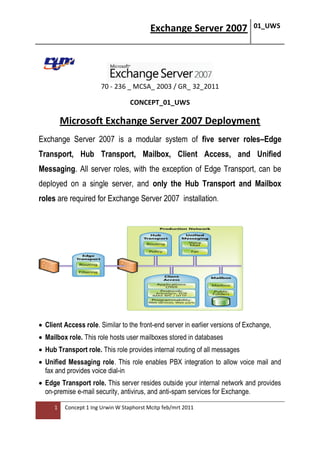
Exchange Server 2007 is a modular system of five server roles–Edge
Transport, Hub Transport, Mailbox, Client Access, and Unified
Messaging. All server roles, with the exception of Edge Transport, can be
deployed on a single server, and only the Hub Transport and Mailbox
roles are required for Exchange Server 2007 installation.


 Client Access role. Similar to the front-end server in earlier versions of Exchange,
 Mailbox role. This role hosts user mailboxes stored in databases
 Hub Transport role. This role provides internal routing of all messages
 Unified Messaging role. This role enables PBX integration to allow voice mail and
  fax and provides voice dial-in
 Edge Transport role. This server resides outside your internal network and provides
  on-premise e-mail security, antivirus, and anti-spam services for Exchange.

     1    Concept 1 Ing Urwin W Staphorst Mcitp feb/mrt 2011
Exchange Server 2007                    01_UWS


                                                                64-bit by the numbers
                                                                             32
                                                                32-bit = 2        or 4 GB of
                                                                addressable memory
                                                                             64
                                                                64-bit = 2        or 16 Exabytes of
                                                                addressable memory
Installation Exchange Server 2007
 Preparing your Windows Server 2003 machine for Exch 2007


Domain ( Member ) Server or DC_2
Sysmanager extract
Exchangeserver 2007 extract

         IIS 7 ( Webserver ) Service


RPC over HTTP Proxy


      2    Concept 1 Ing Urwin W Staphorst Mcitp feb/mrt 2011
Exchange Server 2007   01_UWS


 Preparing your Windows Server 2003 machine for Exch 2007

        Internet explorer v8
        MSI 4.5
        Dotnet + Upgrade ( Hotfix )
        Net Framework v2.0
        Net Fr ( Hotfix ) SP1
        PowerShell
        Server 2003 Hotfix
        MMC 3.0 (installed by default)

  Preparing your Windows Server 2003 machine for Exchange 2007


Setup.exe


     3    Concept 1 Ing Urwin W Staphorst Mcitp feb/mrt 2011
Exchange Server 2007   01_UWS


Upgrade
You cannot perform an in-place server upgrade to Exchange 2007
on a server that has a previous version of Exchange installed.

All messages within an Exchange Server 2007 organization are
encrypted by default because each server is automatically
configured with SSL certificate.

Anywhere Access
 Outlook Anywhere allows users to access their mailbox from any
 computer running Outlook that is connected to the Internet.

Selecting a typical install which installs Clientaccess ,
Hub Transport, Mailbox roles and management tools


N A T (RRAS)in place (in domain ???)

    4   Concept 1 Ing Urwin W Staphorst Mcitp feb/mrt 2011
Exchange Server 2007   01_UWS


Exchange Management Console


To restart the Microsoft Exchange (Information) Store Services

1. On the Start menu, click Run, type services.msc, and then click OK.
2. In the Results pane, find the Microsoft Exchange (Information) Store
  service e.o.
3. Right-click the service, and then click Restart.

CHECKPOINTS

   1. Root certificate
   2. Webserver cert
   3. User & Computer certs
   4. Domain certificate
   5. Virtualservers certs
   6. Registery
   7. Internet Explorer
    5   Concept 1 Ing Urwin W Staphorst Mcitp feb/mrt 2011
Exchange Server 2007   01_UWS


MX Record !!!!

HUB Transport configure ( Send Connector )
Organisation configuration

Received Connector ( Mail from Internet )
SERVER CONFIGURATION

Also configure the default connectors
( avoid overlapping )

New Mailbox / User / Postmaster
Add Exchange Admin (Organisation configuration )
AD user vs. EXCH Console user


      Self-Signed Certificate in Exchange 2007
A digital certificate is an electronic file that works like an online
password to verify the identity of a user or a computer. It is also used
to create an SSL-encrypted channel that is used for communications
between a server that is running Microsoft Exchange and a client
computer or device. Digital certificates do the following:

         They authenticate that their holders—people, Web sites, and
          even network resources such as routers—are truly who or what
          they claim to be.
         They help protect data that is exchanged online from theft or
          tampering.

      6    Concept 1 Ing Urwin W Staphorst Mcitp feb/mrt 2011
Exchange Server 2007       01_UWS


Enable Outlook Anywhere
OUTLOOK WEB ACCESS
https://servername/owa/username

https://servername.domainname/owa/username


TOOLS

ManagementShell: (get-mailbox) (get-eventloglevel)


END Part 1

Maart 2011 Ing. U.W. STAPHORST Mct/ Mcse/Mcitp

Paramaribo- Suriname

                                    http://www.slideshare.net/rtmsuriname
http://www.scribd.com/rtmsuriname


        7    Concept 1 Ing Urwin W Staphorst Mcitp feb/mrt 2011

Microsoft Exchange Server 2007 Deployment

  • 1.
    Exchange Server 2007 01_UWS 70 - 236 _ MCSA_ 2003 / GR_ 32_2011 CONCEPT_01_UWS Microsoft Exchange Server 2007 Deployment Exchange Server 2007 is a modular system of five server roles–Edge Transport, Hub Transport, Mailbox, Client Access, and Unified Messaging. All server roles, with the exception of Edge Transport, can be deployed on a single server, and only the Hub Transport and Mailbox roles are required for Exchange Server 2007 installation.  Client Access role. Similar to the front-end server in earlier versions of Exchange,  Mailbox role. This role hosts user mailboxes stored in databases  Hub Transport role. This role provides internal routing of all messages  Unified Messaging role. This role enables PBX integration to allow voice mail and fax and provides voice dial-in  Edge Transport role. This server resides outside your internal network and provides on-premise e-mail security, antivirus, and anti-spam services for Exchange. 1 Concept 1 Ing Urwin W Staphorst Mcitp feb/mrt 2011
  • 2.
    Exchange Server 2007 01_UWS 64-bit by the numbers 32 32-bit = 2 or 4 GB of addressable memory 64 64-bit = 2 or 16 Exabytes of addressable memory Installation Exchange Server 2007 Preparing your Windows Server 2003 machine for Exch 2007 Domain ( Member ) Server or DC_2 Sysmanager extract Exchangeserver 2007 extract  IIS 7 ( Webserver ) Service RPC over HTTP Proxy 2 Concept 1 Ing Urwin W Staphorst Mcitp feb/mrt 2011
  • 3.
    Exchange Server 2007 01_UWS Preparing your Windows Server 2003 machine for Exch 2007  Internet explorer v8  MSI 4.5  Dotnet + Upgrade ( Hotfix )  Net Framework v2.0  Net Fr ( Hotfix ) SP1  PowerShell  Server 2003 Hotfix  MMC 3.0 (installed by default) Preparing your Windows Server 2003 machine for Exchange 2007 Setup.exe 3 Concept 1 Ing Urwin W Staphorst Mcitp feb/mrt 2011
  • 4.
    Exchange Server 2007 01_UWS Upgrade You cannot perform an in-place server upgrade to Exchange 2007 on a server that has a previous version of Exchange installed. All messages within an Exchange Server 2007 organization are encrypted by default because each server is automatically configured with SSL certificate. Anywhere Access  Outlook Anywhere allows users to access their mailbox from any computer running Outlook that is connected to the Internet. Selecting a typical install which installs Clientaccess , Hub Transport, Mailbox roles and management tools N A T (RRAS)in place (in domain ???) 4 Concept 1 Ing Urwin W Staphorst Mcitp feb/mrt 2011
  • 5.
    Exchange Server 2007 01_UWS Exchange Management Console To restart the Microsoft Exchange (Information) Store Services 1. On the Start menu, click Run, type services.msc, and then click OK. 2. In the Results pane, find the Microsoft Exchange (Information) Store service e.o. 3. Right-click the service, and then click Restart. CHECKPOINTS 1. Root certificate 2. Webserver cert 3. User & Computer certs 4. Domain certificate 5. Virtualservers certs 6. Registery 7. Internet Explorer 5 Concept 1 Ing Urwin W Staphorst Mcitp feb/mrt 2011
  • 6.
    Exchange Server 2007 01_UWS MX Record !!!! HUB Transport configure ( Send Connector ) Organisation configuration Received Connector ( Mail from Internet ) SERVER CONFIGURATION Also configure the default connectors ( avoid overlapping ) New Mailbox / User / Postmaster Add Exchange Admin (Organisation configuration ) AD user vs. EXCH Console user Self-Signed Certificate in Exchange 2007 A digital certificate is an electronic file that works like an online password to verify the identity of a user or a computer. It is also used to create an SSL-encrypted channel that is used for communications between a server that is running Microsoft Exchange and a client computer or device. Digital certificates do the following:  They authenticate that their holders—people, Web sites, and even network resources such as routers—are truly who or what they claim to be.  They help protect data that is exchanged online from theft or tampering. 6 Concept 1 Ing Urwin W Staphorst Mcitp feb/mrt 2011
  • 7.
    Exchange Server 2007 01_UWS Enable Outlook Anywhere OUTLOOK WEB ACCESS https://servername/owa/username https://servername.domainname/owa/username TOOLS ManagementShell: (get-mailbox) (get-eventloglevel) END Part 1 Maart 2011 Ing. U.W. STAPHORST Mct/ Mcse/Mcitp Paramaribo- Suriname http://www.slideshare.net/rtmsuriname http://www.scribd.com/rtmsuriname 7 Concept 1 Ing Urwin W Staphorst Mcitp feb/mrt 2011