PCB DESIGN
By M.LAVANYA
N BINITA
N RAVI TEJA
P MANASA
P ADITYA
EASY EDA
(Electronics Design
Automation)
Introduction
An Easier and Powerful Online PCB Design Tool Featuring Parts and PCB
Services Powered by LCSC.
EasyEDA is an easier and powerful online PCB design tool that allows
electronics engineers, educators, students, makers, and enthusiasts to
design and share their projects.This is a design tool integrated LCSC
components catalog and JLCPCB PCB service that helps users to save
time to make their ideas into real products.
WHAT IS EASY EDA FOR?
EasyEDA is a web-based EDA tool suite that enables hardware
engineers to design, simulate, share - publicly and privately -
and discuss schematics, simulations and printed circuit
boards. Other features include the creation of a bill of
materials, Gerber files and pick and place files and
documentary outputs in PDF, PNG and SVG formats.
INTRO : PCB DESIGN USING EASY EDA
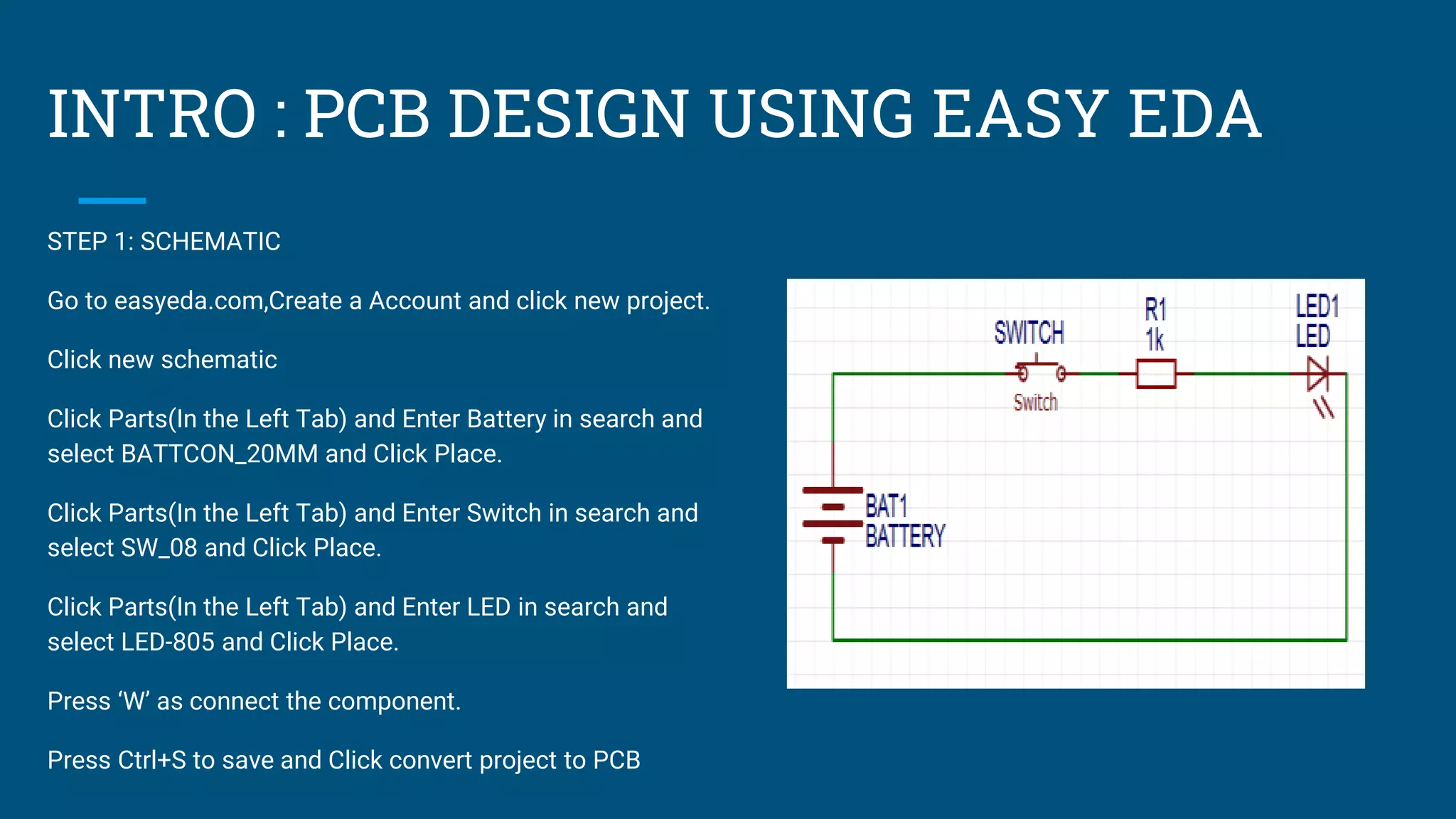
STEP 1: SCHEMATIC
Go to easyeda.com,Create a Account and click new project.
Click new schematic
Click Parts(In the Left Tab) and Enter Battery in search and
select BATTCON_20MM and Click Place.
Click Parts(In the Left Tab) and Enter Switch in search and
select SW_08 and Click Place.
Click Parts(In the Left Tab) and Enter LED in search and
select LED-805 and Click Place.
Press ‘W’ as connect the component.
Press Ctrl+S to save and Click convert project to PCB
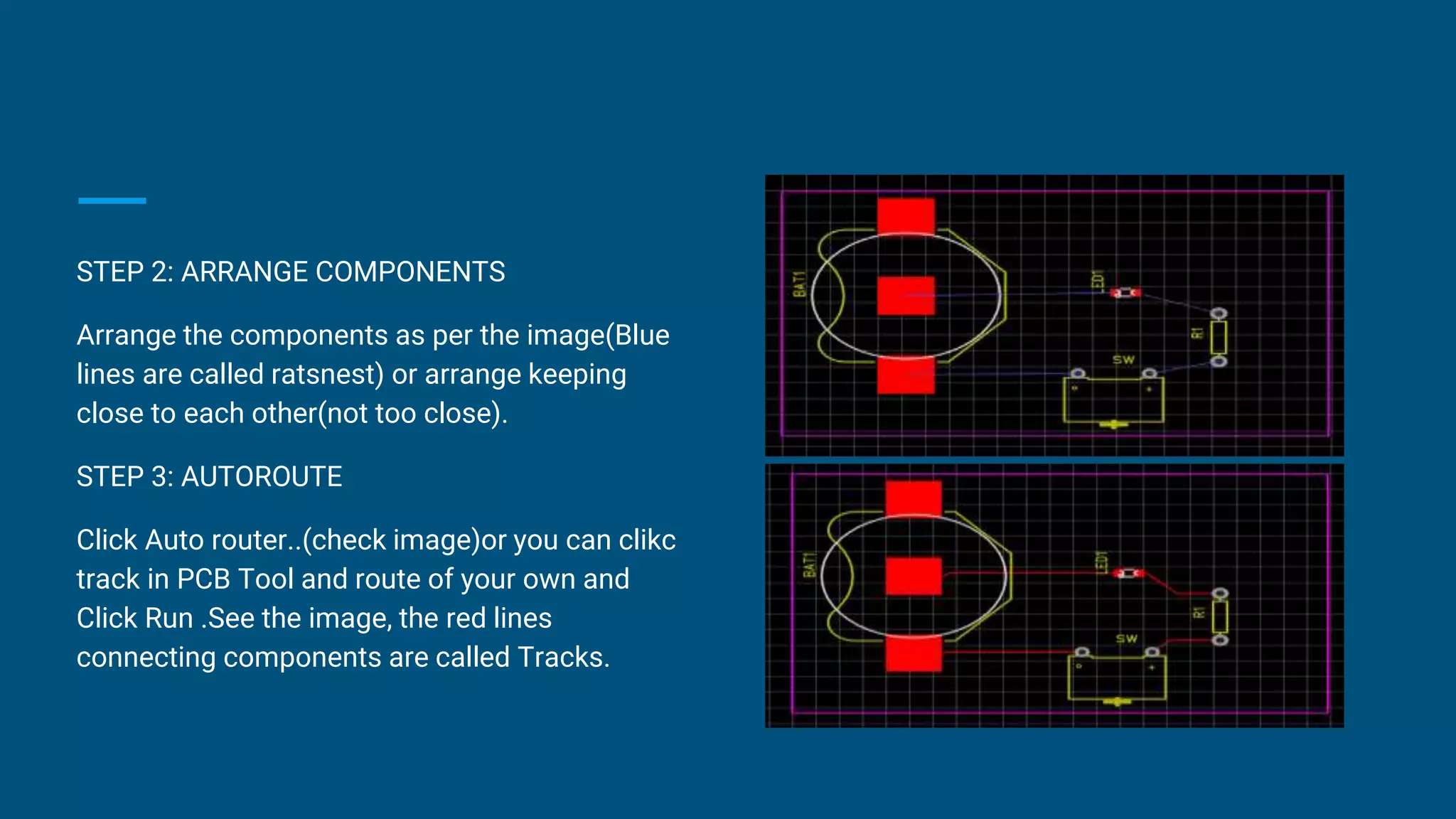
STEP 2: ARRANGE COMPONENTS
Arrange the components as per the image(Blue
lines are called ratsnest) or arrange keeping
close to each other(not too close).
STEP 3: AUTOROUTE
Click Auto router..(check image)or you can clikc
track in PCB Tool and route of your own and
Click Run .See the image, the red lines
connecting components are called Tracks.
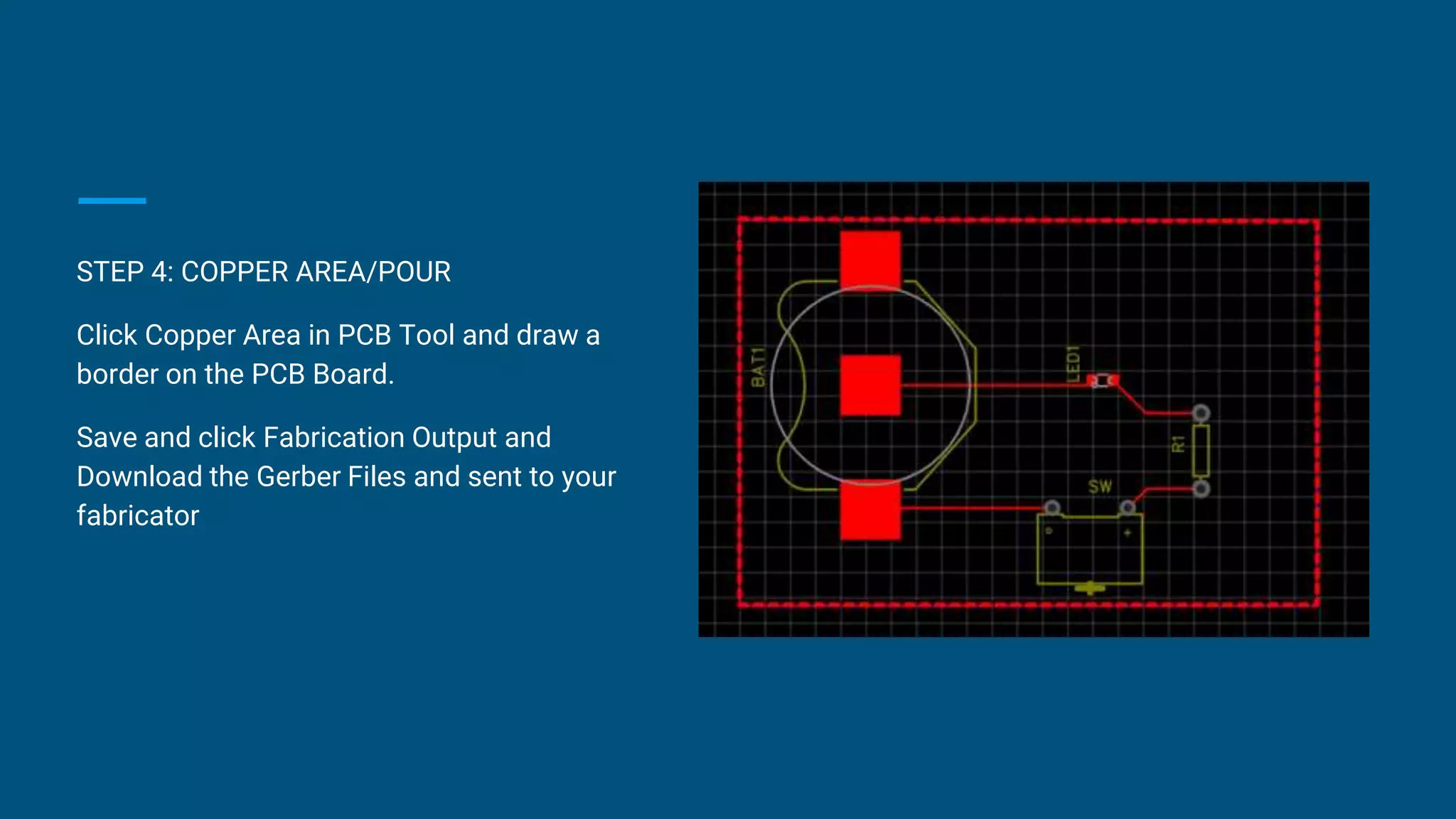
STEP 4: COPPER AREA/POUR
Click Copper Area in PCB Tool and draw a
border on the PCB Board.
Save and click Fabrication Output and
Download the Gerber Files and sent to your
fabricator
FEATURES
● Simple, Easy, Friendly, and Powerful drawing capabilities
● Works Anywhere, Anytime, on Any Device
● Real-time Team Cooperation
● PCB Layout
○ Design Rules Checking(DRC)
○ Multi-Layer, 6 copper layer supported
○ Document export(PDF, PNG, SVG)
○ EasyEDA source file export(json)
○ Altium Designer format export
○ BOM export
○ DXF export
○ Photo view
○ 3D view
Is EasyEDA safe?
EasyEDA will try to protect your designs in following ways:
We utilize SSL throughout the entire domain EasyEDA.com. Secure Socket Layer
(SSL) technology encrypts all data transferred between your computer and our
servers. Your data is for your eyes only.
You can save your files locally.
Multiple copies of every file are saved in your local database.
EasyEDA servers backup your designs frequently.
Advantages
● No need to install any special softwares, a web browser is
enough.
● Will work on all operating systems.
● No need of large resources or high power computers to do big
projects.
● Access to large and updated libraries
● Share your design with online community.
DISADVANTAGES
● Needs internet connection for its operation.
But it will work in offline mode once the tool is loaded in the
browser and it can save the design locally. We can also hope
that they will develop an offline tool or software for this
purpose soon.
THANK YOU

Untitled presentation.pptx

  • 1.
    PCB DESIGN By M.LAVANYA NBINITA N RAVI TEJA P MANASA P ADITYA
  • 2.
  • 3.
    Introduction An Easier andPowerful Online PCB Design Tool Featuring Parts and PCB Services Powered by LCSC. EasyEDA is an easier and powerful online PCB design tool that allows electronics engineers, educators, students, makers, and enthusiasts to design and share their projects.This is a design tool integrated LCSC components catalog and JLCPCB PCB service that helps users to save time to make their ideas into real products.
  • 4.
    WHAT IS EASYEDA FOR? EasyEDA is a web-based EDA tool suite that enables hardware engineers to design, simulate, share - publicly and privately - and discuss schematics, simulations and printed circuit boards. Other features include the creation of a bill of materials, Gerber files and pick and place files and documentary outputs in PDF, PNG and SVG formats.
  • 5.
    INTRO : PCBDESIGN USING EASY EDA STEP 1: SCHEMATIC Go to easyeda.com,Create a Account and click new project. Click new schematic Click Parts(In the Left Tab) and Enter Battery in search and select BATTCON_20MM and Click Place. Click Parts(In the Left Tab) and Enter Switch in search and select SW_08 and Click Place. Click Parts(In the Left Tab) and Enter LED in search and select LED-805 and Click Place. Press ‘W’ as connect the component. Press Ctrl+S to save and Click convert project to PCB
  • 6.
    STEP 2: ARRANGECOMPONENTS Arrange the components as per the image(Blue lines are called ratsnest) or arrange keeping close to each other(not too close). STEP 3: AUTOROUTE Click Auto router..(check image)or you can clikc track in PCB Tool and route of your own and Click Run .See the image, the red lines connecting components are called Tracks.
  • 7.
    STEP 4: COPPERAREA/POUR Click Copper Area in PCB Tool and draw a border on the PCB Board. Save and click Fabrication Output and Download the Gerber Files and sent to your fabricator
  • 8.
    FEATURES ● Simple, Easy,Friendly, and Powerful drawing capabilities ● Works Anywhere, Anytime, on Any Device ● Real-time Team Cooperation ● PCB Layout ○ Design Rules Checking(DRC) ○ Multi-Layer, 6 copper layer supported ○ Document export(PDF, PNG, SVG) ○ EasyEDA source file export(json) ○ Altium Designer format export ○ BOM export ○ DXF export ○ Photo view ○ 3D view
  • 9.
    Is EasyEDA safe? EasyEDAwill try to protect your designs in following ways: We utilize SSL throughout the entire domain EasyEDA.com. Secure Socket Layer (SSL) technology encrypts all data transferred between your computer and our servers. Your data is for your eyes only. You can save your files locally. Multiple copies of every file are saved in your local database. EasyEDA servers backup your designs frequently.
  • 10.
    Advantages ● No needto install any special softwares, a web browser is enough. ● Will work on all operating systems. ● No need of large resources or high power computers to do big projects. ● Access to large and updated libraries ● Share your design with online community.
  • 11.
    DISADVANTAGES ● Needs internetconnection for its operation. But it will work in offline mode once the tool is loaded in the browser and it can save the design locally. We can also hope that they will develop an offline tool or software for this purpose soon.
  • 12.