UNTANGLING THE WEB
CLASS 1 – INTRODUCTION TO THE COURSE
THE HARDWARE AND PROTOCOLS THAT POWER THE WEB
INTERVIEW QUESTION: WHAT HAPPENS WHEN YOU TYPE A URL IN THE
SEARCH BAR?
AGENDA FOR TONIGHT
• Intro to the course
• The hardware that powers the internet
• Basic internet protocols
• Larger networks, load balancing, caching, content delivery
networks
• Web servers and HTTP
• Wrap-up
HIGH LEVEL GOALS
• Introduce you to the web and web software development
• Learn how web development teams work together
• Understand customers and applications
• Start to build a development portfolio
WHAT THIS COURSE IS NOT
• It is not a rigorous introduction to software development
• We won’t talk too much about data structures, Big-O notation, memory
efficiency
• It is not the end of the road, but just barely a beginning
• Academic computer science, bootcamps, practical experience
• It is not a Lean Launchpad style business accelerator
• We’ll talk about what you want to do to launch a web business, but I do
not expect the group projects you do in the class to be the basis of that
business. If you hit a home run out of the gate, of course, that’s great
too! But it is not the goal or expectation.
INSTRUCTOR BIO – DEREK JACOBY
• Recent computer science PhD at Uvic, but in the field since the early 90’s
• 10 years at Microsoft, mostly in Microsoft Research working on speech
recognition
• Development, user research, program management were all roles I filled
• Singularity University graduate
• Focus areas
• Web development
• Bioinformatics
• Data visualization and VR/AR
• User interface design and speech recognition
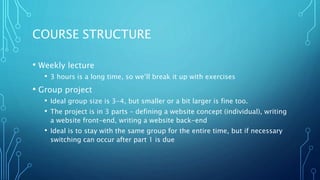
COURSE STRUCTURE
• Weekly lecture
• 3 hours is a long time, so we’ll break it up with exercises
• Group project
• Ideal group size is 3-4, but smaller or a bit larger is fine too.
• The project is in 3 parts – defining a website concept (individual), writing
a website front-end, writing a website back-end
• Ideal is to stay with the same group for the entire time, but if necessary
switching can occur after part 1 is due
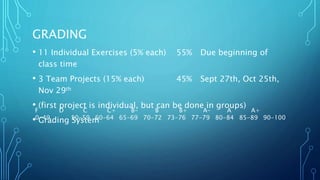
GRADING
• 11 Individual Exercises (5% each) 55% Due beginning of
class time
• 3 Team Projects (15% each) 45% Sept 27th, Oct 25th,
Nov 29th
• (first project is individual, but can be done in groups)
• Grading System
F D C C+ B- B B+ A- A A+
0-49 50-59 60-64 65-69 70-72 73-76 77-79 80-84 85-89 90-100
RESOURCES
• Syllabus
https://heat.csc.uvic.ca/coview/course/2017091/CSC101
• Slack – please send me email at derekja@gmail.com with the title
“slack access” and I’ll add you
• https://untangling.slack.com/
• Slides
• http://www.slideshare.net/derekja (all slides from this term are labeled
“fall2017”, please feel free to peruse the others, though.)
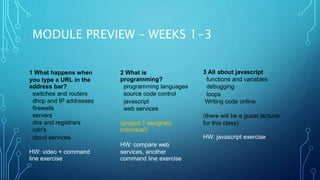
MODULE PREVIEW – WEEKS 1-3
1 What happens when
you type a URL in the
address bar?
switches and routers
dhcp and IP addresses
firewalls
servers
dns and registrars
cdn's
cloud services
HW: video + command
line exercise
2 What is
programming?
programming languages
source code control
javascript
web services
(project 1 assigned,
individual)
HW: compare web
services, another
command line exercise
3 All about javascript
functions and variables
debugging
loops
Writing code online
(there will be a guest lecturer

for this class)
HW: javascript exercise
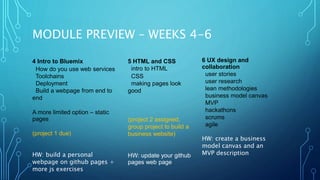
MODULE PREVIEW – WEEKS 4-6
4 Intro to Bluemix
How do you use web services
Toolchains
Deployment
Build a webpage from end to
end
A more limited option – static
pages
(project 1 due)
HW: build a personal
webpage on github pages +
more js exercises
5 HTML and CSS
intro to HTML
CSS
making pages look
good
(project 2 assigned,
group project to build a
business website)
HW: update your github
pages web page
6 UX design and
collaboration
user stories
user research
lean methodologies
business model canvas
MVP
hackathons
scrums
agile
HW: create a business
model canvas and an
MVP description
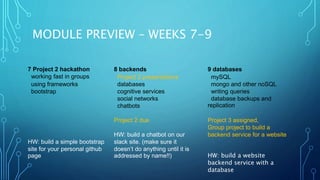
MODULE PREVIEW – WEEKS 7-9
7 Project 2 hackathon
working fast in groups
using frameworks
bootstrap
HW: build a simple bootstrap
site for your personal github
page
8 backends
Project 2 presentations
databases
cognitive services
social networks
chatbots
Project 2 due
HW: build a chatbot on our
slack site. (make sure it
doesn’t do anything until it is
addressed by name!!)
9 databases
mySQL
mongo and other noSQL
writing queries
database backups and
replication
Project 3 assigned,
Group project to build a
backend service for a website
HW: build a website
backend service with a
database
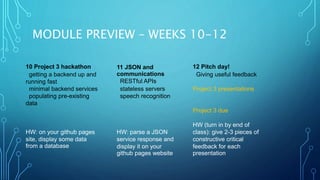
MODULE PREVIEW – WEEKS 10-12
10 Project 3 hackathon
getting a backend up and
running fast
minimal backend services
populating pre-existing
data
HW: on your github pages
site, display some data
from a database
11 JSON and
communications
RESTful APIs
stateless servers
speech recognition
HW: parse a JSON
service response and
display it on your
github pages website
12 Pitch day!
Giving useful feedback
Project 3 presentations
Project 3 due
HW (turn in by end of
class): give 2-3 pieces of
constructive critical
feedback for each
presentation
QUESTIONS ABOUT THE STRUCTURE OF
THE COURSE?
SHORT BREAK – INTRODUCTION TO IBM
BLUEMIX
https://www.youtube.com/watch?v=7Ed2R1ozChw
BLUEMIX VIDEO TERMS
• What’s an app? What’s a service? What’s a cloud platform?
What’s an API? What’s a git repository?
• As we go through the course we’ll untangle all of these terms
more fully
TECHNOLOGY STACKS AND A WEB
INTRODUCTION
WHEN YOU TYPE A URL INTO THE ADDRESS BAR, WHAT HAPPENS?
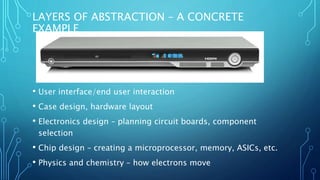
LAYERS OF ABSTRACTION – A CONCRETE
EXAMPLE
• User interface/end user interaction
• Case design, hardware layout
• Electronics design – planning circuit boards, component
selection
• Chip design – creating a microprocessor, memory, ASICs, etc.
• Physics and chemistry – how electrons move
LAYERS OF ABSTRACTION – AN ABSTRACT
EXAMPLE
• Differential equations
• Calculus
• Geometry
• Algebra
• Functions and logic
• Counting and arithmetic
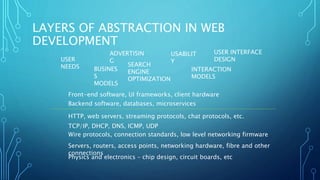
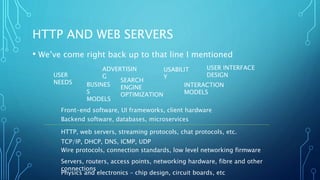
LAYERS OF ABSTRACTION IN WEB
DEVELOPMENT
Physics and electronics – chip design, circuit boards, etc
Servers, routers, access points, networking hardware, fibre and other
connections
Wire protocols, connection standards, low level networking firmware
TCP/IP, DHCP, DNS, ICMP, UDP
HTTP, web servers, streaming protocols, chat protocols, etc.
Backend software, databases, microservices
Front-end software, UI frameworks, client hardware
USER
NEEDS BUSINES
S
MODELS
ADVERTISIN
G
SEARCH
ENGINE
OPTIMIZATION
USABILIT
Y
INTERACTION
MODELS
USER INTERFACE
DESIGN
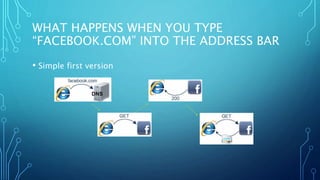
WHAT HAPPENS WHEN YOU TYPE
“FACEBOOK.COM” INTO THE ADDRESS BAR
• Simple first version
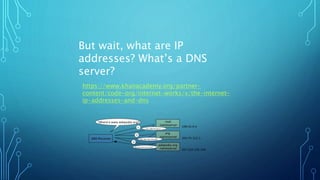
https://www.khanacademy.org/partner-
content/code-org/internet-works/v/the-internet-
ip-addresses-and-dns
But wait, what are IP
addresses? What’s a DNS
server?
SHORT BREAK
• Questions?
• Be back in 5!
Another description of DNS
https://www.youtube.com/watch?v=dE4rsNuG0aw
ROUTERS, SWITCHES, AND HUBS OH MY!
• How does my computer connect to the internet?
• First, a wired computer.
• Every computer gets an IP address, but not necessarily one that
connects to the general internet.
• Let’s first look at how the computers around you connect to
each other
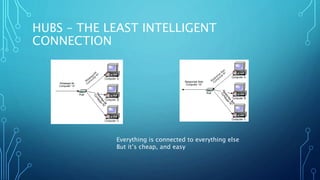
HUBS – THE LEAST INTELLIGENT
CONNECTION
Everything is connected to everything else
But it’s cheap, and easy
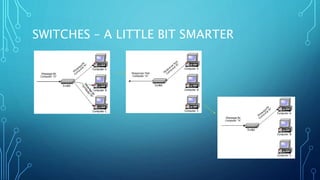
SWITCHES – A LITTLE BIT SMARTER
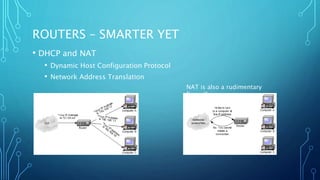
ROUTERS – SMARTER YET
• DHCP and NAT
• Dynamic Host Configuration Protocol
• Network Address Translation
NAT is also a rudimentary
firewall
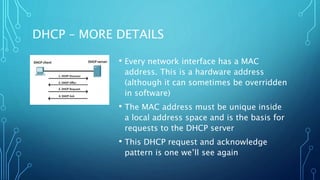
DHCP – MORE DETAILS
• Every network interface has a MAC
address. This is a hardware address
(although it can sometimes be overridden
in software)
• The MAC address must be unique inside
a local address space and is the basis for
requests to the DHCP server
• This DHCP request and acknowledge
pattern is one we’ll see again
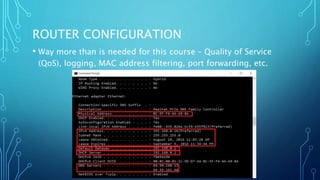
ROUTER CONFIGURATION
• Way more than is needed for this course – Quality of Service
(QoS), logging, MAC address filtering, port forwarding, etc.
WIRELESS CLIENTS
• Only a little bit different. A Wi-Fi access point is generally
integrated with a router.
• Each access point broadcasts an SSID – Service Set Identifier
• There are also more variants of wireless security since physical
access isn’t needed to connect
A SHORT BREAK AND AN EXERCISE
• Open a terminal (start menu, cmd on PC)(Application-
>utilities->terminal on Mac)
• Find your ip address (on PC, type “ipconfig”) (on Mac, type
“ifconfig”)
• Is that IP address on the main internet or is it granted by a wifi
access point?
• What is your external IP address? (go to
https://www.whatismyip.com/)
LARGER NETWORKS
• Routing on the internet
• Caching
• Load balancing
• Anycast
• Content delivery networks (CDNs)
• Network tools
ROUTING AND RELIABILITY
• We’ve talked about routers in local networks, but they also
drive the internet
• https://www.khanacademy.org/partner-content/code-
org/internet-works/v/the-internet-packet-routers-and-
reliability
PORTS AND PROTOCOLS
• Ports are like a door in an apartment building – arbitrarily
assigned but if you knock on the wrong one you’ll never find
who you’re looking for
• We’ve talked about TCP/IP but other protocols exist
• UDP
• ICMP
• Multicast
• SIP
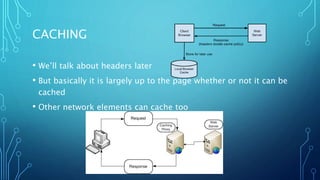
CACHING
• We’ll talk about headers later
• But basically it is largely up to the page whether or not it can be
cached
• Other network elements can cache too
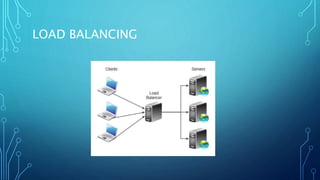
LOAD BALANCING
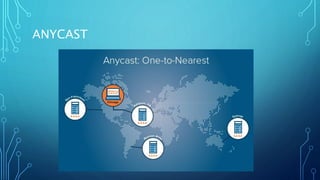
ANYCAST
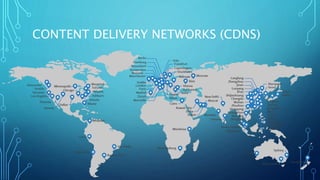
CONTENT DELIVERY NETWORKS (CDNS)
HTTP AND WEB SERVERS
• We’ve come right back up to that line I mentioned
Physics and electronics – chip design, circuit boards, etc
Servers, routers, access points, networking hardware, fibre and other
connections
Wire protocols, connection standards, low level networking firmware
TCP/IP, DHCP, DNS, ICMP, UDP
HTTP, web servers, streaming protocols, chat protocols, etc.
Backend software, databases, microservices
Front-end software, UI frameworks, client hardware
USER
NEEDS BUSINES
S
MODELS
ADVERTISIN
G
SEARCH
ENGINE
OPTIMIZATION
USABILIT
Y
INTERACTION
MODELS
USER INTERFACE
DESIGN
HTML AND HTTP
• https://youtu.be/1K64fWX5z4U?t=61
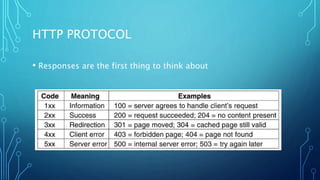
HTTP PROTOCOL
• Responses are the first thing to think about
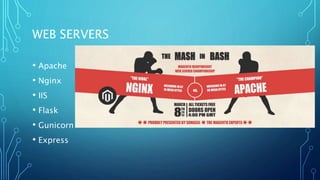
WEB SERVERS
• Apache
• Nginx
• IIS
• Flask
• Gunicorn
• Express
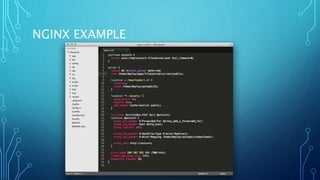
NGINX EXAMPLE
WEB SERVERS
• Web servers basically serve up files
• Many of those are HTML files, but also media files, text files,
etc.
• The HTTP response codes are important, for instance it would
be very easy to configure a particular page with two different
entry points, but much better to configure one of them to
return a 301 and then serve the page up from only a single
location. This is because of the way search engines work. Want
to try and find an answer as to why for next week?
EXERCISE
• In pairs, answer the question:
• what happens when you type facebook.com in the address bar?
what about when you misspell it as fcebook.com? how about
facebook.com/somemissingpage.htm?
PC ARCHITECTURE AND USER INTERFACES
• Most of this course is about the web
• But you’ll be using your laptop to access and create content for
it, so understanding some of the computer internals is useful
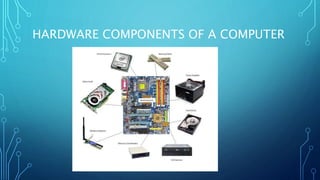
HARDWARE COMPONENTS OF A COMPUTER
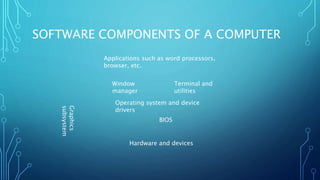
SOFTWARE COMPONENTS OF A COMPUTER
Hardware and devices
Graphics
subsystem
BIOS
Operating system and device
drivers
Window
manager
Terminal and
utilities
Applications such as word processors,
browser, etc.
TERMINAL (COMMAND SHELL, BASH SHELL)
• We’ll be using the command line a lot in this class
• It is the lowest normally accessed level of interaction with the
computer
• In many ways it’s simpler than a graphical user interface
because it is so precisely defined
• But that definition isn’t obvious until you learn about it, unlike
a graphical user interface there is no easy discoverability of
commands and features
FILES AND DIRECTORIES
• Your hard drive contains files (packages with stuff in them, either text or
binary data) and directories (containers of files)
• There are also links, or shortcuts, but these are really just a special kind of file so
we’ll ignore those for now
• In the command window (otherwise known and the terminal, or shell) you
are always in a specific directory
• You can always tell what that directory is with the command “pwd” (which
stands for Present Working Directory)
• In windows, names are not case-sensitive, but on unix and mac they are, so
be careful of case
SOME TERMINAL COMMANDS
• After this week we’ll all be using the git bash command
window, which will be more similar between mac and pc.
• A detailed command line reference is found at
http://ss64.com/
• To get the directory listing, on mac it is “ls” and on the pc it is
“dir”
• Once the git bash install has occurred we will use “ls” on both
systems, for example
REDIRECTION OF COMMAND INPUT
• command > filename Redirect command output (stdout) into a file
• command >> filename Redirect command output and APPEND into
a file
• command < filename Redirect a file into a command
• command1 | command2 Redirect stdout of command1 to
command2
• These work the same on all shells, but after you install bash, use that
and reference the page here: http://ss64.com/bash/syntax-
redirection.html
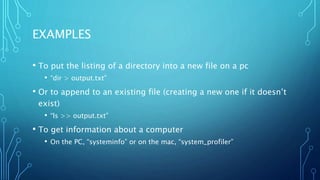
EXAMPLES
• To put the listing of a directory into a new file on a pc
• “dir > output.txt”
• Or to append to an existing file (creating a new one if it doesn’t
exist)
• “ls >> output.txt”
• To get information about a computer
• On the PC, “systeminfo” or on the mac, “system_profiler”
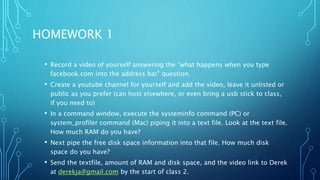
HOMEWORK 1
• Record a video of yourself answering the “what happens when you type
facebook.com into the address bar” question.
• Create a youtube channel for yourself and add the video, leave it unlisted or
public as you prefer (can host elsewhere, or even bring a usb stick to class,
if you need to)
• In a command window, execute the systeminfo command (PC) or
system_profiler command (Mac) piping it into a text file. Look at the text file.
How much RAM do you have?
• Next pipe the free disk space information into that file. How much disk
space do you have?
• Send the textfile, amount of RAM and disk space, and the video link to Derek
at derekja@gmail.com by the start of class 2.
GETTING READY FOR NEXT WEEK
• Make a github account. This will be your developer’s portfolio,
so we’ll start populating it!
• Install git on your computer (install “git bash” from https://git-
scm.com/downloads)
• Please make sure you’ve gotten on the slack channel. Send me
email at derekja@gmail.com to get access.

Untangling fall2017 week1

  • 1.
    UNTANGLING THE WEB CLASS1 – INTRODUCTION TO THE COURSE THE HARDWARE AND PROTOCOLS THAT POWER THE WEB INTERVIEW QUESTION: WHAT HAPPENS WHEN YOU TYPE A URL IN THE SEARCH BAR?
  • 2.
    AGENDA FOR TONIGHT •Intro to the course • The hardware that powers the internet • Basic internet protocols • Larger networks, load balancing, caching, content delivery networks • Web servers and HTTP • Wrap-up
  • 3.
    HIGH LEVEL GOALS •Introduce you to the web and web software development • Learn how web development teams work together • Understand customers and applications • Start to build a development portfolio
  • 4.
    WHAT THIS COURSEIS NOT • It is not a rigorous introduction to software development • We won’t talk too much about data structures, Big-O notation, memory efficiency • It is not the end of the road, but just barely a beginning • Academic computer science, bootcamps, practical experience • It is not a Lean Launchpad style business accelerator • We’ll talk about what you want to do to launch a web business, but I do not expect the group projects you do in the class to be the basis of that business. If you hit a home run out of the gate, of course, that’s great too! But it is not the goal or expectation.
  • 5.
    INSTRUCTOR BIO –DEREK JACOBY • Recent computer science PhD at Uvic, but in the field since the early 90’s • 10 years at Microsoft, mostly in Microsoft Research working on speech recognition • Development, user research, program management were all roles I filled • Singularity University graduate • Focus areas • Web development • Bioinformatics • Data visualization and VR/AR • User interface design and speech recognition
  • 6.
    COURSE STRUCTURE • Weeklylecture • 3 hours is a long time, so we’ll break it up with exercises • Group project • Ideal group size is 3-4, but smaller or a bit larger is fine too. • The project is in 3 parts – defining a website concept (individual), writing a website front-end, writing a website back-end • Ideal is to stay with the same group for the entire time, but if necessary switching can occur after part 1 is due
  • 7.
    GRADING • 11 IndividualExercises (5% each) 55% Due beginning of class time • 3 Team Projects (15% each) 45% Sept 27th, Oct 25th, Nov 29th • (first project is individual, but can be done in groups) • Grading System F D C C+ B- B B+ A- A A+ 0-49 50-59 60-64 65-69 70-72 73-76 77-79 80-84 85-89 90-100
  • 8.
    RESOURCES • Syllabus https://heat.csc.uvic.ca/coview/course/2017091/CSC101 • Slack– please send me email at derekja@gmail.com with the title “slack access” and I’ll add you • https://untangling.slack.com/ • Slides • http://www.slideshare.net/derekja (all slides from this term are labeled “fall2017”, please feel free to peruse the others, though.)
  • 9.
    MODULE PREVIEW –WEEKS 1-3 1 What happens when you type a URL in the address bar? switches and routers dhcp and IP addresses firewalls servers dns and registrars cdn's cloud services HW: video + command line exercise 2 What is programming? programming languages source code control javascript web services (project 1 assigned, individual) HW: compare web services, another command line exercise 3 All about javascript functions and variables debugging loops Writing code online (there will be a guest lecturer for this class) HW: javascript exercise
  • 10.
    MODULE PREVIEW –WEEKS 4-6 4 Intro to Bluemix How do you use web services Toolchains Deployment Build a webpage from end to end A more limited option – static pages (project 1 due) HW: build a personal webpage on github pages + more js exercises 5 HTML and CSS intro to HTML CSS making pages look good (project 2 assigned, group project to build a business website) HW: update your github pages web page 6 UX design and collaboration user stories user research lean methodologies business model canvas MVP hackathons scrums agile HW: create a business model canvas and an MVP description
  • 11.
    MODULE PREVIEW –WEEKS 7-9 7 Project 2 hackathon working fast in groups using frameworks bootstrap HW: build a simple bootstrap site for your personal github page 8 backends Project 2 presentations databases cognitive services social networks chatbots Project 2 due HW: build a chatbot on our slack site. (make sure it doesn’t do anything until it is addressed by name!!) 9 databases mySQL mongo and other noSQL writing queries database backups and replication Project 3 assigned, Group project to build a backend service for a website HW: build a website backend service with a database
  • 12.
    MODULE PREVIEW –WEEKS 10-12 10 Project 3 hackathon getting a backend up and running fast minimal backend services populating pre-existing data HW: on your github pages site, display some data from a database 11 JSON and communications RESTful APIs stateless servers speech recognition HW: parse a JSON service response and display it on your github pages website 12 Pitch day! Giving useful feedback Project 3 presentations Project 3 due HW (turn in by end of class): give 2-3 pieces of constructive critical feedback for each presentation
  • 13.
    QUESTIONS ABOUT THESTRUCTURE OF THE COURSE?
  • 14.
    SHORT BREAK –INTRODUCTION TO IBM BLUEMIX https://www.youtube.com/watch?v=7Ed2R1ozChw
  • 15.
    BLUEMIX VIDEO TERMS •What’s an app? What’s a service? What’s a cloud platform? What’s an API? What’s a git repository? • As we go through the course we’ll untangle all of these terms more fully
  • 16.
    TECHNOLOGY STACKS ANDA WEB INTRODUCTION WHEN YOU TYPE A URL INTO THE ADDRESS BAR, WHAT HAPPENS?
  • 17.
    LAYERS OF ABSTRACTION– A CONCRETE EXAMPLE • User interface/end user interaction • Case design, hardware layout • Electronics design – planning circuit boards, component selection • Chip design – creating a microprocessor, memory, ASICs, etc. • Physics and chemistry – how electrons move
  • 18.
    LAYERS OF ABSTRACTION– AN ABSTRACT EXAMPLE • Differential equations • Calculus • Geometry • Algebra • Functions and logic • Counting and arithmetic
  • 19.
    LAYERS OF ABSTRACTIONIN WEB DEVELOPMENT Physics and electronics – chip design, circuit boards, etc Servers, routers, access points, networking hardware, fibre and other connections Wire protocols, connection standards, low level networking firmware TCP/IP, DHCP, DNS, ICMP, UDP HTTP, web servers, streaming protocols, chat protocols, etc. Backend software, databases, microservices Front-end software, UI frameworks, client hardware USER NEEDS BUSINES S MODELS ADVERTISIN G SEARCH ENGINE OPTIMIZATION USABILIT Y INTERACTION MODELS USER INTERFACE DESIGN
  • 20.
    WHAT HAPPENS WHENYOU TYPE “FACEBOOK.COM” INTO THE ADDRESS BAR • Simple first version
  • 21.
  • 22.
    SHORT BREAK • Questions? •Be back in 5! Another description of DNS https://www.youtube.com/watch?v=dE4rsNuG0aw
  • 23.
    ROUTERS, SWITCHES, ANDHUBS OH MY! • How does my computer connect to the internet? • First, a wired computer. • Every computer gets an IP address, but not necessarily one that connects to the general internet. • Let’s first look at how the computers around you connect to each other
  • 24.
    HUBS – THELEAST INTELLIGENT CONNECTION Everything is connected to everything else But it’s cheap, and easy
  • 25.
    SWITCHES – ALITTLE BIT SMARTER
  • 26.
    ROUTERS – SMARTERYET • DHCP and NAT • Dynamic Host Configuration Protocol • Network Address Translation NAT is also a rudimentary firewall
  • 27.
    DHCP – MOREDETAILS • Every network interface has a MAC address. This is a hardware address (although it can sometimes be overridden in software) • The MAC address must be unique inside a local address space and is the basis for requests to the DHCP server • This DHCP request and acknowledge pattern is one we’ll see again
  • 28.
    ROUTER CONFIGURATION • Waymore than is needed for this course – Quality of Service (QoS), logging, MAC address filtering, port forwarding, etc.
  • 29.
    WIRELESS CLIENTS • Onlya little bit different. A Wi-Fi access point is generally integrated with a router. • Each access point broadcasts an SSID – Service Set Identifier • There are also more variants of wireless security since physical access isn’t needed to connect
  • 30.
    A SHORT BREAKAND AN EXERCISE • Open a terminal (start menu, cmd on PC)(Application- >utilities->terminal on Mac) • Find your ip address (on PC, type “ipconfig”) (on Mac, type “ifconfig”) • Is that IP address on the main internet or is it granted by a wifi access point? • What is your external IP address? (go to https://www.whatismyip.com/)
  • 31.
    LARGER NETWORKS • Routingon the internet • Caching • Load balancing • Anycast • Content delivery networks (CDNs) • Network tools
  • 32.
    ROUTING AND RELIABILITY •We’ve talked about routers in local networks, but they also drive the internet • https://www.khanacademy.org/partner-content/code- org/internet-works/v/the-internet-packet-routers-and- reliability
  • 33.
    PORTS AND PROTOCOLS •Ports are like a door in an apartment building – arbitrarily assigned but if you knock on the wrong one you’ll never find who you’re looking for • We’ve talked about TCP/IP but other protocols exist • UDP • ICMP • Multicast • SIP
  • 34.
    CACHING • We’ll talkabout headers later • But basically it is largely up to the page whether or not it can be cached • Other network elements can cache too
  • 35.
  • 36.
  • 37.
  • 38.
    HTTP AND WEBSERVERS • We’ve come right back up to that line I mentioned Physics and electronics – chip design, circuit boards, etc Servers, routers, access points, networking hardware, fibre and other connections Wire protocols, connection standards, low level networking firmware TCP/IP, DHCP, DNS, ICMP, UDP HTTP, web servers, streaming protocols, chat protocols, etc. Backend software, databases, microservices Front-end software, UI frameworks, client hardware USER NEEDS BUSINES S MODELS ADVERTISIN G SEARCH ENGINE OPTIMIZATION USABILIT Y INTERACTION MODELS USER INTERFACE DESIGN
  • 39.
    HTML AND HTTP •https://youtu.be/1K64fWX5z4U?t=61
  • 40.
    HTTP PROTOCOL • Responsesare the first thing to think about
  • 41.
    WEB SERVERS • Apache •Nginx • IIS • Flask • Gunicorn • Express
  • 42.
  • 43.
    WEB SERVERS • Webservers basically serve up files • Many of those are HTML files, but also media files, text files, etc. • The HTTP response codes are important, for instance it would be very easy to configure a particular page with two different entry points, but much better to configure one of them to return a 301 and then serve the page up from only a single location. This is because of the way search engines work. Want to try and find an answer as to why for next week?
  • 44.
    EXERCISE • In pairs,answer the question: • what happens when you type facebook.com in the address bar? what about when you misspell it as fcebook.com? how about facebook.com/somemissingpage.htm?
  • 45.
    PC ARCHITECTURE ANDUSER INTERFACES • Most of this course is about the web • But you’ll be using your laptop to access and create content for it, so understanding some of the computer internals is useful
  • 46.
  • 47.
    SOFTWARE COMPONENTS OFA COMPUTER Hardware and devices Graphics subsystem BIOS Operating system and device drivers Window manager Terminal and utilities Applications such as word processors, browser, etc.
  • 48.
    TERMINAL (COMMAND SHELL,BASH SHELL) • We’ll be using the command line a lot in this class • It is the lowest normally accessed level of interaction with the computer • In many ways it’s simpler than a graphical user interface because it is so precisely defined • But that definition isn’t obvious until you learn about it, unlike a graphical user interface there is no easy discoverability of commands and features
  • 49.
    FILES AND DIRECTORIES •Your hard drive contains files (packages with stuff in them, either text or binary data) and directories (containers of files) • There are also links, or shortcuts, but these are really just a special kind of file so we’ll ignore those for now • In the command window (otherwise known and the terminal, or shell) you are always in a specific directory • You can always tell what that directory is with the command “pwd” (which stands for Present Working Directory) • In windows, names are not case-sensitive, but on unix and mac they are, so be careful of case
  • 50.
    SOME TERMINAL COMMANDS •After this week we’ll all be using the git bash command window, which will be more similar between mac and pc. • A detailed command line reference is found at http://ss64.com/ • To get the directory listing, on mac it is “ls” and on the pc it is “dir” • Once the git bash install has occurred we will use “ls” on both systems, for example
  • 51.
    REDIRECTION OF COMMANDINPUT • command > filename Redirect command output (stdout) into a file • command >> filename Redirect command output and APPEND into a file • command < filename Redirect a file into a command • command1 | command2 Redirect stdout of command1 to command2 • These work the same on all shells, but after you install bash, use that and reference the page here: http://ss64.com/bash/syntax- redirection.html
  • 52.
    EXAMPLES • To putthe listing of a directory into a new file on a pc • “dir > output.txt” • Or to append to an existing file (creating a new one if it doesn’t exist) • “ls >> output.txt” • To get information about a computer • On the PC, “systeminfo” or on the mac, “system_profiler”
  • 53.
    HOMEWORK 1 • Recorda video of yourself answering the “what happens when you type facebook.com into the address bar” question. • Create a youtube channel for yourself and add the video, leave it unlisted or public as you prefer (can host elsewhere, or even bring a usb stick to class, if you need to) • In a command window, execute the systeminfo command (PC) or system_profiler command (Mac) piping it into a text file. Look at the text file. How much RAM do you have? • Next pipe the free disk space information into that file. How much disk space do you have? • Send the textfile, amount of RAM and disk space, and the video link to Derek at derekja@gmail.com by the start of class 2.
  • 54.
    GETTING READY FORNEXT WEEK • Make a github account. This will be your developer’s portfolio, so we’ll start populating it! • Install git on your computer (install “git bash” from https://git- scm.com/downloads) • Please make sure you’ve gotten on the slack channel. Send me email at derekja@gmail.com to get access.