Embracing Technology  as a Nonprofit: 5 Easy Steps Brooke Csukas Account Executive, eTapestry Division of Blackbaud October 21, 2009
What is our history? Founded by former execs of MSC First “Software as a Service” solution for nonprofits in 1999 6,000+ Nonprofit clients worldwide Became part of Blackbaud-August 2007
Agenda Optimizing your Website Attracting Donors/Support through Social Media Collecting Information on the Web Making your Database Work for You Communicating with New/Existing Donors
How is the Economy Affecting Giving? Image Source: http://www.emu.edu.tr/mbalcilar/econconference/index_files/global-economy_0.jpg
How is the Economy Affecting Giving? 52.3% of donors are still planning to give the same amount or more in donations for 2009—only 17% are planning to give LESS Donors plan to give less through direct mail, telemarketing, door-to-door canvassing and  MORE  through online giving and in kind gifts instead of cash *Overall Online Gifts have increased 26% in 2008  THE MORE PEOPLE DO WITH YOUR ORGANIZATION, THE LARGER THEIR GIVING AND ENGAGEMENT! Source: Philanthropy In A Turbulent Economy: Penelope Burk March 2009 * Source: NTEN Benchmark Study 2009
The Rules Still Apply (It’s all about relationships… not technology)
Web Site Optimization 75% of donors will check your website before making a gift whether it is Online/Offline If Relationships are Built on Communications . . . Set yourself up for success! A Few Key Changes can Make a Huge Difference  Your website = tool for engagement
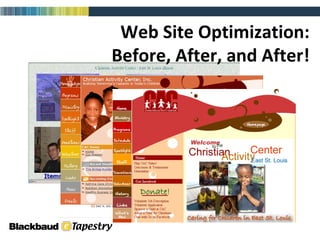
Web Site Optimization: Before, After, and After!
1.   Learn from your content (Start with Google Analytics to see how many unique visitors you have, how they found you, what they viewed, where they stayed the longest, and what content produced actions.)  2. Make your content easy to consume (Always offer RSS feeds in addition to various subscribe options.  Make sure they are easy to find and use.)  3. Make your content ever changing  (Be brave enough to blog, show responses, share viewpoints, and utilize forums.  New information needs to be added daily or weekly by you and your community.  Why do you think millions go to Facebook or Twitter by the minute?)  4. Make your site easy to find (Every NPO and those serving NPO’s should have a social web presence.  Facebook, MySpace, LinkedIn, YouTube, Twitter and Flickr are your outposts linking back to the web site hub!) Keys to Building a Successful Web Site
 
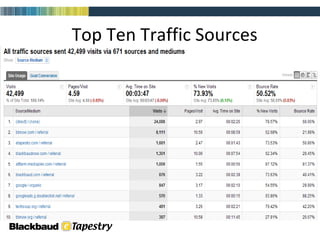
Top Ten Traffic Sources
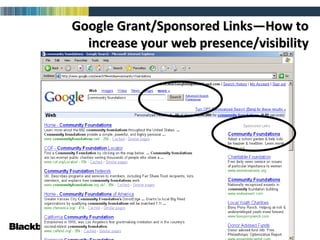
Google Grant/Sponsored Links—How to increase your web presence/visibility
They’re at your website, now what do they do? Can they engage? Can they add content? (Web 2.0) Can they give or volunteer? Your goal – to get something from them!
Keep it simple & Make Integration a Focus Constituent Website Gather Information Use Email Database Database Social Media
Do you have an Online/Social Media Strategy? Google Adwords Media & PR E-mail Campaigns Social Networks Integration with Direct Mail Banner Ads on Homepage, Blog and eNewsletter
What is Social Media? Social media  is online content created by people using highly accessible and scalable publishing technologies. Social media is a shift in how people discover, read and share news, information and content; it's a fusion of sociology and technology,  transforming people from content readers into publishers.   Social media  has become extremely popular because it allows people to connect in the online world to  form relationships for personal, political and business use.  Source: Wikipedia, 2009.


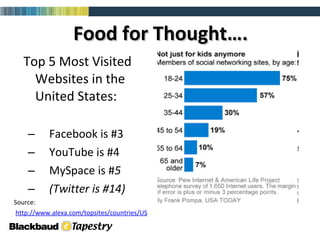
Food for Thought…. Top 5 Most Visited Websites in the United States: Facebook is #3  YouTube is #4 MySpace is # 5 (Twitter is #14) Source: h ttp://www.alexa.com/topsites/countries/US
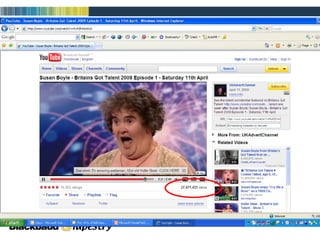
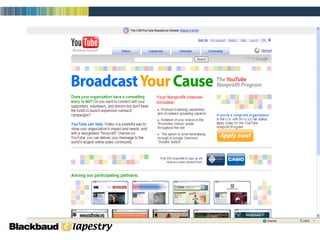
YouTube! Allows you to attract more traffic to your website Videos can easily be posted on website or as a link within an eBlast or eNewsletter FREE service to increase your visibility Growing in popularity and becoming more accepted in the NP world as a method for reaching constituents
April 2009 Data comScore Video Metrix Service Video now bigger than Search: 12 Billion Videos per month vs. 10.5 Billion searches conducted  78.6% of total U.S. Internet audience viewed online video.  Average video viewer watched 385 minutes of video, or 6.4 hours  107.1 million viewers watched 6.8 billion videos on YouTube.com (63.5 videos per viewer)  The duration of the average online video was 3.5 minutes Source: BrightRoll
 
 
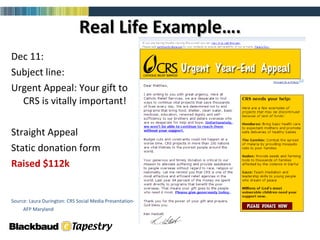
Real Life Example…. Dec 11: Subject line:  Urgent Appeal: Your gift to CRS is vitally important! Straight Appeal  Static donation form Raised $112k Source: Laura Durington: CRS Social Media Presentation-AFP Maryland
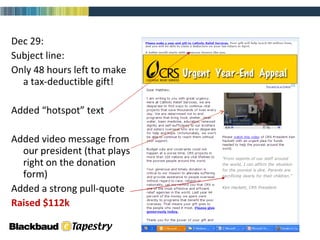
Dec 29: Subject line:  Only 48 hours left to make a tax-deductible gift! Added “hotspot” text Added video message from our president (that plays right on the donation form) Added a strong pull-quote Raised $112k Source: Laura Durington: CRS Social Media Presentation-AFP Maryland
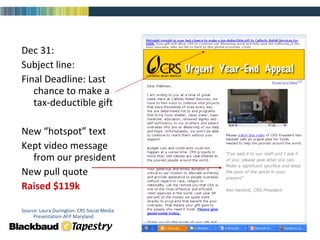
Dec 31: Subject line:  Final Deadline: Last chance to make a tax-deductible gift New “hotspot” text Kept video message from our president New pull quote Raised $119k Source: Laura Durington: CRS Social Media Presentation-AFP Maryland
Was CRS’s most successful online fundraising campaign to date (non-emergency). Three e-mail messages in this campaign (based on a direct mail piece) Posts on social networking sites advertising campaign  Coordination with Google AdWords This campaign raised $594k online.   Source: Laura Durington: CRS Social Media Presentation-AFP Maryland The Results…
YouTube Takeaways… “ SHOP” Others Identify a few constituents who would like to share their story with others & record a few different testimonials each year Integrate with your website and eNewsletter blasts  Get Creative!!
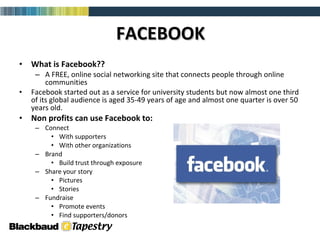
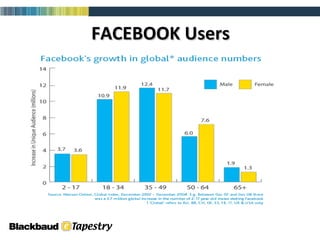
FACEBOOK What is Facebook?? A FREE, online social networking site that connects people through online communities Facebook started out as a service for university students but now almost one third of its global audience is aged 35-49 years of age and almost one quarter is over 50 years old. Non profits can use Facebook to:  Connect With supporters With other organizations Brand Build trust through exposure Share your story  Pictures Stories Fundraise  Promote events Find supporters/donors
FACEBOOK Users
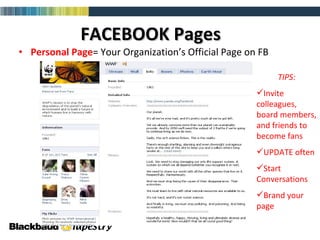
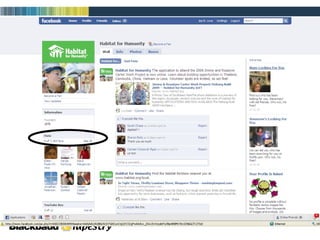
FACEBOOK Pages Personal Page = Your Organization’s Official Page on FB TIPS: Invite colleagues, board members, and friends to become fans UPDATE often Start Conversations Brand your page
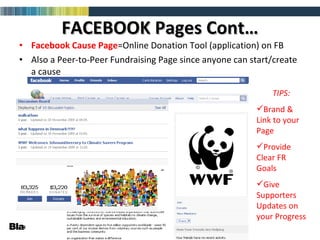
FACEBOOK Pages Cont… Facebook Cause   Page =Online Donation Tool (application) on FB Also a Peer-to-Peer Fundraising Page since anyone can start/create a cause TIPS: Brand & Link to your Page Provide Clear FR Goals Give Supporters Updates on your Progress
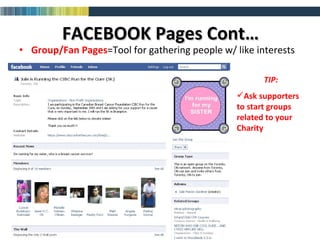
FACEBOOK Pages Cont… Group/Fan   Pages =Tool for gathering people w/ like interests TIP: Ask supporters to start groups related to your Charity
 
FACEBOOK Takeaways… Real Life Application The Nature Conservency’s “Lil Green Patch” Case Study Built a cause page on FB to attract users to support the Adopt an Acre program to conserve rainforests in Costa Rica & fight global warming 20K new cause members and $33K in support since Feb 2008 These results will most likely NOT be the case for your organization… HOWEVER, creating an online, Facebook presence will not hurt  Creating a group of fans/people that advocate for your cause WILL increase your giving and support POST YOUR ONLINE GIVING PAGE LINK  ANYWHERE YOU CAN  ON FACEBOOK
What is Twitter??  Twitter is a service for friends, family, and co–workers to communicate and stay connected through the exchange of quick, frequent answers to one simple question:  What are you doing? Compete.com numbers show that roughly 2.5 million people visit Twitter.com each month. Just as a comparison, Facebook receives about 41 million unique visitors per month.  But NTEN (the Nonprofit Technology Network) reminds us that Twitter isn’t the point. Relationships are the point. Relationships are always the point. The most basic of fundraising secrets is that people give to people. Twitter is simply one more tool to help people connect with each other.  **Can your nonprofit afford to not explore all the tools available?**  TWITTER—Stupid or Worth a Second Look?
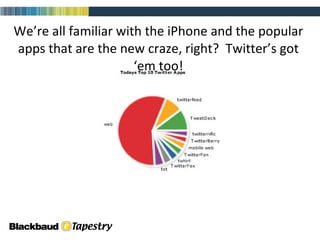
We’re all familiar with the iPhone and the popular apps that are the new craze, right?  Twitter’s got ‘em too!
TwitterFeed  connects your blog to Twitter and automatically feeds posts into the timeline with each new update. Whoshouldifollow.com   makes it easy to find relevant, like-minded friends as well as friends of friends based on keyword and validated networks. Twubble  can help expand your Twitter network. It searches your friend graph and introduces and recommends new people who you may want to follow. Twellow , a service of WebProNews, is an exceptional service for finding people who matter to your business or industry, by category. You can search keywords or browser through common categories to find the voices you deem as worthy following and/or connecting with on Twitter or other social networks. You can also claim your Twitter ID to further customize your individual profile with a short bio, extended bio, links to other profiles popular social networks such Facebook, LinkedIn, Delicious, Flickr, FriendFeed, etc. A few apps to take a look at as you get started
Don’t get overwhelmed—there is a lot of information to sift through in the beginning as you learn how to use it effectively Don’t be afraid to try it and start connecting with other like organizations—You’ll be surprised how fast your followers grow “ Tweet” regularly—assign someone this responsibility each week Use Twitter to reach out to your constituents as a way to get information in front of people—whether that be about your organization as a whole or to inform them of the need for support, or to celebrate how well things are going   Takeaways from Twitter…
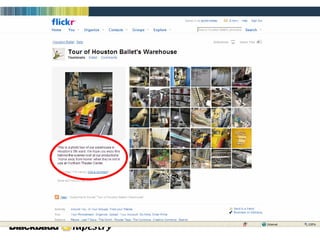
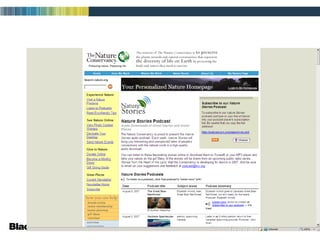
Flickr, Podcasts, Message Boards, Blogs Flickr —Photo Sharing Application Podcasts —Short recordings about a variety of different topics that can be purchased, downloaded for free, or posted on a web page Message Boards —A segment of a website that hosts an open discussion amongst users Blogs —A portion of a website (or a separate entity altogether like Twitter) in which an author posts discussion topics or information to be shared with followers Personal Blogs=Online ‘Diary’ Organizational blogs=Information sharing/News Updates


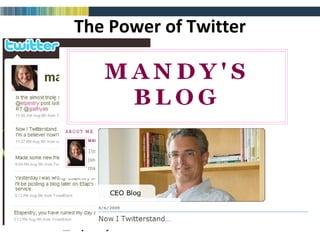
The Power of Twitter
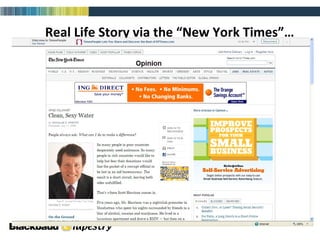
Real Life Story via the “New York Times”…
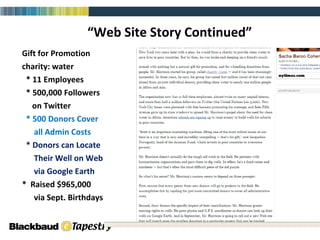
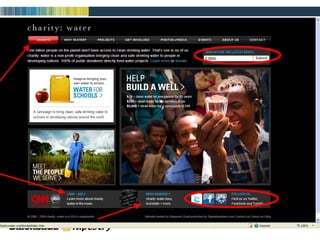
“ Web Site Story Continued” Gift for Promotion charity: water * 11 Employees * 500,000 Followers  on Twitter * 500 Donors Cover all Admin Costs * Donors can Locate Their Well on Web via Google Earth *  Raised $965,000 via Sept. Birthdays
 
Collecting information on your website Ecommerce / Online Giving Personal Fundraising Shopping Cart
Ecommerce & Online Giving Important Functions of your Online Donation Page: Integrates directly into donor database Requires no additional manual entry Customizable Are your website and database integrated?
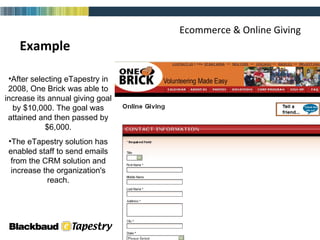
Ecommerce & Online Giving Example After selecting eTapestry in 2008, One Brick was able to increase its annual giving goal by $10,000. The goal was attained and then passed by $6,000. The eTapestry solution has enabled staff to send emails from the CRM solution and increase the organization's reach.
 
Online Giving with Recurring Gifts Recurring Gifts Donors become investors Steady stream of incoming funds Larger amounts in total Amounts are more manageable by the donors Key ingredient to sustaining long term donors and constituent loyalty
Matching Gifts Does your organization have a Matching Gift Campaign? Do you know which companies in your area having a Matching Gift policy?  How do you track which donors work for a Matching Gift corporation?
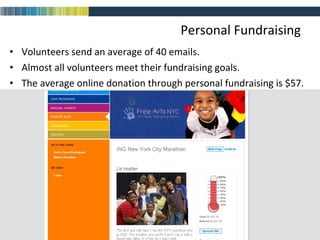
Personal Fundraising Volunteers send an average of 40 emails.  Almost all volunteers meet their fundraising goals.  The average online donation through personal fundraising is $57.  Source: Kintera
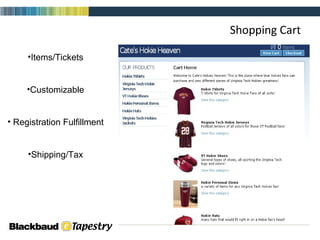
Shopping Cart Items/Tickets Customizable Registration Fulfillment Shipping/Tax
Where does the information go?  How do you track all of the information you know about a donor?  Can you store their interests, historical conversations, and all contact points in one location? Is your institutional memory protected?  What are the benefits to combining all this information into one location?
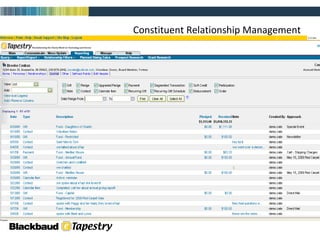
Constituent Relationship Management
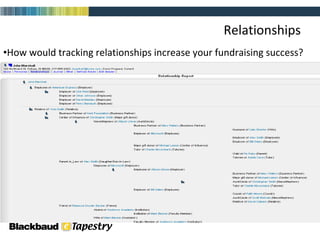
Relationships How would tracking relationships increase your fundraising success?
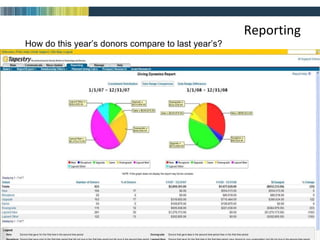
Reporting How do this year’s donors compare to last year’s?
Database = Fundraising Tool Only works if used daily by all Must be consistent/accurate Powerful Memory Supplement Technology makes it easy
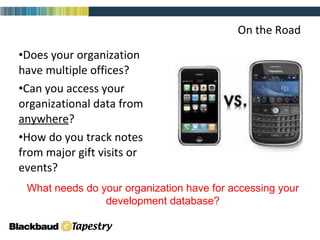
On the Road Does your organization have multiple offices?  Can you access your organizational data from  anywhere ?  How do you track notes from major gift visits or events? What needs do your organization have for accessing your development database?
Communications People are connected 24/7 How can we be expected to communicate with so many people? How can we personalize our message?
Why Has Email Become So Important? People are busy…they want to  communicate/interact on their  own time Email is inexpensive… Email provides virtually instant access  to friends and supporters Email is a great equalizer Email is measurable
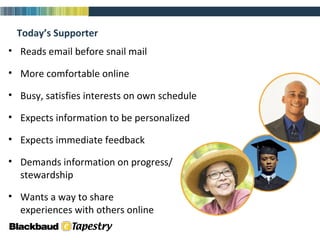
Reads email before snail mail More comfortable online Busy, satisfies interests on own schedule Expects information to be personalized Expects immediate feedback Demands information on progress/ stewardship Wants a way to share  experiences with others online Today’s Supporter
No Email List? No Problem…  Whether you have some contacts or are starting from scratch, anyone can grow a strong email list   The three most important factors in effective email list-building are: Where and how you acquire the addresses How you welcome each new subscriber  How you manage the relationship after the opt-in Source: EmailLabs
Grow Your List Online Direct staff and other close  supporters (board, volunteers, etc.)  to include subscription  links in email signatures Use Search Engine Optimization/ Marketing to increase traffic and  subscriptions Investigate alliances or partnerships with similar or complementary organizations to reach common supporters Advertise your newsletter/services/cause through a 3 rd  party list
Grow Your List Offline Ask for email addresses at  every touch point Instruct staff to capture email  addresses over phone when  appropriate  Include your website address  on all printed materials Offer an incentive to register (contest, raffle) to  collect emails
Now that I have permission… Hook them early, and keep them  engaged over time Optimize the welcome message Send follow up message within a  week (or less) After a few months of active email, survey lists to see if you are meeting expectations
Why Segmentation is Important Segmentation breaks your  audience into manageable parts If the goal is building relationships,  it helps to know who you are talking to  Segmenting your list will lead to more targeted messages If you don’t segment, you are treating every one of your recipients like they are the exact same type of person
How to be a Good Sender In your messages, always include: The purpose; why you are sending it to the  reader A clear way to unsubscribe.  Consider offering alternative ways to receive  emails, such as: Receiving newsletters monthly vs. weekly Change of address (home vs. business email) Sign up via RSS Link to your homepage Privacy policy Physical/street address of your organization Don’t get caught in spamtraps
How Important is that Header? 80% of respondents decide whether  to click on the "Report Spam" or  "Junk" button  without opening the  actual message 73% based that decision on the "From" name 69% percent based the decision on the subject line Source: 2007 Email Sender and Provider Coalition (ESPC) study
Use Landing Pages to Increase Conversions So I got them to click…now what? Landing pages are a natural extension of email, regardless of message The goal of most landing pages is to persuade a visitor to complete a transaction Landing page effectiveness is measured by conversion rate You should test landing page elements like you would test email or direct mail
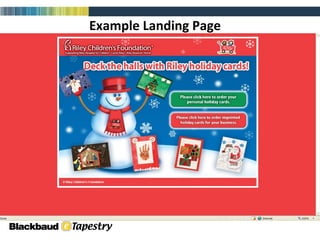
Example Landing Page


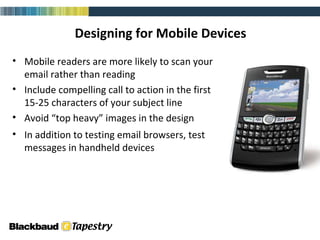
Designing for Mobile Devices Mobile readers are more likely to scan your email rather than reading Include compelling call to action in the first 15-25 characters of your subject line Avoid “top heavy” images in the design In addition to testing email browsers, test messages in handheld devices email (html)
A Few Email Design & Usage Tips Keep truly important items above the  fold Ask subscribers to add your from address to their address book Host images on your web site rather than embedding them  Links to resources and to special landing pages on your web site are powerful  (Especially  “tell a friend”  functions) Develop  your own writing style  that readers will learn to love (people adore stories, so tell many . . . )
 
What Now? 1.  Take a look in the mirror How do you stack up? Website Database E-mail/Communications Social Media Presence
What Now? 2.  Plan Make it a priority Set Aside Time for Review Add to Board Agenda Seek Professional Assistance  (Most companies will help you do this at NO COST!)
What Now? 3.  Continuous Evaluation Must be Measurable Website Hits Fundraising Donor Retention Communications  Cost vs. Results Social Media “Friends”
What Now? 4.  Have Fun!!! Try New Things Get Creative Share your passion for your mission!
What Now? 1. How do we stack up? 2. Written Plan 3. Continuous Evaluation of Tools/Technology 4. Have FUN
Resources Getting Started with Facebook Beth Kanter Blog – How Nonprofits Can Use Social Media Jay Love Blog – CEO eTapestry  ---  Jay Love Twitter Page Blackbaud – Raising Money During Challenging Times Getting Started with Google Analytics LotusJump – Website Marketing Made Easy eTapestry Home Page Contact eTapestry for Guidance
Questions?
Thanks! Brooke Csukas [email_address]   317.336.3912

Embracing Technology As A Nonprofit Birmingham Presentation

  • 1.
    Embracing Technology as a Nonprofit: 5 Easy Steps Brooke Csukas Account Executive, eTapestry Division of Blackbaud October 21, 2009
  • 2.
    What is ourhistory? Founded by former execs of MSC First “Software as a Service” solution for nonprofits in 1999 6,000+ Nonprofit clients worldwide Became part of Blackbaud-August 2007
  • 3.
    Agenda Optimizing yourWebsite Attracting Donors/Support through Social Media Collecting Information on the Web Making your Database Work for You Communicating with New/Existing Donors
  • 4.
    How is theEconomy Affecting Giving? Image Source: http://www.emu.edu.tr/mbalcilar/econconference/index_files/global-economy_0.jpg
  • 5.
    How is theEconomy Affecting Giving? 52.3% of donors are still planning to give the same amount or more in donations for 2009—only 17% are planning to give LESS Donors plan to give less through direct mail, telemarketing, door-to-door canvassing and MORE through online giving and in kind gifts instead of cash *Overall Online Gifts have increased 26% in 2008 THE MORE PEOPLE DO WITH YOUR ORGANIZATION, THE LARGER THEIR GIVING AND ENGAGEMENT! Source: Philanthropy In A Turbulent Economy: Penelope Burk March 2009 * Source: NTEN Benchmark Study 2009
  • 6.
    The Rules StillApply (It’s all about relationships… not technology)
  • 7.
    Web Site Optimization75% of donors will check your website before making a gift whether it is Online/Offline If Relationships are Built on Communications . . . Set yourself up for success! A Few Key Changes can Make a Huge Difference Your website = tool for engagement
  • 8.
    Web Site Optimization:Before, After, and After!
  • 9.
    1. Learn from your content (Start with Google Analytics to see how many unique visitors you have, how they found you, what they viewed, where they stayed the longest, and what content produced actions.) 2. Make your content easy to consume (Always offer RSS feeds in addition to various subscribe options. Make sure they are easy to find and use.) 3. Make your content ever changing (Be brave enough to blog, show responses, share viewpoints, and utilize forums. New information needs to be added daily or weekly by you and your community. Why do you think millions go to Facebook or Twitter by the minute?) 4. Make your site easy to find (Every NPO and those serving NPO’s should have a social web presence. Facebook, MySpace, LinkedIn, YouTube, Twitter and Flickr are your outposts linking back to the web site hub!) Keys to Building a Successful Web Site
  • 10.
  • 11.
  • 12.
    Google Grant/Sponsored Links—Howto increase your web presence/visibility
  • 13.
    They’re at yourwebsite, now what do they do? Can they engage? Can they add content? (Web 2.0) Can they give or volunteer? Your goal – to get something from them!
  • 14.
    Keep it simple& Make Integration a Focus Constituent Website Gather Information Use Email Database Database Social Media
  • 15.
    Do you havean Online/Social Media Strategy? Google Adwords Media & PR E-mail Campaigns Social Networks Integration with Direct Mail Banner Ads on Homepage, Blog and eNewsletter
  • 16.
    What is SocialMedia? Social media is online content created by people using highly accessible and scalable publishing technologies. Social media is a shift in how people discover, read and share news, information and content; it's a fusion of sociology and technology, transforming people from content readers into publishers. Social media has become extremely popular because it allows people to connect in the online world to form relationships for personal, political and business use. Source: Wikipedia, 2009.
  • 17.
  • 18.
  • 19.
  • 20.
    Food for Thought….Top 5 Most Visited Websites in the United States: Facebook is #3 YouTube is #4 MySpace is # 5 (Twitter is #14) Source: h ttp://www.alexa.com/topsites/countries/US
  • 21.
    YouTube! Allows youto attract more traffic to your website Videos can easily be posted on website or as a link within an eBlast or eNewsletter FREE service to increase your visibility Growing in popularity and becoming more accepted in the NP world as a method for reaching constituents
  • 22.
    April 2009 DatacomScore Video Metrix Service Video now bigger than Search: 12 Billion Videos per month vs. 10.5 Billion searches conducted 78.6% of total U.S. Internet audience viewed online video. Average video viewer watched 385 minutes of video, or 6.4 hours 107.1 million viewers watched 6.8 billion videos on YouTube.com (63.5 videos per viewer) The duration of the average online video was 3.5 minutes Source: BrightRoll
  • 23.
  • 24.
  • 25.
    Real Life Example….Dec 11: Subject line: Urgent Appeal: Your gift to CRS is vitally important! Straight Appeal Static donation form Raised $112k Source: Laura Durington: CRS Social Media Presentation-AFP Maryland
  • 26.
    Dec 29: Subjectline: Only 48 hours left to make a tax-deductible gift! Added “hotspot” text Added video message from our president (that plays right on the donation form) Added a strong pull-quote Raised $112k Source: Laura Durington: CRS Social Media Presentation-AFP Maryland
  • 27.
    Dec 31: Subjectline: Final Deadline: Last chance to make a tax-deductible gift New “hotspot” text Kept video message from our president New pull quote Raised $119k Source: Laura Durington: CRS Social Media Presentation-AFP Maryland
  • 28.
    Was CRS’s mostsuccessful online fundraising campaign to date (non-emergency). Three e-mail messages in this campaign (based on a direct mail piece) Posts on social networking sites advertising campaign Coordination with Google AdWords This campaign raised $594k online. Source: Laura Durington: CRS Social Media Presentation-AFP Maryland The Results…
  • 29.
    YouTube Takeaways… “SHOP” Others Identify a few constituents who would like to share their story with others & record a few different testimonials each year Integrate with your website and eNewsletter blasts Get Creative!!
  • 30.
    FACEBOOK What isFacebook?? A FREE, online social networking site that connects people through online communities Facebook started out as a service for university students but now almost one third of its global audience is aged 35-49 years of age and almost one quarter is over 50 years old. Non profits can use Facebook to: Connect With supporters With other organizations Brand Build trust through exposure Share your story Pictures Stories Fundraise Promote events Find supporters/donors
  • 31.
  • 32.
    FACEBOOK Pages PersonalPage = Your Organization’s Official Page on FB TIPS: Invite colleagues, board members, and friends to become fans UPDATE often Start Conversations Brand your page
  • 33.
    FACEBOOK Pages Cont…Facebook Cause Page =Online Donation Tool (application) on FB Also a Peer-to-Peer Fundraising Page since anyone can start/create a cause TIPS: Brand & Link to your Page Provide Clear FR Goals Give Supporters Updates on your Progress
  • 34.
    FACEBOOK Pages Cont…Group/Fan Pages =Tool for gathering people w/ like interests TIP: Ask supporters to start groups related to your Charity
  • 35.
  • 36.
    FACEBOOK Takeaways… RealLife Application The Nature Conservency’s “Lil Green Patch” Case Study Built a cause page on FB to attract users to support the Adopt an Acre program to conserve rainforests in Costa Rica & fight global warming 20K new cause members and $33K in support since Feb 2008 These results will most likely NOT be the case for your organization… HOWEVER, creating an online, Facebook presence will not hurt Creating a group of fans/people that advocate for your cause WILL increase your giving and support POST YOUR ONLINE GIVING PAGE LINK ANYWHERE YOU CAN ON FACEBOOK
  • 37.
    What is Twitter?? Twitter is a service for friends, family, and co–workers to communicate and stay connected through the exchange of quick, frequent answers to one simple question: What are you doing? Compete.com numbers show that roughly 2.5 million people visit Twitter.com each month. Just as a comparison, Facebook receives about 41 million unique visitors per month. But NTEN (the Nonprofit Technology Network) reminds us that Twitter isn’t the point. Relationships are the point. Relationships are always the point. The most basic of fundraising secrets is that people give to people. Twitter is simply one more tool to help people connect with each other. **Can your nonprofit afford to not explore all the tools available?** TWITTER—Stupid or Worth a Second Look?
  • 38.
    We’re all familiarwith the iPhone and the popular apps that are the new craze, right? Twitter’s got ‘em too!
  • 39.
    TwitterFeed connectsyour blog to Twitter and automatically feeds posts into the timeline with each new update. Whoshouldifollow.com makes it easy to find relevant, like-minded friends as well as friends of friends based on keyword and validated networks. Twubble can help expand your Twitter network. It searches your friend graph and introduces and recommends new people who you may want to follow. Twellow , a service of WebProNews, is an exceptional service for finding people who matter to your business or industry, by category. You can search keywords or browser through common categories to find the voices you deem as worthy following and/or connecting with on Twitter or other social networks. You can also claim your Twitter ID to further customize your individual profile with a short bio, extended bio, links to other profiles popular social networks such Facebook, LinkedIn, Delicious, Flickr, FriendFeed, etc. A few apps to take a look at as you get started
  • 40.
    Don’t get overwhelmed—thereis a lot of information to sift through in the beginning as you learn how to use it effectively Don’t be afraid to try it and start connecting with other like organizations—You’ll be surprised how fast your followers grow “ Tweet” regularly—assign someone this responsibility each week Use Twitter to reach out to your constituents as a way to get information in front of people—whether that be about your organization as a whole or to inform them of the need for support, or to celebrate how well things are going  Takeaways from Twitter…
  • 41.
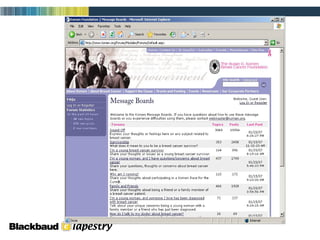
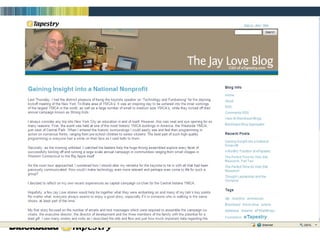
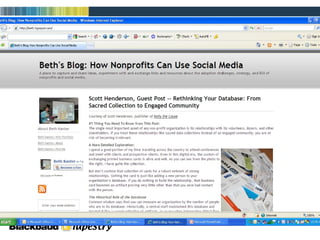
    Flickr, Podcasts, MessageBoards, Blogs Flickr —Photo Sharing Application Podcasts —Short recordings about a variety of different topics that can be purchased, downloaded for free, or posted on a web page Message Boards —A segment of a website that hosts an open discussion amongst users Blogs —A portion of a website (or a separate entity altogether like Twitter) in which an author posts discussion topics or information to be shared with followers Personal Blogs=Online ‘Diary’ Organizational blogs=Information sharing/News Updates
  • 42.
  • 43.
  • 44.
  • 45.
  • 46.
  • 47.
    The Power ofTwitter
  • 48.
    Real Life Storyvia the “New York Times”…
  • 49.
    “ Web SiteStory Continued” Gift for Promotion charity: water * 11 Employees * 500,000 Followers on Twitter * 500 Donors Cover all Admin Costs * Donors can Locate Their Well on Web via Google Earth * Raised $965,000 via Sept. Birthdays
  • 50.
  • 51.
    Collecting information onyour website Ecommerce / Online Giving Personal Fundraising Shopping Cart
  • 52.
    Ecommerce & OnlineGiving Important Functions of your Online Donation Page: Integrates directly into donor database Requires no additional manual entry Customizable Are your website and database integrated?
  • 53.
    Ecommerce & OnlineGiving Example After selecting eTapestry in 2008, One Brick was able to increase its annual giving goal by $10,000. The goal was attained and then passed by $6,000. The eTapestry solution has enabled staff to send emails from the CRM solution and increase the organization's reach.
  • 54.
  • 55.
    Online Giving withRecurring Gifts Recurring Gifts Donors become investors Steady stream of incoming funds Larger amounts in total Amounts are more manageable by the donors Key ingredient to sustaining long term donors and constituent loyalty
  • 56.
    Matching Gifts Doesyour organization have a Matching Gift Campaign? Do you know which companies in your area having a Matching Gift policy? How do you track which donors work for a Matching Gift corporation?
  • 57.
    Personal Fundraising Volunteerssend an average of 40 emails. Almost all volunteers meet their fundraising goals. The average online donation through personal fundraising is $57. Source: Kintera
  • 58.
    Shopping Cart Items/TicketsCustomizable Registration Fulfillment Shipping/Tax
  • 59.
    Where does theinformation go? How do you track all of the information you know about a donor? Can you store their interests, historical conversations, and all contact points in one location? Is your institutional memory protected? What are the benefits to combining all this information into one location?
  • 60.
  • 61.
    Relationships How wouldtracking relationships increase your fundraising success?
  • 62.
    Reporting How dothis year’s donors compare to last year’s?
  • 63.
    Database = FundraisingTool Only works if used daily by all Must be consistent/accurate Powerful Memory Supplement Technology makes it easy
  • 64.
    On the RoadDoes your organization have multiple offices? Can you access your organizational data from anywhere ? How do you track notes from major gift visits or events? What needs do your organization have for accessing your development database?
  • 65.
    Communications People areconnected 24/7 How can we be expected to communicate with so many people? How can we personalize our message?
  • 66.
    Why Has EmailBecome So Important? People are busy…they want to communicate/interact on their own time Email is inexpensive… Email provides virtually instant access to friends and supporters Email is a great equalizer Email is measurable
  • 67.
    Reads email beforesnail mail More comfortable online Busy, satisfies interests on own schedule Expects information to be personalized Expects immediate feedback Demands information on progress/ stewardship Wants a way to share experiences with others online Today’s Supporter
  • 68.
    No Email List?No Problem… Whether you have some contacts or are starting from scratch, anyone can grow a strong email list The three most important factors in effective email list-building are: Where and how you acquire the addresses How you welcome each new subscriber How you manage the relationship after the opt-in Source: EmailLabs
  • 69.
    Grow Your ListOnline Direct staff and other close supporters (board, volunteers, etc.) to include subscription links in email signatures Use Search Engine Optimization/ Marketing to increase traffic and subscriptions Investigate alliances or partnerships with similar or complementary organizations to reach common supporters Advertise your newsletter/services/cause through a 3 rd party list
  • 70.
    Grow Your ListOffline Ask for email addresses at every touch point Instruct staff to capture email addresses over phone when appropriate Include your website address on all printed materials Offer an incentive to register (contest, raffle) to collect emails
  • 71.
    Now that Ihave permission… Hook them early, and keep them engaged over time Optimize the welcome message Send follow up message within a week (or less) After a few months of active email, survey lists to see if you are meeting expectations
  • 72.
    Why Segmentation isImportant Segmentation breaks your audience into manageable parts If the goal is building relationships, it helps to know who you are talking to Segmenting your list will lead to more targeted messages If you don’t segment, you are treating every one of your recipients like they are the exact same type of person
  • 73.
    How to bea Good Sender In your messages, always include: The purpose; why you are sending it to the reader A clear way to unsubscribe. Consider offering alternative ways to receive emails, such as: Receiving newsletters monthly vs. weekly Change of address (home vs. business email) Sign up via RSS Link to your homepage Privacy policy Physical/street address of your organization Don’t get caught in spamtraps
  • 74.
    How Important isthat Header? 80% of respondents decide whether to click on the "Report Spam" or "Junk" button without opening the actual message 73% based that decision on the "From" name 69% percent based the decision on the subject line Source: 2007 Email Sender and Provider Coalition (ESPC) study
  • 75.
    Use Landing Pagesto Increase Conversions So I got them to click…now what? Landing pages are a natural extension of email, regardless of message The goal of most landing pages is to persuade a visitor to complete a transaction Landing page effectiveness is measured by conversion rate You should test landing page elements like you would test email or direct mail
  • 76.
  • 77.
  • 78.
  • 79.
  • 80.
    Designing for MobileDevices Mobile readers are more likely to scan your email rather than reading Include compelling call to action in the first 15-25 characters of your subject line Avoid “top heavy” images in the design In addition to testing email browsers, test messages in handheld devices email (html)
  • 81.
    A Few EmailDesign & Usage Tips Keep truly important items above the fold Ask subscribers to add your from address to their address book Host images on your web site rather than embedding them Links to resources and to special landing pages on your web site are powerful (Especially “tell a friend” functions) Develop your own writing style that readers will learn to love (people adore stories, so tell many . . . )
  • 82.
  • 83.
    What Now? 1. Take a look in the mirror How do you stack up? Website Database E-mail/Communications Social Media Presence
  • 84.
    What Now? 2. Plan Make it a priority Set Aside Time for Review Add to Board Agenda Seek Professional Assistance (Most companies will help you do this at NO COST!)
  • 85.
    What Now? 3. Continuous Evaluation Must be Measurable Website Hits Fundraising Donor Retention Communications Cost vs. Results Social Media “Friends”
  • 86.
    What Now? 4. Have Fun!!! Try New Things Get Creative Share your passion for your mission!
  • 87.
    What Now? 1.How do we stack up? 2. Written Plan 3. Continuous Evaluation of Tools/Technology 4. Have FUN
  • 88.
    Resources Getting Startedwith Facebook Beth Kanter Blog – How Nonprofits Can Use Social Media Jay Love Blog – CEO eTapestry --- Jay Love Twitter Page Blackbaud – Raising Money During Challenging Times Getting Started with Google Analytics LotusJump – Website Marketing Made Easy eTapestry Home Page Contact eTapestry for Guidance
  • 89.
  • 90.
    Thanks! Brooke Csukas[email_address] 317.336.3912

Editor's Notes

  • #4 Today, we are going to cover several aspects of technology as it pertains to fundraising. In the past, we’ve struggled to simplify this enough to be able to cover it all in one session. Now, we feel like we’ve been able to effectively summarize all of these separate avenues of technology but most importantly paint the picture of how all of these tools can come together and work for you, regardless of shape or size.
  • #5 Economy a hot button now and it seems to be sort of the underlying theme in most presentations these days. Forcing organizations to change the ways of thinking and operating In our experience, a lot of gloom and doom, but we are already starting to see that organizations that are forging ahead and continuing to invest in their mission are beginning to emerge Open the floor for opinions on how the economy has affected overall giving
  • #6 Studies show that people are still giving – although they might be changing the WAY they give, which you need to be aware of and understand how to interact and follow-up We’ve also seen a significant increase in Online Donations. Not sure how much that is connected to the economy but people are more inclined than ever to find out about you and support your mission online To audience: Have you stopped giving? Have you changed the way you give?
  • #7 Don’t want people to recognize your technology…want them to CONNECT with you! Machine is NOT replacing Man How can we apply these ideas and concepts that have been around for years into technology?? That’s what we’ll explore today. segue ----To audience: Where is the first place you go to find information about any topic?
  • #8 How many of you guys are happy with your website and feel it’s effective?
  • #10 If you build it, will they come? Having a website is first priority Key steps to building/maintaining a successful website
  • #11 To audience: Has anyone heard of Google Analytics? eTapestry web services inserts this into every page we build & suggests that our customers use this info
  • #13 How many of you have typed your name into Yahoo or Google??
  • #14 Now they are the creators of content
  • #16 Now lets talk about some other methods of increasing awareness and reach on the web. Technology has really revolutionized the way people are finding you or information about you on the internet. To audience: Does anyone have a strategy when it comes to online/social media?
  • #17 Social Media by definition More than anything, it’s the use of technology for the real-time sharing of information among millions of people! ! Connecting People and RECONNECTING people Growth of Twitter – we’ve talked about it for years!
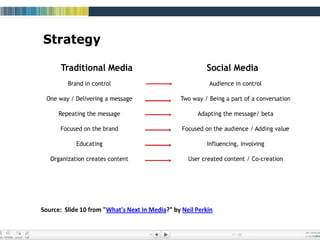
  • #18 This table outlines the concept and transition well. Where have we come in 10 years? It used to be a one-way electronic “brochure” of information. Now, it’s engaging people, influencing action, etc.
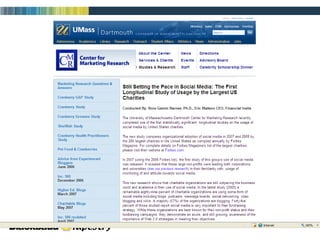
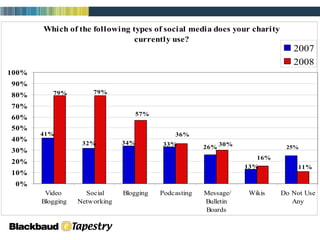
  • #19 Umass and Dartmouth joint study of the 200 largest charities in the US
  • #21 Perception of Social Media has changed – everyone is using it! You cannot ignore the potential outreach (Google is #1) (Yahoo #2)
  • #22 Provides a strong avenue for your organization to broadcast testimonials and describe how you are serving the community Show clips from EVENTS Volunteer activities TEstimonials
  • #23 Viral Effect Video can elicit emotion How many of you have forwarded a video? Laughing and Crying---powerful emotions Think about this: read in your thank you letter that the kids loved the new playground that your money went towards….how cool would it be to have a link to a video on the website? Would you forward?
  • #25 To Audience: Have you heard of Broadcast your cause? Specifically built for Nonprofits Premium branding; increased uploading capabilities Rotation of videos in “promoted area” Option to use google checkout to drive fundraising
  • #26 Catholic Relief Services Year end campaign—went out to 100,000 people so yes, big campaign….but let’s look at the concept
  • #27 A week later, they changed the Subject Line (gave sense of urgency) Added hotspot text (taking end-user back to online giving page) Added emotional video appeal (Only a link to the video – on Youtube) Raised $112K
  • #28 Continuously changing content of the letter Multi-channel communications (Facebook – “keep an eye out for our e-mail”)
  • #33 Difference between Personal Page & Organizational/Cause Page
  • #37 CAR WASH! Half people are washing cars….what are the other half doing??? Social media are your Fools out there drawing people back to your website!
  • #44 PODCASTS! Who does these?? The neat thing about these is that you can take a good look at these, and borrow some ideas.
  • #45 Msg boards. Driving traffic to your website. Letting people discuss how breast cancer has affected their life or their loved ones. We happen to have a division of eTapestry that can help you with doing this.
  • #49 Scott Harrison – 5 yrs. Ago owned a nightclub in Manhattan
  • #51 Charity: water * 11 Employees * 500,000 Followers on Twitter * 500 Donors Cover all Admin Costs * Donors can Locate Their Well on Web via Google Earth
  • #52 Katie’s last slide is a segue right into mine… ecommerce and social media (tips for connecting with donors)
  • #53 Use customer as testimonial (if they are using eCom)
  • #55 The Foundry
  • #56 Story Idea: Riley or Make-a-wish radio-a-thons
  • #59 To audience: Does anyone sell items/tickets on your website?
  • #60 Jay’s major giving at Butler story.
  • #61 What information do you want to know “at a glance” about one of your constituents?
  • #62 Does your organization track relationships in your “database” now?
  • #65 segue: H
  • #66 Besides social media platforms, communications in general have seen a HUGE transition. Donors still expect to be communicated with. The obvious answer for most seems to be E-mail.
  • #68 To add a little more insight into today’s typical supporter… We’ve seen a lot of changes in habits
  • #69 A lot of groups we talk to are still in the infant stages of collecting e-mail addresses and taking advantage
  • #73 This is why your E-mail list MUST be connected to a database. Otherwise, the segmentation opportunity is not there
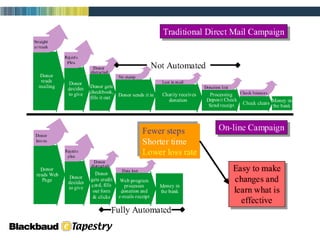
  • #78 With eTapestry, our philosophy is to make EVERYTHING work together in regards to building and sending these e-mails.
  • #79 We’re sending them as an HTML-formatted e-mail
  • #80 In the database, you get reports with complete click-through statistics
  • #81 To audience: Has anyone here ever tested a mass e-mail on your PDA’s or handheld devices?
  • #88 Something tangible – a plan of attack you can take home and use