By,
Prof. S.S.Gawali
Computer Engineering,
Sanjivani College of Engineering
Sanjivani Rural Education Society’s
Sanjivani College of Engineering, Kopargaon-423 603
Department of Computer Engineering
 Dictionary is mapping data type in python.
 Dictionary is a data structure which store values as a pair of key and value.
 In dictionary keys are unique and immutable.
 In dictionary values are not unique but mutable.
Department of Computer Engineering, Sanjivani College of Engineering, Kopargaon 2
 Dictionary consist item as pair of key and value.
 Dictionary is represented by {}
 Each key and value is separated by :
 Each item separated by ,
 Syntax:
dict={'a':1,'b':2,'c’:3}
Here dict is variable to store dictionary data.
‘a’,’b’ and ‘c’ are keys
1,2 and 3 are values of keys.
Department of Computer Engineering, Sanjivani College of Engineering, Kopargaon 3
 Style 1:
stud={'rollno':1,'name':'Soham','class':'FY’}
 Style 2: More readable format
stud={'rollno':1,
'name':'Soham',
'class':'FY'}
Department of Computer Engineering, Sanjivani College of Engineering, Kopargaon 4
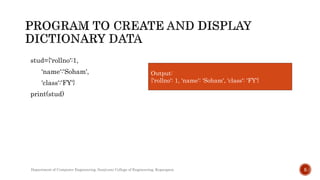
stud={'rollno':1,
'name':'Soham',
'class':'FY'}
print(stud)
Output:
{'rollno': 1, 'name': 'Soham', 'class': 'FY'}
Department of Computer Engineering, Sanjivani College of Engineering, Kopargaon 5
 To access values in dictionary, use square brackets along with key.
 We can access value/data using key only.
Department of Computer Engineering, Sanjivani College of Engineering, Kopargaon 6
stud={'rollno':1,
'name':'Soham',
'class':'FY'}
print(stud['rollno']) #Display rollno value
print(stud['name']) #Display name value
print(stud['class']) #Display class value
print(f'Name of Student is {stud['name']}')# display value with message
Output:
1
Soham
FY
Name of Student is Soham
Department of Computer Engineering, Sanjivani College of Engineering, Kopargaon 7
stud={'rollno':1,
'name':'Soham',
'class':'FY'}
print(f'Dictionary {stud}')
stud['Div']='G' #add new key and value
print(f'Dictionary after adding new item {stud}’)
[note: new item added at the end]
Output:
Dictionary {'rollno': 1, 'name': 'Soham',
'class': 'FY'}
Dictionary after adding new item
{'rollno': 1, 'name': 'Soham', 'class': 'FY',
'Div': 'G'}
Department of Computer Engineering, Sanjivani College of Engineering, Kopargaon 8
stud={'rollno':1,
'name':'Soham',
'class':'FY'}
print(f'Dictionary before modification {stud}’)
stud['rollno']=2 #modify rollno key’s value
print(f'Dictionary after modification {stud}')
Output:
Dictionary before modification
{'rollno': 1, 'name': 'Soham', 'class':
'FY'}
Dictionary after modification
{'rollno': 2, 'name': 'Soham', 'class':
'FY'}
Department of Computer Engineering, Sanjivani College of Engineering, Kopargaon 9
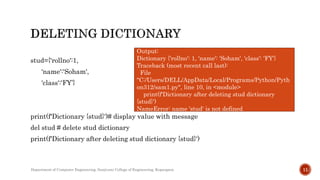
 del statement use to delete item or delete dictionary in python.
stud={'rollno':1,
'name':'Soham',
'class':'FY'}
print(f'Dictionary {stud}’)
del stud['name'] # deleting key name and its value
print(f'Dictionary after delete operation {stud}’)
Output:
Dictionary {'rollno': 1, 'name':
'Soham', 'class': 'FY'}
Dictionary after delete operation
{'rollno': 1, 'class': 'FY'}
Department of Computer Engineering, Sanjivani College of Engineering, Kopargaon 10
stud={'rollno':1,
'name':'Soham',
'class':'FY’}
print(f'Dictionary {stud}')# display value with message
del stud # delete stud dictionary
print(f'Dictionary after deleting stud dictionary {stud}')
Output:
Dictionary {'rollno': 1, 'name': 'Soham', 'class': 'FY'}
Traceback (most recent call last):
File
"C:/Users/DELL/AppData/Local/Programs/Python/Pyth
on312/sam1.py", line 10, in <module>
print(f'Dictionary after deleting stud dictionary
{stud}')
NameError: name 'stud' is not defined
Department of Computer Engineering, Sanjivani College of Engineering, Kopargaon 11
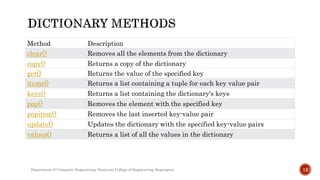
Method Description
clear() Removes all the elements from the dictionary
copy() Returns a copy of the dictionary
get() Returns the value of the specified key
items() Returns a list containing a tuple for each key value pair
keys() Returns a list containing the dictionary's keys
pop() Removes the element with the specified key
popitem() Removes the last inserted key-value pair
update() Updates the dictionary with the specified key-value pairs
values() Returns a list of all the values in the dictionary
Department of Computer Engineering, Sanjivani College of Engineering, Kopargaon 12
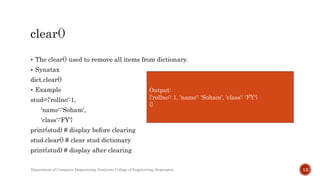
 The clear() used to remove all items from dictionary.
 Synatax
dict.clear()
 Example
stud={'rollno':1,
'name':'Soham',
'class':'FY'}
print(stud) # display before clearing
stud.clear() # clear stud dictionary
print(stud) # display after clearing
Output:
{'rollno': 1, 'name': 'Soham', 'class': 'FY'}
{}
Department of Computer Engineering, Sanjivani College of Engineering, Kopargaon 13
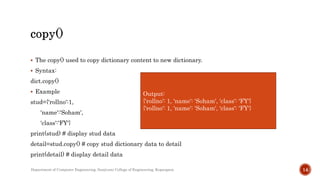
 The copy() used to copy dictionary content to new dictionary.
 Syntax:
dict.copy()
 Example
stud={'rollno':1,
'name':'Soham',
'class':'FY'}
print(stud) # display stud data
detail=stud.copy() # copy stud dictionary data to detail
print(detail) # display detail data
Output:
{'rollno': 1, 'name': 'Soham', 'class': 'FY'}
Department of Computer Engineering, Sanjivani College of Engineering, Kopargaon 14
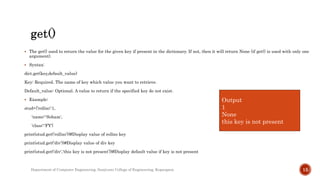
 The get() used to return the value for the given key if present in the dictionary. If not, then it will return None (if get() is used with only one
argument).
 Syntax:
dict.get(key,default_value)
Key: Required. The name of key which value you want to retrieve.
Default_value: Optional. A value to return if the specified key do not exist.
 Example:
stud={'rollno':1,
'name':'Soham',
'class':'FY'}
print(stud.get('rollno'))#Display value of rollno key
print(stud.get('div'))#Display value of div key
print(stud.get('div','this key is not present’))#Display default value if key is not present
Output
1
None
this key is not present
Department of Computer Engineering, Sanjivani College of Engineering, Kopargaon 15
 The items() method is used to return the list with all dictionary keys with values.
 Syntax
dict.items()
 Example 1:
stud={'rollno':1,
'name':'Soham',
'class':'FY'}
print(stud.items())
Output:
dict_items([('rollno', 1), ('name', 'Soham'), ('class', 'FY')])
Department of Computer Engineering, Sanjivani College of Engineering, Kopargaon 16
 Example 2:
stud={'rollno':1,
'name':'Soham',
'class':'FY'}
item=stud.items() # item variable to stored items in stud dict
print('origional dictionary items')
print(item) #display item
del stud['class'] #deleting class key and its value
print('updated dictionary items')
print(item) #updated items in stud dictionary
Output:
origional dictionary items
dict_items([('rollno', 1), ('name', 'Soham'), ('class', 'FY')])
updated dictionary items
dict_items([('rollno', 1), ('name', 'Soham')])
Department of Computer Engineering, Sanjivani College of Engineering, Kopargaon 17
 The keys() method returns a view object.
 The view object contains the keys of the dictionary, as a list.
 Syntax:
dict.keys()
 Example:
stud={'rollno':1,
'name':'Soham',
'class':'FY'}
print(stud.keys()) # display keys of stud dictionary as a list
Output:
dict_keys(['rollno', 'name', 'class'])
Department of Computer Engineering, Sanjivani College of Engineering, Kopargaon 18
 Example 2:
 When an item is added in the dictionary, the view object also gets updated:
stud={'rollno':1,
'name':'Soham',
'class':'FY'}
key=stud.keys() # key variable to stored keys in stud dict
print('origional dictionary keys')
print(key) #display keys
stud['branch']='Comp' #inserting new branch key
print('updated dictionary keys')
print(key) #updated keys in stud dictionary
Output:
origional dictionary keys
dict_keys(['rollno', 'name', 'class'])
updated dictionary keys
dict_keys(['rollno', 'name', 'class',
'branch'])
Department of Computer Engineering, Sanjivani College of Engineering, Kopargaon 19
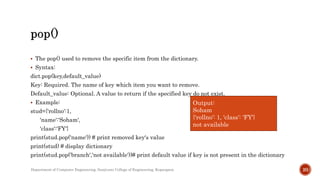
 The pop() used to remove the specific item from the dictionary.
 Syntax:
dict.pop(key,default_value)
Key: Required. The name of key which item you want to remove.
Default_value: Optional. A value to return if the specified key do not exist.
 Example:
stud={'rollno':1,
'name':'Soham',
'class':'FY'}
print(stud.pop('name')) # print removed key's value
print(stud) # display dictionary
print(stud.pop('branch','not available'))# print default value if key is not present in the dictionary
Output:
Soham
{'rollno': 1, 'class': 'FY'}
not available
Department of Computer Engineering, Sanjivani College of Engineering, Kopargaon 20
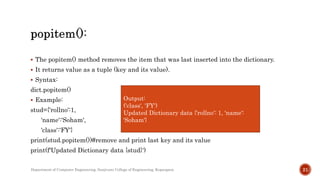
 The popitem() method removes the item that was last inserted into the dictionary.
 It returns value as a tuple (key and its value).
 Syntax:
dict.popitem()
 Example:
stud={'rollno':1,
'name':'Soham',
'class':'FY'}
print(stud.popitem())#remove and print last key and its value
print(f'Updated Dictionary data {stud}')
Output:
('class', 'FY')
Updated Dictionary data {'rollno': 1, 'name':
'Soham'}
Department of Computer Engineering, Sanjivani College of Engineering, Kopargaon 21
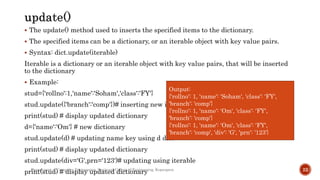
 The update() method used to inserts the specified items to the dictionary.
 The specified items can be a dictionary, or an iterable object with key value pairs.
 Syntax: dict.update(iterable)
Iterable is a dictionary or an iterable object with key value pairs, that will be inserted
to the dictionary
 Example:
stud={'rollno':1,'name':'Soham','class':'FY'}
stud.update({'branch':'comp'})# inserting new item
print(stud) # display updated dictionary
d={'name':'Om'} # new dictionary
stud.update(d) # updating name key using d dict
print(stud) # display updated dictionary
stud.update(div='G',prn='123')# updating using iterable
print(stud) # display updated dictionary
Output:
{'rollno': 1, 'name': 'Soham', 'class': 'FY',
'branch': 'comp'}
{'rollno': 1, 'name': 'Om', 'class': 'FY',
'branch': 'comp'}
{'rollno': 1, 'name': 'Om', 'class': 'FY',
'branch': 'comp', 'div': 'G', 'prn': '123'}
Department of Computer Engineering, Sanjivani College of Engineering, Kopargaon 22
 The values() method returns a view object.
 The view object contains the values of the dictionary, as a list.
 Syntax:
dict.values()
 Example:
stud={'rollno':1,
'name':'Soham',
'class':'FY'}
print(stud.values()) # display keys of stud dictionary as a list
Output:
dict_values([1, 'Soham', 'FY'])
Department of Computer Engineering, Sanjivani College of Engineering, Kopargaon 23
 Example 2:
 When an item is added in the dictionary, the view object also gets updated:
stud={'rollno':1,
'name':'Soham',
'class':'FY'}
val=stud.values() # val variable to stored keys in stud dict
print('origional dictionary values')
print(val) #display values
stud['branch']='Comp' #inserting new branch key
print('updated dictionary values')
print(val) #updated values in stud dictionary
Output:
origional dictionary values
dict_values([1, 'Soham', 'FY'])
updated dictionary values
dict_values([1, 'Soham', 'FY',
'Comp'])
Department of Computer Engineering, Sanjivani College of Engineering, Kopargaon 24
 An Aliasing Dictionary is use to assign a dictionary to another dictionary by updating the
content on both dictionary at a time.
 Aliasing is whenever two variables refer to the same dictionary object, changes to one
affect the other
 Example:
stud={'rollno':1,
'name':'Soham',
'class':'FY'}
stud_new={} #another dict
stud_new=stud # aliasing stud dict to stud_new
print(stud_new) # diplay stud_new dict
stud['class']='SY' #updating stud dict
print(f'Original Dict: {stud}')# display stud dict
print(f'Alised Dict: {stud_new}')# display stud_new dict
Output:
{'rollno': 1, 'name': 'Soham', 'class': 'FY'}
Original Dict: {'rollno': 1, 'name': 'Soham', 'class':
'SY'}
Alised Dict: {'rollno': 1, 'name': 'Soham', 'class':
'SY'}
Department of Computer Engineering, Sanjivani College of Engineering, Kopargaon 25
 Copy() used to copy dictionary.
 But with this updating one dictionary not reflected on another dictionary.
 Example:
stud={'rollno':1,
'name':'Soham',
'class':'FY'}
stud_new={} #another dict
stud_new=stud.copy() # copying stud dict to stud_new
print(stud_new) # diplay stud_new dict
stud['class']='SY' #updating stud dict
print(f'Original Dict: {stud}')# display stud dict
print(f'Copied Dict: {stud_new}')# display stud_new dict
Output:
{'rollno': 1, 'name': 'Soham', 'class': 'FY'}
Original Dict: {'rollno': 1, 'name': 'Soham', 'class':
'SY'}
Alised Dict: {'rollno': 1, 'name': 'Soham', 'class':
‘FY'}
Department of Computer Engineering, Sanjivani College of Engineering, Kopargaon 26
Department of Computer Engineering, Sanjivani College of Engineering, Kopargaon 27

Unit4-Basic Concepts and methods of Dictionary.pptx

  • 1.
    By, Prof. S.S.Gawali Computer Engineering, SanjivaniCollege of Engineering Sanjivani Rural Education Society’s Sanjivani College of Engineering, Kopargaon-423 603 Department of Computer Engineering
  • 2.
     Dictionary ismapping data type in python.  Dictionary is a data structure which store values as a pair of key and value.  In dictionary keys are unique and immutable.  In dictionary values are not unique but mutable. Department of Computer Engineering, Sanjivani College of Engineering, Kopargaon 2
  • 3.
     Dictionary consistitem as pair of key and value.  Dictionary is represented by {}  Each key and value is separated by :  Each item separated by ,  Syntax: dict={'a':1,'b':2,'c’:3} Here dict is variable to store dictionary data. ‘a’,’b’ and ‘c’ are keys 1,2 and 3 are values of keys. Department of Computer Engineering, Sanjivani College of Engineering, Kopargaon 3
  • 4.
     Style 1: stud={'rollno':1,'name':'Soham','class':'FY’} Style 2: More readable format stud={'rollno':1, 'name':'Soham', 'class':'FY'} Department of Computer Engineering, Sanjivani College of Engineering, Kopargaon 4
  • 5.
    stud={'rollno':1, 'name':'Soham', 'class':'FY'} print(stud) Output: {'rollno': 1, 'name':'Soham', 'class': 'FY'} Department of Computer Engineering, Sanjivani College of Engineering, Kopargaon 5
  • 6.
     To accessvalues in dictionary, use square brackets along with key.  We can access value/data using key only. Department of Computer Engineering, Sanjivani College of Engineering, Kopargaon 6
  • 7.
    stud={'rollno':1, 'name':'Soham', 'class':'FY'} print(stud['rollno']) #Display rollnovalue print(stud['name']) #Display name value print(stud['class']) #Display class value print(f'Name of Student is {stud['name']}')# display value with message Output: 1 Soham FY Name of Student is Soham Department of Computer Engineering, Sanjivani College of Engineering, Kopargaon 7
  • 8.
    stud={'rollno':1, 'name':'Soham', 'class':'FY'} print(f'Dictionary {stud}') stud['Div']='G' #addnew key and value print(f'Dictionary after adding new item {stud}’) [note: new item added at the end] Output: Dictionary {'rollno': 1, 'name': 'Soham', 'class': 'FY'} Dictionary after adding new item {'rollno': 1, 'name': 'Soham', 'class': 'FY', 'Div': 'G'} Department of Computer Engineering, Sanjivani College of Engineering, Kopargaon 8
  • 9.
    stud={'rollno':1, 'name':'Soham', 'class':'FY'} print(f'Dictionary before modification{stud}’) stud['rollno']=2 #modify rollno key’s value print(f'Dictionary after modification {stud}') Output: Dictionary before modification {'rollno': 1, 'name': 'Soham', 'class': 'FY'} Dictionary after modification {'rollno': 2, 'name': 'Soham', 'class': 'FY'} Department of Computer Engineering, Sanjivani College of Engineering, Kopargaon 9
  • 10.
     del statementuse to delete item or delete dictionary in python. stud={'rollno':1, 'name':'Soham', 'class':'FY'} print(f'Dictionary {stud}’) del stud['name'] # deleting key name and its value print(f'Dictionary after delete operation {stud}’) Output: Dictionary {'rollno': 1, 'name': 'Soham', 'class': 'FY'} Dictionary after delete operation {'rollno': 1, 'class': 'FY'} Department of Computer Engineering, Sanjivani College of Engineering, Kopargaon 10
  • 11.
    stud={'rollno':1, 'name':'Soham', 'class':'FY’} print(f'Dictionary {stud}')# displayvalue with message del stud # delete stud dictionary print(f'Dictionary after deleting stud dictionary {stud}') Output: Dictionary {'rollno': 1, 'name': 'Soham', 'class': 'FY'} Traceback (most recent call last): File "C:/Users/DELL/AppData/Local/Programs/Python/Pyth on312/sam1.py", line 10, in <module> print(f'Dictionary after deleting stud dictionary {stud}') NameError: name 'stud' is not defined Department of Computer Engineering, Sanjivani College of Engineering, Kopargaon 11
  • 12.
    Method Description clear() Removesall the elements from the dictionary copy() Returns a copy of the dictionary get() Returns the value of the specified key items() Returns a list containing a tuple for each key value pair keys() Returns a list containing the dictionary's keys pop() Removes the element with the specified key popitem() Removes the last inserted key-value pair update() Updates the dictionary with the specified key-value pairs values() Returns a list of all the values in the dictionary Department of Computer Engineering, Sanjivani College of Engineering, Kopargaon 12
  • 13.
     The clear()used to remove all items from dictionary.  Synatax dict.clear()  Example stud={'rollno':1, 'name':'Soham', 'class':'FY'} print(stud) # display before clearing stud.clear() # clear stud dictionary print(stud) # display after clearing Output: {'rollno': 1, 'name': 'Soham', 'class': 'FY'} {} Department of Computer Engineering, Sanjivani College of Engineering, Kopargaon 13
  • 14.
     The copy()used to copy dictionary content to new dictionary.  Syntax: dict.copy()  Example stud={'rollno':1, 'name':'Soham', 'class':'FY'} print(stud) # display stud data detail=stud.copy() # copy stud dictionary data to detail print(detail) # display detail data Output: {'rollno': 1, 'name': 'Soham', 'class': 'FY'} {'rollno': 1, 'name': 'Soham', 'class': 'FY'} Department of Computer Engineering, Sanjivani College of Engineering, Kopargaon 14
  • 15.
     The get()used to return the value for the given key if present in the dictionary. If not, then it will return None (if get() is used with only one argument).  Syntax: dict.get(key,default_value) Key: Required. The name of key which value you want to retrieve. Default_value: Optional. A value to return if the specified key do not exist.  Example: stud={'rollno':1, 'name':'Soham', 'class':'FY'} print(stud.get('rollno'))#Display value of rollno key print(stud.get('div'))#Display value of div key print(stud.get('div','this key is not present’))#Display default value if key is not present Output 1 None this key is not present Department of Computer Engineering, Sanjivani College of Engineering, Kopargaon 15
  • 16.
     The items()method is used to return the list with all dictionary keys with values.  Syntax dict.items()  Example 1: stud={'rollno':1, 'name':'Soham', 'class':'FY'} print(stud.items()) Output: dict_items([('rollno', 1), ('name', 'Soham'), ('class', 'FY')]) Department of Computer Engineering, Sanjivani College of Engineering, Kopargaon 16
  • 17.
     Example 2: stud={'rollno':1, 'name':'Soham', 'class':'FY'} item=stud.items()# item variable to stored items in stud dict print('origional dictionary items') print(item) #display item del stud['class'] #deleting class key and its value print('updated dictionary items') print(item) #updated items in stud dictionary Output: origional dictionary items dict_items([('rollno', 1), ('name', 'Soham'), ('class', 'FY')]) updated dictionary items dict_items([('rollno', 1), ('name', 'Soham')]) Department of Computer Engineering, Sanjivani College of Engineering, Kopargaon 17
  • 18.
     The keys()method returns a view object.  The view object contains the keys of the dictionary, as a list.  Syntax: dict.keys()  Example: stud={'rollno':1, 'name':'Soham', 'class':'FY'} print(stud.keys()) # display keys of stud dictionary as a list Output: dict_keys(['rollno', 'name', 'class']) Department of Computer Engineering, Sanjivani College of Engineering, Kopargaon 18
  • 19.
     Example 2: When an item is added in the dictionary, the view object also gets updated: stud={'rollno':1, 'name':'Soham', 'class':'FY'} key=stud.keys() # key variable to stored keys in stud dict print('origional dictionary keys') print(key) #display keys stud['branch']='Comp' #inserting new branch key print('updated dictionary keys') print(key) #updated keys in stud dictionary Output: origional dictionary keys dict_keys(['rollno', 'name', 'class']) updated dictionary keys dict_keys(['rollno', 'name', 'class', 'branch']) Department of Computer Engineering, Sanjivani College of Engineering, Kopargaon 19
  • 20.
     The pop()used to remove the specific item from the dictionary.  Syntax: dict.pop(key,default_value) Key: Required. The name of key which item you want to remove. Default_value: Optional. A value to return if the specified key do not exist.  Example: stud={'rollno':1, 'name':'Soham', 'class':'FY'} print(stud.pop('name')) # print removed key's value print(stud) # display dictionary print(stud.pop('branch','not available'))# print default value if key is not present in the dictionary Output: Soham {'rollno': 1, 'class': 'FY'} not available Department of Computer Engineering, Sanjivani College of Engineering, Kopargaon 20
  • 21.
     The popitem()method removes the item that was last inserted into the dictionary.  It returns value as a tuple (key and its value).  Syntax: dict.popitem()  Example: stud={'rollno':1, 'name':'Soham', 'class':'FY'} print(stud.popitem())#remove and print last key and its value print(f'Updated Dictionary data {stud}') Output: ('class', 'FY') Updated Dictionary data {'rollno': 1, 'name': 'Soham'} Department of Computer Engineering, Sanjivani College of Engineering, Kopargaon 21
  • 22.
     The update()method used to inserts the specified items to the dictionary.  The specified items can be a dictionary, or an iterable object with key value pairs.  Syntax: dict.update(iterable) Iterable is a dictionary or an iterable object with key value pairs, that will be inserted to the dictionary  Example: stud={'rollno':1,'name':'Soham','class':'FY'} stud.update({'branch':'comp'})# inserting new item print(stud) # display updated dictionary d={'name':'Om'} # new dictionary stud.update(d) # updating name key using d dict print(stud) # display updated dictionary stud.update(div='G',prn='123')# updating using iterable print(stud) # display updated dictionary Output: {'rollno': 1, 'name': 'Soham', 'class': 'FY', 'branch': 'comp'} {'rollno': 1, 'name': 'Om', 'class': 'FY', 'branch': 'comp'} {'rollno': 1, 'name': 'Om', 'class': 'FY', 'branch': 'comp', 'div': 'G', 'prn': '123'} Department of Computer Engineering, Sanjivani College of Engineering, Kopargaon 22
  • 23.
     The values()method returns a view object.  The view object contains the values of the dictionary, as a list.  Syntax: dict.values()  Example: stud={'rollno':1, 'name':'Soham', 'class':'FY'} print(stud.values()) # display keys of stud dictionary as a list Output: dict_values([1, 'Soham', 'FY']) Department of Computer Engineering, Sanjivani College of Engineering, Kopargaon 23
  • 24.
     Example 2: When an item is added in the dictionary, the view object also gets updated: stud={'rollno':1, 'name':'Soham', 'class':'FY'} val=stud.values() # val variable to stored keys in stud dict print('origional dictionary values') print(val) #display values stud['branch']='Comp' #inserting new branch key print('updated dictionary values') print(val) #updated values in stud dictionary Output: origional dictionary values dict_values([1, 'Soham', 'FY']) updated dictionary values dict_values([1, 'Soham', 'FY', 'Comp']) Department of Computer Engineering, Sanjivani College of Engineering, Kopargaon 24
  • 25.
     An AliasingDictionary is use to assign a dictionary to another dictionary by updating the content on both dictionary at a time.  Aliasing is whenever two variables refer to the same dictionary object, changes to one affect the other  Example: stud={'rollno':1, 'name':'Soham', 'class':'FY'} stud_new={} #another dict stud_new=stud # aliasing stud dict to stud_new print(stud_new) # diplay stud_new dict stud['class']='SY' #updating stud dict print(f'Original Dict: {stud}')# display stud dict print(f'Alised Dict: {stud_new}')# display stud_new dict Output: {'rollno': 1, 'name': 'Soham', 'class': 'FY'} Original Dict: {'rollno': 1, 'name': 'Soham', 'class': 'SY'} Alised Dict: {'rollno': 1, 'name': 'Soham', 'class': 'SY'} Department of Computer Engineering, Sanjivani College of Engineering, Kopargaon 25
  • 26.
     Copy() usedto copy dictionary.  But with this updating one dictionary not reflected on another dictionary.  Example: stud={'rollno':1, 'name':'Soham', 'class':'FY'} stud_new={} #another dict stud_new=stud.copy() # copying stud dict to stud_new print(stud_new) # diplay stud_new dict stud['class']='SY' #updating stud dict print(f'Original Dict: {stud}')# display stud dict print(f'Copied Dict: {stud_new}')# display stud_new dict Output: {'rollno': 1, 'name': 'Soham', 'class': 'FY'} Original Dict: {'rollno': 1, 'name': 'Soham', 'class': 'SY'} Alised Dict: {'rollno': 1, 'name': 'Soham', 'class': ‘FY'} Department of Computer Engineering, Sanjivani College of Engineering, Kopargaon 26
  • 27.
    Department of ComputerEngineering, Sanjivani College of Engineering, Kopargaon 27