LIST
Prepared by,
Prof. S. S. Gawali
Computer Engineering
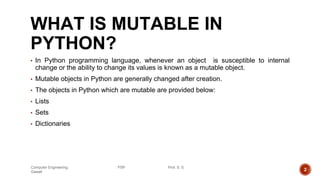
WHAT IS MUTABLE IN
PYTHON?
▪ In Python programming language, whenever an object is susceptible to internal
change or the ability to change its values is known as a mutable object.
▪ Mutable objects in Python are generally changed after creation.
▪ The objects in Python which are mutable are provided below:
▪ Lists
▪ Sets
▪ Dictionaries
Computer Engineering PSP Prof. S. S.
Gawali 2
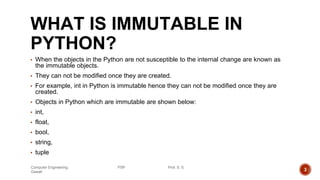
WHAT IS IMMUTABLE IN
PYTHON?
▪ When the objects in the Python are not susceptible to the internal change are known as
the immutable objects.
▪ They can not be modified once they are created.
▪ For example, int in Python is immutable hence they can not be modified once they are
created.
▪ Objects in Python which are immutable are shown below:
▪ int,
▪ float,
▪ bool,
▪ string,
▪ tuple
Computer Engineering PSP Prof. S. S.
Gawali 3
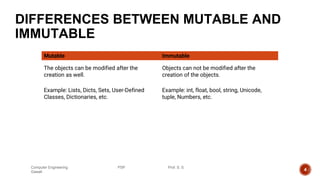
DIFFERENCES BETWEEN MUTABLE AND
IMMUTABLE
Mutable Immutable
The objects can be modified after the
creation as well.
Objects can not be modified after the
creation of the objects.
Example: Lists, Dicts, Sets, User-Defined
Classes, Dictionaries, etc.
Example: int, float, bool, string, Unicode,
tuple, Numbers, etc.
Computer Engineering PSP Prof. S. S.
Gawali 4
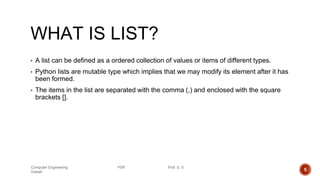
WHAT IS LIST?
▪ A list can be defined as a ordered collection of values or items of different types.
▪ Python lists are mutable type which implies that we may modify its element after it has
been formed.
▪ The items in the list are separated with the comma (,) and enclosed with the square
brackets [].
Computer Engineering PSP Prof. S. S.
Gawali 5
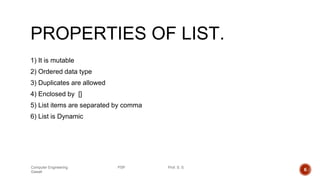
PROPERTIES OF LIST.
1) It is mutable
2) Ordered data type
3) Duplicates are allowed
4) Enclosed by []
5) List items are separated by comma
6) List is Dynamic
Computer Engineering PSP Prof. S. S.
Gawali 6
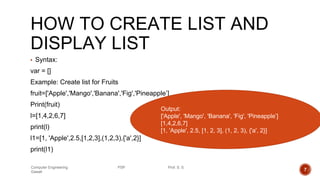
HOW TO CREATE LIST AND
DISPLAY LIST
▪ Syntax:
var = []
Example: Create list for Fruits
fruit=['Apple','Mango','Banana','Fig','Pineapple’]
Print(fruit)
l=[1,4,2,6,7]
print(l)
l1=[1, 'Apple',2.5,[1,2,3],(1,2,3),{'a',2}]
print(l1)
Output:
['Apple', 'Mango', 'Banana', 'Fig', 'Pineapple’]
[1,4,2,6,7]
[1, 'Apple', 2.5, [1, 2, 3], (1, 2, 3), {'a', 2}]
Computer Engineering PSP Prof. S. S.
Gawali 7
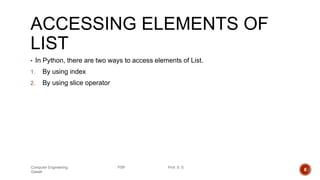
ACCESSING ELEMENTS OF
LIST
▪ In Python, there are two ways to access elements of List.
1. By using index
2. By using slice operator
Computer Engineering PSP Prof. S. S.
Gawali 8
ACCESSING CHARACTERS
BY USING INDEX:
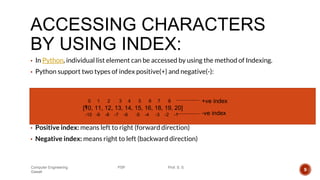
▪ In Python, individual list element can be accessed by using the method of Indexing.
▪ Python support two types of index positive(+) and negative(-):
▪ Positive index: means left to right (forward direction)
▪ Negative index: means right to left (backward direction)
[10, 11, 12, 13, 14, 15, 16, 18, 19, 20]
0 1 2 3 4 5 6 7 8
9
+ve index
-10 -9 -8 -7 -6 -5 -4 -3 -2 -1 -ve index
Computer Engineering PSP Prof. S. S.
Gawali 9
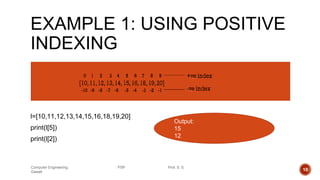
EXAMPLE 1: USING POSITIVE
INDEXING
l=[10,11,12,13,14,15,16,18,19,20]
print(l[5])
print(l[2])
Output:
15
12
Computer Engineering PSP Prof. S. S.
Gawali 10
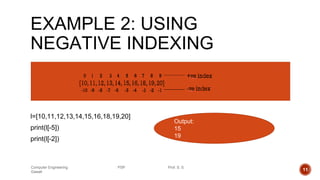
EXAMPLE 2: USING
NEGATIVE INDEXING
l=[10,11,12,13,14,15,16,18,19,20]
print(l[-5])
print(l[-2])
Output:
15
19
Computer Engineering PSP Prof. S. S.
Gawali 11
ACCESSING LIST ELEMENTS BY USING
SLICE OPERATOR:
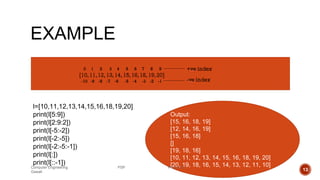
Python also allows a form of indexing syntax that extracts multiple elements from a list,
known as list slicing.
If l is a list, an expression of the form l[m:n] returns the portion of l starting with
position m, and up to but not including position n.
Syntax:
String[beginindex:endindex:step]
Computer Engineering PSP Prof. S. S.
Gawali 12
EXAMPLE
Output:
[15, 16, 18, 19]
[12, 14, 16, 19]
[15, 16, 18]
[]
[19, 18, 16]
[10, 11, 12, 13, 14, 15, 16, 18, 19, 20]
[20, 19, 18, 16, 15, 14, 13, 12, 11, 10]
l=[10,11,12,13,14,15,16,18,19,20]
print(l[5:9])
print(l[2:9:2])
print(l[-5:-2])
print(l[-2:-5])
print(l[-2:-5:-1])
print(l[:])
print(l[::-1])
Computer Engineering PSP Prof. S. S.
Gawali 13
UPDATING LIST ELEMENTS USING INDEXING
AND SLICE OPERATOR
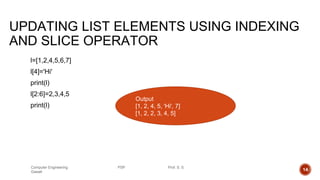
l=[1,2,4,5,6,7]
l[4]='Hi'
print(l)
l[2:6]=2,3,4,5
print(l)
Computer Engineering PSP Prof. S. S.
Gawali 14
Output
[1, 2, 4, 5, 'Hi', 7]
[1, 2, 2, 3, 4, 5]
ACCEPT LIST ELEMENTS
FROM USER
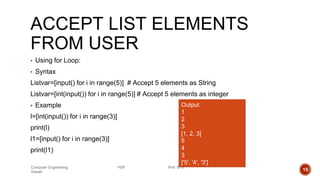
▪ Using for Loop:
▪ Syntax
Listvar=[input() for i in range(5)] # Accept 5 elements as String
Listvar=[int(input()) for i in range(5)] # Accept 5 elements as integer
▪ Example
l=[int(input()) for i in range(3)]
print(l)
l1=[input() for i in range(3)]
print(l1)
Output
1
2
3
[1, 2, 3]
5
4
3
['5', '4', '3']
Computer Engineering PSP Prof. S. S.
Gawali 15
ACCEPT LIST ELEMENTS
FROM USER
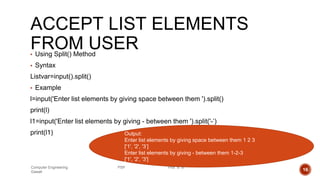
▪ Using Split() Method
▪ Syntax
Listvar=input().split()
▪ Example
l=input('Enter list elements by giving space between them ').split()
print(l)
l1=input('Enter list elements by giving - between them ').split('-’)
print(l1) Output:
Enter list elements by giving space between them 1 2 3
['1', '2', '3’]
Enter list elements by giving - between them 1-2-3
['1', '2', '3']
Computer Engineering PSP Prof. S. S.
Gawali 16
ACCEPTING LIST ELEMENTS
FROM USER
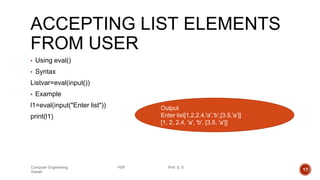
▪ Using eval()
▪ Syntax
Listvar=eval(input())
▪ Example
l1=eval(input("Enter list"))
print(l1)
Output
Enter list[1,2,2.4,'a','b',[3.5,'a’]]
[1, 2, 2.4, 'a', 'b', [3.5, 'a']]
Computer Engineering PSP Prof. S. S.
Gawali 17
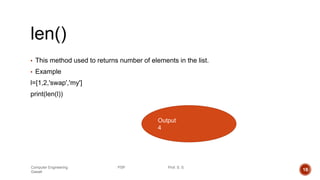
len()
▪ This method used to returns number of elements in the list.
▪ Example
l=[1,2,'swap','my']
print(len(l))
Output
4
Computer Engineering PSP Prof. S. S.
Gawali 18
TRAVERSING LIST
ELEMENTS
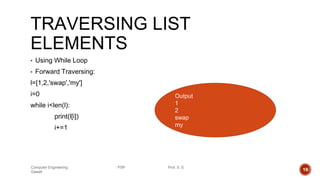
▪ Using While Loop
▪ Forward Traversing:
l=[1,2,'swap','my']
i=0
while i<len(l):
print(l[i])
i+=1
Output
1
2
swap
my
Computer Engineering PSP Prof. S. S.
Gawali 19
TRAVERSING LIST
ELEMENTS
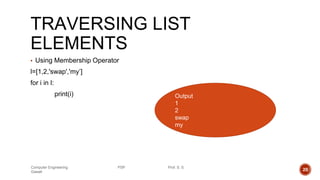
▪ Using Membership Operator
l=[1,2,'swap','my’]
for i in l:
print(i) Output
1
2
swap
my
Computer Engineering PSP Prof. S. S.
Gawali 20
TRAVERSING LIST
ELEMENTS
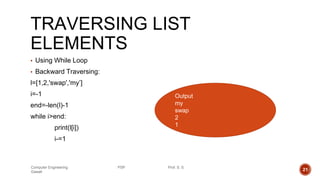
▪ Using While Loop
▪ Backward Traversing:
l=[1,2,'swap','my’]
i=-1
end=-len(l)-1
while i>end:
print(l[i])
i-=1
Output
my
swap
2
1
Computer Engineering PSP Prof. S. S.
Gawali 21
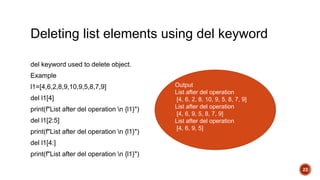
Deleting list elements using del keyword
del keyword used to delete object.
Example
l1=[4,6,2,8,9,10,9,5,8,7,9]
del l1[4]
print(f"List after del operation n {l1}")
del l1[2:5]
print(f"List after del operation n {l1}")
del l1[4:]
print(f"List after del operation n {l1}")
22
Output
List after del operation
[4, 6, 2, 8, 10, 9, 5, 8, 7, 9]
List after del operation
[4, 6, 9, 5, 8, 7, 9]
List after del operation
[4, 6, 9, 5]
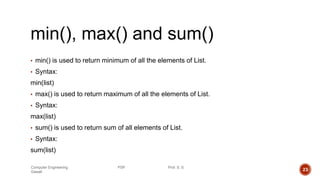
min(), max() and sum()
▪ min() is used to return minimum of all the elements of List.
▪ Syntax:
min(list)
▪ max() is used to return maximum of all the elements of List.
▪ Syntax:
max(list)
▪ sum() is used to return sum of all elements of List.
▪ Syntax:
sum(list)
Computer Engineering PSP Prof. S. S.
Gawali 23
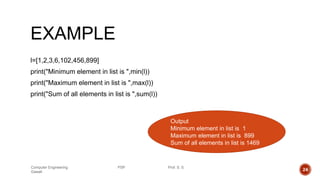
EXAMPLE
l=[1,2,3,6,102,456,899]
print("Minimum element in list is ",min(l))
print("Maximum element in list is ",max(l))
print("Sum of all elements in list is ",sum(l))
Output
Minimum element in list is 1
Maximum element in list is 899
Sum of all elements in list is 1469
Computer Engineering PSP Prof. S. S.
Gawali 24
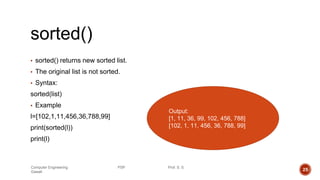
sorted()
▪ sorted() returns new sorted list.
▪ The original list is not sorted.
▪ Syntax:
sorted(list)
▪ Example
l=[102,1,11,456,36,788,99]
print(sorted(l))
print(l)
Output:
[1, 11, 36, 99, 102, 456, 788]
[102, 1, 11, 456, 36, 788, 99]
Computer Engineering PSP Prof. S. S.
Gawali 25
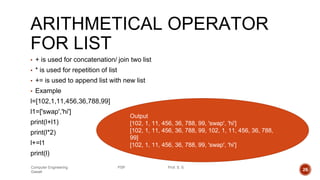
ARITHMETICAL OPERATOR
FOR LIST
▪ + is used for concatenation/ join two list
▪ * is used for repetition of list
▪ += is used to append list with new list
▪ Example
l=[102,1,11,456,36,788,99]
l1=['swap','hi']
print(l+l1)
print(l*2)
l+=l1
print(l)
Output
[102, 1, 11, 456, 36, 788, 99, 'swap', 'hi']
[102, 1, 11, 456, 36, 788, 99, 102, 1, 11, 456, 36, 788,
99]
[102, 1, 11, 456, 36, 788, 99, 'swap', 'hi']
Computer Engineering PSP Prof. S. S.
Gawali 26
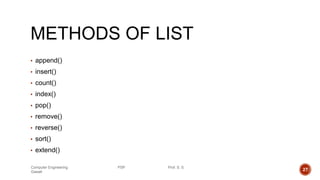
METHODS OF LIST
▪ append()
▪ insert()
▪ count()
▪ index()
▪ pop()
▪ remove()
▪ reverse()
▪ sort()
▪ extend()
Computer Engineering PSP Prof. S. S.
Gawali 27
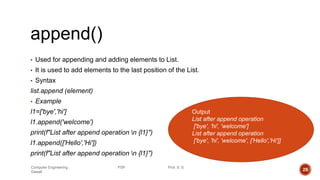
append()
▪ Used for appending and adding elements to List.
▪ It is used to add elements to the last position of the List.
▪ Syntax
list.append (element)
▪ Example
l1=['bye','hi']
l1.append('welcome')
print(f"List after append operation n {l1}")
l1.append(['Hello','Hi'])
print(f"List after append operation n {l1}")
Output
List after append operation
['bye', 'hi', 'welcome']
List after append operation
['bye', 'hi', 'welcome', ['Hello','Hi']]
Computer Engineering PSP Prof. S. S.
Gawali 28
insert()
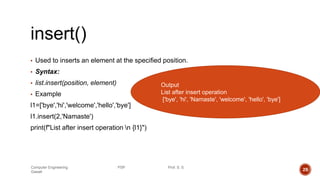
▪ Used to inserts an element at the specified position.
▪ Syntax:
▪ list.insert(position, element)
▪ Example
l1=['bye','hi','welcome','hello','bye']
l1.insert(2,'Namaste')
print(f"List after insert operation n {l1}")
Output
List after insert operation
['bye', 'hi', 'Namaste', 'welcome', 'hello', 'bye']
Computer Engineering PSP Prof. S. S.
Gawali 29
count()
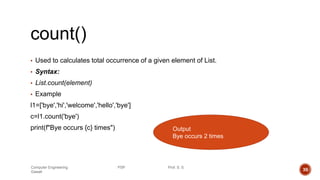
▪ Used to calculates total occurrence of a given element of List.
▪ Syntax:
▪ List.count(element)
▪ Example
l1=['bye','hi','welcome','hello','bye']
c=l1.count('bye')
print(f"Bye occurs {c} times") Output
Bye occurs 2 times
Computer Engineering PSP Prof. S. S.
Gawali 30
index()
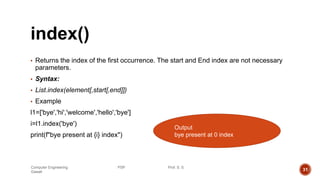
▪ Returns the index of the first occurrence. The start and End index are not necessary
parameters.
▪ Syntax:
▪ List.index(element[,start[,end]])
▪ Example
l1=['bye','hi','welcome','hello','bye']
i=l1.index('bye')
print(f"bye present at {i} index")
Output
bye present at 0 index
Computer Engineering PSP Prof. S. S.
Gawali 31
pop()
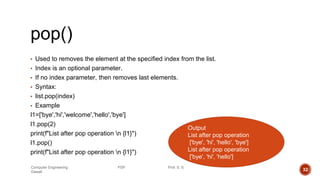
▪ Used to removes the element at the specified index from the list.
▪ Index is an optional parameter.
▪ If no index parameter, then removes last elements.
▪ Syntax:
▪ list.pop(index)
▪ Example
l1=['bye','hi','welcome','hello','bye']
l1.pop(2)
print(f"List after pop operation n {l1}")
l1.pop()
print(f"List after pop operation n {l1}")
Output
List after pop operation
['bye', 'hi', 'hello', 'bye']
List after pop operation
['bye', 'hi', 'hello']
Computer Engineering PSP Prof. S. S.
Gawali 32
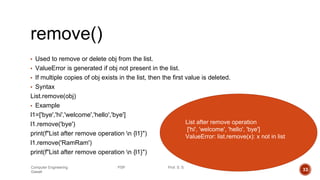
remove()
▪ Used to remove or delete obj from the list.
▪ ValueError is generated if obj not present in the list.
▪ If multiple copies of obj exists in the list, then the first value is deleted.
▪ Syntax
List.remove(obj)
▪ Example
l1=['bye','hi','welcome','hello','bye']
l1.remove('bye')
print(f"List after remove operation n {l1}")
l1.remove('RamRam')
print(f"List after remove operation n {l1}")
List after remove operation
['hi', 'welcome', 'hello', 'bye']
ValueError: list.remove(x): x not in list
Computer Engineering PSP Prof. S. S.
Gawali 33
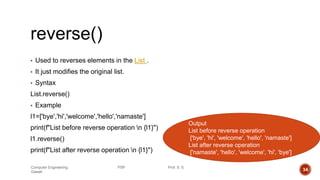
reverse()
▪ Used to reverses elements in the List .
▪ It just modifies the original list.
▪ Syntax
List.reverse()
▪ Example
l1=['bye','hi','welcome','hello','namaste']
print(f"List before reverse operation n {l1}")
l1.reverse()
print(f"List after reverse operation n {l1}")
Output
List before reverse operation
['bye', 'hi', 'welcome', 'hello', 'namaste']
List after reverse operation
['namaste', 'hello', 'welcome', 'hi', 'bye']
Computer Engineering PSP Prof. S. S.
Gawali 34
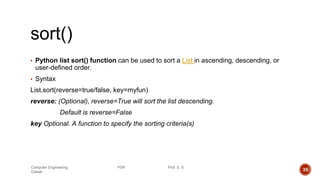
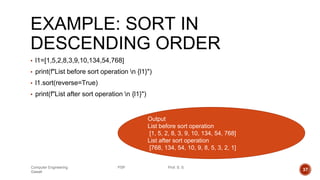
sort()
▪ Python list sort() function can be used to sort a List in ascending, descending, or
user-defined order.
▪ Syntax
List.sort(reverse=true/false, key=myfun)
reverse: (Optional), reverse=True will sort the list descending.
Default is reverse=False
key Optional. A function to specify the sorting criteria(s)
Computer Engineering PSP Prof. S. S.
Gawali 35
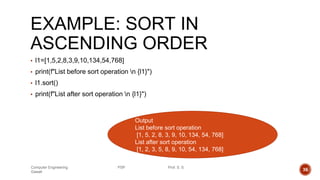
EXAMPLE: SORT IN
ASCENDING ORDER
▪ l1=[1,5,2,8,3,9,10,134,54,768]
▪ print(f"List before sort operation n {l1}")
▪ l1.sort()
▪ print(f"List after sort operation n {l1}")
Output
List before sort operation
[1, 5, 2, 8, 3, 9, 10, 134, 54, 768]
List after sort operation
[1, 2, 3, 5, 8, 9, 10, 54, 134, 768]
Computer Engineering PSP Prof. S. S.
Gawali 36
EXAMPLE: SORT IN
DESCENDING ORDER
▪ l1=[1,5,2,8,3,9,10,134,54,768]
▪ print(f"List before sort operation n {l1}")
▪ l1.sort(reverse=True)
▪ print(f"List after sort operation n {l1}")
Output
List before sort operation
[1, 5, 2, 8, 3, 9, 10, 134, 54, 768]
List after sort operation
[768, 134, 54, 10, 9, 8, 5, 3, 2, 1]
Computer Engineering PSP Prof. S. S.
Gawali 37
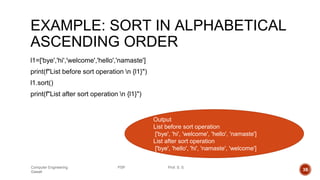
EXAMPLE: SORT IN ALPHABETICAL
ASCENDING ORDER
l1=['bye','hi','welcome','hello','namaste']
print(f"List before sort operation n {l1}")
l1.sort()
print(f"List after sort operation n {l1}")
Output
List before sort operation
['bye', 'hi', 'welcome', 'hello', 'namaste']
List after sort operation
['bye', 'hello', 'hi', 'namaste', 'welcome']
Computer Engineering PSP Prof. S. S.
Gawali 38
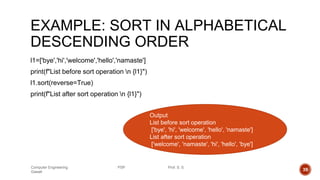
EXAMPLE: SORT IN ALPHABETICAL
DESCENDING ORDER
l1=['bye','hi','welcome','hello','namaste']
print(f"List before sort operation n {l1}")
l1.sort(reverse=True)
print(f"List after sort operation n {l1}")
Output
List before sort operation
['bye', 'hi', 'welcome', 'hello', 'namaste']
List after sort operation
['welcome', 'namaste', 'hi', 'hello', 'bye']
Computer Engineering PSP Prof. S. S.
Gawali 39
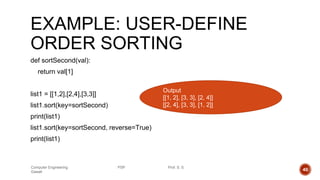
EXAMPLE: USER-DEFINE
ORDER SORTING
def sortSecond(val):
return val[1]
list1 = [[1,2],[2,4],[3,3]]
list1.sort(key=sortSecond)
print(list1)
list1.sort(key=sortSecond, reverse=True)
print(list1)
Computer Engineering PSP Prof. S. S.
Gawali 40
Output
[[1, 2], [3, 3], [2, 4]]
[[2, 4], [3, 3], [1, 2]]
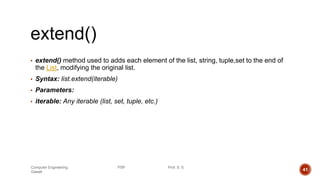
extend()
▪ extend() method used to adds each element of the list, string, tuple,set to the end of
the List, modifying the original list.
▪ Syntax: list.extend(iterable)
▪ Parameters:
▪ iterable: Any iterable (list, set, tuple, etc.)
Computer Engineering PSP Prof. S. S.
Gawali 41
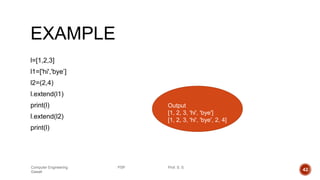
EXAMPLE
l=[1,2,3]
l1=['hi','bye’]
l2=(2,4)
l.extend(l1)
print(l)
l.extend(l2)
print(l)
Computer Engineering PSP Prof. S. S.
Gawali 42
Output
[1, 2, 3, 'hi', 'bye']
[1, 2, 3, 'hi', 'bye', 2, 4]
THANK YOU
Computer Engineering PSP Prof. S. S.
Gawali 43