Introduction:
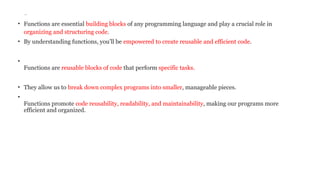
• Functions areessential building blocks of any programming language and play a crucial role in
organizing and structuring code.
• By understanding functions, you’ll be empowered to create reusable and efficient code.
•
Functions are reusable blocks of code that perform specific tasks.
• They allow us to break down complex programs into smaller, manageable pieces.
•
Functions promote code reusability, readability, and maintainability, making our programs more
efficient and organized.
3.
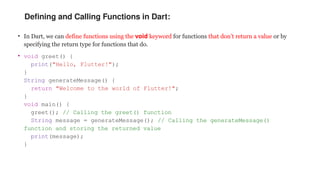
Defining and CallingFunctions in Dart:
• In Dart, we can define functions using the void keyword for functions that don’t return a value or by
specifying the return type for functions that do.
• void greet() {
print("Hello, Flutter!");
}
String generateMessage() {
return "Welcome to the world of Flutter!";
}
void main() {
greet(); // Calling the greet() function
String message = generateMessage(); // Calling the generateMessage()
function and storing the returned value
print(message);
}
4.
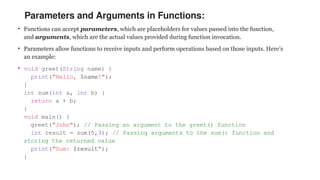
Parameters and Argumentsin Functions:
• Functions can accept parameters, which are placeholders for values passed into the function,
and arguments, which are the actual values provided during function invocation.
• Parameters allow functions to receive inputs and perform operations based on those inputs. Here’s
an example:
• void greet(String name) {
print("Hello, $name!");
}
int sum(int a, int b) {
return a + b;
}
void main() {
greet("John"); // Passing an argument to the greet() function
int result = sum(5,3); // Passing arguments to the sum() function and
storing the returned value
print("Sum: $result");
}
5.
Types of Parametersin Dart:
• Dart supports different types of parameters:
Required Parameters: These parameters must be provided when invoking the function.
Optional Positional Parameters: These parameters are enclosed in square brackets [] and can
be omitted during function invocation. They are matched based on their position.
• Optional Named Parameters: These parameters are enclosed in curly braces {} and can be
omitted during function invocation. They are matched based on their names
6.
Types of Parametersin Dart:
Example
void greet(String name, [String? message]) {
print("Hello, $name!");
if (message != null) {
print(message);
}
}
void main() {
greet("John"); // Calling the greet() function with only the required
parameter
greet("Alice", "Welcome to Dart!"); // Calling the greet() function with
both required and optional positional parameters
}
7.
Types of Parametersin Dart:
Example
void greet(String name, [String? message]) {
print("Hello, $name!");
if (message != null) {
print(message);
}
}
void main() {
greet("John"); // Calling the greet() function with only the required
parameter
greet("Alice", "Welcome to Dart!"); // Calling the greet() function with
both required and optional positional parameters
}
8.
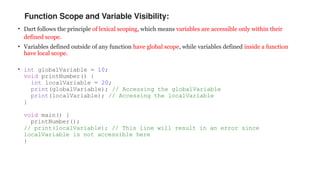
Function Scope andVariable Visibility:
• Dart follows the principle of lexical scoping, which means variables are accessible only within their
defined scope.
• Variables defined outside of any function have global scope, while variables defined inside a function
have local scope.
• int globalVariable = 10;
void printNumber() {
int localVariable = 20;
print(globalVariable); // Accessing the globalVariable
print(localVariable); // Accessing the localVariable
}
void main() {
printNumber();
// print(localVariable); // This line will result in an error since
localVariable is not accessible here
}
9.
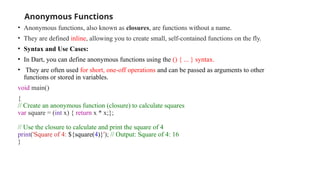
Anonymous Functions
• Anonymousfunctions, also known as closures, are functions without a name.
• They are defined inline, allowing you to create small, self-contained functions on the fly.
• Syntax and Use Cases:
• In Dart, you can define anonymous functions using the () { ... } syntax.
• They are often used for short, one-off operations and can be passed as arguments to other
functions or stored in variables.
void main()
{
// Create an anonymous function (closure) to calculate squares
var square = (int x) { return x * x;};
// Use the closure to calculate and print the square of 4
print('Square of 4: ${square(4)}'); // Output: Square of 4: 16
}
10.
Arrow Functions
• InDart, you can define arrow functions using the => syntax. The arrow function syntax is as
follows:
• returnType functionName(parameters) => expression;
void main() {
List<int> numbers = [1, 2, 3, 4, 5, 6];
// Use an arrow function to filter even numbers
List<int> evenNumbers = numbers.where((number) => number % 2 == 0).toList();
print('Even Numbers: $evenNumbers'); // Output: Even Numbers: [2, 4, 6]
}
We have a list of numbers.
We use the where method to filter the list and select only the even numbers.
The arrow function (number) => number % 2 == 0 defines the filtering criteria. It checks if a number
is even by using the modulo operator (%).
The filtered even numbers are stored in the evenNumbers list and printed to the console.

![Types of Parameters in Dart:
• Dart supports different types of parameters:
Required Parameters: These parameters must be provided when invoking the function.
Optional Positional Parameters: These parameters are enclosed in square brackets [] and can
be omitted during function invocation. They are matched based on their position.
• Optional Named Parameters: These parameters are enclosed in curly braces {} and can be
omitted during function invocation. They are matched based on their names](https://image.slidesharecdn.com/functions-250911012505-6e00775d/85/unit-ii-dart-programmming-Functions-pptx-5-320.jpg)
![Types of Parameters in Dart:
Example
void greet(String name, [String? message]) {
print("Hello, $name!");
if (message != null) {
print(message);
}
}
void main() {
greet("John"); // Calling the greet() function with only the required
parameter
greet("Alice", "Welcome to Dart!"); // Calling the greet() function with
both required and optional positional parameters
}](https://image.slidesharecdn.com/functions-250911012505-6e00775d/85/unit-ii-dart-programmming-Functions-pptx-6-320.jpg)
![Types of Parameters in Dart:
Example
void greet(String name, [String? message]) {
print("Hello, $name!");
if (message != null) {
print(message);
}
}
void main() {
greet("John"); // Calling the greet() function with only the required
parameter
greet("Alice", "Welcome to Dart!"); // Calling the greet() function with
both required and optional positional parameters
}](https://image.slidesharecdn.com/functions-250911012505-6e00775d/85/unit-ii-dart-programmming-Functions-pptx-7-320.jpg)
![Arrow Functions
• In Dart, you can define arrow functions using the => syntax. The arrow function syntax is as
follows:
• returnType functionName(parameters) => expression;
void main() {
List<int> numbers = [1, 2, 3, 4, 5, 6];
// Use an arrow function to filter even numbers
List<int> evenNumbers = numbers.where((number) => number % 2 == 0).toList();
print('Even Numbers: $evenNumbers'); // Output: Even Numbers: [2, 4, 6]
}
We have a list of numbers.
We use the where method to filter the list and select only the even numbers.
The arrow function (number) => number % 2 == 0 defines the filtering criteria. It checks if a number
is even by using the modulo operator (%).
The filtered even numbers are stored in the evenNumbers list and printed to the console.](https://image.slidesharecdn.com/functions-250911012505-6e00775d/85/unit-ii-dart-programmming-Functions-pptx-10-320.jpg)


