Dart Programming
Sameeha moogab
2024
Outline
• What is Dart
What is Dart
• Dart is for Scalable, productive app development.
• Dart is an open-source, scalable programming
language, with robust libraries and runtimes, for
building web, server, and mobile apps.
Dart Basic Concepts
• Everything you can place in a variable is an
object, and every object is an instance of a
class. Even numbers, functions, and null are
objects. All objects inherit from the Object
class.
• Specifying static types clarifies your intent and
enables static checking by tools, but it’s
optional. The variables with no specified type
Dart Basic Concepts
● Unlike Java, Dart doesn’t have the keywords public,
protected, and private. If an identifier starts with an
underscore (_), it’s private to its library.
● Identifiers can start with a letter or _, followed by
any combination of those characters plus digits.
Basics - Dart Program
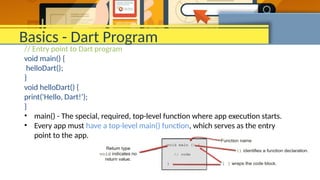
// Entry point to Dart program
void main() {
helloDart();
}
void helloDart() {
print('Hello, Dart!’);
}
• main() - The special, required, top-level function where app execution starts.
• Every app must have a top-level main() function, which serves as the entry
point to the app.
Comments
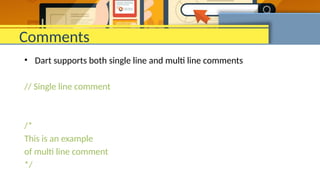
• Dart supports both single line and multi line comments
// Single line comment
/*
This is an example
of multi line comment
*/
Variables
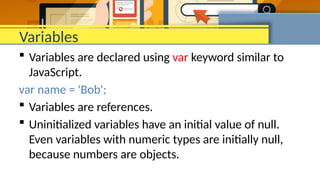
 Variables are declared using var keyword similar to
JavaScript.
var name = 'Bob';
 Variables are references.
 Uninitialized variables have an initial value of null.
Even variables with numeric types are initially null,
because numbers are objects.
Data Types in Dart
There are a few key places that you need to know about
types for now, and the rest will be covered in time. First,
when declaring variables, you give them a type:
• number
 int - Integer values, which generally should be in
the range -253 to 253
 double - 64-bit (double-precision) floating-point
numbers, as specified by the IEEE 754 standard
• string
• boolean – true and false
• symbol
• Collections
 list (arrays)
 map
 Queue
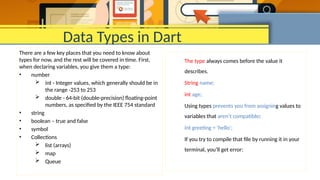
The type always comes before the value it
describes.
String name;
int age;
Using types prevents you from assigning values to
variables that aren’t compatible:
int greeting = 'hello';
If you try to compile that file by running it in your
terminal, you’ll get error:
Dynamic Types
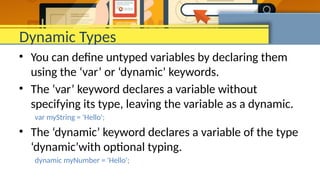
• You can define untyped variables by declaring them
using the ‘var’ or ‘dynamic’ keywords.
• The ‘var’ keyword declares a variable without
specifying its type, leaving the variable as a dynamic.
var myString = 'Hello';
• The ‘dynamic’ keyword declares a variable of the type
‘dynamic’with optional typing.
dynamic myNumber = 'Hello';
String Interpolation
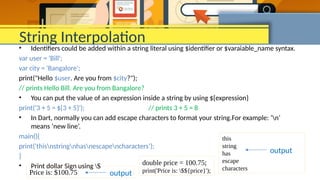
• Identifiers could be added within a string literal using $identifier or $varaiable_name syntax.
var user = 'Bill';
var city = 'Bangalore';
print("Hello $user. Are you from $city?");
// prints Hello Bill. Are you from Bangalore?
• You can put the value of an expression inside a string by using ${expression}
print('3 + 5 = ${3 + 5}'); // prints 3 + 5 = 8
• In Dart, normally you can add escape characters to format your string.For example: ‘n’
means ‘new line’.
main(){
print('thisnstringnhasnescapencharacters’);
}
• Print dollar Sign using $
this
string
has
escape
characters
output
double price = 100.75;
print('Price is: $${price}');
Price is: $100.75 output
Collection
• Perhaps the most common collection in nearly every
programming language is the array, or ordered group
of objects.
• In Dart, arrays are List objects, so we usually just call
them lists.
var numbers = [1,2,3,4,5];
var cities = ['Bangalore', ‘Kolkata', ‘Chennai'];
Operators
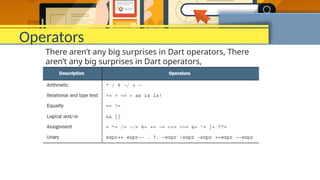
There aren’t any big surprises in Dart operators, There
aren’t any big surprises in Dart operators,
THE ?. OPERATOR
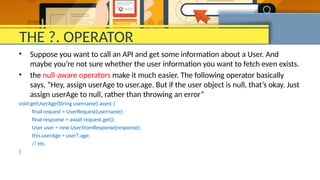
• Suppose you want to call an API and get some information about a User. And
maybe you’re not sure whether the user information you want to fetch even exists.
• the null-aware operators make it much easier. The following operator basically
says, “Hey, assign userAge to user.age. But if the user object is null, that’s okay. Just
assign userAge to null, rather than throwing an error”
void getUserAge(String username) async {
final request = UserRequest(username);
final response = await request.get();
User user = new User.fromResponse(response);
this.userAge = user?.age;
// etc.
}
THE ?? OPERATOR
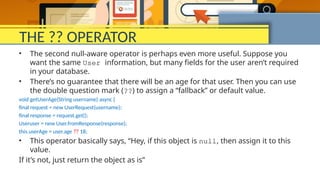
• The second null-aware operator is perhaps even more useful. Suppose you
want the same User information, but many fields for the user aren’t required
in your database.
• There’s no guarantee that there will be an age for that user. Then you can use
the double question mark (??) to assign a “fallback” or default value.
void getUserAge(String username) async {
final request = new UserRequest(username);
final response = request.get();
Useruser = new User.fromResponse(response);
this.userAge = user.age ?? 18;
• This operator basically says, “Hey, if this object is null, then assign it to this
value.
If it’s not, just return the object as is”
Control flow
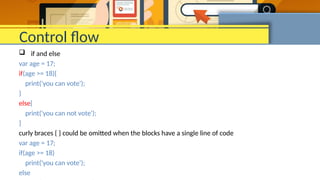
 if and else
var age = 17;
if(age >= 18){
print('you can vote');
}
else{
print('you can not vote');
}
curly braces { } could be omitted when the blocks have a single line of code
var age = 17;
if(age >= 18)
print('you can vote');
else
Control flow
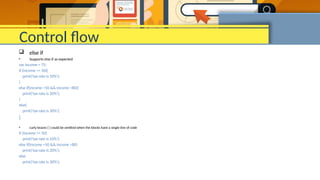
 else if
• Supports else if as expected
var income = 75;
if (income <= 50){
print('tax rate is 10%');
}
else if(income >50 && income <80){
print('tax rate is 20%');
}
else{
print('tax rate is 30%');
}
• curly braces { } could be omitted when the blocks have a single line of code
if (income <= 50)
print('tax rate is 10%');
else if(income >50 && income <80)
print('tax rate is 20%');
else
print('tax rate is 30%');
loops
Supports standard for loop (as supported by other languages that follow C like syntax)
for(int ctr=0; ctr<5; ctr++){
print(ctr);
}
Iterable classes such as List and Set also support the for-in form of iteration
var cities = ['Kolkata','Bangalore','Chennai','Delhi'];
for(var city in cities){
print(city);
}
Iterable classes also support forEach method
var cities = ['Kolkata','Bangalore','Chennai','Delhi'];
cities.forEach((city) => print(city));
WHILE LOOPS
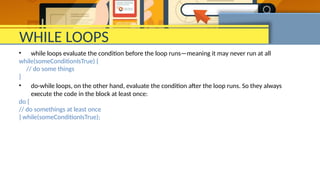
• while loops evaluate the condition before the loop runs—meaning it may never run at all
while(someConditionIsTrue) {
// do some things
}
• do-while loops, on the other hand, evaluate the condition after the loop runs. So they always
execute the code in the block at least once:
do {
// do somethings at least once
} while(someConditionIsTrue);
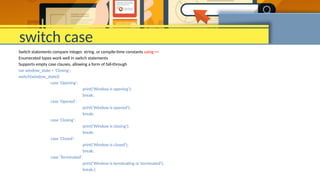
switch case
Switch statements compare integer, string, or compile-time constants using ==
Enumerated types work well in switch statements
Supports empty case clauses, allowing a form of fall-through
var window_state = 'Closing';
switch(window_state){
case 'Opening':
print('Window is opening');
break;
case 'Opened':
print('Window is opened');
break;
case 'Closing':
print('Window is closing');
break;
case 'Closed':
print('Window is closed');
break;
case 'Terminated':
print('Window is terminating or terminated');
break;}
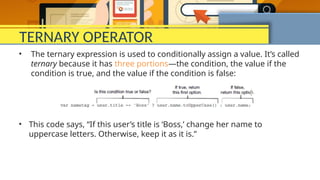
TERNARY OPERATOR
• The ternary expression is used to conditionally assign a value. It’s called
ternary because it has three portions—the condition, the value if the
condition is true, and the value if the condition is false:
• This code says, “If this user’s title is ‘Boss,’ change her name to
uppercase letters. Otherwise, keep it as it is.”
Functions
• The function signature follows this pattern: ReturnType
functionName(ArgumentType arg). And every function that uses
return must have a return type—otherwise, its return type is void.
• It’s important to note that Dart is a true object-oriented language. Even
functions are objects, with the type Function. You can pass functions
around and assign them to variables. Languages that support passing
functions as arguments and returning functions from functions usually
refer to these as higher-order functions.
Functions
Dart also supports a nice shorthand syntax for any function that has only
one expression. In other words, is the code inside the function block only
one line? Then it’s probably one expression, and you can use this syntax to
be concise:
String makeGreeting(String name) => 'Hello, $name’;
we’ll call this an arrow function. Arrow functions implicitly return the result
of the expression. => expression; is essentially the same as { return
expression; }.There’s no need to (and you can’t) include the return
keyword.
Parameters
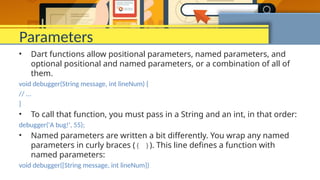
• Dart functions allow positional parameters, named parameters, and
optional positional and named parameters, or a combination of all of
them.
void debugger(String message, int lineNum) {
// ...
}
• To call that function, you must pass in a String and an int, in that order:
debugger('A bug!', 55);
• Named parameters are written a bit differently. You wrap any named
parameters in curly braces ({ }). This line defines a function with
named parameters:
void debugger({String message, int lineNum})
• you can pass positional parameters that are optional, using [ ]:
int addSomeNums(int x, int y, [int z]) {
int sum = x + y;
if (z != null) {
sum += z;
}
return sum;
}
• You can define default values for parameters with the = operator in the
function signature:
addSomeNums(int x, int y, [int z = 5]) => x + y + z;
Object oriented in Dart
• When writing Dart code, you’ll likely want to create separate
classes for everything that can represent a real-world “thing.”
• Consider if we were writing a point-of-sale (POS) system used
to sell goods to customers. What kinds of classes do you think
you’d need to represent “things” (or data)? What kind of
“things” does a POS app need to know about? Perhaps we
need classes to represent a Customer, Business, Employee,
Product, and Money. Those are all classes that represent real-
world things.
Class
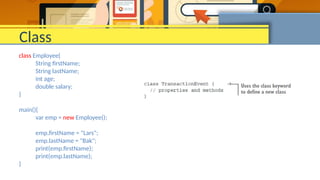
class Employee{
String firstName;
String lastName;
int age;
double salary;
}
main(){
var emp = new Employee();
emp.firstName = "Lars";
emp.lastName = "Bak";
print(emp.firstName);
print(emp.lastName);
}
Class constructor
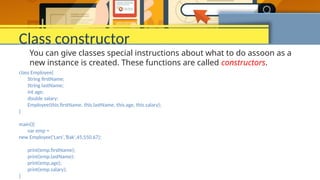
class Employee{
String firstName;
String lastName;
int age;
double salary;
Employee(this.firstName, this.lastName, this.age, this.salary);
}
main(){
var emp =
new Employee('Lars','Bak',45,550.67);
print(emp.firstName);
print(emp.lastName);
print(emp.age);
print(emp.salary);
}
You can give classes special instructions about what to do assoon as a
new instance is created. These functions are called constructors.
Inheritance
• In object-oriented programming, inheritance is the idea that a class can
inherit or subclass a different class. A cat is a specific kind of mammal,
so it follows that a cat will have all the same functionality and
properties as all other mammals. You can write a Mammal class once,
and then both the Dog and Cat classes can extend the Mammal class.
class Cat extends Mammal {}
class Eric extends Human {}
class Honda extends Car {}
• When a class inherits from another class (called its superclass), it’s
essentially a copy of the superclass, and you can add extra functionality
—whatever you define in the class itself.

App_development55555555555555555555.pptx

  • 1.
  • 2.
  • 3.
    What is Dart •Dart is for Scalable, productive app development. • Dart is an open-source, scalable programming language, with robust libraries and runtimes, for building web, server, and mobile apps.
  • 4.
    Dart Basic Concepts •Everything you can place in a variable is an object, and every object is an instance of a class. Even numbers, functions, and null are objects. All objects inherit from the Object class. • Specifying static types clarifies your intent and enables static checking by tools, but it’s optional. The variables with no specified type
  • 5.
    Dart Basic Concepts ●Unlike Java, Dart doesn’t have the keywords public, protected, and private. If an identifier starts with an underscore (_), it’s private to its library. ● Identifiers can start with a letter or _, followed by any combination of those characters plus digits.
  • 6.
    Basics - DartProgram // Entry point to Dart program void main() { helloDart(); } void helloDart() { print('Hello, Dart!’); } • main() - The special, required, top-level function where app execution starts. • Every app must have a top-level main() function, which serves as the entry point to the app.
  • 7.
    Comments • Dart supportsboth single line and multi line comments // Single line comment /* This is an example of multi line comment */
  • 8.
    Variables  Variables aredeclared using var keyword similar to JavaScript. var name = 'Bob';  Variables are references.  Uninitialized variables have an initial value of null. Even variables with numeric types are initially null, because numbers are objects.
  • 9.
    Data Types inDart There are a few key places that you need to know about types for now, and the rest will be covered in time. First, when declaring variables, you give them a type: • number  int - Integer values, which generally should be in the range -253 to 253  double - 64-bit (double-precision) floating-point numbers, as specified by the IEEE 754 standard • string • boolean – true and false • symbol • Collections  list (arrays)  map  Queue The type always comes before the value it describes. String name; int age; Using types prevents you from assigning values to variables that aren’t compatible: int greeting = 'hello'; If you try to compile that file by running it in your terminal, you’ll get error:
  • 10.
    Dynamic Types • Youcan define untyped variables by declaring them using the ‘var’ or ‘dynamic’ keywords. • The ‘var’ keyword declares a variable without specifying its type, leaving the variable as a dynamic. var myString = 'Hello'; • The ‘dynamic’ keyword declares a variable of the type ‘dynamic’with optional typing. dynamic myNumber = 'Hello';
  • 11.
    String Interpolation • Identifierscould be added within a string literal using $identifier or $varaiable_name syntax. var user = 'Bill'; var city = 'Bangalore'; print("Hello $user. Are you from $city?"); // prints Hello Bill. Are you from Bangalore? • You can put the value of an expression inside a string by using ${expression} print('3 + 5 = ${3 + 5}'); // prints 3 + 5 = 8 • In Dart, normally you can add escape characters to format your string.For example: ‘n’ means ‘new line’. main(){ print('thisnstringnhasnescapencharacters’); } • Print dollar Sign using $ this string has escape characters output double price = 100.75; print('Price is: $${price}'); Price is: $100.75 output
  • 12.
    Collection • Perhaps themost common collection in nearly every programming language is the array, or ordered group of objects. • In Dart, arrays are List objects, so we usually just call them lists. var numbers = [1,2,3,4,5]; var cities = ['Bangalore', ‘Kolkata', ‘Chennai'];
  • 13.
    Operators There aren’t anybig surprises in Dart operators, There aren’t any big surprises in Dart operators,
  • 14.
    THE ?. OPERATOR •Suppose you want to call an API and get some information about a User. And maybe you’re not sure whether the user information you want to fetch even exists. • the null-aware operators make it much easier. The following operator basically says, “Hey, assign userAge to user.age. But if the user object is null, that’s okay. Just assign userAge to null, rather than throwing an error” void getUserAge(String username) async { final request = UserRequest(username); final response = await request.get(); User user = new User.fromResponse(response); this.userAge = user?.age; // etc. }
  • 15.
    THE ?? OPERATOR •The second null-aware operator is perhaps even more useful. Suppose you want the same User information, but many fields for the user aren’t required in your database. • There’s no guarantee that there will be an age for that user. Then you can use the double question mark (??) to assign a “fallback” or default value. void getUserAge(String username) async { final request = new UserRequest(username); final response = request.get(); Useruser = new User.fromResponse(response); this.userAge = user.age ?? 18; • This operator basically says, “Hey, if this object is null, then assign it to this value. If it’s not, just return the object as is”
  • 16.
    Control flow  ifand else var age = 17; if(age >= 18){ print('you can vote'); } else{ print('you can not vote'); } curly braces { } could be omitted when the blocks have a single line of code var age = 17; if(age >= 18) print('you can vote'); else
  • 17.
    Control flow  elseif • Supports else if as expected var income = 75; if (income <= 50){ print('tax rate is 10%'); } else if(income >50 && income <80){ print('tax rate is 20%'); } else{ print('tax rate is 30%'); } • curly braces { } could be omitted when the blocks have a single line of code if (income <= 50) print('tax rate is 10%'); else if(income >50 && income <80) print('tax rate is 20%'); else print('tax rate is 30%');
  • 18.
    loops Supports standard forloop (as supported by other languages that follow C like syntax) for(int ctr=0; ctr<5; ctr++){ print(ctr); } Iterable classes such as List and Set also support the for-in form of iteration var cities = ['Kolkata','Bangalore','Chennai','Delhi']; for(var city in cities){ print(city); } Iterable classes also support forEach method var cities = ['Kolkata','Bangalore','Chennai','Delhi']; cities.forEach((city) => print(city));
  • 19.
    WHILE LOOPS • whileloops evaluate the condition before the loop runs—meaning it may never run at all while(someConditionIsTrue) { // do some things } • do-while loops, on the other hand, evaluate the condition after the loop runs. So they always execute the code in the block at least once: do { // do somethings at least once } while(someConditionIsTrue);
  • 20.
    switch case Switch statementscompare integer, string, or compile-time constants using == Enumerated types work well in switch statements Supports empty case clauses, allowing a form of fall-through var window_state = 'Closing'; switch(window_state){ case 'Opening': print('Window is opening'); break; case 'Opened': print('Window is opened'); break; case 'Closing': print('Window is closing'); break; case 'Closed': print('Window is closed'); break; case 'Terminated': print('Window is terminating or terminated'); break;}
  • 21.
    TERNARY OPERATOR • Theternary expression is used to conditionally assign a value. It’s called ternary because it has three portions—the condition, the value if the condition is true, and the value if the condition is false: • This code says, “If this user’s title is ‘Boss,’ change her name to uppercase letters. Otherwise, keep it as it is.”
  • 22.
    Functions • The functionsignature follows this pattern: ReturnType functionName(ArgumentType arg). And every function that uses return must have a return type—otherwise, its return type is void. • It’s important to note that Dart is a true object-oriented language. Even functions are objects, with the type Function. You can pass functions around and assign them to variables. Languages that support passing functions as arguments and returning functions from functions usually refer to these as higher-order functions.
  • 23.
    Functions Dart also supportsa nice shorthand syntax for any function that has only one expression. In other words, is the code inside the function block only one line? Then it’s probably one expression, and you can use this syntax to be concise: String makeGreeting(String name) => 'Hello, $name’; we’ll call this an arrow function. Arrow functions implicitly return the result of the expression. => expression; is essentially the same as { return expression; }.There’s no need to (and you can’t) include the return keyword.
  • 24.
    Parameters • Dart functionsallow positional parameters, named parameters, and optional positional and named parameters, or a combination of all of them. void debugger(String message, int lineNum) { // ... } • To call that function, you must pass in a String and an int, in that order: debugger('A bug!', 55); • Named parameters are written a bit differently. You wrap any named parameters in curly braces ({ }). This line defines a function with named parameters: void debugger({String message, int lineNum})
  • 25.
    • you canpass positional parameters that are optional, using [ ]: int addSomeNums(int x, int y, [int z]) { int sum = x + y; if (z != null) { sum += z; } return sum; } • You can define default values for parameters with the = operator in the function signature: addSomeNums(int x, int y, [int z = 5]) => x + y + z;
  • 26.
    Object oriented inDart • When writing Dart code, you’ll likely want to create separate classes for everything that can represent a real-world “thing.” • Consider if we were writing a point-of-sale (POS) system used to sell goods to customers. What kinds of classes do you think you’d need to represent “things” (or data)? What kind of “things” does a POS app need to know about? Perhaps we need classes to represent a Customer, Business, Employee, Product, and Money. Those are all classes that represent real- world things.
  • 27.
    Class class Employee{ String firstName; StringlastName; int age; double salary; } main(){ var emp = new Employee(); emp.firstName = "Lars"; emp.lastName = "Bak"; print(emp.firstName); print(emp.lastName); }
  • 28.
    Class constructor class Employee{ StringfirstName; String lastName; int age; double salary; Employee(this.firstName, this.lastName, this.age, this.salary); } main(){ var emp = new Employee('Lars','Bak',45,550.67); print(emp.firstName); print(emp.lastName); print(emp.age); print(emp.salary); } You can give classes special instructions about what to do assoon as a new instance is created. These functions are called constructors.
  • 29.
    Inheritance • In object-orientedprogramming, inheritance is the idea that a class can inherit or subclass a different class. A cat is a specific kind of mammal, so it follows that a cat will have all the same functionality and properties as all other mammals. You can write a Mammal class once, and then both the Dog and Cat classes can extend the Mammal class. class Cat extends Mammal {} class Eric extends Human {} class Honda extends Car {} • When a class inherits from another class (called its superclass), it’s essentially a copy of the superclass, and you can add extra functionality —whatever you define in the class itself.