London Dart Community

            Chris Buckett
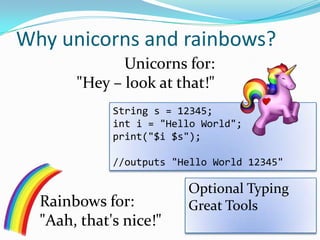
Why unicorns and rainbows?
              Unicorns for:
       "Hey – look at that!"
             String s = 12345;
             int i = "Hello World";
             print("$i $s");

             //outputs "Hello World 12345"

                         Optional Typing
  Rainbows for:          Great Tools
  "Aah, that's nice!"
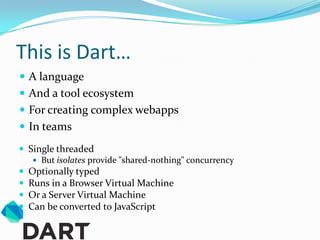
This is Dart…
 A language
 And a tool ecosystem
 For creating complex webapps
 In teams
 Single threaded
    But isolates provide "shared-nothing" concurrency
 Optionally typed
 Runs in a Browser Virtual Machine
 Or a Server Virtual Machine
 Can be converted to JavaScript
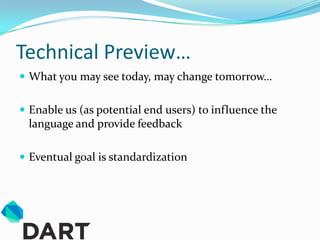
Technical Preview…
 What you may see today, may change tomorrow…


 Enable us (as potential end users) to influence the
 language and provide feedback

 Eventual goal is standardization
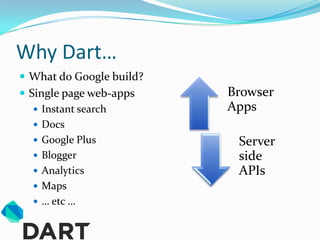
Why Dart…
 What do Google build?
 Single page web-apps    Browser
    Instant search       Apps
    Docs
    Google Plus           Server
    Blogger               side
    Analytics             APIs
    Maps
    … etc …
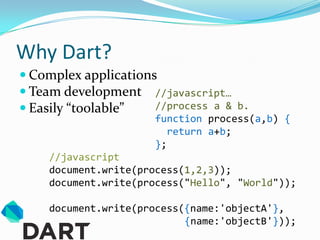
Why Dart?
 Complex applications
 Team development //javascript…
 Easily “toolable”   //process a & b.
                      function process(a,b) {
                         return a+b;
                      };
    //javascript
    document.write(process(1,2,3));
    document.write(process("Hello", "World"));

    document.write(process({name:'objectA'},
                           {name:'objectB'}));
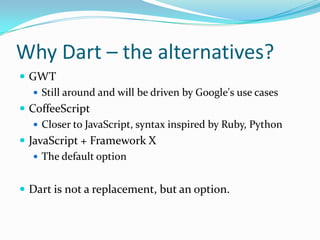
Why Dart – the alternatives?
 GWT
    Still around and will be driven by Google's use cases
 CoffeeScript
    Closer to JavaScript, syntax inspired by Ruby, Python
 JavaScript + Framework X
    The default option


 Dart is not a replacement, but an option.
Design Goals - Flexibility
 Flexible, but with structure

   Optional types provide flexibility


   Libraries to organize code


   Classes and Interfaces to provide structure


   Tools catch errors
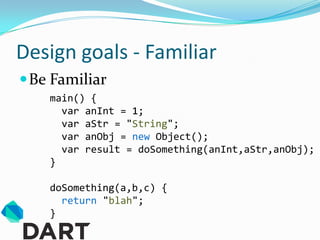
Design goals - Familiar
 Be Familiar
    main() {
      var anInt = 1;
      var aStr = "String";
      var anObj = new Object();
      var result = doSomething(anInt,aStr,anObj);
    }

    doSomething(a,b,c) {
      return "blah";
    }
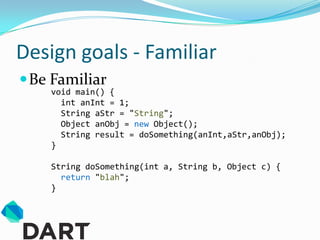
Design goals - Familiar
 Be Familiar
    void main() {
      int anInt = 1;
      String aStr = "String";
      Object anObj = new Object();
      String result = doSomething(anInt,aStr,anObj);
    }

    String doSomething(int a, String b, Object c) {
      return "blah";
    }
Design Goals - Perfomance
 Performance as a feature
    Currently not as fast as V8


    (But D8 is faster at launch than V8 was at launch)


    Converted JS should be as fast as or faster than
     equivalent hand written JavaScript.
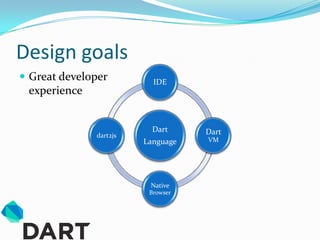
Design goals
 Great developer         IDE
 experience


                          Dart     Dart
              dart2js
                        Language   VM


                         Native
                         Browser
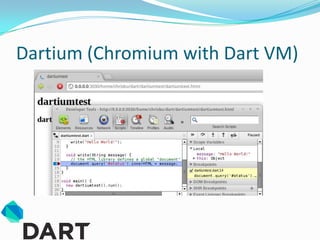
Dartium (Chromium with Dart VM)
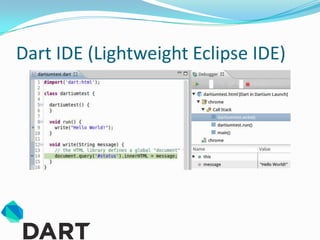
Dart IDE (Lightweight Eclipse IDE)
Demo… debugging and dartium
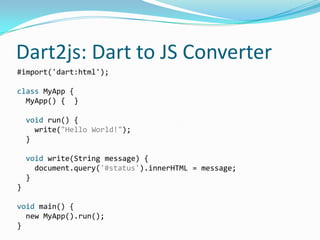
Dart2js: Dart to JS Converter
#import('dart:html');

class MyApp {
  MyApp() { }

    void run() {
      write("Hello World!");
    }

    void write(String message) {
      document.query('#status').innerHTML = message;
    }
}

void main() {
  new MyApp().run();
}
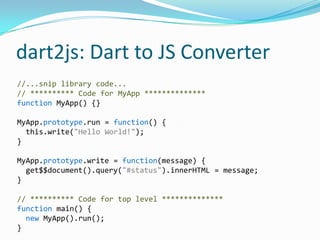
dart2js: Dart to JS Converter
//...snip library code...
// ********** Code for MyApp **************
function MyApp() {}

MyApp.prototype.run = function() {
  this.write("Hello World!");
}

MyApp.prototype.write = function(message) {
  get$$document().query("#status").innerHTML = message;
}

// ********** Code for top level **************
function main() {
  new MyApp().run();
}
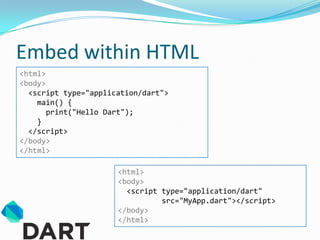
Embed within HTML
<html>
<body>
  <script type="application/dart">
    main() {
       print("Hello Dart");
    }
  </script>
</body>
</html>

                      <html>
                      <body>
                        <script type="application/dart"
                                src="MyApp.dart"></script>
                      </body>
                      </html>
A quick tour of some interesting
      language features…
Dart: Classes and interfaces
   Familiar (to Java and C# developers)                 Optional
   But a couple of nice features                        paramters

    class Duck implements Quackable {
      var colour;

        Duck([this.colour="red"]) { }

        Duck.yellow() {                                Named
          this.colour = "yellow";                    constructors
        }
                                        //Usage
        String sayQuack() => "quack";
                                        var duck1 = new Duck();
    }
                                        var duck2 = new Duck("blue");
Unsurprising                Function    var duck3 = new Duck.yellow();
    this                   shorthand    print(duck3.sayQuack());
Dart: Classes and interfaces
 Familiar (to Java and C# developers)
 But a couple of nice features

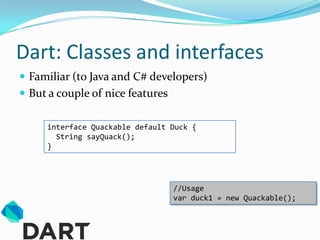
     interface Quackable default Duck {
       String sayQuack();
     }


                                  //Usage
                                  var duck1 = new Quackable();
Dart: Classes and interfaces
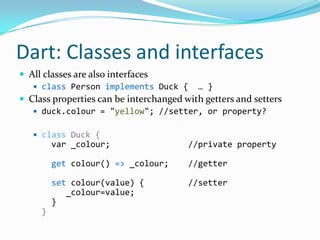
 All classes are also interfaces
    class Person implements Duck { … }
 Class properties can be interchanged with getters and setters
    duck.colour = "yellow"; //setter, or property?


    class Duck {
         var _colour;                   //private property

         get colour() => _colour;       //getter

         set colour(value) {            //setter
            _colour=value;
         }
     }
Demo… classes and interfaces
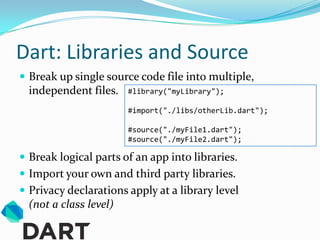
Dart: Libraries and Source
 Break up single source code file into multiple,
  independent files.    #library("myLibrary");

                        #import("./libs/otherLib.dart");

                        #source("./myFile1.dart");
                        #source("./myFile2.dart");

 Break logical parts of an app into libraries.
 Import your own and third party libraries.
 Privacy declarations apply at a library level
  (not a class level)
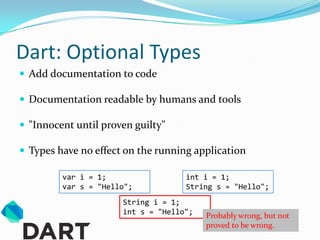
Dart: Optional Types
 Add documentation to code

 Documentation readable by humans and tools

 "Innocent until proven guilty"

 Types have no effect on the running application

         var i = 1;                 int i = 1;
         var s = "Hello";           String s = "Hello";
                      String i = 1;
                      int s = "Hello";   Probably wrong, but not
                                         proved to be wrong.
Dart: Optional Types
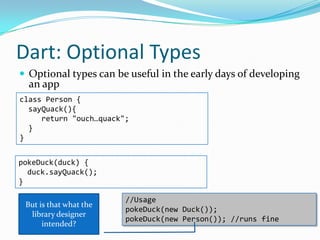
 Optional types can be useful in the early days of developing
  an app
class Person {
  sayQuack(){
     return "ouch…quack";
  }
}


pokeDuck(duck) {
  duck.sayQuack();
}

                        //Usage
 But is that what the
                        pokeDuck(new Duck());
  library designer
                        pokeDuck(new Person()); //runs fine
      intended?
Dart: Optional Types
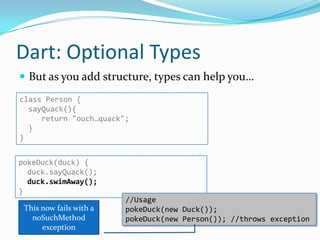
 But as you add structure, types can help you…
class Person {
  sayQuack(){
     return "ouch…quack";
  }
}


pokeDuck(duck) {
  duck.sayQuack();
  duck.swimAway();
}
                         //Usage
 This now fails with a   pokeDuck(new Duck());
   noSuchMethod          pokeDuck(new Person()); //throws exception
      exception
Dart: Optional Types
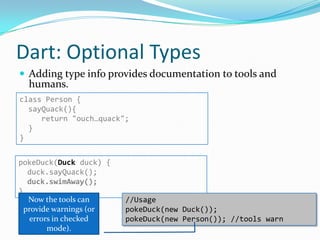
 Adding type info provides documentation to tools and
  humans.
class Person {
  sayQuack(){
     return "ouch…quack";
  }
}


pokeDuck(Duck duck) {
   duck.sayQuack();
   duck.swimAway();
}
   Now the tools can     //Usage
  provide warnings (or   pokeDuck(new Duck());
    errors in checked    pokeDuck(new Person()); //tools warn
         mode).
Demo… Libraries
and optional types
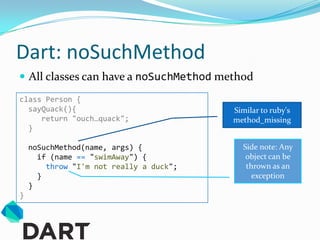
Dart: noSuchMethod
 All classes can have a noSuchMethod method
class Person {
  sayQuack(){                            Similar to ruby's
     return "ouch…quack";                method_missing
  }

    noSuchMethod(name, args) {             Side note: Any
      if (name == "swimAway") {             object can be
        throw "I'm not really a duck";      thrown as an
      }                                       exception
    }
}
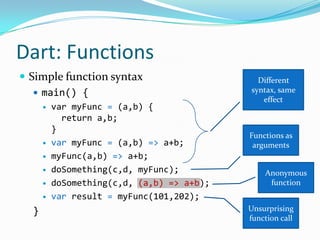
Dart: Functions
 Simple function syntax                      Different
    main() {                               syntax, same
                                               effect
         var myFunc = (a,b) {
            return a,b;
          }
                                            Functions as
         var myFunc = (a,b) => a+b;         arguments
         myFunc(a,b) => a+b;
         doSomething(c,d, myFunc);             Anonymous
         doSomething(c,d, (a,b) => a+b);        function
         var result = myFunc(101,202);
  }                                         Unsurprising
                                            function call
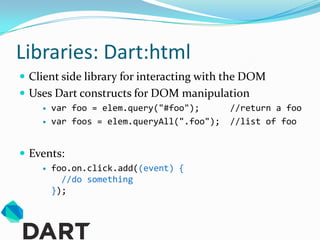
Libraries: Dart:html
 Client side library for interacting with the DOM
 Uses Dart constructs for DOM manipulation
       var foo = elem.query("#foo");       //return a foo
       var foos = elem.queryAll(".foo");   //list of foo


 Events:
       foo.on.click.add((event) {
          //do something
        });
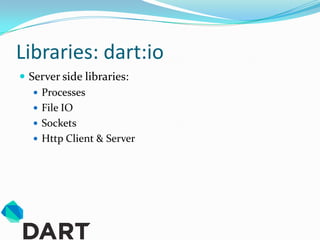
Libraries: dart:io
 Server side libraries:
    Processes
    File IO
    Sockets
    Http Client & Server
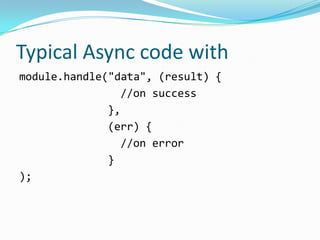
Typical Async code with
module.handle("data", (result) {
                //on success
              },
              (err) {
                //on error
              }
);
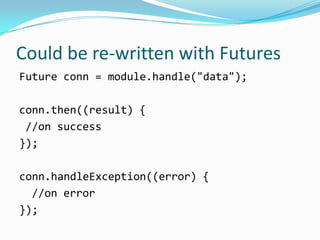
Could be re-written with Futures
Future conn = module.handle("data");

conn.then((result) {
 //on success
});

conn.handleException((error) {
  //on error
});
Demo… futures
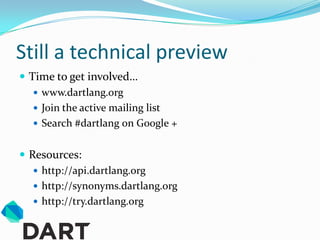
Still a technical preview
 Time to get involved…
    www.dartlang.org
    Join the active mailing list
    Search #dartlang on Google +


 Resources:
    http://api.dartlang.org
    http://synonyms.dartlang.org
    http://try.dartlang.org

Dart, unicorns and rainbows

  • 1.
  • 2.
    Why unicorns andrainbows? Unicorns for: "Hey – look at that!" String s = 12345; int i = "Hello World"; print("$i $s"); //outputs "Hello World 12345" Optional Typing Rainbows for: Great Tools "Aah, that's nice!"
  • 3.
    This is Dart… A language  And a tool ecosystem  For creating complex webapps  In teams  Single threaded  But isolates provide "shared-nothing" concurrency  Optionally typed  Runs in a Browser Virtual Machine  Or a Server Virtual Machine  Can be converted to JavaScript
  • 4.
    Technical Preview…  Whatyou may see today, may change tomorrow…  Enable us (as potential end users) to influence the language and provide feedback  Eventual goal is standardization
  • 5.
    Why Dart…  Whatdo Google build?  Single page web-apps Browser  Instant search Apps  Docs  Google Plus Server  Blogger side  Analytics APIs  Maps  … etc …
  • 6.
    Why Dart?  Complexapplications  Team development //javascript…  Easily “toolable” //process a & b. function process(a,b) { return a+b; }; //javascript document.write(process(1,2,3)); document.write(process("Hello", "World")); document.write(process({name:'objectA'}, {name:'objectB'}));
  • 7.
    Why Dart –the alternatives?  GWT  Still around and will be driven by Google's use cases  CoffeeScript  Closer to JavaScript, syntax inspired by Ruby, Python  JavaScript + Framework X  The default option  Dart is not a replacement, but an option.
  • 8.
    Design Goals -Flexibility  Flexible, but with structure  Optional types provide flexibility  Libraries to organize code  Classes and Interfaces to provide structure  Tools catch errors
  • 9.
    Design goals -Familiar  Be Familiar main() { var anInt = 1; var aStr = "String"; var anObj = new Object(); var result = doSomething(anInt,aStr,anObj); } doSomething(a,b,c) { return "blah"; }
  • 10.
    Design goals -Familiar  Be Familiar void main() { int anInt = 1; String aStr = "String"; Object anObj = new Object(); String result = doSomething(anInt,aStr,anObj); } String doSomething(int a, String b, Object c) { return "blah"; }
  • 11.
    Design Goals -Perfomance  Performance as a feature  Currently not as fast as V8  (But D8 is faster at launch than V8 was at launch)  Converted JS should be as fast as or faster than equivalent hand written JavaScript.
  • 12.
    Design goals  Greatdeveloper IDE experience Dart Dart dart2js Language VM Native Browser
  • 13.
  • 14.
  • 15.
  • 16.
    Dart2js: Dart toJS Converter #import('dart:html'); class MyApp { MyApp() { } void run() { write("Hello World!"); } void write(String message) { document.query('#status').innerHTML = message; } } void main() { new MyApp().run(); }
  • 17.
    dart2js: Dart toJS Converter //...snip library code... // ********** Code for MyApp ************** function MyApp() {} MyApp.prototype.run = function() { this.write("Hello World!"); } MyApp.prototype.write = function(message) { get$$document().query("#status").innerHTML = message; } // ********** Code for top level ************** function main() { new MyApp().run(); }
  • 18.
    Embed within HTML <html> <body> <script type="application/dart"> main() { print("Hello Dart"); } </script> </body> </html> <html> <body> <script type="application/dart" src="MyApp.dart"></script> </body> </html>
  • 19.
    A quick tourof some interesting language features…
  • 20.
    Dart: Classes andinterfaces  Familiar (to Java and C# developers) Optional  But a couple of nice features paramters class Duck implements Quackable { var colour; Duck([this.colour="red"]) { } Duck.yellow() { Named this.colour = "yellow"; constructors } //Usage String sayQuack() => "quack"; var duck1 = new Duck(); } var duck2 = new Duck("blue"); Unsurprising Function var duck3 = new Duck.yellow(); this shorthand print(duck3.sayQuack());
  • 21.
    Dart: Classes andinterfaces  Familiar (to Java and C# developers)  But a couple of nice features interface Quackable default Duck { String sayQuack(); } //Usage var duck1 = new Quackable();
  • 22.
    Dart: Classes andinterfaces  All classes are also interfaces  class Person implements Duck { … }  Class properties can be interchanged with getters and setters  duck.colour = "yellow"; //setter, or property?  class Duck { var _colour; //private property get colour() => _colour; //getter set colour(value) { //setter _colour=value; } }
  • 23.
  • 24.
    Dart: Libraries andSource  Break up single source code file into multiple, independent files. #library("myLibrary"); #import("./libs/otherLib.dart"); #source("./myFile1.dart"); #source("./myFile2.dart");  Break logical parts of an app into libraries.  Import your own and third party libraries.  Privacy declarations apply at a library level (not a class level)
  • 25.
    Dart: Optional Types Add documentation to code  Documentation readable by humans and tools  "Innocent until proven guilty"  Types have no effect on the running application var i = 1; int i = 1; var s = "Hello"; String s = "Hello"; String i = 1; int s = "Hello"; Probably wrong, but not proved to be wrong.
  • 26.
    Dart: Optional Types Optional types can be useful in the early days of developing an app class Person { sayQuack(){ return "ouch…quack"; } } pokeDuck(duck) { duck.sayQuack(); } //Usage But is that what the pokeDuck(new Duck()); library designer pokeDuck(new Person()); //runs fine intended?
  • 27.
    Dart: Optional Types But as you add structure, types can help you… class Person { sayQuack(){ return "ouch…quack"; } } pokeDuck(duck) { duck.sayQuack(); duck.swimAway(); } //Usage This now fails with a pokeDuck(new Duck()); noSuchMethod pokeDuck(new Person()); //throws exception exception
  • 28.
    Dart: Optional Types Adding type info provides documentation to tools and humans. class Person { sayQuack(){ return "ouch…quack"; } } pokeDuck(Duck duck) { duck.sayQuack(); duck.swimAway(); } Now the tools can //Usage provide warnings (or pokeDuck(new Duck()); errors in checked pokeDuck(new Person()); //tools warn mode).
  • 29.
  • 30.
    Dart: noSuchMethod  Allclasses can have a noSuchMethod method class Person { sayQuack(){ Similar to ruby's return "ouch…quack"; method_missing } noSuchMethod(name, args) { Side note: Any if (name == "swimAway") { object can be throw "I'm not really a duck"; thrown as an } exception } }
  • 31.
    Dart: Functions  Simplefunction syntax Different  main() { syntax, same effect  var myFunc = (a,b) { return a,b; } Functions as  var myFunc = (a,b) => a+b; arguments  myFunc(a,b) => a+b;  doSomething(c,d, myFunc); Anonymous  doSomething(c,d, (a,b) => a+b); function  var result = myFunc(101,202); } Unsurprising function call
  • 32.
    Libraries: Dart:html  Clientside library for interacting with the DOM  Uses Dart constructs for DOM manipulation  var foo = elem.query("#foo"); //return a foo  var foos = elem.queryAll(".foo"); //list of foo  Events:  foo.on.click.add((event) { //do something });
  • 33.
    Libraries: dart:io  Serverside libraries:  Processes  File IO  Sockets  Http Client & Server
  • 34.
    Typical Async codewith module.handle("data", (result) { //on success }, (err) { //on error } );
  • 35.
    Could be re-writtenwith Futures Future conn = module.handle("data"); conn.then((result) { //on success }); conn.handleException((error) { //on error });
  • 36.
  • 37.
    Still a technicalpreview  Time to get involved…  www.dartlang.org  Join the active mailing list  Search #dartlang on Google +  Resources:  http://api.dartlang.org  http://synonyms.dartlang.org  http://try.dartlang.org