ENTERPRISE COMPUTING


                 P.Suthahar,
                 Lecturer / IT
Enterprise Architectural overview


The Enterprise
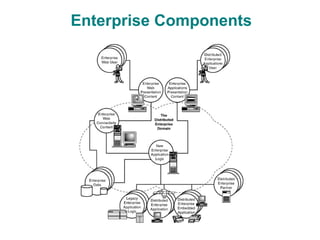
Enterprise Components
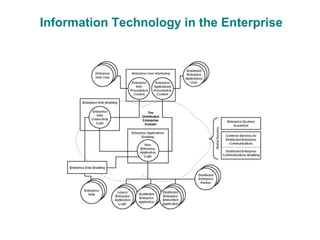
Information Technology in the Enterprise
The Enterprise
the term enterprise can simply refer to an
organization that has set out to accomplish
certain goals.
the term enterprise is typically used to refer
to a large organization
Enterprise Components
Information Technology in the Enterprise
Enterprise User Interfacing
Provides a means to present content to both
Web-based and standard applications based
users of an enterprise system.
Enterprise Data Enabling
Provides a means to access, store, and
manage enterprise information and
knowledge via enterprise databases.
Distributed Enterprise Communications Enabling

Provides a means to access information and
applications throughout a distributed
enterprise system
Common Services for Distributed Enterprise Communications


Provides a set of common services used by
distributed object communications paradigms.
Enterprise Systems Assurance
Provides for the secure, reliable, available,
maintainable, and safe qualities of an
enterprise system
Enterprise Web Enabling:
Provides for the connectivity of the enterprise
to the Internet/Web, as well as for generating
Web-based presentation content
Enterprise Applications Enabling
Provides for the middle tier of application logic
management with the connectivity to legacy enterprise
application logic, the provision of new enterprise
application logic, connectivity to distributed enterprise
applications and embedded devices, and business-to-
business connectivity with commerce partners
Object-Oriented Software Development
           for the Enterprise
Enterprise Objects
The Object-Oriented Development Process
Unified Modeling Language
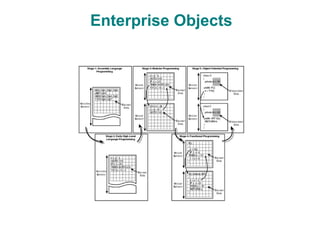
Enterprise Objects
Elements of Object-Oriented Software
 Central to the foundation of OO software is the
 concept of a "class
Object-Oriented Software's Importance to the Enterprise

 OO as a software-development paradigm is use
 to build a successful and distributed enterprise
 systems.
 OO practices foster the development of
 modular programs with encapsulated state and
 implementation behavior, as well as facilitate
 the abstraction of problems
The Object-Oriented Development Process
1. Project Charter
2. Requirements Analysis
3. Preliminary System Design
4. Detailed Design
5. Implementation
6. Unit Test
7. Assembly
8. Thread Test
9. Configuration Specification
10. System Test
11. Deployment
12. Maintenance:
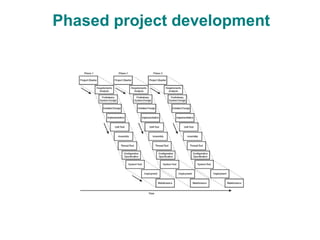
Phased project development
Project Charter
A project charter is a written vision and
mission statement for a project that
summarizes the key goals and objectives to be
accomplished for a particular development
effort.
Requirements Analysis
Requirements analysis involves creating an
understanding and model of what the system to
be developed should do.
System Behavioral Analysis
It describe what is to be produced from your
project
System Interface Analysis
Interfaces to your system and to software that
lie outside of the system boundary should also
be analyzed and modeled.
Preliminary System Design
Preliminary system design involves taking your
conceptual-analysis model and transforming it
into something that can be realized using COTS
or custom software
Detailed Design
The model packages handed to the developer
This enables developers to focus on a
cohesive component of the system to be
developed.
Implementation
After the core classes and their operation
signatures have been defined, the developer
can begin implementation using an OOP
technique and language
Unit Test
Unit testing involves testing software at the
class and package level.
 Many times such tests are performed during
implementation of a particular class and
collection of classes
Assembly
Assembling individually developed software
classes into groups of classes that perform
some specific service
Thread Test
Thread test involves demonstrating that any
assembled classes can interoperate
Configuration Specification
Although sometimes overlooked, the means by
which enterprise software is to be configured
should be specified
System Test
System test involves the functional/behavioral
test of a fully assembled set of software that is
to be deployed
Deployment
Deployment involves packaging the system
that was tested and deploying it onto the
machines that will host it for actual enterprise
operation
Maintenance
Maintenance involves repairing defects while
the system is deployed and in operation.
Maintenance also involves providing upgrades
to a fielded and operational system.
Unified Modeling Language
Static Logical Structure Diagrams
Dynamic Behavior Diagrams
Static Logical Structure Diagrams
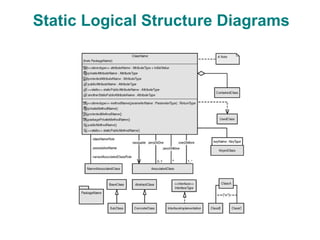
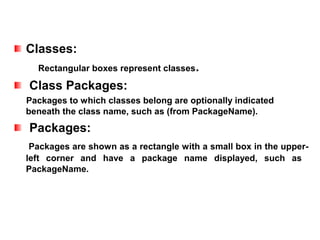
Classes:
  Rectangular boxes represent classes.

Class Packages:
Packages to which classes belong are optionally indicated
beneath the class name, such as (from PackageName).
Packages:
 Packages are shown as a rectangle with a small box in the upper-
left corner and have a package name displayed, such as
PackageName.
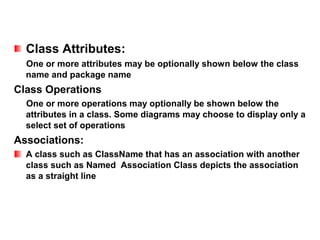
Class Attributes:
  One or more attributes may be optionally shown below the class
  name and package name
Class Operations
  One or more operations may optionally be shown below the
  attributes in a class. Some diagrams may choose to display only a
  select set of operations
Associations:
  A class such as ClassName that has an association with another
  class such as Named Association Class depicts the association
  as a straight line
Uses Relations:
  When a class such as ClassName has a general dependency on
  another class such as UsedClass, a dashed-line arrow depicting
  the dependency is shown.
Inheritance:
   When a SubClass inherits from a BaseClass, a solid
   line with a triangle
Interfaces:
   When an Interface Implementation implements a
   particular InterfaceType, a dashed line with a triangle
Dynamic Behavior Diagrams
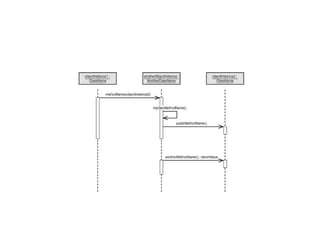
It is used to describe the communication
between objects.
Time:
Sequences in time proceed from top to bottom


Objects:
Object instances are represented by boxes at the top of the diagram.

Object Names:
An object-instance name can be followed by a class name inside of
  an object box.
Methods:
 Method calls are shown as arrows from the invoking object onto
 the invoked object. Method calls may also be made by an object
 onto itself.
Method Names:
 Method names are displayed on method-call arrows, but may
 simply be more descriptive words designating an action to invoke
 on some concept or design entity in conceptual model diagrams.
Method Parameters:
 Object parameters to such methods may also be optionally
 displayed in method calls.
Component-Based Software
      Development for the Enterprise

Enterprise Components
Component Models
Component-Based Development
Standards
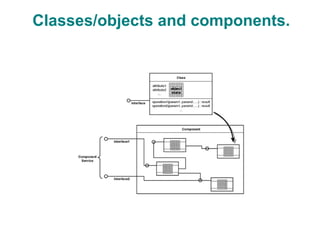
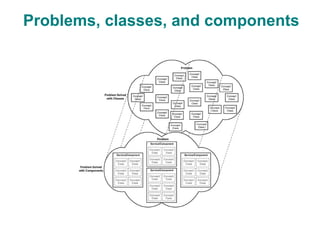
Enterprise Components
class having object state and a set of
operations can encapsulate a singular
concept, a component represents a particular
service as a function of one or more such
concepts.
Classes/objects and components.
Problems, classes, and components
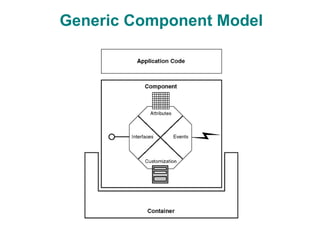
Generic Component Model
component may itself be application-specific
code, it will utilize the services it provides.

Finally, the container represents an environment in
which a component operate
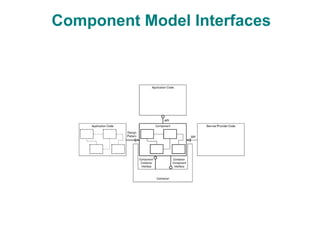
Component Model Interfaces
Component APIs
Design Patterns
Component SPIs
Component-to-Container Interfaces
Container-to-Component Interfaces
Component-Based Development
Project Charter
Analysis Pattern Identification
External Component Interface Analysis
System Component Interface Analysis
Component Model Technology Identification
Component Identification
Component Selection
Component Design Adaptation
Component Implementation
Component Test
Component Assembly
Module Test
Component Configuration Specification
System Test
Deployment
Maintenance
Standards
Applets
CORBA
RMI
COM
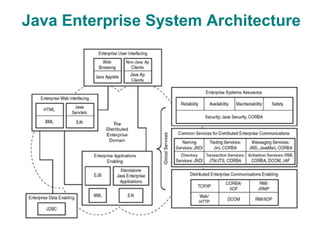
Java Enterprise System Architecture
Enterprise User Interfacing:


Web-based Java applets and desktop Java application clients can
be built using Java-based GUI techniques and can be hosted in
standalone J2SE environments.
Enterprise Data Enabling
The Java Database Connectivity (JDBC) solution is used to
communicate with databases. J2EE Web, EJB application, and
application client containers all utilize the JDBC API
Distributed Enterprise Communications Enabling:

Technologies for distributed communications such as CORBA,
RMI, DCOM, TCP/IP, and Web-based HTTP are all possible within
Java enterprise environments, whether they're embedded in Web
servers, application servers, standalone Java applications, or
enterprise user interface clients.
Common Services for Distributed Enterprise
               Communications


Naming services enable the lookup of named objects across a
network.

Directory services allow for more sophisticated searching of
objects via attribute descriptions of those network objects.

Trading services offer a more dynamic means to connect with

services on a network.
Enterprise Systems Assurance

Various properties of systems assurance such
as reliability, availability, maintainability, safety,
and security are more inherent properties of a
system as opposed to a distinct service.
Enterprise Web Enabling
Java Servlets and Java Server Pages are the
standard J2EE-based mechanisms for receiving
Web-based requests and for generating HTML-
or XML-based responses
Enterprise Applications Enabling

EJBs are the primary means defined within the
J2EE to create server-side application business
logic.
Enterprise Data
Database Basics
Relational Databases
Object Databases
RDBMSs Versus ODBMSs
Relational/Object Translations
CLIs
Embedded SQL
ODBC
JDBC
JDBC

JDBC is used to java application program can
access the Database.

JDBC is an API for the
Java programming language that defines how a
client may access a database. It provides
methods for querying and updating data in a
database.
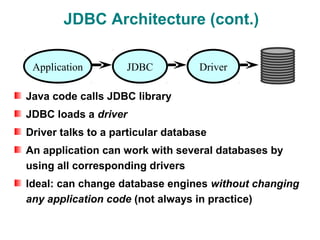
JDBC Architecture (cont.)

 Application        JDBC           Driver

Java code calls JDBC library
JDBC loads a driver
Driver talks to a particular database
An application can work with several databases by
using all corresponding drivers
Ideal: can change database engines without changing
any application code (not always in practice)
Difference between JDBC and ODBC
ODBC is used for managing any kind of data
base and JDBC is specially created to support
the java programs.
Open Database Connectivity (ODBC) is
developed by Microsoft's
JDBC is developed by sun micro system.
JDBC Drivers
A JDBC driver is a software component
enabling a Java application to interact with a
database
Type I: “Bridge”
Type II: “Native”
Type III: “Middleware”
Type IV: “Pure”
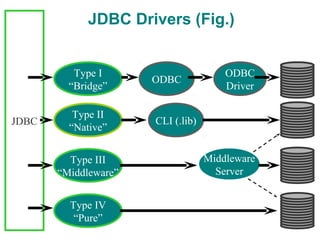
JDBC Drivers (Fig.)


          Type I                       ODBC
                      ODBC
         “Bridge”                      Driver

          Type II
JDBC                  CLI (.lib)
         “Native”


         Type III                  Middleware
       “Middleware”                  Server


         Type IV
          “Pure”
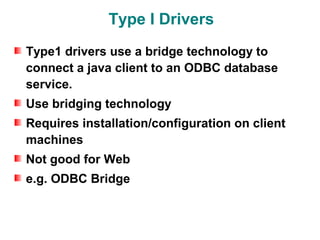
Type I Drivers
Type1 drivers use a bridge technology to
connect a java client to an ODBC database
service.
Use bridging technology
Requires installation/configuration on client
machines
Not good for Web
e.g. ODBC Bridge
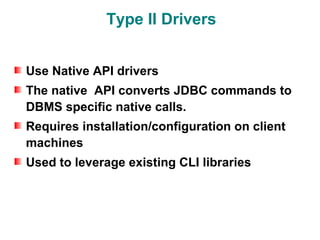
Type II Drivers


Use Native API drivers
The native API converts JDBC commands to
DBMS specific native calls.
Requires installation/configuration on client
machines
Used to leverage existing CLI libraries
Type III Drivers
Calls middleware server, usually on database
host
Very flexible -- allows access to multiple
databases using one driver
Type IV Drivers
100% Pure Java
Use Java networking libraries to talk directly to
database engines
Only disadvantage: need to download a new
driver for each database engine
e.g. Oracle, mSQL
JAVA API
Java.sql.DriverManager
Java.sql.Connection
Java.sql.statement
Java.sql.Resultset
Java.sql.DriverManager
A class that registers JDBC drivers and
supplies connection.
The most commonly used method is
DriverManager.getConnection()
Connection
A connection is an active link to the data base
  through which a java program can read and
  write data.
Statement
A statement is an an object that allows SQL
  statement to be sent through a connection and
  retrieve the resultset.
ResultSet
A table of data representing a database result
set, which is usually generated by executing a
statement that queries the database.
Steps to perform JDBC interaction
1.Establish a connection
2.Create JDBC Statements
3.Execute SQL Statements
4.GET ResultSet
5.Close connections
A Simple JDBC application
                        import java.sql.*;
                        public class jdbctest {
        loadDriver
                         public static void main(String args[]){
      getConnection
                            try{
                             Class.forName(“sun.jdbc.odbc.JdbcOdbcDriver");
      createStatement        Connection con = DriverManager.getConnection
                                (“jdbc:odbc:DSN", "user", "passwd");
       execute(SQL)          Statement stmt = con.createStatement();
                             ResultSet rs = stmt.executeQuery
      Result handling           ("select name, number from pcmtable where number < 2");
yes                          while(rs.next())
                                    System.out.println(rs.getString(1) + " (" + rs.getInt(2) + ")");
          More
         results ?           stmt.close()
                             con.close();
         no
                            } catch(Exception e){
       closeStatment
                             System.err.println(e);
      closeConnection   }}}
Statement Interface
This statement interface will have the following
  three methods to process the SQL command
  from the application.
1.executeQuery()
2.executeUpdate()
3.execute()
executeQuery()
executeQuery() method is used only for select
  statement of SQL commands.


For Example
ResultSet rs=stmt. executeQuery(“select * from
 table”)
executeUpdate()
executeUpdate() method is used for other SQL
  commands like insert,delete,updateetc.
execute()
execute() method is used when more than one
  ResultSet is used.
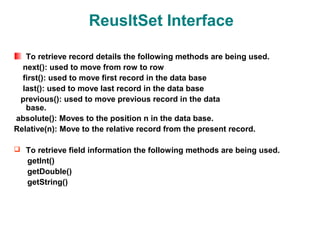
ReusltSet Interface

   To retrieve record details the following methods are being used.
  next(): used to move from row to row
  first(): used to move first record in the data base
  last(): used to move last record in the data base
 previous(): used to move previous record in the data
   base.
absolute(): Moves to the position n in the data base.
Relative(n): Move to the relative record from the present record.

 To retrieve field information the following methods are being used.
   getInt()
   getDouble()
   getString()
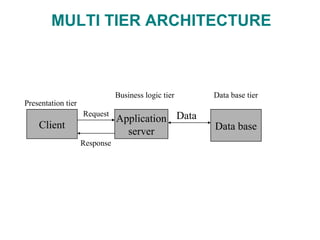
MULTI TIER APPLICATION
 A multi-tier architecture is basically a client-
server architecture in which the application is
to be executed by more than one program.


  In mutli tier architecture the middleware is
server to which the client submits some data
and then the server sends this input data to the
data base.
MULTI TIER ARCHITECTURE


                               Business logic tier   Data base tier
Presentation tier
                    Request
                               Application Data
    Client                                           Data base
                                 server
                    Response
Advanced JDBC
Scrollable Result Sets
Updateable Result Sets
Batch Updates
Advanced Data Types
Stored Procedures
Database Naming via JNDI
Connection Pools
Distributed Transactions
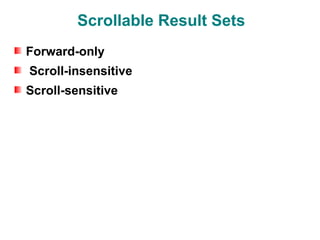
Scrollable Result Sets
Forward-only
Scroll-insensitive
Scroll-sensitive
Scroll-insensitive
  Scroll-sensitive result sets also allow one to
  scroll forward and backward and allow for
absolute and relative positioning
Scroll-sensitive
  Scroll-sensitive result sets also allow one to
  scroll forward and backward and allow for
absolute and relative positioning
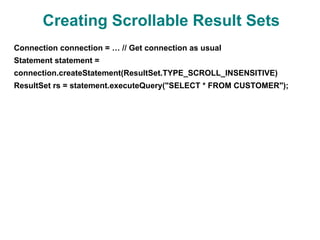
Creating Scrollable Result Sets
Connection connection = … // Get connection as usual
Statement statement =
connection.createStatement(ResultSet.TYPE_SCROLL_INSENSITIVE)
ResultSet rs = statement.executeQuery("SELECT * FROM CUSTOMER");
Updateable Result Sets
Updateable result sets in JDBC 2.0 now allow for the update of rows,
insertion of rows, and deletion of rows in a result set all through the
ResultSet interface itself, whereas JDBC 1.0 previously returned only
result sets that were read-only


Read-only
Updateable
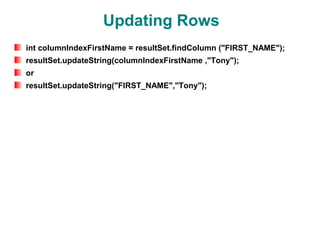
Updating Rows
int columnIndexFirstName = resultSet.findColumn ("FIRST_NAME");
resultSet.updateString(columnIndexFirstName ,"Tony");
or
resultSet.updateString("FIRST_NAME","Tony");
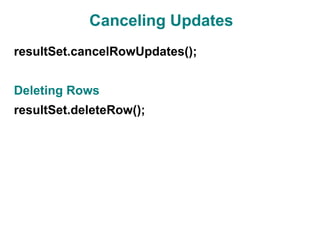
Canceling Updates
resultSet.cancelRowUpdates();


Deleting Rows
resultSet.deleteRow();
Batch Updates
The JDBC 2.0 Core API has introduced a new feature that enables you to
create a batch of update commands associated with a statement and
subsequently submit the entire batch of commands to the database in a
single call.
Executing a Batch Update
connection.setAutoCommit(false);
Statement statement = this.getStatement();
try{
statement.addBatch("INSERT INTO STATE VALUES('VA', 'VIRGINIA')");
statement.addBatch("INSERT INTO STATE VALUES('MD', 'MARYLAND')");
int[] nResults = statement.executeBatch();
}
Advanced Data Types
BLOBs (binary large objects) represent a very large set of binary data

 CLOBs (character large objects) represent a very large set of character data
Stored Procedures
Most databases provide a set of helper functions that database programmers can
use to operate on data while it is in the database versus retrieving it, computing
some result, and possibly updating the database with the new value.

Unit i

  • 1.
    ENTERPRISE COMPUTING P.Suthahar, Lecturer / IT
  • 2.
    Enterprise Architectural overview TheEnterprise Enterprise Components Information Technology in the Enterprise
  • 3.
    The Enterprise the termenterprise can simply refer to an organization that has set out to accomplish certain goals. the term enterprise is typically used to refer to a large organization
  • 4.
  • 5.
  • 6.
    Enterprise User Interfacing Providesa means to present content to both Web-based and standard applications based users of an enterprise system.
  • 7.
    Enterprise Data Enabling Providesa means to access, store, and manage enterprise information and knowledge via enterprise databases.
  • 8.
    Distributed Enterprise CommunicationsEnabling Provides a means to access information and applications throughout a distributed enterprise system
  • 9.
    Common Services forDistributed Enterprise Communications Provides a set of common services used by distributed object communications paradigms.
  • 10.
    Enterprise Systems Assurance Providesfor the secure, reliable, available, maintainable, and safe qualities of an enterprise system
  • 11.
    Enterprise Web Enabling: Providesfor the connectivity of the enterprise to the Internet/Web, as well as for generating Web-based presentation content
  • 12.
    Enterprise Applications Enabling Providesfor the middle tier of application logic management with the connectivity to legacy enterprise application logic, the provision of new enterprise application logic, connectivity to distributed enterprise applications and embedded devices, and business-to- business connectivity with commerce partners
  • 13.
    Object-Oriented Software Development for the Enterprise Enterprise Objects The Object-Oriented Development Process Unified Modeling Language
  • 14.
  • 15.
    Elements of Object-OrientedSoftware Central to the foundation of OO software is the concept of a "class
  • 16.
    Object-Oriented Software's Importanceto the Enterprise OO as a software-development paradigm is use to build a successful and distributed enterprise systems. OO practices foster the development of modular programs with encapsulated state and implementation behavior, as well as facilitate the abstraction of problems
  • 17.
    The Object-Oriented DevelopmentProcess 1. Project Charter 2. Requirements Analysis 3. Preliminary System Design 4. Detailed Design 5. Implementation 6. Unit Test 7. Assembly 8. Thread Test 9. Configuration Specification 10. System Test 11. Deployment 12. Maintenance:
  • 18.
  • 19.
    Project Charter A projectcharter is a written vision and mission statement for a project that summarizes the key goals and objectives to be accomplished for a particular development effort.
  • 20.
    Requirements Analysis Requirements analysisinvolves creating an understanding and model of what the system to be developed should do.
  • 21.
    System Behavioral Analysis Itdescribe what is to be produced from your project
  • 22.
    System Interface Analysis Interfacesto your system and to software that lie outside of the system boundary should also be analyzed and modeled.
  • 23.
    Preliminary System Design Preliminarysystem design involves taking your conceptual-analysis model and transforming it into something that can be realized using COTS or custom software
  • 24.
    Detailed Design The modelpackages handed to the developer This enables developers to focus on a cohesive component of the system to be developed.
  • 25.
    Implementation After the coreclasses and their operation signatures have been defined, the developer can begin implementation using an OOP technique and language
  • 26.
    Unit Test Unit testinginvolves testing software at the class and package level. Many times such tests are performed during implementation of a particular class and collection of classes
  • 27.
    Assembly Assembling individually developedsoftware classes into groups of classes that perform some specific service
  • 28.
    Thread Test Thread testinvolves demonstrating that any assembled classes can interoperate
  • 29.
    Configuration Specification Although sometimesoverlooked, the means by which enterprise software is to be configured should be specified
  • 30.
    System Test System testinvolves the functional/behavioral test of a fully assembled set of software that is to be deployed
  • 31.
    Deployment Deployment involves packagingthe system that was tested and deploying it onto the machines that will host it for actual enterprise operation
  • 32.
    Maintenance Maintenance involves repairingdefects while the system is deployed and in operation. Maintenance also involves providing upgrades to a fielded and operational system.
  • 33.
    Unified Modeling Language StaticLogical Structure Diagrams Dynamic Behavior Diagrams
  • 34.
  • 35.
    Classes: Rectangularboxes represent classes. Class Packages: Packages to which classes belong are optionally indicated beneath the class name, such as (from PackageName). Packages: Packages are shown as a rectangle with a small box in the upper- left corner and have a package name displayed, such as PackageName.
  • 36.
    Class Attributes: One or more attributes may be optionally shown below the class name and package name Class Operations One or more operations may optionally be shown below the attributes in a class. Some diagrams may choose to display only a select set of operations Associations: A class such as ClassName that has an association with another class such as Named Association Class depicts the association as a straight line
  • 37.
    Uses Relations: When a class such as ClassName has a general dependency on another class such as UsedClass, a dashed-line arrow depicting the dependency is shown. Inheritance: When a SubClass inherits from a BaseClass, a solid line with a triangle Interfaces: When an Interface Implementation implements a particular InterfaceType, a dashed line with a triangle
  • 38.
    Dynamic Behavior Diagrams Itis used to describe the communication between objects.
  • 40.
    Time: Sequences in timeproceed from top to bottom Objects: Object instances are represented by boxes at the top of the diagram. Object Names: An object-instance name can be followed by a class name inside of an object box.
  • 41.
    Methods: Method callsare shown as arrows from the invoking object onto the invoked object. Method calls may also be made by an object onto itself. Method Names: Method names are displayed on method-call arrows, but may simply be more descriptive words designating an action to invoke on some concept or design entity in conceptual model diagrams. Method Parameters: Object parameters to such methods may also be optionally displayed in method calls.
  • 42.
    Component-Based Software Development for the Enterprise Enterprise Components Component Models Component-Based Development Standards
  • 43.
    Enterprise Components class havingobject state and a set of operations can encapsulate a singular concept, a component represents a particular service as a function of one or more such concepts.
  • 44.
  • 45.
  • 46.
  • 47.
    component may itselfbe application-specific code, it will utilize the services it provides. Finally, the container represents an environment in which a component operate
  • 48.
  • 49.
    Component Model Interfaces ComponentAPIs Design Patterns Component SPIs Component-to-Container Interfaces Container-to-Component Interfaces
  • 50.
    Component-Based Development Project Charter AnalysisPattern Identification External Component Interface Analysis System Component Interface Analysis Component Model Technology Identification Component Identification Component Selection Component Design Adaptation Component Implementation Component Test Component Assembly Module Test Component Configuration Specification System Test Deployment Maintenance
  • 51.
  • 52.
  • 53.
    Enterprise User Interfacing: Web-basedJava applets and desktop Java application clients can be built using Java-based GUI techniques and can be hosted in standalone J2SE environments.
  • 54.
    Enterprise Data Enabling TheJava Database Connectivity (JDBC) solution is used to communicate with databases. J2EE Web, EJB application, and application client containers all utilize the JDBC API
  • 55.
    Distributed Enterprise CommunicationsEnabling: Technologies for distributed communications such as CORBA, RMI, DCOM, TCP/IP, and Web-based HTTP are all possible within Java enterprise environments, whether they're embedded in Web servers, application servers, standalone Java applications, or enterprise user interface clients.
  • 56.
    Common Services forDistributed Enterprise Communications Naming services enable the lookup of named objects across a network. Directory services allow for more sophisticated searching of objects via attribute descriptions of those network objects. Trading services offer a more dynamic means to connect with services on a network.
  • 57.
    Enterprise Systems Assurance Variousproperties of systems assurance such as reliability, availability, maintainability, safety, and security are more inherent properties of a system as opposed to a distinct service.
  • 58.
    Enterprise Web Enabling JavaServlets and Java Server Pages are the standard J2EE-based mechanisms for receiving Web-based requests and for generating HTML- or XML-based responses
  • 59.
    Enterprise Applications Enabling EJBsare the primary means defined within the J2EE to create server-side application business logic.
  • 60.
    Enterprise Data Database Basics RelationalDatabases Object Databases RDBMSs Versus ODBMSs Relational/Object Translations CLIs Embedded SQL ODBC JDBC
  • 61.
    JDBC JDBC is usedto java application program can access the Database. JDBC is an API for the Java programming language that defines how a client may access a database. It provides methods for querying and updating data in a database.
  • 62.
    JDBC Architecture (cont.) Application JDBC Driver Java code calls JDBC library JDBC loads a driver Driver talks to a particular database An application can work with several databases by using all corresponding drivers Ideal: can change database engines without changing any application code (not always in practice)
  • 63.
    Difference between JDBCand ODBC ODBC is used for managing any kind of data base and JDBC is specially created to support the java programs. Open Database Connectivity (ODBC) is developed by Microsoft's JDBC is developed by sun micro system.
  • 64.
    JDBC Drivers A JDBCdriver is a software component enabling a Java application to interact with a database Type I: “Bridge” Type II: “Native” Type III: “Middleware” Type IV: “Pure”
  • 65.
    JDBC Drivers (Fig.) Type I ODBC ODBC “Bridge” Driver Type II JDBC CLI (.lib) “Native” Type III Middleware “Middleware” Server Type IV “Pure”
  • 66.
    Type I Drivers Type1drivers use a bridge technology to connect a java client to an ODBC database service. Use bridging technology Requires installation/configuration on client machines Not good for Web e.g. ODBC Bridge
  • 67.
    Type II Drivers UseNative API drivers The native API converts JDBC commands to DBMS specific native calls. Requires installation/configuration on client machines Used to leverage existing CLI libraries
  • 68.
    Type III Drivers Callsmiddleware server, usually on database host Very flexible -- allows access to multiple databases using one driver
  • 69.
    Type IV Drivers 100%Pure Java Use Java networking libraries to talk directly to database engines Only disadvantage: need to download a new driver for each database engine e.g. Oracle, mSQL
  • 70.
  • 71.
    Java.sql.DriverManager A class thatregisters JDBC drivers and supplies connection. The most commonly used method is DriverManager.getConnection()
  • 72.
    Connection A connection isan active link to the data base through which a java program can read and write data.
  • 73.
    Statement A statement isan an object that allows SQL statement to be sent through a connection and retrieve the resultset.
  • 74.
    ResultSet A table ofdata representing a database result set, which is usually generated by executing a statement that queries the database.
  • 75.
    Steps to performJDBC interaction 1.Establish a connection 2.Create JDBC Statements 3.Execute SQL Statements 4.GET ResultSet 5.Close connections
  • 76.
    A Simple JDBCapplication import java.sql.*; public class jdbctest { loadDriver public static void main(String args[]){ getConnection try{ Class.forName(“sun.jdbc.odbc.JdbcOdbcDriver"); createStatement Connection con = DriverManager.getConnection (“jdbc:odbc:DSN", "user", "passwd"); execute(SQL) Statement stmt = con.createStatement(); ResultSet rs = stmt.executeQuery Result handling ("select name, number from pcmtable where number < 2"); yes while(rs.next()) System.out.println(rs.getString(1) + " (" + rs.getInt(2) + ")"); More results ? stmt.close() con.close(); no } catch(Exception e){ closeStatment System.err.println(e); closeConnection }}}
  • 77.
    Statement Interface This statementinterface will have the following three methods to process the SQL command from the application. 1.executeQuery() 2.executeUpdate() 3.execute()
  • 78.
    executeQuery() executeQuery() method isused only for select statement of SQL commands. For Example ResultSet rs=stmt. executeQuery(“select * from table”)
  • 79.
    executeUpdate() executeUpdate() method isused for other SQL commands like insert,delete,updateetc.
  • 80.
    execute() execute() method isused when more than one ResultSet is used.
  • 81.
    ReusltSet Interface To retrieve record details the following methods are being used. next(): used to move from row to row first(): used to move first record in the data base last(): used to move last record in the data base previous(): used to move previous record in the data base. absolute(): Moves to the position n in the data base. Relative(n): Move to the relative record from the present record.  To retrieve field information the following methods are being used. getInt() getDouble() getString()
  • 82.
    MULTI TIER APPLICATION A multi-tier architecture is basically a client- server architecture in which the application is to be executed by more than one program. In mutli tier architecture the middleware is server to which the client submits some data and then the server sends this input data to the data base.
  • 83.
    MULTI TIER ARCHITECTURE Business logic tier Data base tier Presentation tier Request Application Data Client Data base server Response
  • 84.
    Advanced JDBC Scrollable ResultSets Updateable Result Sets Batch Updates Advanced Data Types Stored Procedures Database Naming via JNDI Connection Pools Distributed Transactions
  • 85.
  • 86.
    Scroll-insensitive Scroll-sensitiveresult sets also allow one to scroll forward and backward and allow for absolute and relative positioning
  • 87.
    Scroll-sensitive Scroll-sensitiveresult sets also allow one to scroll forward and backward and allow for absolute and relative positioning
  • 88.
    Creating Scrollable ResultSets Connection connection = … // Get connection as usual Statement statement = connection.createStatement(ResultSet.TYPE_SCROLL_INSENSITIVE) ResultSet rs = statement.executeQuery("SELECT * FROM CUSTOMER");
  • 89.
    Updateable Result Sets Updateableresult sets in JDBC 2.0 now allow for the update of rows, insertion of rows, and deletion of rows in a result set all through the ResultSet interface itself, whereas JDBC 1.0 previously returned only result sets that were read-only Read-only Updateable
  • 90.
    Updating Rows int columnIndexFirstName= resultSet.findColumn ("FIRST_NAME"); resultSet.updateString(columnIndexFirstName ,"Tony"); or resultSet.updateString("FIRST_NAME","Tony");
  • 91.
  • 92.
    Batch Updates The JDBC2.0 Core API has introduced a new feature that enables you to create a batch of update commands associated with a statement and subsequently submit the entire batch of commands to the database in a single call.
  • 93.
    Executing a BatchUpdate connection.setAutoCommit(false); Statement statement = this.getStatement(); try{ statement.addBatch("INSERT INTO STATE VALUES('VA', 'VIRGINIA')"); statement.addBatch("INSERT INTO STATE VALUES('MD', 'MARYLAND')"); int[] nResults = statement.executeBatch(); }
  • 94.
    Advanced Data Types BLOBs(binary large objects) represent a very large set of binary data CLOBs (character large objects) represent a very large set of character data
  • 95.
    Stored Procedures Most databasesprovide a set of helper functions that database programmers can use to operate on data while it is in the database versus retrieving it, computing some result, and possibly updating the database with the new value.