Unit 1
Fundamentals of Operating
System
Roadmap
–Operating System Objectives/Functions
– The Evolution of Operating Systems
– Major Achievements
– Developments Leading to Modern Operating
Systems
– Microsoft Windows Overview
– UNIX Systems
– Linux
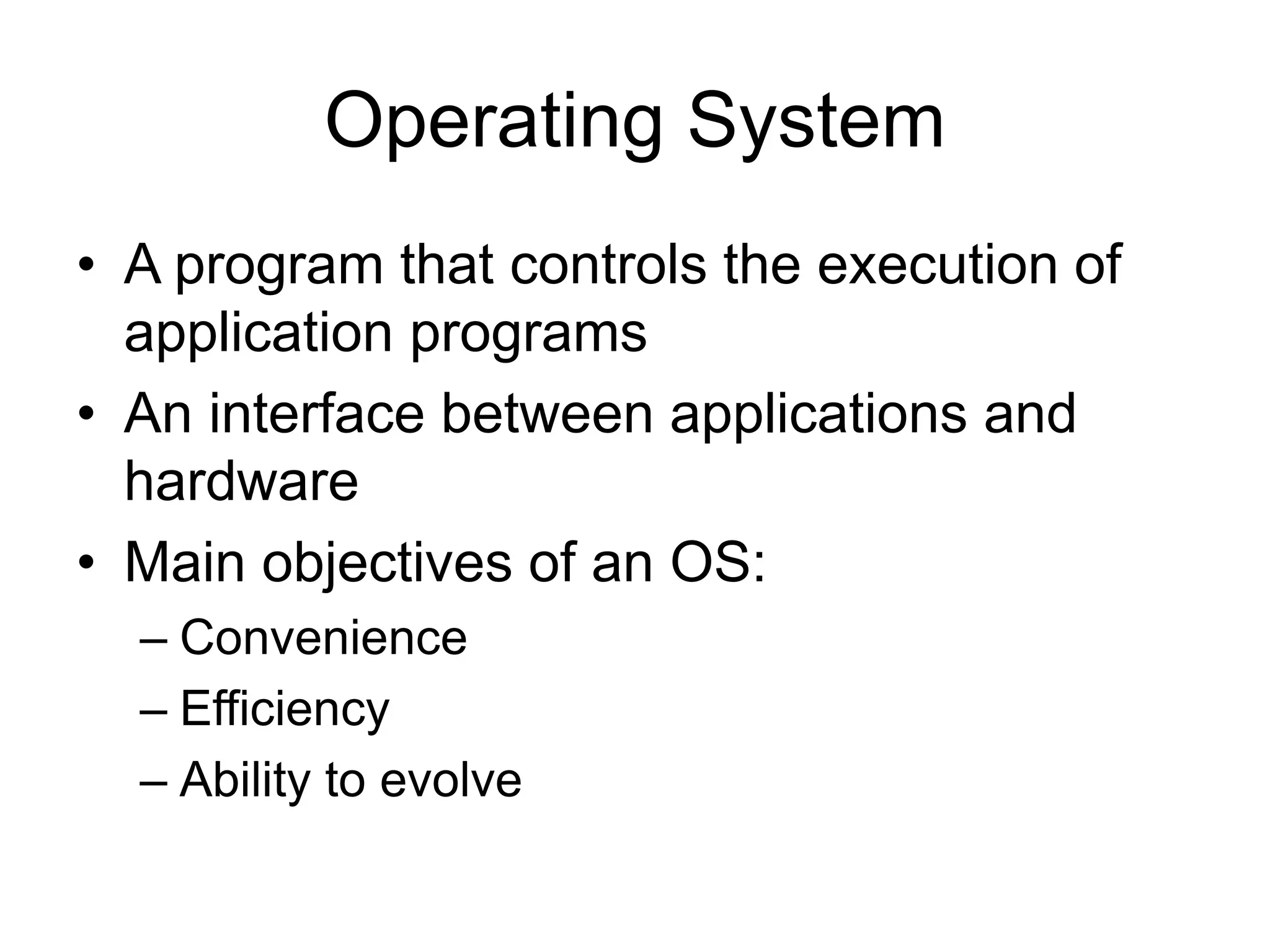
Operating System
• A program that controls the execution of
application programs
• An interface between applications and
hardware
• Main objectives of an OS:
– Convenience
– Efficiency
– Ability to evolve
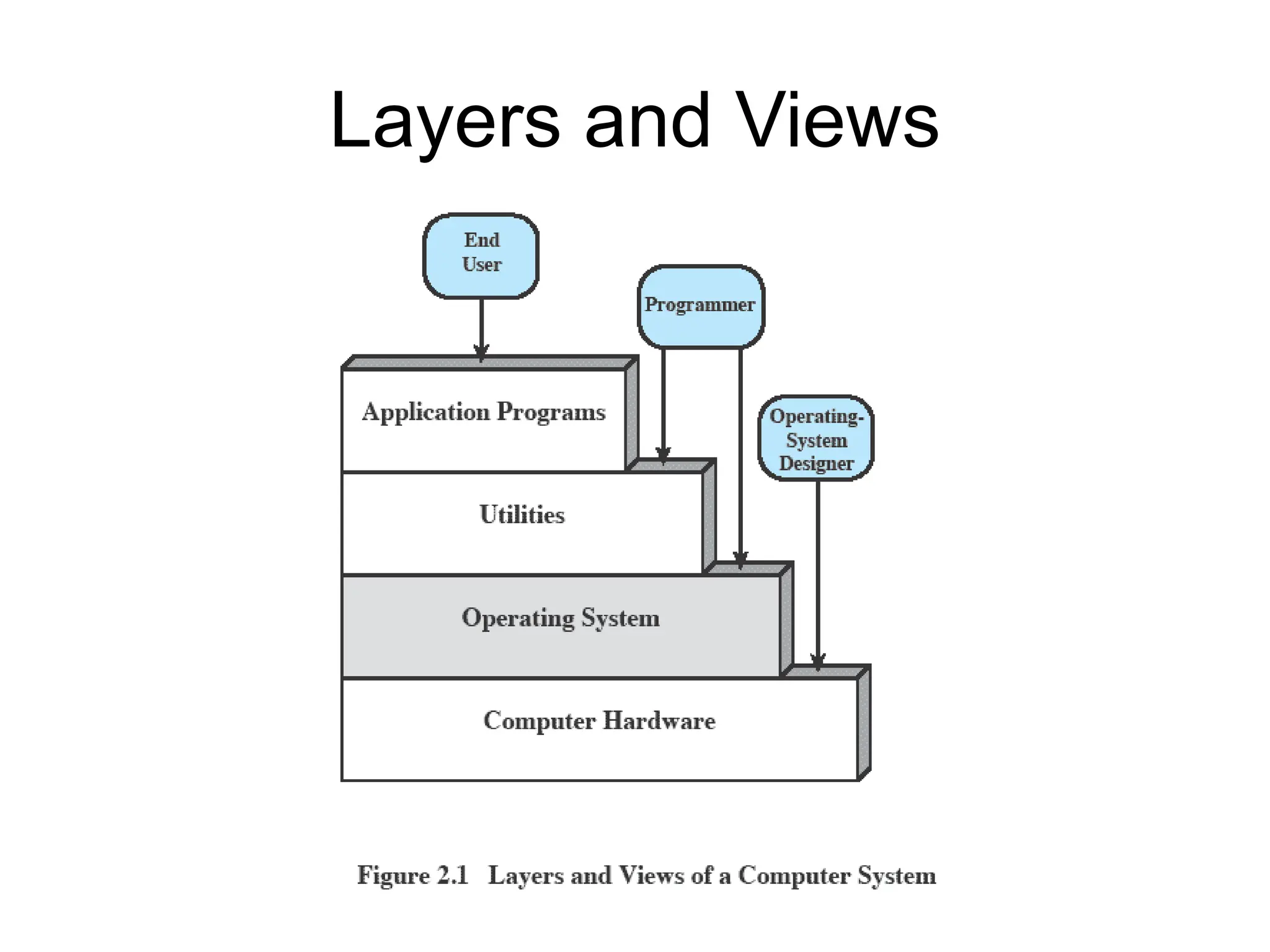
Layers and Views
Services Provided
by the Operating System
• Program development
– Editors and debuggers.
• Program execution
– OS handles scheduling of numerous tasks
required to execute a program
• Access I/O devices
– Each device will have unique interface
– OS presents standard interface to users
Services cont…
• Controlled access to files
– Accessing different media but presenting a
common interface to users
– Provides protection in multi-access systems
• System access
– Controls access to the system and its
resources
Services cont…
• Error detection and response
– Internal and external hardware errors
– Software errors
– Operating system cannot grant request of
application
• Accounting
– Collect usage statistics
– Monitor performance
The Role of an OS
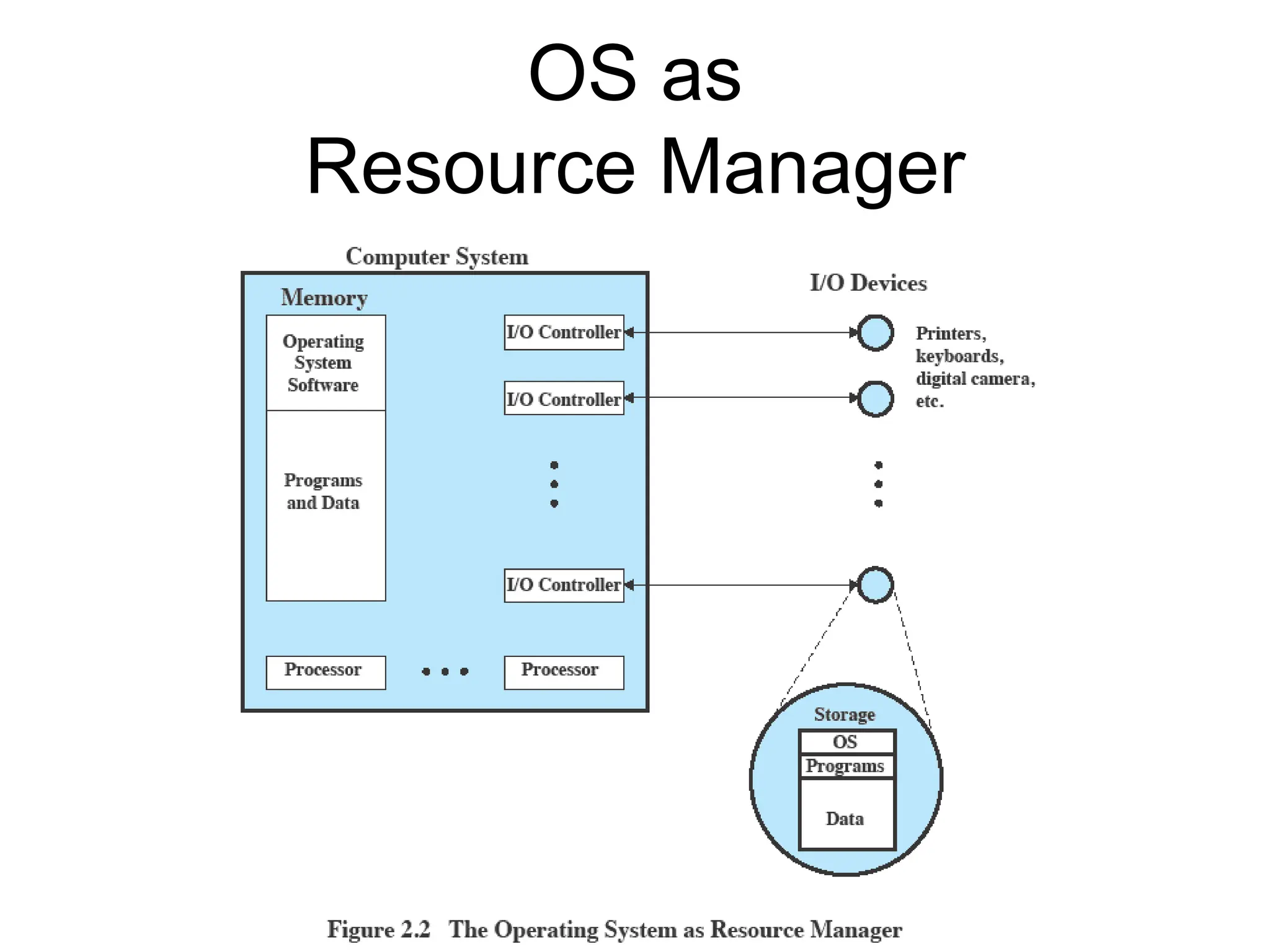
• A computer is a set of resources for the
movement, storage, and processing of
data.
• The OS is responsible for managing these
resources.
Operating System
as Software
• The OS functions in the same way as an
ordinary computer software
– It is a program that is executed by the CPU
• Operating system relinquishes control of
the processor
OS as
Resource Manager
Evolution of Operating
Systems
• Operating systems will evolve over time
– Hardware upgrades plus new types of
hardware
– New services
– Fixes
Roadmap
– Operating System Objectives/Functions
–The Evolution of Operating Systems
– Major Achievements
– Developments Leading to Modern Operating
Systems
– Microsoft Windows Overview
– UNIX Systems
– Linux
Evolution of
Operating Systems
• It may be easier to understand the key
requirements of an OS by considering the
evolution of Operating Systems
• Stages include
– Serial Processing
– Simple Batch Systems
– Multiprogrammed batch systems
– Time Sharing Systems
Serial Processing
• No operating system
• Machines run from a console with display
lights, toggle switches, input device, and
printer
• Problems include:
– Scheduling
– Setup time
Simple batch system
• Early computers were extremely
expensive
– Important to maximize processor utilization
• Monitor
– Software that controls the sequence of events
– Batch jobs together
– Program returns control to monitor when
finished
Monitor’s perspective
• Monitor controls the
sequence of events
• Resident Monitor is software
always in memory
• Monitor reads in job and
gives control
• Job returns control to monitor
Job Control Language
• Special type of programming language to
control jobs
• Provides instruction to the monitor
– What compiler to use
– What data to use
Desirable Hardware
Features
• Memory protection for monitor
– Jobs cannot overwrite or alter
• Timer
– Prevent a job from monopolizing (taking
charge) system
• Privileged instructions
– Only executed by the monitor
• Interrupts: Early computer models did not have
this capability.
Modes of Operation
• User Mode
– User program executes in user mode
– Certain areas of memory protected from user
access
– Certain instructions may not be executed
• Kernel Mode
– Monitor executes in kernel mode
– Privileged instructions may be executed, all
memory accessible.
Multiprogrammed
Batch Systems
• CPU is often idle
– Even with automatic job sequencing.
– I/O devices are slow compared to processor
Uniprogramming
• Processor must wait for I/O instruction to
complete before preceding
Multiprogramming
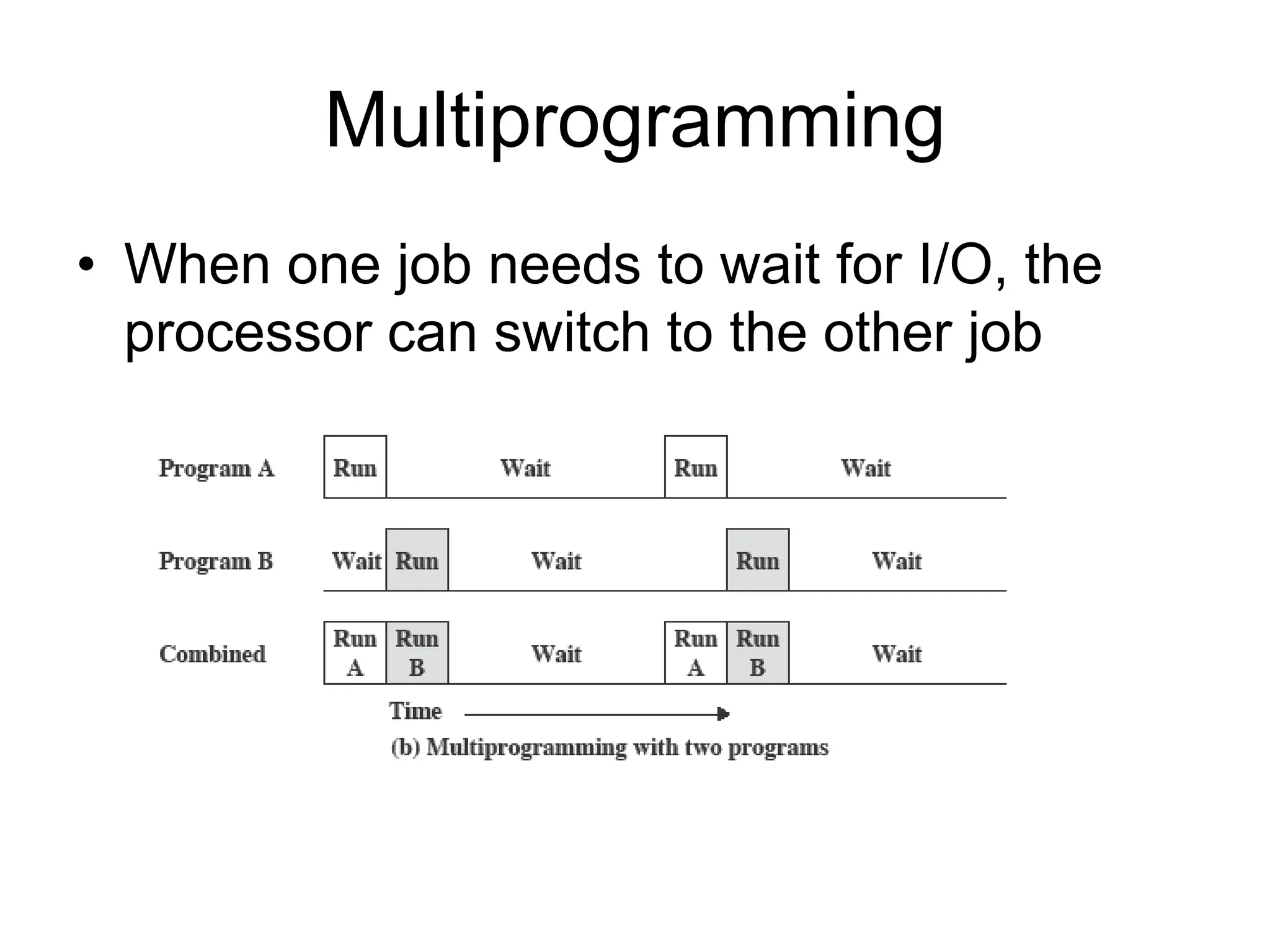
• When one job needs to wait for I/O, the
processor can switch to the other job
Multiprogramming
Time Sharing Systems
• Using multiprogramming to handle multiple
interactive jobs
• Processor’s time is shared among multiple
users
• Multiple users simultaneously access the
system through terminals
Types of OS
Batch Operating System
• This type of operating system does not interact with
the computer directly.
• There is an operator which takes similar jobs having
the same requirement and groups them into
batches.
• It is the responsibility of the operator to sort jobs with
similar needs.
Advantages of Batch Operating System
• Multiple users can share the batch systems.
• The idle time for the batch system is very less.
• It is easy to manage large work repeatedly in batch
systems.
Disadvantages of Batch Operating System
• Operators should be well known with batch systems.
• Batch systems are hard to debug.
• It is sometimes costly.
• The other jobs will have to wait for an unknown time if
any job fails.
• processing time for jobs is commonly difficult to
predict while they are in the queue.
Examples of Batch Operating Systems: Payroll
Systems, Bank Statements, etc.
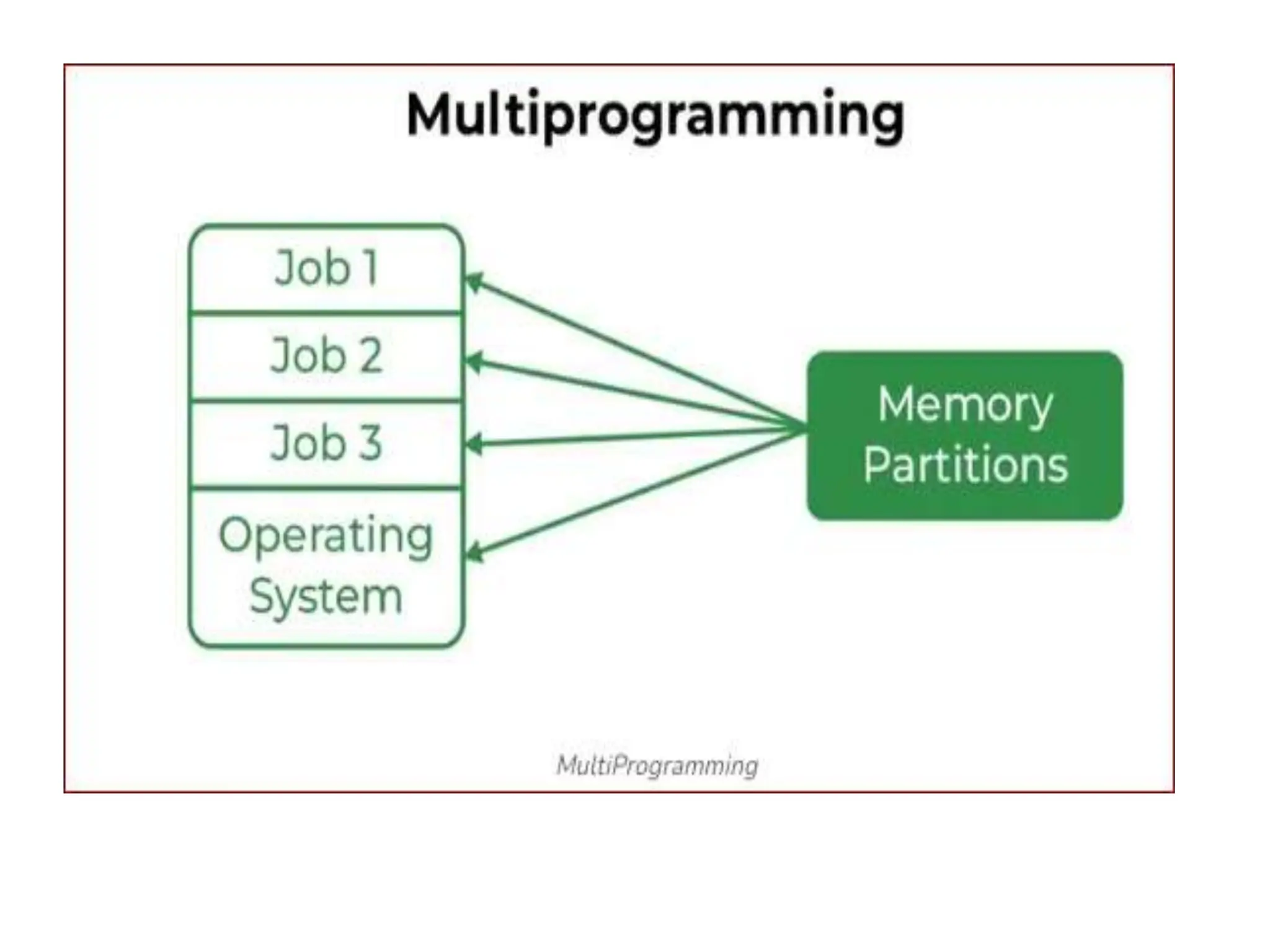
Multi-Programming Operating System
• If more than one program is present in the main
memory and any one of them can be kept in
execution.
• This is basically used for better execution of
resources.
Advantages of Multi-Programming Operating
System
• Multi Programming increases the Throughput of the
System.
• It helps in reducing the response time.
Disadvantages of Multi-Programming Operating
System
• There is not any facility for user interaction of system
resources with the system.
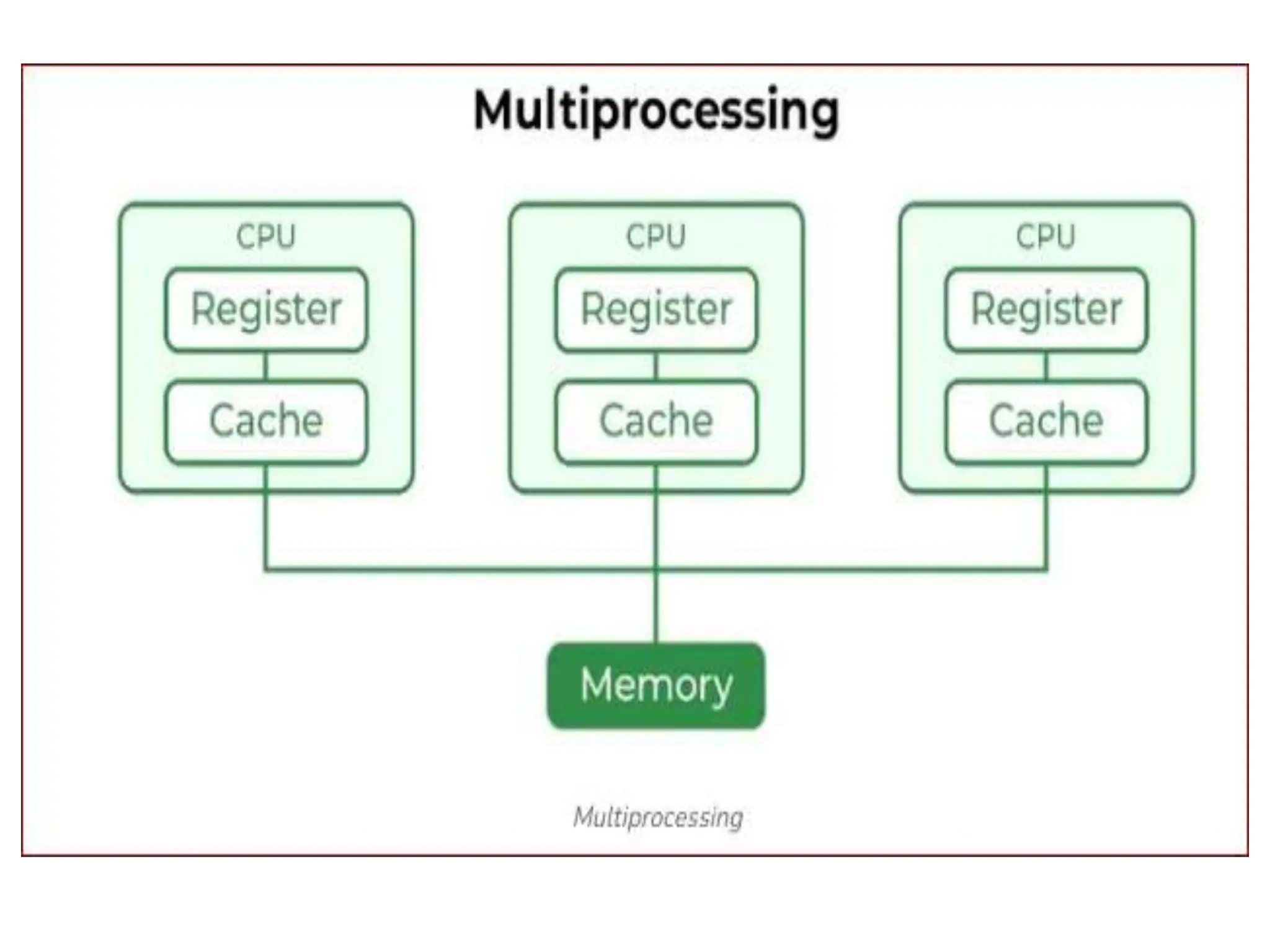
Multi-Processing Operating System
• It is a type of Operating System in which more than
one CPU is used for the execution of resources.
• It betters the throughput of the System.
Advantages of Multi-Processing Operating System
•It increases the throughput of the system.
•As it has several processors, so, if one processor fails,
we can proceed with another processor.
Disadvantages of Multi-Processing Operating
System
•Due to the multiple CPU, it can be more complex and
somehow difficult to understand.
Time-Sharing Operating Systems
• Each task is given some time to execute so that all
the tasks work smoothly.
• Each user gets the time of the CPU as they use a
single system.
• These systems are also known as Multitasking
Systems. The task can be from a single user or
different users also.
• The time that each task gets to execute is called quantum.
• After this time interval is over OS switches over to the next
task
Advantages of Time-Sharing OS
• Each task gets an equal opportunity.
• CPU idle time can be reduced.
• Resource Sharing
• Improved Productivity: Time-sharing allows users to work
concurrently.
• Improved User Experience: interactive environment that
allows users to communicate with the computer in real time.
Disadvantages of Time-Sharing OS
• Reliability problem.
• One must have to take care of the security and integrity of
user programs and data.
• Data communication problem.
• Complexity
• Security Risks: With multiple users sharing resources, the
risk of security breaches increases.
• Requires careful management of user access, authentication,
and authorization to ensure the security of data and software.
Distributed Operating System
• These types of operating system is a recent
advancement in the world of computer technology
• Are widely accepted all over the world and, that too, at
a great pace.
• Various autonomous interconnected computers
communicate with each other using a shared
communication network.
• Independent systems possess their own memory unit
and CPU.
• it is always possible that one user can access the files
or software which are not actually present on his system
• But on other system connected within this network i.e.,
remote access is enabled within the devices connected
in that network.
Advantages of Distributed Operating System
•Failure of one will not affect the network
•Since resources are being shared, computation is highly
fast and durable.
•Load on host computer reduces.
•Systems are scalable as many systems can be easily
added to the network.
•Delay in data processing reduces.
Disadvantages of Distributed Operating System
• Failure of the main network will stop the entire
communication.
• To establish distributed systems the language is used
not well-defined yet.
• These types of systems are not readily available as
they are very expensive.
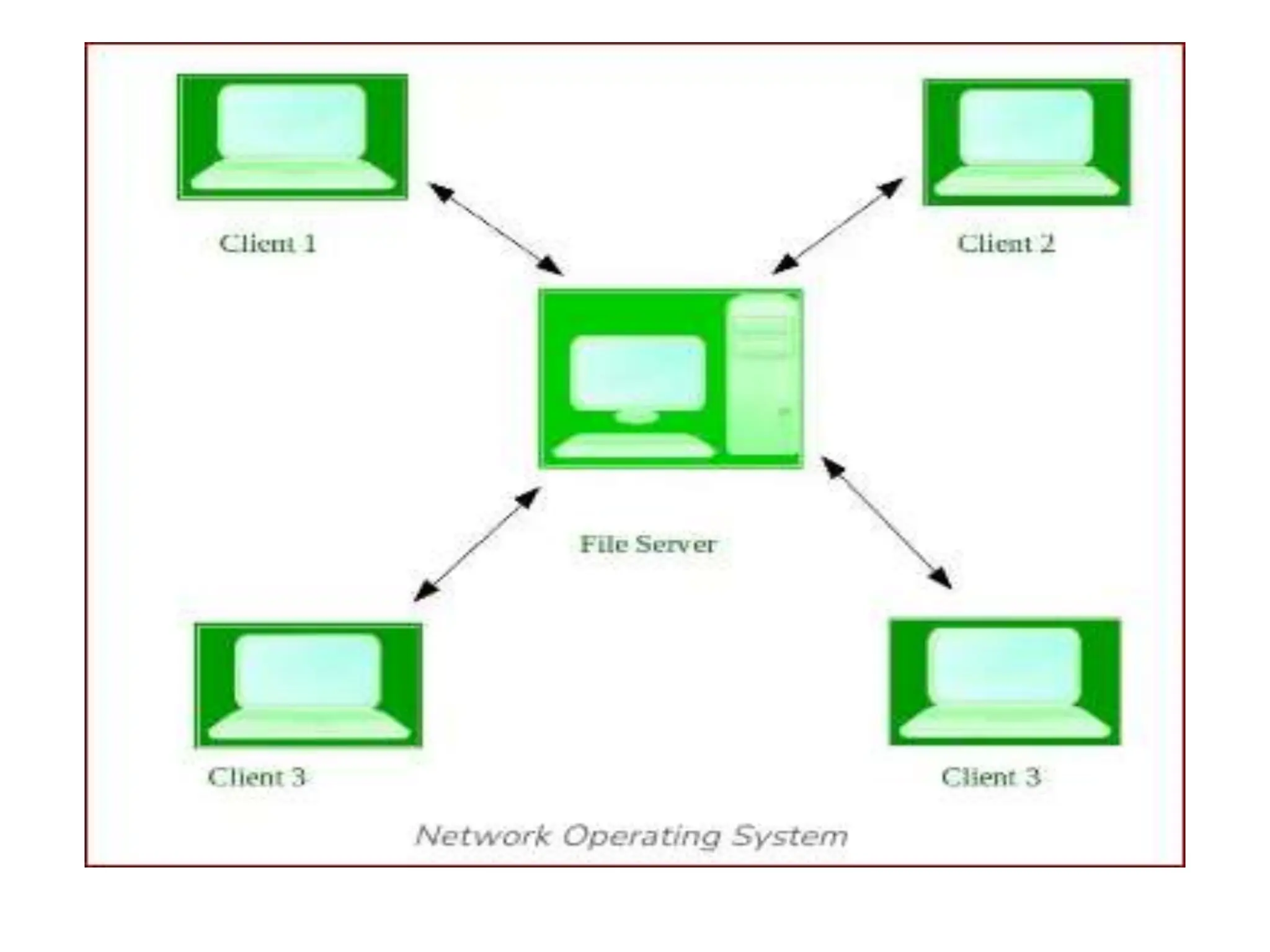
Network Operating System
• These systems run on a server.
• Provides the capability to manage data, users,
groups, security, applications, and other networking
functions.
• It allow shared access to files, printers, security,
applications, and other networking functions over a
small private network.
• All the users are well aware of the underlying
configuration, of all other users within the network.
• Hence are popularly known as tightly coupled
systems.
Advantages of Network Operating System
•Highly stable centralized servers.
•Security concerns are handled through servers.
•New technologies and hardware up-gradation are
easily integrated into the system.
•Server access is possible remotely from different
locations and types of systems.
Disadvantages of Network Operating System
•Servers are costly.
•User has to depend on a central location for most
operations.
•Maintenance and updates are required regularly.
Examples:
Microsoft Windows Server 2003,
Microsoft Windows Server 2008, UNIX, Linux, Mac OS.
Real-Time Operating System
• These types of OSs serve real-time systems.
• The time interval required to process and respond to
inputs is very small.
• This time interval is called response time.
• Real-time systems are used when there are time
requirements that are very strict like missile systems, air
traffic control systems, robots, etc.
Types of Real-Time Operating System:
 Hard Real-Time OS:
 Used for applications where time constraints are
very strict.
 even the shortest possible delay is not acceptable.
 These systems are built for saving life like
automatic parachutes or airbags which are
required to be readily available in case of an
accident.
 Virtual memory is rarely found in these systems.
 Soft Real-Time System
 These OSs are for applications where time-
constraint is less strict.
Advantages of RTOS
• Maximum Consumption: Maximum utilization of devices and
systems, thus more output from all the resources.
•Task Shifting: The time assigned for shifting tasks in these
systems is very less.
•Focus on Application: Focus on running applications and
less importance on applications that are in the queue.
•Error Free: These types of systems are error-free.
•Memory Allocation: Memory allocation is best managed in
these types of systems.
Disadvantages of RTOS
• Limited Tasks: Very few tasks run at the same time and
their concentration is very less on a few applications to
avoid errors.
• Use heavy system resources: Sometimes the system
resources are not so good and they are expensive as well.
• Complex Algorithms: The algorithms are very complex
and difficult for the designer to write on.
Examples:
1. Scientific experiments,
2. Medical imaging systems,
3. Industrial control systems,
4. Weapon systems,
5. Robots,
6. Air traffic control systems, etc.
The Various Design Issues
 Efficiency
 Robustness
 Flexibility
 Portability
 Security
 Compatibility
The Various Design Issues
 Efficiency
 Robustness
 Flexibility
 Portability
 Security
 Compatibility
Roadmap
– Operating System Objectives/Functions
– The Evolution of Operating Systems
– Major Achievements
– Developments Leading to Modern Operating
Systems
–Microsoft Windows Overview
– UNIX Systems
– Linux
Single-User
Multitasking
• From Windows 2000 on Windows
development developed to exploit modern
32-bit and 64-bit microprocessors
• Designed for single users who run multiple
programs
• Main drivers are:
– Increased memory and speed of
microprocessors
– Support for virtual memory
Windows Architecture
Client/Server Model
• Windows OS, protected subsystem, and
applications all use a client/server model
– Common in distributed systems, but can be
used internal to a single system
• Processes communicate via RPC
Windows Objects
• Windows draws heavily on the concepts of
object-oriented design.
• Key Object Oriented concepts used by
Windows are:
– Encapsulation
– Object class and instance
Roadmap
– Operating System Objectives/Functions
– The Evolution of Operating Systems
– Major Achievements
– Developments Leading to Modern Operating
Systems
– Microsoft Windows Overview
–UNIX Systems
– Linux
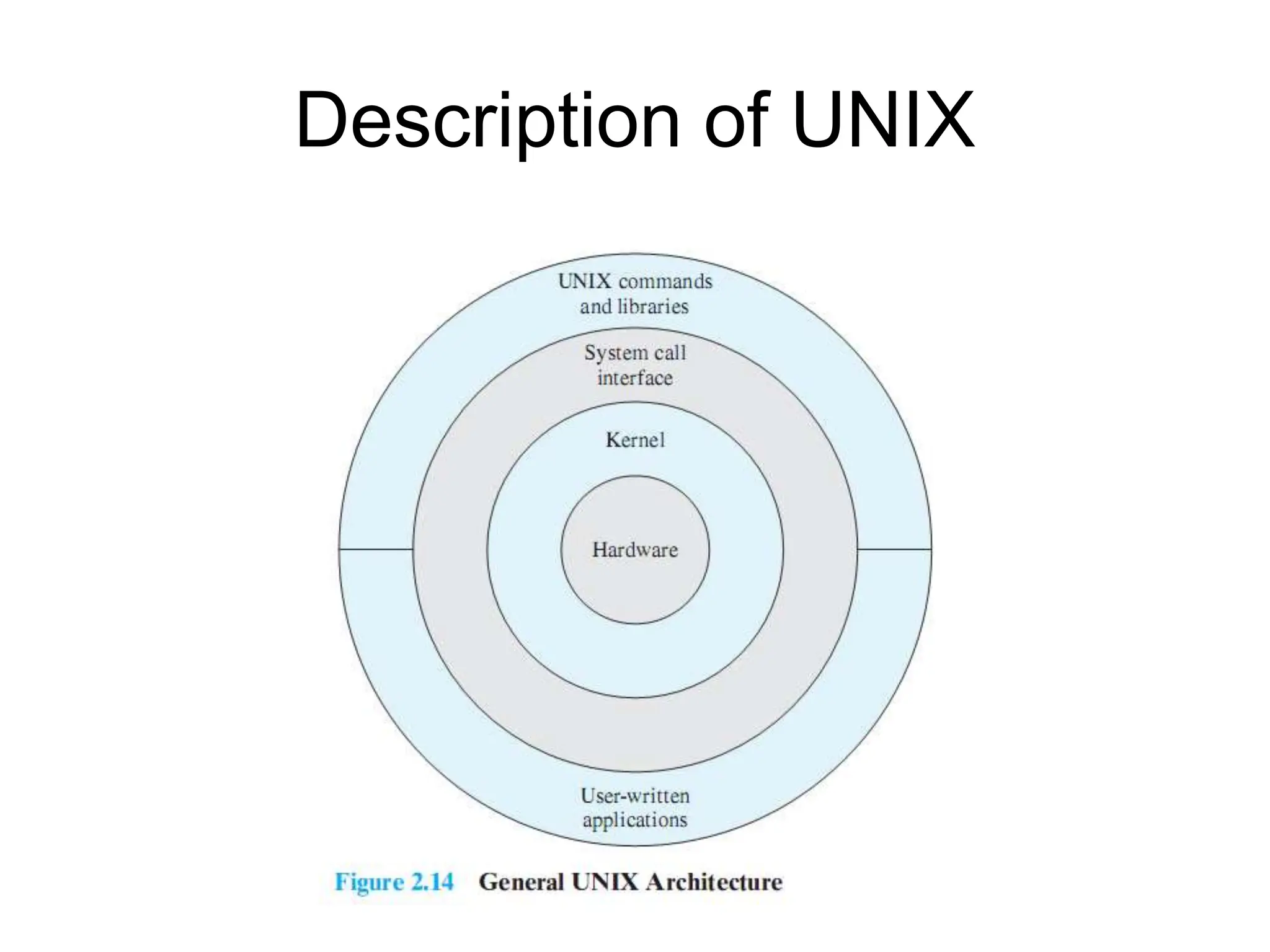
Description of UNIX
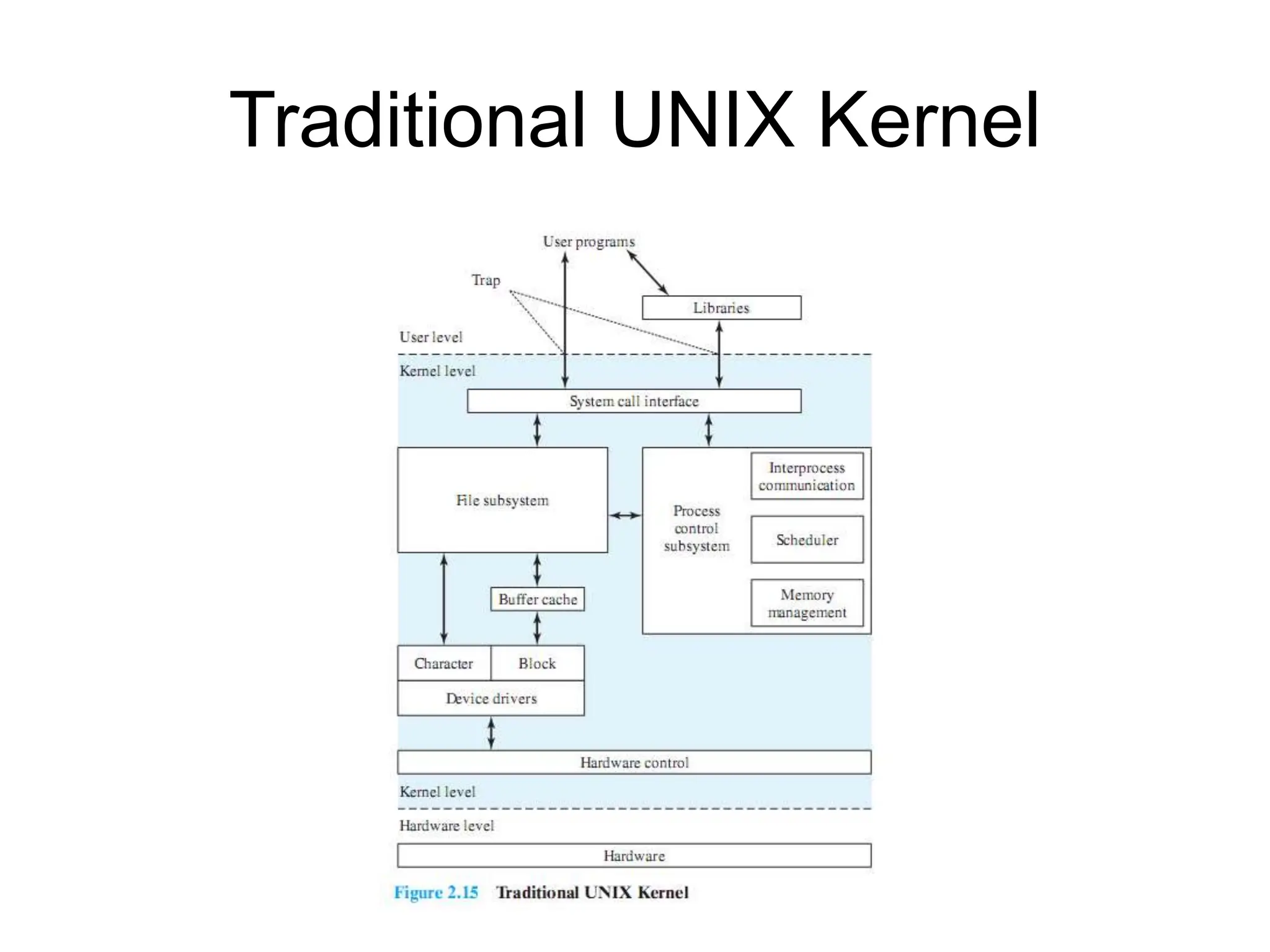
Traditional UNIX Kernel
System V Release 4
(SVR4)
Roadmap
– Operating System Objectives/Functions
– The Evolution of Operating Systems
– Major Achievements
– Developments Leading to Modern Operating
Systems
– Microsoft Windows Overview
– UNIX Systems
–Linux
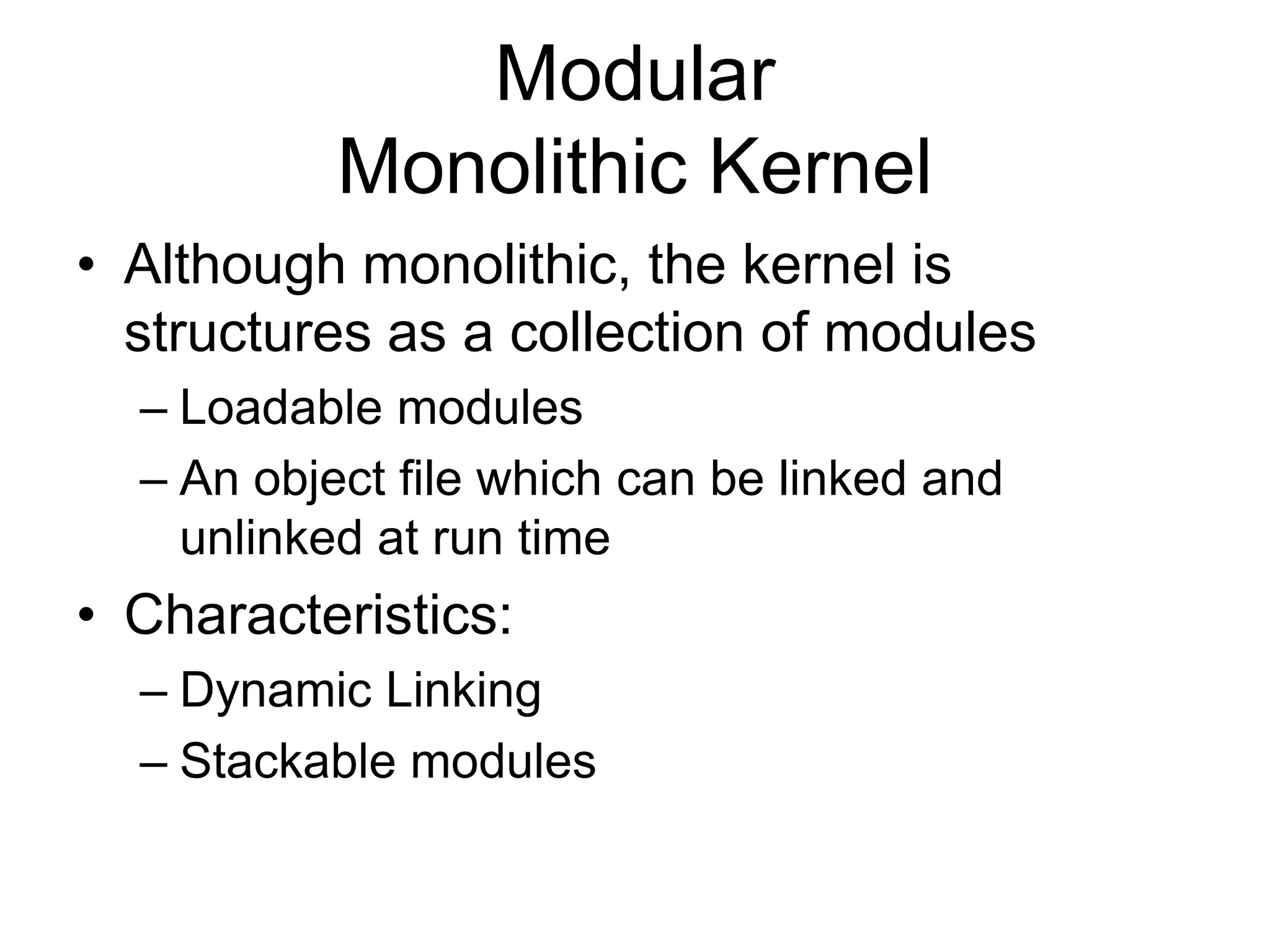
Modular
Monolithic Kernel
• Although monolithic, the kernel is
structures as a collection of modules
– Loadable modules
– An object file which can be linked and
unlinked at run time
• Characteristics:
– Dynamic Linking
– Stackable modules
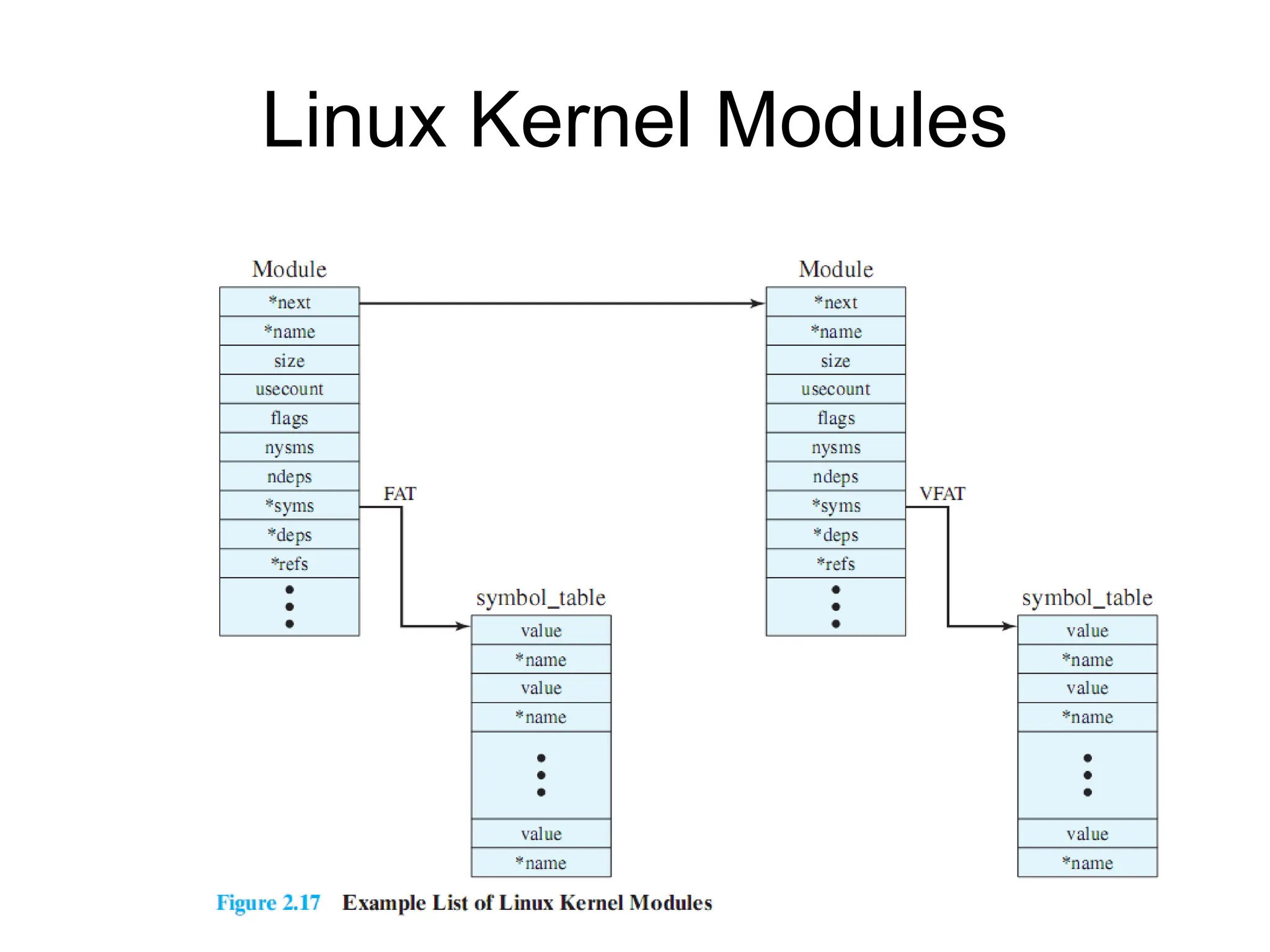
Linux Kernel Modules
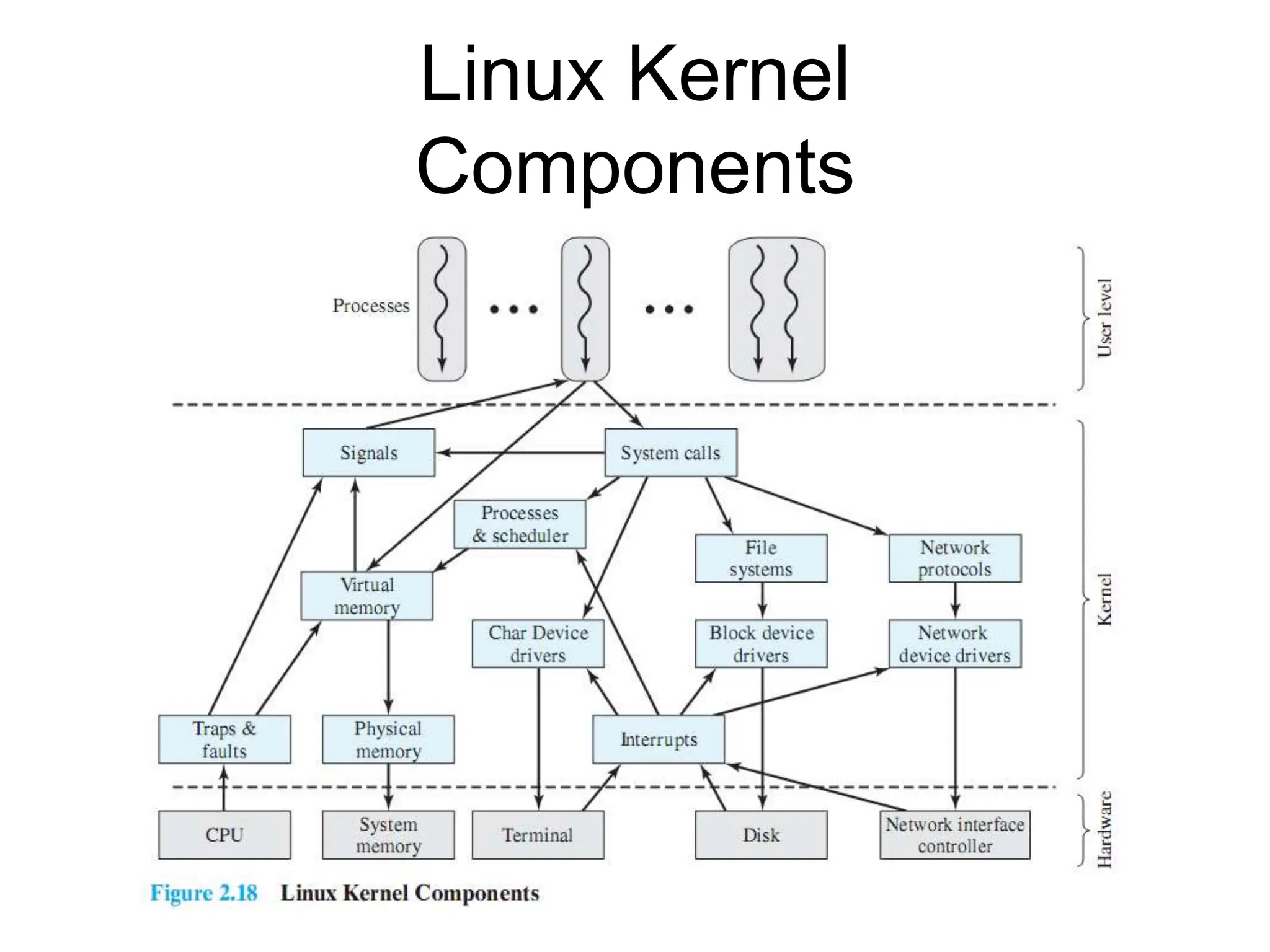
Linux Kernel
Components

Unit 1 ppt os jkhiutufyhfhtjdtrsdcjgnhb,

  • 1.
    Unit 1 Fundamentals ofOperating System
  • 2.
    Roadmap –Operating System Objectives/Functions –The Evolution of Operating Systems – Major Achievements – Developments Leading to Modern Operating Systems – Microsoft Windows Overview – UNIX Systems – Linux
  • 3.
    Operating System • Aprogram that controls the execution of application programs • An interface between applications and hardware • Main objectives of an OS: – Convenience – Efficiency – Ability to evolve
  • 4.
  • 5.
    Services Provided by theOperating System • Program development – Editors and debuggers. • Program execution – OS handles scheduling of numerous tasks required to execute a program • Access I/O devices – Each device will have unique interface – OS presents standard interface to users
  • 6.
    Services cont… • Controlledaccess to files – Accessing different media but presenting a common interface to users – Provides protection in multi-access systems • System access – Controls access to the system and its resources
  • 7.
    Services cont… • Errordetection and response – Internal and external hardware errors – Software errors – Operating system cannot grant request of application • Accounting – Collect usage statistics – Monitor performance
  • 8.
    The Role ofan OS • A computer is a set of resources for the movement, storage, and processing of data. • The OS is responsible for managing these resources.
  • 9.
    Operating System as Software •The OS functions in the same way as an ordinary computer software – It is a program that is executed by the CPU • Operating system relinquishes control of the processor
  • 10.
  • 11.
    Evolution of Operating Systems •Operating systems will evolve over time – Hardware upgrades plus new types of hardware – New services – Fixes
  • 12.
    Roadmap – Operating SystemObjectives/Functions –The Evolution of Operating Systems – Major Achievements – Developments Leading to Modern Operating Systems – Microsoft Windows Overview – UNIX Systems – Linux
  • 13.
    Evolution of Operating Systems •It may be easier to understand the key requirements of an OS by considering the evolution of Operating Systems • Stages include – Serial Processing – Simple Batch Systems – Multiprogrammed batch systems – Time Sharing Systems
  • 14.
    Serial Processing • Nooperating system • Machines run from a console with display lights, toggle switches, input device, and printer • Problems include: – Scheduling – Setup time
  • 15.
    Simple batch system •Early computers were extremely expensive – Important to maximize processor utilization • Monitor – Software that controls the sequence of events – Batch jobs together – Program returns control to monitor when finished
  • 16.
    Monitor’s perspective • Monitorcontrols the sequence of events • Resident Monitor is software always in memory • Monitor reads in job and gives control • Job returns control to monitor
  • 17.
    Job Control Language •Special type of programming language to control jobs • Provides instruction to the monitor – What compiler to use – What data to use
  • 18.
    Desirable Hardware Features • Memoryprotection for monitor – Jobs cannot overwrite or alter • Timer – Prevent a job from monopolizing (taking charge) system • Privileged instructions – Only executed by the monitor • Interrupts: Early computer models did not have this capability.
  • 19.
    Modes of Operation •User Mode – User program executes in user mode – Certain areas of memory protected from user access – Certain instructions may not be executed • Kernel Mode – Monitor executes in kernel mode – Privileged instructions may be executed, all memory accessible.
  • 20.
    Multiprogrammed Batch Systems • CPUis often idle – Even with automatic job sequencing. – I/O devices are slow compared to processor
  • 21.
    Uniprogramming • Processor mustwait for I/O instruction to complete before preceding
  • 22.
    Multiprogramming • When onejob needs to wait for I/O, the processor can switch to the other job
  • 23.
  • 24.
    Time Sharing Systems •Using multiprogramming to handle multiple interactive jobs • Processor’s time is shared among multiple users • Multiple users simultaneously access the system through terminals
  • 25.
  • 26.
    Batch Operating System •This type of operating system does not interact with the computer directly. • There is an operator which takes similar jobs having the same requirement and groups them into batches. • It is the responsibility of the operator to sort jobs with similar needs.
  • 28.
    Advantages of BatchOperating System • Multiple users can share the batch systems. • The idle time for the batch system is very less. • It is easy to manage large work repeatedly in batch systems.
  • 29.
    Disadvantages of BatchOperating System • Operators should be well known with batch systems. • Batch systems are hard to debug. • It is sometimes costly. • The other jobs will have to wait for an unknown time if any job fails. • processing time for jobs is commonly difficult to predict while they are in the queue. Examples of Batch Operating Systems: Payroll Systems, Bank Statements, etc.
  • 30.
    Multi-Programming Operating System •If more than one program is present in the main memory and any one of them can be kept in execution. • This is basically used for better execution of resources.
  • 32.
    Advantages of Multi-ProgrammingOperating System • Multi Programming increases the Throughput of the System. • It helps in reducing the response time. Disadvantages of Multi-Programming Operating System • There is not any facility for user interaction of system resources with the system.
  • 33.
    Multi-Processing Operating System •It is a type of Operating System in which more than one CPU is used for the execution of resources. • It betters the throughput of the System.
  • 34.
    Advantages of Multi-ProcessingOperating System •It increases the throughput of the system. •As it has several processors, so, if one processor fails, we can proceed with another processor. Disadvantages of Multi-Processing Operating System •Due to the multiple CPU, it can be more complex and somehow difficult to understand.
  • 36.
    Time-Sharing Operating Systems •Each task is given some time to execute so that all the tasks work smoothly. • Each user gets the time of the CPU as they use a single system. • These systems are also known as Multitasking Systems. The task can be from a single user or different users also.
  • 37.
    • The timethat each task gets to execute is called quantum. • After this time interval is over OS switches over to the next task
  • 39.
    Advantages of Time-SharingOS • Each task gets an equal opportunity. • CPU idle time can be reduced. • Resource Sharing • Improved Productivity: Time-sharing allows users to work concurrently. • Improved User Experience: interactive environment that allows users to communicate with the computer in real time.
  • 40.
    Disadvantages of Time-SharingOS • Reliability problem. • One must have to take care of the security and integrity of user programs and data. • Data communication problem. • Complexity • Security Risks: With multiple users sharing resources, the risk of security breaches increases. • Requires careful management of user access, authentication, and authorization to ensure the security of data and software.
  • 41.
    Distributed Operating System •These types of operating system is a recent advancement in the world of computer technology • Are widely accepted all over the world and, that too, at a great pace. • Various autonomous interconnected computers communicate with each other using a shared communication network. • Independent systems possess their own memory unit and CPU.
  • 42.
    • it isalways possible that one user can access the files or software which are not actually present on his system • But on other system connected within this network i.e., remote access is enabled within the devices connected in that network.
  • 44.
    Advantages of DistributedOperating System •Failure of one will not affect the network •Since resources are being shared, computation is highly fast and durable. •Load on host computer reduces. •Systems are scalable as many systems can be easily added to the network. •Delay in data processing reduces.
  • 45.
    Disadvantages of DistributedOperating System • Failure of the main network will stop the entire communication. • To establish distributed systems the language is used not well-defined yet. • These types of systems are not readily available as they are very expensive.
  • 46.
    Network Operating System •These systems run on a server. • Provides the capability to manage data, users, groups, security, applications, and other networking functions. • It allow shared access to files, printers, security, applications, and other networking functions over a small private network.
  • 47.
    • All theusers are well aware of the underlying configuration, of all other users within the network. • Hence are popularly known as tightly coupled systems.
  • 48.
    Advantages of NetworkOperating System •Highly stable centralized servers. •Security concerns are handled through servers. •New technologies and hardware up-gradation are easily integrated into the system. •Server access is possible remotely from different locations and types of systems.
  • 50.
    Disadvantages of NetworkOperating System •Servers are costly. •User has to depend on a central location for most operations. •Maintenance and updates are required regularly. Examples: Microsoft Windows Server 2003, Microsoft Windows Server 2008, UNIX, Linux, Mac OS.
  • 51.
    Real-Time Operating System •These types of OSs serve real-time systems. • The time interval required to process and respond to inputs is very small. • This time interval is called response time. • Real-time systems are used when there are time requirements that are very strict like missile systems, air traffic control systems, robots, etc.
  • 52.
    Types of Real-TimeOperating System:  Hard Real-Time OS:  Used for applications where time constraints are very strict.  even the shortest possible delay is not acceptable.  These systems are built for saving life like automatic parachutes or airbags which are required to be readily available in case of an accident.  Virtual memory is rarely found in these systems.
  • 53.
     Soft Real-TimeSystem  These OSs are for applications where time- constraint is less strict.
  • 54.
    Advantages of RTOS •Maximum Consumption: Maximum utilization of devices and systems, thus more output from all the resources. •Task Shifting: The time assigned for shifting tasks in these systems is very less. •Focus on Application: Focus on running applications and less importance on applications that are in the queue. •Error Free: These types of systems are error-free. •Memory Allocation: Memory allocation is best managed in these types of systems.
  • 55.
    Disadvantages of RTOS •Limited Tasks: Very few tasks run at the same time and their concentration is very less on a few applications to avoid errors. • Use heavy system resources: Sometimes the system resources are not so good and they are expensive as well. • Complex Algorithms: The algorithms are very complex and difficult for the designer to write on.
  • 56.
    Examples: 1. Scientific experiments, 2.Medical imaging systems, 3. Industrial control systems, 4. Weapon systems, 5. Robots, 6. Air traffic control systems, etc.
  • 57.
    The Various DesignIssues  Efficiency  Robustness  Flexibility  Portability  Security  Compatibility
  • 58.
    The Various DesignIssues  Efficiency  Robustness  Flexibility  Portability  Security  Compatibility
  • 60.
    Roadmap – Operating SystemObjectives/Functions – The Evolution of Operating Systems – Major Achievements – Developments Leading to Modern Operating Systems –Microsoft Windows Overview – UNIX Systems – Linux
  • 61.
    Single-User Multitasking • From Windows2000 on Windows development developed to exploit modern 32-bit and 64-bit microprocessors • Designed for single users who run multiple programs • Main drivers are: – Increased memory and speed of microprocessors – Support for virtual memory
  • 62.
  • 63.
    Client/Server Model • WindowsOS, protected subsystem, and applications all use a client/server model – Common in distributed systems, but can be used internal to a single system • Processes communicate via RPC
  • 64.
    Windows Objects • Windowsdraws heavily on the concepts of object-oriented design. • Key Object Oriented concepts used by Windows are: – Encapsulation – Object class and instance
  • 65.
    Roadmap – Operating SystemObjectives/Functions – The Evolution of Operating Systems – Major Achievements – Developments Leading to Modern Operating Systems – Microsoft Windows Overview –UNIX Systems – Linux
  • 66.
  • 67.
  • 68.
  • 69.
    Roadmap – Operating SystemObjectives/Functions – The Evolution of Operating Systems – Major Achievements – Developments Leading to Modern Operating Systems – Microsoft Windows Overview – UNIX Systems –Linux
  • 70.
    Modular Monolithic Kernel • Althoughmonolithic, the kernel is structures as a collection of modules – Loadable modules – An object file which can be linked and unlinked at run time • Characteristics: – Dynamic Linking – Stackable modules
  • 71.
  • 72.

Editor's Notes

  • #3 The first section examines the objectives and functions of operating systems. Then we look at how operating systems have evolved from primitive batch systems to sophisticated multitasking, multiuser systems. The remainder of the chapter looks at the history and general characteristics of the two operating systems that serve as examples throughout this book. NOTE: All of the material in this chapter is covered in greater depth later in the book.
  • #4 An OS is a program that controls the execution of application programs and acts as an interface between applications and the computer hardware. It can be thought of as having three objectives: Convenience: An OS makes a computer more convenient to use. Efficiency: An OS allows the computer system resources to be used in an efficient manner. Ability to evolve: An OS should be constructed in such a way as to permit the effective development, testing, and introduction of new system functions without interfering with service.
  • #5 The hardware and software used in providing applications to a user can be viewed in a layered or hierarchical fashion, as depicted here. The user of those applications, the end user, generally is not concerned with the details of computer hardware. The end user views a computer system in terms of a set of applications. An application can be expressed in a programming language and is developed by an application programmer. If one were to develop an application program as a set of machine instructions that is completely responsible for controlling the computer hardware, one would be faced with an overwhelmingly complex undertaking. The most important collection of system programs comprises the OS. The OS masks the details of the hardware from the programmer and provides the programmer with a convenient interface for using the system. It acts as mediator, making it easier for the programmer and for application programs to access and use those facilities and services.
  • #6 Program development: The OS provides a variety of facilities and services, such as editors and debuggers, to assist the programmer in creating programs. Typically, these services are in the form of utility programs that, while not strictly part of the core of the OS, are supplied with the OS and are referred to as application program development tools. Program execution: A number of steps need to be performed to execute a program. Instructions and data must be loaded into main memory, I/O devices and files must be initialized, and other resources must be prepared. The OS handles these scheduling duties for the user. Access to I/O devices: Each I/O device requires its own peculiar set of instructions or control signals for operation. The OS provides a uniform interface that hides these details so that programmers can access such devices using simple reads and writes.
  • #7 Controlled access to files: For file access, the OS must reflect a detailed understanding of not only the nature of the I/O device (disk drive, tape drive) but also the structure of the data contained in the files on the storage medium. In the case of a system with multiple users, the OS may provide protection mechanisms to control access to the files. • System access: For shared or public systems, the OS controls access to the system as a whole and to specific system resources. The access function must provide protection of resources and data from unauthorized users and must resolve conflicts for resource contention.
  • #8 Error detection and response: A variety of errors can occur while a computer system is running. These include internal and external hardware errors, such as a memory error, or a device failure or malfunction; and various software errors, such as division by zero, attempt to access forbidden memory location, and inability of the OS to grant the request of an application. In each case, the OS must provide a response that clears the error condition with the least impact on running applications. The response may range from ending the program that caused the error, to retrying the operation, to simply reporting the error to the application. Accounting: A good OS will collect usage statistics for various resources and monitor performance parameters such as response time. On any system, this information is useful in anticipating the need for future enhancements and in tuning the system to improve performance. On a multiuser system, the information can be used for billing purposes.
  • #10 The OS functions in the same way as ordinary computer software; It is a program or suite of programs executed by the processor. The OS frequently relinquishes control and must depend on the processor to allow it to regain control.
  • #11 This figure suggests the main resources that are managed by the OS. A portion of the OS is in main memory. This includes the kernel, or nucleus, which contains the most frequently used functions in the OS and other portions of the OS currently in use. The remainder of main memory contains user programs and data. The allocation of this resource (main memory) is controlled jointly by the OS and memory management hardware in the processor. The OS decides when an I/O device can be used by a program in execution and controls access to and use of files. The processor itself is a resource, and the OS must determine how much processor time is to be devoted to the execution of a particular user program. In the case of a multiple-processor system, this decision must span all of the processors.
  • #12 Hardware upgrades plus new types of hardware: e.g. early versions of UNIX and the Macintosh operating system did not employ a paging mechanism because they were run on processors without paging hardware. Subsequent versions of these operating systems were modified to exploit paging capabilities. Also, the use of graphics terminals and page-mode terminals instead of line-at-a-time scroll mode terminals affects OS design. For example, a graphics terminal typically allows the user to view several applications at the same time through “windows” on the screen. This requires more sophisticated support in the OS. New services: In response to user demand or in response to the needs of system managers, the OS expands to offer new services. e.g. if it is found to be difficult to maintain good performance for users with existing tools, new measurement and control tools may be added to the OS. Fixes: Any OS has faults. These are discovered over the course of time and fixes are made. Of course, the fix may introduce new faults.
  • #14 In attempting to understand the key requirements for an OS and the significance of the major features of a contemporary OS, it is useful to consider how operating systems have evolved over the years.
  • #15 With the earliest computers (late 1940s to the mid-1950s), the programmer interacted directly with the computer hardware; There was no OS. These computers were run from a console consisting of display lights, toggle switches, some form of input device, and a printer. Programs in machine code were loaded via the input device (e.g., a card reader). If an error halted the program, the error condition was indicated by the lights. If the program proceeded to a normal completion, the output appeared on the printer. These early systems presented two main problems: Scheduling: Most installations used a hardcopy sign-up sheet to reserve computer time. Typically, a user could sign up for a block of time in multiples of a half hour or so. A user might sign up for an hour and finish in 45 minutes; this would result in wasted computer processing time. On the other hand, the user might run into problems, not finish in the allotted time, and be forced to stop before resolving the problem. Setup time: A single program, called a job, could involve loading the compiler plus the high-level language program (source program) into memory, saving the compiled program (object program) and then loading and linking together the object program and common functions. Each of these steps could involve mounting or dismounting tapes or setting up card decks. If an error occurred, the hapless user typically had to go back to the beginning of the setup sequence. Thus, a considerable amount of time was spent just in setting up the program to run
  • #16 Early computers were very expensive, and therefore it was important to maximize processor utilization. The wasted time due to scheduling and setup time was unacceptable. To improve utilization, the concept of a batch operating system was developed. The central idea behind the simple batch-processing scheme is the use of a piece of software known as the monitor. With this type of OS, the user no longer has direct access to the processor. Instead, the user submits the job on cards or tape to a computer operator, who batches the jobs together sequentially and places the entire batch on an input device, for use by the monitor. Each program is constructed to branch back to the monitor when it completes processing, at which point the monitor automatically begins loading the next program.
  • #17 Monitor point of view: The monitor controls the sequence of events. Much of the monitor must always be in main memory and available for execution (Figure 2.3). That portion is referred to as the resident monitor. The rest of the monitor consists of utilities and common functions that are loaded as subroutines to the user program at the beginning of any job that requires them. The monitor reads in jobs one at a time from the input device As it is read in, the current job is placed in the user program area, and control is passed to this job. When the job is completed, it returns control to the monitor, which immediately reads in the next job. The results of each job are sent to an output device, such as a printer, for delivery to the user.
  • #18 The monitor performs a scheduling function: A batch of jobs is queued up, and jobs are executed as rapidly as possible, with no intervening idle time. The monitor improves job setup time as well. With each job, instructions are included in a primitive form of job control language (JCL). A special type of programming language used to provide instructions to the monitor.
  • #19 The monitor, or batch operating system, is simply a computer program. It relies on the ability of the processor to fetch instructions from various portions of main memory to alternately seize and relinquish control. Certain other hardware features are also desirable: Memory protection: While the user program is executing, it must not alter the memory area containing the monitor. If such an attempt is made, the processor hardware should detect an error and transfer control to the monitor. The monitor would then abort the job, print out an error message, and load in the next job. Timer: A timer is used to prevent a single job from monopolizing (taking charge of system) the system. The timer is set at the beginning of each job. If the timer expires, the user program is stopped, and control returns to the monitor. Privileged instructions: Certain machine level instructions are designated privileged and can be executed only by the monitor. If the processor encounters such an instruction while executing a user program, an error occurs causing control to be transferred to the monitor. Among the privileged instructions are I/O instructions, so that the monitor retains control of all I/O devices. E.G. this prevents a user program from accidentally reading job control instructions from the next job. If a user program wishes to perform I/O, it must request that the monitor perform the operation for it. Interrupts: Early computer models did not have this capability. This feature gives the OS more flexibility in relinquishing control to and regaining control from user programs.
  • #20 Considerations of memory protection and privileged instructions lead to the concept of modes of operation. A user program executes in a user mode, in which certain areas of memory are protected from the user’s use and in which certain instructions may not be executed. The monitor executes in a system mode, or what has come to be called kernel mode, in which privileged instructions may be executed and in which protected areas of memory may be accessed.
  • #21 Even with the automatic job sequencing provided by a simple batch operating system, the processor is often idle. The problem is that I/O devices are slow compared to the processor. Figure 2.4 details a representative calculation. The calculation concerns a program that processes a file of records and performs, on average, 100 machine instructions per record. In this example the computer spends over 96% of its time waiting for I/O devices to finish transferring data to and from the file.
  • #22 In a single application system, uniprogramming, the processor spends a certain amount of time executing, until it reaches an I/O instruction. It must then wait until that I/O instruction concludes before proceeding. This inefficiency is not necessary.
  • #23 We know that there must be enough memory to hold the OS (resident monitor) and one user program. Suppose that there is room for the OS and two user programs. When one job needs to wait for I/O, the processor can switch to the other job, which is likely not waiting for I/O (Figure 2.5b).
  • #24 Further-more, we might expand memory to hold three, four, or more programs and switch among all of them (Figure 2.5c). The approach is known as multiprogramming, or multitasking. It is the central theme of modern operating systems.
  • #25 With the use of multiprogramming, batch processing can be quite efficient. However, for many jobs, it is desirable to provide a mode in which the user interacts directly with the computer. Indeed, for some jobs, such as transaction processing, an interactive mode is essential. Today, the requirement for an interactive computing facility can be, and often is, met by the use of a dedicated personal computer or workstation. That option was not available in the 1960s, when most computers were big and costly. Instead, time sharing was developed. The technique is referred to as time sharing, because processor time is shared among multiple users. In a time-sharing system, multiple users simultaneously access the system through terminals, with the OS interleaving the execution of each user program in a short burst or quantum of computation.
  • #62  Windows was driven by a need to exploit the processing capabilities of today’s 32-bit and 64-bit microprocessors, which rival mainframes of just a few years ago in speed, hardware sophistication, and memory capacity. One of the most significant features of these new operating systems is that, although they are still intended for support of a single interactive user, they are multitasking operating systems. Two main developments have triggered the need for multitasking on personal computers, workstations, and servers. The increased speed and memory capacity of microprocessors, The support for virtual memory.
  • #63 Figure 2.13 illustrates the overall structure of Windows 2000; later releases of Windows, including Vista, have essentially the same structure at this level of detail. Its modular structure gives Windows considerable flexibility. Windows separates application-oriented software from the core OS software. The latter, which includes the Executive, the Kernel, device drivers, and the hardware abstraction layer, runs in kernel mode. Kernel mode software has access to system data and to the hardware. The remaining software, running in user mode, has limited access to system data. Windows has a highly modular architecture. Each system function is managed by just one component of the OS. The rest of the OS and all applications access that function through the responsible component using standard interfaces. Key system data can only be accessed through the appropriate function. In principle, any module can be removed, upgraded, or replaced without rewriting the entire system or its standard application program interface (APIs).
  • #64 The Windows operating system services, the protected subsystems, and the applications are structured using the client/server computing model, which is a common model for distributed computing The native NT API is a set of kernel-based services which provide the core abstractions used by the system, such as processes, threads, virtual memory, I/O, and communication. Windows provides a far richer set of services by using the client/server model to implement functionality in user-mode processes. Both the environment subsystems and the Windows user-mode services are implemented as processes that communicate with clients via RPC. Each server process waits for a request from a client for one of its services (for example, memory services, process creation services, or networking services). A client, which can be an application program or another server program, requests a service by sending a message. The message is routed through the Executive to the appropriate server. The server performs the requested operation and returns the results or status information by means of another message, which is routed through the Executive back to the client.
  • #65 Windows draws heavily on the concepts of object-oriented design. This approach facilitates the sharing of resources and data among processes and the protection of resources from unauthorized access. Among the key object-oriented concepts used by Windows are the following: Encapsulation: An object consists of one or more items of data, called attributes, and one or more procedures that may be performed on those data, called services. The only way to access the data in an object is by invoking one of the object’s services. Thus, the data in the object can easily be protected from unauthorized use and from incorrect use (e.g., trying to execute a nonexecutable piece of data). Object class and instance: An object class is a template that lists the attributes and services of an object and defines certain object characteristics. The OS can create specific instances of an object class as needed. e.g., there is a single process object class and one process object for every currently active process. This approach simplifies object creation and management. Inheritance: Although the implementation is hand coded, the Executive uses inheritance to extend object classes by adding new features. Every Executive class is based on a base class which specifies virtual methods that support creating, naming, securing, and deleting objects. Dispatcher objects are Executive objects that inherit the properties of an event object, so they can use common synchronization methods. Other specific object types, such as the device class, allow classes for specific devices to inherit from the base class, and add additional data and methods. Polymorphism: Internally, Windows uses a common set of API functions to manipulate objects of any type; this is a feature of polymorphism. However, Windows is not completely polymorphic because there are many APIs that are specific to specific object types.
  • #67 This figure provides a general description of the classic UNIX architecture. The underlying hardware is surrounded by the OS software. The OS is often called the system kernel, or simply the kernel, to emphasize its isolation from the user and applications. It is the UNIX kernel that we will be concerned with in our use of UNIX as an example in this book. UNIX also comes equipped with a number of user services and interfaces that are considered part of the system. These can be grouped into the shell, other interface software, and the components of the C compiler (compiler, assembler, loader). The layer outside of this consists of user applications and the user interface to the C compiler.
  • #68 User programs can invoke OS services either directly or through library programs. The system call interface is the boundary with the user and allows higher-level software to gain access to specific kernel functions. At the other end, the OS contains primitive routines that interact directly with the hardware. Between these two interfaces, the system is divided into two main parts, one concerned with process control and the other concerned with file management and I/O. The process control subsystem is responsible for memory management, the scheduling and dispatching of processes, and the synchronization and interprocess communication of processes. The file system exchanges data between memory and external devices either as a stream of characters or in blocks. To achieve this, a variety of device drivers are used. For block-oriented transfers, a disk cache approach is used: a system buffer in main memory is interposed between the user address space and the external device.
  • #69 Almost a complete rewrite of the System V kernel and produced a clean, if complex, implementation. New features in the release include real-time processing support, process scheduling classes, dynamically allocated data structures, virtual memory management, virtual file system, and a preemptive kernel. It incorporates most of the important features ever developed on any UNIX system and does so in an integrated, commercially viable fashion.
  • #71 Although Linux does not use a microkernel approach, it achieves many of the potential advantages of this approach by means of its particular modular architecture. Linux is structured as a collection of modules, a number of which can be automatically loaded and unloaded on demand. These relatively independent blocks are referred to as loadable modules. In essence, a module is an object file whose code can be linked to and unlinked from the kernel at runtime. The Linux loadable modules have two important characteristics: Dynamic linking: A kernel module can be loaded and linked into the kernel while the kernel is already in memory and executing. A module can also be unlinked and removed from memory at any time. Saves kernel memory. Stackable modules: The modules are arranged in a hierarchy. Individual modules serve as libraries when they are referenced by client modules higher up in the hierarchy, and as clients when they reference modules further down.
  • #72 Figure 2.17 is an example that illustrates the structures used by Linux to manage modules. It shows that the VFAT module was loaded after the FAT module and that the VFAT module is dependent on the FAT module. The figure shows the list of kernel modules after only two modules have been loaded: FAT and VFAT. Each module is defined by two tables, The module table and the symbol table. The module table includes the following elements: *next: Pointer to the following module. All modules are organized into a linked list. The list begins with a pseudomodule (not shown in Figure 2.17). *name: Pointer to module name. size:Module size in memory pages. usecount:Module usage counter. The counter is incremented when an operation involving the module’s functions is started and decremented when the operation terminates. flags:Module flags. nsyms: Number of exported symbols. ndeps: Number of referenced modules *syms: Pointer to this module’s symbol table. *deps: Pointer to list of modules the are referenced by this module. *refs: Pointer to list of modules that use this module. The symbol table defines those symbols controlled by this module that are used elsewhere.
  • #73 This figure shows the main components of the Linux kernel as implemented on an IA-64 architecture (e.g., Intel Itanium). It shows several processes running on top of the kernel. Each box indicates a separate process, while each squiggly line with an arrowhead represents a thread of execution. The kernel itself consists of an interacting collection of components, with arrows indicating the main interactions. The underlying hardware is also depicted as a set of components with arrows indicating which kernel components use or control which hardware components. All of the kernel components, of course, execute on the processor but, for simplicity, these relationships are not shown.